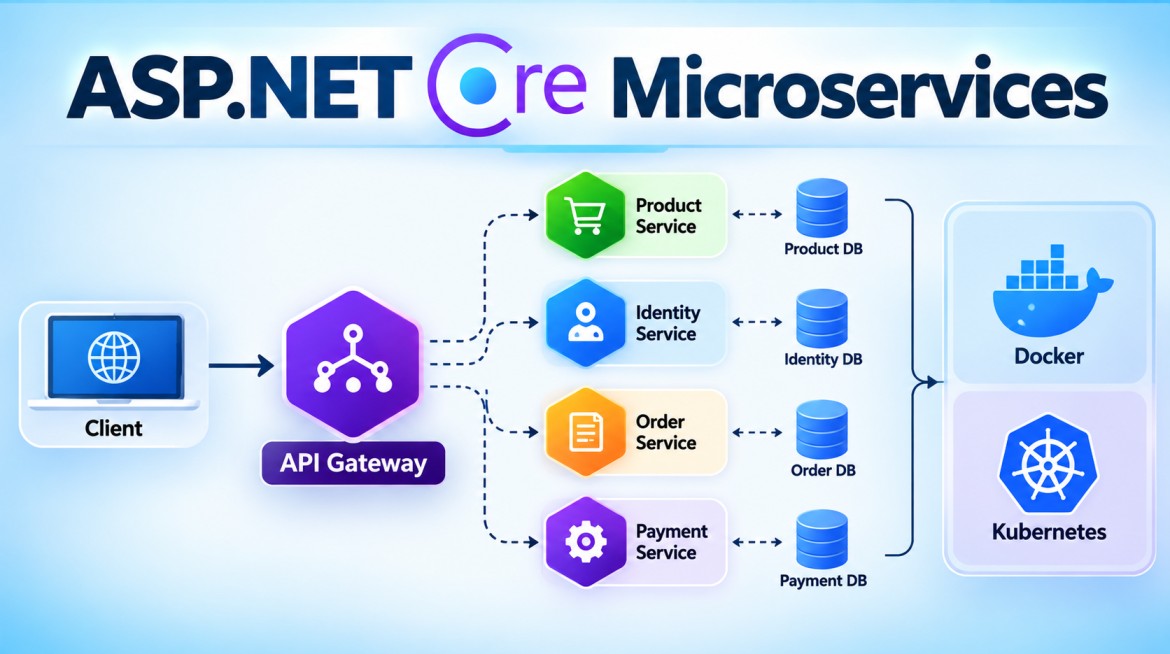


How Does an API Gateway Route Requests to Microservices?
An API Gateway routes incoming client requests to the correct Microservice based on routing rules such as the URL path, HTTP method, hostname, headers, or other request information.
The client calls the Gateway; the Gateway decides which backend service should receive the request.
1. What is API Gateway Routing?
Suppose an application contains:
Product Service
Order Service
Payment Service
Customer Service
The client doesn't need to call each service directly.
                   ┌──→ Product Service
                   │
Client → API Gateway ──→ Order Service
                   │
                   ├──→ Payment Service
                   │
                   └──→ Customer Service
The Gateway contains or obtains routing configuration that maps incoming requests to backend destinations.
For example:
/products/*  → Product Service
/orders/*    → Order Service
/payments/*  → Payment Service
/customers/* → Customer Service
2. Why Do We Need Routing?
Without a Gateway, the frontend may need to know multiple URLs:
https://product.company.com
https://order.company.com
https://payment.company.com
The client becomes coupled to the backend topology.
With a Gateway:
https://api.company.comthe client uses one public address.
The Gateway handles the internal routing.
3. Basic Routing Flow
Suppose the client sends:
GET https://api.company.com/products/101Step 1 — Request reaches the Gateway
Client
   |
   | GET /products/101
   ↓
API Gateway
Step 2 — Gateway examines the request
The Gateway looks at information such as:
Path        = /products/101
HTTP Method = GET
Host        = api.company.com
Headers     = ...
Step 3 — Gateway matches a route
Configured rule:
/products/{**catch-all}
        ↓
Product Service
Therefore:
/products/101matches the Product Service route.
Step 4 — Gateway determines the destination
For example:
Product Service
http://product-service:8080
Step 5 — Request is forwarded
Client
   |
   | GET /products/101
   ↓
API Gateway
   |
   | Forward Request
   ↓
Product Service
Step 6 — Response returns
Product Service
      |
      | Response
      ↓
API Gateway
      |
      ↓
Client
4. Path-Based Routing
This is one of the most common approaches.
Incoming Request              Destination

/products/*     ──────────→   Product Service

/orders/*       ──────────→   Order Service

/payments/*     ──────────→   Payment Service

/customers/*    ──────────→   Customer Service
For example:
GET /products/101routes to:
Product Servicewhile:
POST /ordersroutes to:
Order Service5. HTTP Method-Based Routing
Routing can also consider the HTTP method.
For example:
GET  /orders/* → Order Query Service

POST /orders   → Order Command Service
This can be useful in architectures where reads and writes are handled separately.
6. Host-Based Routing
Routing can use the hostname.
For example:
products.api.company.com
        ↓
Product Service


orders.api.company.com
        ↓
Order Service
The Gateway checks the incoming host and selects the appropriate destination.
7. Header-Based Routing
Some gateways can route based on request headers.
For example:
X-API-Version: 2Conceptually:
X-API-Version: 1
        ↓
Product Service V1

X-API-Version: 2
        ↓
Product Service V2
This can support scenarios such as version routing, canary releases, or controlled migrations.
8. How Does It Handle Multiple Instances?
This is important in Microservices.
Suppose Product Service has three instances:
Product Service

Instance 1 → 10.0.1.10
Instance 2 → 10.0.1.11
Instance 3 → 10.0.1.12
The Gateway should not normally hard-code a single instance forever.
Conceptually:
Client
   ↓
API Gateway
   ↓
Service Discovery /
Load Balancing
   |
   ├──→ Product Instance 1
   ├──→ Product Instance 2
   └──→ Product Instance 3
Depending on the environment, the Gateway may perform load balancing itself or route to a platform/service endpoint that performs it.
9. What Happens During Auto Scaling?
Suppose initially:
Product Service

Instance 1
Instance 2
Traffic increases and the platform adds:
Instance 3
Instance 4
The architecture becomes:
                 ┌──→ Instance 1
                 ├──→ Instance 2
Gateway ─────────├──→ Instance 3
                 └──→ Instance 4
If Instance 2 is later removed:
                 ┌──→ Instance 1
                 ├──X Instance 2
Gateway ─────────├──→ Instance 3
                 └──→ Instance 4
The infrastructure/service-discovery layer updates the set of available instances.
This is why production systems generally don't maintain manually hard-coded IP addresses for dynamically scaled service instances.
10. Example Using YARP in ASP.NET Core
In .NET, YARP (Yet Another Reverse Proxy) can be used to build a reverse proxy/API Gateway.
Conceptually, configuration can define routes and clusters.
For example:
{
  "ReverseProxy": {
    "Routes": {
      "product-route": {
        "ClusterId": "product-cluster",
        "Match": {
          "Path": "/products/{**catch-all}"
        }
      },
      "order-route": {
        "ClusterId": "order-cluster",
        "Match": {
          "Path": "/orders/{**catch-all}"
        }
      }
    },

    "Clusters": {
      "product-cluster": {
        "Destinations": {
          "product1": {
            "Address": "https://product-service/"
          }
        }
      },

      "order-cluster": {
        "Destinations": {
          "order1": {
            "Address": "https://order-service/"
          }
        }
      }
    }
  }
}
The important concepts are:
Route
  ↓
Which request should match?

Cluster
  ↓
Where should that request go?

Destination
  ↓
Actual backend endpoint
So:
/products/101
      ↓
product-route
      ↓
product-cluster
      ↓
Product Service
11. Routing + Other Gateway Functions
Routing is normally only one part of Gateway processing.
A request may pass through:
Client
   ↓
API Gateway
   ↓
Authentication
   ↓
Rate Limiting
   ↓
Route Matching
   ↓
Load Balancing
   ↓
Request Transformation
   ↓
Microservice
The exact order and capabilities depend on the Gateway product and configuration.
12. Advantages
API Gateway routing provides:
- Single entry point
- Centralized routing configuration
- Hides backend service addresses
- Reduces client/backend coupling
- Supports multiple service instances
- Can integrate with service discovery
- Supports load balancing
- Can support API version routing
- Makes backend topology changes less visible to clients
13. Disadvantages
There are also trade-offs:
- Additional infrastructure component
- Routing configuration must be maintained
- Misconfigured routes can affect multiple APIs
- Adds another network hop
- Gateway can become a bottleneck if poorly scaled
- Dynamic routing/service discovery increases operational complexity
14. Key Points
For interviews, remember this flow:
Client Request
      ↓
API Gateway
      ↓
Match Route
      ↓
Find Service / Cluster
      ↓
Select Destination
      ↓
Forward Request
      ↓
Microservice
      ↓
Response
      ↓
API Gateway
      ↓
Client
The most important distinction is:
Routing determines which Microservice handles the request; load balancing determines which instance of that Microservice receives it.
For example:
/products/101
      ↓
Routing
      ↓
Product Service
      ↓
Load Balancing
      ↓
Product Instance 2
Interview Questions & Answers
Q1. How does an API Gateway route requests to Microservices?
Answer:
The API Gateway examines incoming request information such as the URL path, HTTP method, hostname, or headers and matches it against configured routing rules. It then forwards the request to the appropriate backend Microservice.
Q2. What is path-based routing?
Answer:
Path-based routing selects a backend service based on the request URL.
/products/* → Product Service
/orders/*   → Order Service
Q3. How does the Gateway know the Microservice address?
Answer:
The destination can come from static configuration or integration with platform networking/service discovery. In dynamic environments such as Kubernetes, services are commonly accessed through stable service names rather than individual instance IP addresses.
Q4. What happens when a Microservice has multiple instances?
Answer:
Traffic is distributed among healthy instances using load balancing, either by the Gateway itself or by the underlying platform/load-balancing infrastructure.
Q5. What is the difference between routing and load balancing?
Answer:
Routing:
Which Microservice?
      ↓
Product Service


Load Balancing:
Which Product Service instance?
      ↓
Instance 1 / Instance 2 / Instance 3
Q6. Can an API Gateway route based on something other than URL?
Answer:
Yes. Depending on the Gateway, routing can use the path, hostname, HTTP method, headers, query information, or other request metadata.
Interview-Ready Answer
An API Gateway routes requests by matching incoming request information, such as the URL path, HTTP method, hostname, or headers, against configured routing rules. Once a route is matched, the Gateway identifies the corresponding backend service or cluster, selects an available destination through load balancing or service discovery, and forwards the request. For example,
/products/*can route to Product Service while/orders/*routes to Order Service.