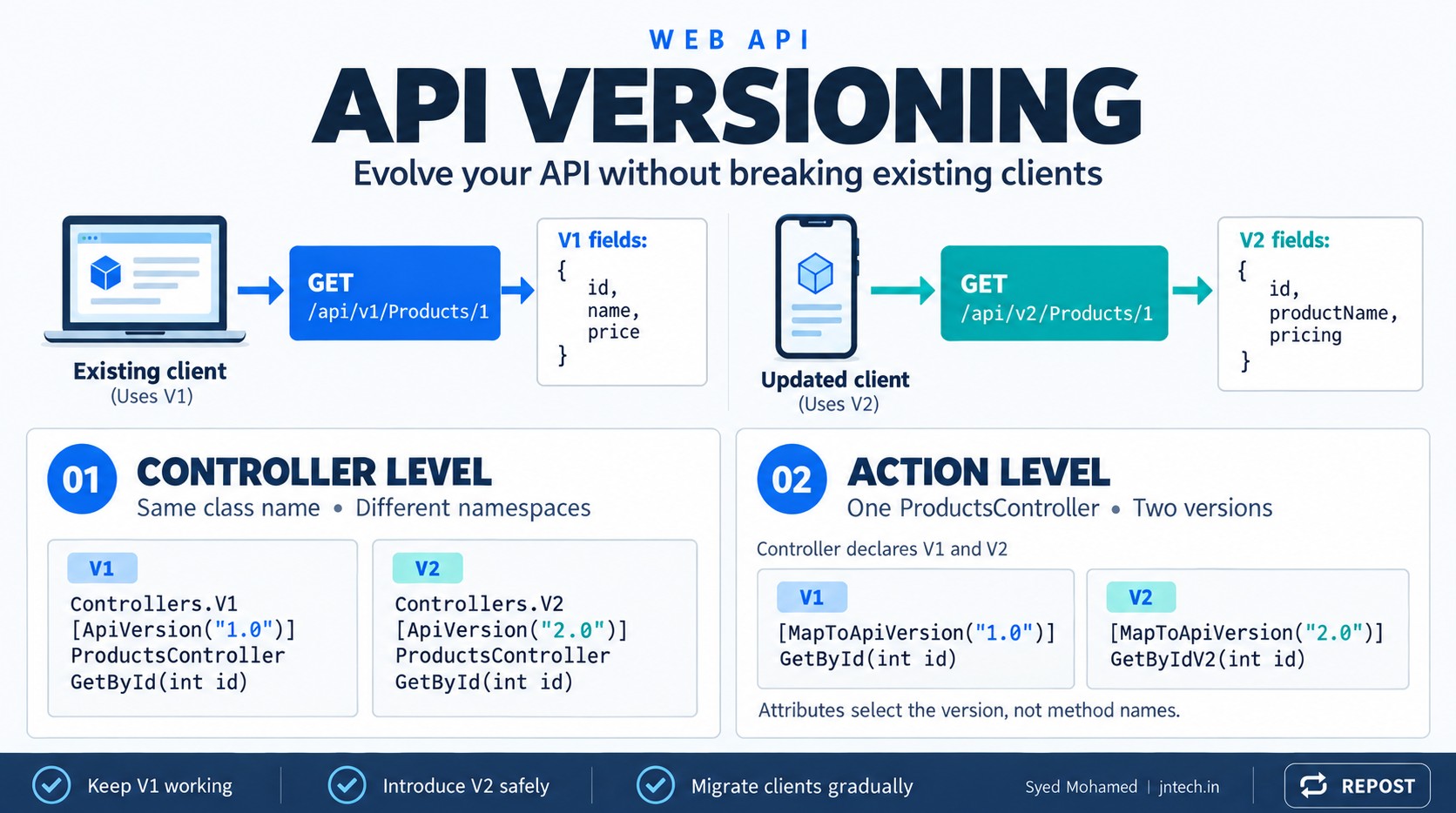


API versioning allows you to change an API while keeping existing applications working with the older API contract.
For example:
GET /api/v1/Products/1
GET /api/v2/Products/1
Both requests retrieve a product, but each version can return a different response structure.
Below, we will use ASP.NET Core Web API with controllers and cover:
-
Why API versioning is needed.
-
How clients specify the version.
-
Controller-level versioning with the same
ProductsControllerclass name. -
Action-level versioning inside one controller.
-
Configuration, request flow, common mistakes, and key points.
These examples use Asp.Versioning.Mvc, with controller support registered through .AddMvc(). This follows the project’s ASP.NET Core setup. (ASP.NET API Versioning Documentation)
1. What is API versioning?
An API has a contract: the agreement between the API and its consumers.
That contract includes:
-
Request URLs and HTTP methods.
-
Request parameters and body.
-
Response property names and data types.
-
Status codes.
-
Expected behavior.
Suppose your existing API returns:
{
  "id": 1,
  "name": "Laptop",
  "price": 55000
}
Your Angular application reads:
product.name
product.price
Later, you change the response to:
{
  "id": 1,
  "productName": "Laptop",
  "pricing": {
    "amount": 55000,
    "currency": "INR"
  }
}
The old Angular application still expects name and price. Those properties no longer exist.
Changing the existing response directly can break that application.
With API versioning:
| Client | Endpoint | Response contract |
|---|---|---|
| Existing application | /api/v1/Products/1 |
name, price |
| Updated application | /api/v2/Products/1 |
productName, pricing |
Both applications continue working while consumers migrate to V2.
The API version is independent of the .NET version. API V1 and API V2 can run inside the same ASP.NET Core application.
2. When should you introduce a new version?
A new version is commonly needed for a breaking change.
| Change | Usually breaking? |
|---|---|
| Remove or rename a response property | Yes |
| Change a property from number to string | Yes |
| Make an optional request field mandatory | Yes |
| Change the response from an array to a wrapper object | Yes |
| Change behavior that clients depend on | Yes |
| Improve SQL query performance without changing behavior | No |
| Refactor internal code | No |
| Add an optional response property | Usually no; depends on client compatibility |
You do not need a new API version for every code change.
3. Two separate versioning decisions
It helps to distinguish these two questions:
| Decision | Options |
|---|---|
| How does the client send the version? | URL, query string, header, media type |
| How do you organize version implementations? | Separate controllers or separate actions |
For example, URL versioning can be used with either controller-level or action-level implementation.
The versioning library supports all four request mechanisms. (GitHub)
| Mechanism | Example |
|---|---|
| URL segment | /api/v1/Products/1 |
| Query string | /api/Products/1?api-version=1.0 |
| Custom header | X-Api-Version: 1.0 |
| Media type | Accept: application/json;v=1.0 |
We will use URL segment versioning for the complete examples because the requested version is easy to see.
4. Create and configure the project
Create a controller-based Web API project:
dotnet new webapi --use-controllers -n ApiVersioningDemo
cd ApiVersioningDemo
dotnet add package Asp.Versioning.Mvc
Use a package release compatible with your project's target .NET framework.
Replace Program.cs with:
using Asp.Versioning;

var builder = WebApplication.CreateBuilder(args);

// Register ASP.NET Core controllers.
builder.Services.AddControllers();

// Register API versioning and its controller integration.
builder.Services
    .AddApiVersioning(options =>
    {
        options.DefaultApiVersion = new ApiVersion(1, 0);

        // Clients must explicitly specify a version.
        options.AssumeDefaultVersionWhenUnspecified = false;

        // Include supported/deprecated version information in headers.
        options.ReportApiVersions = true;

        // Read the version from URLs such as /api/v1/Products.
        options.ApiVersionReader = new UrlSegmentApiVersionReader();
    })
    .AddMvc();

var app = builder.Build();

app.MapControllers();

app.Run();
What each setting does
| Code | Purpose |
|---|---|
AddControllers() |
Registers ASP.NET Core controller services |
AddApiVersioning(...) |
Registers API versioning services |
.AddMvc() |
Integrates API versioning with controllers |
DefaultApiVersion |
Defines the default version used where applicable |
AssumeDefaultVersionWhenUnspecified = false |
Requires an explicit version |
ReportApiVersions = true |
Enables version reporting in response headers |
UrlSegmentApiVersionReader |
Reads the version from the URL route |
MapControllers() |
Maps attribute-routed controller endpoints |
Important: A default version does not fill in a missing URL segment. With our route, /api/Products/1 does not automatically become /api/v1/Products/1. (GitHub)
5. Controller-level versioning — same controller name
In this approach, each version has its own controller class.
As you requested, both classes are named ProductsController.
They have different namespaces:
ApiVersioningDemo.Controllers.V1
ApiVersioningDemo.Controllers.V2
C# permits the same class name in different namespaces because the fully qualified type names are different.
Create these two files:
| File | Namespace | Class name |
|---|---|---|
Controllers/V1/ProductsController.cs |
ApiVersioningDemo.Controllers.V1 |
ProductsController |
Controllers/V2/ProductsController.cs |
ApiVersioningDemo.Controllers.V2 |
ProductsController |
Folders organize the files. The namespace declarations distinguish the C# classes.
V1 controller
File: Controllers/V1/ProductsController.cs
using Asp.Versioning;
using Microsoft.AspNetCore.Mvc;

namespace ApiVersioningDemo.Controllers.V1;

[ApiController]
[ApiVersion("1.0")]
[Route("api/v{version:apiVersion}/[controller]")]
public class ProductsController : ControllerBase
{
    [HttpGet("{id:int}")]
    public IActionResult GetById(int id)
    {
        // Hard-coded data keeps the versioning example simple.
        if (id != 1)
        {
            return NotFound();
        }

        return Ok(new
        {
            Id = 1,
            Name = "Laptop",
            Price = 55000m
        });
    }
}
Request:
GET http://localhost:5000/api/v1/Products/1Response — 200 OK:
{
  "id": 1,
  "name": "Laptop",
  "price": 55000
}
V2 controller — same class name
File: Controllers/V2/ProductsController.cs
using Asp.Versioning;
using Microsoft.AspNetCore.Mvc;

namespace ApiVersioningDemo.Controllers.V2;

[ApiController]
[ApiVersion("2.0")]
[Route("api/v{version:apiVersion}/[controller]")]
public class ProductsController : ControllerBase
{
    [HttpGet("{id:int}")]
    public IActionResult GetById(int id)
    {
        if (id != 1)
        {
            return NotFound();
        }

        return Ok(new
        {
            Id = 1,
            ProductName = "Laptop",
            Pricing = new
            {
                Amount = 55000m,
                Currency = "INR"
            }
        });
    }
}
Request:
GET http://localhost:5000/api/v2/Products/1Response — 200 OK:
{
  "id": 1,
  "productName": "Laptop",
  "pricing": {
    "amount": 55000,
    "currency": "INR"
  }
}
How does ASP.NET Core select the correct controller?
Both controllers use this route:
[Route("api/v{version:apiVersion}/[controller]")]Its parts mean:
| Part | Meaning |
|---|---|
api |
Literal URL prefix |
v |
Literal character before the version |
{version:apiVersion} |
Version route parameter with the API version constraint |
[controller] |
Resolves to Products |
{id:int} on the action |
Matches an integer product ID |
The versioning integration uses the requested version to distinguish matching endpoints. Identical route templates can therefore serve different versions. (GitHub)
| Request | Selected controller type | Action |
|---|---|---|
/api/v1/Products/1 |
Controllers.V1.ProductsController |
GetById(1) |
/api/v2/Products/1 |
Controllers.V2.ProductsController |
GetById(1) |
The namespace does not select the API version in this example.
These attributes select it:
[ApiVersion("1.0")][ApiVersion("2.0")]There is a separate namespace convention available, but we have not enabled it.
Why no [MapToApiVersion] here?
Each controller declares only one version, so its actions belong to that controller’s version. An additional action mapping is unnecessary.
When this approach is useful
Use separate controllers when versions have substantial differences in request models, response models, validation, or available actions.
Keep shared business logic in services so that separate controllers do not require duplicated database and business code.
6. Action-level versioning — one controller, different actions
In this approach:
-
One
ProductsControllersupports V1 and V2. -
[ApiVersion]declares the supported controller versions. -
[MapToApiVersion]maps individual actions to those versions.
This is useful when only a small number of actions differ between versions. The project documentation calls this version interleaving. (ASP.NET API Versioning Documentation)
Treat this as an alternative to the previous example. Remove the two earlier ProductsController classes before adding this one, or use a separate project. Keeping both implementations would create overlapping endpoints.
Keep the same Program.cs.
File: Controllers/ProductsController.cs
using Asp.Versioning;
using Microsoft.AspNetCore.Mvc;

namespace ApiVersioningDemo.Controllers;

[ApiController]
[ApiVersion("1.0")]
[ApiVersion("2.0")]
[Route("api/v{version:apiVersion}/[controller]")]
public class ProductsController : ControllerBase
{
    // GET /api/v1/Products/1
    [HttpGet("{id:int}")]
    [MapToApiVersion("1.0")]
    public IActionResult GetByIdV1(int id)
    {
        if (id != 1)
        {
            return NotFound();
        }

        return Ok(new
        {
            Id = 1,
            Name = "Laptop",
            Price = 55000m
        });
    }

    // GET /api/v2/Products/1
    [HttpGet("{id:int}")]
    [MapToApiVersion("2.0")]
    public IActionResult GetByIdV2(int id)
    {
        if (id != 1)
        {
            return NotFound();
        }

        return Ok(new
        {
            Id = 1,
            ProductName = "Laptop",
            Pricing = new
            {
                Amount = 55000m,
                Currency = "INR"
            }
        });
    }

    // This action is explicitly available in both versions.
    [HttpGet("categories")]
    [MapToApiVersion("1.0")]
    [MapToApiVersion("2.0")]
    public IActionResult GetCategories()
    {
        return Ok(new[] { "Electronics", "Books" });
    }
}
Action selection
| Request | Selected action |
|---|---|
/api/v1/Products/1 |
GetByIdV1(1) |
/api/v2/Products/1 |
GetByIdV2(1) |
/api/v1/Products/categories |
GetCategories() |
/api/v2/Products/categories |
GetCategories() |
The product responses are the same as in the controller-level example.
Both category requests return:
[
  "Electronics",
  "Books"
]
Why do both product actions have the same [HttpGet] route?
[HttpGet("{id:int}")]They represent the same operation for different API versions.
The mappings distinguish them:
[MapToApiVersion("1.0")][MapToApiVersion("2.0")]Do method names control the URL?
No. In these examples, attribute routes control the URL.
The client calls:
GET /api/v2/Products/1It does not call:
GET /api/v2/Products/GetByIdV2/1Naming the method GetByIdV2 helps developers read the code; the name does not establish its API version.
Does [MapToApiVersion] replace [ApiVersion]?
No.
[ApiVersion("1.0")]
[ApiVersion("2.0")]
declares the controller’s versions.
[MapToApiVersion("2.0")]maps an action to one of those versions.
Declare the version at controller level and then map the appropriate actions.
7. Run and test either example
Start the application with a fixed local HTTP address:
dotnet run --no-launch-profile --urls http://localhost:5000Test V1:
curl -i http://localhost:5000/api/v1/Products/1Test V2:
curl -i http://localhost:5000/api/v2/Products/1You can also use a browser or Postman because these are GET requests.
Test a missing product:
GET http://localhost:5000/api/v1/Products/999Result:
404 Not FoundThat 404 comes from our action:
return NotFound();A request for an unsupported version does not automatically fall back to V1 or V2.
8. Controller-level versus action-level
| Point | Separate versioned controllers | Versioned actions in one controller |
|---|---|---|
| Number of controller classes | One per version in our example | One supporting multiple versions |
| Controller name | Same name, different namespaces | One class name |
| Version declaration | [ApiVersion] on each controller |
Multiple [ApiVersion] attributes |
| Action selection | Inherits the controller’s single version | [MapToApiVersion] |
| Useful when | Versions differ substantially | Changes are limited to a few actions |
| Main maintenance concern | Duplicating shared logic | Controller becomes crowded |
| External URLs | /api/v1/Products/1, /api/v2/Products/1 |
Same URLs |
Clients do not need to know which internal organization you use.
9. Using query strings or headers instead
You can retain either controller organization and change how clients supply the version.
For these alternatives, replace the controller route with:
[Route("api/[controller]")]This removes the required version segment.
Query-string versioning
Replace the reader in Program.cs:
options.ApiVersionReader =
    new QueryStringApiVersionReader("api-version");
Requests:
GET /api/Products/1?api-version=1.0
GET /api/Products/1?api-version=2.0
Header versioning
Replace the reader with:
options.ApiVersionReader =
    new HeaderApiVersionReader("X-Api-Version");
Request:
GET /api/Products/1
X-Api-Version: 2.0
The [ApiVersion] and [MapToApiVersion] attributes remain unchanged.
Supporting old clients that omit a version
For a query-string or header design with a matching unversioned URL, you can configure:
options.DefaultApiVersion = new ApiVersion(1, 0);
options.AssumeDefaultVersionWhenUnspecified = true;
With the default selector, a request that omits the version can then select V1. This option is particularly relevant when adding versioning to an existing API whose clients never supplied a version. (dotnet/aspnet-api-versioning Wiki)
It does not mean “use V1 when someone explicitly requests an unsupported version.”
10. Deprecating an older version
Deprecation means:
“This version still works, but consumers should migrate away from it.”
Mark V1 as deprecated:
[ApiVersion("1.0", Deprecated = true)]For the action-level controller:
[ApiVersion("1.0", Deprecated = true)]
[ApiVersion("2.0")]
With version reporting enabled, clients can receive supported and deprecated version information in response headers.
Deprecating a version does not remove its implementation or automatically stop requests.
A practical migration process is:
-
Release V2.
-
Document the contract differences.
-
Announce V1’s retirement date.
-
Monitor remaining V1 usage.
-
Help consumers migrate.
-
Remove V1 when the support period ends.
11. Common mistakes
| Mistake | Correct approach |
|---|---|
| Same controller class name in the same namespace | Use different namespaces |
| Create V1/V2 folders but leave identical namespace declarations | Update the namespace in each file |
Assume a V2 namespace automatically enables V2 |
Use [ApiVersion], or explicitly configure namespace conventions |
Register AddApiVersioning() but omit .AddMvc() |
Add controller integration |
Name an action GetV2 without version metadata |
Use [MapToApiVersion("2.0")] |
| Map an action to V2 without declaring V2 on the controller | Add [ApiVersion("2.0")] |
| Expect a default version to repair a missing URL segment | Supply the segment or use an appropriate unversioned route |
| Keep both complete sample approaches active | Choose one implementation for these endpoints |
| Return database entities directly and change them freely | Use explicit response DTOs to protect API contracts |
For a production application, replace the anonymous response objects with version-specific DTOs such as ProductV1Response and ProductV2Response. Both versions can still use the same database and shared services.
Key points
-
API versioning protects existing clients when API contracts change.
-
API V1/V2 are unrelated to your .NET runtime version.
-
Use
Asp.Versioning.Mvcfor the controller approach shown here. -
Register
AddControllers()andAddApiVersioning(...).AddMvc(). -
Controller-level versioning can use the same controller name in different namespaces.
-
[ApiVersion]declares supported versions. -
[MapToApiVersion]maps individual actions to declared versions. -
URL, query-string, header, and media-type versioning describe how the client supplies the version.
-
Default-version selection does not provide fallback for explicitly unsupported versions.
-
Deprecation signals migration; it does not disable the endpoint.
-
Preserve each supported version’s contract and test it independently.
API versioning does not require the method name GetByIdV2 or GetById2. The name depends on how you organize your controllers.
1. Separate controllers — same method name is allowed
Because the methods are in different classes, both can be named GetById.
// Controllers/V1/ProductsController.cs
namespace ApiVersioningDemo.Controllers.V1;

[ApiVersion("1.0")]
public class ProductsController : ControllerBase
{
    [HttpGet("{id:int}")]
    public IActionResult GetById(int id)
    {
        return Ok("Version 1");
    }
}
// Controllers/V2/ProductsController.cs
namespace ApiVersioningDemo.Controllers.V2;
[ApiVersion("2.0")]
public class ProductsController : ControllerBase
{
[HttpGet("{id:int}")]
public IActionResult GetById(int id)
{
return Ok("Version 2");
}
}Controller route attributes are omitted above for brevity.
2. Same controller — different names are needed when parameters are identical
C# does not allow two methods with the same name and parameter types in the same class.
Therefore, this is valid:
[HttpGet("{id:int}")]
[MapToApiVersion("1.0")]
public IActionResult GetById(int id)
{
    return Ok("Version 1");
}

[HttpGet("{id:int}")]
[MapToApiVersion("2.0")]
public IActionResult GetByIdV2(int id)
{
    return Ok("Version 2");
}
But naming both methods GetById(int id) would cause a C# compilation error. Different attributes do not make their C# signatures different.
| Implementation | Can both methods be GetById(int id)? |
|---|---|
| Separate controller classes | ✅ Yes |
| Same controller class | ❌ No |
[MapToApiVersion("2.0")] selects the version. The method name does not. With the attribute routes above, clients still call /api/v2/Products/1.