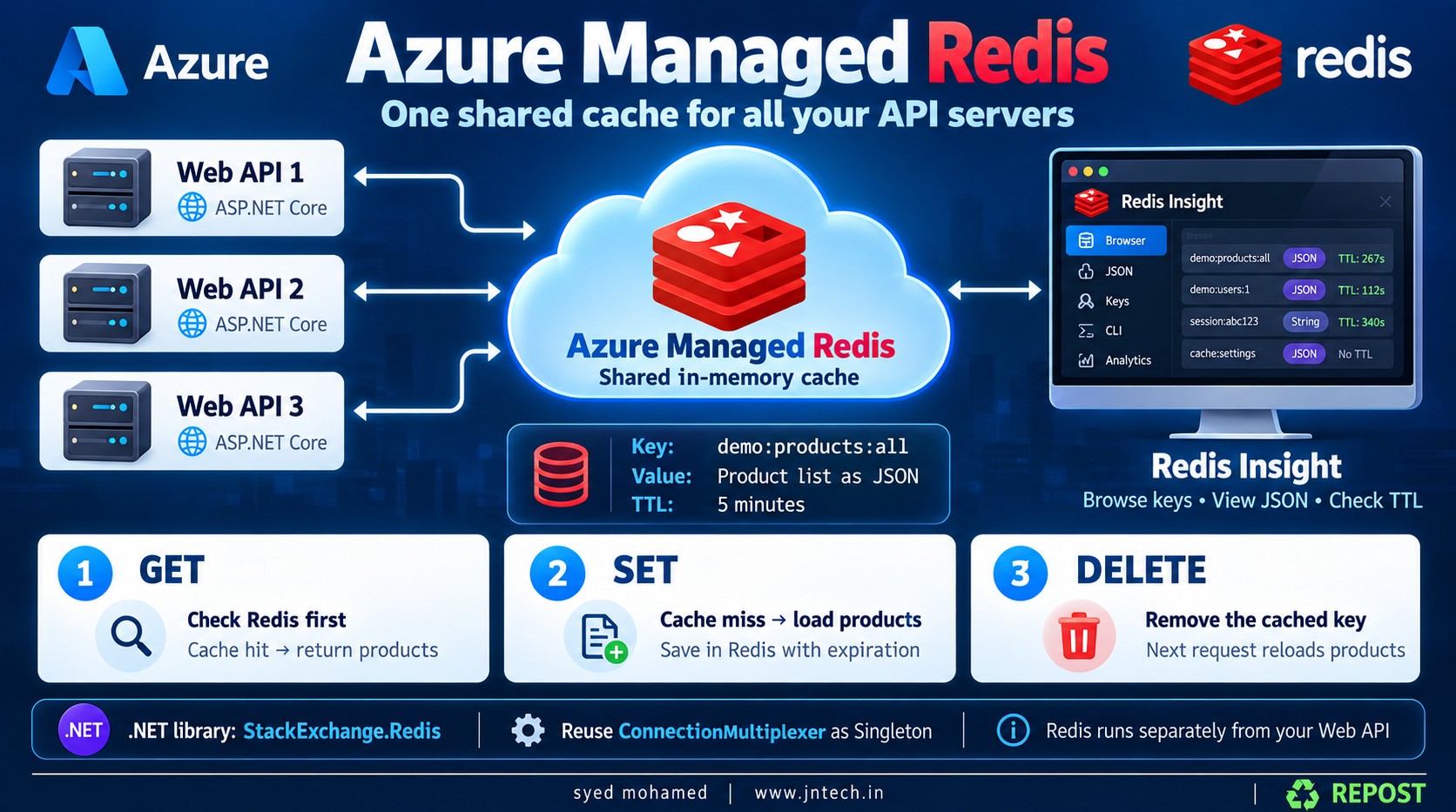


Azure Managed Redis - Distributed Cache
Azure Managed Redis stores cached data in a shared Redis service hosted in Azure. Your Web API connects to it to read, save, and delete cached values.
View Azure Managed Redis source code on GitHub: Azure Redis
1. What is Redis?
Redis is a fast data store that primarily keeps data in memory. A common use is caching frequently requested data.
For example, an API may repeatedly retrieve the same product list:
-
Without caching: each request reads products from the database.
-
With caching: the API checks Redis first; it reads the database only when the cached products are unavailable.
In this example, our hard-coded list replaces the database.
Redis stores data using keys and values:
| Item | Our example |
|---|---|
| Key | demo:products:all |
| Value | Product list serialized into JSON |
| Redis data type | String |
| Expiration | 5 minutes |
The key identifies the cached value, similar to how a dictionary key identifies an item in C#.
// Conceptual example only:
dictionary["demo:products:all"] = productsJson;
Unlike a normal C# dictionary inside your API process, Redis runs as a separate service.
2. What is Azure Managed Redis?
Azure Managed Redis is a managed Redis service hosted in Azure. Your application connects to its endpoint over the network.
If you deploy your Web API to three servers, all three can use the same shared Redis cache.
| Component | Responsibility |
|---|---|
| Web API | Decides when to read, cache, and delete products |
| Azure Managed Redis | Stores cached keys and values |
StackExchange.Redis |
Connects your .NET code to Redis |
| Redis Insight | Lets you inspect and manage Redis data visually |
The cached products live in Azure Managed Redis. Installing the NuGet package does not create a Redis server inside your Web API.
3. Library details
Install StackExchange.Redis.
Using the .NET CLI:
dotnet add package StackExchange.RedisOr Visual Studio’s Package Manager Console:
Install-Package StackExchange.RedisImport its namespace:
using StackExchange.Redis;This package is a .NET Redis client. It provides connections and methods for executing Redis commands.
| Type | Purpose |
|---|---|
ConnectionMultiplexer |
Concrete class that manages connections to Redis |
IConnectionMultiplexer |
Interface used to access the connection manager |
IDatabase |
Interface exposing Redis data operations |
RedisValue |
Represents a Redis value, including a missing value |
ConnectionMultiplexer is thread-safe and designed to be reused. Create one shared instance per application process instead of creating one for every request.
The methods used in our example are:
| C# method | Redis operation | Purpose |
|---|---|---|
StringGetAsync() |
GET |
Read a string value |
StringSetAsync() |
SET |
Save or replace a string value |
KeyDeleteAsync() |
DEL |
Delete a key and its value |
We also use:
using System.Text.Json;System.Text.Json converts between C# objects and JSON. It is included in modern .NET; this example needs no additional JSON package.
4. Create the Web API project
dotnet new webapi --use-controllers -n RedisDemo
cd RedisDemo
dotnet add package StackExchange.Redis
Add these files:
| Folder | File |
|---|---|
| Models | Product.cs |
| Interfaces | IRedisCache.cs |
| Services | RedisCache.cs |
| Controllers | ProductsController.cs |
| Project root | appsettings.json |
| Project root | Program.cs |
5. appsettings.json — Configure the connection
{
  "ConnectionStrings": {
    "Redis": "YOUR-CACHE.YOUR-REGION.redis.azure.net:10000,password=YOUR-ACCESS-KEY,ssl=True,abortConnect=False"
  },
  "Logging": {
    "LogLevel": {
      "Default": "Information",
      "Microsoft.AspNetCore": "Warning"
    }
  },
  "AllowedHosts": "*"
}
Replace the placeholders using your Azure Managed Redis resource:
-
Overview: copy the endpoint.
-
Authentication → Access keys: copy a primary or secondary key.
-
Azure Managed Redis uses port 10000. (Microsoft Learn)
Connection-string explanation:
| Setting | Meaning |
|---|---|
YOUR-CACHE.YOUR-REGION.redis.azure.net |
Redis server hostname |
10000 |
Connection port |
password=... |
Access key used to authenticate |
ssl=True |
Encrypts the connection using TLS |
abortConnect=False |
Allows the connection manager to remain available and reconnect if no server is reachable initially |
abortConnect=False does not mean Redis operations will succeed while Redis is unavailable. Those operations can still fail. The client supports background reconnection. (GitHub)
This sample uses access-key authentication, which must be enabled. Keep real keys out of source control; store them in User Secrets locally or App Service configuration when deployed.
6. Product.cs — Define the product
namespace RedisDemo.Models;

public class Product
{
    public int Id { get; set; }

    public string Name { get; set; } = string.Empty;

    public decimal Price { get; set; }
}
Explanation:
-
Id: product identifier. -
Name: product name. -
Price: product price. -
string.Empty: initializesNamewith an empty string.
Example product:
new Product
{
    Id = 1,
    Name = "Laptop",
    Price = 55000m
};
The m suffix makes the numeric literal a decimal.
7. IRedisCache.cs — Define the contract
namespace RedisDemo.Interfaces;

public interface IRedisCache
{
    Task<T?> GetAsync<T>(string key) where T : class;

    Task SetAsync<T>(string key, T value, TimeSpan expiry);

    Task<bool> DeleteAsync(string key);
}
This is our own interface. It is not provided by StackExchange.Redis.
It describes the three operations our controller needs:
| Method | Inputs | Result |
|---|---|---|
GetAsync<T> |
Cache key | Requested object or null |
SetAsync<T> |
Key, value, expiration | Completes after saving |
DeleteAsync |
Cache key | true if deleted; otherwise false |
Understanding this declaration:
Task<T?> GetAsync<T>(string key) where T : class;-
T: the type of object to retrieve. -
T?: the result may benull. -
Task: the operation is asynchronous. -
where T : class: restrictsTto reference types, such asProductorList<Product>.
For example:
List<Product>? products =
    await redisCache.GetAsync<List<Product>>("demo:products:all");
Here, T becomes List<Product>.
Using an interface lets the controller depend on the cache contract while the implementation handles Redis commands and JSON conversion.
8. RedisCache.cs — Implement get, set, and delete
using System.Text.Json;
using RedisDemo.Interfaces;
using StackExchange.Redis;

namespace RedisDemo.Services;

public class RedisCache : IRedisCache
{
    private readonly IDatabase _db;

    public RedisCache(IConnectionMultiplexer connection)
    {
        // Get an object used to execute Redis data commands.
        _db = connection.GetDatabase();
    }

    public async Task<T?> GetAsync<T>(string key) where T : class
    {
        // Read the JSON string stored under this key.
        RedisValue value = await _db.StringGetAsync(key);

        // Return null if there is no usable cached value.
        if (value.IsNullOrEmpty)
            return null;

        // Convert JSON back into a C# object.
        return JsonSerializer.Deserialize<T>(value.ToString());
    }

    public async Task SetAsync<T>(
        string key,
        T value,
        TimeSpan expiry)
    {
        // Convert the C# object into JSON.
        string json = JsonSerializer.Serialize(value);

        // Save the JSON string with an expiration.
        // An existing value under the same key is overwritten.
        await _db.StringSetAsync(key, json, expiry);
    }

    public async Task<bool> DeleteAsync(string key)
    {
        // Remove the key and its value.
        return await _db.KeyDeleteAsync(key);
    }
}
Constructor explanation
private readonly IDatabase _db;_db holds the object through which we execute Redis commands.
readonly means this field can be assigned in the constructor but cannot later be reassigned by ordinary methods.
public RedisCache(IConnectionMultiplexer connection)Dependency injection supplies the registered Redis connection manager.
_db = connection.GetDatabase();GetDatabase() gives us a lightweight object for accessing a Redis logical database. It uses the existing connection manager; it does not create a new Redis server or a fresh connection for each operation.
Get explanation
RedisValue value = await _db.StringGetAsync(key);This asks Redis:
“Return the value stored under this key.”
if (value.IsNullOrEmpty)
    return null;
A key may be unavailable because it:
-
Has never been created.
-
Has expired.
-
Was deleted.
-
Was evicted under the configured memory policy.
Our wrapper also treats an empty string as a cache miss.
return JsonSerializer.Deserialize<T>(value.ToString());This converts the stored JSON into the requested C# type.
For example, JSON becomes a List<Product>.
Set explanation
string json = JsonSerializer.Serialize(value);This converts the product list into JSON text.
await _db.StringSetAsync(key, json, expiry);This saves the JSON under the key and sets its expiration.
Delete explanation
return await _db.KeyDeleteAsync(key);This removes the cache entry:
-
true: a key existed and was deleted. -
false: the key did not exist.
It does not delete products from your original data source.
9. Program.cs — Register dependencies
Replace Program.cs with:
using RedisDemo.Interfaces;
using RedisDemo.Services;
using StackExchange.Redis;

var builder = WebApplication.CreateBuilder(args);

// Enable controller-based APIs.
builder.Services.AddControllers();

// Register one shared Redis connection manager.
builder.Services.AddSingleton<IConnectionMultiplexer>(sp =>
{
    var configuration =
        sp.GetRequiredService<IConfiguration>();

    string connectionString =
        configuration.GetConnectionString("Redis")
        ?? throw new InvalidOperationException(
            "Redis connection string is missing.");

    return ConnectionMultiplexer.Connect(connectionString);
});

// Register our cache implementation.
builder.Services.AddSingleton<IRedisCache, RedisCache>();

var app = builder.Build();

// Map controller routes.
app.MapControllers();

app.Run();
Explanation:
builder.Services.AddControllers();Registers services required by API controllers.
builder.Services.AddSingleton<IConnectionMultiplexer>(...);Registers one connection manager shared across requests in this application instance.
If you run three API instances, each has its own connection manager, and all three can connect to the same Redis service.
configuration.GetConnectionString("Redis")Reads this configuration entry:
ConnectionStrings:RedisConnectionMultiplexer.Connect(connectionString)Creates the Redis connection manager using your connection settings.
builder.Services.AddSingleton<IRedisCache, RedisCache>();Tells dependency injection:
“When a class requests
IRedisCache, supplyRedisCache.”
Our wrapper can be a singleton because it holds no per-request state and uses the shared Redis client.
app.MapControllers();Makes the controller routes available.
10. ProductsController.cs — Use the cache
using Microsoft.AspNetCore.Mvc;
using RedisDemo.Interfaces;
using RedisDemo.Models;

namespace RedisDemo.Controllers;

[ApiController]
[Route("api/products")]
public class ProductsController : ControllerBase
{
    private readonly IRedisCache _redisCache;

    // Unique key for this cached product list.
    private const string CacheKey = "demo:products:all";

    public ProductsController(IRedisCache redisCache)
    {
        _redisCache = redisCache;
    }

    // GET /api/products
    [HttpGet]
    public async Task<IActionResult> GetAllProducts()
    {
        // STEP 1: Try to GET products from Redis.
        var products =
            await _redisCache.GetAsync<List<Product>>(CacheKey);

        // STEP 2: If found, return cached products.
        if (products is not null)
        {
            return Ok(new
            {
                Source = "Redis Cache",
                Products = products
            });
        }

        // STEP 3: Cache miss.
        // Use hard-coded products instead of a database.
        products = new List<Product>
        {
            new Product
            {
                Id = 1,
                Name = "Laptop",
                Price = 55000m
            },
            new Product
            {
                Id = 2,
                Name = "Mouse",
                Price = 750m
            },
            new Product
            {
                Id = 3,
                Name = "Keyboard",
                Price = 1500m
            }
        };

        // STEP 4: SET products in Redis for five minutes.
        await _redisCache.SetAsync(
            CacheKey,
            products,
            TimeSpan.FromMinutes(5));

        // STEP 5: Return the original product list.
        return Ok(new
        {
            Source = "Hard-coded List",
            Products = products
        });
    }

    // DELETE /api/products/cache
    [HttpDelete("cache")]
    public async Task<IActionResult> DeleteProductsCache()
    {
        // Delete only this product cache entry.
        bool deleted =
            await _redisCache.DeleteAsync(CacheKey);

        return Ok(new
        {
            Message = deleted
                ? "Products cache deleted."
                : "Products cache does not exist."
        });
    }
}
Controller explanation
private const string CacheKey = "demo:products:all";This is the name of our cache entry.
The colon-separated structure is a naming convention:
| Part | Meaning |
|---|---|
demo |
Application or feature prefix |
products |
Data category |
all |
Complete product list |
The colons do not create actual folders in Redis.
await _redisCache.GetAsync<List<Product>>(CacheKey);Tries to retrieve and deserialize the cached products.
if (products is not null)This means cache hit: products were found.
The method returns immediately, so the hard-coded list is not created on this path.
If the result is null, that is a cache miss. The controller creates the list and saves it:
await _redisCache.SetAsync(
    CacheKey,
    products,
    TimeSpan.FromMinutes(5));
This pattern is called cache-aside: the application checks the cache, loads missing data, and populates the cache.
The Source property is included only to make testing easy.
11. How expiration works
TimeSpan.FromMinutes(5)Sets a 5-minute lifetime from the write.
Example:
| Time | Action | Result |
|---|---|---|
| 10:00 | First GET | Products cached; expiry around 10:05 |
| 10:02 | Another GET | Products read from Redis |
| 10:04 | Another GET | Products read from Redis |
| 10:05 or later | Next GET after expiry | Cache miss; products cached again |
Reading the key does not extend its expiration in this example.
Calling SetAsync again overwrites the value and starts the supplied expiration again. A key can also disappear earlier through deletion or memory eviction.
12. Run and test the API
dotnet run --no-launch-profile --urls http://localhost:5000Using Postman:
| Step | Method | URL | Expected result |
|---|---|---|---|
| 1 | GET | http://localhost:5000/api/products |
Hard-coded list, if cache is empty |
| 2 | GET | http://localhost:5000/api/products |
Redis cache |
| 3 | DELETE | http://localhost:5000/api/products/cache |
Cache deleted |
| 4 | GET | http://localhost:5000/api/products |
Hard-coded list; cache populated again |
First response when the key is absent:
{
  "source": "Hard-coded List",
  "products": [
    { "id": 1, "name": "Laptop", "price": 55000 },
    { "id": 2, "name": "Mouse", "price": 750 },
    { "id": 3, "name": "Keyboard", "price": 1500 }
  ]
}
The next response has:
"source": "Redis Cache"Restarting the API does not clear the external Redis cache. If the key still exists, even your first request after restarting can return "Redis Cache".
13. What is Redis Insight?
Redis Insight is a graphical application for connecting to Redis and inspecting its data—similar in purpose to how you use SSMS to inspect SQL Server.
It provides:
-
A browser for finding keys and viewing values.
-
Tools to add, edit, and delete data.
-
JSON formatting for readable values.
-
A built-in CLI for Redis commands.
-
A Workbench for working with commands. (Docs)
Redis Insight is a separate tool. Your Web API continues to work when Redis Insight is closed.
Download it from the official Redis Insight installation page.
14. Connect Redis Insight to Azure Managed Redis
For this example, use a manual connection with an access key.
-
Open Redis Insight.
-
Select Add database or Connect existing database.
-
Choose the option to enter connection details manually.
-
Enter the following values.
| Field | Value |
|---|---|
| Database alias | Any friendly name, such as Azure Redis Demo |
| Host | Your Azure Redis hostname |
| Port | 10000 |
| Username | Leave blank for password-only authentication; if required, use default |
| Password | Your Azure Redis access key |
| TLS / Use TLS | Enabled |
The Host field contains only the hostname:
YOUR-CACHE.YOUR-REGION.redis.azure.netDo not paste the complete .NET connection string into that field.
Use the access key itself in Password, without password=.
Redis Insight supports both access-key and Microsoft Entra ID authentication. The Azure-specific sign-in flow may guide you through Entra authentication; the manual connection is appropriate for this access-key example. (Microsoft Learn)
Your computer must also have network access to the Redis endpoint. A private endpoint requires an appropriate network path, such as a connected VPN or a machine in the virtual network.
15. View the cached products
After connecting:
-
Call
GET /api/productsto populate the cache. -
Open your database in Redis Insight.
-
Open Browser.
-
Refresh the key list.
-
Search for:
demo:products:all-
Select the key.
-
Inspect its value and remaining TTL.
-
Choose JSON formatting if available.
You should see JSON resembling:
[
  {
    "Id": 1,
    "Name": "Laptop",
    "Price": 55000
  },
  {
    "Id": 2,
    "Name": "Mouse",
    "Price": 750
  },
  {
    "Id": 3,
    "Name": "Keyboard",
    "Price": 1500
  }
]
Why does Redis Insight show type STRING, even though the value contains JSON?
Because we saved JSON text using:
_db.StringSetAsync(key, json, expiry);The underlying Redis type is a string containing JSON text. Selecting JSON formatting changes how the value is displayed.
Also, our direct JsonSerializer.Serialize() call preserves property names such as Id, while the API’s default JSON response uses camel case such as id. Both represent the same products.
16. Verify using Redis Insight’s CLI
Open >_ CLI and run these commands individually.
Test the connection:
PINGExpected result:
PONGRead the cached products:
GET demo:products:allReturns the JSON string. A missing or expired key returns a nil/null result.
Check whether the key exists:
EXISTS demo:products:all| Result | Meaning |
|---|---|
1 |
Key exists |
0 |
Key does not exist |
Check the remaining expiration time:
TTL demo:products:all| Result | Meaning |
|---|---|
Positive number, such as 240 |
Seconds remaining |
0 |
Less than approximately one second remaining |
-1 |
Key exists without an expiration |
-2 |
Key does not exist |
Check its Redis data type:
TYPE demo:products:allExpected result:
stringDelete the sample cache entry:
DEL demo:products:allReturns 1 if deleted or 0 if already absent.
After deletion, call the API again. It should return "Hard-coded List" and recreate the cache entry.
17. Common issues
| Issue | What to check |
|---|---|
| Authentication failure | Correct access key and access-key authentication enabled |
| Connection timeout | Host, port, firewall, and private-endpoint connectivity |
| TLS connection error | TLS enabled and correct hostname |
| Key missing in Redis Insight | Call the API, refresh, and check before five minutes pass |
| API and Insight show different data | Confirm both connect to the same Redis instance and key |
| Old products after changing code | Delete the cached key or wait for expiration |
| Redis failure causes API failure | This sample does not implement fallback handling |
Key points to remember
-
Azure Managed Redis holds the shared cached data.
-
StackExchange.Redisis the .NET client library. -
IConnectionMultiplexermanages reusable connections. -
IDatabaseexposes Redis operations. -
Our
IRedisCacheinterface wraps get, set, and delete. -
Objects are serialized to JSON before storage.
-
Expiration is five minutes from the write; reads do not extend it.
-
Redis Insight lets you inspect the same data your API uses.
-
This teaching example leaves connection errors visible. Production code should define outage handling, protect cache-deletion endpoints, and invalidate cached data when the source changes.
The code is ready for you to run, but I have not executed it against your Azure Redis instance.