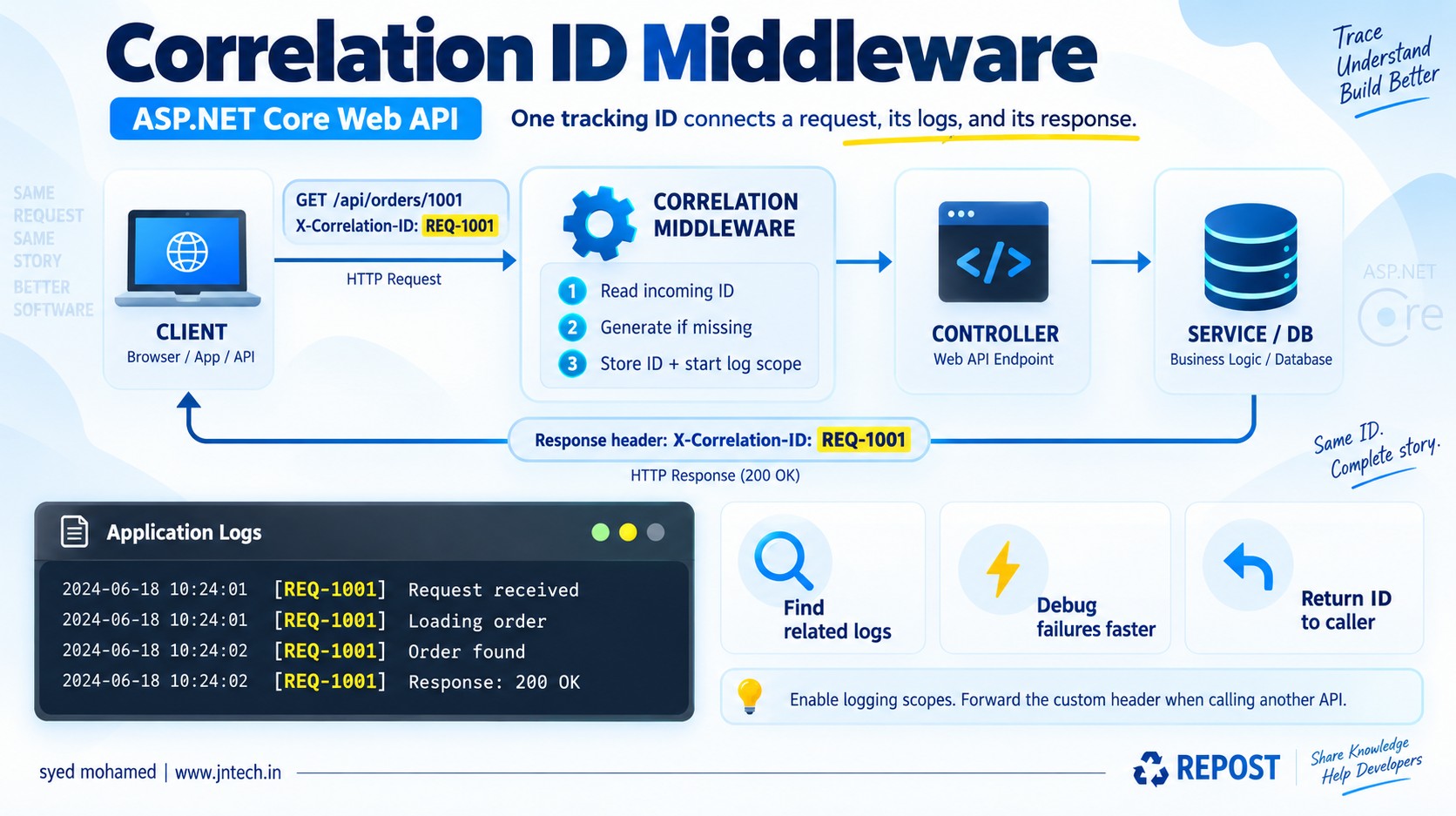


Correlation ID - Thousands of Logs. One Failed Request. Find It with Correlation ID Middleware.
Correlation ID middleware is code that assigns a tracking ID to an API request, includes that ID in related logs, and returns it to the caller.
It helps you answer: “Which log messages belong to this request?”
1. What is a correlation ID?
A correlation ID is a value used to connect related operations and log messages.
For example:
91c892c4-473b-4c93-94ea-292b290440fcThink of it as a courier tracking number. A parcel passes through different locations, but the same number helps you follow its journey.
Similarly, an API request may pass through middleware, a controller, and a service. Using the same ID in their logs helps you follow that request.
A common HTTP header for this is:
X-Correlation-ID: 91c892c4-473b-4c93-94ea-292b290440fcThe header name is an application convention. ASP.NET Core does not automatically implement this custom header.
2. What is correlation ID middleware?
It is middleware that runs early in the request pipeline and typically:
-
Reads the correlation ID sent by the client.
-
Generates one if none is supplied.
-
Makes the ID available during the request.
-
Adds it to a logging scope.
-
Returns it in the response header.
-
Passes control to the next middleware.
A logging scope attaches shared information, such as a correlation ID, to logs written while the scope is active. The logging provider must support and capture scopes. (learn.microsoft.com)
3. Why do we need it?
Your API may handle many requests at the same time. Their log messages can become mixed together.
Without correlation IDs:
Request received
Loading order 1001
Request received
Loading order 2002
Database timeout
Order found
Which request had the database timeout?
With correlation IDs:
[REQ-A] Request received
[REQ-A] Loading order 1001
[REQ-B] Request received
[REQ-B] Loading order 2002
[REQ-A] Database timeout
[REQ-B] Order found
Now you can search for REQ-A and see:
[REQ-A] Request received
[REQ-A] Loading order 1001
[REQ-A] Database timeout
The ID helps you locate the relevant messages quickly.
4. What is its purpose?
| Purpose | How it helps |
|---|---|
| Troubleshooting | Finds logs related to a failed request |
| Support | Gives the caller a reference to share when reporting a problem |
| Tracking processing | Connects logs from middleware, controllers, and services |
| Performance investigation | Connects timing logs belonging to the same operation |
| Multiple services | Connects related requests when the ID is forwarded |
A correlation ID helps investigate an error. It does not fix the error or handle the exception.
5. Very simple working example
For this first example, we will generate a new ID for every incoming request. This keeps the code small.
Everything goes in Program.cs.
Create the project:
dotnet new web -n CorrelationDemo
cd CorrelationDemo
Replace Program.cs with:
var builder = WebApplication.CreateBuilder(args);

// Display logging scopes in the console.
builder.Logging.ClearProviders();

builder.Logging.AddSimpleConsole(options =>
{
    options.IncludeScopes = true;
    options.SingleLine = true;
});

var app = builder.Build();

// Correlation ID middleware
app.Use(async (context, next) =>
{
    // 1. Create an ID for this request.
    string correlationId = Guid.NewGuid().ToString();

    // 2. Store it for use during this request.
    context.Items["CorrelationId"] = correlationId;

    // 3. Send it back to the caller.
    context.Response.Headers["X-Correlation-ID"] = correlationId;

    // 4. Include the ID in logs inside this scope.
    using (app.Logger.BeginScope(
        "CorrelationId: {CorrelationId}", correlationId))
    {
        app.Logger.LogInformation("Request started");

        // 5. Execute the endpoint.
        await next(context);

        app.Logger.LogInformation(
            "Request finished with status {StatusCode}",
            context.Response.StatusCode);
    }
});

// Simple API endpoint
app.MapGet("/api/orders/{id:int}", (int id) =>
{
    app.Logger.LogInformation("Loading order {OrderId}", id);

    // Sample data; no database connection.
    var order = new
    {
        Id = id,
        Product = "Laptop",
        Price = 75000
    };

    app.Logger.LogInformation("Order found");

    return Results.Ok(order);
});

app.Run();
Run:
dotnet run --no-launch-profile --urls http://localhost:5000Open this URL in your browser or Postman:
http://localhost:5000/api/orders/10016. Expected response
Response body:
{
  "id": 1001,
  "product": "Laptop",
  "price": 75000
}
Response header:
X-Correlation-ID: 91c892c4-473b-4c93-94ea-292b290440fcYou can see the header in Postman → Response Headers or your browser’s Developer Tools → Network.
The console output contains the following information. Formatting may differ:
[CorrelationId: 91c892c4-473b-4c93-94ea-292b290440fc]
Request started

[CorrelationId: 91c892c4-473b-4c93-94ea-292b290440fc]
Loading order 1001

[CorrelationId: 91c892c4-473b-4c93-94ea-292b290440fc]
Order found

[CorrelationId: 91c892c4-473b-4c93-94ea-292b290440fc]
Request finished with status 200
One request has the same ID across its related logs. Another request gets a new ID.
7. Understand the important lines
string correlationId = Guid.NewGuid().ToString();Creates a new tracking value for this request.
context.Items["CorrelationId"] = correlationId;Stores the value temporarily in the current request.
Other code with access to HttpContext can retrieve it:
var correlationId = context.Items["CorrelationId"]?.ToString();context.Response.Headers["X-Correlation-ID"] = correlationId;Returns the value to the caller in an HTTP header. It does not automatically add it to the JSON body.
using (app.Logger.BeginScope(
    "CorrelationId: {CorrelationId}", correlationId))
Starts a logging scope. Logs written through the configured logging system while this scope is active can include the ID.
The using statement ends the scope when execution leaves the block.
await next(context);Continues processing the request. In this example, the order endpoint runs and returns its response.
The code below this line executes when control returns normally.
8. What if the client already sends an ID?
The simple example above always generates one. The earlier image instead reuses an incoming ID when present.
A basic implementation reads the header:
string? correlationId =
    context.Request.Headers["X-Correlation-ID"].FirstOrDefault();

if (string.IsNullOrWhiteSpace(correlationId))
{
    correlationId = Guid.NewGuid().ToString();
}
This replaces the ID-generation line in the middleware.
For example:
X-Correlation-ID: REQ-1001The middleware then uses REQ-1001 in the response and logging scope.
For production, validate incoming IDs for permitted characters, length, and multiple values. A client-supplied ID is untrusted and may be reused by different callers.
9. What happens when an error occurs?
Suppose the endpoint throws an exception.
-
The ID is already available in the request context.
-
Logs written inside the active scope can include that ID.
-
A separate exception handler should log the exception and produce the error response.
-
If the exception escapes
await next(context), the “Request finished” line is skipped.
For a production implementation, registering the response header through Response.OnStarting() is more robust when downstream code may clear or replace the response.
10. What about multiple APIs?
Suppose an Order API calls a Payment API.
To use the same custom correlation ID in both applications, the Order API must add it to its outgoing request:
X-Correlation-ID: REQ-1001The Payment API must read and reuse it.
That gives you related logs such as:
Order API   [REQ-1001] Payment requested
Payment API [REQ-1001] Payment processing started
Payment API [REQ-1001] Payment declined
Order API   [REQ-1001] Order payment failed
The custom header is not automatically forwarded by this middleware.
.NET also provides distributed tracing with trace IDs and the standard traceparent header. That infrastructure tracks operations across participating services and can work alongside a custom correlation ID. (learn.microsoft.com)
Key points
-
A correlation ID connects related log messages and operations.
-
Correlation middleware should run early enough to cover the components you want to track.
-
Generate an ID, or read and validate one from the caller.
-
Guid.NewGuid()is a simple way to generate an ID. -
X-Correlation-IDis a commonly used custom header name. -
HttpContext.Itemsshares the ID during the current request. -
Return the ID in a response header so the caller can report it.
-
BeginScope()attaches the ID to logs written within the scope. -
Enable scopes in your logging provider.
-
Scopes do not automatically affect earlier logs,
Console.WriteLine, or separate database server logs. -
await next(context)continues the request pipeline. -
Correlation middleware does not replace exception handling.
-
Forward the custom ID explicitly when calling another API.
-
An ID does not authenticate a user or guarantee that a client-supplied value is unique.
-
A correlation ID is not an idempotency key; it does not prevent duplicate payments or orders.
-
For a browser app on another origin, expose
X-Correlation-IDin your CORS policy if JavaScript needs to read the response header.