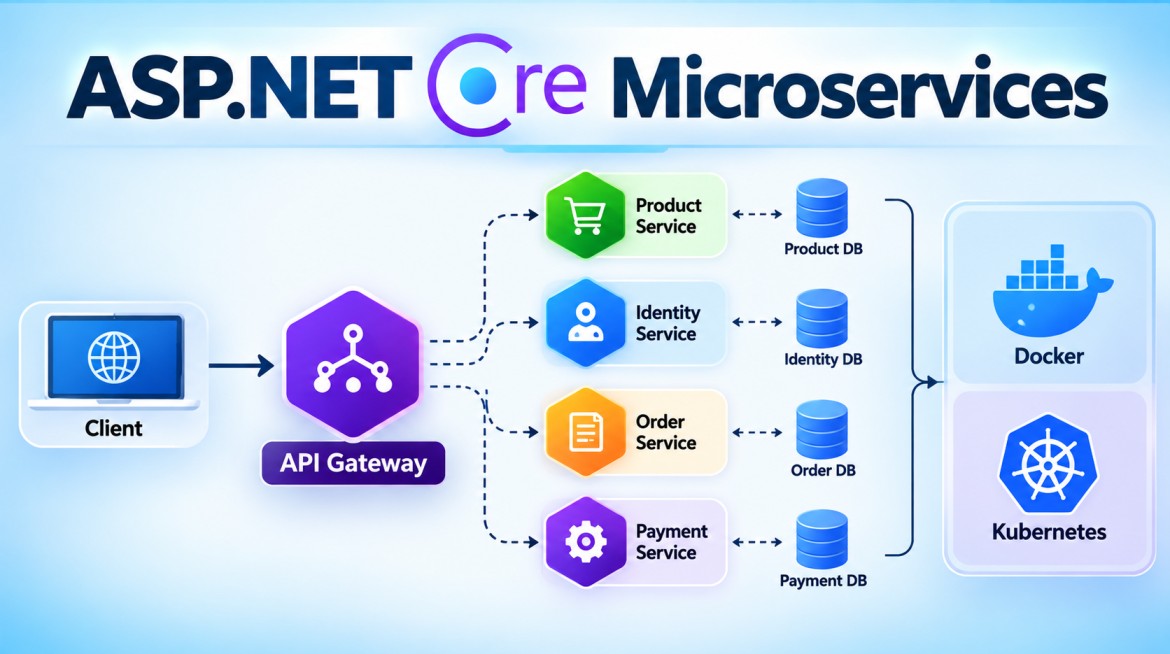


How Do You Create a Microservice Using ASP.NET Core?
In ASP.NET Core, a microservice is commonly created as an independent ASP.NET Core Web API responsible for a specific business capability.
For example, in an E-commerce system:
Product Service
Order Service
Payment Service
Inventory Service
Each can be a separate ASP.NET Core Web API with its own business logic, deployment lifecycle, and ideally clear data ownership.
1. What Are We Going to Create?
Let's create a simple Product Microservice.
Client
   |
   ↓
Product Microservice
   |
   ├── GET  /api/products
   ├── GET  /api/products/{id}
   └── POST /api/products
For simplicity, we'll use an in-memory collection. No external NuGet package is required for this basic example.
2. Create the ASP.NET Core Web API
Using the .NET CLI:
dotnet new webapi -n ProductService
cd ProductService
Run it:
dotnet runThe service will run independently on its configured HTTP/HTTPS port.
3. Suggested Project Structure
A simple microservice can start with:
ProductService
│
├── Controllers
│   └── ProductsController.cs
│
├── Models
│   └── Product.cs
│
├── Services
│   ├── IProductService.cs
│   └── ProductService.cs
│
├── Program.cs
└── appsettings.json
For a complex business service, you could later introduce Clean Architecture or DDD layers.
4. Create the Product Model
Models/Product.cs
namespace ProductService.Models;

public class Product
{
    public int Id { get; set; }

    public string Name { get; set; } = string.Empty;

    public decimal Price { get; set; }
}
This represents the data managed by the Product Service.
5. Create the Service Interface
Services/IProductService.cs
using ProductService.Models;

namespace ProductService.Services;

public interface IProductService
{
    IEnumerable<Product> GetAll();

    Product? GetById(int id);

    Product Add(Product product);
}
This defines the operations supported by our Product Service.
6. Create the Product Service
Services/ProductService.cs
using ProductService.Models;

namespace ProductService.Services;

public class ProductService : IProductService
{
    private readonly List<Product> _products =
    [
        new Product
        {
            Id = 1,
            Name = "Laptop",
            Price = 50000
        },
        new Product
        {
            Id = 2,
            Name = "Mobile",
            Price = 20000
        }
    ];

    public IEnumerable<Product> GetAll()
    {
        return _products;
    }

    public Product? GetById(int id)
    {
        return _products.FirstOrDefault(x => x.Id == id);
    }

    public Product Add(Product product)
    {
        product.Id = _products.Max(x => x.Id) + 1;

        _products.Add(product);

        return product;
    }
}
For demonstration, the products are stored in memory.
In a production service, this would normally interact with its owned database through EF Core or another data-access mechanism.
7. Create the API Controller
Controllers/ProductsController.cs
using Microsoft.AspNetCore.Mvc;
using ProductService.Models;
using ProductService.Services;

namespace ProductService.Controllers;

[ApiController]
[Route("api/[controller]")]
public class ProductsController : ControllerBase
{
    private readonly IProductService _productService;

    public ProductsController(
        IProductService productService)
    {
        _productService = productService;
    }

    [HttpGet]
    public IActionResult GetAll()
    {
        var products = _productService.GetAll();

        return Ok(products);
    }

    [HttpGet("{id}")]
    public IActionResult GetById(int id)
    {
        var product = _productService.GetById(id);

        if (product == null)
            return NotFound();

        return Ok(product);
    }

    [HttpPost]
    public IActionResult Create(Product product)
    {
        var createdProduct =
            _productService.Add(product);

        return CreatedAtAction(
            nameof(GetById),
            new { id = createdProduct.Id },
            createdProduct);
    }
}
Notice that IProductService is passed through the constructor.
ASP.NET Core's built-in Dependency Injection container will provide the implementation automatically after we register it.
8. Configure Program.cs
using ProductService.Services;

var builder = WebApplication.CreateBuilder(args);

builder.Services.AddControllers();

builder.Services.AddScoped<
    IProductService,
    ProductService.Services.ProductService>();

builder.Services.AddOpenApi();

var app = builder.Build();

if (app.Environment.IsDevelopment())
{
    app.MapOpenApi();
}

app.UseHttpsRedirection();

app.MapControllers();

app.Run();
The important registration is:
builder.Services.AddScoped<
    IProductService,
    ProductService.Services.ProductService>();
ASP.NET Core DI now knows:
IProductService
       ↓
ProductService
9. Test the Microservice
Get all products
GET /api/productsResponse:
[
  {
    "id": 1,
    "name": "Laptop",
    "price": 50000
  },
  {
    "id": 2,
    "name": "Mobile",
    "price": 20000
  }
]
Get one product
GET /api/products/1Create product
POST /api/products
Content-Type: application/json
{
"name": "Keyboard",
"price": 1500
}10. Is This Already a Microservice?
Technically, creating a separate Web API alone does not automatically make it a well-designed microservice.
A proper microservice should have characteristics such as:
Specific Business Capability
          ↓
Independent Application
          ↓
Clear Data Ownership
          ↓
Independent Deployment
          ↓
Independent Scaling
          ↓
Well-defined API / Events
For example:
Product Service
      ↓
Product Database

Order Service
      ↓
Order Database

Payment Service
      ↓
Payment Database
Each should have clear ownership of its business functionality.
11. How Multiple ASP.NET Core Microservices Work Together
Suppose we later create three services:
                    Client
                       |
                       ↓
                  API Gateway
                       |
         ┌─────────────┼─────────────┐
         ↓             ↓             ↓
 Product Service   Order Service   Payment Service
         |             |             |
         ↓             ↓             ↓
    Product DB      Order DB      Payment DB
Each service could be a separate ASP.NET Core project/application.
For example:
ECommerce
│
├── ProductService
│
├── OrderService
│
├── PaymentService
└── InventoryService
They can communicate using:
Synchronous
REST
gRPC
Asynchronous
RabbitMQ
Azure Service Bus
Kafka
12. Real Production Microservice
A production ASP.NET Core microservice commonly needs more than controllers and a database.
                    API Gateway
                         |
                         ↓
                  Product Service
                         |
        ┌────────────────┼────────────────┐
        ↓                ↓                ↓
   Product DB       Message Broker    Observability
Typical concerns include:
- Authentication and Authorization
- Database/data ownership
- Health Checks
- Centralized logging
- Distributed tracing
- Exception handling
- Validation
- Resilience
- API versioning
- Docker
- CI/CD
- Secret management
- Metrics and monitoring
Depending on the requirements, libraries/platforms such as EF Core, OpenTelemetry, messaging clients, and resilience libraries may be added.
13. Containerization
Microservices are commonly packaged as containers.
A simple Dockerfile might be:
FROM mcr.microsoft.com/dotnet/aspnet:8.0 AS base
WORKDIR /app
EXPOSE 8080

FROM mcr.microsoft.com/dotnet/sdk:8.0 AS build
WORKDIR /src

COPY ["ProductService.csproj", "."]
RUN dotnet restore "ProductService.csproj"

COPY . .
RUN dotnet publish "ProductService.csproj" \
    -c Release \
    -o /app/publish

FROM base AS final
WORKDIR /app

COPY --from=build /app/publish .

ENTRYPOINT ["dotnet", "ProductService.dll"]
Use a container image version matching the target framework of the service.
The service can then be independently deployed to platforms such as Kubernetes, Azure Container Apps, Azure App Service, or other container platforms.
14. Advantages
Creating microservices using ASP.NET Core provides:
- Independent development
- Independent deployment
- Independent scaling
- Built-in Dependency Injection
- Strong Web API support
- Built-in configuration system
- Health Check support
- Logging support
- Good container support
- REST and gRPC support
- Cross-platform deployment
15. Disadvantages / Challenges
The ASP.NET Core project itself is straightforward. The complexity comes from the distributed architecture.
You need to handle:
- Service-to-service communication
- Network failures
- Distributed transactions
- Eventual consistency
- Authentication between services
- API versioning
- Centralized logging
- Distributed tracing
- Deployment of multiple applications
- Monitoring many service instances
Therefore:
Creating a Web API is easy; designing and operating a good microservice system is the harder part.
16. Key Points
- An ASP.NET Core microservice is commonly implemented as an independent Web API/application.
- Design it around a business capability or bounded context.
- Don't create microservices merely based on database tables.
- Each service should have clear data ownership.
- Services communicate using REST, gRPC or messaging/events.
- ASP.NET Core provides built-in DI, configuration, logging and health-check capabilities.
- Services should be independently deployable and scalable.
- Docker is commonly used, but Docker is not mandatory for microservices.
- An API Gateway can provide a common entry point for multiple services.
- Production systems require security, resilience and observability.
17. Interview Questions & Answers
Q1. How do you create a Microservice using ASP.NET Core?
Create an independent ASP.NET Core Web API around a specific business capability, implement its business logic and data ownership, expose APIs/events, configure DI and operational concerns, and deploy it independently.
Q2. Is every ASP.NET Core Web API a microservice?
No. A Web API becomes part of a microservices architecture when it has an appropriate business boundary, clear ownership, and an independent deployment lifecycle.
Q3. Does every microservice need a separate ASP.NET Core project?
Usually each independently deployable microservice has its own deployable application. Internally, that service can contain one project or multiple projects depending on its complexity.
Q4. How do ASP.NET Core microservices communicate?
Commonly using:
REST
gRPC
RabbitMQ
Kafka
Azure Service Bus
Q5. Does each microservice need its own database?
Each service should ideally own its data. This doesn't necessarily require a separate physical database server, but other services should not directly manipulate its internal tables.
Q6. Is Docker mandatory for ASP.NET Core Microservices?
No. Docker is not mandatory, but containers are widely used because they provide consistent packaging and deployment.
Q7. How do you handle failures between ASP.NET Core microservices?
Using techniques such as:
- Timeout
- Retry
- Circuit Breaker
- Bulkhead
- Asynchronous messaging
- Graceful degradation
Q8. What is the role of an API Gateway?
It provides a common entry point and can handle routing and cross-cutting concerns such as authentication, rate limiting and request aggregation.
Interview One-Line Answer
In ASP.NET Core, a microservice is typically created as an independently deployable Web API aligned with a business capability, with clear data ownership and communication through REST, gRPC, or messaging.