

Database Design and Audit Tables
What is Normalization?
Normalization is the process of organizing data in database tables to:
-
Reduce duplicate data
-
Prevent data inconsistency
-
Make data easier to maintain
-
Improve data integrity
Without normalization
| StudentId | StudentName | Course1 | Course2 |
|---|---|---|---|
| 1 | Ahmed | SQL | C# |
| 2 | Priya | SQL | Angular |
Problems:
-
Multiple courses are stored in one row.
-
Adding more courses requires additional columns.
-
Course information may be repeated.
After normalization
Students
| StudentId | StudentName |
|---|---|
| 1 | Ahmed |
| 2 | Priya |
Courses
| CourseId | CourseName |
|---|---|
| 101 | SQL |
| 102 | C# |
| 103 | Angular |
StudentCourses
| StudentId | CourseId |
|---|---|
| 1 | 101 |
| 1 | 102 |
| 2 | 101 |
| 2 | 103 |
Here, each piece of information is stored in the correct table, and the tables are connected using keys.
Common normal forms
-
1NF: Each column contains a single value; no repeating groups.
-
2NF: Must be in 1NF, and every non-key column must depend on the complete primary key.
-
3NF: Must be in 2NF, and non-key columns must not depend on other non-key columns.
-
BCNF: A stronger version of 3NF where every determinant must be a candidate key.
Key points
-
Normalization divides large tables into smaller related tables.
-
It reduces duplicate data.
-
It prevents insert, update and delete anomalies.
-
Primary and foreign keys connect normalized tables.
-
3NF is commonly sufficient for transactional applications.
-
Excessive normalization can require more joins and may affect query performance.
First, Second and Third Normal Forms
Normal forms are rules used to organize database tables and reduce duplicate data.
1. First Normal Form (1NF)
A table is in 1NF when:
-
Every column contains only one value.
-
There are no repeating columns or groups.
-
Each row can be uniquely identified using a primary key.
Not in 1NF
| StudentId | StudentName | Courses |
|---|---|---|
| 1 | Ahmed | SQL, C# |
| 2 | Priya | SQL, Angular |
Courses contains multiple values.
Converted to 1NF
| StudentId | StudentName | Course |
|---|---|---|
| 1 | Ahmed | SQL |
| 1 | Ahmed | C# |
| 2 | Priya | SQL |
| 2 | Priya | Angular |
Each column now contains a single value.
2. Second Normal Form (2NF)
A table is in 2NF when:
-
It is already in 1NF.
-
Every non-key column depends on the complete primary key.
-
There is no partial dependency.
This rule is mainly relevant when a table has a composite primary key.
Not in 2NF
Primary key: (StudentId, CourseId)
| StudentId | CourseId | StudentName | CourseName | Marks |
|---|---|---|---|---|
| 1 | 101 | Ahmed | SQL | 85 |
| 1 | 102 | Ahmed | C# | 90 |
Problems:
-
StudentNamedepends only onStudentId. -
CourseNamedepends only onCourseId. -
Only
Marksdepends on bothStudentIdandCourseId.
These are called partial dependencies.
Converted to 2NF
Students
| StudentId | StudentName |
|---|---|
| 1 | Ahmed |
Courses
| CourseId | CourseName |
|---|---|
| 101 | SQL |
| 102 | C# |
StudentCourses
| StudentId | CourseId | Marks |
|---|---|---|
| 1 | 101 | 85 |
| 1 | 102 | 90 |
Now every non-key column depends on the complete primary key of its table.
3. Third Normal Form (3NF)
A table is in 3NF when:
-
It is already in 2NF.
-
Non-key columns depend only on the primary key.
-
A non-key column must not depend on another non-key column.
-
There is no transitive dependency.
Not in 3NF
| EmployeeId | EmployeeName | DepartmentId | DepartmentName |
|---|---|---|---|
| 1 | Ahmed | 10 | IT |
| 2 | Priya | 20 | HR |
Here:
-
EmployeeNamedepends onEmployeeId. -
DepartmentIddepends onEmployeeId. -
But
DepartmentNamedepends onDepartmentId, not directly onEmployeeId.
This is a transitive dependency:
EmployeeId → DepartmentId → DepartmentName
Converted to 3NF
Employees
| EmployeeId | EmployeeName | DepartmentId |
|---|---|---|
| 1 | Ahmed | 10 |
| 2 | Priya | 20 |
Departments
| DepartmentId | DepartmentName |
|---|---|
| 10 | IT |
| 20 | HR |
DepartmentName is now stored only in the Departments table.
Simple summary
| Normal form | Main rule | Removes |
|---|---|---|
| 1NF | Store one value in each column | Repeating groups |
| 2NF | Depend on the complete composite key | Partial dependency |
| 3NF | Depend only on the key, not another non-key column | Transitive dependency |
A simple way to remember:
-
1NF: One value per cell.
-
2NF: Depend on the whole key.
-
3NF: Depend on nothing but the key.
They may look similar because both split data into smaller tables, but they remove different types of dependency.
Main difference
| Normal form | Problem removed |
|---|---|
| 2NF | Partial dependency on part of a composite key |
| 3NF | Dependency between non-key columns |
2NF example
Consider this table with the composite primary key (StudentId, CourseId):
| StudentId | CourseId | StudentName | CourseName | Marks |
|---|---|---|---|---|
| 1 | 101 | Ahmed | SQL | 85 |
| 1 | 102 | Ahmed | C# | 90 |
Dependencies:
-
StudentNamedepends only onStudentId. -
CourseNamedepends only onCourseId. -
Marksdepends on bothStudentIdandCourseId.
Because some columns depend on only part of the composite key, this violates 2NF.
After converting to 2NF
Students(StudentId, StudentName)

Courses(CourseId, CourseName)

StudentCourses(StudentId, CourseId, Marks)
3NF example
Consider this table with a single-column primary key:
| EmployeeId | EmployeeName | DepartmentId | DepartmentName |
|---|---|---|---|
| 1 | Ahmed | 10 | IT |
| 2 | Priya | 20 | HR |
This table is already in 2NF because:
-
Its primary key contains only
EmployeeId. -
A partial dependency cannot exist with a single-column key.
However, it is not in 3NF because:
EmployeeId → DepartmentId → DepartmentNameDepartmentName depends on the non-key column DepartmentId.
After converting to 3NF
Employees(EmployeeId, EmployeeName, DepartmentId)

Departments(DepartmentId, DepartmentName)
Easy way to remember
-
2NF: Does a column depend on only part of a composite key?
-
3NF: Does a non-key column depend on another non-key column?
Therefore, every table in 3NF must already be in 2NF, but a table in 2NF is not necessarily in 3NF.
What is Denormalization?
Denormalization means intentionally adding duplicate or pre-calculated data to normalized tables to improve read performance.
It reduces joins, but increases data duplication.
When is denormalization appropriate?
Denormalization is appropriate when:
-
The application performs significantly more reads than writes.
-
Complex joins make frequently executed queries slow.
-
Reports and dashboards require fast results.
-
Aggregated values such as totals or counts are repeatedly calculated.
-
Data warehouses and analytical systems require faster queries.
-
Caching alone does not solve the performance problem.
-
Performance testing proves that normalization is causing a bottleneck.
Example
Normalized design
Orders
| OrderId | CustomerId |
|---|---|
| 1001 | 10 |
Customers
| CustomerId | CustomerName |
|---|---|
| 10 | Ahmed |
To display an order with the customer’s name, a join is required:
SELECT o.OrderId, c.CustomerName
FROM Orders o
JOIN Customers c
    ON c.CustomerId = o.CustomerId;
Denormalized design
Orders(OrderId, CustomerId, CustomerName)CustomerName is copied into the Orders table, allowing the application to read it without a join.
Another common example is storing a calculated total:
Orders(OrderId, CustomerId, OrderTotal)Instead of calculating OrderTotal from all order items every time, the value is stored in Orders.
Disadvantages
-
Data duplication increases storage.
-
INSERT,UPDATEandDELETEoperations become more complex. -
Duplicate values can become inconsistent.
-
Additional logic is required to keep the data synchronized.
-
It can weaken data integrity if implemented incorrectly.
Key points
-
Normalize first for correctness and maintainability.
-
Denormalize only after identifying a proven performance problem.
-
Use indexes, query optimization, caching or indexed views before duplicating data.
-
Clearly define how duplicated data will be synchronized.
-
Denormalization trades write simplicity and consistency for faster reads.
OLTP vs OLAP Databases
What is OLTP?
OLTP (Online Transaction Processing) databases manage daily business transactions.
Examples:
-
Creating an order
-
Transferring money
-
Updating customer information
-
Booking a ticket
What is OLAP?
OLAP (Online Analytical Processing) databases analyse large amounts of historical data for reporting and decision-making.
Examples:
-
Annual sales analysis
-
Customer-behaviour reports
-
Sales trends by region
-
Management dashboards
Key differences
| Feature | OLTP | OLAP |
|---|---|---|
| Purpose | Daily transactions | Analysis and reporting |
| Operations | INSERT, UPDATE, DELETE, simple SELECT |
Complex SELECT and aggregations |
| Data | Current and detailed | Historical and summarized |
| Query type | Short and simple | Complex and long-running |
| Users | Customers and operational staff | Analysts and managers |
| Transactions | Many small transactions | Fewer but complex queries |
| Response time | Milliseconds or seconds | Seconds or minutes |
| Design | Highly normalized | Often denormalized |
| Schema | Relational tables | Star or snowflake schema |
| Data updates | Continuous and frequent | Loaded periodically using ETL/ELT |
| Main priority | Transaction speed and consistency | Query and reporting performance |
| Example systems | Banking, e-commerce and reservations | Data warehouse and BI systems |
Simple example
OLTP question
What items did customer 101 purchase today?
SELECT *
FROM Orders
WHERE CustomerId = 101
  AND OrderDate = CAST(GETDATE() AS DATE);
OLAP question
What is the total yearly sales for each region?
SELECT Region, YEAR(OrderDate) AS SalesYear,
       SUM(OrderTotal) AS TotalSales
FROM SalesData
GROUP BY Region, YEAR(OrderDate);
Simple data flow
OLTP systems → ETL/ELT process → OLAP data warehouse → ReportsKey points
-
OLTP runs the business.
-
OLAP analyses the business.
-
OLTP usually uses normalized tables to reduce duplication.
-
OLAP often uses denormalized models to reduce joins and improve reporting.
-
OLAP should usually run separately so heavy reports do not slow down operational transactions.
What is a Star Schema?
A star schema is a database design commonly used in data warehouses and OLAP systems.
It contains:
-
One central fact table
-
Multiple surrounding dimension tables
The structure resembles a star.
flowchart TB
    Date["Date Dimension"] --> Sales["Sales Fact"]
    Product["Product Dimension"] --> Sales
    Customer["Customer Dimension"] --> Sales
    Store["Store Dimension"] --> Sales
1. Fact table
The fact table stores:
-
Business transactions or events
-
Numeric measurements
-
Foreign keys connecting to dimension tables
SalesFact
| DateKey | ProductKey | CustomerKey | StoreKey | Quantity | SalesAmount |
|---|---|---|---|---|---|
| 20260919 | 101 | 501 | 10 | 2 | 2000 |
| 20260919 | 102 | 502 | 20 | 1 | 1500 |
Quantity and SalesAmount are called measures.
2. Dimension tables
Dimension tables contain descriptive information used to filter, group and analyse facts.
ProductDimension
| ProductKey | ProductName | Category | Brand |
|---|---|---|---|
| 101 | Laptop | Electronics | Dell |
| 102 | Mobile | Electronics | Samsung |
Other dimensions could contain:
-
Date: day, month, quarter and year
-
Customer: name, city and region
-
Store: store name, city and state
Example query
Total sales by product category:
SELECT
    p.Category,
    SUM(f.SalesAmount) AS TotalSales
FROM SalesFact AS f
INNER JOIN ProductDimension AS p
    ON p.ProductKey = f.ProductKey
GROUP BY p.Category;
Result
| Category | TotalSales |
|---|---|
| Electronics | 3500 |
Why use a star schema?
-
Simple to understand
-
Requires fewer joins
-
Provides fast analytical queries
-
Suitable for reports and dashboards
-
Easy to filter and aggregate data
Key points
-
The fact table is at the centre.
-
Dimension tables surround the fact table.
-
Fact tables contain keys and measurable values.
-
Dimension tables contain descriptive details.
-
Dimension tables are usually denormalized.
-
It is mainly used for OLAP, reporting and business intelligence—not typical OLTP transaction processing.
Fact Table vs Dimension Table
In a data warehouse, fact tables store measurable business events, while dimension tables describe those events.
Example
Date ─────────┐
Product ──────┤
Customer ─────┼── SalesFact
Store ────────┘
Key differences
| Feature | Fact table | Dimension table |
|---|---|---|
| Purpose | Stores business events and measurements | Stores descriptive information |
| Examples | Sales, orders, payments | Product, customer, date, store |
| Data | Quantity, amount, cost, profit | Name, category, city, region |
| Keys | Contains foreign keys to dimensions | Contains a primary key |
| Rows | Usually very large | Usually smaller |
| Data type | Mostly numeric measurements and keys | Mostly descriptive text and attributes |
| Usage | Calculations and aggregations | Filtering, grouping and labeling |
| Updates | New rows are frequently added | Changes less frequently |
| Normalization | Usually contains minimal descriptive data | Often denormalized in a star schema |
Fact table example
SalesFact
| DateKey | ProductKey | CustomerKey | Quantity | SalesAmount |
|---|---|---|---|---|
| 20260919 | 101 | 501 | 2 | 2000 |
| 20260919 | 102 | 502 | 1 | 1500 |
-
DateKey,ProductKeyandCustomerKeyare foreign keys. -
QuantityandSalesAmountare measurable facts.
Dimension table example
ProductDimension
| ProductKey | ProductName | Category | Brand |
|---|---|---|---|
| 101 | Laptop | Electronics | Dell |
| 102 | Mobile | Electronics | Samsung |
These columns describe the products referenced by the fact table.
Example query
SELECT
    p.Category,
    SUM(f.SalesAmount) AS TotalSales
FROM SalesFact AS f
INNER JOIN ProductDimension AS p
    ON p.ProductKey = f.ProductKey
GROUP BY p.Category;
The dimension table provides the category, while the fact table provides the sales amount.
Easy way to remember
-
Fact table: What happened, and how much?
-
Dimension table: Who, what, where and when?
Example:
Customer Ahmed bought two Dell laptops for ₹1,00,000 on 19 September.
-
Fact: Quantity and sales amount
-
Dimensions: Customer, product and date
What is Soft Deletion?
Soft deletion means marking a record as deleted instead of physically removing it from the database.
It is commonly implemented using columns such as:
-
IsDeleted -
DeletedAt -
DeletedBy
Example table
CREATE TABLE Employees
(
    EmployeeId   INT PRIMARY KEY,
    EmployeeName VARCHAR(100),
    IsDeleted    BIT NOT NULL DEFAULT 0,
    DeletedAt    DATETIME2 NULL
);
Soft delete
Instead of using:
DELETE FROM Employees
WHERE EmployeeId = 10;
Use:
UPDATE Employees
SET IsDeleted = 1,
    DeletedAt = SYSDATETIME()
WHERE EmployeeId = 10;
Retrieve active records
SELECT EmployeeId, EmployeeName
FROM Employees
WHERE IsDeleted = 0;
Why use soft deletion?
-
Deleted records can be restored.
-
Historical data is preserved.
-
It supports auditing and investigation.
-
Related records are not immediately lost.
-
Accidental deletion is easier to recover from.
Problems soft deletion can create
1. Deleted records may appear accidentally
Developers must remember to filter them:
WHERE IsDeleted = 0Missing this condition can expose deleted data.
2. Unique constraints can cause problems
Suppose a deleted user has this email:
ahmed@example.comCreating another user with the same email can fail if the email column has a normal unique constraint.
A filtered unique index can help:
CREATE UNIQUE INDEX UX_Users_Email_Active
ON Users(Email)
WHERE IsDeleted = 0;
3. Foreign-key relationships become complicated
A parent may be marked as deleted while its child records remain active.
For example:
Deleted Customer → Active OrdersThe application must decide whether related records should also be soft-deleted.
4. Tables continue to grow
Soft-deleted rows remain in the database, resulting in:
-
Increased storage
-
Larger indexes
-
Slower queries
-
Longer backups and maintenance operations
5. Reporting becomes complicated
Reports must clearly decide whether to include or exclude deleted records.
6. Security and privacy concerns
Soft deletion does not physically remove personal data. It may not satisfy legal or privacy-related deletion requirements.
7. Restoring data can be difficult
Restoring a parent record may also require restoring its related child records in the correct order.
Key points
-
Soft delete usually changes an
IsDeletedflag instead of deleting the row. -
It is useful for recovery, auditing and history.
-
All normal queries must exclude deleted records.
-
Use filtered indexes where appropriate.
-
Define clear rules for related records.
-
Consider periodically archiving or permanently deleting old records.
-
Do not treat soft deletion as a replacement for backups or proper audit logging.
What is Auditing?
Auditing records who changed data, what was changed, and when it happened.
It is useful for:
-
Security investigations
-
Tracking user activity
-
Troubleshooting
-
Compliance
-
Recovering previous values
Common auditing approaches
1. Audit columns
Add tracking columns directly to the business table.
CREATE TABLE Employees
(
    EmployeeId   INT PRIMARY KEY,
    EmployeeName VARCHAR(100),

    CreatedAt    DATETIME2 NOT NULL DEFAULT SYSDATETIME(),
    CreatedBy    VARCHAR(100) NOT NULL,
    UpdatedAt    DATETIME2 NULL,
    UpdatedBy    VARCHAR(100) NULL
);
Update them whenever data changes:
UPDATE Employees
SET EmployeeName = 'Ahmed Khan',
    UpdatedAt = SYSDATETIME(),
    UpdatedBy = 'admin@company.com'
WHERE EmployeeId = 1;
This shows the latest change, but it does not keep the complete change history.
2. Separate audit table
Create a table that stores every change.
CREATE TABLE EmployeeAudit
(
    AuditId        BIGINT IDENTITY PRIMARY KEY,
    EmployeeId     INT,
    ActionType     VARCHAR(10),
    OldName        VARCHAR(100),
    NewName        VARCHAR(100),
    ChangedBy      VARCHAR(100),
    ChangedAt      DATETIME2 DEFAULT SYSDATETIME()
);
Example audit record:
INSERT INTO EmployeeAudit
(
    EmployeeId,
    ActionType,
    OldName,
    NewName,
    ChangedBy
)
VALUES
(
    1,
    'UPDATE',
    'Ahmed',
    'Ahmed Khan',
    'admin@company.com'
);
This maintains historical information for each change.
3. Database trigger
A trigger can automatically insert changes into the audit table.
CREATE TRIGGER trg_Employees_UpdateAudit
ON Employees
AFTER UPDATE
AS
BEGIN
    SET NOCOUNT ON;

    INSERT INTO EmployeeAudit
    (
        EmployeeId,
        ActionType,
        OldName,
        NewName,
        ChangedBy
    )
    SELECT
        d.EmployeeId,
        'UPDATE',
        d.EmployeeName,
        i.EmployeeName,
        ORIGINAL_LOGIN()
    FROM deleted AS d
    INNER JOIN inserted AS i
        ON i.EmployeeId = d.EmployeeId;
END;-
deletedcontains the old values. -
insertedcontains the new values.
Triggers capture changes from different applications, but they can add hidden complexity and performance overhead.
4. SQL Server temporal tables
Temporal tables automatically maintain earlier row versions.
CREATE TABLE Employees
(
    EmployeeId   INT PRIMARY KEY,
    EmployeeName VARCHAR(100),

    ValidFrom DATETIME2 GENERATED ALWAYS AS ROW START,
    ValidTo   DATETIME2 GENERATED ALWAYS AS ROW END,

    PERIOD FOR SYSTEM_TIME (ValidFrom, ValidTo)
)
WITH
(
    SYSTEM_VERSIONING = ON
    (
        HISTORY_TABLE = dbo.EmployeeHistory
    )
);
Query the complete history:
SELECT *
FROM Employees
FOR SYSTEM_TIME ALL
WHERE EmployeeId = 1;
Temporal tables record what changed and when, but the application may still need to supply who made the change.
5. SQL Server Audit
SQL Server Audit records database-level activity, such as:
-
Login attempts
-
Permission changes
-
Schema changes
-
Access to sensitive tables
It is mainly used for security and compliance rather than detailed business-history tracking.
Application-level auditing in ASP.NET Core
The application can capture the current authenticated user and write an audit record:
var changedBy = User.Identity?.Name ?? "Unknown";

employee.EmployeeName = request.EmployeeName;
employee.UpdatedAt = DateTime.UtcNow;
employee.UpdatedBy = changedBy;

db.EmployeeAudits.Add(new EmployeeAudit
{
    EmployeeId = employee.EmployeeId,
    ActionType = "UPDATE",
    OldName = oldName,
    NewName = employee.EmployeeName,
    ChangedBy = changedBy,
    ChangedAt = DateTime.UtcNow
});

await db.SaveChangesAsync();
Which approach should you use?
| Requirement | Suitable approach |
|---|---|
| Store only creator and last editor | Audit columns |
| Store complete business-change history | Audit table |
| Automatically track row history | Temporal tables |
| Capture changes made by every application | Trigger |
| Monitor logins, permissions and database access | SQL Server Audit |
| Capture user, IP address and request details | Application-level auditing |
Key points
-
Capture who, what, when and where.
-
Store old and new values when detailed history is required.
-
Save timestamps in UTC.
-
Protect audit records from modification or deletion.
-
Avoid storing passwords, tokens or sensitive values.
-
Add indexes for common searches such as entity ID and date.
-
Keep the business update and its audit record in the same transaction.
-
Define retention and archival policies because audit tables grow quickly.
What is Multi-Tenancy?
Multi-tenancy means one application serves multiple customers or organizations called tenants.
Example tenants:
-
Company A
-
Company B
-
Company C
Each tenant’s data must remain securely separated.
Common database designs
| Design | Description | Suitable for |
|---|---|---|
| Shared database and shared tables | All tenants share tables; rows contain TenantId |
Many small or medium tenants |
| Shared database with separate schemas | Each tenant has its own schema | Moderate tenant count and stronger separation |
| Separate database per tenant | Every tenant has its own database | Large tenants or strict security requirements |
| Hybrid | Small tenants share a database; large tenants get separate databases | SaaS applications with different tenant sizes |
Shared-table design
This is the most common and cost-effective approach.
Tenants table
CREATE TABLE Tenants
(
    TenantId   INT IDENTITY PRIMARY KEY,
    TenantName NVARCHAR(200) NOT NULL,
    IsActive   BIT NOT NULL DEFAULT 1
);
Customers table
CREATE TABLE Customers
(
    TenantId    INT NOT NULL,
    CustomerId  BIGINT IDENTITY NOT NULL,
    CustomerName NVARCHAR(200) NOT NULL,
    Email        NVARCHAR(320) NOT NULL,

    CONSTRAINT PK_Customers
        PRIMARY KEY (TenantId, CustomerId),

    CONSTRAINT FK_Customers_Tenants
        FOREIGN KEY (TenantId)
        REFERENCES Tenants(TenantId)
);
Orders table
CREATE TABLE Orders
(
    TenantId   INT NOT NULL,
    OrderId    BIGINT IDENTITY NOT NULL,
    CustomerId BIGINT NOT NULL,
    OrderDate  DATETIME2 NOT NULL DEFAULT SYSUTCDATETIME(),
    TotalAmount DECIMAL(18,2) NOT NULL,

    CONSTRAINT PK_Orders
        PRIMARY KEY (TenantId, OrderId),

    CONSTRAINT FK_Orders_Customers
        FOREIGN KEY (TenantId, CustomerId)
        REFERENCES Customers(TenantId, CustomerId)
);
Including TenantId in the foreign key prevents an order from one tenant from referencing another tenant’s customer.
Querying tenant data
Every query must filter by TenantId:
SELECT OrderId, OrderDate, TotalAmount
FROM Orders
WHERE TenantId = @TenantId;
The tenant ID should come from a trusted source such as an authenticated user’s JWT claim—not directly from an unverified request value.
Tenant-specific uniqueness
An email may need to be unique only within each tenant:
CREATE UNIQUE INDEX UX_Customers_Tenant_Email
ON Customers(TenantId, Email);
This allows different tenants to use the same email address, while preventing duplicates within one tenant.
Important design considerations
1. Always include TenantId
Add TenantId to every tenant-owned table, including:
-
Customers
-
Orders
-
Products
-
Audit records
Global lookup tables, such as countries, may not require it.
2. Use composite foreign keys
Use both TenantId and the entity ID in relationships:
(TenantId, CustomerId)This provides database-level tenant isolation.
3. Create tenant-aware indexes
Place TenantId first when queries usually filter by tenant:
CREATE INDEX IX_Orders_Tenant_OrderDate
ON Orders(TenantId, OrderDate);
4. Enforce data isolation
Do not depend only on developers remembering:
WHERE TenantId = @TenantIdUse additional protections such as:
-
EF Core global query filters
-
Repository/service-level filtering
-
SQL Server Row-Level Security
-
Automated tenant-isolation tests
5. Plan for large tenants
A tenant with significantly more data may require:
-
Table partitioning
-
A dedicated database
-
Tenant-specific archival
-
Separate performance limits
6. Include tenant information in auditing
Audit records should contain:
TenantId, UserId, Action, EntityId, ChangedAtKey points
-
Shared tables with
TenantIdare simple and cost-effective. -
Separate databases provide the strongest isolation but cost more to operate.
-
Include
TenantIdin primary keys, foreign keys, unique constraints and indexes. -
Obtain the tenant identity from authenticated server-side context.
-
Never trust a client-supplied
TenantIdwithout validation. -
Test specifically for cross-tenant data leakage.
-
Select the architecture based on security, scale, cost and compliance requirements.
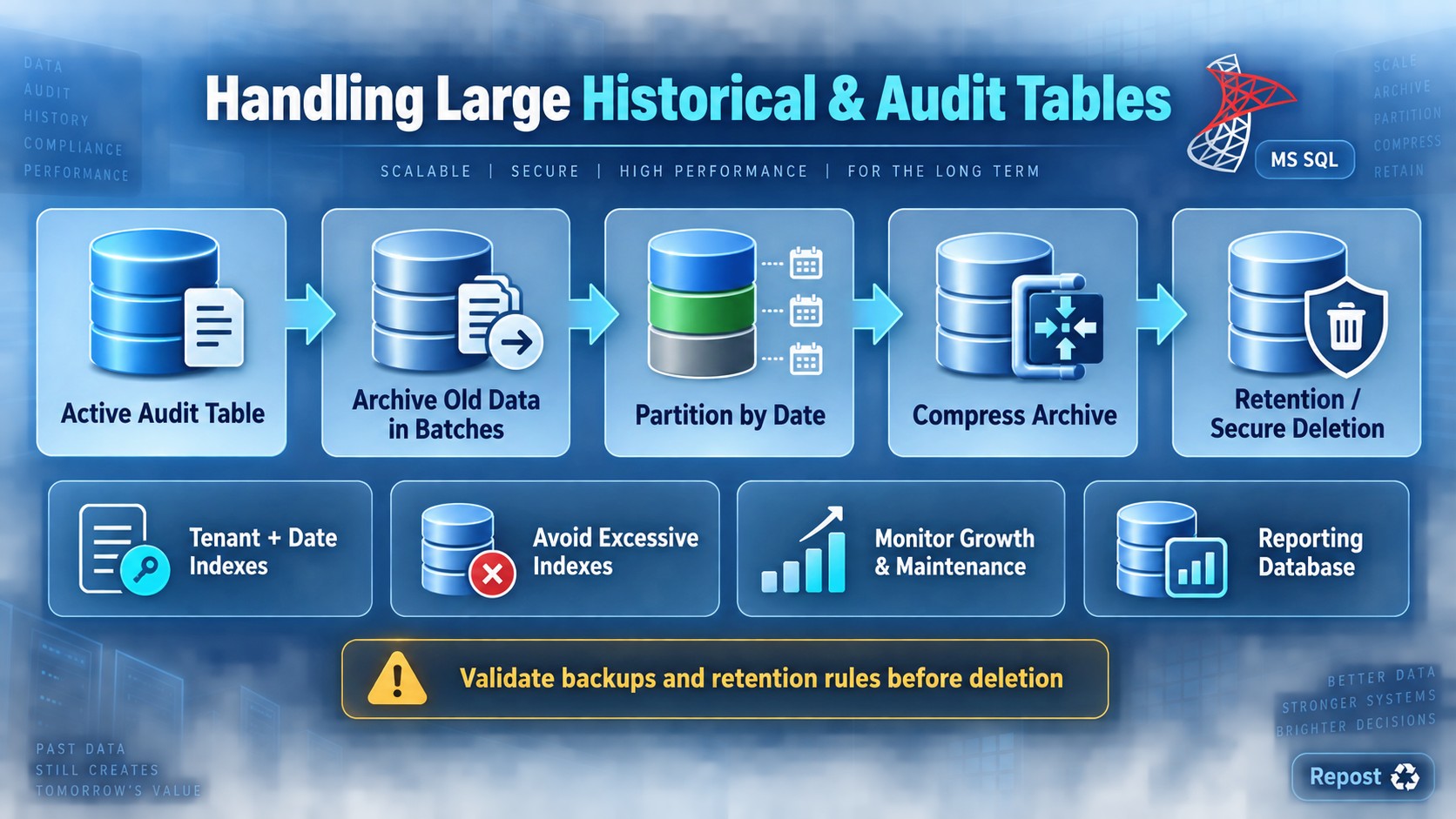
Handling Large Historical or Audit Tables
Historical and audit tables continuously grow because records are rarely updated or deleted. Without proper management, they can slow queries, backups and maintenance.
1. Define a retention policy
Decide how long data must remain in the main database.
Example:
-
Keep 12 months in the active table.
-
Move older records to an archive table.
-
Permanently delete records after 7 years, if regulations allow.
Never delete audit data without checking legal and business requirements.
2. Archive old records
Move older records in small batches instead of one large transaction:
WHILE 1 = 1
BEGIN
    DELETE TOP (5000)
    FROM AuditLog
    OUTPUT
        deleted.AuditId,
        deleted.TenantId,
        deleted.ActionType,
        deleted.ChangedAt
    INTO AuditLogArchive
    (
        AuditId,
        TenantId,
        ActionType,
        ChangedAt
    )
    WHERE ChangedAt < DATEADD(YEAR, -2, SYSUTCDATETIME());

    IF @@ROWCOUNT = 0
        BREAK;
END;
The OUTPUT clause copies rows to the archive before deleting them from the active table.
For critical systems, validate row counts and test recovery before running an archival process.
3. Partition the table
Partition large tables by a date column such as ChangedAt.
Example partitions:
2024 data | 2025 data | 2026 dataBenefits:
-
Queries can scan only the required partitions.
-
Old data can be archived efficiently.
-
Maintenance can be performed partition by partition.
Partitioning improves manageability but does not automatically make every query faster.
4. Create appropriate indexes
Index the columns commonly used for searching:
CREATE INDEX IX_AuditLog_Tenant_Date
ON AuditLog(TenantId, ChangedAt)
INCLUDE (ActionType, EntityId);
Avoid too many indexes because every audit insert must update them.
5. Use data compression
Historical data is usually read more often than modified, making it suitable for compression:
ALTER TABLE AuditLogArchive
REBUILD WITH (DATA_COMPRESSION = PAGE);
Compression reduces storage and I/O but uses additional CPU.
6. Separate active and archive data
Store old records in:
-
An archive table
-
A separate archive database
-
Cheaper long-term storage
-
A reporting or data-warehouse system
This keeps the operational database smaller.
7. Use efficient data types
Choose appropriate sizes:
BIGINT       — AuditId
DATETIME2    — ChangedAt
INT/BIGINT   — UserId and EntityId
Avoid storing complete JSON documents or large text values unless required. For detailed changes, store only necessary old and new values.
8. Control reporting queries
Reports should always use:
-
Date filters
-
Pagination
-
Suitable indexes
-
Read-only reporting databases when necessary
Avoid queries such as:
SELECT * FROM AuditLog;9. Automate maintenance
Use scheduled jobs for:
-
Archiving
-
Retention cleanup
-
Index maintenance
-
Statistics updates
-
Monitoring table growth
-
Verifying archival results
Key points
-
Define retention rules before deleting anything.
-
Archive old data in small batches.
-
Partition very large tables by date when appropriate.
-
Index common filters such as
TenantId,EntityIdandChangedAt. -
Use compression for older, rarely changed data.
-
Keep the active operational table small.
-
Avoid excessive indexes on insert-heavy audit tables.
-
Test archival and deletion processes with backups and recovery procedures.