

Section 2: Encapsulation & Access Modifiers | 6 Important Questions | C# / .NET
1. 🔴 What is encapsulation, and how is it implemented in C#?
What is encapsulation?
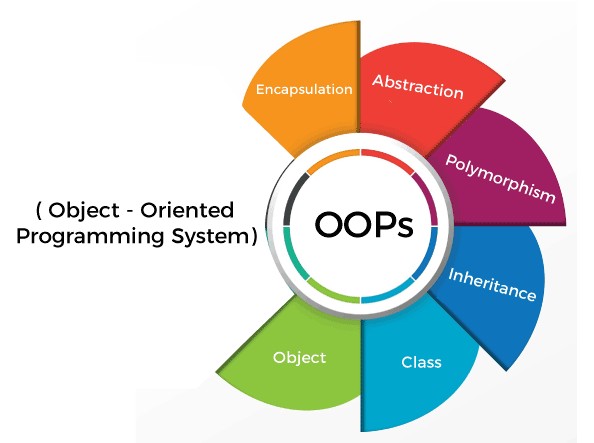
Encapsulation is one of the four main pillars of Object-Oriented Programming (OOP).
It is the process of combining data (fields) and behavior (methods) into a single class while restricting direct access to internal data.
In C#, encapsulation is commonly implemented using:
-
Access modifiers such as
private,public, andprotected. -
Properties with controlled getters and setters.
-
Methods that validate data before modifying internal state.
C# example: Without encapsulation
public class BankAccount
{
    public decimal Balance;
}
Usage:
BankAccount account = new BankAccount();

account.Balance = 10000;
account.Balance = -5000; // Invalid balance allowed
Problem: Any code can directly modify Balance, including assigning negative values.
C# example: With encapsulation
public class BankAccount
{
    private decimal _balance;

    public decimal Balance => _balance;

    public void Deposit(decimal amount)
    {
        if (amount <= 0)
            throw new ArgumentException("Invalid amount");

        _balance += amount;
    }

    public void Withdraw(decimal amount)
    {
        if (amount <= 0 || amount > _balance)
            throw new InvalidOperationException(
                "Invalid withdrawal amount");

        _balance -= amount;
    }
}
Usage:
BankAccount account = new BankAccount();

account.Deposit(10000);
account.Withdraw(2000);

Console.WriteLine(account.Balance); // 8000

// Compilation error: read-only property
// account.Balance = -5000;
Code explanation
-
_balanceis declaredprivate, preventing direct access from outside the class. -
Balanceis a read-only property exposing the current balance. -
Deposit()validates the amount before increasing the balance. -
Withdraw()validates the amount and available balance before withdrawing.
Real-time scenario
In a banking application, account balances should not be modified directly by external code. Instead, operations such as deposit, withdrawal, and transfer should pass through controlled business methods.
Advantages
-
Prevents uncontrolled data modification.
-
Centralizes business validation.
-
Protects internal object state.
-
Reduces dependencies on implementation details.
-
Improves maintainability and testability.
Interview answer
Encapsulation is the process of combining data and methods into a class while restricting direct access to internal data. In C#, it is implemented using access modifiers, properties, and methods. It helps protect object state, enforce validation, and improve maintainability.
2. 🔴 What are access modifiers in C#?
What are access modifiers?
Access modifiers are keywords that control the visibility and accessibility of classes, fields, properties, methods, and other members.
C# supports six main access modifiers.
Access modifiers – Comparison table
C# Access Modifiers – Colorful Comparison Table
|
Modifier |
Same class |
Derived class (same assembly) |
Other class (same assembly) |
Derived class (other assembly) |
Other class (other assembly) |
|
public |
Yes |
Yes |
Yes |
Yes |
Yes |
|
private |
Yes |
No |
No |
No |
No |
|
protected |
Yes |
Yes |
No |
Yes |
No |
|
internal |
Yes |
Yes |
Yes |
No |
No |
|
protected internal |
Yes |
Yes |
Yes |
Yes |
No |
|
private protected |
Yes |
Yes |
No |
No |
No |
Important points for interviews
-
public— Accessible from anywhere. -
private— Accessible only within the containing type. -
protected— Accessible within the class and derived classes. -
internal— Accessible within the same assembly. -
protected internal— Same assembly OR derived class in another assembly. -
private protected— Same assembly AND derived class.
Assumes ordinary class members, access through permitted expressions, and no InternalsVisibleTo configuration. Protected access in derived classes is subject to C# receiver restrictions.
Explanation with examples
1. public – Accessible from anywhere
public class Employee
{
    public string Name = "John";
}
Employee emp = new Employee();
Console.WriteLine(emp.Name);2. private – Accessible only within the containing type
public class Employee
{
    private decimal salary = 50000;

    public decimal GetSalary()
    {
        return salary;
    }
}
Employee emp = new Employee();
// emp.salary; // Compilation error
Console.WriteLine(emp.GetSalary());3. protected – Accessible within the class and derived classes
public class Employee
{
    protected decimal Salary = 50000;
}

public class Manager : Employee
{
    public void Display()
    {
        Console.WriteLine(Salary);
    }
}
4. internal – Accessible within the same assembly
internal class SalaryCalculator
{
    public decimal Calculate()
    {
        return 50000;
    }
}
The class is accessible within the same assembly, but normally not from another assembly.
5. protected internal – Same assembly OR derived class in another assembly
public class Employee
{
    protected internal decimal Salary = 50000;
}
It can be accessed by other classes in the same assembly or through inheritance in another assembly.
6. private protected – Derived classes within the same assembly only
public class Employee
{
    private protected decimal Salary = 50000;
}
Only the containing class and its derived classes within the same assembly can access this member.
Important difference
protected internal vs private protected
|
|
|
|---|---|
|
Same assembly OR derived class |
Same assembly AND derived class |
|
Less restrictive |
More restrictive |
|
Allows qualifying derived-class access from another assembly |
Does not allow access from another assembly |
Real-time ASP.NET Core scenario
Consider a Clean Architecture application:
Solution
|
+-- Domain
|   +-- Employee.cs
|
+-- Application
|   +-- EmployeeService.cs
|
+-- Infrastructure
|   +-- EmployeeRepository.cs
|
+-- WebAPI
+-- EmployeeController.cs-
public: DTOs and service contracts shared between assemblies. -
private: Internal fields and helper methods. -
protected: Members intended for derived classes. -
internal: Implementation types used only within an assembly.
Interview answer
Access modifiers control the accessibility of types and members in C#. The six main modifiers are public, private, protected, internal, protected internal, and private protected. They help enforce encapsulation and prevent unintended access to implementation details.
3. 🔴 What is the difference between fields and properties in C#?
What is a field?
A field is a variable declared directly inside a class or struct. It stores data associated with an object or type.
What is a property?
A property provides controlled access to data through get, set, or init accessors.
Properties can include validation, computed values, or other logic.
C# example: Field
public class Employee
{
    public decimal Salary;
}
Usage:
Employee emp = new Employee();

emp.Salary = -10000; // Allowed
Here, Salary is a public field, so external code can assign any decimal value.
C# example: Property
public class Employee
{
    private decimal _salary;

    public decimal Salary
    {
        get
        {
            return _salary;
        }

        set
        {
            if (value < 0)
                throw new ArgumentException(
                    "Salary cannot be negative");

            _salary = value;
        }
    }
}
Usage:
Employee emp = new Employee();

emp.Salary = 50000;

Console.WriteLine(emp.Salary); // 50000

emp.Salary = -10000; // Exception
Key differences
|
Field |
Property |
|---|---|
|
Stores data directly |
Provides access to data |
|
Declared as a variable |
Declared with accessors |
|
Does not have |
Supports |
|
No automatic assignment validation |
Can validate assigned values |
|
Can be declared |
Can have a getter without a setter |
|
Often used for internal state |
Commonly used for public APIs and models |
Real-time scenario
In ASP.NET Core Entity Framework Core models, public properties are commonly used to represent database columns.
public class Employee
{
    public int Id { get; set; }

    public string Name { get; set; } = "";

    public decimal Salary { get; private set; }

    public void UpdateSalary(decimal salary)
    {
        if (salary <= 0)
            throw new ArgumentException(
                "Salary must be positive");

        Salary = salary;
    }
}
Here:
-
IdandNameare public read/write properties. -
Salaryhas a public getter and private setter. -
UpdateSalary()controls modifications.
Interview answer
A field is a variable that directly stores data inside a class, while a property provides controlled access to data through accessors. Properties support validation, computed values, and different access levels for reading and writing. Public properties are generally preferred over public fields when exposing object state.
4. 🔴 What is the difference between encapsulation and abstraction?
Encapsulation
Encapsulation focuses on protecting internal data and controlling how it can be accessed or modified.
Abstraction
Abstraction focuses on hiding implementation details and exposing only the essential functionality.
C# example: Encapsulation
public class BankAccount
{
    private decimal _balance;

    public decimal Balance => _balance;

    public void Deposit(decimal amount)
    {
        if (amount <= 0)
            throw new ArgumentException();

        _balance += amount;
    }
}
Explanation: The balance cannot be modified directly. It can only be updated through the validated Deposit() method.
C# example: Abstraction
public interface IPaymentService
{
    void Pay(decimal amount);
}

public class UpiPayment : IPaymentService
{
    public void Pay(decimal amount)
    {
        Console.WriteLine(
            $"UPI payment: {amount}");
    }
}

public class CardPayment : IPaymentService
{
    public void Pay(decimal amount)
    {
        Console.WriteLine(
            $"Card payment: {amount}");
    }
}
Usage:
IPaymentService payment = new UpiPayment();

payment.Pay(1000);
Explanation: The caller only knows about the Pay() method through the interface. It does not need to know how UPI payment processing is implemented.
Key differences
|
Encapsulation |
Abstraction |
|---|---|
|
Hides and protects internal state |
Hides implementation complexity |
|
Focuses on how data is accessed |
Focuses on what functionality is exposed |
|
Uses access modifiers and properties |
Commonly uses interfaces and abstract classes |
|
Helps enforce data integrity |
Helps reduce coupling |
|
Example: Private balance with validated methods |
Example: |
Real-time scenario
Consider an ASP.NET Core application using a repository pattern.
Abstraction:
public interface IEmployeeRepository
{
    Employee? GetById(int id);
}
The service depends on IEmployeeRepository rather than knowing the database query implementation.
Encapsulation:
public class Employee
{
    public decimal Salary { get; private set; }

    public void UpdateSalary(decimal salary)
    {
        if (salary <= 0)
            throw new ArgumentException();

        Salary = salary;
    }
}
The Employee class controls how its salary is modified.
Interview answer
Encapsulation protects an object's internal state by restricting direct access and providing controlled operations. Abstraction hides implementation details and exposes only essential functionality. Encapsulation is commonly implemented using access modifiers and properties, while abstraction is commonly implemented using interfaces and abstract classes.
Easy way to remember:
-
Encapsulation: How do we protect data?
-
Abstraction: How do we hide complexity?
5. 🟡 What are auto-implemented properties, read-only properties, and init properties?
1. Auto-implemented properties
Auto-implemented properties allow the compiler to create a hidden backing field automatically.
public class Employee
{
    public int Id { get; set; }

    public string Name { get; set; } = "";
}
Usage:
Employee emp = new Employee();

emp.Id = 101;
emp.Name = "John";
When to use: When no custom getter or setter logic is required.
2. Read-only properties
A read-only property provides a getter but no externally accessible setter.
public class Employee
{
    public string Name { get; }

    public Employee(string name)
    {
        Name = name;
    }
}
Usage:
Employee emp = new Employee("John");

Console.WriteLine(emp.Name);

// emp.Name = "David"; // Compilation error
When to use: When a property should not be modified by external code after object initialization.
3. init properties
An init accessor allows assignment during object initialization but prevents reassignment afterward.
Introduced in C# 9.
public class Employee
{
    public int Id { get; init; }

    public string Name { get; init; } = "";
}
Usage:
Employee emp = new Employee
{
    Id = 101,
    Name = "John"
};

// emp.Name = "David"; // Compilation error
Comparison table
|
Feature |
Auto property ( |
Read-only ( |
Init-only ( |
|---|---|---|---|
|
Read value |
Yes |
Yes |
Yes |
|
Set after creation externally |
Yes |
No |
No |
|
Assign using object initializer |
Yes |
No, unless special construction support |
Yes |
|
Assign in constructor |
Yes |
Yes |
Yes |
|
Typical usage |
Mutable models |
Fixed values |
Initialization-only data |
Real-time ASP.NET Core example
public record CreateEmployeeRequest
{
    public required string Name { get; init; }

    public required string Email { get; init; }
}
Usage:
var request = new CreateEmployeeRequest
{
    Name = "John",
    Email = "john@example.com"
};
This is useful for request and response models where property values should not be reassigned after initialization.
Important: init prevents reassignment of the property after initialization. It does not guarantee deep immutability if the property references a mutable object.
Interview answer
Auto-implemented properties automatically generate backing fields and are useful when custom access logic is unnecessary. Read-only properties expose values without allowing external modification. init properties allow assignment during object initialization but prevent reassignment afterward, making them useful for initialization-only data models.
6. 🟡 How does encapsulation help with data security, validation, and maintainability?
Explanation
Encapsulation improves application design by ensuring that object data is accessed and modified through controlled operations.
It provides three important benefits.
1. Data protection
Private fields prevent external code from directly modifying internal object state.
public class UserAccount
{
    private string _passwordHash = "";

    public void SetPasswordHash(string hash)
    {
        if (string.IsNullOrWhiteSpace(hash))
            throw new ArgumentException("Invalid hash");

        _passwordHash = hash;
    }
}
External code cannot directly access _passwordHash.
In a real authentication system, password hashing should be performed by a trusted password-hashing service rather than accepting arbitrary hashes from callers.
2. Data validation
Encapsulation allows business rules to be validated before updating object state.
public class Product
{
    public decimal Price { get; private set; }

    public void UpdatePrice(decimal price)
    {
        if (price <= 0)
            throw new ArgumentException(
                "Price must be greater than zero");

        Price = price;
    }
}
Usage:
Product product = new Product();

product.UpdatePrice(500);

// Throws exception
product.UpdatePrice(-100);
This prevents invalid price values from being assigned through the public API.
3. Maintainability
Encapsulation centralizes business logic so changes can be made in one place.
public class Employee
{
    public decimal Salary { get; private set; }

    public void IncreaseSalary(decimal percentage)
    {
        if (percentage <= 0 || percentage > 20)
            throw new ArgumentException(
                "Invalid increment percentage");

        Salary += Salary * percentage / 100;
    }
}
Usage:
Employee emp = new Employee();

emp.IncreaseSalary(10);
Suppose the organization changes its salary increment policy from a maximum of 20% to 15%.
Only the validation rule inside IncreaseSalary() needs to change. Callers do not need to implement the new rule individually.
Benefits comparison
|
Area |
How encapsulation helps |
|---|---|
|
Data protection |
Prevents direct modification of private state |
|
Validation |
Enforces business rules before updates |
|
Maintainability |
Centralizes data modification logic |
|
Reusability |
Makes controlled operations reusable |
|
Debugging |
Reduces the number of places where state can change |
|
Testing |
Allows business rules to be tested independently |
Important security consideration
Encapsulation supports secure design, but it is not a replacement for authentication, authorization, encryption, or server-side validation.
For example, a private Balance field prevents direct access through the class's public API, but it does not prevent an unauthorized user from calling a poorly secured withdrawal endpoint.
In ASP.NET Core, use encapsulation together with proper authorization, input validation, and database transaction controls.
Real-time scenario
In an enterprise payroll system:
-
Salary cannot be modified directly.
-
Salary increments must satisfy business rules.
-
Only authorized application operations should be allowed to request salary changes.
-
Future policy changes can be implemented centrally.
Interview answer
Encapsulation protects internal object state by restricting direct access and allowing changes through controlled methods. It improves data integrity through validation, enhances maintainability by centralizing business rules, and reduces unintended modifications. However, it must be combined with proper authentication and authorization for application security.
Quick Interview Revision – All 6 Questions
|
Question |
Key points to remember |
|---|---|
|
1. Encapsulation |
Data hiding, access modifiers, properties, methods |
|
2. Access modifiers |
Public, Private, Protected, Internal, Protected Internal, Private Protected |
|
3. Fields vs Properties |
Direct storage vs controlled access |
|
4. Encapsulation vs Abstraction |
Protect internal state vs hide implementation details |
|
5. Property types |
|
|
6. Encapsulation benefits |
Data integrity, validation, maintainability, controlled access |
Interview priority: Questions 1, 2, 3, and 4 are especially important for .NET Developer and Technical Lead interviews. Be prepared to explain protected internal versus private protected, field versus property, and encapsulation versus abstraction with practical C# examples.