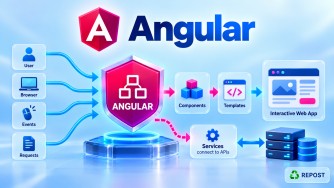


1. Explain the complete Angular application startup flow.
The browser loads index.html, which loads Angular's JavaScript bundle. main.ts bootstraps the root component, initializes providers, and renders the application through the router.
index.html → main.ts → bootstrapApplication()
           → app.config.ts → Root Component
           → RouterOutlet → Page Component
2. Explain standalone Angular architecture.
Standalone Angular uses components, directives, and pipes without requiring NgModules. Dependencies are imported directly into components, and application services are configured through providers.
bootstrapApplication(App, {
  providers: [provideRouter(routes), provideHttpClient()]
});
3. Explain traditional NgModule architecture.
Traditional Angular organizes components, directives, pipes, and providers using NgModules. AppModule bootstraps the application, while feature modules organize functionality.
AppModule
  ├── AppRoutingModule
  ├── Feature Modules
  ├── Components
  └── Services
4. Standalone vs NgModule — what changed and why?
|
NgModule |
Standalone |
|---|---|
|
Components declared in modules |
Components import dependencies directly |
|
|
|
|
|
|
|
More module configuration |
Less boilerplate |
Key Point: Standalone architecture simplifies dependency management, lazy loading, and application organization.
5. Explain component communication.
Angular components communicate using input(), output(), shared services, or Signals. Parent-to-child communication uses inputs; child-to-parent communication uses outputs.
userId = input<number>(0);    // Parent → Child
saved = output<void>();       // Child → Parent
6. Explain Angular Dependency Injection.
Dependency Injection (DI) provides required services to components without manually creating instances. Angular manages service creation and lifetime through injectors.
private articleService = inject(ArticleService);Key Point: providedIn: 'root' commonly creates an application-wide singleton service.
7. Explain Angular routing.
Angular Router enables navigation between components without reloading the entire page. Routes are defined using Routes, registered through provideRouter(), and displayed in router-outlet.
{ path: 'articles', component: ArticleList }8. Explain route guards.
Route guards control navigation based on conditions such as authentication or roles. Modern Angular uses functional guards like CanActivateFn and CanMatchFn.
export const authGuard: CanActivateFn = () =>
  inject(AuthService).isLoggedIn();
Key Point: Route guards do not replace server-side authorization.
9. Explain Reactive Forms and validation.
Reactive Forms use FormControl, FormGroup, and Validators to manage form values and validation in TypeScript. They support custom validators and dynamic forms.
form = new FormGroup({
  email: new FormControl('', [Validators.required, Validators.email])
});
10. Explain Angular HttpClient.
HttpClient communicates with ASP.NET Core Web API through HTTP methods such as GET, POST, PUT, and DELETE. It returns RxJS Observables.
this.http.get<Article[]>('/api/articles');Key Point: Configure it using provideHttpClient().
11. Explain RxJS Observables.
Observables represent asynchronous streams that can emit multiple values over time. Angular uses them for HTTP requests, form changes, and event processing.
this.articleService.getAll().subscribe(data => console.log(data));12. Explain Signals.
Signals are reactive containers that notify Angular when their values change. Use signal(), computed(), and effect() to manage reactive state.
count = signal(0);
doubleCount = computed(() => this.count() * 2);
13. Signals vs Observables — when should each be used?
Use Signals for synchronous UI state and RxJS Observables for asynchronous streams and complex event processing.
|
Signals |
Observables |
|---|---|
|
UI state |
HTTP and events |
|
|
|
|
|
|
|
Read using |
Subscribe or AsyncPipe |
14. Explain HTTP interceptors.
HTTP interceptors execute before requests and during response processing. They are commonly used for JWT headers, logging, error handling, and loading indicators.
provideHttpClient(withInterceptors([authInterceptor]));15. Explain JWT authentication between Angular and ASP.NET Core.
Angular submits login credentials to ASP.NET Core, which validates the user and issues a JWT. Angular sends the token in the Authorization: Bearer header for protected API requests.
Angular Login → Web API → Validate User
                            |
                         Issue JWT
                            |
Angular ← JWT ←─────────────┘
   |
   └── Bearer JWT → Protected API
16. Explain access-token and refresh-token flow.
An access token authorizes API requests, while a refresh token obtains new access tokens without requiring another login. Refresh tokens should be protected, rotated, and revocable.
Access Token Expires
        |
        v
Refresh Endpoint → Validate Refresh Token
        |
        v
New Access Token + Rotated Refresh Token
        |
        v
Retry Original API Request
17. Explain CORS between Angular and ASP.NET Core.
CORS allows an ASP.NET Core API to explicitly permit browser requests from an Angular application hosted on another origin. Configure allowed origins in ASP.NET Core.
builder.Services.AddCors(o => o.AddPolicy("Angular",
    p => p.WithOrigins("https://app.example.com").AllowAnyHeader().AllowAnyMethod()));
Key Point: CORS is enforced by browsers, not Postman.
18. Explain Angular security.
Angular provides template escaping and sanitization to reduce XSS risks. Use HTTPS, protect authentication credentials, avoid exposing secrets, and enforce authorization in ASP.NET Core.
Key Point: Client-side security is not a substitute for backend validation and authorization.
19. Explain lazy loading.
Lazy loading loads components or feature routes only when required, reducing the initial JavaScript bundle size and improving startup performance.
{ path: 'admin', loadComponent: () =>
  import('./admin/dashboard').then(m => m.Dashboard) }
20. Explain change detection.
Change detection updates Angular templates when application state changes. Modern Angular supports Signals, OnPush, and zoneless change detection.
Key Point: OnPush helps reduce unnecessary checking, while Signals notify Angular when reactive state changes.
21. Explain SSR vs CSR.
|
CSR |
SSR |
|---|---|
|
Browser renders the page |
Server generates initial HTML |
|
More browser-side rendering |
Faster initial content visibility in many cases |
|
SEO needs additional consideration |
Search engines receive pre-rendered HTML |
|
Suitable for Admin dashboards |
Useful for public content and SEO |
Key Point: Angular supports CSR, SSR, SSG, and hybrid rendering.
22. Explain Angular environment and configuration management.
Use environment files, build configurations, or runtime configuration to manage API URLs and application settings across development and production.
export const environment = {
  apiUrl: 'https://api.example.com'
};
Key Point: Never store API secrets or database passwords in Angular environment files.
23. Explain Angular + ASP.NET Core Clean Architecture integration.
Angular communicates with ASP.NET Core through HTTP/JSON API contracts. The Application layer handles use cases, Domain contains business rules, and Infrastructure provides data access.
Angular
   |
   v
ASP.NET Core Web API
   |
   v
Application Layer ─────→ Domain Layer
   |
   v
Repository Interface
   ^
   | implemented by
Infrastructure Layer
   |
   v
EF Core → SQL Server
24. Explain production deployment of Angular + ASP.NET Core.
Build Angular using ng build --configuration production and publish ASP.NET Core using dotnet publish. Deploy them together or independently using Azure hosting services.
Git Repository
      |
      v
Azure DevOps / GitHub Actions
      |
      +── Angular → Azure Static Web Apps
      |
      +── ASP.NET Core → Azure App Service
                              |
                              v
                         Azure SQL
25. Explain how you would migrate an ASP.NET Core MVC application to an Angular frontend.
Replace MVC Views with Angular standalone components while retaining the existing ASP.NET Core Web API, Application, Domain, Infrastructure, and database layers.
BEFORE:
ASP.NET Core MVC → Web API → Application → Database

AFTER:
Angular          → Web API → Application → Database
Key Point: Migrate page-by-page, reuse API contracts, and verify authentication, routing, validation, and SEO requirements.
Final Interview Revision — Top 10 Priorities
|
Priority |
Topic |
Focus |
|---|---|---|
|
1 |
Standalone Architecture |
Components, bootstrap, providers |
|
2 |
Dependency Injection |
Services, injectors, |
|
3 |
Routing and Guards |
Routes, lazy loading, authentication |
|
4 |
Reactive Forms |
FormGroup, validation |
|
5 |
HttpClient |
CRUD, API integration |
|
6 |
RxJS and Signals |
Asynchronous streams vs UI state |
|
7 |
HTTP Interceptors |
JWT, errors, logging |
|
8 |
JWT Authentication |
Login, refresh tokens, authorization |
|
9 |
Clean Architecture |
Angular → Web API → Application → Infrastructure |
|
10 |
Deployment |
Azure, CORS, CI/CD |
Interview takeaway: Be prepared to explain one complete practical workflow:
Angular Component
        |
        v
Angular Service
        |
        v
HTTP Interceptor (JWT)
        |
        v
ASP.NET Core Web API
        |
        v
Authentication / Authorization
        |
        v
Application Service
        |
        v
Repository Implementation (Infrastructure)
        |
        v
SQL Server
        |
        v
JSON Response → Angular → UI Update
For a Senior .NET Full Stack Developer / Technical Lead interview, explaining this end-to-end workflow and the responsibilities of each layer is particularly valuable.