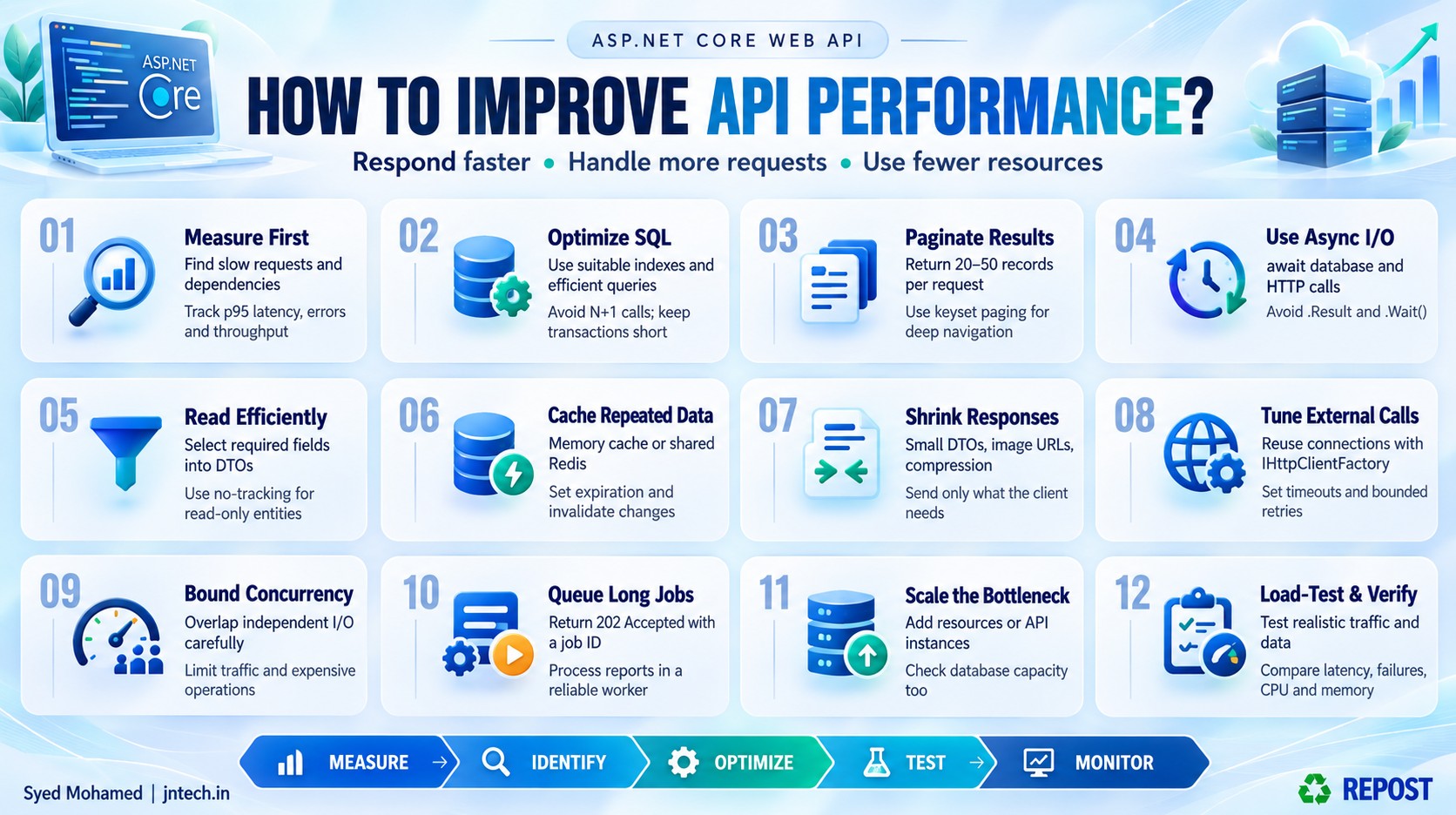


Stop Guessing! Find What’s Slowing Down Your API
Improving API performance means making an API respond faster, handle more requests, and use server resources efficiently.
For example, a product API takes 3 seconds to return 20 products. After finding and fixing an inefficient database query, it takes 200 milliseconds.
Those numbers are an example; the improvement depends on the actual problem.
For an ASP.NET Core Web API, the main areas to examine are:
-
Database queries.
-
Application code.
-
Caching.
-
Response size.
-
Calls to other services.
-
Server capacity.
The most important rule: measure first, identify the slow part, improve it, and measure again.
1. Understand what “good performance” means
Performance involves more than how quickly one request finishes.
| Measurement | Simple meaning | Example |
|---|---|---|
| Response time / latency | How long a request takes | A product request takes 150 ms |
| Throughput | How many requests complete in a period | 500 requests per second |
| Concurrent requests | How many requests are being processed at the same time | 200 active requests |
| Error rate | Percentage of requests that fail | 1% return server errors |
| Resource usage | CPU, memory, connections, and other resources consumed | CPU stays at 90% during peak traffic |
An API might respond quickly with one user but become slow when 1,000 users access it.
Your goal is to maintain acceptable response times and reliability under the expected load.
Also check p95 response time.
If p95 is 500 ms, approximately 95% of measured requests finish within 500 ms. This helps reveal slow requests that an average can hide.
2. Find where the time is being spent
Before changing code, inspect the request.
Consider this imaginary timing breakdown:
| Operation | Time |
|---|---|
| Authentication and middleware | 20 ms |
| Application logic | 30 ms |
| SQL query | 1,700 ms |
| JSON creation and other processing | 50 ms |
| Total server processing | 1,800 ms |
Here, the SQL query is the main bottleneck.
Changing a small C# loop will have little impact while that query remains slow.
Useful diagnostic tools include:
-
Application Insights: Request timings, failures, and dependency calls.
-
OpenTelemetry: Instrumentation for traces, metrics, and logs.
-
SQL Server Query Store: Query performance history and execution plans.
-
Visual Studio Profiler / .NET diagnostic tools: CPU, memory, and thread investigation.
A trace helps you follow one request through your API, database, and downstream services.
Measure the individual stages instead of assuming that every slow request is a database problem.
3. Optimize database queries
Simple definition: Database optimization means getting the required data with less unnecessary work.
Microsoft’s EF Core guidance emphasizes appropriate indexes, selecting only required columns, limiting result sizes, and avoiding unnecessary database round trips. (Microsoft Learn)
A. Select only the required columns
Suppose the Products table contains:
Id
Name
Price
Description
ImageData
CreatedDate
ModifiedDate
Your product list displays only:
Id
Name
Price
Avoid retrieving every column:
SELECT *
FROM Products;
Retrieve what the screen needs:
SELECT Id, Name, Price
FROM Products;
This reduces the data that SQL Server must send and the API must hold in memory.
B. Create suitable indexes
Suppose this query runs frequently:
SELECT Id, Name, Price
FROM Products
WHERE CategoryId = @CategoryId;
A candidate index is:
CREATE INDEX IX_Products_CategoryId
ON Products(CategoryId)
INCLUDE (Name, Price);
This example assumes Id is the clustered primary key, so SQL Server already includes it in the nonclustered index.
Do not create indexes blindly. Check the execution plan and actual workload. Indexes use storage and add work to inserts, updates, and deletes.
C. Investigate blocking
A query can be slow because it is waiting for another transaction.
For example:
-
Transaction A updates product prices and stays open.
-
Transaction B tries to access conflicting data.
-
Transaction B waits.
Keep transactions short. Avoid holding a database transaction open while waiting for an external API.
D. Avoid repeated database calls
Suppose you load 100 orders, then make one separate query per order to retrieve its items.
1 query for orders
100 queries for order items
---------------------------
101 queries
This is the N+1 query problem.
Design the query to retrieve the required order information in a small number of planned queries.
4. Return fewer records using pagination
Simple definition: Pagination means returning data in small portions.
Instead of returning 100,000 products, return 20 or 50 at a time.
Example request:
GET /api/products?page=1&pageSize=20EF Core example:
var products = await db.Products
    .OrderBy(p => p.Id)
    .Skip((page - 1) * pageSize)
    .Take(pageSize)
    .ToListAsync(cancellationToken);
Validate the inputs:
if (page < 1 || pageSize < 1 || pageSize > 100)
{
    return BadRequest(
        "Page must be positive. Page size must be between 1 and 100.");
}
For deep pages on large datasets, consider keyset pagination:
var products = await db.Products
    .Where(p => p.Id > lastId)
    .OrderBy(p => p.Id)
    .Take(20)
    .ToListAsync(cancellationToken);
If the previous response ended with product ID 150, the next request asks for products after 150.
Keyset pagination works well for Next / Load more navigation. It does not directly support jumping to an arbitrary page number. Use a matching index and a unique ordering. (Microsoft Learn)
5. Use async and await for I/O operations
Simple definition: Asynchronous code allows a server thread to do other work while an operation, such as a database call, is waiting.
Avoid blocking on asynchronous work:
var products = db.Products.ToListAsync().Result;Use:
var products =
    await db.Products.ToListAsync(cancellationToken);
Also avoid:
task.Wait();Important distinction: async does not automatically make the SQL query execute faster. It helps the server handle concurrent requests without tying up threads while waiting.
Use asynchronous methods throughout the controller, service, and repository call chain. Do not wrap ordinary database or HTTP calls in Task.Run() to make them appear asynchronous. (Microsoft Learn)
6. Make EF Core read operations efficient
For read-only entity queries, use:
var products = await db.Products
    .AsNoTracking()
    .Take(20)
    .ToListAsync(cancellationToken);
AsNoTracking() tells EF Core that it does not need to track those entities for later updates.
For API responses, project directly into a DTO:
var products = await db.Products
    .OrderBy(p => p.Id)
    .Select(p => new ProductDto
    {
        Id = p.Id,
        Name = p.Name,
        Price = p.Price
    })
    .Take(20)
    .ToListAsync(cancellationToken);
A DTO projection containing only scalar values, as above, does not materialize tracked entity instances, so AsNoTracking() is not necessary for that projection.
Apply filtering before loading data.
Avoid:
var allProducts = await db.Products.ToListAsync();

var products = allProducts
    .Where(p => p.CategoryId == categoryId)
    .ToList();
Prefer:
var products = await db.Products
    .Where(p => p.CategoryId == categoryId)
    .ToListAsync(cancellationToken);
The second version sends the filter to the database. (Microsoft Learn)
7. Use caching for frequently requested data
Simple definition: Caching means temporarily storing a result so the application can reuse it.
For example, a product category list might change only occasionally but be requested thousands of times.
With caching:
-
The first request reads the database.
-
The result is stored in the cache.
-
Later requests reuse the stored result.
-
After expiration or invalidation, the API reads fresh data.
| Cache type | What it stores | Typical use |
|---|---|---|
| In-memory cache | Data inside one application instance | Frequently used local data |
| Distributed cache, such as Redis | Data shared by application instances | Multiple API servers |
| Output cache | Generated endpoint responses | Reusable responses from eligible endpoints |
| HTTP response caching | Responses according to HTTP cache rules | Browser or proxy reuse |
ASP.NET Core supports these different approaches; choose according to what you need to reuse and where it must be available. (Microsoft Learn)
Simple in-memory example:
// Program.cs
builder.Services.AddMemoryCache();
Inside a controller with injected IMemoryCache cache and database context db:
const string key = "categories";

if (!cache.TryGetValue(key, out List<CategoryDto>? categories))
{
    categories = await db.Categories
        .Select(c => new CategoryDto
        {
            Id = c.Id,
            Name = c.Name
        })
        .ToListAsync(cancellationToken);

    cache.Set(
        key,
        categories,
        TimeSpan.FromMinutes(5));
}

return Ok(categories);
When a category changes:
cache.Remove("categories");Cache decisions matter:
-
Decide how long slightly outdated data is acceptable.
-
Include relevant user, tenant, filter, or language information in cache keys.
-
Set memory limits and expiration policies.
-
Prevent many simultaneous cache misses from all rebuilding an expensive result.
-
Remember that each API server has its own in-memory cache.
8. Reduce response size
Simple definition: Send only what the client needs.
Suppose a product listing needs:
{
  "id": 101,
  "name": "Keyboard",
  "price": 1500
}
Do not also send a long description, audit history, and image bytes unless the client requires them.
Practical improvements:
-
Use small, purpose-specific DTOs.
-
Return image URLs instead of embedding large images in JSON.
-
Paginate collections.
-
Avoid deeply nested object graphs.
-
Use file downloads or streaming for large exports.
A smaller response can reduce database transfer, memory allocation, serialization work, and network transfer time.
Compression can further reduce JSON transfer size using Brotli or Gzip. It uses CPU, so measure the trade-off. Avoid recompressing formats already compressed, such as JPEG. For HTTPS responses containing secrets mixed with attacker-controlled content, assess compression-related information disclosure risks before enabling it. (Microsoft Learn)
9. Optimize calls to external APIs
Your API may depend on a payment service, inventory service, or shipping service.
Even efficient application code can feel slow when a dependency is slow.
Use IHttpClientFactory to manage outbound HTTP clients and reuse underlying handlers and connections. (Microsoft Learn)
Register a client:
builder.Services.AddHttpClient("Inventory", client =>
{
    client.BaseAddress =
        new Uri("https://inventory.example.com/");

    client.Timeout = TimeSpan.FromSeconds(3);
});
Use it:
var client = httpClientFactory.CreateClient("Inventory");

using var response = await client.GetAsync(
    $"api/stock/{productId}",
    cancellationToken);

response.EnsureSuccessStatusCode();
The three-second timeout is illustrative; choose one that fits your request budget.
Also consider:
-
Cache suitable dependency results.
-
Limit retries to transient failures.
-
Use backoff and jitter between retries.
-
Avoid retrying non-idempotent operations without duplicate protection.
-
Use a circuit breaker to reduce repeated calls to a failing dependency.
Retries can increase load and latency. More retries do not necessarily mean better performance.
10. Run independent operations concurrently
Suppose a product page needs:
| Operation | Illustrative duration |
|---|---|
| Retrieve stock | 300 ms |
| Retrieve shipping estimate | 400 ms |
Sequential execution takes roughly:
300 + 400 = 700 msIf the operations are independent, they can overlap:
var stockTask =
    stockService.GetStockAsync(productId, cancellationToken);

var shippingTask =
    shippingService.GetEstimateAsync(productId, cancellationToken);

await Task.WhenAll(stockTask, shippingTask);

var stock = await stockTask;
var shipping = await shippingTask;
Elapsed time may then be close to the slower operation, plus overhead.
Conditions:
-
Neither operation depends on the result of the other.
-
Downstream systems can support the additional concurrency.
-
Concurrency is bounded.
Do not execute parallel EF Core operations on the same DbContext; it does not support that usage.
11. Move long-running work to background processing
Simple definition: Let a worker process time-consuming jobs after the API has accepted them.
Example: generating a large monthly report.
A useful design is:
-
The client requests a report.
-
The API records and queues the job.
-
The API returns
202 Acceptedwith a job ID. -
A worker generates the report.
-
The client checks job status and downloads the completed file.
Example response:
HTTP/1.1 202 Accepted
Location: /api/report-jobs/123
{
"jobId": 123,
"status": "Queued"
}This improves the initial response time; the report still takes time to generate.
Use reliable job storage or a durable queue when work must survive application restarts. Do not rely on an untracked Task.Run() started inside a controller. Microsoft recommends background or out-of-process handling for suitable long-running work. (Microsoft Learn)
12. Protect the API from overload
Rate limiting controls how frequently callers can make requests.
Concurrency limiting controls how many requests may execute at once.
For example:
-
Allow each caller a defined number of requests per minute.
-
Allow only a bounded number of expensive report operations simultaneously.
-
Keep waiting queues short enough that requests do not wait indefinitely.
Rate limiting does not speed up a slow SQL query. It helps preserve service quality by controlling excessive demand.
Configure rejection behavior deliberately. In ASP.NET Core, you can explicitly choose 429 Too Many Requests for rate-limit rejections. Load-test your policies before deployment. (Microsoft Learn)
Also pass a CancellationToken to supported database and HTTP operations so abandoned requests can stop unnecessary work.
13. Scale when measurements show a capacity problem
| Approach | Meaning | Example |
|---|---|---|
| Vertical scaling | Increase resources on one server | More CPU or RAM |
| Horizontal scaling | Add application instances | Three API servers behind a load balancer |
Adding API servers can help when the application tier is the limiting resource.
However, if every server sends expensive queries to the same overloaded database, adding servers may increase the database problem.
For multiple instances:
-
Keep request handling as stateless as practical.
-
Use shared storage for state that must be shared.
-
Plan cache consistency.
-
Account for the total number of database connections across all instances.
-
Ensure background jobs are coordinated.
Scale the constrained part of the system based on evidence.
14. Verify with realistic load tests
A single successful request in Swagger proves functionality, not performance under load.
Test realistic scenarios such as:
-
Normal traffic.
-
Peak traffic.
-
Sudden traffic increases.
-
Sustained traffic over time.
-
Slow or failing dependencies.
-
Cold cache and warm cache.
-
Large, production-like datasets.
Compare before and after:
| Metric | What to look for |
|---|---|
| p95 / p99 latency | Are slow requests improving? |
| Throughput | Can the API complete the expected workload? |
| Errors and timeouts | Is speed coming at the cost of failures? |
| CPU and memory | Is resource usage sustainable? |
| Database waits and connections | Has pressure moved to the database? |
| Cache hit rate | Is the cache actually avoiding repeated work? |
Change one major factor at a time where practical. Otherwise, it becomes difficult to know which change helped.
15. Simple improved product endpoint
This example assumes you already have a registered EF Core AppDbContext with a Products table.
It combines:
-
Input validation.
-
Keyset pagination.
-
Database-side filtering.
-
Small DTO projection.
-
Asynchronous execution.
-
Cancellation support.
using Microsoft.AspNetCore.Mvc;
using Microsoft.EntityFrameworkCore;

public sealed class ProductDto
{
    public int Id { get; set; }

    public string Name { get; set; } = "";

    public decimal Price { get; set; }
}

[ApiController]
[Route("api/products")]
public class ProductsController : ControllerBase
{
    private readonly AppDbContext _db;

    public ProductsController(AppDbContext db)
    {
        _db = db;
    }

    [HttpGet]
    public async Task<ActionResult<List<ProductDto>>> Get(
        CancellationToken cancellationToken,
        [FromQuery] int afterId = 0,
        [FromQuery] int pageSize = 20)
    {
        if (afterId < 0 || pageSize < 1 || pageSize > 100)
        {
            return BadRequest(
                "afterId must be non-negative. " +
                "pageSize must be between 1 and 100.");
        }

        var products = await _db.Products
            .Where(p => p.Id > afterId)
            .OrderBy(p => p.Id)
            .Select(p => new ProductDto
            {
                Id = p.Id,
                Name = p.Name,
                Price = p.Price
            })
            .Take(pageSize)
            .ToListAsync(cancellationToken);

        return Ok(products);
    }
}
First request:
GET /api/products?pageSize=20If the last returned ID is 28, the next request is:
GET /api/products?afterId=28&pageSize=20Use the actual last returned ID; IDs need not be consecutive.
Key points for interview revision
-
Measure before optimizing.
-
Identify the slowest and most frequently used operations.
-
Optimize queries, indexes, and database round trips.
-
Return required columns and a bounded number of records.
-
Use
async/awaitfor I/O without blocking. -
Use appropriate caching with expiration and invalidation.
-
Reduce response size.
-
Reuse outbound HTTP connections.
-
Set timeouts and control retries.
-
Move suitable long-running work to reliable background processing.
-
Protect capacity with rate and concurrency limits.
-
Scale based on the actual bottleneck.
-
Verify improvements with realistic load tests.
Interview-ready answer:
“To improve API performance, I first measure request latency, throughput, errors, and dependency timings to identify the bottleneck. Then I optimize database queries and indexes, reduce unnecessary data and calls, use asynchronous I/O, introduce suitable caching, and control external dependencies. I move suitable long-running tasks to background processing and apply overload protection. Finally, I validate the improvements under realistic load and scale the constrained resources when necessary.”