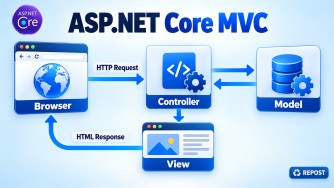


Responsibilities of Model, View, and Controller
| Component | Responsibilities |
|---|---|
| Model | Represents application data, contains business rules, validates data and communicates with the service/data-access layer. |
| View | Displays data to the user, generates the HTML UI using Razor (.cshtml) and collects user input. |
| Controller | Receives HTTP requests, processes user input, calls services, prepares data for the View and returns an appropriate result. |
Simple Flow
User Request → Controller → Model/Service → Controller → View → UserKey Points
- Model = Data and business rules.
- View = User interface and presentation.
- Controller = Request-handling coordinator.
- A View should not contain business or database logic.
- A Controller should remain thin and delegate business logic to services.
- The separation improves maintainability, testability and code reuse.
ASP.NET Core MVC vs Razor Pages vs Minimal APIs
| Feature | ASP.NET Core MVC | Razor Pages | Minimal APIs |
|---|---|---|---|
| Pattern | Model–View–Controller | Page-based | Route-handler based |
| Main files | Controller, Model and View | .cshtml and .cshtml.cs |
Usually Program.cs or endpoint files |
| Best suited for | Large, structured web applications | Page-focused web applications | Lightweight APIs and microservices |
| UI support | Razor Views | Razor Pages | No built-in UI pattern |
| API support | Yes | Not primarily designed for APIs | Yes |
| Complexity | More structure and files | Simpler than MVC | Minimal setup |
| Request handling | Controller actions | Page-handler methods | Lambda or method handlers |
| Routing | Controller/action or attribute routing | File-based routing | Explicit endpoint mapping |
| Separation of concerns | Strong | Page logic grouped together | Developer-defined |
| Testing | Controller actions are easy to test | Page models can be tested | Endpoint handlers can be tested |
| Typical methods | IActionResult Index() |
OnGet(), OnPost() |
MapGet(), MapPost() |
MVC Example
public class ProductController : Controller
{
    public IActionResult Details(int id)
    {
        return View();
    }
}
Razor Pages Example
public class DetailsModel : PageModel
{
    public void OnGet(int id)
    {
    }
}
Minimal API Example
app.MapGet("/products/{id}", (int id) =>
{
    return Results.Ok(id);
});
Key Points
- Choose MVC for large web applications requiring controllers, views and clear separation.
- Choose Razor Pages for page-oriented applications such as forms and admin screens.
- Choose Minimal APIs for lightweight APIs, microservices and small HTTP services.
- All three are part of ASP.NET Core and can be used in the same application.
How Does an ASP.NET Core Application Start?
In modern ASP.NET Core, the application starts from the Program.cs file using top-level statements.
var builder = WebApplication.CreateBuilder(args);

// Register services
builder.Services.AddControllersWithViews();

var app = builder.Build();

// Configure middleware pipeline
app.UseHttpsRedirection();
app.UseStaticFiles();

app.UseRouting();

app.UseAuthentication();
app.UseAuthorization();

// Configure routes
app.MapControllerRoute(
    name: "default",
    pattern: "{controller=Home}/{action=Index}/{id?}");

app.Run();
Key Points
Program.csis the application’s entry point.WebApplication.CreateBuilder(args)creates the application builder.- Configuration is automatically loaded from sources such as:
appsettings.jsonappsettings.{Environment}.json- Environment variables
- Command-line arguments
builder.Servicesregisters services in the built-in dependency-injection container.builder.Build()creates the application.app.Use...()adds middleware to the request pipeline.- Middleware order is important.
app.MapControllerRoute()defines conventional MVC routing.app.Run()starts the application and begins listening for HTTP requests.- Modern ASP.NET Core combines the older
Program.csandStartup.csconfiguration into a singleProgram.csfile.
What is Middleware?
Middleware is a component in the ASP.NET Core HTTP pipeline that processes requests and responses.
Examples:
- Global exception handling
- Authentication and authorization
- HTTPS redirection
- Static files
- CORS
- Request logging
app.UseAuthentication();
app.UseAuthorization();
Middleware vs MVC Filters
| Feature | Middleware | MVC Filters |
|---|---|---|
| Scope | Entire application | MVC controllers and actions only |
| Execution | Before and after endpoint execution | Around MVC action/result execution |
| Access | HttpContext |
MVC-specific context and action data |
| Runs for | MVC, Razor Pages, Minimal APIs and static files | MVC controllers/actions |
| Registration | Program.cs |
Globally, controller or action level |
| Best for | Application-wide concerns | MVC-specific concerns |
| Examples | Logging, exception handling, authentication, CORS | Action validation, auditing and result modification |
| Short-circuiting | Can stop the request pipeline | Can stop MVC action/result execution |
Execution Flow
Request
   ↓
Middleware
   ↓
Routing
   ↓
MVC Filters
   ↓
Controller Action
   ↓
MVC Filters
   ↓
Middleware
   ↓
Response
MVC Filter Types
- Authorization filters
- Resource filters
- Action filters
- Exception filters
- Result filters
Key Points
- Use middleware for application-wide request and response processing.
- Use filters when logic requires controller, action, model or result information.
- Middleware runs outside MVC; filters run inside the MVC pipeline.
- Middleware order is defined by its order in
Program.cs. - Filters can be applied globally or to specific controllers and actions.
Why Does Middleware Order Matter?
- Middleware executes in the same order it is registered for the request.
- It executes in the reverse order for the response.
- Each middleware can:
- Process the request.
- Call the next middleware.
- Process the response.
- Stop the pipeline.
Request  → Middleware 1 → Middleware 2 → Middleware 3
Response ← Middleware 1 ← Middleware 2 ← Middleware 3
Correct Example
app.UseExceptionHandler("/Home/Error");
app.UseHttpsRedirection();
app.UseStaticFiles();

app.UseRouting();

app.UseAuthentication();
app.UseAuthorization();

app.MapControllerRoute(
    name: "default",
    pattern: "{controller=Home}/{action=Index}/{id?}");

app.Run();
Important Ordering Rules
| Middleware | Why this position matters |
|---|---|
| Exception handler | Placed early so it can catch exceptions from later middleware |
| HTTPS redirection | Redirects HTTP requests before further processing |
| Static files | Serves files early without running MVC |
| Routing | Identifies the endpoint before authorization |
| Authentication | Identifies the user before authorization |
| Authorization | Checks whether the identified user can access the endpoint |
| Endpoint mapping | Executes the matched controller action |
Incorrect Order Example
app.UseAuthorization();
app.UseAuthentication();
Authorization runs before the user is identified, which can cause valid users to be denied.
Key Points
- Middleware order directly controls application behaviour.
- Incorrect order can cause authentication, authorization, routing and exception handling problems.
- Terminal middleware can stop later middleware from executing.
- A common rule is:
Routing → Authentication → Authorization → Endpoint