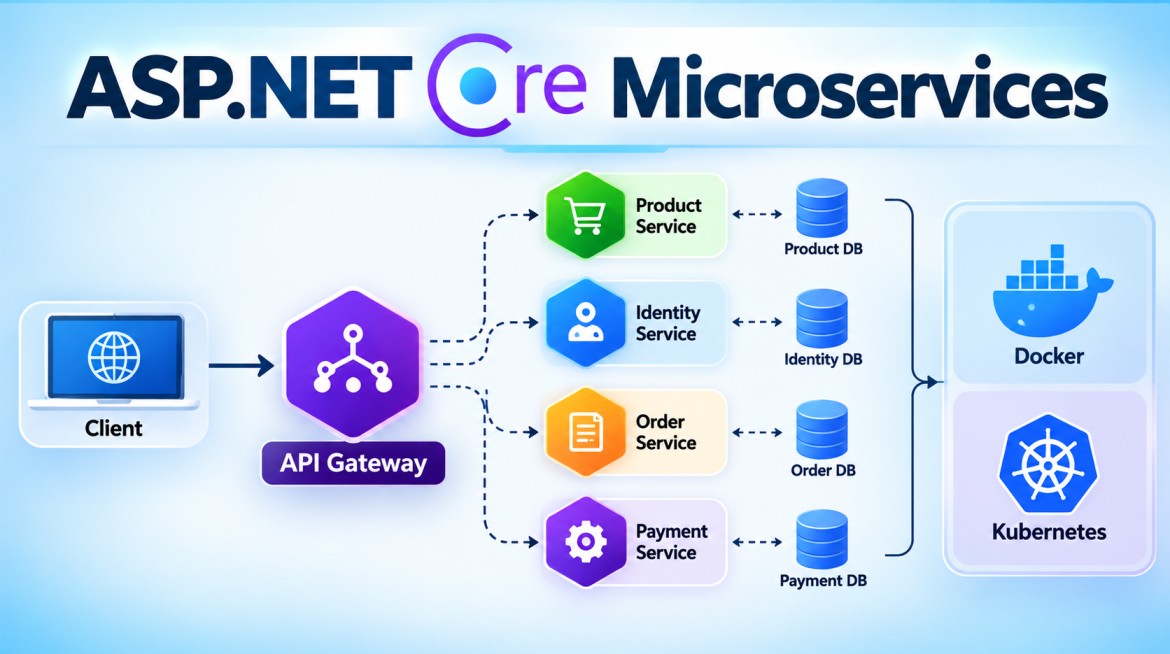


What is Ocelot API Gateway?
Ocelot is an API Gateway library for ASP.NET Core.
In a Microservices architecture, instead of allowing client applications to directly communicate with every microservice, we can place Ocelot in front of the microservices.
Without API Gateway
                ┌──► Product Service
                │
Client ─────────┼──► Order Service
                │
                ├──► Payment Service
                │
                └──► Customer Service
The client needs to know:
- Product Service URL
- Order Service URL
- Payment Service URL
- Customer Service URL
- Ports/endpoints of each service
For example:
https://product-api:5001/api/products
https://order-api:5002/api/orders
https://payment-api:5003/api/payments
This creates unnecessary coupling between the client and individual services.
With Ocelot API Gateway
                         ┌──► Product Service
                         │
Client ──► Ocelot ───────┼──► Order Service
          API Gateway    │
                         ├──► Payment Service
                         │
                         └──► Customer Service
The client communicates with one gateway URL:
https://api.jntech.inFor example:
GET /gateway/products
GET /gateway/orders
GET /gateway/payments
Ocelot determines which Microservice should receive each request.
Why do we need Ocelot?
Consider that you have 20 Microservices.
Without a gateway, the frontend may need to know the addresses of many services.
Angular
   │
   ├── Product API
   ├── Order API
   ├── Customer API
   ├── Payment API
   ├── Shipping API
   └── Notification API
If service locations change, this can affect client configuration.
Instead:
Angular
   │
   ▼
API Gateway
   │
   ├── Product API
   ├── Order API
   ├── Customer API
   ├── Payment API
   ├── Shipping API
   └── Notification API
The frontend mainly needs to know the gateway endpoint.
Purpose of Ocelot
Ocelot acts as the entry point into an ASP.NET Core Microservices system.
It can participate in gateway concerns such as:
| Feature | Purpose |
|---|---|
| Routing | Forward requests to the correct service |
| Authentication | Validate authenticated access |
| Authorization | Restrict access according to authorization rules |
| Rate Limiting | Restrict excessive requests |
| Load Balancing | Distribute requests across service instances |
| Caching | Cache appropriate downstream responses |
| Request Aggregation | Combine selected downstream API calls |
| Header Transformation | Add/remove/transform headers |
| Claims Transformation | Map claims into downstream requests |
| Service Discovery | Integrate with supported discovery mechanisms |
| QoS | Apply resilience-related policies where supported/configured |
| Logging/Tracing | Integrate with ASP.NET Core/.NET observability mechanisms |
Important: Not every capability in this table is implemented entirely by Ocelot itself. For example, authentication relies heavily on ASP.NET Core authentication, while logging can use standard .NET logging providers. Some optional features require additional Ocelot packages/integrations.
Ocelot Request Flow
Suppose the client sends:
GET https://localhost:7000/gateway/productsThe flow is approximately:
Client
   │
   │ GET /gateway/products
   ▼
Ocelot API Gateway
   │
   │ Find matching route
   │
   │ Apply configured gateway pipeline behavior
   │
   ▼
Product Microservice
   │
   │ GET /api/products
   ▼
ProductController
   │
   │ Response
   ▼
Ocelot
   │
   ▼
Client
The client doesn't need to call the Product Microservice directly.
2. How do you implement Ocelot in ASP.NET Core?
Let's create a simple architecture:
MicroservicesDemo
│
├── ApiGateway
│
├── ProductService
│
└── OrderService
We'll expose:
ProductService
https://localhost:7001/api/products

OrderService
https://localhost:7002/api/orders
Clients will instead call:
https://localhost:7000/gateway/products

https://localhost:7000/gateway/orders
Step 1 — Create the projects
dotnet new webapi -n ProductService

dotnet new webapi -n OrderService

dotnet new web -n ApiGateway
Create a solution:
dotnet new sln -n MicroservicesDemoAdd projects:
dotnet sln add ProductService/ProductService.csproj

dotnet sln add OrderService/OrderService.csproj

dotnet sln add ApiGateway/ApiGateway.csproj
Step 2 — Product Microservice
Create:
ProductService
    Controllers
        ProductsController.cs
ProductsController.cs
using Microsoft.AspNetCore.Mvc;

namespace ProductService.Controllers;

[ApiController]
[Route("api/[controller]")]
public class ProductsController : ControllerBase
{
    [HttpGet]
    public IActionResult GetProducts()
    {
        var products = new[]
        {
            new
            {
                Id = 1,
                Name = "Laptop",
                Price = 75000
            },
            new
            {
                Id = 2,
                Name = "Mouse",
                Price = 1500
            }
        };

        return Ok(products);
    }
}
The API endpoint will be:
GET https://localhost:7001/api/productsStep 3 — Order Microservice
OrdersController.cs
using Microsoft.AspNetCore.Mvc;

namespace OrderService.Controllers;

[ApiController]
[Route("api/[controller]")]
public class OrdersController : ControllerBase
{
    [HttpGet]
    public IActionResult GetOrders()
    {
        var orders = new[]
        {
            new
            {
                Id = 101,
                Product = "Laptop",
                Quantity = 1
            },
            new
            {
                Id = 102,
                Product = "Mouse",
                Quantity = 2
            }
        };

        return Ok(orders);
    }
}
Endpoint:
GET https://localhost:7002/api/ordersStep 4 — Install Ocelot
Install the Ocelot NuGet package in the API Gateway project, not in every Microservice.
cd ApiGateway

dotnet add package Ocelot
The main package is:
OcelotYour Microservices themselves normally don't need the Ocelot package.
Step 5 — Create ocelot.json
Inside the ApiGateway project create:
ocelot.jsonAdd:
{
  "Routes": [
    {
      "DownstreamPathTemplate": "/api/products",
      "DownstreamScheme": "https",
      "DownstreamHostAndPorts": [
        {
          "Host": "localhost",
          "Port": 7001
        }
      ],
      "UpstreamPathTemplate": "/gateway/products",
      "UpstreamHttpMethod": [ "GET" ]
    },
    {
      "DownstreamPathTemplate": "/api/orders",
      "DownstreamScheme": "https",
      "DownstreamHostAndPorts": [
        {
          "Host": "localhost",
          "Port": 7002
        }
      ],
      "UpstreamPathTemplate": "/gateway/orders",
      "UpstreamHttpMethod": [ "GET" ]
    }
  ],
  "GlobalConfiguration": {
    "BaseUrl": "https://localhost:7000"
  }
}
This is the most important Ocelot configuration.
Understanding ocelot.json
Consider:
{
  "DownstreamPathTemplate": "/api/products",
  "DownstreamScheme": "https",

  "DownstreamHostAndPorts": [
    {
      "Host": "localhost",
      "Port": 7001
    }
  ],

  "UpstreamPathTemplate": "/gateway/products",

  "UpstreamHttpMethod": [
    "GET"
  ]
}
Upstream
Upstream means the request coming into Ocelot from the client.
Client
   │
   │ Upstream
   ▼
Ocelot
Therefore:
"UpstreamPathTemplate": "/gateway/products"means the client calls:
GET https://localhost:7000/gateway/productsDownstream
Downstream refers to where Ocelot forwards the request.
Ocelot
   │
   │ Downstream
   ▼
Product Service
For example:
"DownstreamPathTemplate": "/api/products"with:
"DownstreamHostAndPorts": [
  {
    "Host": "localhost",
    "Port": 7001
  }
]
means Ocelot forwards the request to:
https://localhost:7001/api/productsEasy way to remember
CLIENT
   │
   │ Upstream
   ▼
OCELOT
   │
   │ Downstream
   ▼
MICROSERVICE
Therefore:
Upstream   = Client → Gateway

Downstream = Gateway → Microservice
This is a very important Ocelot interview concept.
Step 6 — Configure Program.cs
In the ApiGateway project:
using Ocelot.DependencyInjection;
using Ocelot.Middleware;

var builder = WebApplication.CreateBuilder(args);

builder.Configuration
       .AddJsonFile(
            "ocelot.json",
            optional: false,
            reloadOnChange: true);

builder.Services.AddOcelot(builder.Configuration);

var app = builder.Build();

await app.UseOcelot();

app.Run();
There are two major Ocelot registrations here.
Register Ocelot services
builder.Services.AddOcelot(builder.Configuration);This adds the services Ocelot needs to ASP.NET Core's DI container.
Add Ocelot middleware
await app.UseOcelot();This adds Ocelot's gateway middleware/pipeline.
Step 7 — Make sure ocelot.json is copied
Normally, ensure the file is part of the project/output as required.
For example:
<ItemGroup>
  <Content Include="ocelot.json">
    <CopyToOutputDirectory>PreserveNewest</CopyToOutputDirectory>
  </Content>
</ItemGroup>
Depending on your project configuration, SDK defaults may already handle content appropriately; the key requirement is that the gateway can load the file at runtime.
Step 8 — Run all three applications
For example:
API Gateway
https://localhost:7000

Product Service
https://localhost:7001

Order Service
https://localhost:7002
Now call:
GET https://localhost:7000/gateway/productsOcelot receives:
/gateway/productsand routes it to:
https://localhost:7001/api/productsSimilarly:
GET https://localhost:7000/gateway/ordersbecomes:
https://localhost:7002/api/ordersRequest Flow
For Product Service:
Client
   │
   │ GET
   │ /gateway/products
   ▼
┌─────────────────────┐
│   Ocelot Gateway    │
│ localhost:7000      │
└──────────┬──────────┘
           │
           │ Route lookup
           │
           │ /api/products
           ▼
┌─────────────────────┐
│   Product Service   │
│ localhost:7001      │
└──────────┬──────────┘
           │
           │ JSON
           ▼
      Ocelot Gateway
           │
           ▼
         Client
Route Parameters
Real applications often have parameters.
Suppose the Product Service has:
GET /api/products/10Your Ocelot configuration can use a placeholder:
{
  "DownstreamPathTemplate": "/api/products/{id}",
  "DownstreamScheme": "https",
  "DownstreamHostAndPorts": [
    {
      "Host": "localhost",
      "Port": 7001
    }
  ],
  "UpstreamPathTemplate": "/gateway/products/{id}",
  "UpstreamHttpMethod": [ "GET" ]
}
Client calls:
/gateway/products/10Ocelot routes it to:
/api/products/10Conceptually:
Client

GET /gateway/products/10
              │
              ▼
          Ocelot
              │
              ▼
GET /api/products/10
              │
              ▼
       Product Service
Multiple HTTP Methods
Suppose Product Service supports:
GET
POST
PUT
DELETE
You can configure:
"UpstreamHttpMethod": [
  "GET",
  "POST",
  "PUT",
  "DELETE"
]
Example:
{
  "DownstreamPathTemplate": "/api/products/{everything}",
  "DownstreamScheme": "https",

  "DownstreamHostAndPorts": [
    {
      "Host": "localhost",
      "Port": 7001
    }
  ],

  "UpstreamPathTemplate": "/gateway/products/{everything}",

  "UpstreamHttpMethod": [
    "GET",
    "POST",
    "PUT",
    "DELETE"
  ]
}
This is useful when exposing a larger portion of a service through one route pattern.
Load Balancing
Imagine Product Service is running on three instances:
Product Service

Instance 1 → localhost:7001
Instance 2 → localhost:7002
Instance 3 → localhost:7003
You can configure multiple downstream hosts:
{
  "DownstreamPathTemplate": "/api/products",
  "DownstreamScheme": "https",

  "DownstreamHostAndPorts": [
    {
      "Host": "localhost",
      "Port": 7001
    },
    {
      "Host": "localhost",
      "Port": 7002
    },
    {
      "Host": "localhost",
      "Port": 7003
    }
  ],

  "UpstreamPathTemplate": "/gateway/products",

  "UpstreamHttpMethod": [
    "GET"
  ],

  "LoadBalancerOptions": {
    "Type": "RoundRobin"
  }
}
Conceptually:
                     ┌──► Product Instance 1
                     │
Client ──► Ocelot ───┼──► Product Instance 2
                     │
                     └──► Product Instance 3
The exact load-balancer types and behavior should be checked against the Ocelot version you're using, because Ocelot configuration capabilities can change between releases.
Rate Limiting
Rate limiting protects APIs from excessive traffic.
Conceptually:
Client
   │
   │ 1000 requests
   ▼
Ocelot
   │
   ├── Allowed requests ──► Microservice
   │
   └── Excess requests ──► Rejected
Ocelot supports route-level rate-limiting configuration, but the exact configuration keys have changed across Ocelot versions. For a production implementation, use the syntax documented for the exact Ocelot package version installed rather than copying an older RateLimitOptions example from a blog or interview article.
The important interview concept is:
Rate limiting controls how frequently clients can access gateway routes, helping protect downstream services from excessive traffic.
Authentication
Ocelot can work with ASP.NET Core authentication.
The general flow is:
Client
   │
   │ JWT
   ▼
Ocelot
   │
   │ Authentication
   ▼
Authorized?
   │
   ├── No ──► 401
   │
   └── Yes
        │
        ▼
   Microservice
A route can reference an authentication provider configured in ASP.NET Core. The precise route syntax depends on the Ocelot version and authentication setup.
The key point is that Ocelot does not replace ASP.NET Core authentication. You normally configure authentication services in the gateway and tell Ocelot which gateway routes require them.
Caching
For cacheable requests:
Client
   │
   ▼
Ocelot
   │
   ▼
Cache available?
   │
   ├── YES ──► Return cached response
   │
   └── NO
        │
        ▼
   Microservice
        │
        ▼
      Cache
        │
        ▼
      Client
Caching can reduce repeated calls to downstream services.
Depending on the Ocelot version and caching provider, an additional package/integration may be required. Treat caching configuration as version-specific rather than assuming every historical Ocelot cache example applies to the current package.
Header Transformation
Ocelot can transform headers as requests/responses move through the gateway.
Conceptually:
Client
   │
   ▼
Ocelot
   │
   │ Add/transform header
   ▼
Microservice
This can be useful for gateway-generated or forwarded information such as:
Correlation IDs
Forwarding information
Selected claims
Custom gateway metadata
Care is required with security-sensitive headers: downstream services should not blindly trust client-controlled identity headers.
Service Discovery
Hardcoding this:
{
  "Host": "localhost",
  "Port": 7001
}
is acceptable for learning and some static environments.
In dynamic Microservices environments, service instances may be created and removed:
Product Service

Instance A
Instance B
Instance C
Service discovery allows the gateway to locate available instances through a supported registry/integration.
Conceptually:
                Service Registry
                     ▲
                     │
                     │ discover
                     │
Client ──► Ocelot ───┘
              │
              ▼
       Product Service
This becomes particularly relevant when service locations are dynamic.
Logging and Observability
Ocelot runs inside an ASP.NET Core application, so standard .NET logging infrastructure can be used.
For example:
var builder = WebApplication.CreateBuilder(args);

builder.Logging.ClearProviders();
builder.Logging.AddConsole();
Then:
builder.Services.AddOcelot(builder.Configuration);For production Microservices, gateway observability commonly includes:
Logging
Tracing
Correlation IDs
Metrics
Request duration
Status codes
Downstream failures
You can integrate those concerns using ASP.NET Core/.NET observability tooling and suitable external platforms.
Advantages of Ocelot
1. Single entry point
Clients can access Microservices through one gateway.
Client → Gateway → Microservices2. Centralized routing
Routing rules are maintained at the gateway.
3. Authentication integration
Gateway routes can integrate with ASP.NET Core authentication.
4. Rate limiting
Helps protect downstream services from excessive requests.
5. Load balancing
Can distribute requests among multiple downstream instances.
6. Service discovery integration
Useful when service addresses are dynamic.
7. Response aggregation
Certain client workflows can be simplified by combining calls at the gateway.
8. Hides internal architecture
Clients don't necessarily need to know every internal Microservice URL.
Disadvantages
1. Additional component
Without gateway:
Client → ServiceWith gateway:
Client → Gateway → ServiceThere is another component to deploy, configure, monitor, and troubleshoot.
2. Potential bottleneck
If the gateway is poorly designed or under-provisioned:
               Gateway
              /   |   \
             ▼    ▼    ▼
            S1   S2   S3
many requests pass through the same gateway tier.
For production environments, the gateway itself therefore needs appropriate scaling and availability.
3. Configuration complexity
As the number of services and routes increases, gateway configuration can become substantial.
4. Additional network hop
Requests normally pass through:
Client
  ↓
Gateway
  ↓
Microservice
which adds another processing/network layer.
5. Gateway failure impact
If there is only one gateway instance and it fails, clients may lose access to many services.
Therefore production deployments normally avoid a single gateway process as the sole unprotected instance.
When should we use Ocelot?
Ocelot is particularly relevant when you have an ASP.NET Core-centric Microservices architecture and need gateway functionality such as:
Centralized routing
Authentication integration
Authorization integration
Rate limiting
Load balancing
Service discovery
Header transformation
Aggregation
For a small application with only one API, introducing a gateway may add complexity without providing much benefit.
Key Points
For interviews, remember these:
- Ocelot is an API Gateway library for ASP.NET Core.
- It provides a single entry point to multiple Microservices.
- Client-facing routes are called Upstream routes.
- Service-facing routes are called Downstream routes.
- Routing is commonly configured using
ocelot.json. - Register Ocelot using:
builder.Services.AddOcelot(builder.Configuration);- Add the gateway middleware using:
await app.UseOcelot();- Ocelot can support gateway concerns such as routing, load balancing, rate limiting, aggregation, transformations, authentication integration, and service discovery.
- Ocelot does not mean every cross-cutting concern is magically handled by Ocelot itself; several capabilities integrate with ASP.NET Core or optional providers/packages.
- The gateway should itself be deployed with appropriate scalability, security, monitoring, and high availability.
Interview Questions and Answers
Q1. What is Ocelot?
Answer:
Ocelot is an API Gateway library for ASP.NET Core. It provides a single entry point for clients and routes requests to appropriate downstream Microservices.
Q2. Why do we need Ocelot?
Answer:
In a Microservices architecture, clients otherwise may need to know multiple service URLs. Ocelot provides centralized routing and can participate in concerns such as authentication, authorization, rate limiting, load balancing, aggregation, and service discovery.
Q3. What is an Upstream route?
Answer:
An Upstream route is the endpoint exposed by Ocelot to the client.
Example:
/gateway/productsQ4. What is a Downstream route?
Answer:
A Downstream route represents the service endpoint to which Ocelot forwards the request.
Example:
/api/productsFlow:
Client
   │
   │ Upstream
   ▼
Ocelot
   │
   │ Downstream
   ▼
Product Service
Q5. Where is Ocelot routing configured?
Usually in:
ocelot.jsonExample:
{
  "UpstreamPathTemplate": "/gateway/products",
  "DownstreamPathTemplate": "/api/products"
}
Q6. How do you register Ocelot?
builder.Services.AddOcelot(builder.Configuration);and:
await app.UseOcelot();Q7. Does every Microservice need Ocelot?
No.
Normally Ocelot is installed in a separate API Gateway application.
                API Gateway
                    │
       ┌────────────┼────────────┐
       ▼            ▼            ▼
    Product       Order       Payment
    Service       Service      Service
Q8. Can Ocelot load balance requests?
Yes.
When multiple downstream instances are configured or discovered, Ocelot can use an appropriate load-balancing strategy to select an instance.
Q9. Can Ocelot authenticate JWT tokens?
Ocelot can integrate with ASP.NET Core authentication, including JWT bearer authentication. The gateway configures the authentication scheme/provider, and protected Ocelot routes can require it.
Q10. Is Ocelot itself a Microservice?
Not usually.
Ocelot is a gateway library hosted in an ASP.NET Core application. That application sits in front of the Microservices.
Interview-ready summary
Ocelot is an API Gateway library for ASP.NET Core used primarily in Microservices architectures. It provides a single entry point for clients and routes upstream requests to downstream services. Routing is commonly configured through
ocelot.json, and Ocelot can support gateway capabilities such as authentication integration, authorization, rate limiting, load balancing, service discovery, aggregation, caching through appropriate integrations, and request/response transformation. In ASP.NET Core, we register it usingAddOcelot()and add its middleware usingUseOcelot().