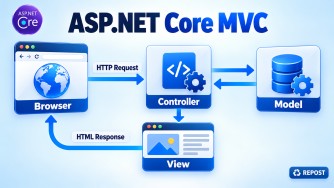


Passing Data from a Controller to a View
ASP.NET Core MVC provides four common approaches:
| Method | Type-safe? | Lifetime | Best use |
|---|---|---|---|
| Model | Yes | Current request | Main page data |
ViewBag |
No | Current request | Small additional data |
ViewData |
No | Current request | Small additional data |
TempData |
No | Current and next request | Data after a redirect |
1. Strongly Typed Model — Recommended
Controller:
public IActionResult Details()
{
    var product = new Product
    {
        Id = 1,
        Name = "Laptop",
        Price = 50000
    };

    return View(product);
}
View:
@model Product

<h2>@Model.Name</h2>
<p>Price: @Model.Price</p>
2. ViewBag
Controller:
ViewBag.Message = "Welcome";
return View();
View:
<h2>@ViewBag.Message</h2>3. ViewData
Controller:
ViewData["Message"] = "Welcome";
return View();
View:
<h2>@ViewData["Message"]</h2>4. TempData
Useful when redirecting to another action.
[HttpPost]
public IActionResult Create(Product product)
{
    TempData["SuccessMessage"] = "Product created successfully.";

    return RedirectToAction("Index");
}
View:
<p>@TempData["SuccessMessage"]</p>Key Points
- Prefer a strongly typed Model for primary page data.
- Use a ViewModel when the View needs data from multiple models.
ViewBagis dynamic and checked at runtime.ViewDatauses a string-key dictionary.ViewBagandViewDatashare the same underlying data.TempDataretains data for the next request, making it suitable for redirects.- Avoid passing large amounts of data through
ViewBag,ViewData, orTempData.
ViewData vs ViewBag in ASP.NET Core MVC
Both ViewData and ViewBag are used to pass small amounts of data from a Controller to a View.
| Feature | ViewData | ViewBag |
|---|---|---|
| Type | ViewDataDictionary |
Dynamic wrapper around ViewData |
| Syntax | ViewData["Name"] |
ViewBag.Name |
| Type casting | Often required | Usually not required |
| Compile-time checking | No | No |
| Data lifetime | Current request | Current request |
| Internally | Dictionary | Uses the same underlying ViewData |
ViewData Example
Controller:
public IActionResult Index()
{
    ViewData["Name"] = "Syed";
    ViewData["Age"] = 40;

    return View();
}
View:
<h2>@ViewData["Name"]</h2>
<p>Age: @ViewData["Age"]</p>
For strongly typed usage, casting may be necessary:
@{
    string name = (string)ViewData["Name"];
}
ViewBag Example
Controller:
public IActionResult Index()
{
    ViewBag.Name = "Syed";
    ViewBag.Age = 40;

    return View();
}
View:
<h2>@ViewBag.Name</h2>
<p>Age: @ViewBag.Age</p>
Important Point
ViewBag is essentially a dynamic wrapper around ViewData. They share the same underlying data.
For example:
ViewData["Name"] = "Syed";can be accessed as:
@ViewBag.NameAnd:
ViewBag.City = "Chennai";can be accessed as:
@ViewData["City"]Interview Answer
ViewData stores values using dictionary-style string keys, while ViewBag provides dynamic property syntax over the same underlying
ViewData. Both are used to pass data from a controller to a view and normally exist only for the current request.
Key point: For larger or structured data, prefer a strongly typed ViewModel instead of ViewData/ViewBag.