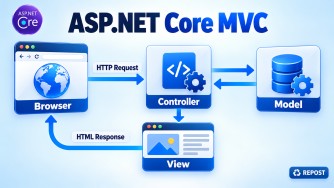


The Razor View Engine converts an ASP.NET Core MVC Razor view (.cshtml) into HTML that a browser can display.
Razor allows us to combine:
- HTML markup
- C# code
- Model data
It uses the @ symbol to switch from HTML to C#.
Simple example
Controller
public IActionResult Details()
{
    var product = new Product
    {
        Name = "Laptop",
        Price = 50000
    };

    return View(product);
}
Razor View – Details.cshtml
@model Product

<h2>@Model.Name</h2>
<p>Price: ₹@Model.Price</p>

@if (Model.Price > 40000)
{
    <p>This is a premium product.</p>
}
Generated HTML
<h2>Laptop</h2>
<p>Price: ₹50000</p>
<p>This is a premium product.</p>
How it works
Important Razor features
- Strongly typed models using
@model - C# expressions using Model.Name
- Code blocks using
@{ } - Conditions using
@if - Loops using
@foreach - Shared layouts using
_Layout.cshtml - Reusable partial views
- View Components
- Tag Helpers such as
asp-controllerandasp-action - Automatic HTML encoding to reduce cross-site scripting risks
Is any library required?
No additional library is normally required. Razor support is included in ASP.NET Core MVC when using:
builder.Services.AddControllersWithViews();and:
app.MapControllerRoute(
    name: "default",
    pattern: "{controller=Home}/{action=Index}/{id?}");
Key points
- Razor is a server-side rendering technology.
- Razor files normally use the
.cshtmlextension. - C# code executes on the server—not in the browser.
- The browser receives only the generated HTML.
- Razor syntax is clean because it does not usually require opening and closing server-side code tags.
_ViewImports.cshtml and _ViewStart.cshtml are special Razor files used to share common settings across multiple views.
_ViewImports.cshtml
It defines common Razor directives that should be available to views, avoiding repeated imports in every .cshtml file.
Example
@using MyApp
@using MyApp.Models
@using MyApp.ViewModels
@addTagHelper *, Microsoft.AspNetCore.Mvc.TagHelpers
Purpose
- Imports namespaces with
@using - Enables Tag Helpers with
@addTagHelper - Supports dependency injection using
@inject - Can specify a common base class using
@inherits
Because MVC Tag Helpers are added here, views can use:
<a asp-controller="Product"
   asp-action="Details"
   asp-route-id="10">
    View Product
</a>
Without the @addTagHelper directive, attributes such as asp-controller and asp-action will not work as Tag Helpers.
_ViewStart.cshtml
It contains Razor code that should execute before every full view is rendered.
It is most commonly used to assign the shared layout.
Example
@{
    Layout = "_Layout";
}
This means views automatically use:
Views/Shared/_Layout.cshtmlTherefore, we do not need to write the following inside every view:
@{
    Layout = "_Layout";
}
A specific view can override it:
@{
    Layout = "_AdminLayout";
}
Or disable the layout:
@{
    Layout = null;
}
Key differences
_ViewImports.cshtml |
_ViewStart.cshtml |
|---|---|
| Shares Razor directives and namespaces | Executes common Razor code |
Commonly configures @using and Tag Helpers |
Commonly assigns the layout |
| Settings apply while Razor views are compiled | Runs before each full view is rendered |
| Can exist at multiple folder levels | Can exist at multiple folder levels |
| Applies to views and partial views | Normally doesn’t run for partial views |
Folder hierarchy
Both files can exist at different folder levels. Razor applies the appropriate files based on the view’s folder hierarchy.
Views/
├── _ViewImports.cshtml
├── _ViewStart.cshtml
├── Shared/
│   └── _Layout.cshtml
├── Home/
│   └── Index.cshtml
└── Admin/
    ├── _ViewImports.cshtml
    ├── _ViewStart.cshtml
    └── Dashboard.cshtml
An Admin/_ViewStart.cshtml can assign an admin-specific layout:
@{
    Layout = "_AdminLayout";
}
Interview answer
_ViewImports.cshtml provides common Razor directives, namespaces and Tag Helper registrations, while _ViewStart.cshtml executes common code before full views—most commonly to set the shared layout.