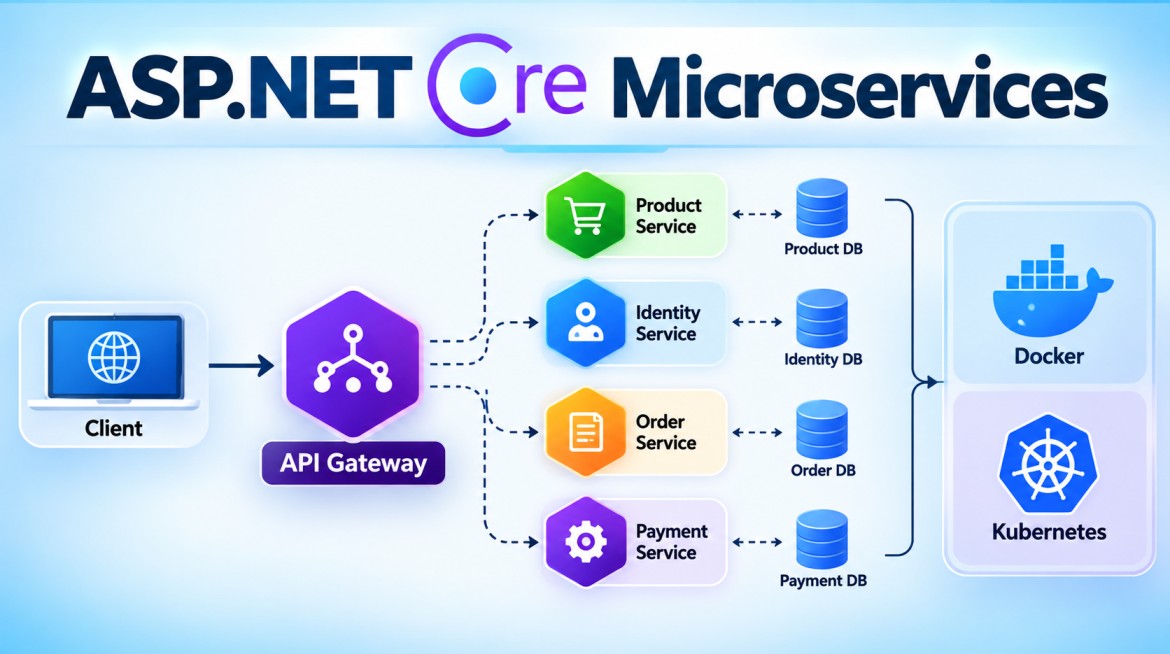


How Do You Secure Microservices?
Securing microservices means protecting every entry point, service-to-service call, credential, secret, database, message, and network path rather than securing only the public API.
A useful security model is:
                    Internet
                       |
                    HTTPS/TLS
                       |
                       v
              +----------------+
              |  API Gateway   |
              | Auth / Rate    |
              | Limit / Routing|
              +-------+--------+
                      |
              Validate Token
                      |
          +-----------+-----------+
          |                       |
          v                       v
 +----------------+       +----------------+
 | Order Service  | ----> | Payment Service|
 | Authorization  | mTLS/ | Authorization  |
 | Validation     | Token | Validation     |
 +-------+--------+       +-------+--------+
         |                        |
         v                        v
    Order DB                 Payment DB
   Own identity             Own identity

           +----------------------+
           | Message Broker       |
           | Auth + TLS + ACLs    |
           +----------------------+

 Secrets -> Key Vault / Secret Manager
 Logs    -> Centralized Observability
The important principle is defense in depth: compromising one layer should not automatically compromise the entire system.
1. What Is Microservices Security?
Microservices security is the collection of controls used to protect:
- APIs
- users and identities
- service identities
- service-to-service communication
- data
- databases
- message brokers
- secrets
- containers
- infrastructure
- logs
- configuration
A monolithic application might have:
Client
  |
  v
Application
  |
  v
Database
Microservices introduce many more communication boundaries:
Client
  |
  v
Gateway
  |
  +----> Product Service
  |
  +----> Order Service ----> Inventory Service
  |               |
  |               +-------> Payment Service
  |
  +----> Customer Service

Services ----> Message Broker
Services ----> Databases
Services ----> External APIs
Every arrow is potentially a security boundary.
2. Why Do We Need Security in Microservices?
A microservices application usually has a larger attack surface than a monolith.
Suppose an e-commerce system contains:
Identity Service
Product Service
Order Service
Payment Service
Inventory Service
Notification Service
If the Payment Service simply trusts anything arriving from the internal network:
Order Service
      |
      | POST /api/payments
      v
Payment Service
an attacker who compromises another workload could potentially call Payment Service directly.
Therefore:
Being inside the internal network is not sufficient proof of trust.
The receiving service should establish things such as:
Who is calling?
        +
Is the caller authenticated?
        +
Is it authorized for this operation?
        +
Is the request encrypted?
        +
Is the input valid?
        +
Is the request abusive?
        +
Can the activity be audited?
3. Purpose
Microservices security primarily provides:
| Requirement | Purpose |
|---|---|
| Authentication | Determine caller identity |
| Authorization | Determine permitted actions |
| TLS | Encrypt communication |
| Service identity | Authenticate one workload to another |
| API Gateway | Protect/manage external entry points |
| Rate limiting | Reduce abuse and resource exhaustion |
| Input validation | Reject malformed/untrusted input |
| Secret management | Protect credentials and keys |
| Network controls | Restrict unnecessary connectivity |
| Database isolation | Limit data exposure |
| Broker security | Protect asynchronous communication |
| Logging/auditing | Detect and investigate activity |
| Security headers | Protect applicable HTTP clients |
| Container security | Reduce workload attack surface |
4. Major Security Layers
A production microservices environment should normally consider all of these layers:
1. HTTPS / TLS
2. Authentication
3. Authorization
4. API Gateway security
5. Service-to-service authentication
6. Network security / Zero Trust
7. Secret management
8. Input validation
9. Rate limiting
10. Database security
11. Message broker security
12. Container/platform security
13. Logging and auditing
14. Dependency and supply-chain security
15. CORS / CSRF where applicable
Let's examine the most important parts.
5. Authentication
What is authentication?
Authentication answers:
Who are you?
For example:
User
 |
 | username/password
 v
Identity Provider
 |
 | access token
 v
Client
 |
 | Authorization: Bearer <token>
 v
API Gateway / Microservice
Common technologies include:
- OAuth 2.0
- OpenID Connect
- JWT access tokens
- Microsoft Entra ID
- Keycloak
- Auth0
- Duende IdentityServer
For user-facing distributed systems, centralized identity is usually preferable to implementing separate login systems inside every microservice.
6. JWT Authentication in ASP.NET Core
Assume the client receives this access token:
eyJhbGciOiJSUzI1NiIs...It sends:
GET /api/orders
Authorization: Bearer eyJhbGciOiJSUzI1NiIs...
The API validates the token before allowing access.
Required package
Depending on the project/shared framework and authentication setup, the commonly used package is:
dotnet add package Microsoft.AspNetCore.Authentication.JwtBearerappsettings.json
For an authorization server / identity provider:
{
  "Authentication": {
    "Authority": "https://identity.example.com",
    "Audience": "order-api"
  }
}
Do not store production secrets directly in source-controlled appsettings.json.
7. Full JWT Configuration
Program.cs
using Microsoft.AspNetCore.Authentication.JwtBearer;

var builder = WebApplication.CreateBuilder(args);

builder.Services.AddControllers();

builder.Services
    .AddAuthentication(JwtBearerDefaults.AuthenticationScheme)
    .AddJwtBearer(options =>
    {
        options.Authority =
            builder.Configuration["Authentication:Authority"];

        options.Audience =
            builder.Configuration["Authentication:Audience"];

        options.RequireHttpsMetadata = true;
    });

builder.Services.AddAuthorization();

var app = builder.Build();

app.UseHttpsRedirection();

app.UseAuthentication();
app.UseAuthorization();

app.MapControllers();

app.Run();
Notice the order:
UseAuthentication()
       |
       v
UseAuthorization()
Authentication must establish the principal before authorization evaluates permissions.
8. Protecting the Controller
using Microsoft.AspNetCore.Authorization;
using Microsoft.AspNetCore.Mvc;

namespace OrderService.Controllers;

[ApiController]
[Route("api/[controller]")]
[Authorize]
public class OrdersController : ControllerBase
{
    [HttpGet]
    public IActionResult GetOrders()
    {
        return Ok(new[]
        {
            new
            {
                Id = 1001,
                Product = "Laptop",
                Amount = 75000
            }
        });
    }
}
Without a valid token:
Client
  |
  | No token
  v
Order Service
  |
  X
401 Unauthorized
With a valid token:
Client
  |
  | Bearer token
  v
Authentication
  |
  | Valid
  v
Authorization
  |
  v
Controller
9. Authentication vs Authorization
These are different security operations.
Authentication
Who are you?Example:
User = SyedAuthorization
What are you allowed to do?Example:
User = Syed
Role = Admin

Allowed:
Create Order
Delete Order
View Order
10. Role-Based Authorization
Example:
[Authorize(Roles = "Admin")]
[HttpDelete("{id}")]
public IActionResult Delete(int id)
{
    return Ok($"Order {id} deleted.");
}
Only a caller carrying the appropriate role claim can access it.
11. Policy-Based Authorization
For larger applications, policies are often more flexible than scattering role checks everywhere.
builder.Services.AddAuthorization(options =>
{
    options.AddPolicy("CanManageOrders", policy =>
    {
        policy.RequireClaim("permission", "orders.manage");
    });
});
Controller:
[Authorize(Policy = "CanManageOrders")]
[HttpDelete("{id}")]
public IActionResult Delete(int id)
{
    return Ok($"Order {id} deleted.");
}
Token:
{
  "sub": "12345",
  "permission": "orders.manage"
}
This supports permission-oriented authorization:
Identity
   |
   v
orders.read
orders.create
orders.manage
payments.read
payments.process
12. API Gateway Security
The API Gateway is usually the external entry point.
For example:
Internet
   |
   v
API Gateway
   |
   +---- Product Service
   |
   +---- Order Service
   |
   +---- Payment Service
The gateway can handle cross-cutting controls such as:
Authentication
Rate limiting
Routing
TLS termination
Header management
Request-size limits
Observability
WAF integration
However, there is an important rule:
Do not assume that gateway authentication means downstream services require no authorization.
Services should still enforce authorization appropriate to their own resources.
13. Why Security Only at the Gateway Is Dangerous
Consider:
Internet
   |
   v
Gateway
   |
   v
Payment Service
You protect:
Gateway -> JWT validationBut Payment Service has no security.
If an attacker or compromised internal service can reach:
https://payment-service/api/paymentsthey may bypass the gateway.
A safer model is:
Client
   |
   v
Gateway
   |
Authentication
   |
   v
Order Service
   |
Authorization
   |
   v
Payment Service
   |
Authorization
This is defense in depth.
14. Service-to-Service Authentication
This is one of the most important microservices security topics.
Suppose:
Order Service
      |
      v
Payment Service
Payment Service should know:
Is this genuinely an authorized workload calling me?
Common approaches include:
- OAuth 2.0 Client Credentials
- managed/workload identities
- mTLS
- service mesh identity
- platform-specific workload identity
15. OAuth Client Credentials Flow
This flow is intended for machine-to-machine scenarios where there is no end user involved.
Order Service
     |
     | Client identity
     v
Authorization Server
     |
     | Access Token
     v
Order Service
     |
     | Bearer Access Token
     v
Payment Service
The important distinction is:
User token
    !=
Service identity token
The appropriate model depends on whether Payment Service needs to authorize the user, the calling service, or both.
16. HttpClient for Service-to-Service Calls
Register a typed or named HttpClient:
builder.Services.AddHttpClient("PaymentService", client =>
{
    client.BaseAddress =
        new Uri("https://payment-service");
});
Then:
public class PaymentClient
{
    private readonly IHttpClientFactory _factory;

    public PaymentClient(IHttpClientFactory factory)
    {
        _factory = factory;
    }

    public async Task<string> GetPaymentAsync()
    {
        var client =
            _factory.CreateClient("PaymentService");

        var response =
            await client.GetAsync("/api/payments/1001");

        response.EnsureSuccessStatusCode();

        return await response.Content.ReadAsStringAsync();
    }
}
In a secured production implementation, the client would obtain an appropriate access token/workload credential and attach it to the outgoing request.
17. HTTPS / TLS
Never send sensitive production traffic using plain HTTP over an untrusted path.
Bad:
http://payment-servicePreferred:
https://payment-serviceTLS protects data in transit against interception and modification.
ASP.NET Core:
app.UseHttpsRedirection();But application middleware alone is not the whole TLS architecture. In production, TLS may terminate or be re-established at:
Load Balancer
API Gateway
Ingress Controller
Reverse Proxy
Service Mesh
Application
The trust boundary determines whether downstream traffic must also be encrypted.
18. What Is mTLS?
Normal TLS primarily establishes server identity:
Client ----TLS----> ServerMutual TLS establishes identities on both sides:
Client Certificate
       |
       v
Client <---- mTLS ----> Server
                         ^
                         |
                 Server Certificate
Therefore:
Server verifies client
+
Client verifies server
mTLS is useful for workload-to-workload authentication, particularly when implemented through infrastructure such as a service mesh.
19. Zero Trust
A useful microservices security principle is:
Never trust a request merely because it originated from the internal network.
Instead, verify:
Identity
+
Authorization
+
Device/workload context where relevant
+
Encrypted communication
+
Least privilege
Old assumption:
Inside network = trustedZero-trust-oriented design:
Every request
    |
    v
Authenticate
    |
    v
Authorize
    |
    v
Apply policy
    |
    v
Allow / Deny
20. Secret Management
Microservices frequently require:
Database passwords
API keys
Certificates
Signing credentials
Broker credentials
Third-party credentials
Avoid putting production secrets directly into:
{
  "ConnectionStrings": {
    "DefaultConnection": "Server=...;Password=MyPassword123"
  }
}
especially when the file is committed to source control.
Use a dedicated secret store/platform mechanism such as:
- Azure Key Vault
- AWS Secrets Manager
- Google Secret Manager
- Kubernetes Secrets combined with appropriate encryption/access controls
- development-only .NET User Secrets for local development
21. Azure Key Vault Example
Install the relevant packages:
dotnet add package Azure.Extensions.AspNetCore.Configuration.Secrets
dotnet add package Azure.Identity
Then:
using Azure.Identity;

var builder = WebApplication.CreateBuilder(args);

var keyVaultUri =
    builder.Configuration["KeyVaultUri"];

if (!string.IsNullOrWhiteSpace(keyVaultUri))
{
    builder.Configuration.AddAzureKeyVault(
        new Uri(keyVaultUri),
        new DefaultAzureCredential());
}

builder.Services.AddControllers();

var app = builder.Build();

app.MapControllers();

app.Run();
A stronger Azure deployment pattern is:
Microservice
    |
Managed Identity
    |
    v
Azure Key Vault
    |
    v
Secret
That avoids embedding a Key Vault password inside the application merely to retrieve another password.
22. Input Validation
Never trust input simply because it came through the gateway or another service.
Example DTO:
using System.ComponentModel.DataAnnotations;

public class CreateOrderRequest
{
    [Required]
    [Range(1, int.MaxValue)]
    public int ProductId { get; set; }

    [Range(1, 100)]
    public int Quantity { get; set; }
}
Controller:
[ApiController]
[Route("api/orders")]
public class OrdersController : ControllerBase
{
    [HttpPost]
    public IActionResult Create(
        CreateOrderRequest request)
    {
        return Ok(request);
    }
}
With [ApiController], invalid model validation can automatically result in a 400 Bad Request.
Also validate business rules separately; Data Annotations alone do not make an endpoint secure.
23. Prevent SQL Injection
Bad:
var sql =
    "SELECT * FROM Users WHERE Name = '" +
    username +
    "'";
Use parameterized access.
For example:
var user = await db.Users
    .FirstOrDefaultAsync(x => x.Name == username);
With EF Core LINQ in normal parameterizable queries, values are parameterized.
For raw SQL, use safe parameterization APIs rather than string concatenation.
24. Rate Limiting
Rate limiting helps protect services against:
- abusive clients
- accidental request floods
- brute-force attempts
- resource exhaustion
ASP.NET Core provides built-in rate limiting.
using System.Threading.RateLimiting;

builder.Services.AddRateLimiter(options =>
{
    options.AddFixedWindowLimiter("fixed", limiter =>
    {
        limiter.PermitLimit = 100;
        limiter.Window = TimeSpan.FromMinutes(1);

        limiter.QueueLimit = 0;

        limiter.QueueProcessingOrder =
            QueueProcessingOrder.OldestFirst;
    });
});
Pipeline:
app.UseRateLimiter();Controller:
using Microsoft.AspNetCore.RateLimiting;

[EnableRateLimiting("fixed")]
[ApiController]
[Route("api/orders")]
public class OrdersController : ControllerBase
{
    [HttpGet]
    public IActionResult Get()
    {
        return Ok("Orders");
    }
}
Flow:
Client
  |
  | Request 1..100
  v
Allowed

Request over configured limit
  |
  v
429 Too Many Requests
Production rate-limit partitioning should normally be designed around meaningful identities such as authenticated client/application/user/API key rather than blindly treating all traffic as one bucket.
25. Database Security
A strong microservices architecture usually avoids giving every service unrestricted access to every database.
Prefer:
Order Service
     |
     v
Order Database

Payment Service
     |
     v
Payment Database

Inventory Service
     |
     v
Inventory Database
Avoid:
Order Service --------+
Payment Service ------+----> Shared DB
Inventory Service ----+
particularly when every service has unrestricted credentials.
Apply:
Least privilege
Separate credentials/identities
Encryption in transit
Encryption at rest
Auditing
Credential rotation
Backups
Network restrictions
A Payment Service should not automatically have permission to modify Order Service tables.
26. Message Broker Security
Microservices frequently communicate asynchronously:
Order Service
      |
      | OrderCreated
      v
RabbitMQ / Azure Service Bus / Kafka
      |
      +------> Inventory Service
      |
      +------> Notification Service
The broker itself is a security boundary.
Protect it with:
- TLS
- authentication
- authorization/ACLs
- least-privilege publisher/consumer permissions
- credential rotation
- network isolation
- encryption where required
- monitoring/auditing
For example:
Order Service
   |
   | Can publish:
   | orders.created
   v
Broker

Notification Service
   |
   | Can consume:
   | orders.created
Do not automatically grant every service:
Publish ALL
Consume ALL
Admin ALL
27. API Keys
API keys can be useful for certain application-to-application or partner API scenarios.
Example:
GET /api/products
X-API-Key: abc123
But API keys should not be treated as a universal replacement for modern identity protocols.
For richer service authentication/authorization, technologies such as:
OAuth 2.0
Managed Identity
Workload Identity
mTLS
are often more appropriate.
If API keys are used, protect, rotate, scope, monitor, and avoid logging them.
28. CORS
CORS controls which browser origins may call your API through browser-enforced cross-origin rules.
Example:
builder.Services.AddCors(options =>
{
    options.AddPolicy("AngularClient", policy =>
    {
        policy
            .WithOrigins("https://www.jntech.in")
            .AllowAnyHeader()
            .AllowAnyMethod();
    });
});
Then:
app.UseCors("AngularClient");Avoid indiscriminate production policies such as:
.AllowAnyOrigin()
.AllowAnyHeader()
.AllowAnyMethod()
unless unrestricted cross-origin browser access is genuinely intended.
Also remember:
CORS is not API authentication.
Non-browser clients are not stopped by CORS.
29. Logging and Auditing
Security-relevant events should be observable.
Useful events include:
Authentication failures
Authorization failures
Unusual request rates
Administrative operations
Secret/configuration access failures
Broker failures
Unexpected service-to-service calls
Example:
_logger.LogWarning(
    "Unauthorized payment request. TraceId: {TraceId}",
    HttpContext.TraceIdentifier);
But never casually log:
Passwords
Access tokens
Refresh tokens
API keys
Credit-card data
Connection-string passwords
Use correlation/trace IDs to follow a request:
Gateway
  |
  | TraceId: ABC123
  v
Order Service
  |
  | ABC123
  v
Payment Service
This makes distributed investigation substantially easier.
30. Container and Platform Security
Microservices often run inside containers.
Example:
Docker
   |
Kubernetes / Azure Container Apps
   |
Microservices
Important controls include:
- use minimal trusted base images
- patch images
- scan images for vulnerabilities
- run as non-root where possible
- use read-only filesystems where practical
- don't bake secrets into images
- restrict Linux capabilities
- set CPU/memory limits
- use network policies
- use signed/verified build artifacts where supported
31. Dependency / Supply-Chain Security
Your own source code is only part of the application.
You may depend on:
NuGet packages
Container base images
npm packages
CI/CD actions
OS libraries
Security therefore also includes:
Dependency scanning
Vulnerability monitoring
Patch management
Version governance
SBOMs
Build-pipeline protection
Artifact integrity
For .NET, one useful command is:
dotnet list package --vulnerable32. Complete Security Flow
Consider an order request:
Angular / Mobile Client
          |
          | HTTPS
          | JWT
          v
+------------------------+
| API Gateway            |
|------------------------|
| TLS                    |
| Authentication         |
| Rate Limiting          |
| Routing                |
| Logging                |
+-----------+------------+
            |
            | authenticated request
            v
+------------------------+
| Order Service          |
|------------------------|
| Authorization          |
| Input Validation       |
| Business Rules         |
| Audit / Trace          |
+-----------+------------+
            |
            | Workload identity /
            | OAuth token / mTLS
            v
+------------------------+
| Payment Service        |
|------------------------|
| Authentication         |
| Authorization          |
| Validation             |
+-----------+------------+
            |
            v
      Payment Database

Order Service
      |
      | TLS + authenticated producer
      v
+------------------------+
| Message Broker         |
| ACL / Authorization    |
+-----------+------------+
            |
            v
   Notification Service

Secrets
   ^
   |
Managed Identity
   |
Key Vault
This illustrates the key concept:
Security exists at multiple boundaries, not only at the API Gateway.
33. Example ASP.NET Core Secure Microservice
A simplified Program.cs combining important controls:
using Microsoft.AspNetCore.Authentication.JwtBearer;
using Microsoft.AspNetCore.RateLimiting;
using System.Threading.RateLimiting;

var builder = WebApplication.CreateBuilder(args);

builder.Services.AddControllers();


// ---------------------------------
// Authentication
// ---------------------------------

builder.Services
    .AddAuthentication(JwtBearerDefaults.AuthenticationScheme)
    .AddJwtBearer(options =>
    {
        options.Authority =
            builder.Configuration["Authentication:Authority"];

        options.Audience =
            builder.Configuration["Authentication:Audience"];

        options.RequireHttpsMetadata = true;
    });


// ---------------------------------
// Authorization
// ---------------------------------

builder.Services.AddAuthorization(options =>
{
    options.AddPolicy("CanReadOrders", policy =>
    {
        policy.RequireClaim(
            "permission",
            "orders.read");
    });

    options.AddPolicy("CanManageOrders", policy =>
    {
        policy.RequireClaim(
            "permission",
            "orders.manage");
    });
});


// ---------------------------------
// Rate Limiting
// ---------------------------------

builder.Services.AddRateLimiter(options =>
{
    options.AddFixedWindowLimiter(
        "OrderApi",
        limiter =>
        {
            limiter.PermitLimit = 100;

            limiter.Window =
                TimeSpan.FromMinutes(1);

            limiter.QueueLimit = 0;

            limiter.QueueProcessingOrder =
                QueueProcessingOrder.OldestFirst;
        });
});


// ---------------------------------
// CORS
// ---------------------------------

builder.Services.AddCors(options =>
{
    options.AddPolicy(
        "AngularClient",
        policy =>
        {
            policy
                .WithOrigins(
                    "https://www.jntech.in")
                .AllowAnyHeader()
                .AllowAnyMethod();
        });
});


// ---------------------------------
// HttpClient
// ---------------------------------

builder.Services.AddHttpClient(
    "PaymentService",
    client =>
    {
        client.BaseAddress =
            new Uri(
                "https://payment-service");
    });


var app = builder.Build();


// ---------------------------------
// Security Pipeline
// ---------------------------------

app.UseHttpsRedirection();

app.UseCors("AngularClient");

app.UseRateLimiter();

app.UseAuthentication();

app.UseAuthorization();

app.MapControllers();

app.Run();
Controller:
using Microsoft.AspNetCore.Authorization;
using Microsoft.AspNetCore.Mvc;
using Microsoft.AspNetCore.RateLimiting;

namespace OrderService.Controllers;

[ApiController]
[Route("api/[controller]")]
[Authorize]
[EnableRateLimiting("OrderApi")]
public class OrdersController : ControllerBase
{
    [Authorize(Policy = "CanReadOrders")]
    [HttpGet]
    public IActionResult Get()
    {
        return Ok(new[]
        {
            new
            {
                Id = 1001,
                Product = "Laptop",
                Quantity = 1
            }
        });
    }


    [Authorize(Policy = "CanManageOrders")]
    [HttpPost]
    public IActionResult Create(
        CreateOrderRequest request)
    {
        return Ok(new
        {
            Message = "Order created",
            Order = request
        });
    }
}


public class CreateOrderRequest
{
    public int ProductId { get; set; }

    public int Quantity { get; set; }
}
This is still a simplified teaching example. Production identity-provider settings, token validation requirements, rate-limit partitioning, network policy, secret management, and workload identity need to be configured for the actual deployment environment.
34. Advantages
Strong isolation
A compromised service does not automatically receive access to everything.
Independent authorization
Each service can enforce its own resource-specific permissions.
Reduced blast radius
Separate credentials, databases, and network permissions limit how far one compromise can spread.
Secure communication
TLS/mTLS protects traffic between distributed components.
Centralized external controls
The API Gateway can apply common protections to public traffic.
Better auditing
Distributed tracing and security logs can reveal how a request moved through the system.
Better secret handling
Secret managers reduce hard-coded credentials.
35. Disadvantages
Increased complexity
Instead of securing one application:
Applicationyou may need to secure:
Gateway
Identity provider
20 Microservices
Databases
Broker
Containers
Kubernetes
CI/CD
Secret manager
Certificate management
mTLS introduces certificate issuance, renewal and revocation concerns.
Token management
Tokens introduce:
Expiration
Validation
Scopes
Audience
Issuer
Key rotation
Operational overhead
Security policies need consistent deployment and monitoring across services.
Performance overhead
Encryption, token validation, gateway processing, policy checks, and telemetry add some processing overhead, though normally this is accepted for required security guarantees.
36. Key Points for Interview
Remember these points:
- Use HTTPS/TLS everywhere appropriate.
- Use OAuth 2.0 / OpenID Connect for standardized identity flows.
- Validate tokens at the relevant trust boundaries.
- Perform authorization inside the owning microservice, not only at the gateway.
- Use Client Credentials / workload identity / mTLS for service-to-service authentication where appropriate.
- Follow Zero Trust principles.
- Keep production secrets in a secret manager, not source code.
- Apply least privilege.
- Use rate limiting to reduce abuse.
- Validate all external input.
- Protect databases with separate identities and permissions.
- Secure RabbitMQ/Kafka/Service Bus with authentication, authorization and TLS.
- Centralize logs and distributed tracing.
- Never log secrets or access tokens.
- Scan dependencies and container images.
- Apply network segmentation/policies.
- Prefer short-lived credentials over long-lived shared secrets where the platform supports them.
- Use defense in depth.
37. Interview Questions and Answers
Q1. How do you secure Microservices?
Answer:
I use multiple layers of security rather than relying on a single mechanism. External traffic is protected with HTTPS and authentication through OAuth/OIDC and an API Gateway. Each microservice performs its own authorization. Service-to-service communication uses workload identity, OAuth Client Credentials, mTLS, or an equivalent platform mechanism. Secrets are stored in a secure secret manager such as Azure Key Vault. I also apply least privilege, input validation, rate limiting, network restrictions, database isolation, secure messaging, centralized logging, dependency scanning, and container security.
Q2. Should authentication happen at the API Gateway or Microservice?
Answer:
The gateway can authenticate external requests centrally, but downstream services should not blindly trust requests merely because they passed through the gateway. Each service should enforce the authorization rules for the resources it owns, and the architecture should prevent unauthorized direct access.
Q3. How do Microservices authenticate each other?
Answer:
Common mechanisms include:
OAuth 2.0 Client Credentials
Managed/workload identity
mTLS
Service mesh identity
The appropriate mechanism depends on the hosting platform and trust model.
Q4. What is Zero Trust?
Answer:
Zero Trust means that network location alone does not establish trust. Requests should be authenticated and authorized based on identity and policy, with least-privilege access.
Q5. How do you manage secrets?
Answer:
I avoid storing production secrets in source code or committed configuration files. I use a secret-management system such as Azure Key Vault and, where possible, access it through managed/workload identity.
Q6. How do you protect communication between Microservices?
Answer:
Use TLS for encryption in transit. For stronger workload authentication, mTLS or identity-based access tokens can be used. Network policies should additionally restrict which workloads can communicate.
Q7. Is JWT enough to secure Microservices?
Answer:
No.
JWT solves only part of the problem. Microservices security also requires:
Authorization
TLS
Service identity
Secret management
Input validation
Rate limiting
Network controls
Database security
Broker security
Monitoring
Container security
Q8. Why shouldn't Microservices trust the internal network?
Answer:
Because an attacker who compromises one internal workload may attempt lateral movement to other services. Internal location alone therefore should not provide unrestricted access.
Q9. How do you secure RabbitMQ or Kafka?
Answer:
Use TLS, authenticated clients, authorization/ACLs, least-privilege producer and consumer permissions, network restrictions, secure credential management, and monitoring.
Q10. How do you secure a database in Microservices?
Answer:
Give each service only the database permissions it requires. Prefer separate service identities/credentials, encrypt traffic and stored data where appropriate, restrict network access, rotate credentials, audit access, and avoid allowing unrelated services to manipulate another service's private data directly.
Interview Summary
A strong short interview answer is:
Microservices are secured using defense in depth. I secure external traffic with HTTPS, OAuth/OIDC and an API Gateway; enforce authorization inside each microservice; secure service-to-service communication using workload identity, OAuth Client Credentials or mTLS; store secrets in systems such as Azure Key Vault; and apply least privilege, network restrictions, input validation, rate limiting, database and message-broker security, centralized auditing, container security, and dependency scanning. I don't trust a request merely because it comes from the internal network.
The most important distinction to remember is:
              API Gateway
                   |
          Authentication
                   |
                   v
             Microservice
                   |
            Authorization
                   |
                   v
        Service-to-Service
          Authentication
                   |
                   v
          Another Service
Gateway security is the first layer—not the entire security architecture.