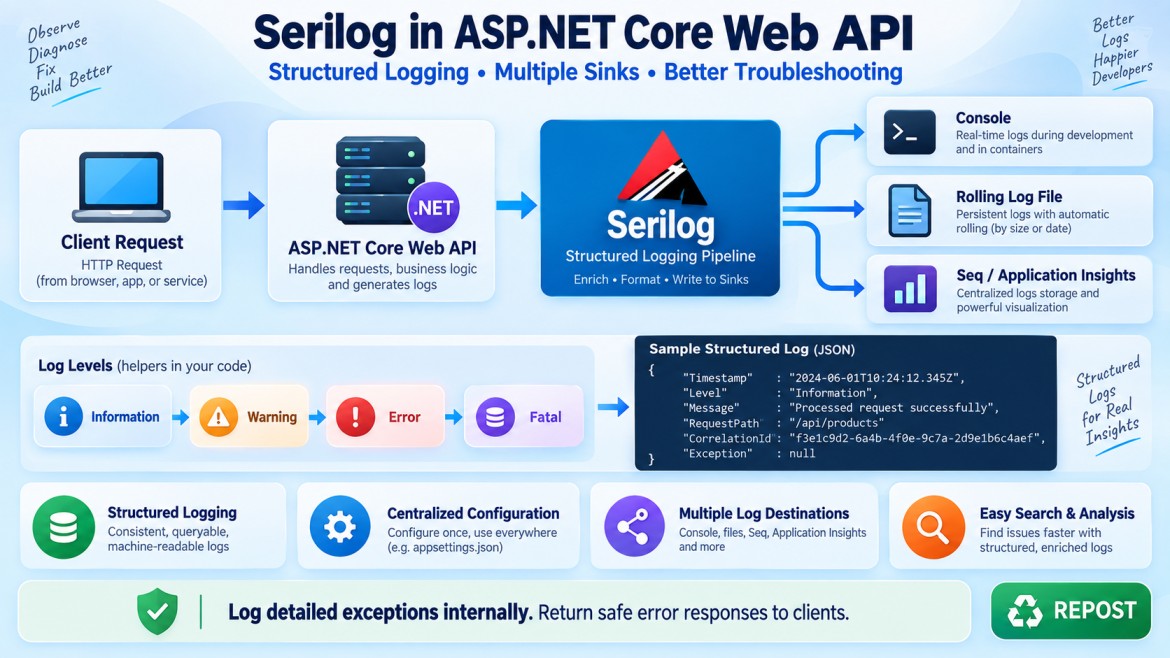


Serilog in ASP.NET Core Web API
1. What is Serilog?
Serilog is a structured logging library for .NET applications.
It records application activities, warnings, errors, exceptions, HTTP requests, performance information, and other diagnostic data.
Serilog can write logs to different destinations, such as:
-
Console
-
Text files
-
SQL Server
-
Seq
-
Elasticsearch
-
Application Insights
-
Azure
-
Splunk
These destinations are called sinks.
The Serilog.AspNetCore package integrates Serilog with ASP.NET Core so that both framework-generated logs and logs written through ILogger<T> use the same Serilog configuration and destinations. Serilog.AspNetCore documentation
2. Why do we need Serilog?
ASP.NET Core already provides the ILogger<T> logging abstraction. However, Serilog adds powerful capabilities such as:
-
Structured logging
-
Multiple logging destinations
-
File rolling and retention
-
Contextual properties
-
JSON-formatted logs
-
Centralized log management
-
Request logging middleware
-
Flexible filtering
-
Environment-specific configuration
-
Integration with Seq, Elasticsearch and other systems
Without proper logging
When an application returns:
500 Internal Server Errorwe may not know:
-
Which request failed?
-
Which user made the request?
-
Which controller was executing?
-
What input caused the problem?
-
What exception occurred?
-
Which server handled the request?
-
How long did the request take?
Serilog can capture these details as searchable properties.
3. What is structured logging?
Traditional logging usually creates one plain text message:
_logger.LogInformation(
    $"Order 1001 was created for customer 25");
The final log is just text:
Order 1001 was created for customer 25It is difficult for a logging system to reliably search or filter the customer and order separately.
With structured logging:
_logger.LogInformation(
    "Order {OrderId} was created for customer {CustomerId}",
    1001,
    25);
Serilog stores both the message and its properties:
{
  "Message": "Order 1001 was created for customer 25",
  "OrderId": 1001,
  "CustomerId": 25
}
We can now search using conditions such as:
OrderId = 1001
CustomerId = 25
Important
Use message templates:
_logger.LogInformation(
    "Product {ProductId} retrieved successfully",
    productId);
Avoid string interpolation:
_logger.LogInformation(
    $"Product {productId} retrieved successfully");
Structured templates preserve ProductId as a separate searchable property.
4. Important Serilog concepts
Logger
The component that creates log events.
Log.Information("Application started");or through ASP.NET Core:
_logger.LogInformation("Application started");Sink
A destination where logs are written.
Examples:
Console Sink       → Console
File Sink          → Text/JSON files
SQL Server Sink    → SQL Server table
Seq Sink           → Seq server
Elasticsearch Sink → Elasticsearch
Enricher
Adds additional information to log events.
Examples:
-
Application name
-
Environment name
-
Machine name
-
Thread ID
-
User ID
-
Correlation ID
-
Request ID
Minimum level
Controls which log events are recorded.
Message template
Defines a log message with structured properties:
"Customer {CustomerId} placed order {OrderId}"Log context
Adds properties to every log event generated within a particular operation or scope.
5. Serilog log levels
Serilog supports the following levels:
| Level | Purpose | Example |
|---|---|---|
Verbose |
Very detailed diagnostic information | Every internal calculation |
Debug |
Developer debugging information | Method execution details |
Information |
Normal business/application activity | Order created |
Warning |
Unexpected condition, but application continues | Retry attempted |
Error |
Operation failed because of an exception or error | Database query failed |
Fatal |
Application cannot continue | Application startup failure |
Example
_logger.LogTrace("Entering GetProduct method");

_logger.LogDebug(
    "Searching product with ID {ProductId}",
    productId);

_logger.LogInformation(
    "Product {ProductId} retrieved successfully",
    productId);

_logger.LogWarning(
    "Product {ProductId} is low in stock",
    productId);

_logger.LogError(
    exception,
    "Failed to retrieve product {ProductId}",
    productId);

_logger.LogCritical(
    exception,
    "Database connection is unavailable");
In Microsoft’s ILogger<T>, Trace roughly maps to Serilog’s Verbose, while Critical maps to Fatal.
6. Install the required NuGet packages
Run these commands inside the Web API project:
dotnet add package Serilog.AspNetCore
dotnet add package Serilog.Settings.Configuration
dotnet add package Serilog.Sinks.Console
dotnet add package Serilog.Sinks.File
Serilog.AspNetCore should generally match the major .NET version of the application. For example, a .NET 8 application should normally use the corresponding 8.x integration package. Serilog.AspNetCore versioning guidance
Some dependencies may already be installed transitively, but listing the packages explicitly makes the project’s logging requirements clear.
7. Configure Serilog in appsettings.json
Add a top-level Serilog section:
{
  "Serilog": {
    "Using": [
      "Serilog.Sinks.Console",
      "Serilog.Sinks.File"
    ],

    "MinimumLevel": {
      "Default": "Information",

      "Override": {
        "Microsoft": "Warning",
        "Microsoft.AspNetCore": "Warning",
        "Microsoft.EntityFrameworkCore.Database.Command": "Warning",
        "System": "Warning"
      }
    },

    "WriteTo": [
      {
        "Name": "Console",
        "Args": {
          "outputTemplate": "[{Timestamp:yyyy-MM-dd HH:mm:ss.fff zzz} {Level:u3}] [{CorrelationId}] {SourceContext}: {Message:lj}{NewLine}{Exception}"
        }
      },

      {
        "Name": "File",
        "Args": {
          "path": "Logs/webapi-.log",
          "rollingInterval": "Day",
          "rollOnFileSizeLimit": true,
          "fileSizeLimitBytes": 10485760,
          "retainedFileCountLimit": 30,
          "shared": true,
          "flushToDiskInterval": "00:00:01",
          "outputTemplate": "[{Timestamp:yyyy-MM-dd HH:mm:ss.fff zzz} {Level:u3}] [{CorrelationId}] {SourceContext}: {Message:lj}{NewLine}{Exception}"
        }
      }
    ],

    "Enrich": [
      "FromLogContext"
    ],

    "Properties": {
      "Application": "ProductWebApi"
    }
  },

  "AllowedHosts": "*"
}
Serilog’s configuration provider reads settings from the top-level Serilog section by default. Serilog.Settings.Configuration documentation
Configuration explanation
Using
"Using": [
  "Serilog.Sinks.Console",
  "Serilog.Sinks.File"
]
Specifies the assemblies containing the configured sinks.
MinimumLevel.Default
"Default": "Information"Records:
-
Information
-
Warning
-
Error
-
Fatal
It ignores:
-
Debug
-
Verbose
MinimumLevel.Override
"Microsoft.AspNetCore": "Warning"ASP.NET Core produces many framework logs. This override suppresses lower-level framework messages while preserving warnings and errors.
Your own application can continue logging at Information.
WriteTo
Defines the destinations:
"Name": "Console"Writes logs to the console.
"Name": "File"Writes logs to a file.
path
"path": "Logs/webapi-.log"Logs are stored inside the Logs folder.
With daily rolling enabled, filenames resemble:
Logs/webapi-20260917.log
Logs/webapi-20260918.log
rollingInterval
"rollingInterval": "Day"Creates a separate log file every day.
Possible values include:
-
Infinite
-
Year
-
Month
-
Day
-
Hour
-
Minute
fileSizeLimitBytes
"fileSizeLimitBytes": 10485760Limits each log file to approximately 10 MB.
rollOnFileSizeLimit
"rollOnFileSizeLimit": trueCreates another file when the current file reaches its size limit.
retainedFileCountLimit
"retainedFileCountLimit": 30Keeps only the most recent 30 log files.
This prevents logs from consuming unlimited disk space.
Enrich.FromLogContext
"Enrich": ["FromLogContext"]Allows contextual information such as correlation IDs and scoped properties to be added to log events.
Properties
"Properties": {
  "Application": "ProductWebApi"
}
Adds the application name to every log event.
This is useful when multiple applications send logs to one centralized logging system.
8. Configure Serilog in Program.cs
The following uses Serilog’s recommended two-stage initialization.
using Serilog;

Log.Logger = new LoggerConfiguration()
    .WriteTo.Console()
    .CreateBootstrapLogger();

try
{
    Log.Information("Starting Product Web API");

    var builder = WebApplication.CreateBuilder(args);

    builder.Services.AddSerilog((services, loggerConfiguration) =>
    {
        loggerConfiguration
            .ReadFrom.Configuration(builder.Configuration)
            .ReadFrom.Services(services)
            .Enrich.FromLogContext();
    });

    builder.Services.AddControllers();
    builder.Services.AddEndpointsApiExplorer();
    builder.Services.AddSwaggerGen();

    var app = builder.Build();

    if (app.Environment.IsDevelopment())
    {
        app.UseSwagger();
        app.UseSwaggerUI();
    }

    app.UseHttpsRedirection();

    app.UseSerilogRequestLogging();

    app.UseAuthorization();

    app.MapControllers();

    app.Run();
}
catch (Exception exception)
{
    Log.Fatal(
        exception,
        "Application terminated unexpectedly");
}
finally
{
    await Log.CloseAndFlushAsync();
}
Why use a bootstrap logger?
Log.Logger = new LoggerConfiguration()
    .WriteTo.Console()
    .CreateBootstrapLogger();
The bootstrap logger starts before the ASP.NET Core host is completely built.
Therefore, it can capture startup failures such as:
-
Invalid application configuration
-
Dependency-injection errors
-
Missing configuration values
-
Database setup failures
-
Invalid service registrations
After the host is created, the final logger replaces the bootstrap logger and reads the complete configuration from appsettings.json. Serilog documents this pattern as two-stage initialization. Two-stage initialization
AddSerilog()
builder.Services.AddSerilog((services, loggerConfiguration) =>
{
    loggerConfiguration
        .ReadFrom.Configuration(builder.Configuration)
        .ReadFrom.Services(services)
        .Enrich.FromLogContext();
});
This connects Serilog to ASP.NET Core’s logging infrastructure.
Consequently, the following injected logger also writes through Serilog:
ILogger<ProductsController>ReadFrom.Configuration()
.ReadFrom.Configuration(builder.Configuration)Reads:
-
Minimum levels
-
Sinks
-
File paths
-
Output templates
-
Enrichers
-
Application properties
from appsettings.json.
ReadFrom.Services()
.ReadFrom.Services(services)Allows Serilog to obtain registered enrichers, filters, sinks and other logging components from dependency injection.
Enrich.FromLogContext()
.Enrich.FromLogContext()Enables properties added through:
-
BeginScope() -
LogContext.PushProperty() -
Custom middleware
9. HTTP request logging
Add this middleware:
app.UseSerilogRequestLogging();For every HTTP request, Serilog produces a completion event similar to:
HTTP GET /api/products/10 responded 200 in 37.4261 msThe event contains structured properties such as:
{
  "RequestMethod": "GET",
  "RequestPath": "/api/products/10",
  "StatusCode": 200,
  "Elapsed": 37.4261
}
Serilog’s request-logging middleware condenses the usual multiple ASP.NET Core request messages into a single event containing method, path, response status and elapsed time. Request logging documentation
Middleware order is important
Place it before controllers and endpoint execution:
app.UseSerilogRequestLogging();

app.UseAuthorization();

app.MapControllers();
The middleware cannot time or log components that execute before it.
10. Customize HTTP request logging
using Serilog.Events;

app.UseSerilogRequestLogging(options =>
{
    options.MessageTemplate =
        "HTTP {RequestMethod} {RequestPath} responded " +
        "{StatusCode} in {Elapsed:0.0000} ms";

    options.GetLevel = (httpContext, elapsed, exception) =>
    {
        if (exception is not null)
            return LogEventLevel.Error;

        if (httpContext.Response.StatusCode >= 500)
            return LogEventLevel.Error;

        if (httpContext.Response.StatusCode >= 400)
            return LogEventLevel.Warning;

        return LogEventLevel.Information;
    };

    options.EnrichDiagnosticContext =
        (diagnosticContext, httpContext) =>
        {
            diagnosticContext.Set(
                "RequestHost",
                httpContext.Request.Host.Value);

            diagnosticContext.Set(
                "RequestScheme",
                httpContext.Request.Scheme);

            diagnosticContext.Set(
                "ClientIP",
                httpContext.Connection.RemoteIpAddress?.ToString());

            diagnosticContext.Set(
                "UserName",
                httpContext.User.Identity?.Name ?? "Anonymous");

            diagnosticContext.Set(
                "TraceIdentifier",
                httpContext.TraceIdentifier);
        };
});
Now each request log contains additional searchable information.
Do not normally log request bodies, passwords, tokens or other sensitive data.
11. Logging inside a controller
using Microsoft.AspNetCore.Mvc;

[ApiController]
[Route("api/[controller]")]
public class ProductsController : ControllerBase
{
    private readonly ILogger<ProductsController> _logger;

    public ProductsController(
        ILogger<ProductsController> logger)
    {
        _logger = logger;
    }

    [HttpGet("{id:int}")]
    public IActionResult GetProduct(int id)
    {
        _logger.LogInformation(
            "Retrieving product {ProductId}",
            id);

        if (id <= 0)
        {
            _logger.LogWarning(
                "Invalid product ID {ProductId} was supplied",
                id);

            return BadRequest(new
            {
                Message = "Product ID must be greater than zero."
            });
        }

        if (id == 100)
        {
            _logger.LogWarning(
                "Product {ProductId} was not found",
                id);

            return NotFound(new
            {
                Message = "Product not found."
            });
        }

        var product = new
        {
            Id = id,
            Name = "Laptop",
            Price = 75000
        };

        _logger.LogInformation(
            "Product {ProductId} retrieved successfully",
            id);

        return Ok(product);
    }

    [HttpPost]
    public IActionResult CreateProduct(
        CreateProductRequest request)
    {
        _logger.LogInformation(
            "Creating product {ProductName} in category {CategoryId}",
            request.Name,
            request.CategoryId);

        var productId = Random.Shared.Next(1000, 9999);

        _logger.LogInformation(
            "Product {ProductId} created successfully",
            productId);

        return CreatedAtAction(
            nameof(GetProduct),
            new { id = productId },
            new
            {
                Id = productId,
                request.Name,
                request.Price,
                request.CategoryId
            });
    }
}

public record CreateProductRequest(
    string Name,
    decimal Price,
    int CategoryId);
12. Logging exceptions correctly
Use the overload that accepts the exception:
try
{
    // Operation
}
catch (Exception exception)
{
    _logger.LogError(
        exception,
        "Failed to process order {OrderId}",
        orderId);

    throw;
}
This records:
-
Exception type
-
Exception message
-
Stack trace
-
Inner exception
-
Order ID
-
Source context
Avoid this:
_logger.LogError(exception.Message);It loses important information such as:
-
Stack trace
-
Inner exception
-
Structured context
Also avoid logging and silently swallowing the error unless you can safely recover.
13. Serilog with global exception handling
For modern ASP.NET Core applications, implement IExceptionHandler.
Create GlobalExceptionHandler.cs
using Microsoft.AspNetCore.Diagnostics;
using Microsoft.AspNetCore.Mvc;

public sealed class GlobalExceptionHandler
    : IExceptionHandler
{
    private readonly ILogger<GlobalExceptionHandler> _logger;

    public GlobalExceptionHandler(
        ILogger<GlobalExceptionHandler> logger)
    {
        _logger = logger;
    }

    public async ValueTask<bool> TryHandleAsync(
        HttpContext httpContext,
        Exception exception,
        CancellationToken cancellationToken)
    {
        var correlationId =
            httpContext.Items["CorrelationId"]?.ToString()
            ?? httpContext.TraceIdentifier;

        _logger.LogError(
            exception,
            "Unhandled exception occurred. " +
            "Method: {RequestMethod}, Path: {RequestPath}, " +
            "CorrelationId: {CorrelationId}",
            httpContext.Request.Method,
            httpContext.Request.Path,
            correlationId);

        var problemDetails = new ProblemDetails
        {
            Status = StatusCodes.Status500InternalServerError,
            Title = "Internal Server Error",
            Detail =
                "An unexpected error occurred. " +
                "Use the correlation ID when contacting support.",
            Instance = httpContext.Request.Path
        };

        problemDetails.Extensions["correlationId"] =
            correlationId;

        httpContext.Response.StatusCode =
            StatusCodes.Status500InternalServerError;

        await httpContext.Response.WriteAsJsonAsync(
            problemDetails,
            cancellationToken);

        return true;
    }
}
Register the exception handler
builder.Services.AddExceptionHandler<GlobalExceptionHandler>();
builder.Services.AddProblemDetails();
Add middleware
app.UseExceptionHandler();Recommended order
app.UseMiddleware<CorrelationIdMiddleware>();

app.UseSerilogRequestLogging();

app.UseExceptionHandler();

app.UseHttpsRedirection();

app.UseAuthorization();

app.MapControllers();
The global handler logs the full exception but sends only a safe response to the client.
14. Implement a correlation ID
A correlation ID identifies all log events belonging to the same HTTP request.
Suppose this request fails:
POST /api/ordersThe application may generate logs from:
-
Controller
-
Service
-
Repository
-
Database operation
-
External API call
-
Exception handler
If every event contains the same correlation ID, we can retrieve the entire request flow.
Create CorrelationIdMiddleware.cs
using Serilog.Context;

public sealed class CorrelationIdMiddleware
{
    private const string HeaderName = "X-Correlation-ID";

    private readonly RequestDelegate _next;

    public CorrelationIdMiddleware(RequestDelegate next)
    {
        _next = next;
    }

    public async Task InvokeAsync(HttpContext context)
    {
        var correlationId =
            context.Request.Headers.TryGetValue(
                HeaderName,
                out var suppliedCorrelationId)
            && !string.IsNullOrWhiteSpace(suppliedCorrelationId)
                ? suppliedCorrelationId.ToString()
                : Guid.NewGuid().ToString("N");

        context.Items["CorrelationId"] = correlationId;

        context.Response.Headers[HeaderName] = correlationId;

        using (LogContext.PushProperty(
                   "CorrelationId",
                   correlationId))
        {
            await _next(context);
        }
    }
}
Register middleware
app.UseMiddleware<CorrelationIdMiddleware>();

app.UseSerilogRequestLogging();
Resulting log
[2026-09-17 10:20:31 INF] [ae75a5736c98436f89b2014814a74f19]
ProductsController: Retrieving product 10
All logs generated during that request carry the same ID.
15. Add properties using BeginScope()
BeginScope() adds common properties to multiple log events.
using (_logger.BeginScope(
    new Dictionary<string, object>
    {
        ["UserId"] = userId,
        ["OrderId"] = orderId,
        ["Operation"] = "CreateOrder"
    }))
{
    _logger.LogInformation("Validating order");

    _logger.LogInformation("Saving order");

    _logger.LogInformation("Order completed");
}
All three events contain:
UserId
OrderId
Operation
Enrich.FromLogContext() must be enabled for scoped properties to be included.
16. Object destructuring using @
Consider this object:
var order = new
{
    Id = 1001,
    CustomerId = 25,
    Amount = 4500
};
Without @:
_logger.LogInformation(
    "Order received: {Order}",
    order);
The object may be stored using its string representation.
With @:
_logger.LogInformation(
    "Order received: {@Order}",
    order);
Serilog captures the object’s properties:
{
  "Order": {
    "Id": 1001,
    "CustomerId": 25,
    "Amount": 4500
  }
}
Use destructuring carefully. Do not log complete entities or DTOs if they contain:
-
Passwords
-
Access tokens
-
Refresh tokens
-
Credit-card details
-
Personal information
-
Connection strings
Prefer selecting safe properties:
_logger.LogInformation(
    "Order received {@OrderSummary}",
    new
    {
        order.Id,
        order.CustomerId,
        order.Amount
    });
17. Environment-specific configuration
appsettings.Development.json
{
  "Serilog": {
    "MinimumLevel": {
      "Default": "Debug",
      "Override": {
        "Microsoft": "Information"
      }
    }
  }
}
Development can contain more detailed logs.
appsettings.Production.json
{
  "Serilog": {
    "MinimumLevel": {
      "Default": "Information",
      "Override": {
        "Microsoft": "Warning",
        "Microsoft.AspNetCore": "Warning",
        "System": "Warning"
      }
    }
  }
}
Production normally uses less verbose logging to reduce:
-
Storage usage
-
Performance impact
-
Noise
-
Risk of exposing sensitive information
18. Complete Program.cs
using Serilog;
using Serilog.Events;

Log.Logger = new LoggerConfiguration()
    .MinimumLevel.Information()
    .WriteTo.Console()
    .CreateBootstrapLogger();

try
{
    Log.Information("Starting Product Web API");

    var builder = WebApplication.CreateBuilder(args);

    builder.Services.AddSerilog((services, configuration) =>
    {
        configuration
            .ReadFrom.Configuration(builder.Configuration)
            .ReadFrom.Services(services)
            .Enrich.FromLogContext();
    });

    builder.Services.AddControllers();

    builder.Services.AddEndpointsApiExplorer();
    builder.Services.AddSwaggerGen();

    builder.Services
        .AddExceptionHandler<GlobalExceptionHandler>();

    builder.Services.AddProblemDetails();

    var app = builder.Build();

    if (app.Environment.IsDevelopment())
    {
        app.UseSwagger();
        app.UseSwaggerUI();
    }

    app.UseMiddleware<CorrelationIdMiddleware>();

    app.UseSerilogRequestLogging(options =>
    {
        options.MessageTemplate =
            "HTTP {RequestMethod} {RequestPath} responded " +
            "{StatusCode} in {Elapsed:0.0000} ms";

        options.GetLevel =
            (httpContext, elapsed, exception) =>
            {
                if (exception is not null ||
                    httpContext.Response.StatusCode >= 500)
                {
                    return LogEventLevel.Error;
                }

                if (httpContext.Response.StatusCode >= 400)
                {
                    return LogEventLevel.Warning;
                }

                return LogEventLevel.Information;
            };

        options.EnrichDiagnosticContext =
            (diagnosticContext, httpContext) =>
            {
                diagnosticContext.Set(
                    "RequestHost",
                    httpContext.Request.Host.Value);

                diagnosticContext.Set(
                    "RequestScheme",
                    httpContext.Request.Scheme);

                diagnosticContext.Set(
                    "ClientIP",
                    httpContext.Connection
                        .RemoteIpAddress?
                        .ToString());

                diagnosticContext.Set(
                    "UserName",
                    httpContext.User.Identity?.Name
                    ?? "Anonymous");

                diagnosticContext.Set(
                    "TraceIdentifier",
                    httpContext.TraceIdentifier);
            };
    });

    app.UseExceptionHandler();

    app.UseHttpsRedirection();

    app.UseAuthorization();

    app.MapControllers();

    Log.Information(
        "Product Web API started successfully in {Environment}",
        app.Environment.EnvironmentName);

    app.Run();
}
catch (Exception exception)
{
    Log.Fatal(
        exception,
        "Product Web API terminated unexpectedly");
}
finally
{
    await Log.CloseAndFlushAsync();
}
19. Example output
Successful request
[2026-09-17 10:15:30.125 +00:00 INF]
[853e34c7b24f4c998ca6c8ad4e613849]
ProductsController:
Retrieving product 10
[2026-09-17 10:15:30.178 +00:00 INF]
[853e34c7b24f4c998ca6c8ad4e613849]
Serilog.AspNetCore.RequestLoggingMiddleware:
HTTP GET /api/products/10 responded 200 in 53.2178 msFailed request
[2026-09-17 10:16:48.501 +00:00 ERR]
[3e58bd6af8804a07a08d82e8da272bb3]
GlobalExceptionHandler:
Unhandled exception occurred.
Method: GET,
Path: /api/products/500,
CorrelationId: 3e58bd6af8804a07a08d82e8da272bb3

System.InvalidOperationException:
Product database is unavailable.
Client response:
{
  "type": "about:blank",
  "title": "Internal Server Error",
  "status": 500,
  "detail": "An unexpected error occurred. Use the correlation ID when contacting support.",
  "instance": "/api/products/500",
  "correlationId": "3e58bd6af8804a07a08d82e8da272bb3"
}
20. ILogger<T> versus static Log
Serilog offers a static logger:
Log.Information("Application started");ASP.NET Core provides dependency-injected logging:
private readonly ILogger<ProductsController> _logger;Recommended approach
Use ILogger<T> inside:
-
Controllers
-
Services
-
Repositories
-
Middleware
-
Background services
-
Exception handlers
_logger.LogInformation(
    "Product {ProductId} retrieved",
    productId);
Use Serilog’s static Log mainly during application bootstrap and shutdown:
Log.Information("Starting application");

Log.Fatal(exception, "Application terminated");

await Log.CloseAndFlushAsync();
This keeps business code dependent on Microsoft’s logging abstraction rather than directly on Serilog.
21. Serilog versus default ASP.NET Core logging
| Feature | ASP.NET Core logging | Serilog |
|---|---|---|
| Logging abstraction | Yes | Integrates with it |
| Structured logging | Supported through providers | Strong structured-logging model |
| Console logging | Yes | Yes |
| File logging | No built-in file provider | File sink available |
| Rolling files | Not built in | Supported |
| Multiple destinations | Through providers | Through sinks |
| Request logging | Multiple framework events | One concise request event |
| Enrichment | Scopes | Rich enrichers and log context |
| Seq integration | Additional provider | Native sink |
| Elasticsearch integration | Additional provider | Sink available |
| Flexible filtering | Supported | Extensive configuration |
Serilog does not replace the ILogger<T> abstraction. It acts as a logging provider behind it.
22. Common mistakes
Mistake 1: Using string interpolation
Avoid:
_logger.LogInformation(
    $"Product {productId} retrieved");
Use:
_logger.LogInformation(
    "Product {ProductId} retrieved",
    productId);
Mistake 2: Logging only the exception message
Avoid:
_logger.LogError(exception.Message);Use:
_logger.LogError(
    exception,
    "Failed to retrieve product {ProductId}",
    productId);
Mistake 3: Logging sensitive information
Never log:
-
Passwords
-
Authorization headers
-
JWT tokens
-
Refresh tokens
-
API keys
-
Full credit-card numbers
-
Connection strings
-
Sensitive personal data
Mistake 4: Excessive Information logs
Avoid logging every loop iteration or every minor internal action at Information.
Use:
-
Debugfor development details -
Informationfor meaningful business activities -
Warningfor recoverable abnormal conditions -
Errorfor failed operations
Mistake 5: Incorrect request middleware placement
Incorrect:
app.MapControllers();

app.UseSerilogRequestLogging();
Correct:
app.UseSerilogRequestLogging();

app.MapControllers();
Mistake 6: Unlimited log-file growth
Always configure:
"rollingInterval": "Day",
"rollOnFileSizeLimit": true,
"fileSizeLimitBytes": 10485760,
"retainedFileCountLimit": 30
Mistake 7: Logging the same exception multiple times
If the service, controller and global exception handler all log the same exception, three identical error events may be created.
Recommended rule:
-
Log an exception where it is handled.
-
If you only rethrow it without adding useful context, consider letting the global handler log it.
-
Add meaningful business context when logging locally.
23. Production best practices
-
Use structured message templates.
_logger.LogInformation(
    "Order {OrderId} created for customer {CustomerId}",
    orderId,
customerId);-
Add a correlation ID to every request.
-
Use centralized logging such as Seq, Application Insights or Elasticsearch for multiple servers.
-
Configure file rolling and retention.
-
Keep framework logging at
Warningunless diagnosing a problem. -
Never expose exception details to API clients.
-
Never log secrets or authentication tokens.
-
Use environment-specific minimum levels.
-
Include meaningful identifiers:
OrderId
CustomerId
UserId
CorrelationId
TraceId
Application
Environment-
Flush Serilog during shutdown:
await Log.CloseAndFlushAsync();-
Prefer
ILogger<T>in application classes. -
Use JSON logs when logs are collected by machines or centralized logging platforms.
-
Monitor disk usage if local file logging is enabled.
-
Avoid recording large object graphs.
-
Define a clear organizational logging policy.
24. Interview-ready answer
Serilog is a structured logging library for .NET. It integrates with ASP.NET Core’s ILogger<T> abstraction and records logs as message templates with named properties. Logs can be written to destinations called sinks, such as Console, File, SQL Server, Seq, Elasticsearch and Application Insights.
In ASP.NET Core Web API, we install Serilog.AspNetCore, configure sinks and minimum levels in appsettings.json, register Serilog using AddSerilog(), and enable HTTP request logging using UseSerilogRequestLogging(). In production, we should use structured properties, correlation IDs, rolling files, retention policies, centralized logging, safe exception handling, and avoid logging sensitive data.
Key points
-
Serilog is primarily a structured logging library.
-
Log destinations are called sinks.
-
Additional log properties are added through enrichment.
-
Prefer
ILogger<T>within application classes. -
Use message templates instead of interpolation.
-
UseSerilogRequestLogging()creates one useful event per HTTP request. -
Add correlation IDs to trace a request across application layers.
-
Use rolling and retention limits for file logging.
-
Log exceptions with the exception object.
-
Never log passwords, tokens, API keys or sensitive information.
-
Use centralized logging in load-balanced or distributed environments.