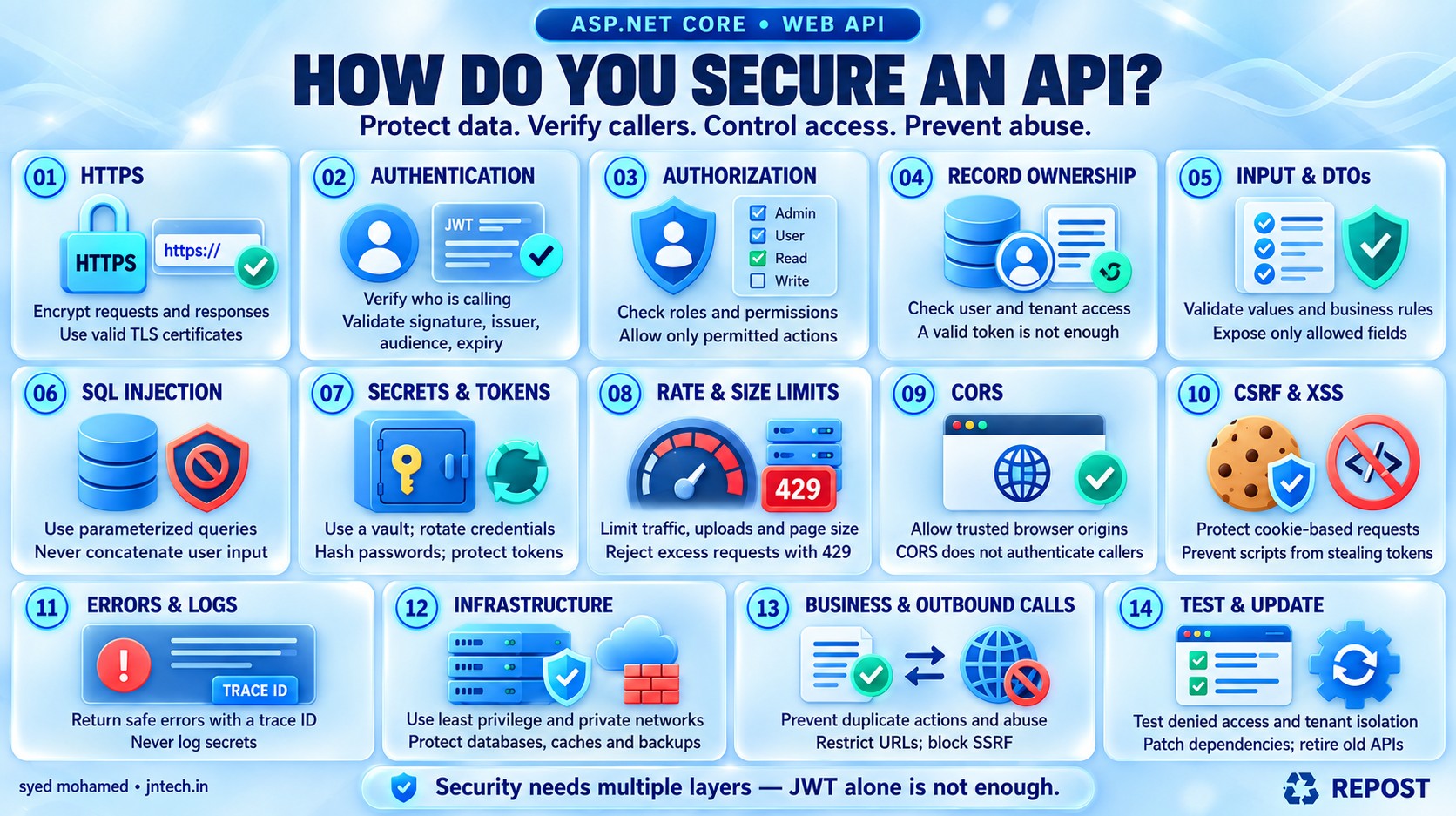


How Secure Is Your API? 14 Checks Every .NET Developer Should Know
Securing an API means protecting its data and operations so that only permitted users or applications can access them and misuse is prevented.
For example, in a banking API:
-
A customer must log in before viewing an account.
-
The customer can view only their own account.
-
Only authorized employees can approve certain transactions.
-
Passwords and account information must remain protected.
-
Attackers must not be able to overload the API or manipulate its database.
API security requires several layers. Adding JWT authentication alone is not enough.
1. Use HTTPS — protect data while it travels
HTTPS encrypts communication between the client and the API.
Suppose a client sends:
POST /api/login
Content-Type: application/json

{
  "username": "syed",
  "password": "example-password"
}
With unencrypted HTTP, someone intercepting the connection may read the credentials. HTTPS protects the request and response during transmission.
-
Expose production API endpoints through HTTPS.
-
Use a valid TLS certificate.
-
Clients should call the HTTPS address directly.
-
An HTTP redirect cannot protect information already sent over HTTP.
-
HTTPS protects data in transit; stored data needs separate protection. (OWASP Cheat Sheet Series)
ASP.NET Core supports HTTPS redirection:
app.UseHttpsRedirection();Your hosting environment or reverse proxy must also have HTTPS configured.
2. Authentication — check who is calling
Authentication means verifying the identity of the user or application.
For example:
“This request belongs to Syed.”
Common approaches include:
| Approach | Typical use |
|---|---|
| OAuth 2.0 access token, often a JWT | APIs used by web apps, mobile apps and services |
| Cookie authentication | Browser applications with a server-managed session |
| API key | Identifying a calling application or integration |
| Client certificate / mTLS | Strong authentication between services |
JWT is a token format. OAuth 2.0 defines how applications obtain and use access permissions. OpenID Connect adds user sign-in.
A typical token flow:
-
The user signs in through an identity provider.
-
The client receives an access token.
-
The client sends that token to the API.
-
The API validates it before accepting the identity.
GET /api/orders
Authorization: Bearer <access-token>
The API must validate the token’s signature, issuer, audience and expiry. Simply decoding a JWT does not establish trust.
Use an established identity provider for production token issuance, and send an access token, not an ID token, to your API. (Microsoft Learn)
3. Authorization — check what the caller can do
Authorization means checking whether the identified user has permission to perform an action.
| Authentication | Authorization |
|---|---|
| Who are you? | What are you allowed to do? |
| Syed has signed in. | Syed can view orders but cannot delete users. |
ASP.NET Core examples:
// Requires an authenticated user.
[Authorize]
[HttpGet]
public IActionResult GetProducts()
{
    return Ok("Products");
}
// Requires the Admin role.
[Authorize(Roles = "Admin")]
[HttpDelete("{id:int}")]
public IActionResult DeleteProduct(int id)
{
return NoContent();
}Authorization can use:
-
Roles: Admin, Customer, Support.
-
Policies: Rules such as requiring a particular permission.
-
Resource checks: Whether the caller can access this specific order or account.
[Authorize] requires authentication and authorization services to be configured.
4. Check ownership — can this user access this particular record?
This is one of the most important API security checks.
Suppose Syed owns order 101:
GET /api/orders/101He changes the URL:
GET /api/orders/102Order 102 belongs to another customer.
A valid token must not allow him to read somebody else’s order. Every operation accepting a record ID needs the appropriate access check. OWASP calls missing checks Broken Object Level Authorization. (OWASP API Security Top 10)
Example using EF Core, assuming JWT claim mapping is disabled and sub identifies the customer:
[Authorize]
[HttpGet("{id:int}")]
public async Task<IActionResult> GetOrder(int id)
{
    var userId = User.FindFirst("sub")?.Value;

    if (string.IsNullOrWhiteSpace(userId))
        return Forbid();

    var order = await _db.Orders
        .Where(o => o.Id == id && o.CustomerId == userId)
        .Select(o => new
        {
            o.Id,
            o.TotalAmount,
            o.Status
        })
        .SingleOrDefaultAsync();

    return order is null ? NotFound() : Ok(order);
}
The query checks both the order ID and the current customer’s identity.
For a multi-tenant application, also enforce tenant boundaries. Never trust a tenant ID or customer ID from the request without verifying it.
5. Validate input and control which fields can change
Input validation means checking whether incoming values are acceptable.
For example:
-
Quantity must be positive.
-
Email must have an acceptable format.
-
Text must have a maximum length.
-
Uploaded files must have permitted sizes and types.
-
Page size must have an upper limit.
Use request DTOs:
using System.ComponentModel.DataAnnotations;

public class CreateOrderRequest
{
    [Range(1, int.MaxValue)]
    public int ProductId { get; set; }

    [Range(1, 100)]
    public int Quantity { get; set; }
}
With [ApiController], invalid model data normally produces a 400 Bad Request.
Also validate business rules. A valid quantity does not prove that the product exists or that enough stock is available.
Avoid accepting sensitive server-controlled fields:
{
  "productId": 10,
  "quantity": 2,
  "price": 1,
  "isApproved": true
}
The server should calculate the price and decide approval status. Binding requests directly to database entities can expose fields that clients should not control. Return response DTOs containing only permitted information. (GitHub)
6. Prevent SQL injection
SQL injection happens when input becomes executable SQL instead of remaining data.
Unsafe:
string sql =
    "SELECT * FROM Users WHERE Email = '" + email + "'";
Safe approach with a parameter:
using var command = new SqlCommand(
    "SELECT Id, Name FROM Users WHERE Email = @Email",
    connection);

command.Parameters
    .Add("@Email", SqlDbType.NVarChar, 256)
    .Value = email;
EF Core LINQ also parameterizes ordinary input values:
var user = await _db.Users
    .SingleOrDefaultAsync(u => u.Email == email);
Key points:
-
Use parameterized queries.
-
Avoid concatenating input into SQL.
-
Stored procedures can still be vulnerable if they construct unsafe dynamic SQL.
-
Allowlist dynamic column names used for sorting; SQL parameters cannot represent column names. (OWASP Cheat Sheet Series)
7. Protect passwords, tokens and application secrets
A secret is sensitive information that grants access to a system.
Examples:
-
Database passwords.
-
API keys.
-
Redis connection credentials.
-
Token signing keys.
-
Client secrets.
Do not commit production secrets to GitHub or put them in frontend JavaScript.
For ASP.NET Core:
| Environment | Approach |
|---|---|
| Local development | .NET User Secrets |
| Production | A secret manager such as Azure Key Vault |
| Supported Azure services | Managed identity to reduce stored credentials |
Restrict access, rotate secrets and replace exposed credentials immediately. Deleting a leaked secret from the latest commit does not invalidate it. (OWASP Cheat Sheet Series)
For user credentials and sessions:
-
Store passwords using a purpose-built password hasher, such as ASP.NET Core Identity’s password hasher.
-
Never store plaintext passwords.
-
Use short-lived access tokens and controlled refresh-token handling.
-
Protect administrator accounts with MFA.
-
Do not log passwords, API keys or bearer tokens.
-
A typical signed JWT is readable; do not put passwords or confidential records inside it.
8. Apply rate limiting and resource limits
Rate limiting controls how frequently a caller can use the API.
Example policy:
A customer can make 100 requests per minute.
When the limit is exceeded, configure the API to respond with:
429 Too Many RequestsASP.NET Core requires:
builder.Services.AddRateLimiter(options =>
{
    options.RejectionStatusCode =
        StatusCodes.Status429TooManyRequests;

    // Configure limiters and policies here.
});app.UseRateLimiter();Useful protections include:
-
Stricter limits for login, OTP and password-reset endpoints.
-
Per-user, per-client or appropriate per-IP limits.
-
Maximum request body and upload sizes.
-
Bounded pagination.
-
Timeouts and concurrency limits for expensive operations.
Built-in application limits are generally local to each server instance. For shared limits across servers, use a suitable gateway or distributed solution.
Rate limiting helps with overload and abuse, but large DDoS attacks require infrastructure protection as well. (Microsoft Learn)
9. Configure CORS correctly — understand its limits
CORS tells browsers which other website origins may read API responses.
Example: allow your portfolio frontend to call your API:
builder.Services.AddCors(options =>
{
    options.AddPolicy("PortfolioClient", policy =>
    {
        policy.WithOrigins("https://www.jntech.in")
              .WithMethods("GET", "POST", "PUT", "DELETE")
              .WithHeaders("Content-Type", "Authorization");
    });
});app.UseCors("PortfolioClient");However:
-
CORS does not authenticate users.
-
It does not stop Postman, scripts or another server from calling your API.
-
It does not replace authorization.
-
CORS failures do not guarantee that a request never reached the server.
-
Avoid combining arbitrary origins with credentialed access. (Microsoft Learn)
10. Protect browser sessions against CSRF and token theft
CSRF means tricking a user’s browser into sending an unwanted authenticated request.
If authentication uses cookies that the browser sends automatically:
-
Use antiforgery protection for state-changing requests.
-
Configure
Secure,HttpOnlyand appropriateSameSitecookie settings. -
Do not use GET endpoints to change data.
With bearer tokens explicitly added to the Authorization header, classic cookie-based CSRF is less applicable. However, malicious JavaScript running in your page can still steal accessible tokens or make requests.
Prevent XSS through safe rendering and appropriate browser protections. Choose token storage deliberately; browser local storage is accessible to JavaScript.
11. Return safe errors and maintain useful logs
Clients need useful error messages, but they should not receive:
-
Stack traces.
-
Database connection strings.
-
SQL statements containing sensitive values.
-
Internal file paths.
Example response:
{
  "title": "An unexpected error occurred.",
  "status": 500,
  "traceId": "request-reference"
}
Log the detailed exception securely on the server, using the trace or correlation ID to connect it with the response.
Also monitor failed authentication, denied access and unusual request patterns. Protect logs against unauthorized access and avoid recording sensitive request bodies. (OWASP Cheat Sheet Series)
12. Protect the database and infrastructure
Least privilege means giving each component only the permissions it needs.
For example, the API’s database account should not normally be a SQL Server administrator.
-
Keep databases and caches off the public internet where possible.
-
Restrict network access.
-
Encrypt sensitive stored data and backups.
-
Give each service its own controlled identity.
-
Secure internal service calls.
-
Use a gateway or WAF where appropriate.
-
Keep authorization checks inside the API even when a gateway validates tokens. (OWASP Cheat Sheet Series)
13. Protect business operations and external calls
An authenticated user can still misuse a valid operation.
| Scenario | Protection |
|---|---|
| Repeated checkout requests | Idempotency key and database uniqueness |
| Two requests spend the same balance | Transaction and concurrency control |
| Automated coupon abuse | Business limits and abuse detection |
| Client changes a purchase price | Calculate the price on the server |
| API downloads a user-provided URL | Restrict destinations and block access to internal services |
| External API returns unexpected data | Validate its response and apply timeouts |
The URL-download problem is called Server-Side Request Forgery (SSRF). An attacker may try to make your server access a private internal address. (OWASP API Security Top 10)
14. Test security and maintain it
Security checks should include failure scenarios:
| Test | Expected behavior |
|---|---|
| Missing token on a protected endpoint | 401 Unauthorized |
| Expired or tampered token | 401 Unauthorized |
| Customer calls an admin-only operation | 403 Forbidden |
| Customer requests another customer’s order | Denied, often 404 to hide existence |
| Invalid quantity | 400 Bad Request |
| Rate limit exceeded | 429 Too Many Requests |
| Request attempts to set an admin-only field | Field cannot change |
| Customer requests another tenant’s records | Access denied |
Keep the runtime and dependencies updated, scan for exposed secrets and vulnerable packages, and retire unused endpoints and old API versions.
A simple ASP.NET Core authentication setup
This example requires an existing identity provider that issues JWT access tokens.
Install Microsoft.AspNetCore.Authentication.JwtBearer, selecting a supported version compatible with your project’s target framework.
Example configuration — replace these illustrative values:
{
  "Authentication": {
    "Authority": "https://identity.example.com",
    "Audience": "orders-api"
  }
}Program.cs:
using Microsoft.AspNetCore.Authentication.JwtBearer;
using Microsoft.AspNetCore.Authorization;

var builder = WebApplication.CreateBuilder(args);

builder.Services.AddControllers();

builder.Services
    .AddAuthentication(JwtBearerDefaults.AuthenticationScheme)
    .AddJwtBearer(options =>
    {
        options.Authority =
            builder.Configuration["Authentication:Authority"];

        options.Audience =
            builder.Configuration["Authentication:Audience"];

        // Preserve claim names such as "sub" and "roles".
        options.MapInboundClaims = false;

        // Match this to your identity provider's role claim.
        options.TokenValidationParameters.RoleClaimType = "roles";
    });

builder.Services.AddAuthorization(options =>
{
    // Require authentication unless an endpoint opts out.
    options.FallbackPolicy = new AuthorizationPolicyBuilder()
        .RequireAuthenticatedUser()
        .Build();
});

var app = builder.Build();

app.UseHttpsRedirection();

app.UseAuthentication();
app.UseAuthorization();

app.MapControllers();

app.Run();-
Authorityidentifies the trusted token issuer and its signing-key metadata. -
Audienceidentifies the API the token is intended for. -
Authentication runs before authorization.
-
[AllowAnonymous]explicitly opens an endpoint. -
The fallback policy requires a valid identity; individual endpoints still need relevant permission and ownership checks.
This configures token validation, not a login or token-issuing service.
Key points for interview revision
-
Use HTTPS.
-
Authenticate the caller.
-
Authorize the action and the specific record.
-
Enforce tenant boundaries.
-
Validate input and use request/response DTOs.
-
Parameterize database queries.
-
Protect credentials and secrets.
-
Apply rate and resource limits.
-
Understand CORS and CSRF.
-
Return safe errors and monitor securely.
-
Use least privilege.
-
Test access-denial scenarios and keep dependencies updated.
Interview answer:
“I secure an API using multiple layers: HTTPS, trusted authentication, permission and record-level authorization, input validation, parameterized queries, and secure secret storage. I also apply rate limits, protect browser sessions, avoid exposing sensitive data in responses or logs, and use least-privilege access to infrastructure. Finally, I test unauthorized access scenarios and keep dependencies updated.”