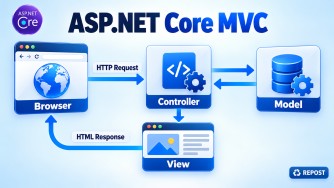


View() vs PartialView() vs Redirect() vs RedirectToAction()
| Method | Purpose | Browser makes new request? | URL changes? |
|---|---|---|---|
View() |
Returns a complete Razor View | No | No |
PartialView() |
Returns a reusable portion of a View | No | No |
Redirect() |
Redirects to a specified URL | Yes | Yes |
RedirectToAction() |
Redirects to another controller action | Yes | Yes |
View()
Returns a complete Razor View, normally including the layout.
public IActionResult Index()
{
    return View();
}
Returns:
Views/Product/Index.cshtmlPartialView()
Returns only part of a page, normally without the full layout.
public IActionResult ProductList()
{
    return PartialView("_ProductList");
}
Commonly used for:
- Reusable UI sections
- AJAX requests
- Dynamically updating part of a page
Redirect()
Redirects the browser to a specific URL.
return Redirect("/Product/Index");It can also redirect to an external website:
return Redirect("https://example.com");Avoid redirecting to an unvalidated user-provided URL because it can cause an open-redirect vulnerability.
RedirectToAction()
Redirects to another controller action using MVC routing.
return RedirectToAction("Index", "Product");With route values:
return RedirectToAction(
    "Details",
    "Product",
    new { id = 10 });
Key Points
View()andPartialView()render content during the current request.Redirect()andRedirectToAction()create a new browser request.- Use
View()for a complete page. - Use
PartialView()for a reusable page section. - Use
Redirect()when you know the exact URL. - Prefer
RedirectToAction()for MVC actions because it uses routing. - After a successful POST, use
RedirectToAction()to follow the Post/Redirect/Get pattern and prevent duplicate form submission.
Preventing a Public Method from Becoming an Action
Apply the [NonAction] attribute to the public controller method.
public class ProductController : Controller
{
    public IActionResult Index()
    {
        string message = GetMessage();
        return View();
    }

    [NonAction]
    public string GetMessage()
    {
        return "Welcome";
    }
}
Key Points
- Public controller methods may be considered action methods.
[NonAction]tells MVC not to treat a public method as an action.- The method cannot be accessed directly through routing.
- It can still be called internally from other controller methods.
- Prefer moving reusable business logic into a service.
- Private and protected methods are not action methods, so
[NonAction]is unnecessary.
private string GetMessage()
{
    return "Welcome";
}
Synchronous vs Asynchronous Actions
| Synchronous action | Asynchronous action |
|---|---|
Uses IActionResult |
Uses Task<IActionResult> |
| Blocks the request thread while waiting | Releases the thread during I/O waiting |
| Suitable for quick, CPU-only work | Suitable for database, file and network operations |
| Simpler for operations without asynchronous APIs | Improves scalability for I/O-bound operations |
Uses methods such as ToList() |
Uses methods such as ToListAsync() |
Synchronous Action
Use it when the operation is quick and does not wait for external resources.
public IActionResult Calculate()
{
    int total = 10 + 20;
    return View(total);
}
Asynchronous Action
Use it for I/O-bound operations such as:
- Database calls
- External API calls
- File operations
- Cloud storage access
public async Task<IActionResult> Index()
{
    var products = await _context.Products.ToListAsync();

    return View(products);
}
Key Points
- Use asynchronous actions for I/O-bound operations.
- Use synchronous actions for short, in-memory or CPU-only operations.
- Async improves scalability by freeing the request thread while waiting.
- Async does not automatically make CPU-intensive work faster.
- Use async throughout the complete call chain.
- Avoid
.Resultand.Wait()because they block threads. - Do not use
Task.Run()merely to make an MVC action asynchronous. - Use a
CancellationTokenfor long-running I/O operations.
public async Task<IActionResult> Index(CancellationToken cancellationToken)
{
    var products = await _context.Products
        .ToListAsync(cancellationToken);

    return View(products);
}