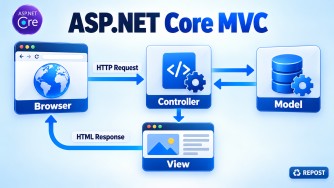


What is ASP.NET Core MVC?
- A Microsoft framework for building web applications and APIs.
- Uses the Model–View–Controller design pattern:
- Model: Data and business logic
- View: User interface using Razor (
.cshtml) - Controller: Handles requests and returns responses
- Built on modern .NET.
- Cross-platform, open-source and high-performance.
- Includes built-in dependency injection.
- Uses a middleware-based request pipeline.
ASP.NET Core MVC vs ASP.NET MVC 5
| Feature | ASP.NET Core MVC | ASP.NET MVC 5 |
|---|---|---|
| Runtime | Modern .NET | .NET Framework |
| Platform | Windows, Linux and macOS | Windows only |
| Performance | Faster and optimized | Comparatively slower |
| Dependency injection | Built in | External library usually required |
| Configuration | appsettings.json |
web.config |
| Request pipeline | Middleware | HTTP modules and handlers |
| Web API support | MVC and Web API are unified | MVC and Web API are separate |
| Hosting | Kestrel, IIS, Docker and cloud | Mainly IIS |
| Startup | Program.cs |
Global.asax |
| Recommended usage | New applications | Maintaining legacy applications |
Key point
ASP.NET Core MVC is the modern, cross-platform replacement for ASP.NET MVC 5 and is recommended for new application development.
MVC Request-Processing Lifecycle
Client Request
      ↓
Kestrel Web Server
      ↓
Middleware Pipeline
      ↓
Routing
      ↓
Controller Creation
      ↓
Model Binding and Validation
      ↓
Filters
      ↓
Action Method
      ↓
Action Result / Razor View
      ↓
HTTP Response
Key Points
- Client Request: Browser sends an HTTP request.
- Kestrel: Receives the request and forwards it to the application.
- Middleware: Performs tasks such as exception handling, authentication and authorization.
- Routing: Matches the URL to a controller action.
- Controller Creation: Dependency injection creates the controller and injects its dependencies.
- Model Binding: Converts route, query-string, form and body values into .NET objects.
- Model Validation: Validates the model using validation attributes.
- Filters: Run additional logic before or after the action.
- Action Method: Processes the request and returns an action result.
- Result Execution: Renders a Razor view, returns JSON, redirects, or produces a status code.
- Response: Travels back through the middleware pipeline and is sent to the client.
Example
GET /Products/Details/10
        ↓
ProductsController.Details(id: 10)
        ↓
View(product)
        ↓
HTML Response
Responsibilities of Model, View, and Controller
| Component | Responsibilities |
|---|---|
| Model | Represents application data, contains business rules, validates data and communicates with the service/data-access layer. |
| View | Displays data to the user, generates the HTML UI using Razor (.cshtml) and collects user input. |
| Controller | Receives HTTP requests, processes user input, calls services, prepares data for the View and returns an appropriate result. |
Simple Flow
User Request → Controller → Model/Service → Controller → View → UserKey Points
- Model = Data and business rules.
- View = User interface and presentation.
- Controller = Request-handling coordinator.
- A View should not contain business or database logic.
- A Controller should remain thin and delegate business logic to services.
- The separation improves maintainability, testability and code reuse.