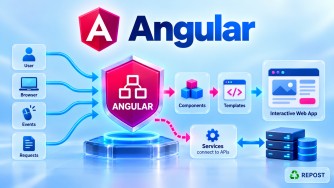


Angular API URLs, Multiple APIs, and SQL Server Access
These four questions are closely related to how an Angular application should communicate with backend systems.
A typical architecture is:
Angular
   │
   ├── Products API ──→ SQL Server
   │
   ├── Orders API ────→ SQL Server
   │
   └── Identity API ──→ User Store
Angular communicates with APIs, not directly with databases.
Full Simple Sample Program
Suppose Angular calls two ASP.NET Core APIs:
Product API
https://localhost:7001/api

Order API
https://localhost:7002/api
We'll configure the URLs separately for development and production.
Development — environment.ts
export const environment = {
  production: false,

  productApiUrl:
    'https://localhost:7001/api',

  orderApiUrl:
    'https://localhost:7002/api'
};
Production — environment.production.ts
export const environment = {
  production: true,

  productApiUrl:
    'https://api.jntech.in/api',

  orderApiUrl:
    'https://orders-api.jntech.in/api'
};
product.ts
export interface Product {
  id: number;
  name: string;
  price: number;
}
order.ts
export interface Order {
  id: number;
  productId: number;
  quantity: number;
}
product.service.ts
import { inject, Injectable } from '@angular/core';
import { HttpClient } from '@angular/common/http';
import { Observable } from 'rxjs';

import { environment } from '../environments/environment';
import { Product } from './product';

@Injectable({
  providedIn: 'root'
})
export class ProductService {

  private http = inject(HttpClient);

  private apiUrl =
    `${environment.productApiUrl}/products`;

  getProducts(): Observable<Product[]> {

    return this.http.get<Product[]>(
      this.apiUrl
    );
  }
}
order.service.ts
import { inject, Injectable } from '@angular/core';
import { HttpClient } from '@angular/common/http';
import { Observable } from 'rxjs';

import { environment } from '../environments/environment';
import { Order } from './order';

@Injectable({
  providedIn: 'root'
})
export class OrderService {

  private http = inject(HttpClient);

  private apiUrl =
    `${environment.orderApiUrl}/orders`;

  getOrders(): Observable<Order[]> {

    return this.http.get<Order[]>(
      this.apiUrl
    );
  }
}
1. How Do You Configure the ASP.NET Core API Base URL?
What is an API Base URL?
Suppose you have these endpoints:
https://localhost:7001/api/products
https://localhost:7001/api/categories
https://localhost:7001/api/articles
https://localhost:7001/api/users
The common portion is:
https://localhost:7001/apiThis is your base API URL.
Instead of repeating:
'https://localhost:7001/api/products'and:
'https://localhost:7001/api/categories'store the common part centrally.
Using Angular Environment Configuration
A common Angular setup is to define environment-specific configuration.
For example:
export const environment = {
  production: false,
  apiUrl: 'https://localhost:7001/api'
};
Then use it:
import { environment }
  from '../environments/environment';
and:
private apiUrl =
  `${environment.apiUrl}/products`;
Now:
this.http.get<Product[]>(
  this.apiUrl
);
results in:
GET https://localhost:7001/api/productsWhy Centralize the Base URL?
Without centralized configuration:
// ProductService
'https://localhost:7001/api/products'

// CategoryService
'https://localhost:7001/api/categories'

// ArticleService
'https://localhost:7001/api/articles'
If the server changes, you must update many files.
With centralized configuration:
apiUrl:
  'https://localhost:7001/api'
all services use the same value:
environment.apiUrl
        │
        ├── /products
        ├── /categories
        ├── /articles
        └── /users
This improves maintainability.
2. How Do You Handle Development and Production API URLs?
Your API URL will usually be different between environments.
For example:
Development

Angular
http://localhost:4200

        ↓

ASP.NET Core
https://localhost:7001
Production:
Angular
https://www.jntech.in

        ↓

ASP.NET Core
https://api.jntech.in
You should not manually edit every service before deployment.
Development Configuration
// environment.ts

export const environment = {

  production: false,

  apiUrl:
    'https://localhost:7001/api'

};
Production Configuration
// environment.production.ts

export const environment = {

  production: true,

  apiUrl:
    'https://api.jntech.in/api'

};
Your service remains unchanged:
private apiUrl =
  `${environment.apiUrl}/products`;
During the appropriate build configuration, Angular can use the corresponding environment file through CLI configuration/file replacements.
Conceptually:
Development build
      ↓
environment.ts
      ↓
https://localhost:7001/api


Production build
      ↓
environment.production.ts
      ↓
https://api.jntech.in/api
Angular CLI Configuration
The production file replacement can be configured in angular.json.
A simplified example:
{
  "configurations": {
    "production": {
      "fileReplacements": [
        {
          "replace": "src/environments/environment.ts",
          "with": "src/environments/environment.production.ts"
        }
      ]
    }
  }
}
Then:
ng builduses the default configuration defined by your Angular workspace, while an explicit production build can be run with:
ng build --configuration productionThe important idea is:
Same Angular source code
        ↓
Different build configuration
        ↓
Different API URL
Important: Angular Environment Files Are Not Secret Storage
This is a very important interview and security point.
Don't store secrets such as:
Database passwords
SQL Server connection strings
JWT signing secrets
Private API secrets
Azure client secrets
inside Angular environment files.
Why?
Angular runs in the user's browser.
Anything included in the Angular application bundle can potentially be inspected by the user.
Therefore:
Angular environment
        ↓
Public client configuration
not:
Angular environment
        ↓
Secret storage  ✗
A backend URL is generally fine:
apiUrl:
  'https://api.example.com/api'
A database password is not.
3. How Do You Call Multiple Web APIs from Angular?
There is no requirement that Angular communicates with only one API.
For example:
                    Angular
                       │
        ┌──────────────┼──────────────┐
        ↓              ↓              ↓
   Product API     Order API      Identity API
      :7001           :7002           :7003
Each service can use its corresponding API URL.
Environment Configuration
export const environment = {

  production: false,

  productApiUrl:
    'https://localhost:7001/api',

  orderApiUrl:
    'https://localhost:7002/api',

  identityApiUrl:
    'https://localhost:7003/api'

};
Product Service
@Injectable({
  providedIn: 'root'
})
export class ProductService {

  private http = inject(HttpClient);

  private apiUrl =
    environment.productApiUrl;

  getProducts(): Observable<Product[]> {

    return this.http.get<Product[]>(
      `${this.apiUrl}/products`
    );
  }
}
Request:
GET
https://localhost:7001/api/products
Order Service
@Injectable({
  providedIn: 'root'
})
export class OrderService {

  private http = inject(HttpClient);

  private apiUrl =
    environment.orderApiUrl;

  getOrders(): Observable<Order[]> {

    return this.http.get<Order[]>(
      `${this.apiUrl}/orders`
    );
  }
}
Request:
GET
https://localhost:7002/api/orders
So:
ProductService
      ↓
environment.productApiUrl
      ↓
Product API


OrderService
      ↓
environment.orderApiUrl
      ↓
Order API
Multiple APIs in Microservices
This becomes particularly relevant with microservices.
Without an API Gateway:
                    Angular
                       │
          ┌────────────┼────────────┐
          ↓            ↓            ↓
      Product API   Order API   Customer API
          │            │            │
          ↓            ↓            ↓
      Product DB    Order DB    Customer DB
Angular may know several backend URLs.
For example:
export const environment = {

  productApiUrl:
    'https://products.example.com/api',

  orderApiUrl:
    'https://orders.example.com/api',

  customerApiUrl:
    'https://customers.example.com/api'

};
Multiple APIs with an API Gateway
In a microservices architecture, you may instead expose one API Gateway.
For example:
Angular
   ↓
https://api.example.com
   ↓
API Gateway
   │
   ├── /products
   │       ↓
   │   Product API
   │
   ├── /orders
   │       ↓
   │    Order API
   │
   └── /customers
           ↓
       Customer API
Now Angular may only need:
export const environment = {

  apiUrl:
    'https://api.example.com'

};
Angular calls:
https://api.example.com/products
https://api.example.com/orders
https://api.example.com/customers
The gateway determines the downstream service.
This can simplify the frontend's backend topology, though whether to use a gateway depends on the architecture.
CORS with Multiple APIs
If Angular directly calls multiple APIs from a different origin, each relevant ASP.NET Core API needs an appropriate CORS policy.
For example, Angular:
http://localhost:4200Product API:
https://localhost:7001Order API:
https://localhost:7002These are different origins.
The Product API might configure:
builder.Services.AddCors(options =>
{
    options.AddPolicy("AngularApp", policy =>
    {
        policy
            .WithOrigins(
                "http://localhost:4200")
            .AllowAnyHeader()
            .AllowAnyMethod();
    });
});
And:
app.UseCors("AngularApp");The Order API would need an appropriate policy as well if the browser calls it directly.
Multiple APIs and JWT Interceptors
Suppose you have an authentication interceptor:
Authorization: Bearer <token>Be careful when Angular calls multiple external APIs.
You generally should not blindly attach your application's JWT to every URL.
For example:
Your Product API
      ↓
Attach token ✓


Your Order API
      ↓
Attach token ✓


Unrelated external API
      ↓
Do not automatically leak token ✗
An interceptor can inspect the request URL and attach credentials only to trusted APIs.
4. Should Angular Access SQL Server Directly?
No.
Angular should not directly connect to SQL Server.
The correct architecture is:
Angular
   ↓
HTTPS
   ↓
ASP.NET Core Web API
   ↓
Application / Business Logic
   ↓
Infrastructure / EF Core
   ↓
SQL Server
Not:
Angular
   ↓
SQL Server
Why Should Angular Not Access SQL Server Directly?
1. Angular Runs in the Browser
Angular is client-side code.
If Angular directly connected to SQL Server, it would need information such as:
Server
Database
Username
Password
That would expose database credentials to the client.
That is unacceptable security architecture.
2. Database Credentials Would Be Exposed
Imagine putting this into Angular:
const connectionString =
  'Server=...;Database=...;User Id=...;Password=...';
The Angular bundle is delivered to the browser.
A user could inspect it.
Angular Bundle
      ↓
Browser
      ↓
Developer Tools
      ↓
Credentials exposed
Never put a SQL Server connection string in Angular.
3. Business Rules Belong on the Server
Suppose creating an order requires:
Check customer
Check product
Check stock
Calculate price
Apply discount
Save order
Publish event
These rules should execute in the backend.
Angular
   ↓
POST /api/orders
   ↓
ASP.NET Core
   ↓
Authentication
   ↓
Authorization
   ↓
Validation
   ↓
Business Rules
   ↓
EF Core
   ↓
SQL Server
If important rules exist only in Angular, a malicious client can bypass the UI and call the backend differently.
4. API Provides a Security Boundary
The API can enforce:
Authentication
Authorization
Validation
Rate limiting
Logging
Auditing
Business rules
Data access policies
For example:
Angular
   ↓

Authorization:
Bearer JWT

   ↓

ASP.NET Core API
   ↓

[Authorize]

   ↓

Business Logic
   ↓

EF Core
   ↓

SQL Server
5. Database Schema Shouldn't Become Your Frontend Contract
If Angular directly depended on database tables:
Angular
   ↓
Articles Table
Categories Table
ArticleTags Table
Users Table
then database schema changes could tightly couple the UI to persistence details.
Instead:
SQL Server
   ↓
EF Core Entity
   ↓
Application Logic
   ↓
DTO
   ↓
Web API
   ↓
JSON
   ↓
Angular Model
This provides separation of concerns.
Your Angular + ASP.NET Core Architecture
For an Angular frontend replacing an ASP.NET Core MVC frontend, a clean structure is:
                  Angular
             Public + Admin
                    │
                    │ HTTPS
                    ↓
            ASP.NET Core Web API
                    │
                    ↓
              Application
                    │
                    ↓
                 Domain
                    ↑
                    │
             Infrastructure
                    │
                  EF Core
                    │
                    ↓
               SQL Server
From Angular's perspective:
Angular
   ↓
Web API
Angular doesn't need to know:
Which SQL Server?
Which tables?
Which EF Core DbContext?
Which repository?
Which database credentials?
Those are backend concerns.
API URL vs SQL Connection String
Don't confuse these two.
Angular needs:
https://api.example.com/apiThat's an HTTP API URL.
ASP.NET Core needs:
Server=...;
Database=...;
User Id=...;
Password=...;
That's a database connection string.
Architecture:
Angular

API URL
   │
   ↓

https://api.example.com
   │
   ↓

ASP.NET Core

Connection String
   │
   ↓

SQL Server
Development vs Production — Complete Picture
Development
Angular
http://localhost:4200
       │
       ↓
ASP.NET Core API
https://localhost:7001
       │
       ↓
Local / Development SQL Server
Angular configuration:
export const environment = {

  production: false,

  apiUrl:
    'https://localhost:7001/api'

};
ASP.NET Core configuration contains the backend database configuration.
Production
Angular
https://www.example.com
       │
       ↓
ASP.NET Core API
https://api.example.com
       │
       ↓
Production SQL Server
Angular:
export const environment = {

  production: true,

  apiUrl:
    'https://api.example.com/api'

};
ASP.NET Core separately manages its production connection string through appropriate server-side configuration/secret storage.
Angular never receives that database connection string.
Key Points
- Centralize the ASP.NET Core API base URL instead of hard-coding it in every Angular service.
- Development and production API URLs can be handled through Angular build/environment configuration.
- Don't store secrets in Angular environment files.
- Angular can call multiple APIs by maintaining separate base URLs.
- In microservices, Angular may call multiple APIs directly or communicate through an API Gateway.
- When directly calling multiple origins, configure CORS appropriately on each API.
- Don't automatically attach authentication tokens to unrelated external API requests.
- Angular should never directly access SQL Server.
- Angular should communicate with SQL Server through an ASP.NET Core API/backend.
- SQL Server credentials and connection strings belong on the backend.
- Business rules, authentication, authorization, and database access should be enforced server-side.
Interview Questions and Answers
1. How do you configure an ASP.NET Core API base URL in Angular?
Store the base URL in centralized application configuration, such as an environment configuration:
export const environment = {
  apiUrl: 'https://localhost:7001/api'
};
Then:
private apiUrl =
  `${environment.apiUrl}/products`;
2. How do you handle development and production API URLs?
Maintain environment-specific configurations.
Development:
apiUrl:
  'https://localhost:7001/api'
Production:
apiUrl:
  'https://api.example.com/api'
Angular's build configuration can select the appropriate configuration.
3. Should secrets be stored in Angular environment files?
No.
Angular executes in the browser, so values bundled into the application should be considered visible to users.
Never store database passwords, connection strings, JWT signing secrets, or private client secrets there.
4. How do you call multiple Web APIs from Angular?
Configure multiple base URLs:
export const environment = {

  productApiUrl:
    'https://localhost:7001/api',

  orderApiUrl:
    'https://localhost:7002/api'

};
Then each feature service calls the appropriate API.
5. Can Angular call APIs on different servers?
Yes. Angular can call different HTTP/HTTPS APIs, subject to browser security requirements such as CORS and the authentication model of each API.
6. How can an API Gateway simplify multiple API calls?
Instead of exposing multiple backend service addresses:
Angular
 ├── Product API
 ├── Order API
 └── Customer API
you can expose:
Angular
   ↓
API Gateway
   ├── Product API
   ├── Order API
   └── Customer API
Angular can then use a common gateway endpoint while the gateway routes requests to downstream services.
7. Should Angular access SQL Server directly?
No. Angular should call a backend API:
Angular
   ↓
ASP.NET Core Web API
   ↓
EF Core
   ↓
SQL Server
8. Why shouldn't Angular connect directly to SQL Server?
Because it would expose database connectivity/credentials, bypass backend authorization and business rules, tightly couple the frontend to the database schema, and create serious security and maintainability problems.
9. Where should the SQL Server connection string be stored?
It belongs in server-side configuration/secret storage used by ASP.NET Core, not in Angular.
Short Interview Answer
Angular should keep API endpoints in centralized configuration and use environment/build-specific values for development and production. It can call multiple Web APIs using separate base URLs or through an API Gateway. Angular should never access SQL Server directly; database access, credentials, authorization, validation, and business logic belong behind the ASP.NET Core Web API.