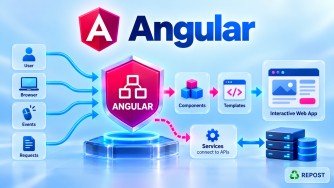


What is Angular CLI?
1. What is Angular CLI?
Angular CLI (Command Line Interface) is the official command-line tool used to create, develop, generate, build, test, and maintain Angular applications.
Instead of manually creating all Angular files and configuration, Angular CLI provides commands that automate common development tasks.
The main command is:
ngFor example:
ng new my-appcreates a new Angular application.
ng serveruns the Angular application locally.
ng generate component homegenerates a new component.
So, in simple terms:
Angular CLI is a command-line tool that helps developers create and manage Angular applications using
ngcommands.
2. Why Do We Need Angular CLI?
Without Angular CLI, developers would need to manually configure many parts of an Angular project, such as:
Project structure
TypeScript configuration
Build configuration
Development server
Testing configuration
Application files
Components
Services
Routing
Dependencies
Angular CLI automates much of this work.
For example, instead of manually creating:
home/
├── home.ts
├── home.html
├── home.css
└── home.spec.ts
we can run:
ng generate component homeor the shorter form:
ng g c homeAngular CLI generates the required files based on the project's configuration.
3. Purpose of Angular CLI
Angular CLI provides a standardized development workflow for Angular projects.
Its main purposes include:
- Creating Angular projects
- Running applications locally
- Generating components and services
- Building applications
- Running tests
- Managing project configuration
- Updating Angular packages
- Creating optimized production builds
Typical workflow:
Install Angular CLI
       ↓
Create Application
       ↓
Generate Components/Services
       ↓
Run Application
       ↓
Develop
       ↓
Test
       ↓
Build
       ↓
Deploy
4. Installing Angular CLI
Angular CLI is installed using npm.
First, Node.js and npm must be available.
Check Node.js:
node --versionCheck npm:
npm --versionInstall Angular CLI globally:
npm install -g @angular/cliThen verify the installation:
ng versionor:
ng vThis displays information about Angular CLI, Angular packages, Node.js, npm, and the operating environment.
5. Creating an Angular Application
Use:
ng new my-appAngular CLI asks configuration questions and creates the application.
Then:
cd my-appRun it:
ng serveBy default, the development application is commonly available at:
http://localhost:4200You can also use:
ng serve --openShort form:
ng serve -oThis starts the development server and opens the application in the browser.
6. Important Angular CLI Commands
ng new
Creates a new Angular application.
ng new my-appExample with routing:
ng new my-app --routingng serve
Runs the application using the Angular development server.
ng serveOpen browser automatically:
ng serve -oConceptually:
Angular Source Code
       ↓
    ng serve
       ↓
Development Build
       ↓
Development Server
       ↓
Browser
ng serve is mainly for development, not production hosting.
ng generate
Generates Angular code.
General syntax:
ng generate <type> <name>Short form:
ng g <type> <name>7. Common Generate Commands
Component
ng generate component homeShort form:
ng g c homeThis can create files such as:
home/
├── home.ts
├── home.html
├── home.css
└── home.spec.ts
The exact generated filenames depend on the Angular CLI version and project configuration.
Service
ng generate service services/productShort form:
ng g s services/productGuard
ng generate guard guards/authShort form:
ng g g guards/authInterceptor
ng generate interceptor interceptors/authPipe
ng generate pipe pipes/custom-dateShort form:
ng g p pipes/custom-dateDirective
ng generate directive directives/highlightShort form:
ng g d directives/highlightInterface
ng generate interface models/productShort form:
ng g i models/product8. ng build
ng build builds the Angular application.
ng buildConceptually:
Angular Source Code
       ↓
    ng build
       ↓
Compile
Bundle
Optimize
       ↓
Build Output
The generated output can then be deployed to an appropriate web hosting environment.
For example:
Angular Source
      ↓
ng build
      ↓
Build Output
      ↓
Web Server / Hosting
9. ng test
Runs unit tests configured for the Angular project.
ng testIt is used during development to verify application behavior.
10. ng update
Angular CLI can help update Angular packages.
For example:
ng updateThis shows packages that can be updated.
Specific Angular packages can also be updated through the CLI.
This is useful when moving an application to a newer Angular version.
11. ng add
ng add adds supported libraries or capabilities to an Angular application and can run the library's installation schematic.
General syntax:
ng add <package>It may do more than simply install an npm package because the package can provide setup logic that modifies the Angular project.
12. Angular CLI Configuration
Angular CLI projects commonly contain:
angular.jsonThis file contains workspace/project configuration related to tasks such as:
- Build
- Serve
- Test
- Assets
- Styles
- Scripts
- Different build configurations
A simplified project structure might look like:
my-app/
│
├── src/
│   ├── app/
│   ├── assets/
│   ├── index.html
│   └── main.ts
│
├── angular.json
├── package.json
├── tsconfig.json
└── node_modules/
13. Global CLI vs Local CLI
This is an important concept.
Global Angular CLI
Installed using:
npm install -g @angular/cliIt makes the ng command conveniently available from the terminal.
Local Angular CLI
An Angular project normally has Angular CLI as a project dependency.
You can see dependencies in:
package.jsonFor example, @angular/cli is normally listed under development dependencies.
Difference
| Global CLI | Local CLI |
|---|---|
| Installed on the machine | Installed for the project |
Conveniently provides ng command |
Project-specific CLI dependency |
Installed with -g |
Managed through package.json |
| Useful for creating/managing projects | Helps provide reproducible project tooling |
You can also invoke package-provided CLI tooling using npx, for example:
npx ng version14. Simple Angular CLI Workflow
A basic workflow is:
npm install -g @angular/cliCreate project:
ng new my-appEnter project:
cd my-appRun application:
ng serve -oGenerate component:
ng g c homeGenerate service:
ng g s services/productBuild:
ng buildSo the overall flow is:
Angular CLI
    |
    +-- ng new
    |      ↓
    |   Create Project
    |
    +-- ng generate
    |      ↓
    |   Generate Code
    |
    +-- ng serve
    |      ↓
    |   Develop / Run
    |
    +-- ng test
    |      ↓
    |   Test
    |
    +-- ng build
           ↓
       Build for Deployment
15. Advantages of Angular CLI
1. Faster Development
Common tasks can be performed with simple commands.
ng g c productsinstead of manually creating and configuring files.
2. Standardized Project Structure
CLI-generated Angular applications follow Angular conventions.
3. Reduces Manual Configuration
The CLI manages much of the build and development tooling.
4. Code Generation
It can generate:
Components
Services
Guards
Interceptors
Pipes
Directives
Interfaces
Classes
5. Development Server
You can quickly run the application using:
ng serve6. Build Support
Production-ready build output can be generated using:
ng build7. Update Support
Angular CLI provides:
ng updateto assist with framework/package updates and migrations.
16. Disadvantages
1. CLI Commands Need to Be Learned
Developers need to become familiar with commands such as:
ng new
ng serve
ng generate
ng build
ng test
ng update
2. Version Compatibility Matters
Angular, Angular CLI, Node.js, TypeScript, and related packages have compatibility requirements.
Using incompatible versions can cause installation or build problems.
3. Generated Code May Need Customization
CLI-generated files provide a starting structure. Real applications still require proper architecture and implementation.
4. Abstraction Can Hide Build Details
Because Angular CLI handles much of the underlying build configuration, beginners may initially have less visibility into how the tooling works internally.
17. Key Points
For interviews, remember:
- CLI = Command Line Interface.
- Angular CLI is the official tooling for Angular development.
- The main command is
ng. - Install it using:
npm install -g @angular/cli- Check the version using:
ng version- Create a project:
ng new my-app- Run locally:
ng serve- Generate code:
ng generateor:
ng g- Build:
ng build- Angular CLI uses project configuration such as
angular.json. - Angular CLI greatly reduces manual setup and repetitive development work.
ng serveis a development server, not your production hosting solution.
18. Interview Questions and Answers
Q1. What is Angular CLI?
Answer:
Angular CLI is the official command-line tool used to create, develop, generate, build, test, and maintain Angular applications. Its primary command is ng.
Q2. How do you install Angular CLI?
npm install -g @angular/cliThen verify it using:
ng versionQ3. How do you create a new Angular application?
ng new my-appQ4. How do you run an Angular application?
ng serveTo automatically open the browser:
ng serve -oQ5. What is the difference between ng new and ng generate?
ng new creates a new Angular workspace/application.
ng new my-appng generate generates code inside an existing Angular project.
ng g c productsQ6. What is the difference between ng serve and ng build?
ng serve |
ng build |
|---|---|
| Used during development | Creates build output |
| Starts development server | Does not serve the application by itself |
| Watches source changes | Produces deployable artifacts |
| Useful for local development | Used as part of deployment |
Q7. What is angular.json?
Answer:
angular.json is the Angular workspace configuration file. It contains configuration for tasks such as building, serving, testing, styles, scripts, and assets.
Q8. What does ng generate component do?
It generates the files required for an Angular component according to the project's configured conventions.
For example:
ng g c homecan generate:
home.ts
home.html
home.css
home.spec.ts
Q9. What is the difference between global and local Angular CLI?
Answer:
The global CLI is installed on the developer's machine and conveniently exposes the ng command. The local CLI is installed as part of the Angular project's dependencies and provides project-specific tooling.
Interview Summary
Angular CLI is the official command-line tool for Angular development. It provides the
ngcommand and is used to create Angular projects, generate components and services, run development servers, execute tests, build applications, and update Angular packages. Common commands includeng new,ng serve,ng generate,ng test,ng build, andng update.