

1. What is an Angular Component?
What is an Angular Component?
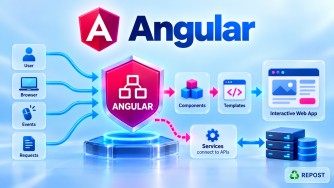
An Angular component is the fundamental building block used to create the user interface (UI) of an Angular application.
A component normally controls a particular section of a web page.
For example, an application may contain:
App
│
├── Header
├── Navigation
├── ProductList
│   └── Product
├── ShoppingCart
└── Footer
Here, Header, ProductList, Product, ShoppingCart, and Footer can each be separate Angular components.
A component mainly combines:
Component
   │
   ├── TypeScript Class  → Logic & Data
   ├── HTML Template     → UI
   ├── CSS               → Styling
   └── Metadata          → Angular Configuration
Why Do We Need Components?
Without components, the entire application's UI and logic could become one large piece of code.
Components allow us to divide the UI into small, independent, reusable, and maintainable pieces.
For example, instead of putting the header, products, cart, and footer into one large page:
Application
   │
   ├── Header Component
   ├── Product Component
   ├── Cart Component
   └── Footer Component
Each component is responsible for its own part of the UI.
Purpose of a Component
The main purposes are:
- Display data in the UI.
- Handle user interactions.
- Encapsulate UI logic.
- Divide a large application into smaller pieces.
- Make UI functionality reusable.
- Connect TypeScript data with an HTML template.
- Communicate with parent and child components.
For example:
ProductComponent
      │
      ├── Displays product
      ├── Shows price
      ├── Handles Add to Cart
      └── Displays product image
Simple Component Example
With modern Angular standalone components:
product.ts
import { Component } from '@angular/core';

@Component({
  selector: 'app-product',
  standalone: true,
  templateUrl: './product.html',
  styleUrl: './product.css'
})
export class Product {
  productName = 'Laptop';
  price = 50000;

  buyProduct() {
    alert('Product purchased');
  }
}
product.html
<h2>{{ productName }}</h2>

<p>Price: ₹{{ price }}</p>

<button (click)="buyProduct()">
  Buy
</button>
product.css
h2 {
  font-weight: bold;
}

button {
  padding: 10px;
}
Code Explanation
@Component
@Component({
})
@Component is a decorator.
It tells Angular:
This TypeScript class represents an Angular component.
The configuration inside @Component() is called component metadata.
selector
selector: 'app-product'Defines the HTML tag used to represent the component.
For example:
<app-product></app-product>Angular renders the Product component at this location.
standalone
standalone: trueIndicates that the component is standalone and doesn't need to be declared inside an NgModule.
Modern Angular uses standalone APIs by default.
templateUrl
templateUrl: './product.html'Specifies the HTML template belonging to the component.
styleUrl
styleUrl: './product.css'Specifies the CSS file used by the component.
Component Class
export class Product {
  productName = 'Laptop';
  price = 50000;
}
The TypeScript class contains the component's data and behavior.
The HTML accesses the values using interpolation:
{{ productName }}
{{ price }}
Event Handling
<button (click)="buyProduct()">When the user clicks the button, Angular calls:
buyProduct() {
  alert('Product purchased');
}
So the basic relationship is:
User
  │
  ▼
HTML Template
  │
  │ (click)
  ▼
TypeScript Class
  │
  │ Data changes
  ▼
HTML Template
Advantages
Reusability
A component can be reused in different places.
<app-product></app-product>Maintainability
Instead of maintaining one huge application file, functionality is divided into smaller components.
Separation of Concerns
HTML handles presentation, TypeScript handles behavior/data, and CSS handles styling.
Testability
Individual components can be tested separately.
Modularity
Large applications can be organized into a component hierarchy.
Disadvantages
Too Many Components
Breaking every tiny UI element into a separate component can make the application unnecessarily complicated.
Component Communication
Communication between deeply nested components can become difficult if the component hierarchy is poorly designed.
Learning Curve
Beginners need to understand concepts such as:
Components
Inputs / Outputs
Services
Dependency Injection
Signals
Lifecycle hooks
Routing
Key Points
- A component is a basic UI building block in Angular.
- Every Angular application contains components.
- A component controls a specific portion of the UI.
- A component contains a TypeScript class, template, styles, and metadata.
@Component()identifies a class as an Angular component.selectordefines how the component is referenced in HTML.templateUrlidentifies its HTML file.styleUrlidentifies its CSS file.- Modern Angular applications primarily use standalone components.
- Before standalone components, components were normally declared inside an
NgModule.
2. What Are the Parts of an Angular Component?
An Angular component can be understood as having four main parts:
| Part | Purpose |
|---|---|
| TypeScript Class | Data and behavior |
| HTML Template | UI structure |
| Styles | Component appearance |
| Metadata | Tells Angular how to configure the component |
Conceptually:
                 Angular Component
                        │
       ┌────────────────┼────────────────┐
       │                │                │
       ▼                ▼                ▼
 TypeScript Class   HTML Template      Styles
       │
       │
       ▼
 Component Metadata
1. TypeScript Class
The class contains the component's data and behavior.
export class Product {
  productName = 'Laptop';
  price = 50000;

  buyProduct() {
    console.log('Buying product');
  }
}
Here:
productName
price
are component data.
And:
buyProduct()is component behavior.
2. HTML Template
The template defines what the user sees.
<h2>{{ productName }}</h2>

<p>Price: ₹{{ price }}</p>

<button (click)="buyProduct()">
  Buy
</button>
The template can interact with the component class.
TypeScript                       HTML

productName  ────────────────► {{ productName }}

price        ────────────────► {{ price }}

buyProduct() ◄──────────────── (click)
3. Styles
Styles define the appearance of the component.
h2 {
  font-size: 24px;
}

button {
  padding: 10px;
}
Angular components can have their own styles, which helps keep styling associated with the relevant UI component.
4. Component Metadata
Metadata is defined using the @Component decorator.
@Component({
  selector: 'app-product',
  standalone: true,
  templateUrl: './product.html',
  styleUrl: './product.css'
})
Metadata tells Angular how the component should be created and used.
Important metadata properties include:
| Property | Purpose |
|---|---|
selector |
HTML selector for the component |
standalone |
Defines whether it is standalone |
templateUrl |
External HTML template |
template |
Inline HTML template |
styleUrl |
External style file |
styleUrls |
Multiple external style files |
styles |
Inline styles |
imports |
Dependencies used by a standalone component |
For example:
@Component({
  selector: 'app-product',
  imports: [CurrencyPipe],
  templateUrl: './product.html'
})
imports tells Angular which dependencies the standalone component's template needs.
External vs Inline Component
The template and CSS don't necessarily have to be separate files.
External
@Component({
  selector: 'app-product',
  templateUrl: './product.html',
  styleUrl: './product.css'
})
Usually better for normal or larger components.
Inline
@Component({
  selector: 'app-product',
  template: `
    <h2>Product</h2>
    <p>Laptop</p>
  `,
  styles: `
    h2 {
      font-weight: bold;
    }
  `
})
export class Product {
}
Inline templates/styles can be useful for very small components.
Before Standalone Components
Traditionally, Angular components were registered with an NgModule.
For example:
@NgModule({
  declarations: [
    AppComponent,
    ProductComponent
  ],
  imports: [
    BrowserModule
  ],
  bootstrap: [
    AppComponent
  ]
})
export class AppModule {
}
The component itself:
@Component({
  selector: 'app-product',
  templateUrl: './product.component.html',
  styleUrls: ['./product.component.css']
})
export class ProductComponent {
}
The important difference is:
Older Angular

Component
    │
    ▼
declared in NgModule
    │
    ▼
AppModule


Modern Angular

Standalone Component
    │
    ▼
Can directly import its dependencies
Standalone components therefore reduce the need for NgModule-based component registration.
Advantages of Component Structure
- Clear separation between UI, logic, and styles.
- Components are easier to maintain.
- Components can be reused.
- Individual components can be tested.
- Large applications can be divided into manageable sections.
- Standalone components reduce
NgModuleboilerplate.
Disadvantages
- Poor component design can create excessive component nesting.
- Parent-child communication can become complicated.
- Developers must decide the correct responsibility and boundary for each component.
- Large components can still become difficult to maintain if too much logic is placed in the component class.
Key Points
The easiest interview explanation is:
An Angular component is a reusable UI building block that controls a portion of the application's screen. It consists primarily of a TypeScript class, HTML template, styles, and metadata defined using the
@Componentdecorator.
Remember this relationship:
@Component Metadata
        │
        ▼
TypeScript Class
   ↕
HTML Template
   +
CSS Styles
        │
        ▼
      UI
Interview Questions & Answers
1. What is an Angular component?
An Angular component is a building block of the Angular UI. It combines a TypeScript class, HTML template, styles, and component metadata to control a specific part of the screen.
2. What are the main parts of a component?
The main parts are:
1. TypeScript class
2. HTML template
3. CSS/styles
4. Component metadata
3. What is @Component?
@Component is an Angular decorator that provides metadata about a component, such as its selector, template, styles, and imports.
4. What is a component selector?
A selector defines the HTML element used to render a component.
selector: 'app-product'Usage:
<app-product></app-product>5. What is the difference between template and templateUrl?
template defines HTML directly inside the component metadata.
template: `<h1>Hello</h1>`templateUrl references an external HTML file.
templateUrl: './product.html'6. What is the difference between older and modern Angular components?
Traditionally, components were declared inside an NgModule. Modern Angular primarily uses standalone components, where components can directly import their template dependencies without requiring NgModule declarations.