

Angular — Interview Quick Revision
1. What is Angular?
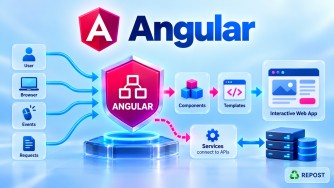
Angular is a TypeScript-based frontend framework developed by Google for building dynamic web applications, especially Single Page Applications (SPAs). It uses a component-based architecture.
@Component({ selector: 'app-home', template: `<h1>Hello Angular</h1>` })2. Why is Angular used with ASP.NET Core Web API?
Angular handles the frontend/UI, while ASP.NET Core Web API handles backend logic, database access, authentication, and APIs. Angular communicates with the API mainly through HTTP/JSON.
this.http.get<Product[]>('https://localhost:5001/api/products');3. What are the main features of Angular?
Angular provides components, data binding, directives, pipes, routing, forms, dependency injection, HttpClient, Signals, and RxJS. It provides a complete framework for building scalable frontend applications.
name = signal('Syed');4. What is a Single Page Application (SPA)?
A SPA loads the main application page once and dynamically updates content without performing a full browser page reload for every navigation.
/products → /products/10 → /cart (No full page reload)5. How does an Angular SPA work?
The browser initially loads Angular's index.html and JavaScript bundles. Angular then handles client-side routing, renders components, and communicates with backend APIs as required.
{ path: 'products', component: Products }6. What is the Angular CLI?
Angular CLI is a command-line tool used to create, develop, generate, build, test, and manage Angular applications.
ng new my-app
ng serve
ng generate component product
7. What is the Angular application structure?
An Angular application typically contains src, main.ts, index.html, components, services, routes, models, and configuration files. Modern Angular applications commonly use standalone components.
src → app → components / services / models / app.routes.ts8. What is a component in Angular?
A component is the basic building block of an Angular UI. It contains a TypeScript class, an HTML template, optional styles, and component metadata.
@Component({ selector: 'app-product', templateUrl: './product.html' })9. What is a template?
A template is the HTML view of an Angular component. It defines what is displayed and can contain Angular features such as interpolation, binding, and control flow.
<h2>Welcome {{ userName }}</h2>10. What is component metadata?
Component metadata is the configuration supplied to the @Component decorator that tells Angular how the component should behave, including its selector, template, styles, and imports.
@Component({ selector: 'app-home', templateUrl: './home.html', imports: [] })11. What is a selector in Angular?
A selector is the custom HTML identifier Angular uses to locate and render a component inside another template.
selector: 'app-product'Usage:
<app-product></app-product>12. What is the difference between Angular and AngularJS?
AngularJS is the older JavaScript-based framework using controllers, scopes, and directives. Angular is TypeScript-based, component-oriented, faster, and designed for modern application development.
AngularJS → JavaScript + Controllers
Angular   → TypeScript + Components
13. What is TypeScript, and why does Angular use it?
TypeScript is a superset of JavaScript that adds static typing, interfaces, classes, generics, and other development features. Angular uses it to improve type safety, maintainability, tooling, and scalability.
let productName: string = 'Laptop';14. How does an Angular application bootstrap?
Bootstrapping is the process of starting the Angular application and loading its root component. Modern standalone Angular uses bootstrapApplication() in main.ts.
bootstrapApplication(App, appConfig);Before standalone Angular, the root AppModule was bootstrapped:
platformBrowserDynamic().bootstrapModule(AppModule);15. What happens when an Angular application starts?
The browser loads index.html, which loads the Angular bundles. main.ts then bootstraps the application, Angular creates the root component, initializes required services/routing, and renders the UI.
index.html → main.ts → bootstrapApplication() → App → UI
16. What is Angular History and Version History?
AngularJS 1.x was released by Google in 2010 using JavaScript. Angular 2 was released in 2016 as a complete TypeScript-based rewrite; later versions continued evolving the same Angular framework.
AngularJS 1.x → Angular 2 → Angular 4 → ... → Modern AngularKey version milestones: Angular 2 introduced the modern component architecture; Angular 14 introduced standalone components as a developer preview, Angular 15 stabilized standalone APIs, Angular 16 introduced Signals, and Angular 17 introduced built-in control flow such as @if and @for.
17. What is Standalone vs Traditional NgModule Angular?
Traditional Angular organizes components, directives, and pipes inside NgModules, typically starting with AppModule. Modern Angular supports standalone components, allowing dependencies to be imported directly without requiring an NgModule.
Traditional NgModule:
@NgModule({ declarations: [AppComponent], imports: [BrowserModule] })Standalone:
@Component({ standalone: true, imports: [CommonModule] })Modern Angular applications generally use standalone APIs:
bootstrapApplication(App);18. What is Node.js and what is the role of NPM in Angular?
Node.js provides the runtime environment needed to execute Angular development tools such as the Angular CLI. NPM (Node Package Manager) installs and manages Angular and third-party packages defined in package.json.
npm install
npm install @angular/material
ng serve
In short:
Node.js → Runs Angular development tools
NPM     → Installs/manages packages
Angular → Builds the frontend application
Node.js is mainly a development/build dependency for a typical client-side Angular application; it is not automatically the production backend.