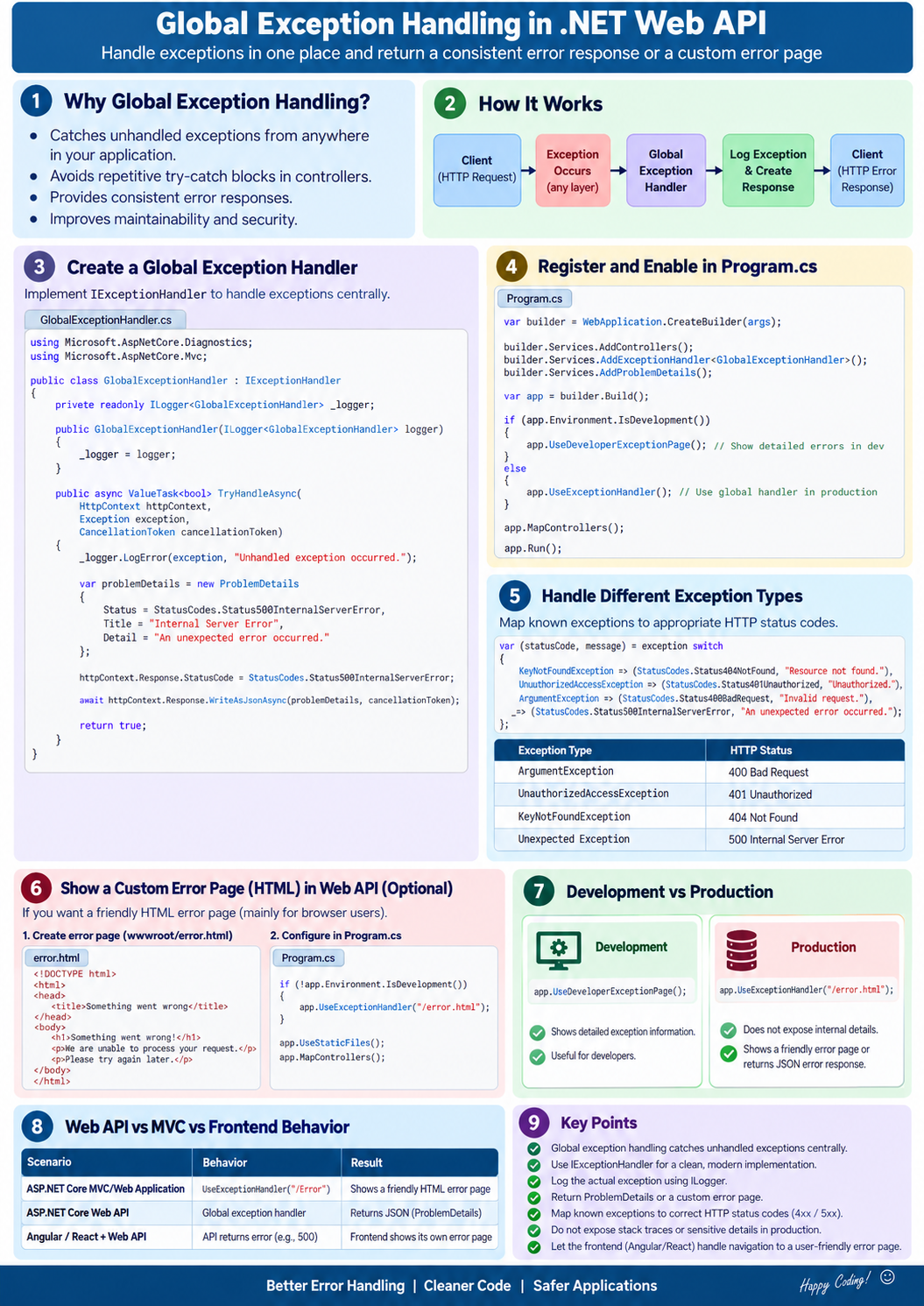


Global Exception Handling in ASP.NET Core Web API
Global exception handling is a centralized mechanism that catches unhandled exceptions from anywhere in the API and converts them into a consistent HTTP error response.
Instead of writing try-catch in every controller action, we configure one exception handler for the entire application.
ASP.NET Core provides built-in support through:
-
IExceptionHandler— recommended for .NET 8+ -
Exception-handling middleware
-
ProblemDetails— standard API error-response format
No external NuGet library is required.
1. Why do we need global exception handling?
Without global handling:
[HttpGet("{id}")]
public async Task<IActionResult> Get(int id)
{
    try
    {
        var product = await _service.GetByIdAsync(id);
        return Ok(product);
    }
    catch (Exception)
    {
        return StatusCode(500, "Something went wrong");
    }
}
This creates several problems:
-
Repeated
try-catchblocks -
Different error formats from different endpoints
-
Difficult logging and maintenance
-
Risk of exposing sensitive exception details
-
Controllers contain infrastructure concerns
With global handling:
[HttpGet("{id}")]
public async Task<IActionResult> Get(int id)
{
    var product = await _service.GetByIdAsync(id);
    return Ok(product);
}
If an exception occurs, the global handler catches it.
2. Request flow
flowchart TD
    A["Client request"] --> B["Exception middleware"]
    B --> C["Controller"]
    C --> D["Service"]
    D --> E["Repository / Database"]
    E -->|Success| F["Normal response"]
    E -->|Exception| B
    B --> G["Log exception"]
    G --> H["Map exception to status code"]
    H --> I["Return ProblemDetails JSON"]
Recommended implementation using IExceptionHandler
3. Create custom exceptions
Custom exceptions make it easy to distinguish different business errors.
NotFoundException.cs
namespace MyApi.Exceptions;

public sealed class NotFoundException : Exception
{
    public NotFoundException(string message)
        : base(message)
    {
    }
}
BadRequestException.cs
namespace MyApi.Exceptions;

public sealed class BadRequestException : Exception
{
    public BadRequestException(string message)
        : base(message)
    {
    }
}
ConflictException.cs
namespace MyApi.Exceptions;

public sealed class ConflictException : Exception
{
    public ConflictException(string message)
        : base(message)
    {
    }
}
4. Create the global exception handler
GlobalExceptionHandler.cs
using Microsoft.AspNetCore.Diagnostics;
using Microsoft.AspNetCore.Mvc;
using MyApi.Exceptions;

namespace MyApi.ExceptionHandlers;

public sealed class GlobalExceptionHandler
    : IExceptionHandler
{
    private readonly ILogger<GlobalExceptionHandler> _logger;
    private readonly IHostEnvironment _environment;

    public GlobalExceptionHandler(
        ILogger<GlobalExceptionHandler> logger,
        IHostEnvironment environment)
    {
        _logger = logger;
        _environment = environment;
    }

    public async ValueTask<bool> TryHandleAsync(
        HttpContext httpContext,
        Exception exception,
        CancellationToken cancellationToken)
    {
        // 1. Log complete exception internally
        _logger.LogError(
            exception,
            "Unhandled exception occurred. TraceId: {TraceId}",
            httpContext.TraceIdentifier);

        // 2. Convert exception into an HTTP status code
        var statusCode = exception switch
        {
            BadRequestException     => StatusCodes.Status400BadRequest,
            UnauthorizedAccessException
                                    => StatusCodes.Status403Forbidden,
            NotFoundException       => StatusCodes.Status404NotFound,
            ConflictException       => StatusCodes.Status409Conflict,
            TimeoutException        => StatusCodes.Status504GatewayTimeout,
            _                       => StatusCodes.Status500InternalServerError
        };

        // 3. Create a standard ProblemDetails response
        var problemDetails = new ProblemDetails
        {
            Status = statusCode,
            Title = GetTitle(statusCode),

            // Do not expose internal exception details in production
            Detail = statusCode == StatusCodes.Status500InternalServerError
                ? _environment.IsDevelopment()
                    ? exception.Message
                    : "An unexpected error occurred. Please try again later."
                : exception.Message,

            Instance = httpContext.Request.Path
        };

        problemDetails.Extensions["traceId"] =
            httpContext.TraceIdentifier;

        // 4. Return JSON response
        httpContext.Response.StatusCode = statusCode;

        await httpContext.Response.WriteAsJsonAsync(
            problemDetails,
            cancellationToken);

        // true means the exception has been handled
        return true;
    }

    private static string GetTitle(int statusCode)
    {
        return statusCode switch
        {
            StatusCodes.Status400BadRequest =>
                "Bad request",

            StatusCodes.Status403Forbidden =>
                "Access forbidden",

            StatusCodes.Status404NotFound =>
                "Resource not found",

            StatusCodes.Status409Conflict =>
                "Conflict occurred",

            StatusCodes.Status504GatewayTimeout =>
                "External service timeout",

            _ =>
                "Internal server error"
        };
    }
}
5. Register the exception handler
Program.cs
using MyApi.ExceptionHandlers;

var builder = WebApplication.CreateBuilder(args);

builder.Services.AddControllers();
builder.Services.AddEndpointsApiExplorer();
builder.Services.AddSwaggerGen();

// Register standardized ProblemDetails support
builder.Services.AddProblemDetails();

// Register the global exception handler
builder.Services.AddExceptionHandler<GlobalExceptionHandler>();

var app = builder.Build();

// Place it early so it can catch exceptions
// from middleware and endpoints registered after it.
app.UseExceptionHandler();

if (app.Environment.IsDevelopment())
{
    app.UseSwagger();
    app.UseSwaggerUI();
}

app.UseHttpsRedirection();

app.UseAuthentication();
app.UseAuthorization();

app.MapControllers();

app.Run();
The important registrations are:
builder.Services.AddProblemDetails();
builder.Services.AddExceptionHandler<GlobalExceptionHandler>();

app.UseExceptionHandler();
6. Service example
using MyApi.Exceptions;

public sealed class ProductService
{
    private static readonly List<Product> Products =
    [
        new Product(1, "Laptop", 75000),
        new Product(2, "Mobile", 35000)
    ];

    public Product GetById(int id)
    {
        if (id <= 0)
        {
            throw new BadRequestException(
                "Product ID must be greater than zero.");
        }

        var product = Products.FirstOrDefault(x => x.Id == id);

        if (product is null)
        {
            throw new NotFoundException(
                $"Product with ID {id} was not found.");
        }

        return product;
    }
}

public record Product(int Id, string Name, decimal Price);
7. Controller example
using Microsoft.AspNetCore.Mvc;

[ApiController]
[Route("api/[controller]")]
public sealed class ProductsController : ControllerBase
{
    private readonly ProductService _productService;

    public ProductsController(ProductService productService)
    {
        _productService = productService;
    }

    [HttpGet("{id:int}")]
    public ActionResult<Product> GetById(int id)
    {
        var product = _productService.GetById(id);

        return Ok(product);
    }
}
Register the service:
builder.Services.AddScoped<ProductService>();Notice that the controller does not contain a try-catch.
8. Example responses
Product not found
Request:
GET /api/products/100Response:
HTTP/1.1 404 Not Found
Content-Type: application/problem+json
{
"type": "about:blank",
"title": "Resource not found",
"status": 404,
"detail": "Product with ID 100 was not found.",
"instance": "/api/products/100",
"traceId": "0HN7K2B8N98R2:00000001"
}Unexpected exception
{
  "type": "about:blank",
  "title": "Internal server error",
  "status": 500,
  "detail": "An unexpected error occurred. Please try again later.",
  "instance": "/api/products/10",
  "traceId": "0HN7K2B8N98R2:00000002"
}
The client can provide the traceId to the support team. The support team can search the logs using that value.
9. Recommended exception-to-status-code mapping
| Exception situation | HTTP status |
|---|---|
| Invalid input | 400 Bad Request |
| Authentication required | 401 Unauthorized |
| Authenticated but no permission | 403 Forbidden |
| Resource not found | 404 Not Found |
| Duplicate record or concurrency conflict | 409 Conflict |
| Business validation failed | 422 Unprocessable Entity |
| External service timeout | 504 Gateway Timeout |
| Unexpected programming/system error | 500 Internal Server Error |
Normally, authentication middleware produces 401, rather than throwing an exception.
10. What is ProblemDetails?
ProblemDetails provides a standard structure for API errors.
Important properties:
| Property | Purpose |
|---|---|
Status |
HTTP status code |
Title |
Short error description |
Detail |
More information about the error |
Instance |
API path where the error occurred |
Type |
URI identifying the error type |
Extensions |
Additional values such as traceId |
Microsoft recommends Problem Details for consistent HTTP API error responses. Microsoft: Handle errors in ASP.NET Core APIs
11. Handle validation errors separately
Model validation errors are usually not exceptions.
With [ApiController], ASP.NET Core automatically returns 400 Bad Request when model validation fails.
public sealed class CreateProductRequest
{
    [Required]
    public string Name { get; set; } = string.Empty;

    [Range(1, 1_000_000)]
    public decimal Price { get; set; }
}
Controller:
[HttpPost]
public IActionResult Create(CreateProductRequest request)
{
    return Ok(request);
}
Invalid input automatically produces a validation response. Therefore, global exception handling should mainly handle unexpected exceptions and deliberately thrown business exceptions.
12. Middleware vs exception filter
| Global exception middleware | Exception filter |
|---|---|
| Handles errors across the application pipeline | Handles MVC/controller exceptions |
| Can catch exceptions from middleware, controllers and services registered after it | Mainly works inside the MVC pipeline |
| Recommended for general global handling | Useful for controller-specific behaviour |
Registered using UseExceptionHandler() |
Implements IExceptionFilter or IAsyncExceptionFilter |
For application-wide handling, prefer exception-handling middleware with IExceptionHandler.
13. Important production practices
-
Never return stack traces, SQL queries, connection strings or internal class names.
-
Log the complete exception on the server.
-
Return a safe message to the client.
-
Include a
traceIdor correlation ID. -
Use custom exceptions for known business situations.
-
Keep controller actions free from repetitive
try-catch. -
Do not convert every error to
500. -
Do not use exceptions for normal control flow.
-
Ensure exception middleware is registered early.
-
Send logs to Serilog, Application Insights, Seq, Elasticsearch or another centralized system.
-
If the response has already started, the exception handler may be unable to replace it with an error response.
Important distinction
Global exception handling catches thrown exceptions. It does not automatically handle every unsuccessful status code, such as an ordinary 404 caused by an unknown URL. Status-code handling can be configured separately using UseStatusCodePages().
Interview-ready answer
Global exception handling is a centralized mechanism for catching unhandled exceptions throughout an ASP.NET Core Web API. In .NET 8+, we can implement
IExceptionHandler, register it withAddExceptionHandler, and enable it usingUseExceptionHandler. The handler logs the complete exception, maps known exceptions to appropriate HTTP status codes, and returns a consistentProblemDetailsresponse. This avoids repetitivetry-catchblocks, prevents sensitive information from being exposed, and improves logging and maintainability.