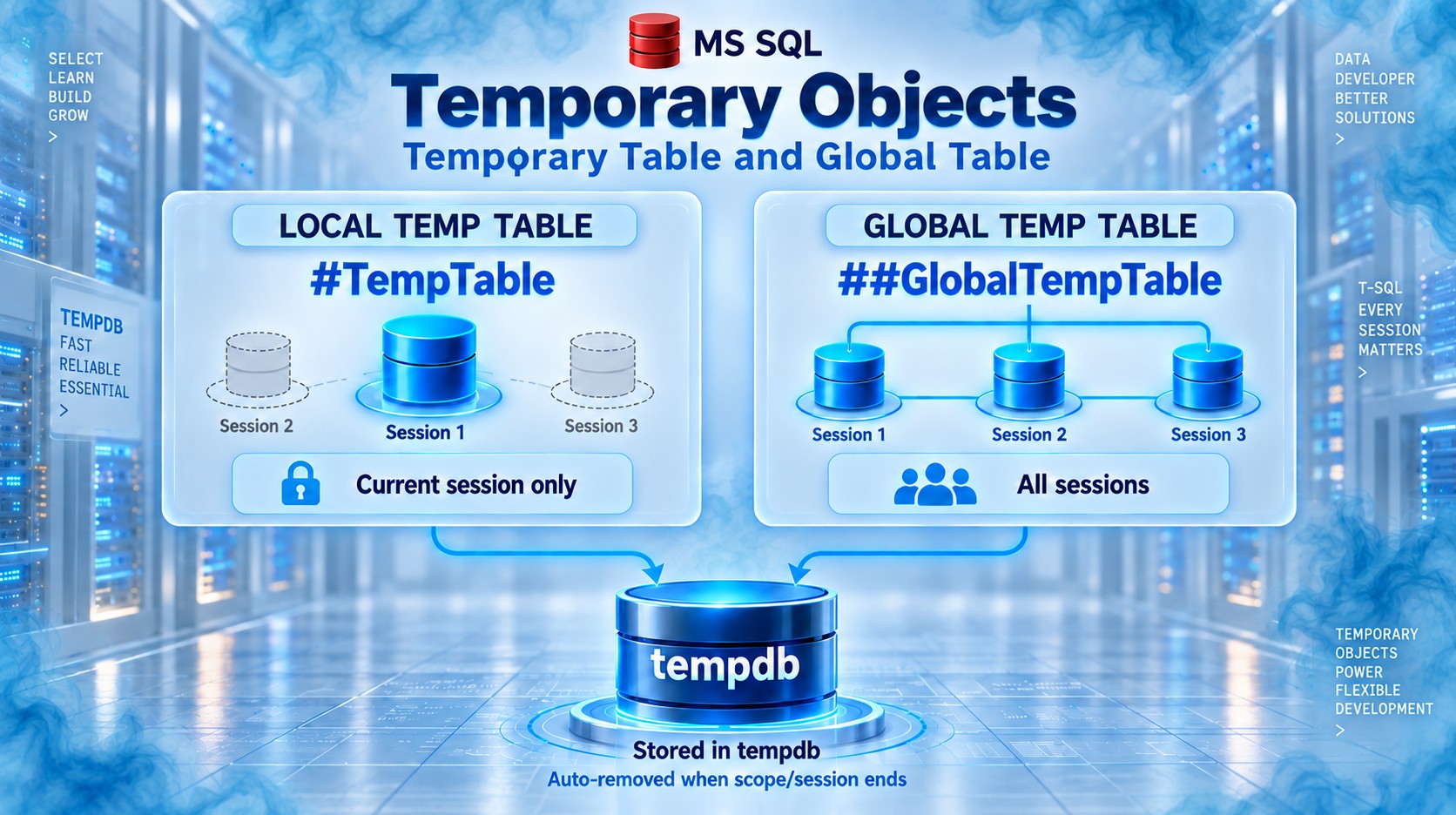


Local vs Global Temporary Tables in SQL Server
Temporary tables store intermediate data temporarily. They are created in the tempdb system database and are usually removed automatically when they are no longer required.
There are two types:
- Local temporary table — starts with
# - Global temporary table — starts with
##
1. Local Temporary Table
A local temporary table is available only to the SQL session or connection that created it.
Syntax
CREATE TABLE #Employee
(
    EmployeeId   INT,
    EmployeeName VARCHAR(100),
    Salary       DECIMAL(10,2)
);
Insert and retrieve data
INSERT INTO #Employee
VALUES
    (1, 'Arun', 50000),
    (2, 'Fathima', 60000);

SELECT *
FROM #Employee;
Result
| EmployeeId | EmployeeName | Salary |
|---|---|---|
| 1 | Arun | 50000.00 |
| 2 | Fathima | 60000.00 |
The table can be accessed only from the connection in which it was created.
If another user or another independent connection executes:
SELECT *
FROM #Employee;
SQL Server returns an error:
Invalid object name '#Employee'.Lifetime
A local temporary table is automatically deleted when:
- The connection that created it is closed.
- The stored procedure that created it finishes, if it was created inside that procedure.
- It is manually removed using
DROP TABLE.
DROP TABLE #Employee;2. Global Temporary Table
A global temporary table starts with ## and can be accessed by all SQL Server sessions and connections.
Syntax
CREATE TABLE ##Employee
(
    EmployeeId   INT,
    EmployeeName VARCHAR(100),
    Salary       DECIMAL(10,2)
);
Insert data
INSERT INTO ##Employee
VALUES
    (1, 'Arun', 50000),
    (2, 'Fathima', 60000);
Other users and connections can now execute:
SELECT *
FROM ##Employee;
Result
| EmployeeId | EmployeeName | Salary |
|---|---|---|
| 1 | Arun | 50000.00 |
| 2 | Fathima | 60000.00 |
Lifetime
A global temporary table is automatically deleted when:
- The session that created it is closed.
- No other active session is using or referencing it.
It can also be removed manually:
DROP TABLE ##Employee;Main differences
| Feature | Local temporary table | Global temporary table |
|---|---|---|
| Prefix | # |
## |
| Example | #Employee |
##Employee |
| Visibility | Creating session only | All sessions |
| Other connections can access it | No | Yes |
| Name conflict | Different sessions can use the same name | Only one table with that name can exist |
| Automatic removal | When its session or scope ends | When the creating session ends and no other session is using it |
| Common usage | Intermediate data within one process | Temporary data shared across sessions |
| Security risk | Lower | Higher because other sessions can access it |
| Recommended usage | Common and generally preferred | Use only when cross-session sharing is genuinely required |
Practical demonstration
Local temporary table test
Connection 1
CREATE TABLE #Orders
(
    OrderId     INT,
    CustomerName VARCHAR(100),
    Amount       DECIMAL(10,2)
);

INSERT INTO #Orders
VALUES
    (101, 'Rahim', 2500),
    (102, 'Kumar', 1800);

SELECT * FROM #Orders;
Connection 2
Open a new query window using a separate connection and execute:
SELECT * FROM #Orders;Result
Invalid object name '#Orders'.The second connection cannot see the local temporary table.
Important: In SSMS, a new query window may sometimes reuse the same connection context depending on how it is opened. Check the session ID using
SELECT @@SPID.
Global temporary table test
Connection 1
CREATE TABLE ##Orders
(
    OrderId      INT,
    CustomerName VARCHAR(100),
    Amount       DECIMAL(10,2)
);

INSERT INTO ##Orders
VALUES
    (101, 'Rahim', 2500),
    (102, 'Kumar', 1800);
Connection 2
SELECT * FROM ##Orders;Result
| OrderId | CustomerName | Amount |
|---|---|---|
| 101 | Rahim | 2500.00 |
| 102 | Kumar | 1800.00 |
Both connections can access the global temporary table.
Usage inside a stored procedure
Local temporary table
CREATE OR ALTER PROCEDURE dbo.GetDepartmentSummary
AS
BEGIN
    CREATE TABLE #DepartmentSummary
    (
        DepartmentId INT,
        EmployeeCount INT
    );

    INSERT INTO #DepartmentSummary
    SELECT DepartmentId, COUNT(*)
    FROM dbo.Employees
    GROUP BY DepartmentId;

    SELECT *
    FROM #DepartmentSummary;
END;
Execute it:
EXEC dbo.GetDepartmentSummary;The local temporary table is automatically removed after the stored procedure finishes.
The caller generally cannot access it afterward:
SELECT * FROM #DepartmentSummary;Invalid object name '#DepartmentSummary'.Calling a stored procedure from another procedure
A local temporary table created by a parent procedure can normally be accessed by a nested stored procedure executed within the same session.
CREATE OR ALTER PROCEDURE dbo.ReadTempEmployee
AS
BEGIN
    SELECT *
    FROM #Employee;
END;
GO

CREATE OR ALTER PROCEDURE dbo.CreateTempEmployee
AS
BEGIN
    CREATE TABLE #Employee
    (
        EmployeeId   INT,
        EmployeeName VARCHAR(100)
    );

    INSERT INTO #Employee
    VALUES (1, 'Arun');

    EXEC dbo.ReadTempEmployee;
END;
GO
Execute:
EXEC dbo.CreateTempEmployee;Result
| EmployeeId | EmployeeName |
|---|---|
| 1 | Arun |
This works because the nested procedure runs under the same database session.
However, a temporary table created inside a child procedure is not generally available to the parent after the child procedure has finished.
Temporary tables and dynamic SQL
Created outside dynamic SQL
A local temporary table created outside dynamic SQL can be accessed inside sp_executesql because it runs within the same session.
CREATE TABLE #Product
(
    ProductId   INT,
    ProductName VARCHAR(100)
);

INSERT INTO #Product
VALUES (1, 'Laptop');

EXEC sys.sp_executesql N'
    SELECT *
    FROM #Product;
';
This works successfully.
Created inside dynamic SQL
EXEC sys.sp_executesql N'
    CREATE TABLE #Product
    (
        ProductId INT
    );

    INSERT INTO #Product
    VALUES (1);
';

SELECT *
FROM #Product;
The final SELECT normally fails because the local temporary table was created inside the dynamic SQL scope and was removed when that scope ended.
A common solution is to create the temporary table before executing the dynamic SQL:
CREATE TABLE #Product
(
    ProductId INT
);

EXEC sys.sp_executesql N'
    INSERT INTO #Product
    VALUES (1);
';

SELECT *
FROM #Product;
Name handling in tempdb
SQL Server internally adds a unique suffix to local temporary-table names.
For example:
CREATE TABLE #Employee
(
    EmployeeId INT
);
Internally, SQL Server stores it with a name similar to:
#Employee_____________________________________00000000001ATherefore, two separate sessions can create their own local table named #Employee without conflicting.
-- Connection 1
CREATE TABLE #Employee (EmployeeId INT);

-- Connection 2
CREATE TABLE #Employee (EmployeeId INT);
Each connection gets its own separate temporary table.
Global temporary tables do not receive session-specific isolation in this way. Therefore, two sessions cannot simultaneously create different global tables using the same name.
-- Connection 1
CREATE TABLE ##Employee (EmployeeId INT);

-- Connection 2
CREATE TABLE ##Employee (EmployeeId INT);
The second connection receives an error because ##Employee already exists.
Global-table concurrency problem
Because every connection can access the same global temporary table, multiple users may overwrite or mix data.
CREATE TABLE ##ImportResult
(
    UserId  INT,
    Message VARCHAR(200)
);
User 1 inserts:
INSERT INTO ##ImportResult
VALUES (1, 'User 1 import completed');
User 2 inserts:
INSERT INTO ##ImportResult
VALUES (2, 'User 2 import failed');
Now both users see both rows:
SELECT *
FROM ##ImportResult;
This can create:
- Data mixing
- Race conditions
- Name conflicts
- Unexpected deletion
- Information exposure between users
- Difficult production issues
For this reason, global temporary tables should be used cautiously in multi-user applications.
Checking whether a temporary table exists
Local temporary table
IF OBJECT_ID('tempdb..#Employee') IS NOT NULL
BEGIN
    DROP TABLE #Employee;
END;
Modern SQL Server syntax:
DROP TABLE IF EXISTS #Employee;Global temporary table
IF OBJECT_ID('tempdb..##Employee') IS NOT NULL
BEGIN
    DROP TABLE ##Employee;
END;
Or:
DROP TABLE IF EXISTS ##Employee;Can temporary tables have indexes and constraints?
Yes. Both local and global temporary tables support:
- Primary keys
- Unique constraints
CHECKconstraintsDEFAULTconstraints- Clustered indexes
- Nonclustered indexes
- Statistics
Example:
CREATE TABLE #Employee
(
    EmployeeId   INT PRIMARY KEY,
    EmployeeName VARCHAR(100) NOT NULL,
    Salary       DECIMAL(10,2) CHECK (Salary >= 0)
);

CREATE NONCLUSTERED INDEX IX_Employee_EmployeeName
ON #Employee(EmployeeName);
This makes temporary tables useful for processing larger intermediate datasets.
Real-world examples
Use a local temporary table when
- Processing data inside a stored procedure
- Breaking a complicated query into smaller steps
- Performing bulk-data validation
- Generating a report
- Storing filtered intermediate records
- Reusing intermediate results
- Creating indexes on temporary data
Example:
SELECT
    CustomerId,
    SUM(Amount) AS TotalAmount
INTO #CustomerSales
FROM dbo.Orders
WHERE OrderDate >= '20260101'
GROUP BY CustomerId;

SELECT *
FROM #CustomerSales
WHERE TotalAmount > 100000;
Use a global temporary table when
- Multiple sessions must deliberately share temporary data
- An administrative process needs to exchange temporary results
- Different SQL Agent job steps or connections need shared data
However, a permanent staging table with a unique ProcessId, BatchId or UserId is often safer.
CREATE TABLE dbo.ImportStaging
(
    BatchId       UNIQUEIDENTIFIER,
    RecordId      INT,
    ImportedValue VARCHAR(200),
    CreatedAt     DATETIME2 DEFAULT SYSUTCDATETIME()
);
This approach provides better control over:
- Ownership
- Security
- Cleanup
- Concurrency
- Auditing
Performance considerations
Both types of temporary tables are physically stored in tempdb. They are not purely memory-based.
SQL Server may use memory for caching, but the temporary table still belongs to tempdb.
Performance can be affected by:
- Large numbers of temporary tables
- Excessive creation and deletion
- Large data volumes
- Missing indexes
- Too many indexes
- Heavy concurrent use of
tempdb - Long-running transactions
- Poorly sized
tempdbfiles
Temporary tables usually have statistics, so SQL Server can create better execution plans than it often can for some table-variable scenarios.
Important interview points
#TableNamecreates a local temporary table.##TableNamecreates a global temporary table.- Both are created in
tempdb. - A local temporary table is visible only within the creating session and its valid nested scope.
- A global temporary table is visible to every session.
- Separate sessions can create local temporary tables with the same name.
- Only one global temporary table with a particular name can exist at a time.
- Local temporary tables are commonly used in stored procedures and intermediate processing.
- Global temporary tables can cause concurrency, security and naming problems.
- Temporary tables can have indexes, constraints and statistics.
- They are automatically removed based on their scope and connection lifetime.
- Prefer local temporary tables unless temporary data must genuinely be shared across sessions.
Short interview answer
A local temporary table starts with # and is accessible only within the session that created it. It is normally removed when that session or its applicable scope ends. A global temporary table starts with ## and can be accessed by all sessions. It remains until the creating session ends and no other session is using it. Local temporary tables are safer and more common, while global temporary tables should be used carefully because they can cause naming, concurrency and data-sharing problems.
What is tempdb in SQL Server?
tempdb is a system database in SQL Server used as a temporary workspace.
SQL Server uses it to store:
- Temporary tables and temporary stored procedures
- Intermediate query results
- Sorting, grouping and hashing data
- Row versions used by snapshot-based isolation
- Work data required for operations such as index creation
- Internal data created by the SQL Server engine
tempdb is shared by all databases, users and sessions in the same SQL Server instance.
Why is tempdb required?
Many SQL Server operations need temporary storage while processing data.
Consider this query:
SELECT *
FROM dbo.Employees
ORDER BY Salary DESC;
If SQL Server cannot complete the sorting operation entirely in memory, it writes part of the sorting work to tempdb. This is called a spill to tempdb.
Therefore, even when an application does not explicitly create temporary tables, its queries may still use tempdb.
How is tempdb created?
tempdb is recreated every time the SQL Server service starts.
This means:
- Existing objects and data in
tempdbare removed during restart. - It always starts as a clean database.
- Applications must not store permanent business data in it.
- Its initial file size and configuration remain based on the configured settings.
Objects in tempdb are temporary, but its physical data and log files still exist on disk.
Main uses of tempdb
1. Local temporary tables
A local temporary table starts with a single #.
CREATE TABLE #Employee
(
    EmployeeId   INT,
    EmployeeName VARCHAR(100),
    Salary       DECIMAL(10,2)
);

INSERT INTO #Employee
VALUES
    (1, 'Arun', 50000),
    (2, 'Fathima', 60000);

SELECT *
FROM #Employee;
Result
| EmployeeId | EmployeeName | Salary |
|---|---|---|
| 1 | Arun | 50000.00 |
| 2 | Fathima | 60000.00 |
The table is physically created in tempdb:
SELECT *
FROM tempdb.sys.tables
WHERE name LIKE '#Employee%';
SQL Server internally adds a unique suffix to the table name so that multiple sessions can create local temporary tables with the same name.
2. Global temporary tables
A global temporary table starts with ##.
CREATE TABLE ##ProcessingStatus
(
    ProcessId INT,
    Status    VARCHAR(50)
);

INSERT INTO ##ProcessingStatus
VALUES (101, 'Completed');
It is accessible from other sessions:
SELECT *
FROM ##ProcessingStatus;
Global temporary tables are also stored in tempdb.
They should be used carefully because multiple sessions can read or modify their data.
3. Table variables
Table variables are also backed by tempdb; they are not guaranteed to exist only in memory.
DECLARE @Employee TABLE
(
    EmployeeId   INT,
    EmployeeName VARCHAR(100)
);

INSERT INTO @Employee
VALUES
    (1, 'Arun'),
    (2, 'Fathima');

SELECT *
FROM @Employee;
Their scope is normally limited to the batch, stored procedure or function in which they are declared.
4. Sorting operations
Queries using operations such as the following may require temporary space:
ORDER BYGROUP BYDISTINCT- Window functions
- Merge joins
- Index creation or rebuilding
Example:
SELECT
    EmployeeId,
    EmployeeName,
    Salary
FROM dbo.Employees
ORDER BY Salary DESC;
SQL Server first requests a memory grant for the sorting operation.
If the available memory is insufficient, the sort writes temporary work data into tempdb.
Execution plans may report:
Sort Warnings
Spill Level
Spilled Data Size
A spill increases disk I/O and can reduce query performance.
5. Hash operations
SQL Server may use hash operations for:
- Hash joins
- Hash aggregation
- Duplicate removal
Example:
SELECT
    d.DepartmentName,
    COUNT(*) AS EmployeeCount
FROM dbo.Employees AS e
INNER JOIN dbo.Departments AS d
    ON d.DepartmentId = e.DepartmentId
GROUP BY d.DepartmentName;
The execution plan may use:
Hash Match (Inner Join)Hash Match (Aggregate)
If the memory grant is insufficient, part of the hash data is written to tempdb.
6. Intermediate query results
SQL Server can use tempdb to hold intermediate results created during complex query processing.
Examples include:
- Spools
- Worktables
- Workfiles
- Cursors
- Large object processing
- Complex joins
- Recursive queries
- Trigger processing
For example, an execution plan may contain:
Table Spool
Index Spool
Window Spool
A spool temporarily stores rows so SQL Server can reuse them instead of repeatedly reading or calculating the same data.
The associated work data may use tempdb.
7. Row versioning
tempdb contains a version store that keeps older versions of modified rows.
Row versions are used by features such as:
READ COMMITTED SNAPSHOTSNAPSHOTisolation- Online index operations
- Certain trigger operations
- Accelerated Database Recovery-related processing, depending on configuration
Example scenario
Assume the following data exists:
SELECT AccountId, Balance
FROM dbo.Accounts
WHERE AccountId = 1;
Original value
| AccountId | Balance |
|---|---|
| 1 | 5000.00 |
One transaction updates it:
BEGIN TRANSACTION;

UPDATE dbo.Accounts
SET Balance = 4000
WHERE AccountId = 1;

-- Transaction remains open
When snapshot-based isolation is enabled, SQL Server can keep the previous version—5000—in the version store.
Another transaction may read the previous committed value without being blocked by the uncommitted update.
Long-running transactions can prevent old row versions from being cleaned up, causing the version store and tempdb to grow.
8. Index operations
Index creation and rebuilding may use tempdb for sorting.
ALTER INDEX IX_Employees_DepartmentId
ON dbo.Employees
REBUILD WITH (SORT_IN_TEMPDB = ON);
SORT_IN_TEMPDB = ON instructs SQL Server to store intermediate sorting data in tempdb instead of the user database.
Possible benefits
- Reduces temporary work in the user database
- May improve index-building performance when
tempdbis on faster storage - Can make the final index allocation more sequential
Requirement
tempdb must have enough free space for the sorting operation.
9. DBCC CHECKDB
Database consistency checks can use significant tempdb space.
DBCC CHECKDB ('SalesDatabase');DBCC CHECKDB performs internal consistency checking and may require temporary space depending on the database size and operation.
For large databases, insufficient tempdb capacity can cause the command to fail.
10. Temporary stored procedures
Temporary stored procedures can also be created.
Local temporary procedure
CREATE PROCEDURE #GetCurrentDate
AS
BEGIN
    SELECT GETDATE() AS CurrentDate;
END;
GO

EXEC #GetCurrentDate;
Global temporary procedure
CREATE PROCEDURE ##GetServerName
AS
BEGIN
    SELECT @@SERVERNAME AS ServerName;
END;
GO
They are stored in tempdb and follow rules similar to temporary tables.
Temporary stored procedures are supported but are used less frequently than temporary tables.
User objects vs internal objects vs version store
tempdb usage can be divided into three main categories.
| Category | Examples |
|---|---|
| User objects | Temporary tables, table variables and temporary procedures |
| Internal objects | Sorts, hashes, spools, worktables and workfiles |
| Version store | Older row versions required by snapshot-based processing |
This distinction is important when diagnosing why tempdb is growing.
Check tempdb files
USE tempdb;
GO

SELECT
    name,
    type_desc,
    size * 8.0 / 1024 AS SizeMB,
    growth,
    is_percent_growth,
    physical_name
FROM sys.database_files;
Important columns
name: Logical file nametype_desc: Data file or log fileSizeMB: Current file sizegrowth: Configured growth amountis_percent_growth: Indicates percentage-based growthphysical_name: File location
Check overall space usage
USE tempdb;
GO

SELECT
    SUM(user_object_reserved_page_count) * 8.0 / 1024
        AS UserObjectsMB,
    SUM(internal_object_reserved_page_count) * 8.0 / 1024
        AS InternalObjectsMB,
    SUM(version_store_reserved_page_count) * 8.0 / 1024
        AS VersionStoreMB,
    SUM(unallocated_extent_page_count) * 8.0 / 1024
        AS FreeSpaceMB
FROM sys.dm_db_file_space_usage;
This helps determine whether tempdb space is being consumed by:
- Temporary tables
- Internal query operations
- Row versioning
Find sessions consuming tempdb
SELECT
    session_id,
    user_objects_alloc_page_count * 8.0 / 1024
        AS UserObjectsAllocatedMB,
    user_objects_dealloc_page_count * 8.0 / 1024
        AS UserObjectsDeallocatedMB,
    internal_objects_alloc_page_count * 8.0 / 1024
        AS InternalObjectsAllocatedMB,
    internal_objects_dealloc_page_count * 8.0 / 1024
        AS InternalObjectsDeallocatedMB
FROM sys.dm_db_session_space_usage
ORDER BY
    user_objects_alloc_page_count +
    internal_objects_alloc_page_count DESC;
This shows cumulative allocations and deallocations for each session.
To estimate currently retained pages:
SELECT
    session_id,
    (
        user_objects_alloc_page_count -
        user_objects_dealloc_page_count
    ) * 8.0 / 1024 AS CurrentUserObjectsMB,
    (
        internal_objects_alloc_page_count -
        internal_objects_dealloc_page_count
    ) * 8.0 / 1024 AS CurrentInternalObjectsMB
FROM sys.dm_db_session_space_usage
ORDER BY CurrentUserObjectsMB + CurrentInternalObjectsMB DESC;
Negative or unexpected values can occasionally appear because of allocation-accounting behavior, task movement or timing, so combine this information with request-level diagnostics.
Find active requests using tempdb
SELECT
    r.session_id,
    r.status,
    r.command,
    r.database_id,
    r.cpu_time,
    r.total_elapsed_time,
    t.internal_objects_alloc_page_count * 8.0 / 1024
        AS InternalAllocatedMB,
    t.user_objects_alloc_page_count * 8.0 / 1024
        AS UserAllocatedMB,
    st.text AS SqlText
FROM sys.dm_exec_requests AS r
INNER JOIN sys.dm_db_task_space_usage AS t
    ON r.session_id = t.session_id
   AND r.request_id = t.request_id
CROSS APPLY sys.dm_exec_sql_text(r.sql_handle) AS st
ORDER BY
    t.internal_objects_alloc_page_count +
    t.user_objects_alloc_page_count DESC;
Because a request may have multiple tasks, this can produce multiple rows per request. For parallel queries, aggregate task values by session_id and request_id for accurate totals.
Why can tempdb grow?
Common reasons include:
- Large temporary tables
- Poorly written queries
- Sort or hash spills
- Large index rebuilds
- Long-running transactions
- Snapshot isolation or RCSI
- Unclosed transactions
- Large reporting queries
- Large
DBCC CHECKDBoperations - Insufficient query memory grants
- Heavy concurrent workloads
- Lack of cleanup in application sessions
Example:
BEGIN TRANSACTION;

UPDATE dbo.LargeTable
SET Status = 'Processed';

-- Transaction remains open for a long time
With row-versioning features active, old row versions may need to remain in tempdb until the transaction ends.
What happens when tempdb becomes full?
Operations requiring temporary space may fail.
Possible errors include:
Could not allocate space for object in database 'tempdb'
because the filegroup is full.
Possible effects include:
- Queries failing
- Sorting and grouping operations failing
- Temporary-table creation failing
- Index rebuilding failing
- Snapshot-based transactions failing
- Overall server performance degradation
Because all databases share tempdb, one problematic workload can affect the entire SQL Server instance.
tempdb data file and log file
Like other databases, tempdb has:
- One or more data files
- One transaction log file
Data files
They store:
- Temporary tables
- Internal work objects
- Version-store pages
Log file
It records changes required for transaction rollback and operational consistency.
tempdb uses simplified logging because crash recovery is unnecessary: the database is recreated when SQL Server starts. However, it is still not “unlogged.”
Configuration best practices
1. Pre-size tempdb
Set an initial size large enough for the normal workload.
This reduces repeated automatic growth:
ALTER DATABASE tempdb
MODIFY FILE
(
    NAME = tempdev,
    SIZE = 8192MB
);
Choose the size based on actual monitoring, not a universal fixed number.
2. Use fixed-size autogrowth
Prefer an appropriate fixed MB growth value instead of a small percentage:
ALTER DATABASE tempdb
MODIFY FILE
(
    NAME = tempdev,
    FILEGROWTH = 512MB
);
The correct value depends on the workload and storage speed.
Very small growth values cause frequent growth events. Extremely large values may cause unnecessary delays and disk usage.
3. Use multiple equally sized data files when needed
Multiple tempdb data files can reduce allocation contention under concurrent workloads.
Common starting guidance is:
- For servers with up to eight logical processors, consider up to eight equally sized files.
- For larger servers, begin conservatively and add files in groups if monitoring confirms allocation contention.
Do not blindly create one file per CPU.
All data files should normally have:
- Equal initial sizes
- Equal growth settings
- Appropriate storage placement
Modern SQL Server setup often configures multiple tempdb files automatically based on detected processors, but the configuration should still be reviewed.
4. Use fast storage
tempdb can generate heavy read and write activity.
Fast, low-latency storage can improve workloads involving:
- Large sorts
- Hash operations
- Temporary tables
- Row versioning
- Index maintenance
Storage must also provide enough capacity for peak usage.
5. Monitor query spills
Sort and hash spills frequently indicate:
- Inaccurate cardinality estimates
- Outdated statistics
- Poor execution plans
- Insufficient indexes
- Insufficient memory grants
- Memory pressure
- Excessively large result sets
Increasing tempdb size prevents space failures, but it does not fix the underlying query problem.
6. Avoid shrinking it routinely
Do not regularly shrink tempdb.
DBCC SHRINKDATABASE (tempdb);Routine shrinking can cause:
- File fragmentation
- Repeated file growth
- Additional I/O
- Performance instability
Shrink it only after an exceptional one-time growth event and after identifying the cause.
7. Keep transactions short
Long-running transactions may retain row versions and delay cleanup.
BEGIN TRANSACTION;

-- Perform database work quickly

COMMIT TRANSACTION;
Avoid user interaction, long waits or external API calls inside a database transaction.
What should not be stored in tempdb?
Do not use tempdb for:
- Permanent customer information
- Application configuration
- Audit records
- Transaction history
- Data that must survive a SQL Server restart
- Backups of important business data
For example, this is unsafe:
USE tempdb;
GO

CREATE TABLE dbo.CustomerOrders
(
    OrderId INT,
    Amount  DECIMAL(10,2)
);
Although the table can be created, it will disappear when SQL Server restarts.
tempdb versus a normal user database
| Feature | tempdb |
User database |
|---|---|---|
| Purpose | Temporary workspace | Permanent application data |
| Recreated at restart | Yes | No |
| Data survives restart | No | Yes |
| Shared across databases | Yes | No |
| Stores temporary tables | Yes | Not directly |
| Used for row versions | Yes | Depending on feature/configuration, related metadata may exist elsewhere |
| Backup supported | No | Yes |
| Full recovery available | No | Yes |
| Common recovery model | Simple | Simple, Full or Bulk-logged |
Real-world example
Consider a monthly sales report:
SELECT
    CustomerId,
    SUM(Amount) AS TotalSales
INTO #CustomerSales
FROM dbo.Orders
WHERE OrderDate >= '20260901'
  AND OrderDate <  '20261001'
GROUP BY CustomerId;

CREATE INDEX IX_CustomerSales_TotalSales
ON #CustomerSales(TotalSales);

SELECT *
FROM #CustomerSales
WHERE TotalSales >= 100000
ORDER BY TotalSales DESC;
tempdb may be used for:
- Storing
#CustomerSales - Sorting data during index creation
- Sorting the final result
- Internal grouping or hash operations
- Spills if the memory grant is insufficient
A single query can therefore use tempdb in several ways.
Important interview points
tempdbis a system database used as SQL Server’s temporary workspace.- It is shared by all databases and sessions in the SQL Server instance.
- It is recreated every time SQL Server starts.
- Data stored in it does not survive a server restart.
- Local and global temporary tables are stored in
tempdb. - Table variables also use
tempdb; they are not always memory-only. - SQL Server uses it for sorts, hashes, spools, worktables and other internal operations.
- The version store in
tempdbsupports snapshot-based isolation and related features. - Sort and hash spills occur when a query’s memory grant is insufficient.
tempdbshould be correctly sized and monitored.- Multiple equally sized data files can reduce allocation contention.
- Fixed-size autogrowth is usually preferable to small percentage growth.
- Routine shrinking is not recommended.
- When it becomes full, operations across the entire SQL Server instance may fail.
- Increasing its size treats a capacity problem; query and transaction tuning may still be necessary.
Short interview answer
tempdb is a SQL Server system database that acts as a shared temporary workspace. It stores temporary tables, table variables, intermediate query results, sort and hash work data, spools and row versions. It is recreated whenever SQL Server starts, so its data is not permanent. Because every database and session can use it, poor queries, long transactions or incorrect sizing can create instance-wide performance problems.
What causes tempdb performance problems?
tempdb performance problems occur when SQL Server creates more temporary work than the available storage, memory, file configuration, or I/O subsystem can handle.
Because one tempdb database is shared by all databases and sessions in a SQL Server instance, a single inefficient query can affect the entire server.
Common causes
1. Large temporary tables
Queries or stored procedures may create temporary tables containing millions of rows.
SELECT *
INTO #LargeOrders
FROM dbo.Orders;
This copies every column and row into tempdb.
Problems
- High
tempdbspace usage - Heavy disk reads and writes
- Transaction-log growth
- Longer execution time
- Contention between concurrent sessions
Better approach
Copy only the required rows and columns:
SELECT
    OrderId,
    CustomerId,
    OrderDate,
    TotalAmount
INTO #RecentOrders
FROM dbo.Orders
WHERE OrderDate >= DATEADD(MONTH, -1, GETDATE());
2. Sort spills
Operations such as these may require sorting:
ORDER BYGROUP BYDISTINCT- Window functions
- Merge joins
- Index creation
SELECT
    CustomerId,
    OrderDate,
    TotalAmount
FROM dbo.Orders
ORDER BY TotalAmount DESC;
SQL Server requests memory to perform the sort. If the granted memory is insufficient, SQL Server writes intermediate data to tempdb. This is called a sort spill.
Common causes
- Outdated statistics
- Incorrect row estimates
- Missing indexes
- Server memory pressure
- Very large result sets
- Parameter-sensitive execution plans
How to identify it
Check the actual execution plan for warnings such as:
Operator used tempdb to spill data during executionThe Sort operator may show:
- Spill level
- Number of spilled pages
- Granted memory
- Used memory
Possible solutions
- Update statistics
- Create an appropriate index
- Return fewer rows and columns
- Correct cardinality-estimation problems
- Investigate parameter sniffing
- Reduce server memory pressure
- Rewrite the query if necessary
Increasing tempdb size prevents space errors, but it does not eliminate the underlying spill.
3. Hash spills
SQL Server uses hash operations for:
- Hash joins
- Hash aggregation
- Duplicate removal
SELECT
    o.CustomerId,
    SUM(o.TotalAmount) AS TotalSales
FROM dbo.Orders AS o
INNER JOIN dbo.Customers AS c
    ON c.CustomerId = o.CustomerId
GROUP BY o.CustomerId;
If the hash table does not fit into the granted memory, part of it is written to tempdb.
Effects
- Additional physical I/O
- Slower query execution
- Higher
tempdbutilization - Increased competition with other queries
Solutions
- Update statistics
- Create suitable indexes on join and grouping columns
- Filter unnecessary rows earlier
- Correct poor cardinality estimates
- Review memory availability
- Inspect the execution plan
4. Excessive temporary-table creation and deletion
Applications may repeatedly create and drop temporary tables:
CREATE TABLE #Result
(
    Id    INT,
    Value VARCHAR(100)
);

-- Use the table

DROP TABLE #Result;
When hundreds or thousands of sessions do this concurrently, SQL Server repeatedly updates tempdb metadata and allocation structures.
Possible results
- Metadata contention
- Allocation-page contention
- Increased CPU usage
- Sessions waiting to create or drop objects
Temporary-object caching and newer SQL Server metadata improvements can reduce this problem, but poor application design can still create excessive pressure.
Improvements
- Avoid unnecessary temporary tables
- Reuse temporary tables within the same procedure where practical
- Reduce extremely frequent create/drop cycles
- Combine unnecessary processing steps
- Keep SQL Server updated
- Consider memory-optimized
tempdbmetadata where supported and appropriate
5. Allocation-page contention
When many sessions simultaneously create or expand temporary objects, they may compete for special allocation pages in tempdb.
Historically important allocation pages include:
- PFS — Page Free Space
- GAM — Global Allocation Map
- SGAM — Shared Global Allocation Map
Symptoms
Sessions may wait on:
PAGELATCH_UP
PAGELATCH_EX
A page latch wait concerns access to an in-memory page. It is different from a physical disk I/O wait.
If many sessions wait on the same tempdb allocation page, it normally indicates allocation contention.
Common solutions
- Use multiple equally sized
tempdbdata files - Use identical file-growth settings
- Keep SQL Server current
- Reduce unnecessary temporary-object creation
- Review metadata optimization options
Modern SQL Server versions contain several improvements that reduce allocation contention, so file count should be based on monitoring rather than blindly adding files.
6. Incorrect number of data files
Using only one tempdb data file on a heavily concurrent server can create allocation contention.
However, creating too many files can also cause:
- Unnecessary management overhead
- Longer startup and recovery-related initialization work
- Excessive storage use
- No improvement when contention is not the actual problem
General starting guidance
- For up to eight logical processors, commonly start with an equal number of
tempdbdata files, up to eight. - For more than eight logical processors, commonly start with eight files.
- Add files in groups only when monitoring confirms continuing allocation contention.
This is a starting point, not a universal rule.
All tempdb data files should normally have:
- Equal initial sizes
- Equal autogrowth settings
- The same performance characteristics
7. Unequally sized data files
SQL Server distributes page allocations across data files using proportional-fill behavior.
If one file is much larger, it receives more allocations than the smaller files.
Example:
| File | Size |
|---|---|
tempdev1 |
16 GB |
tempdev2 |
4 GB |
tempdev3 |
4 GB |
tempdev4 |
4 GB |
The first file receives a larger portion of the workload, which defeats the purpose of having multiple files.
Better configuration
| File | Size | Growth |
|---|---|---|
tempdev1 |
16 GB | 1 GB |
tempdev2 |
16 GB | 1 GB |
tempdev3 |
16 GB | 1 GB |
tempdev4 |
16 GB | 1 GB |
8. Small initial file size
If tempdb starts too small, its files must repeatedly grow as the workload increases.
Effects
- Query delays during growth
- File fragmentation
- Frequent growth events
- Risk of running out of disk space
- Unpredictable performance
Solution
Pre-size tempdb based on observed normal and peak usage.
ALTER DATABASE tempdb
MODIFY FILE
(
    NAME = tempdev,
    SIZE = 16384MB
);
Do not choose a size without verifying available disk capacity.
9. Poor autogrowth configuration
Very small growth setting
For example:
FILEGROWTH = 1MBThis can cause hundreds of growth events during a large operation.
Percentage growth
For example:
FILEGROWTH = 10%As the file becomes larger, each growth becomes progressively larger and less predictable.
Better approach
Use a reasonable fixed-size increment:
ALTER DATABASE tempdb
MODIFY FILE
(
    NAME = tempdev,
    FILEGROWTH = 512MB
);
The correct size depends on:
- Workload
- File size
- Storage speed
- Acceptable growth duration
- Available disk space
Autogrowth is an emergency safety mechanism, not a replacement for proper sizing.
10. Slow storage
tempdb can generate intensive random and sequential reads and writes.
Slow storage affects:
- Temporary-table processing
- Sort and hash spills
- Row-version access
- Index creation and rebuilding
- Reporting queries
- Worktables and spools
Common symptoms
- High disk latency
PAGEIOLATCH_*waits- Long-running queries using temporary objects
- Slow spill operations
Improvements
- Place
tempdbon fast, low-latency storage - Ensure sufficient IOPS and throughput
- Pre-size files
- Avoid sharing a heavily saturated disk
- Tune queries that generate unnecessary I/O
Faster storage can reduce the symptoms, but inefficient queries should still be corrected.
11. Insufficient disk space
Large operations can consume all available tempdb space:
- Large index rebuilds
- Large temporary tables
DBCC CHECKDB- Sort or hash spills
- Row-version growth
- Large reporting queries
When no space is available, SQL Server can return an error similar to:
Could not allocate space for object in database 'tempdb'
because the filegroup is full.
Prevention
- Monitor free space
- Configure alerts
- Estimate space for maintenance operations
- Pre-size files
- Avoid unrestricted file growth
- Identify unusually large consumers
12. Long-running transactions and version-store growth
When row versioning is used, older versions of modified rows are stored in the version store.
Features that can use row versions include:
READ COMMITTED SNAPSHOTSNAPSHOTisolation- Online index operations
- Certain triggers
- Multiple Active Result Sets
- Some engine features
A long-running transaction may prevent SQL Server from cleaning up old versions.
Example
SET TRANSACTION ISOLATION LEVEL SNAPSHOT;
BEGIN TRANSACTION;

SELECT *
FROM dbo.Orders;

-- Transaction remains open for a long time
Meanwhile, other sessions update many rows. SQL Server may have to retain older versions until the snapshot transaction finishes.
Effects
- Rapid version-store growth
- High
tempdbI/O - Disk-space exhaustion
- Performance degradation for the entire instance
Find long-running transactions
DBCC OPENTRAN;For snapshot-related activity:
SELECT
    transaction_id,
    session_id,
    elapsed_time_seconds,
    is_snapshot
FROM sys.dm_tran_active_snapshot_database_transactions
ORDER BY elapsed_time_seconds DESC;
Solutions
- Keep transactions short
- Close abandoned sessions
- Avoid user interaction inside transactions
- Commit or roll back promptly
- Process large updates in controlled batches
- Monitor version-store usage
13. Large index rebuilds
Index creation or rebuilding may use significant temporary space, particularly with:
ALTER INDEX ALL
ON dbo.LargeOrders
REBUILD WITH (SORT_IN_TEMPDB = ON);
SORT_IN_TEMPDB = ON places intermediate sorting data in tempdb.
Problems
tempdbmay become full- Other workloads compete for I/O
- Large log activity
- Performance degradation during maintenance
Solutions
- Estimate space before rebuilding
- Rebuild during low-activity periods
- Rebuild only indexes that require maintenance
- Avoid rebuilding every index automatically
- Use an appropriate maintenance strategy
- Confirm that
tempdbhas enough capacity
14. Large DBCC CHECKDB operations
DBCC CHECKDB ('ProductionDatabase');DBCC CHECKDB can require significant temporary working space, especially for large databases.
Running it during busy periods may compete with application queries for:
- CPU
- Memory
- Storage bandwidth
tempdbcapacity
Schedule it carefully and monitor available space.
15. Poorly designed queries
Queries can unnecessarily consume tempdb because of:
- Selecting unnecessary columns
- Processing too many rows
- Missing filters
- Repeated
DISTINCT - Unnecessary
ORDER BY - Large Cartesian joins
- Poor join conditions
- Deeply nested queries
- Excessive use of cursors
- Repeated temporary staging
- Missing or unsuitable indexes
Poor example
SELECT DISTINCT *
FROM dbo.Orders AS o
CROSS JOIN dbo.Products AS p
ORDER BY o.OrderDate;
This can generate a massive intermediate result and require large sorting space.
Better approach
Return only required columns and join using the correct relationship:
SELECT
    o.OrderId,
    o.OrderDate,
    p.ProductName
FROM dbo.Orders AS o
INNER JOIN dbo.OrderItems AS oi
    ON oi.OrderId = o.OrderId
INNER JOIN dbo.Products AS p
    ON p.ProductId = oi.ProductId
WHERE o.OrderDate >= '20260101';
16. Missing or outdated statistics
Statistics help SQL Server estimate how many rows a query will process.
When estimates are inaccurate:
- Memory grants may be too small, causing spills.
- Memory grants may be too large, wasting memory and reducing concurrency.
- SQL Server may choose an inefficient join or aggregation strategy.
Check estimated versus actual rows in the actual execution plan.
Possible action:
UPDATE STATISTICS dbo.Orders;Or for a specific statistic:
UPDATE STATISTICS dbo.Orders IX_Orders_OrderDate
WITH FULLSCAN;
FULLSCAN can be expensive on large tables, so use it only when justified.
17. Missing or inefficient indexes
Without suitable indexes, SQL Server may need to scan, join, sort or aggregate large amounts of data.
Example:
SELECT
    OrderId,
    CustomerId,
    OrderDate
FROM dbo.Orders
WHERE CustomerId = 1001
ORDER BY OrderDate DESC;
A suitable index might be:
CREATE INDEX IX_Orders_CustomerId_OrderDate
ON dbo.Orders(CustomerId, OrderDate DESC)
INCLUDE (OrderId);
This may reduce the number of rows processed and eliminate an explicit sort.
Do not create an index based only on one execution plan without evaluating its effect on writes, storage and other queries.
18. Parameter sniffing and unstable memory grants
A stored procedure’s cached execution plan may be created using one parameter value and reused for very different values.
CREATE PROCEDURE dbo.GetOrders
    @CustomerId INT
AS
BEGIN
    SELECT *
    FROM dbo.Orders
    WHERE CustomerId = @CustomerId;
END;
Suppose:
- Customer 1 has 10 orders.
- Customer 2 has 5 million orders.
A plan compiled for Customer 1 may request too little memory when reused for Customer 2, causing sort or hash spills to tempdb.
Possible solutions depend on the workload:
- Improve indexes and statistics
- Use
OPTION (RECOMPILE)for appropriate cases - Use
OPTIMIZE FOR - Use Query Store plan management
- Use Parameter Sensitive Plan optimization where supported
- Rewrite the procedure
Do not automatically use RECOMPILE; it increases compilation cost.
19. Excessive spools and worktables
Execution plans may contain:
- Table Spool
- Index Spool
- Window Spool
- Worktable
- Workfile
Spools can improve performance by preventing repeated work, but large or repeatedly executed spools may consume considerable tempdb space.
Possible causes
- Missing indexes
- Complex window functions
- Repeated subqueries
- Halloween protection requirements
- Poor join strategy
Inspect the actual execution plan before deciding whether a spool is harmful. A spool is not automatically a problem.
20. Heavy concurrent workload
One query may perform well alone but create problems when hundreds of users execute it simultaneously.
For example, if one procedure creates a 100 MB temporary table:
100 MB × 500 concurrent sessions = approximately 50 GBConcurrency can cause:
- Space exhaustion
- Allocation contention
- Metadata contention
- Storage saturation
- Frequent file growth
- CPU pressure
Testing only one execution does not reveal these problems. Load testing is necessary.
21. Unnecessary use of SELECT INTO
SELECT INTO is convenient and can be efficient, but repeated concurrent use creates temporary objects and performs schema creation.
SELECT *
INTO #Result
FROM dbo.Orders;
Possible improvements include:
- Select only required columns
- Add filters
- Explicitly create the table when control over data types is required
- Create indexes after loading when appropriate
- Avoid repeated unnecessary recreation
SELECT INTO is not inherently bad; the data volume and frequency determine its impact.
22. Uncommitted or abandoned transactions
An application can open a transaction and fail to commit or roll it back:
BEGIN TRANSACTION;

UPDATE dbo.Orders
SET Status = 'Processing'
WHERE OrderId = 101;

-- Missing COMMIT or ROLLBACK
This may retain:
- Locks
- Log records
- Row versions
- Resources needed by other sessions
Use proper error handling:
SET XACT_ABORT ON;

BEGIN TRY
    BEGIN TRANSACTION;

    UPDATE dbo.Orders
    SET Status = 'Processing'
    WHERE OrderId = 101;

    COMMIT TRANSACTION;
END TRY
BEGIN CATCH
    IF XACT_STATE() <> 0
        ROLLBACK TRANSACTION;

    THROW;
END CATCH;
23. Routine shrinking
Regularly shrinking tempdb can cause a repeated cycle:
Shrink → workload grows files → shrink → files grow againThis results in:
- Repeated autogrowth
- Extra I/O
- File fragmentation
- Unstable performance
Do not use shrinking as normal maintenance. Shrink only after exceptional growth, after correcting the original cause, and when the space will not soon be required again.
How to diagnose tempdb problems
1. Check file sizes and growth settings
USE tempdb;
GO

SELECT
    name,
    type_desc,
    size * 8.0 / 1024 AS SizeMB,
    CASE
        WHEN is_percent_growth = 1
            THEN CAST(growth AS VARCHAR(20)) + '%'
        ELSE CAST(growth * 8.0 / 1024 AS VARCHAR(20)) + ' MB'
    END AS GrowthSetting,
    physical_name
FROM sys.database_files;
Look for:
- Very small files
- Percentage growth
- Unequal data-file sizes
- Different growth settings
- Unexpected file locations
2. Check how space is being used
SELECT
    SUM(user_object_reserved_page_count) * 8.0 / 1024
        AS UserObjectsMB,
    SUM(internal_object_reserved_page_count) * 8.0 / 1024
        AS InternalObjectsMB,
    SUM(version_store_reserved_page_count) * 8.0 / 1024
        AS VersionStoreMB,
    SUM(unallocated_extent_page_count) * 8.0 / 1024
        AS FreeSpaceMB
FROM tempdb.sys.dm_db_file_space_usage;
Interpretation
| High usage | Likely cause |
|---|---|
| User objects | Temporary tables or table variables |
| Internal objects | Sorts, hashes, spools or worktables |
| Version store | Snapshot transactions or long-running transactions |
| Low free space | Capacity problem or abnormal workload |
3. Find sessions using the most space
SELECT
    session_id,
    (user_objects_alloc_page_count -
     user_objects_dealloc_page_count) * 8.0 / 1024
        AS UserObjectsMB,
    (internal_objects_alloc_page_count -
     internal_objects_dealloc_page_count) * 8.0 / 1024
        AS InternalObjectsMB
FROM sys.dm_db_session_space_usage
ORDER BY UserObjectsMB + InternalObjectsMB DESC;
This helps identify sessions retaining large amounts of temporary space.
4. Check active-request usage
SELECT
    r.session_id,
    r.request_id,
    r.status,
    r.command,
    SUM(
        tsu.user_objects_alloc_page_count -
        tsu.user_objects_dealloc_page_count
    ) * 8.0 / 1024 AS UserObjectsMB,
    SUM(
        tsu.internal_objects_alloc_page_count -
        tsu.internal_objects_dealloc_page_count
    ) * 8.0 / 1024 AS InternalObjectsMB
FROM sys.dm_exec_requests AS r
INNER JOIN sys.dm_db_task_space_usage AS tsu
    ON tsu.session_id = r.session_id
   AND tsu.request_id = r.request_id
GROUP BY
    r.session_id,
    r.request_id,
    r.status,
    r.command
ORDER BY UserObjectsMB + InternalObjectsMB DESC;
Aggregation is important because parallel requests may contain multiple tasks.
5. Check wait statistics
Common waits related to tempdb investigation include:
| Wait type | Possible meaning |
|---|---|
PAGELATCH_UP / PAGELATCH_EX |
In-memory page or allocation contention |
PAGEIOLATCH_* |
Slow physical reads |
WRITELOG |
Transaction-log write latency |
IO_COMPLETION |
Storage-related wait |
RESOURCE_SEMAPHORE |
Queries waiting for memory grants |
Wait types are clues, not final diagnoses. Check the affected database and page before concluding that tempdb is responsible.
Cause-to-solution summary
| Cause | Main solution |
|---|---|
| Large temporary tables | Reduce rows/columns and index appropriately |
| Sort/hash spills | Fix estimates, statistics, indexes and memory pressure |
| Allocation contention | Multiple equal-sized files and query tuning |
| Metadata contention | Reduce create/drop frequency and use supported metadata optimizations |
| Small files | Pre-size based on observed workload |
| Poor autogrowth | Use reasonable fixed-size growth |
| Slow storage | Use faster storage and reduce unnecessary I/O |
| Version-store growth | Find long transactions and commit quickly |
| Index rebuilds | Schedule carefully and ensure capacity |
| Poor queries | Tune joins, filters, sorting and aggregation |
| Too many files | Reduce to a monitored, justified configuration |
| Unequal files | Make data files equal in size and growth |
| Disk full | Add controlled capacity and identify the consumer |
| Routine shrinking | Stop regular shrinking |
| High concurrency | Load-test and reduce per-session usage |
Important key points
tempdbis shared across the entire SQL Server instance.- A problem in one database can affect every other database.
- Its main consumers are user objects, internal objects and the version store.
- Sort and hash spills occur when query memory is insufficient.
- Long-running transactions can prevent version-store cleanup.
- Multiple equally sized data files can reduce allocation contention.
- Adding more files does not solve slow storage, bad queries or insufficient capacity.
- Pre-size files and use reasonable fixed-size autogrowth.
- Do not routinely shrink
tempdb. - Monitor actual usage before changing its configuration.
- Treat
tempdbgrowth as a symptom and identify the underlying workload.
Short interview answer
tempdb performance problems are commonly caused by large temporary tables, sort and hash spills, long-running snapshot transactions, version-store growth, allocation contention, excessive temporary-object creation, large index rebuilds, poorly designed queries, insufficient disk capacity, slow storage and incorrect file configuration. Troubleshooting should identify whether the space is consumed by user objects, internal objects or the version store, then correct the responsible query, transaction or configuration.
Temp Table vs Table Variable in SQL Server
Both temporary tables and table variables temporarily store intermediate data. However, they differ in syntax, scope, statistics, indexing, recompilation, transaction behavior, and suitability for large datasets.
-- Temporary table
CREATE TABLE #Employee
(
    EmployeeId INT,
    Name       VARCHAR(100)
);

-- Table variable
DECLARE @Employee TABLE
(
    EmployeeId INT,
    Name       VARCHAR(100)
);
Important clarification
A common misunderstanding is:
“Temp tables are stored on disk, but table variables are stored only in memory.”
This is incorrect.
Both temporary tables and table variables use tempdb. SQL Server may cache data pages in memory, but either object can require physical tempdb storage.
1. Temporary table
A temporary table uses the same basic structure as a regular table, but it is created in tempdb.
A local temporary table starts with #:
CREATE TABLE #Employee
(
    EmployeeId   INT,
    EmployeeName VARCHAR(100),
    Salary       DECIMAL(10,2)
);
Insert and retrieve data:
INSERT INTO #Employee
VALUES
    (1, 'Arun', 50000),
    (2, 'Fathima', 60000);

SELECT *
FROM #Employee;
Result:
| EmployeeId | EmployeeName | Salary |
|---|---|---|
| 1 | Arun | 50000.00 |
| 2 | Fathima | 60000.00 |
It normally remains available until:
- The session ends
- The stored procedure scope that created it ends
- It is explicitly dropped
DROP TABLE #Employee;2. Table variable
A table variable is declared using DECLARE and is treated syntactically like a variable.
DECLARE @Employee TABLE
(
    EmployeeId   INT,
    EmployeeName VARCHAR(100),
    Salary       DECIMAL(10,2)
);
Insert and retrieve data:
INSERT INTO @Employee
VALUES
    (1, 'Arun', 50000),
    (2, 'Fathima', 60000);

SELECT *
FROM @Employee;
Its scope is limited to the current:
- Batch
- Stored procedure
- Function
It is automatically removed when that scope finishes. You do not explicitly drop it.
Main differences
| Feature | Temporary table | Table variable |
|---|---|---|
| Syntax | CREATE TABLE #Employee |
DECLARE @Employee TABLE |
| Storage | Uses tempdb |
Also uses tempdb |
| Scope | Session or creating procedure scope | Current batch, procedure or function |
Explicit DROP |
Supported | Not supported or needed |
| Statistics | Column statistics are generally maintained | Generally lacks normal column-distribution statistics |
| Cardinality estimates | Usually better for larger or uneven data | Can be less accurate |
| Index creation | Flexible—can create indexes before or after creation | More restricted, although modern versions support inline indexes |
| Schema changes | Supports ALTER TABLE |
Cannot normally alter after declaration |
| Recompilation | More likely due to statistics/schema changes | Generally fewer recompilations |
| Transactions | Changes participate fully in transaction rollback | Transaction rollback behavior is more limited |
| Dynamic SQL | Can be accessed from dynamic SQL in the same valid scope | Cannot directly be accessed from a separate dynamic SQL scope |
| Functions | Cannot use a temp table inside a user-defined function | Table variables can be used inside functions |
| Data volume | Usually better for medium or large data | Usually best for small data |
| Parallelism | Often produces better plans for large workloads | Some operations involving table variables may inhibit parallelism |
| Main strength | Statistics, indexing and optimizer visibility | Simple, small and short-lived intermediate data |
1. Declaration and creation
Temp table
CREATE TABLE #Orders
(
    OrderId   INT,
    CustomerId INT,
    Amount    DECIMAL(10,2)
);
Table variable
DECLARE @Orders TABLE
(
    OrderId    INT,
    CustomerId INT,
    Amount     DECIMAL(10,2)
);
The temporary table is an object in tempdb. The table variable is a variable whose data is also supported by tempdb.
2. Scope
Temp table scope
A local temp table created in a query window is available throughout that session:
CREATE TABLE #Result
(
    Id INT
);
GO

INSERT INTO #Result
VALUES (1);
GO

SELECT *
FROM #Result;
This works because GO separates batches but the same SQL connection remains active.
Table variable scope
DECLARE @Result TABLE
(
    Id INT
);
GO

INSERT INTO @Result
VALUES (1);
This fails:
Must declare the table variable "@Result".GO starts a new batch, so the table variable is no longer in scope.
Key difference
- Temp table: can survive across batches in the same session.
- Table variable: limited to the batch, procedure or function where declared.
3. Statistics and execution plans
This is one of the most important differences.
Temp table statistics
SQL Server can create statistics on temp-table columns.
CREATE TABLE #Orders
(
    OrderId    INT,
    CustomerId INT,
    Amount     DECIMAL(10,2)
);

INSERT INTO #Orders
SELECT
    OrderId,
    CustomerId,
    Amount
FROM dbo.Orders;

CREATE INDEX IX_Orders_CustomerId
ON #Orders(CustomerId);

SELECT *
FROM #Orders
WHERE CustomerId = 1001;
Statistics help SQL Server estimate:
- Number of matching rows
- Appropriate join type
- Required memory grant
- Whether an index seek or scan is appropriate
- Whether parallel processing would help
This generally makes temp tables more suitable for large or unevenly distributed data.
Table-variable statistics
Table variables generally do not maintain ordinary column-distribution statistics.
DECLARE @Orders TABLE
(
    OrderId    INT,
    CustomerId INT,
    Amount     DECIMAL(10,2)
);
Without distribution statistics, SQL Server may not know whether:
- One customer has two orders
- Another customer has two million orders
- Values are uniformly distributed
- Most rows contain the same value
This can result in:
- Incorrect row estimates
- Poor join choices
- Insufficient memory grants
- Sort or hash spills
- Serial execution plans
- Slow queries
4. Deferred compilation in modern SQL Server
Historically, SQL Server commonly estimated that a table variable contained only one row.
Modern SQL Server versions can use table-variable deferred compilation when the database compatibility level supports it.
Instead of compiling the statement before the table variable is populated, SQL Server can delay compilation until its first use. It can then see the actual row count at that moment.
Example:
DECLARE @Orders TABLE
(
    OrderId    INT,
    CustomerId INT
);

INSERT INTO @Orders
SELECT OrderId, CustomerId
FROM dbo.Orders;

SELECT *
FROM @Orders
WHERE CustomerId = 1001;
Deferred compilation may allow SQL Server to see that @Orders contains, for example, 100,000 rows rather than assuming one row.
However, it does not give the table variable full column-distribution statistics.
Therefore, SQL Server may know the total row count but still not know how those rows are distributed by CustomerId.
Important point
Deferred compilation improves table-variable estimates, but it does not make table variables identical to temp tables.
5. Indexing
Indexes on temp tables
Temp tables support normal index creation:
CREATE TABLE #Orders
(
    OrderId    INT,
    CustomerId INT,
    OrderDate  DATE,
    Amount     DECIMAL(10,2)
);

CREATE CLUSTERED INDEX IX_Orders_OrderId
ON #Orders(OrderId);

CREATE NONCLUSTERED INDEX IX_Orders_CustomerId
ON #Orders(CustomerId)
INCLUDE (OrderDate, Amount);
Indexes can be added after the table has been created and populated.
You can also define constraints:
CREATE TABLE #Orders
(
    OrderId    INT PRIMARY KEY,
    CustomerId INT NOT NULL,
    Amount     DECIMAL(10,2) CHECK (Amount >= 0)
);
Indexes on table variables
Indexes are commonly created through constraints:
DECLARE @Orders TABLE
(
    OrderId    INT PRIMARY KEY,
    CustomerId INT,
    Amount     DECIMAL(10,2),
    UNIQUE (CustomerId, OrderId)
);
Modern SQL Server versions also support inline index definitions:
DECLARE @Orders TABLE
(
    OrderId    INT,
    CustomerId INT,
    OrderDate  DATE,

    INDEX IX_Orders_CustomerId
        NONCLUSTERED (CustomerId)
);
However, table-variable indexing remains less flexible:
- You cannot normally add an index later with
CREATE INDEX. - You cannot easily modify its definition after declaration.
- Normal column statistics are still not created.
6. Schema modification
Temp table
You can modify its structure:
CREATE TABLE #Employee
(
    EmployeeId INT
);

ALTER TABLE #Employee
ADD EmployeeName VARCHAR(100);
You can also add an index later:
CREATE INDEX IX_Employee_EmployeeName
ON #Employee(EmployeeName);
Table variable
Once declared, its structure cannot normally be altered:
DECLARE @Employee TABLE
(
    EmployeeId INT
);

ALTER TABLE @Employee
ADD EmployeeName VARCHAR(100);
This is invalid.
Its required columns, constraints and inline indexes must be defined in the original declaration.
7. Transaction behavior
Both objects can be used inside transactions, but their rollback behavior differs.
Temp table transaction example
CREATE TABLE #Accounts
(
    AccountId INT,
    Balance   DECIMAL(10,2)
);

INSERT INTO #Accounts
VALUES (1, 5000);

BEGIN TRANSACTION;

UPDATE #Accounts
SET Balance = 1000
WHERE AccountId = 1;

ROLLBACK TRANSACTION;

SELECT *
FROM #Accounts;
Result:
| AccountId | Balance |
|---|---|
| 1 | 5000.00 |
The temp-table update was rolled back.
Table-variable transaction example
DECLARE @Accounts TABLE
(
    AccountId INT,
    Balance   DECIMAL(10,2)
);

INSERT INTO @Accounts
VALUES (1, 5000);

BEGIN TRANSACTION;

UPDATE @Accounts
SET Balance = 1000
WHERE AccountId = 1;

ROLLBACK TRANSACTION;

SELECT *
FROM @Accounts;
A table variable has limited transaction participation, and modifications to it can survive a user-transaction rollback.
Result:
| AccountId | Balance |
|---|---|
| 1 | 1000.00 |
This behavior can sometimes be useful for retaining diagnostic information after a rollback, but it must be understood carefully.
Do not choose a table variable merely to avoid transaction logging. Table variables still require logging in
tempdb; their transaction semantics are simply different.
8. Dynamic SQL
Temp table with dynamic SQL
A temp table created outside dynamic SQL can be accessed inside dynamic SQL because it uses the same session:
CREATE TABLE #Employee
(
    EmployeeId INT,
    Name       VARCHAR(100)
);

INSERT INTO #Employee
VALUES (1, 'Arun');

EXEC sys.sp_executesql N'
    SELECT *
    FROM #Employee;
';
This works.
Table variable with dynamic SQL
DECLARE @Employee TABLE
(
    EmployeeId INT,
    Name       VARCHAR(100)
);

INSERT INTO @Employee
VALUES (1, 'Arun');

EXEC sys.sp_executesql N'
    SELECT *
    FROM @Employee;
';
This fails:
Must declare the table variable "@Employee".The dynamic SQL is compiled as a separate batch and cannot directly see the outer table variable.
Possible alternatives
- Use a temp table.
- Declare and populate the table variable inside dynamic SQL.
- Pass a table-valued parameter where appropriate.
9. Use inside functions
A user-defined function cannot create or use a temp table.
The following is invalid:
CREATE FUNCTION dbo.GetValues()
RETURNS INT
AS
BEGIN
    CREATE TABLE #Result
    (
        Id INT
    );

    RETURN 1;
END;
A multi-statement table-valued function can use a table return variable:
CREATE FUNCTION dbo.GetHighValueOrders()
RETURNS @Result TABLE
(
    OrderId INT,
    Amount  DECIMAL(10,2)
)
AS
BEGIN
    INSERT INTO @Result
    SELECT OrderId, Amount
    FROM dbo.Orders
    WHERE Amount >= 10000;

    RETURN;
END;
Therefore, functions are one scenario where a table variable may be required.
10. Recompilation
Temp table
A temp table may cause statement recompilation when:
- Its schema changes
- An index is added or removed
- Statistics change significantly
- Row counts change enough to affect optimization
This recompilation has a CPU cost, but it can generate a better execution plan based on current data.
Table variable
Table variables generally cause fewer statistics-related recompilations because they do not have normal column statistics.
This may reduce compilation overhead, but plan quality can be worse when data volume or distribution varies substantially.
Therefore:
- Fewer recompilations do not automatically mean better performance.
- A better plan is often more valuable than avoiding a small compilation cost.
11. Stored-procedure example
Assume this table exists:
CREATE TABLE dbo.Orders
(
    OrderId     INT PRIMARY KEY,
    CustomerId  INT,
    OrderDate   DATE,
    TotalAmount DECIMAL(12,2)
);
Using a temp table
CREATE OR ALTER PROCEDURE dbo.GetHighValueCustomerOrders
AS
BEGIN
    SET NOCOUNT ON;

    SELECT
        CustomerId,
        SUM(TotalAmount) AS TotalSales
    INTO #CustomerSales
    FROM dbo.Orders
    GROUP BY CustomerId;

    CREATE INDEX IX_CustomerSales_TotalSales
    ON #CustomerSales(TotalSales);

    SELECT
        CustomerId,
        TotalSales
    FROM #CustomerSales
    WHERE TotalSales >= 100000
    ORDER BY TotalSales DESC;
END;
This is suitable when:
- Many rows are processed.
- Filtering depends on intermediate results.
- An index can improve the final query.
- Accurate optimizer estimates are important.
Using a table variable
CREATE OR ALTER PROCEDURE dbo.GetRecentOrders
AS
BEGIN
    SET NOCOUNT ON;

    DECLARE @RecentOrders TABLE
    (
        OrderId     INT PRIMARY KEY,
        CustomerId  INT,
        TotalAmount DECIMAL(12,2)
    );

    INSERT INTO @RecentOrders
    SELECT TOP (20)
        OrderId,
        CustomerId,
        TotalAmount
    FROM dbo.Orders
    ORDER BY OrderDate DESC;

    SELECT *
    FROM @RecentOrders;
END;
This can be appropriate because the intermediate result is small and simple.
12. Performance example
Assume dbo.Orders contains ten million rows.
Table variable
DECLARE @Orders TABLE
(
    OrderId    INT PRIMARY KEY,
    CustomerId INT
);

INSERT INTO @Orders
SELECT OrderId, CustomerId
FROM dbo.Orders;

SELECT o.OrderId, c.CustomerName
FROM @Orders AS o
INNER JOIN dbo.Customers AS c
    ON c.CustomerId = o.CustomerId;
Possible problems:
- Insufficient distribution information
- Poor join selection
- Incorrect memory grant
- Reduced parallelism
- Spills to
tempdb
Temp table
CREATE TABLE #Orders
(
    OrderId    INT PRIMARY KEY,
    CustomerId INT
);

INSERT INTO #Orders
SELECT OrderId, CustomerId
FROM dbo.Orders;

CREATE INDEX IX_Orders_CustomerId
ON #Orders(CustomerId);

SELECT o.OrderId, c.CustomerName
FROM #Orders AS o
INNER JOIN dbo.Customers AS c
    ON c.CustomerId = o.CustomerId;
The optimizer has statistics and an appropriate index, so it is more likely to choose an efficient plan.
For ten million rows, the temp table is normally the better starting choice.
13. Can both have constraints?
Yes.
Temp table
CREATE TABLE #Product
(
    ProductId   INT PRIMARY KEY,
    ProductCode VARCHAR(20) UNIQUE,
    Price       DECIMAL(10,2) CHECK (Price >= 0),
    IsActive    BIT DEFAULT 1
);
Table variable
DECLARE @Product TABLE
(
    ProductId   INT PRIMARY KEY,
    ProductCode VARCHAR(20) UNIQUE,
    Price       DECIMAL(10,2) CHECK (Price >= 0),
    IsActive    BIT DEFAULT 1
);
Both support useful constraints, but temp tables offer more flexibility for later structural changes and indexes.
14. Table variable as a stored-procedure parameter
A table variable type can be used to pass multiple rows to a stored procedure using a table-valued parameter.
Create the table type
CREATE TYPE dbo.OrderItemType AS TABLE
(
    ProductId INT,
    Quantity  INT,
    UnitPrice DECIMAL(10,2)
);
Stored procedure
CREATE PROCEDURE dbo.CreateOrderItems
    @Items dbo.OrderItemType READONLY
AS
BEGIN
    INSERT INTO dbo.OrderItems
    (
        ProductId,
        Quantity,
        UnitPrice
    )
    SELECT
        ProductId,
        Quantity,
        UnitPrice
    FROM @Items;
END;
A temp table cannot be passed as a formal stored-procedure parameter in this manner.
Table-valued parameters must be declared
READONLY.
When should you use a temp table?
Use a temp table when:
- The intermediate result can contain many rows.
- Data distribution varies considerably.
- The data will be joined with large tables.
- Accurate statistics are important.
- Multiple indexes are required.
- The structure must be changed later.
- Data must be available across multiple batches.
- Dynamic SQL must access the temporary data.
- Query performance is more important than avoiding recompilation.
Example:
SELECT
    CustomerId,
    SUM(TotalAmount) AS TotalSales
INTO #CustomerSales
FROM dbo.Orders
GROUP BY CustomerId;

CREATE INDEX IX_CustomerSales_TotalSales
ON #CustomerSales(TotalSales);
When should you use a table variable?
Use a table variable when:
- The dataset is small.
- The logic is simple and short-lived.
- It is used within a single batch, procedure or function.
- Complex indexes and statistics are not required.
- A table-valued parameter is needed.
- A table-return variable is needed inside a function.
- Limited transaction rollback behavior is specifically useful and understood.
Example:
DECLARE @Status TABLE
(
    StatusCode INT PRIMARY KEY,
    StatusName VARCHAR(30)
);

INSERT INTO @Status
VALUES
    (1, 'Pending'),
    (2, 'Completed'),
    (3, 'Failed');
Is there a fixed row limit?
No rule says:
Use a table variable below 100 rows.
Use a temp table above 100 rows.
There is no universal row-count limit.
The correct choice depends on:
- Number of rows
- Data distribution
- Number and complexity of joins
- Required indexes
- SQL Server version
- Database compatibility level
- Query execution plan
- Frequency of execution
- Concurrent users
- Memory grants
- Whether dynamic SQL is involved
Test both options using the actual execution plan and realistic production-like data.
Common misconceptions
Misconception 1: Table variables are memory-only
Incorrect. They also use tempdb.
Misconception 2: Table variables are always faster
Incorrect. They can be faster for small, simple datasets but slower for large joins and aggregations.
Misconception 3: Temp tables are always slow
Incorrect. Statistics and flexible indexing often make them much faster for larger datasets.
Misconception 4: Table variables never participate in transactions
Incorrect. They have transaction behavior, but changes to them have limited rollback semantics compared with temp tables.
Misconception 5: Modern deferred compilation makes them identical
Incorrect. Deferred compilation improves the initial row-count estimate, but table variables still do not have the same column statistics and flexibility as temp tables.
Quick comparison
| Requirement | Better starting choice |
|---|---|
| Very small intermediate dataset | Table variable |
| Large intermediate dataset | Temp table |
| Complex joins | Temp table |
| Several indexes required | Temp table |
| Accurate statistics required | Temp table |
| Access across multiple batches | Temp table |
| Access inside dynamic SQL | Temp table |
| Use inside a function | Table variable |
| Pass multiple rows to a procedure | Table-valued parameter |
| Simple list of a few values | Table variable |
| Schema alteration required | Temp table |
| Data distribution is highly uneven | Temp table |
Key points
- Temp tables use
#; table variables use@. - Both use
tempdb. - Temp tables normally provide better statistics and indexing flexibility.
- Table variables generally suit small and simple datasets.
- Temp tables normally suit medium, large or complex datasets.
- Table variables are limited to the current batch, procedure or function.
- Temp tables can remain available across batches in the same session.
- Dynamic SQL can access a temp table created in the outer session scope.
- Dynamic SQL cannot directly access an outer table variable.
- Table variables can be used in functions; temp tables cannot.
- Modern deferred compilation improves table-variable row estimates but does not create full column statistics.
- There is no fixed row-count rule—verify using actual execution plans and realistic data.
Short interview answer
A temp table is created using #, while a table variable is declared using @. Both use tempdb, so a table variable is not purely memory-based. Temp tables support statistics, flexible indexing, schema changes and access across batches, making them generally better for large or complex datasets. Table variables have a smaller scope and are suitable for small, simple datasets, functions and table-valued parameters. Modern deferred compilation improves table-variable estimates, but it does not give them the same statistics and optimizer flexibility as temp tables.
Temp Table vs Table Variable in SQL Server
Both are used to store temporary intermediate data, but they differ in scope, statistics, indexing flexibility, query optimization, transactions, and suitable data size.
Basic syntax
Temporary table
CREATE TABLE #Employees
(
    EmployeeId   INT,
    EmployeeName VARCHAR(100),
    Salary       DECIMAL(10,2)
);
Table variable
DECLARE @Employees TABLE
(
    EmployeeId   INT,
    EmployeeName VARCHAR(100),
    Salary       DECIMAL(10,2)
);
Both temp tables and table variables use
tempdb. A table variable is not guaranteed to remain only in memory.
Main differences
| Feature | Temp table | Table variable |
|---|---|---|
| Prefix | # |
@ |
| Creation | CREATE TABLE or SELECT INTO |
DECLARE ... TABLE |
| Storage | tempdb |
Also uses tempdb |
| Scope | Session or creating stored procedure | Current batch, procedure or function |
Survives GO |
Yes, within the same connection | No |
| Statistics | Supports column statistics | Generally has no normal column-distribution statistics |
| Query optimization | Usually better for larger data | Usually suitable for smaller data |
| Indexing | Flexible; indexes can be added later | Indexes normally defined during declaration |
| Schema changes | Supports ALTER TABLE |
Cannot normally be altered after declaration |
| Dynamic SQL | Can be accessed from dynamic SQL | Cannot directly be accessed from dynamic SQL |
| Functions | Cannot be used inside a UDF | Can be used inside a UDF |
| Explicit deletion | Can use DROP TABLE |
Automatically removed at scope end |
| Recompilation | More likely | Generally less likely |
| Transaction rollback | Changes are fully rolled back | Has limited transaction rollback behavior |
| Best suited for | Medium/large or complex data | Small and simple data |
1. Simple working example
Using a temp table
CREATE TABLE #Employees
(
    EmployeeId   INT,
    EmployeeName VARCHAR(100),
    Salary       DECIMAL(10,2)
);

INSERT INTO #Employees
VALUES
    (1, 'Arun', 50000),
    (2, 'Fathima', 60000);

SELECT *
FROM #Employees;
Result:
| EmployeeId | EmployeeName | Salary |
|---|---|---|
| 1 | Arun | 50000.00 |
| 2 | Fathima | 60000.00 |
Remove it manually:
DROP TABLE #Employees;Using a table variable
DECLARE @Employees TABLE
(
    EmployeeId   INT,
    EmployeeName VARCHAR(100),
    Salary       DECIMAL(10,2)
);

INSERT INTO @Employees
VALUES
    (1, 'Arun', 50000),
    (2, 'Fathima', 60000);

SELECT *
FROM @Employees;
The result is the same, but the table variable is automatically removed when the batch or procedure ends.
2. Scope difference
Temp table can survive across batches
CREATE TABLE #Test
(
    Id INT
);

INSERT INTO #Test VALUES (1);
GO

SELECT * FROM #Test;
Result:
| Id |
|---|
| 1 |
This works when the batches execute through the same database connection.
Table variable cannot survive across batches
DECLARE @Test TABLE
(
    Id INT
);

INSERT INTO @Test VALUES (1);
GO

SELECT * FROM @Test;
Error:
Must declare the table variable "@Test".GO ends the batch, so @Test is no longer available.
3. Statistics and query optimization
This is the most important performance difference.
Temp table
SQL Server can maintain statistics for temp-table columns.
CREATE TABLE #Orders
(
    OrderId    INT,
    CustomerId INT,
    Amount     DECIMAL(12,2)
);

INSERT INTO #Orders
SELECT OrderId, CustomerId, Amount
FROM dbo.Orders;

CREATE INDEX IX_Orders_CustomerId
ON #Orders(CustomerId);

SELECT *
FROM #Orders
WHERE CustomerId = 1001;
Statistics help SQL Server estimate the number of matching rows and choose:
- Index seek or scan
- Nested-loop, hash or merge join
- Appropriate memory grant
- Parallel or serial execution
- Efficient join order
Table variable
DECLARE @Orders TABLE
(
    OrderId    INT,
    CustomerId INT,
    Amount     DECIMAL(12,2)
);

INSERT INTO @Orders
SELECT OrderId, CustomerId, Amount
FROM dbo.Orders;

SELECT *
FROM @Orders
WHERE CustomerId = 1001;
Table variables generally do not have normal column-distribution statistics. SQL Server may know the total row count but not how values are distributed.
For example:
CustomerId = 1001may have 5 rows.CustomerId = 1002may have 500,000 rows.
Without distribution statistics, SQL Server may produce a poor execution plan.
4. Table-variable deferred compilation
Older SQL Server behavior often estimated that a table variable contained only one row.
Modern SQL Server versions can use table-variable deferred compilation when the appropriate database compatibility level is enabled.
SQL Server waits until the table variable is populated before compiling the statement that uses it:
DECLARE @Orders TABLE
(
    OrderId    INT,
    CustomerId INT
);

INSERT INTO @Orders
SELECT OrderId, CustomerId
FROM dbo.Orders;

SELECT *
FROM @Orders
WHERE CustomerId = 1001;
If @Orders contains 100,000 rows, deferred compilation may let SQL Server see that initial total row count.
However, it still does not provide full statistics showing how rows are distributed by CustomerId.
Therefore:
Deferred compilation improves table variables, but it does not make them equivalent to temp tables.
5. Indexing difference
Temp table indexes
Indexes can be created before or after data is inserted:
CREATE TABLE #Orders
(
    OrderId    INT,
    CustomerId INT,
    Amount     DECIMAL(12,2)
);

INSERT INTO #Orders
SELECT OrderId, CustomerId, Amount
FROM dbo.Orders;

CREATE CLUSTERED INDEX IX_Orders_OrderId
ON #Orders(OrderId);

CREATE NONCLUSTERED INDEX IX_Orders_CustomerId
ON #Orders(CustomerId)
INCLUDE (Amount);
Temp tables provide flexible index management.
Table-variable indexes
Indexes are normally defined when the variable is declared:
DECLARE @Orders TABLE
(
    OrderId    INT PRIMARY KEY,
    CustomerId INT,
    Amount     DECIMAL(12,2),

    INDEX IX_Orders_CustomerId
        NONCLUSTERED (CustomerId)
);
You cannot normally add another index later:
CREATE INDEX IX_NewIndex
ON @Orders(CustomerId);
That syntax is invalid.
6. Schema modification
A temp table can be changed after creation:
CREATE TABLE #Employees
(
    EmployeeId INT
);

ALTER TABLE #Employees
ADD EmployeeName VARCHAR(100);
A table variable cannot normally be changed after declaration:
DECLARE @Employees TABLE
(
    EmployeeId INT
);

ALTER TABLE @Employees
ADD EmployeeName VARCHAR(100);
This is invalid. All required columns and indexes must be declared at the beginning.
7. Dynamic SQL
Temp table works with dynamic SQL
A temp table created outside dynamic SQL can be accessed inside it when using the same session:
CREATE TABLE #Employees
(
    EmployeeId   INT,
    EmployeeName VARCHAR(100)
);

INSERT INTO #Employees
VALUES (1, 'Arun');

EXEC sys.sp_executesql N'
    SELECT *
    FROM #Employees;
';
This works successfully.
Table variable does not work directly
DECLARE @Employees TABLE
(
    EmployeeId   INT,
    EmployeeName VARCHAR(100)
);

INSERT INTO @Employees
VALUES (1, 'Arun');

EXEC sys.sp_executesql N'
    SELECT *
    FROM @Employees;
';
Error:
Must declare the table variable "@Employees".Dynamic SQL is compiled as a separate batch and cannot see the table variable declared in the outer batch.
Use a temp table when temporary data must be shared with dynamic SQL.
8. Stored procedure scope
A temp table created in a parent procedure can be accessed by a child procedure called from the same session.
CREATE OR ALTER PROCEDURE dbo.ReadEmployeeTempTable
AS
BEGIN
    SELECT *
    FROM #Employees;
END;
GO

CREATE OR ALTER PROCEDURE dbo.CreateEmployeeTempTable
AS
BEGIN
    CREATE TABLE #Employees
    (
        EmployeeId   INT,
        EmployeeName VARCHAR(100)
    );

    INSERT INTO #Employees
    VALUES (1, 'Arun');

    EXEC dbo.ReadEmployeeTempTable;
END;
GO
Execute:
EXEC dbo.CreateEmployeeTempTable;Result:
| EmployeeId | EmployeeName |
|---|---|
| 1 | Arun |
A table variable cannot be directly accessed by a child procedure:
DECLARE @Employees TABLE
(
    EmployeeId INT
);

EXEC dbo.SomeOtherProcedure;
SomeOtherProcedure cannot directly see @Employees.
If rows must be passed to another procedure, use a table-valued parameter.
9. Use inside functions
User-defined functions cannot create temp tables, but they can work with table variables or return-table variables.
Example:
CREATE OR ALTER FUNCTION dbo.GetHighValueOrders()
RETURNS @Result TABLE
(
    OrderId     INT,
    CustomerId  INT,
    TotalAmount DECIMAL(12,2)
)
AS
BEGIN
    INSERT INTO @Result
    SELECT OrderId, CustomerId, TotalAmount
    FROM dbo.Orders
    WHERE TotalAmount >= 10000;

    RETURN;
END;
A function cannot do this:
CREATE TABLE #Result
(
    OrderId INT
);
10. Transaction behavior
Temp table
Temp-table changes participate fully in the user transaction:
CREATE TABLE #Accounts
(
    AccountId INT,
    Balance   DECIMAL(12,2)
);

INSERT INTO #Accounts VALUES (1, 5000);

BEGIN TRANSACTION;

UPDATE #Accounts
SET Balance = 1000
WHERE AccountId = 1;

ROLLBACK TRANSACTION;

SELECT * FROM #Accounts;
Result:
| AccountId | Balance |
|---|---|
| 1 | 5000.00 |
The update is rolled back.
Table variable
Table variables have more limited user-transaction rollback behavior:
DECLARE @Accounts TABLE
(
    AccountId INT,
    Balance   DECIMAL(12,2)
);

INSERT INTO @Accounts VALUES (1, 5000);

BEGIN TRANSACTION;

UPDATE @Accounts
SET Balance = 1000
WHERE AccountId = 1;

ROLLBACK TRANSACTION;

SELECT * FROM @Accounts;
The table variable itself remains in scope, and its modification may remain visible after the user transaction rollback.
Do not assume this means table variables are unlogged. They still use tempdb and require logging necessary for SQL Server operation.
11. Recompilation difference
Temp tables can cause statements to recompile when:
- Statistics change
- Indexes are added
- Table structure changes
- Row counts change significantly
Recompilation has a CPU cost, but it can produce a better execution plan.
Table variables usually have fewer statistics-related recompilations. However, avoiding recompilation is not helpful if SQL Server uses an inefficient execution plan.
12. Performance example
Assume dbo.Orders contains five million rows.
Table variable approach
DECLARE @Orders TABLE
(
    OrderId    INT PRIMARY KEY,
    CustomerId INT
);

INSERT INTO @Orders
SELECT OrderId, CustomerId
FROM dbo.Orders;

SELECT
    o.OrderId,
    c.CustomerName
FROM @Orders AS o
INNER JOIN dbo.Customers AS c
    ON c.CustomerId = o.CustomerId;
Possible problems:
- Limited statistics
- Poor join selection
- Incorrect memory grant
- Sort or hash spills
- Reduced parallelism
Temp table approach
CREATE TABLE #Orders
(
    OrderId    INT PRIMARY KEY,
    CustomerId INT
);

INSERT INTO #Orders
SELECT OrderId, CustomerId
FROM dbo.Orders;

CREATE INDEX IX_Orders_CustomerId
ON #Orders(CustomerId);

SELECT
    o.OrderId,
    c.CustomerName
FROM #Orders AS o
INNER JOIN dbo.Customers AS c
    ON c.CustomerId = o.CustomerId;
The temp table gives SQL Server better optimizer information and more flexible indexing. It is normally the better starting choice for millions of rows.
When should you use a temp table?
Use a temp table when:
- The intermediate dataset is medium or large.
- You need accurate optimizer estimates.
- The data is joined with large tables.
- Multiple or flexible indexes are required.
- Data distribution is uneven.
- The structure must be changed later.
- Dynamic SQL must access the data.
- Data must remain available across batches.
- The intermediate data is reused many times.
Example:
SELECT
    CustomerId,
    SUM(TotalAmount) AS TotalSales
INTO #CustomerSales
FROM dbo.Orders
GROUP BY CustomerId;

CREATE INDEX IX_CustomerSales_TotalSales
ON #CustomerSales(TotalSales);

SELECT *
FROM #CustomerSales
WHERE TotalSales >= 100000;
When should you use a table variable?
Use a table variable when:
- The dataset is small.
- The logic is simple.
- It is required only in the current batch or procedure.
- Complex indexes and statistics are unnecessary.
- You need to use it inside a function.
- You need a table-valued parameter.
- You need a small lookup or status list.
Example:
DECLARE @OrderStatus TABLE
(
    StatusId   INT PRIMARY KEY,
    StatusName VARCHAR(30)
);

INSERT INTO @OrderStatus
VALUES
    (1, 'Pending'),
    (2, 'Processing'),
    (3, 'Completed');
Is there a fixed row-count rule?
No fixed rule says:
Below 100 rows → table variable
Above 100 rows → temp table
The decision depends on:
- Number of rows
- Data distribution
- Query complexity
- Required indexes
- Joins and aggregations
- SQL Server version
- Compatibility level
- Concurrent usage
- Actual execution plan
Test with realistic data and compare:
SET STATISTICS IO ON;
SET STATISTICS TIME ON;
Also compare the actual execution plans.
Common misconceptions
-
“Table variables exist only in memory.”
Incorrect. They also usetempdb. -
“Table variables are always faster.”
Incorrect. They may perform poorly with larger or uneven data. -
“Temp tables are always slow.”
Incorrect. Statistics and indexing frequently make them faster. -
“Deferred compilation makes table variables equal to temp tables.”
Incorrect. It improves the initial row-count estimate but does not provide full distribution statistics. -
“Table variables do not require logging.”
Incorrect. They still require appropriatetempdblogging.
Key points
- Temp table syntax:
#TableName. - Table variable syntax:
@TableName. - Both use
tempdb. - Temp tables support better statistics and more flexible indexing.
- Table variables generally work best for small and simple datasets.
- Temp tables generally work best for larger or complex datasets.
- Temp tables can survive across batches in the same session.
- Table variables end with their batch, procedure or function scope.
- Temp tables can be used with dynamic SQL.
- Table variables can be used inside user-defined functions.
- There is no universal row-count limit.
- Verify performance using actual execution plans,
STATISTICS IOandSTATISTICS TIME.
Short interview answer
A temp table is created with #, while a table variable is declared with @. Both use tempdb. Temp tables provide statistics, flexible indexing, schema modification and access across batches, so they are generally better for medium, large or complex datasets. Table variables have a smaller scope and are generally suitable for small, simple datasets, functions and table-valued parameters. Modern deferred compilation improves table-variable estimates, but it does not provide the same statistics and optimizer flexibility as a temp table.
Pages, Extents and Allocation Units in SQL Server
SQL Server stores table and index data using the following hierarchy:
Database
  └─ Data files
       └─ Extents
            └─ Pages
                 └─ Rows
Allocation units logically organize pages belonging to a table or index partition according to the type of data stored.
1. What is a page?
A page is the basic unit of data storage and disk I/O in SQL Server.
Each page is:
8 KB = 8,192 bytesWhen SQL Server reads data from or writes data to a data file, it generally works with pages rather than individual rows.
A page normally belongs to only one database object, such as:
- A table
- An index
- An internal system object
Page structure
A typical data page contains:
8 KB page
├─ 96-byte page header
├─ Data rows
├─ Free space
└─ Row offset array
Page header
The 96-byte header stores information such as:
- Page ID
- File ID
- Page type
- Object-related information
- Amount of free space
- Number of rows
- Previous and next page information
- Allocation details
Data rows
The actual table or index records are stored after the page header.
Row offset array
The row offset array is located at the end of the page. It stores the location of each row within that page.
Because of the page header and other internal structures, the full 8,192 bytes are not available for row data. Approximately 8,060 bytes are available for in-row record storage.
Page address
Every page is identified by:
File ID : Page IDExample:
1:352This means:
- File ID:
1 - Page ID:
352
The page is page number 352 inside data file 1.
The page number is unique within the file, but not necessarily across the entire database.
Common page types
1. Data page
Stores actual rows from a heap or the leaf level of a clustered index.
Page type = 1Example table:
CREATE TABLE dbo.Employee
(
    EmployeeId   INT,
    EmployeeName VARCHAR(100),
    Salary       DECIMAL(10,2)
);
Its rows are stored on data pages.
2. Index page
Stores index keys and page pointers.
Page type = 2Non-leaf levels of clustered and nonclustered indexes use index pages.
CREATE INDEX IX_Employee_Name
ON dbo.Employee(EmployeeName);
A simplified B-tree structure looks like:
Root index page
        ↓
Intermediate index pages
        ↓
Leaf pages
For a clustered index, the leaf pages contain the complete data rows.
For a nonclustered index, the leaf pages contain index keys, included columns and row locators.
3. Text/Image or LOB page
Stores large-value data that cannot remain on the regular in-row page.
Examples include:
varchar(max)nvarchar(max)varbinary(max)xml- Legacy
text,ntextandimage
CREATE TABLE dbo.Article
(
    ArticleId INT PRIMARY KEY,
    Title     VARCHAR(200),
    Content   VARCHAR(MAX)
);
Large Content values may be stored on LOB pages.
4. IAM page
IAM means Index Allocation Map.
An IAM page tracks the extents allocated to a particular allocation unit within a data file.
It helps SQL Server answer:
Which extents in this file belong to this table or index allocation unit?
IAM pages are important when SQL Server scans a heap or index.
5. PFS page
PFS means Page Free Space.
It tracks:
- Whether a page is allocated
- Approximate amount of free space
- Whether the page is an IAM page
- Whether the page contains ghost records
- Other page-level allocation information
PFS information helps SQL Server find a page that has sufficient room for a new row.
6. GAM page
GAM means Global Allocation Map.
It tracks whether an extent is:
- Free
- Allocated
One GAM page covers a large range of extents.
7. SGAM page
SGAM means Shared Global Allocation Map.
It tracks mixed extents that:
- Are already allocated as mixed extents
- Still have at least one free page
Historically, SQL Server used GAM and SGAM pages heavily while allocating mixed and uniform extents.
8. Other page types
Other internal page types include:
- Boot pages
- File header pages
- Differential Changed Map pages
- Bulk Changed Map pages
- Sort pages
- Worktable pages
These support allocation, backup, recovery and internal query processing.
Maximum row size
The commonly stated maximum in-row record size is approximately:
8,060 bytesHowever, a table can contain columns whose declared maximum sizes add up to more than 8,060 bytes.
SQL Server may move certain variable-length columns to ROW_OVERFLOW_DATA.
Example:
CREATE TABLE dbo.CustomerDetails
(
    CustomerId INT,
    Address1   VARCHAR(5000),
    Address2   VARCHAR(5000)
);
If the combined row cannot fit on one page, SQL Server may move one or more variable-length values off-row and keep a pointer in the original row.
A single normal row does not simply continue across two ordinary data pages. SQL Server uses row-overflow or LOB storage for suitable large values.
2. What is an extent?
An extent is a group of eight physically contiguous pages.
Each page is 8 KB:
8 pages × 8 KB = 64 KBTherefore:
1 extent = 64 KBSimplified structure:
Extent: 64 KB
├─ Page 1: 8 KB
├─ Page 2: 8 KB
├─ Page 3: 8 KB
├─ Page 4: 8 KB
├─ Page 5: 8 KB
├─ Page 6: 8 KB
├─ Page 7: 8 KB
└─ Page 8: 8 KB
Pages in an extent are physically contiguous inside the data file.
SQL Server uses extents to manage space efficiently instead of allocating every page separately.
Types of extents
There are two conceptual types:
- Mixed extent
- Uniform extent
Mixed extent
A mixed extent can contain pages owned by different objects.
Example:
Mixed extent
├─ Page 1 → Table A
├─ Page 2 → Table B
├─ Page 3 → Index C
├─ Page 4 → Table D
├─ Page 5 → Free
├─ Page 6 → Free
├─ Page 7 → Free
└─ Page 8 → Free
Historically, mixed extents were used for small objects so SQL Server did not need to allocate an entire 64 KB extent immediately.
Uniform extent
All eight pages in a uniform extent belong to the same allocation unit.
Uniform extent
├─ Page 1 → Table A
├─ Page 2 → Table A
├─ Page 3 → Table A
├─ Page 4 → Table A
├─ Page 5 → Table A
├─ Page 6 → Table A
├─ Page 7 → Table A
└─ Page 8 → Table A
Uniform extents are efficient for objects that continue growing.
Modern SQL Server note
Modern SQL Server versions normally use uniform extents for user objects because mixed-page allocation is disabled by default in newer databases.
However, mixed extents still remain an important internal concept and can exist depending on:
- SQL Server version
- Database settings
- System-object behavior
- Upgrade history
Why are extents required?
Without extents, SQL Server would need to track and allocate every 8 KB page separately.
Extents help SQL Server:
- Reduce allocation-management overhead
- Allocate space efficiently
- Track free and used space
- Group contiguous pages
- Support faster object growth
3. What is an allocation unit?
An allocation unit is a logical collection of pages used to store a particular type of data for one table or index partition.
SQL Server has three allocation-unit types:
IN_ROW_DATAROW_OVERFLOW_DATALOB_DATA
Relationship
Table or index
   └─ Partition
        ├─ IN_ROW_DATA allocation unit
        ├─ ROW_OVERFLOW_DATA allocation unit
        └─ LOB_DATA allocation unit
A heap or index can have one or more partitions. Each partition can have up to three allocation units, depending on its column types and stored data.
1. IN_ROW_DATA
This allocation unit stores normal rows that fit within the page’s in-row limit.
Example:
CREATE TABLE dbo.Employee
(
    EmployeeId   INT,
    EmployeeName VARCHAR(100),
    Salary       DECIMAL(10,2)
);
These values normally fit within a standard data page.
IN_ROW_DATA page
├─ Employee 1
├─ Employee 2
├─ Employee 3
└─ Employee 4
Most ordinary table data is stored in IN_ROW_DATA.
Stored here
- Fixed-length columns such as
INT,DATEandDECIMAL - Variable-length columns when the row fits
- Row metadata
- Pointers to off-row data when required
2. ROW_OVERFLOW_DATA
This stores variable-length column data moved out of the main row when the combined row becomes too large.
Applicable column types include:
varcharnvarcharvarbinarysql_variant
Example:
CREATE TABLE dbo.CustomerProfile
(
    CustomerId      INT,
    Address         VARCHAR(5000),
    AdditionalNotes VARCHAR(5000)
);
The maximum possible row size exceeds the in-row page capacity.
Suppose this row is inserted:
INSERT INTO dbo.CustomerProfile
(
    CustomerId,
    Address,
    AdditionalNotes
)
VALUES
(
    1,
    REPLICATE('A', 5000),
    REPLICATE('B', 5000)
);
Both values cannot fit in-row. SQL Server may move one variable-length value to ROW_OVERFLOW_DATA.
IN_ROW_DATA page
┌──────────────────────────────────┐
│ CustomerId = 1                   │
│ Address = AAAAA...               │
│ Pointer to AdditionalNotes ──────┼──┐
└──────────────────────────────────┘  │
                                      ↓
ROW_OVERFLOW_DATA page
┌──────────────────────────────────┐
│ AdditionalNotes = BBBBB...       │
└──────────────────────────────────┘
Accessing overflow data requires an additional page access and can affect performance.
3. LOB_DATA
LOB means Large Object.
This allocation unit stores large-value data such as:
varchar(max)nvarchar(max)varbinary(max)xmlgeographygeometry- Legacy
text,ntextandimage
Example:
CREATE TABLE dbo.Articles
(
    ArticleId INT PRIMARY KEY,
    Title     VARCHAR(200),
    Content   NVARCHAR(MAX)
);
When Content is large, SQL Server stores it outside the main data row.
IN_ROW_DATA page
┌─────────────────────────────┐
│ ArticleId = 1               │
│ Title = SQL Server Pages    │
│ LOB pointer ────────────────┼──┐
└─────────────────────────────┘  │
                                 ↓
LOB_DATA pages
┌─────────────────────────────┐
│ Large article content...    │
└─────────────────────────────┘
Small max values may remain in-row when space is available. Declaring a column as varchar(max) does not automatically mean every value is stored off-row.
Allocation units and partitions
Every heap or index has at least one partition, even when table partitioning has not been explicitly configured.
For a nonpartitioned table:
One table
  └─ One partition
       ├─ IN_ROW_DATA
       ├─ ROW_OVERFLOW_DATA, if needed
       └─ LOB_DATA, if needed
For a partitioned table:
Orders table
├─ Partition 1
│    ├─ IN_ROW_DATA
│    └─ LOB_DATA
├─ Partition 2
│    ├─ IN_ROW_DATA
│    └─ LOB_DATA
└─ Partition 3
     ├─ IN_ROW_DATA
     └─ LOB_DATA
Each index also has its own partitions and allocation units.
For example, a table with one clustered index and two nonclustered indexes has separate storage structures for each index.
Complete storage relationship
Consider this table:
CREATE TABLE dbo.Articles
(
    ArticleId   INT,
    Title       VARCHAR(200),
    Summary     VARCHAR(5000),
    Content     NVARCHAR(MAX)
);

CREATE CLUSTERED INDEX CIX_Articles_ArticleId
ON dbo.Articles(ArticleId);

CREATE NONCLUSTERED INDEX IX_Articles_Title
ON dbo.Articles(Title);
Possible storage structure:
Articles table
│
├─ Clustered index partition
│   ├─ IN_ROW_DATA
│   │   └─ ArticleId, Title and other in-row values
│   ├─ ROW_OVERFLOW_DATA
│   │   └─ Large Summary values when pushed off-row
│   └─ LOB_DATA
│       └─ Large Content values
│
└─ Nonclustered index partition
    └─ IN_ROW_DATA
        └─ Title key and clustered-key row locator
Each allocation unit manages its own set of pages and extents.
Page split example
Assume a clustered index is ordered by EmployeeId:
CREATE TABLE dbo.Employee
(
    EmployeeId   INT PRIMARY KEY,
    EmployeeName VARCHAR(100)
);
A leaf page is nearly full:
Data page
10, 20, 30, 40, 50
Now SQL Server inserts:
INSERT INTO dbo.Employee
VALUES (25, 'Arun');
The new row belongs between 20 and 30. If the page has insufficient free space, SQL Server may perform a page split:
Before:
[10, 20, 30, 40, 50]

After:
Page A: [10, 20, 25]
Page B: [30, 40, 50]
Page splits can cause:
- Additional I/O
- Extra transaction logging
- Page fragmentation
- Reduced insert performance
Pages are allocated from extents to accommodate the new structure.
How SQL Server finds available space
SQL Server uses allocation-map pages.
| Map | Purpose |
|---|---|
| PFS | Tracks page allocation and approximate free space |
| GAM | Tracks free or allocated extents |
| SGAM | Tracks mixed extents with free pages |
| IAM | Tracks extents belonging to an allocation unit |
| DCM | Tracks extents changed since the last full backup |
| BCM | Tracks extents changed by minimally logged operations |
Simplified allocation process
When SQL Server needs a new page:
- It determines which allocation unit needs space.
- It checks allocation maps.
- It finds a suitable page or extent.
- It marks the page or extent as allocated.
- It associates the allocation with the correct IAM chain.
- It stores the new row or index record.
View allocation units
The following query shows allocation units for a table:
SELECT
    OBJECT_NAME(p.object_id) AS ObjectName,
    i.name AS IndexName,
    p.partition_number,
    au.type_desc AS AllocationUnitType,
    au.total_pages,
    au.used_pages,
    au.data_pages,
    au.total_pages * 8.0 / 1024 AS TotalSpaceMB,
    au.used_pages * 8.0 / 1024 AS UsedSpaceMB
FROM sys.partitions AS p
INNER JOIN sys.indexes AS i
    ON i.object_id = p.object_id
   AND i.index_id = p.index_id
INNER JOIN sys.allocation_units AS au
    ON au.container_id =
       CASE
           WHEN au.type IN (1, 3)
               THEN p.hobt_id
           WHEN au.type = 2
               THEN p.partition_id
       END
WHERE p.object_id = OBJECT_ID('dbo.Articles')
ORDER BY
    i.index_id,
    p.partition_number,
    au.type;
Allocation-unit type values
type |
type_desc |
|---|---|
| 1 | IN_ROW_DATA |
| 2 | LOB_DATA |
| 3 | ROW_OVERFLOW_DATA |
View pages allocated to a table
SELECT
    allocated_page_file_id AS FileId,
    allocated_page_page_id AS PageId,
    page_type_desc AS PageType,
    allocation_unit_type_desc AS AllocationUnitType,
    is_allocated
FROM sys.dm_db_database_page_allocations
(
    DB_ID(),
    OBJECT_ID('dbo.Articles'),
    NULL,
    NULL,
    'DETAILED'
)
WHERE is_allocated = 1;
This can show:
- File and page numbers
- Page types
- Allocation-unit types
- Index-related page information
The DETAILED mode can be resource-intensive for large objects. Use it carefully in production.
Inspect a page
For learning or troubleshooting, a page can be inspected with DBCC PAGE.
DBCC TRACEON(3604);

DBCC PAGE
(
    DB_NAME(), -- Database
    1,         -- File ID
    352,       -- Page ID
    3          -- Output detail
);
DBCC PAGE is an undocumented diagnostic command and should be used carefully. Do not modify database internals based solely on its output.
A safer documented option for reading page-header information in supported SQL Server versions is:
SELECT *
FROM sys.dm_db_page_info
(
    DB_ID(),
    1,      -- File ID
    352,    -- Page ID
    'DETAILED'
);
Calculate pages and extents
Suppose a table uses:
10,000 pagesEach page is 8 KB:
10,000 × 8 KB = 80,000 KBApproximately:
80,000 / 1,024 = 78.125 MBNumber of extents:
10,000 / 8 = 1,250 extentsTherefore:
| Measurement | Value |
|---|---|
| Pages | 10,000 |
| Page size | 8 KB |
| Approximate size | 78.125 MB |
| Extents | 1,250 |
| Extent size | 64 KB |
Pages vs extents vs allocation units
| Feature | Page | Extent | Allocation unit |
|---|---|---|---|
| Meaning | Basic storage/I/O unit | Group of eight contiguous pages | Logical collection of pages |
| Size | 8 KB | 64 KB | Variable |
| Contains | Rows or internal information | Eight pages | Pages and extents |
| Main purpose | Store data/index records | Efficient space allocation | Separate data by storage type |
| Example | Data page | Uniform extent | IN_ROW_DATA |
| Physical or logical | Physical storage unit | Physical allocation unit | Logical storage organization |
Simple real-world analogy
Think of a library:
- Row = one book
- Page = one shelf holding several books
- Extent = a group of eight adjacent shelves
- Allocation unit = a section organizing shelves by book type
- Data file = the entire library building
For example:
Regular books section    → IN_ROW_DATA
Oversized books section  → ROW_OVERFLOW_DATA
Large archives section   → LOB_DATA
Performance considerations
Pages affect I/O
SQL Server reads pages into the buffer pool. A query reading fewer pages normally performs less logical and physical I/O.
SET STATISTICS IO ON;Output might show:
Table 'Orders'. Scan count 1, logical reads 5000This means SQL Server accessed 5,000 pages from memory.
Approximate data read:
5,000 × 8 KB = 40,000 KBApproximately 39 MB.
Extents affect allocation
Heavy concurrent allocation can create contention on allocation-map pages, especially in tempdb.
Possible waits include:
PAGELATCH_UP
PAGELATCH_EX
Modern SQL Server versions include improvements that reduce many historical allocation-contention problems.
Allocation units affect row access
When data is stored off-row:
- SQL Server first reads the in-row page.
- It follows a pointer.
- It reads row-overflow or LOB pages.
This additional page access can increase I/O.
Avoid declaring every string column as varchar(max) or nvarchar(max) without a genuine requirement.
Key points
- A page is SQL Server’s basic 8 KB storage and I/O unit.
- Approximately 8,060 bytes are available for normal in-row record storage.
- An extent contains eight contiguous pages and is 64 KB.
- Mixed extents can contain pages from different objects.
- Uniform extents belong to one allocation unit.
- Modern databases normally use uniform extents for user-object allocation.
- An allocation unit is a logical collection of pages for a table or index partition.
IN_ROW_DATAstores normal rows.ROW_OVERFLOW_DATAstores variable-length data pushed off-row.LOB_DATAstores large-object values.- One partition can have up to three allocation units.
- Tables and indexes have their own allocation units.
- IAM pages track extents belonging to allocation units.
- PFS, GAM and SGAM pages help manage free and allocated space.
- Fewer page reads generally mean better query performance.
Short interview answer
A page is SQL Server’s basic 8 KB storage and I/O unit. An extent is a group of eight physically contiguous pages, totaling 64 KB, used for efficient space allocation. An allocation unit is a logical collection of pages belonging to a table or index partition. SQL Server uses IN_ROW_DATA for normal rows, ROW_OVERFLOW_DATA for variable-length values moved off-row, and LOB_DATA for large values such as varchar(max), nvarchar(max), varbinary(max) and xml.