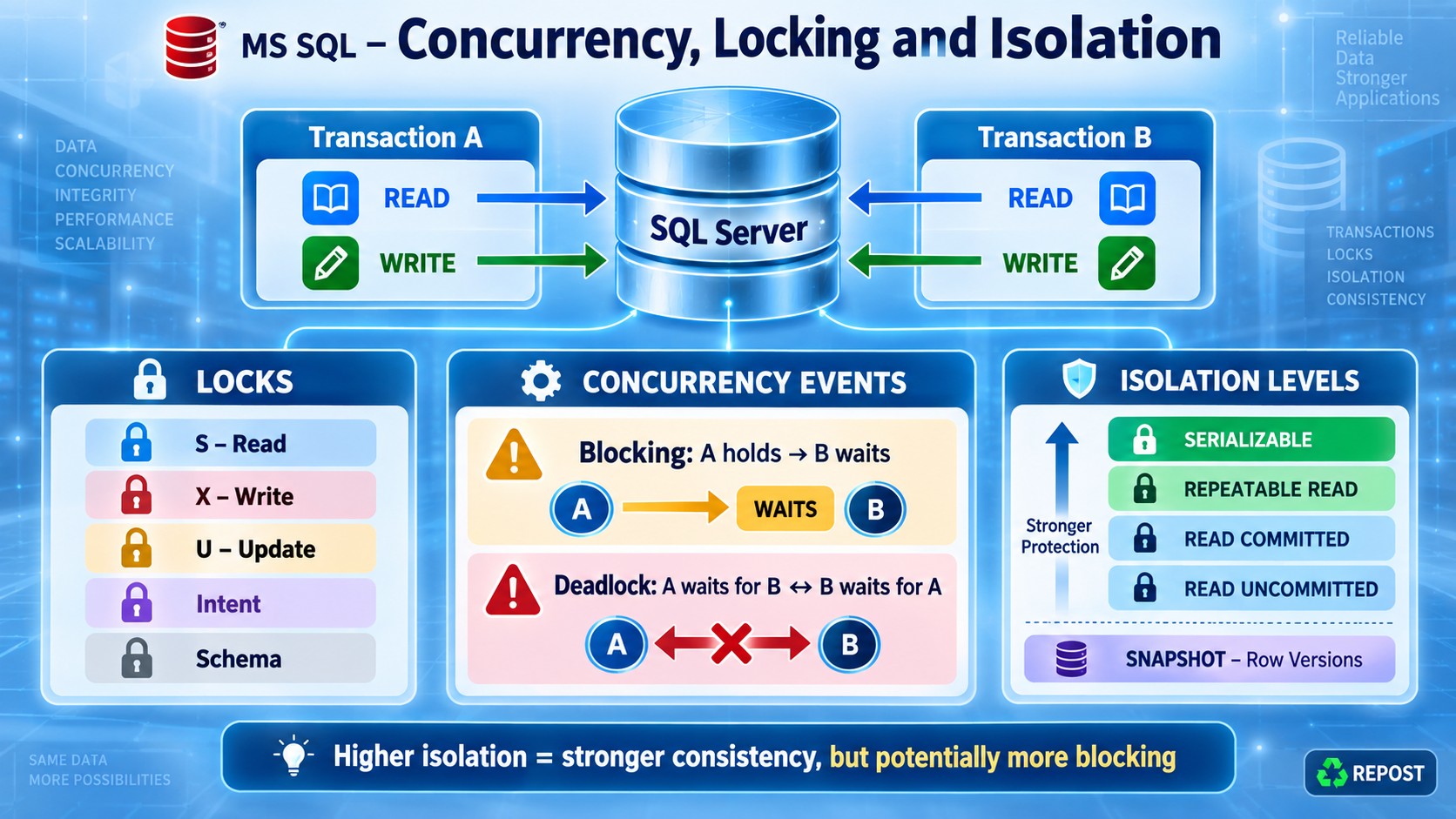


Locks in SQL Server
SQL Server uses locks to control concurrent access and maintain data consistency when multiple transactions access the same data.
1. Shared Lock (S)
Used when reading data.
-
Multiple transactions can hold shared locks on the same data.
-
Prevents other transactions from modifying the data until the shared lock is released.
-
Normally created by
SELECT.
BEGIN TRANSACTION;

SELECT *
FROM Accounts
WHERE AccountId = 1;

-- Shared lock is acquired while reading

COMMIT;
Compatibility: Shared lock is compatible with another shared lock, but not with an exclusive lock.
2. Exclusive Lock (X)
Used when inserting, updating or deleting data.
-
Only one transaction can hold an exclusive lock on a resource.
-
Prevents other transactions from reading or modifying the locked data.
-
Normally created by
INSERT,UPDATEandDELETE.
BEGIN TRANSACTION;

UPDATE Accounts
SET Balance = Balance - 1000
WHERE AccountId = 1;

-- Exclusive lock is held until COMMIT or ROLLBACK

COMMIT;
Under the default
READ COMMITTEDisolation level, a normalSELECTusually waits for this exclusive lock.
3. Update Lock (U)
Used before SQL Server modifies data.
-
SQL Server first reads the row using an update lock.
-
The update lock is later converted into an exclusive lock.
-
Only one transaction can hold an update lock on the same resource.
-
Helps reduce conversion deadlocks where multiple transactions read and then try to update the same row.
BEGIN TRANSACTION;

SELECT Balance
FROM Accounts WITH (UPDLOCK)
WHERE AccountId = 1;

UPDATE Accounts
SET Balance = Balance - 1000
WHERE AccountId = 1;

COMMIT;
UPDLOCK tells SQL Server to use update locks while reading.
4. Intent Locks
Intent locks show that SQL Server holds or plans to acquire locks at a lower level of the lock hierarchy.
Lock hierarchy:
Database → Table → Page → RowMain intent-lock types:
| Lock | Meaning |
|---|---|
IS |
Intends to place shared locks at a lower level |
IX |
Intends to place exclusive locks at a lower level |
SIX |
Shared lock on the resource with intended exclusive locks below it |
Example:
UPDATE Accounts
SET Balance = Balance + 500
WHERE AccountId = 1;
SQL Server may place:
-
An
IXlock on the table -
An
IXlock on the page -
An
Xlock on the affected row
Intent locks help SQL Server quickly determine whether a table-level lock is compatible with existing lower-level locks.
5. Schema Locks
Schema locks protect a table’s structure and metadata.
Schema Stability Lock (Sch-S)
-
Used while compiling and executing queries.
-
Prevents the table structure from being changed during the query.
-
Compatible with normal data locks.
SELECT * FROM Accounts;The query may acquire a Sch-S lock.
Schema Modification Lock (Sch-M)
-
Used when changing an object’s structure.
-
Blocks other schema and data operations on the object.
-
Highly restrictive.
ALTER TABLE Accounts
ADD AccountType VARCHAR(20);
This statement requires a Sch-M lock.
Quick comparison
| Lock | Main purpose | Common operation |
|---|---|---|
Shared (S) |
Read data | SELECT |
Exclusive (X) |
Modify data | INSERT, UPDATE, DELETE |
Update (U) |
Prepare data for modification | Read before UPDATE |
Intent (IS, IX, SIX) |
Indicate lower-level locks | Automatically managed |
Schema (Sch-S, Sch-M) |
Protect object structure | Query execution and DDL |
Key points
-
Shared locks allow concurrent reads but block modifications.
-
Exclusive locks prevent conflicting reads and modifications.
-
Update locks reduce certain read-to-write conversion deadlocks.
-
Intent locks represent locks held at lower levels of the hierarchy.
-
Sch-Sprotects schema during queries. -
Sch-Mis used for structural changes and blocks almost all competing access. -
Lock behaviour depends on isolation level, query plan, indexes and row-versioning settings.
What is Lock Escalation?
Lock escalation is the process where SQL Server replaces many fine-grained locks, such as row or page locks, with a single table-level lock.
Many row/page locks → One table lockWhy SQL Server uses it
Every lock consumes memory. When a query locks thousands of rows, SQL Server may escalate the locks to:
-
Reduce lock-management overhead
-
Save memory
-
Improve internal efficiency
Example
BEGIN TRANSACTION;

UPDATE Employees
SET Salary = Salary + 1000
WHERE DepartmentId = 10;

COMMIT;
If this statement updates many rows, SQL Server may replace thousands of row-level exclusive locks with one table-level exclusive lock.
When escalation may occur
SQL Server considers escalation when:
-
A statement acquires approximately 5,000 locks on a single table or index
-
The SQL Server instance experiences lock-memory pressure
The 5,000 value is an approximate threshold, not a guaranteed trigger. SQL Server also checks whether escalation is possible.
Important behaviour
-
Escalation is normally to a table-level lock, not a page lock.
-
If another transaction holds an incompatible lock, escalation fails.
-
SQL Server continues using lower-level locks and may retry escalation later.
-
Lock escalation can increase blocking because the entire table may become locked.
How to reduce lock escalation
1. Process data in smaller batches
WHILE 1 = 1
BEGIN
    UPDATE TOP (1000) Employees
    SET IsArchived = 1
    WHERE IsArchived = 0;

    IF @@ROWCOUNT = 0
        BREAK;
END;
2. Keep transactions short
Commit transactions as soon as the required work is complete.
3. Create suitable indexes
Good indexes reduce the number of rows SQL Server scans and locks.
4. Avoid unnecessary large updates or deletes
Process large modifications in controlled batches.
5. Configure escalation carefully
ALTER TABLE Employees
SET (LOCK_ESCALATION = DISABLE);
Available options include:
-
TABLE— normal table-level escalation -
AUTO— may escalate at the partition level for partitioned tables -
DISABLE— disables most table-level escalation
Disabling escalation should be a last resort because it can cause excessive lock-memory usage.
Key points
-
Lock escalation converts many row/page locks into one table lock.
-
Its main purpose is to reduce lock memory and management overhead.
-
It is commonly considered around 5,000 locks on one table or index.
-
Escalation may cause increased blocking.
-
Small batches, short transactions and suitable indexes are the preferred solutions.
-
Do not disable lock escalation without testing and monitoring.
What is Blocking in SQL Server?
Blocking occurs when one transaction holds a lock on a resource, and another transaction must wait because it requests an incompatible lock on the same resource.
Transaction 1 holds a lock → Transaction 2 waitsBlocking is a normal SQL Server mechanism used to protect data consistency. It becomes a problem when it lasts too long.
Simple example
Session 1 — Blocking transaction
BEGIN TRANSACTION;

UPDATE Accounts
SET Balance = Balance - 1000
WHERE AccountId = 1;

-- Do not execute COMMIT yet
Session 1 holds an exclusive (X) lock on the affected row.
Session 2 — Blocked transaction
SELECT *
FROM Accounts
WHERE AccountId = 1;
Under the default READ COMMITTED isolation level, Session 2 waits until Session 1 executes:
COMMIT;
-- or ROLLBACK;
Blocking chain
One blocked session can block other sessions:
Session 1 blocks Session 2
Session 2 blocks Session 3
Session 3 blocks Session 4
This is called a blocking chain. Session 1 is the head blocker.
Common causes
-
Long-running or uncommitted transactions
-
Large
UPDATE,DELETEorINSERToperations -
Missing or inefficient indexes
-
Queries scanning and locking many rows
-
User interaction or external API calls inside a transaction
-
High isolation levels such as
SERIALIZABLE -
Lock escalation to a table-level lock
How to identify blocking
SELECT
    session_id,
    blocking_session_id,
    wait_type,
    wait_time,
    wait_resource
FROM sys.dm_exec_requests
WHERE blocking_session_id <> 0;
blocking_session_id identifies the session causing the wait.
You can also use:
-
Activity Monitor
-
Extended Events
-
sp_WhoIsActiveif installed -
DMVs such as
sys.dm_exec_requests
How to reduce blocking
-
Keep transactions short.
-
Always execute
COMMITorROLLBACK. -
Create appropriate indexes.
-
Update or delete large datasets in smaller batches.
-
Avoid user input and external API calls inside transactions.
-
Access tables and rows in a consistent order.
-
Consider
READ_COMMITTED_SNAPSHOTafter proper testing. -
Investigate the head blocker rather than terminating blocked sessions blindly.
WITH (NOLOCK)is not a general solution. It can return dirty, missing or duplicate data.
Blocking vs deadlock
| Blocking | Deadlock |
|---|---|
| One session waits for another | Sessions wait for each other |
| Can continue indefinitely | SQL Server detects the cycle |
| Completes when the blocker releases its lock | SQL Server terminates one transaction |
| Normal, but long blocking is problematic | Always requires investigation |
Key points
-
Blocking is caused by incompatible locks.
-
It protects transactional consistency.
-
Short blocking is normal.
-
Long blocking affects performance and concurrency.
-
Find and fix the head blocker and its underlying cause.
What is a Deadlock in SQL Server?
A deadlock occurs when two or more transactions permanently wait for each other’s locked resources.
Transaction 1 holds Resource A and waits for Resource B
Transaction 2 holds Resource B and waits for Resource A
Neither transaction can continue without SQL Server intervention.
Simple example
Assume these two rows exist:
-- AccountId 1 and AccountId 2Session 1
BEGIN TRANSACTION;

UPDATE Accounts
SET Balance = Balance - 100
WHERE AccountId = 1;  -- Locks Account 1

WAITFOR DELAY '00:00:05';

UPDATE Accounts
SET Balance = Balance + 100
WHERE AccountId = 2;  -- Waits for Account 2

COMMIT;
Session 2 — execute immediately
BEGIN TRANSACTION;

UPDATE Accounts
SET Balance = Balance - 50
WHERE AccountId = 2;  -- Locks Account 2

WAITFOR DELAY '00:00:05';

UPDATE Accounts
SET Balance = Balance + 50
WHERE AccountId = 1;  -- Waits for Account 1

COMMIT;
The cycle becomes:
Session 1: Holds Account 1 → Waits for Account 2
Session 2: Holds Account 2 → Waits for Account 1
What SQL Server does
SQL Server’s deadlock monitor detects the cycle and:
-
Selects one transaction as the deadlock victim.
-
Rolls back that transaction.
-
Releases its locks so the other transaction can continue.
-
Returns error 1205 to the victim:
Transaction was deadlocked ... and has been chosen as the deadlock victim.SQL Server generally chooses the transaction that is less expensive to roll back. DEADLOCK_PRIORITY can influence this choice:
SET DEADLOCK_PRIORITY LOW;Common causes
-
Accessing tables or rows in different orders
-
Long-running transactions
-
Missing or inefficient indexes
-
Modifying large numbers of rows
-
High isolation levels
-
Holding locks while waiting for user input or external services
How to prevent or reduce deadlocks
-
Access resources in the same order in every transaction.
-
Keep transactions short.
-
Create suitable indexes.
-
Update large datasets in smaller batches.
-
Avoid user interaction and external API calls inside transactions.
-
Use an appropriate isolation level.
-
Consider row-versioning options such as
READ_COMMITTED_SNAPSHOT. -
Implement limited retry logic for error
1205.
const int maxAttempts = 3;

for (int attempt = 1; attempt <= maxAttempts; attempt++)
{
    try
    {
        await ExecuteTransactionAsync();
        break;
    }
    catch (SqlException ex) when (ex.Number == 1205 && attempt < maxAttempts)
    {
        await Task.Delay(TimeSpan.FromMilliseconds(200 * attempt));
    }
}
How to investigate
Capture the deadlock graph using:
-
The built-in
system_healthExtended Events session -
A custom Extended Events session
-
SQL Server Management Studio’s deadlock reports
The graph shows:
-
Victim and surviving processes
-
Locked resources
-
SQL statements involved
-
Lock modes and waiting order
Blocking vs deadlock
| Blocking | Deadlock |
|---|---|
| One transaction waits for another | Transactions wait for each other |
| No circular dependency | Circular dependency exists |
| Usually resolves when the blocker finishes | Cannot resolve naturally |
| SQL Server normally does not cancel a transaction | SQL Server rolls back one victim |
Key points
-
A deadlock is a circular dependency between transactions.
-
SQL Server detects and resolves it automatically.
-
One transaction becomes the victim and receives error
1205. -
Consistent resource-access order is one of the best preventive measures.
-
Applications should retry deadlock victims carefully.
-
Investigate the deadlock graph to correct the root cause.
Blocking vs Deadlocking in SQL Server
Blocking
Blocking happens when one transaction holds a lock and another transaction waits for that lock to be released.
Transaction 1 holds Resource A
Transaction 2 waits for Resource A
It normally resolves when Transaction 1 executes COMMIT or ROLLBACK.
Deadlocking
A deadlock occurs when two or more transactions wait for each other in a circular dependency.
Transaction 1 holds A → waits for B
Transaction 2 holds B → waits for A
Neither can continue naturally. SQL Server selects one transaction as the deadlock victim and rolls it back.
Key differences
| Point | Blocking | Deadlocking |
|---|---|---|
| Waiting pattern | One transaction waits for another | Transactions wait for each other |
| Circular dependency | No | Yes |
| Normal behaviour | Short blocking is normal | Always undesirable |
| Resolution | Blocker executes COMMIT or ROLLBACK |
SQL Server terminates one transaction |
| Error | Usually no error | Victim receives error 1205 |
| Duration | Can continue indefinitely | SQL Server detects and resolves it |
| Investigation | Find the head blocker | Examine the deadlock graph |
| Application retry | Usually unnecessary | Victim transaction should be retried carefully |
Simple blocking example
Session 1
BEGIN TRANSACTION;

UPDATE Accounts
SET Balance = Balance - 100
WHERE AccountId = 1;

-- Lock remains because transaction is not completed
Session 2
UPDATE Accounts
SET Balance = Balance + 100
WHERE AccountId = 1;

-- Waits for Session 1
Session 2 continues after Session 1 executes COMMIT or ROLLBACK.
Simple deadlock example
Session 1
BEGIN TRANSACTION;

UPDATE Accounts SET Balance = Balance - 100
WHERE AccountId = 1;  -- Holds Account 1

UPDATE Accounts SET Balance = Balance + 100
WHERE AccountId = 2;  -- Waits for Account 2
Session 2
BEGIN TRANSACTION;

UPDATE Accounts SET Balance = Balance - 50
WHERE AccountId = 2;  -- Holds Account 2

UPDATE Accounts SET Balance = Balance + 50
WHERE AccountId = 1;  -- Waits for Account 1
This creates a circular wait. SQL Server rolls back one transaction.
Key points
-
Blocking: “I am waiting for you.”
-
Deadlocking: “I am waiting for you, and you are waiting for me.”
-
Find the head blocker when investigating blocking.
-
Use a deadlock graph when investigating deadlocks.
-
Short transactions, proper indexes and consistent resource-access order help reduce both.
Dirty Reads, Non-Repeatable Reads and Phantom Reads
These are concurrency problems that can occur when multiple transactions access the same data simultaneously.
Assume this table:
CREATE TABLE Accounts
(
    AccountId INT PRIMARY KEY,
    Balance DECIMAL(10,2)
);

INSERT INTO Accounts VALUES
(1, 5000),
(2, 3000);
1. Dirty Read
A dirty read occurs when one transaction reads data modified by another transaction that has not yet been committed.
If the modifying transaction rolls back, the reader has used invalid data.
Session 1
BEGIN TRANSACTION;

UPDATE Accounts
SET Balance = 1000
WHERE AccountId = 1;

-- The change is not committed yet
WAITFOR DELAY '00:00:10';

ROLLBACK;
Session 2
Run while Session 1 is waiting:
SET TRANSACTION ISOLATION LEVEL READ UNCOMMITTED;

SELECT Balance
FROM Accounts
WHERE AccountId = 1;
Result:
1000Session 2 reads 1000, although Session 1 later rolls back and the actual balance returns to 5000.
Prevented by: READ COMMITTED and higher isolation levels.
2. Non-Repeatable Read
A non-repeatable read occurs when a transaction reads the same row twice but gets different values because another transaction updated or deleted that row and committed between the two reads.
Session 1
SET TRANSACTION ISOLATION LEVEL READ COMMITTED;
BEGIN TRANSACTION;

SELECT Balance
FROM Accounts
WHERE AccountId = 1;  -- Returns 5000

WAITFOR DELAY '00:00:10';

SELECT Balance
FROM Accounts
WHERE AccountId = 1;  -- Returns 4000

COMMIT;
Session 2
Run during Session 1’s delay:
UPDATE Accounts
SET Balance = 4000
WHERE AccountId = 1;
Result in Session 1:
First read:  5000
Second read: 4000
The same row produces different committed values within one transaction.
Prevented by: REPEATABLE READ, SNAPSHOT and SERIALIZABLE.
3. Phantom Read
A phantom read occurs when the same range query is executed twice and returns a different set of rows because another transaction inserted or deleted matching rows.
Session 1
SET TRANSACTION ISOLATION LEVEL REPEATABLE READ;
BEGIN TRANSACTION;

SELECT *
FROM Accounts
WHERE Balance >= 3000;  -- Returns 2 rows

WAITFOR DELAY '00:00:10';

SELECT *
FROM Accounts
WHERE Balance >= 3000;  -- Returns 3 rows

COMMIT;
Session 2
Run during Session 1’s delay:
INSERT INTO Accounts (AccountId, Balance)
VALUES (3, 6000);
Result in Session 1:
First query:  2 rows
Second query: 3 rows
The newly matching row is called a phantom row.
Prevented by: SERIALIZABLE. SNAPSHOT also provides a transactionally consistent versioned view.
Main difference
| Problem | What changes? | Cause |
|---|---|---|
| Dirty read | An uncommitted value is read | Another transaction may roll back |
| Non-repeatable read | Value of an existing row changes | Another transaction updates or deletes it |
| Phantom read | Number or set of matching rows changes | Another transaction inserts or deletes matching rows |
Isolation-level comparison
| Isolation level | Dirty read | Non-repeatable read | Phantom read |
|---|---|---|---|
READ UNCOMMITTED |
Possible | Possible | Possible |
READ COMMITTED |
Prevented | Possible | Possible |
REPEATABLE READ |
Prevented | Prevented | Possible |
SERIALIZABLE |
Prevented | Prevented | Prevented |
SNAPSHOT |
Prevented | Prevented | Prevented for the transaction’s snapshot |
Key points
-
A dirty read reads uncommitted data.
-
A non-repeatable read gets different values for the same row.
-
A phantom read gets a different set of rows for the same condition.
-
Higher isolation improves consistency but may increase blocking when lock-based isolation is used.
-
SNAPSHOTuses row versions to provide consistency with less read/write blocking.
What is Row Versioning in SQL Server?
Row versioning means SQL Server keeps an older copy of a row whenever that row is modified.
This allows readers to access the previously committed version without waiting for the transaction currently modifying the row.
Original committed row: Balance = 5000
Writer changes it to:   Balance = 4000 (not committed)
Reader receives:        Balance = 5000
How it works
When an UPDATE or DELETE occurs:
-
SQL Server preserves the previous row version.
-
The current row contains information linking it to the older version.
-
Readers access the appropriate committed version.
-
Unneeded versions are automatically removed later.
Multiple modifications can create a version chain:
Current row → Previous version → Older versionSimple example
Assume the current committed balance is 5000.
Session 1
BEGIN TRANSACTION;

UPDATE Accounts
SET Balance = 4000
WHERE AccountId = 1;

-- Do not commit yet
Session 1 has changed the row but has not committed it.
Session 2
With READ_COMMITTED_SNAPSHOT enabled:
SELECT Balance
FROM Accounts
WHERE AccountId = 1;
Result:
5000Session 2 reads the previous committed version and normally does not wait for Session 1.
After Session 1 commits, a new statement can return 4000.
Features that use row versioning
Read Committed Snapshot Isolation (RCSI)
ALTER DATABASE YourDatabase
SET READ_COMMITTED_SNAPSHOT ON;-
Automatically applies versioning to
READ COMMITTED. -
Provides a consistent view at the start of each statement.
-
Normally requires no query changes.
Snapshot Isolation
ALTER DATABASE YourDatabase
SET ALLOW_SNAPSHOT_ISOLATION ON;
Used explicitly:
SET TRANSACTION ISOLATION LEVEL SNAPSHOT;
BEGIN TRANSACTION;

SELECT * FROM Accounts;

COMMIT;-
Provides a consistent view from the start of the transaction.
-
Can raise an update-conflict error when concurrent transactions modify the same row.
Where versions are stored
Row versions are generally stored in the version store in tempdb.
When Accelerated Database Recovery (ADR) is enabled, versions can be stored in the database’s Persistent Version Store (PVS).
Advantages
-
Reduces reader-writer blocking
-
Improves concurrency
-
Prevents dirty reads
-
Gives queries a consistent view of committed data
Considerations
-
Requires additional storage for row versions.
-
Adds overhead when rows are modified.
-
Long-running transactions can prevent old versions from being cleaned up.
-
Writers can still block other writers.
-
Version-store usage must be monitored.
Key points
-
Row versioning keeps older versions of modified rows.
-
Readers access committed versions instead of waiting for writers.
-
RCSI provides statement-level consistency.
-
SNAPSHOTprovides transaction-level consistency. -
Row versioning reduces blocking but does not eliminate all concurrency conflicts.
Optimistic and Pessimistic Concurrency
Concurrency control prevents multiple users from incorrectly overwriting or interfering with each other’s changes.
1. Pessimistic concurrency
Pessimistic concurrency assumes that conflicts are likely. It locks the data before modifying it so that other transactions must wait.
Example
BEGIN TRANSACTION;

SELECT Balance
FROM Accounts WITH (UPDLOCK, HOLDLOCK)
WHERE AccountId = 1;

UPDATE Accounts
SET Balance = Balance - 500
WHERE AccountId = 1;

COMMIT;-
UPDLOCKtakes an update lock while reading. -
HOLDLOCKholds the lock until the transaction completes. -
Other transactions trying to modify the row must wait.
Advantages
-
Prevents concurrent modification while the lock is held.
-
Suitable when conflicts are frequent or must be strictly serialized.
Disadvantages
-
Increases blocking.
-
Long transactions can reduce performance.
-
Incorrect lock ordering can contribute to deadlocks.
2. Optimistic concurrency
Optimistic concurrency assumes conflicts are uncommon.
It does not keep a database lock while a user reads or edits data. When saving, the application checks whether the record has changed since it was originally read.
Read data and version → Edit without holding locks
→ Save only if the version is unchanged
Advantages
-
Less blocking
-
Better scalability
-
Suitable for web applications and disconnected users
Disadvantage
If another user changes the row first, the application must reject, retry, merge or reload the operation.
Main difference
| Point | Optimistic | Pessimistic |
|---|---|---|
| Assumption | Conflicts are uncommon | Conflicts are likely |
| Approach | Detect conflicts while saving | Prevent conflicts using locks |
| Lock duration | No long-lived application lock | Holds locks during the transaction |
| Blocking | Lower | Higher |
| Conflict handling | Reject, retry, merge or reload | Other transaction waits |
| Suitable for | Web applications and many readers | Short, critical operations |
How ROWVERSION supports optimistic concurrency
A SQL Server ROWVERSION column is an automatically generated 8-byte binary value. SQL Server changes it whenever the row is inserted or updated.
Despite its older name
TIMESTAMP,ROWVERSIONis not a date or time value.
Create the table
CREATE TABLE Products
(
    ProductId   INT PRIMARY KEY,
    ProductName VARCHAR(100),
    Price       DECIMAL(10,2),
    Version     ROWVERSION
);
Insert and read a product:
INSERT INTO Products (ProductId, ProductName, Price)
VALUES (1, 'Keyboard', 1500);

SELECT ProductId, ProductName, Price, Version
FROM Products
WHERE ProductId = 1;
Possible result:
ProductId  ProductName  Price    Version
1          Keyboard     1500.00  0x00000000000007D1
The application stores both the product data and its original Version.
Update with a version check
UPDATE Products
SET Price = 1600
WHERE ProductId = 1
  AND Version = 0x00000000000007D1;
If the row was unchanged
The version matches:
1 row affectedThe update succeeds, and SQL Server automatically generates a new Version.
If another user changed the row
The stored version no longer matches:
0 rows affectedThis indicates an optimistic-concurrency conflict.
The application can then:
-
Inform the user
-
Reload the latest data
-
Merge the changes
-
Retry when appropriate
Stored-procedure example
CREATE PROCEDURE UpdateProductPrice
    @ProductId      INT,
    @Price          DECIMAL(10,2),
    @OriginalVersion BINARY(8)
AS
BEGIN
    SET NOCOUNT ON;

    UPDATE Products
    SET Price = @Price
    WHERE ProductId = @ProductId
      AND Version = @OriginalVersion;

    IF @@ROWCOUNT = 0
        THROW 50001, 'The product was changed by another user.', 1;
END;
Important ROWVERSION points
-
It is automatically generated by SQL Server.
-
It changes whenever the row is updated, even if values are assigned to their existing values.
-
The application should not manually insert or update its value.
-
It is unique and increasing within the database, but gaps can occur.
-
It does not contain a date or time.
-
It detects that a row changed, but not which column changed.
-
Always combine it with the row’s key in the
UPDATEorDELETEcondition. -
Check
@@ROWCOUNTor the application’s affected-row count to detect conflicts.
Why should NOLOCK be used cautiously?
NOLOCK allows a query to read data without waiting for normal shared locks.
SELECT *
FROM Accounts WITH (NOLOCK);
It is equivalent to:
SET TRANSACTION ISOLATION LEVEL READ UNCOMMITTED;It may reduce blocking, but the result is not guaranteed to be accurate or transactionally consistent.
Can it return incorrect, missing or duplicate data?
Yes. NOLOCK can return all of these.
1. Incorrect data — dirty read
It can read changes that have not been committed and might later be rolled back.
Session 1
BEGIN TRANSACTION;

UPDATE Accounts
SET Balance = 100
WHERE AccountId = 1;

-- Not committed
WAITFOR DELAY '00:00:10';

ROLLBACK;
Session 2
SELECT Balance
FROM Accounts WITH (NOLOCK)
WHERE AccountId = 1;
Session 2 may return 100, even though Session 1 later rolls back the change.
2. Missing rows
While NOLOCK scans a table, another transaction may move rows because of:
-
Page splits
-
Index changes
-
Row updates
-
Page allocation changes
The scan may skip a row that moved to a page it has already processed.
3. Duplicate rows
A row may move from one page to another while the query is scanning. The query could read it from its old location and then read it again from its new location.
Therefore, even operations such as these can be inaccurate:
SELECT COUNT(*)
FROM Orders WITH (NOLOCK);

SELECT SUM(Amount)
FROM Orders WITH (NOLOCK);
They may return incorrect totals.
Other important risks
NOLOCK can also:
-
Read partially completed multi-row transactions
-
Return combinations of data that never existed as one committed state
-
Produce inconsistent joins between related tables
-
Fail with errors such as “Could not continue scan with
NOLOCKdue to data movement” -
Still experience blocking from schema locks
NOLOCK does not mean “no locks at all.” Queries still acquire a schema stability (Sch-S) lock and can be blocked by a schema modification (Sch-M) lock.
When might it be acceptable?
Only when approximate or temporarily inconsistent results are acceptable, such as certain non-critical diagnostic or reporting queries.
It should generally be avoided for:
-
Payments and balances
-
Inventory
-
Orders
-
Financial reports
-
Auditing
-
Any query requiring accurate results
Better alternatives
Use normal READ COMMITTED
Use this when accurate committed data is required and some blocking is acceptable.
Enable Read Committed Snapshot Isolation
ALTER DATABASE YourDatabase
SET READ_COMMITTED_SNAPSHOT ON;
RCSI uses committed row versions, reducing reader-writer blocking without allowing dirty reads. It should still be tested before production use.
Key points
-
NOLOCKimproves concurrency by sacrificing consistency. -
It can return dirty, incorrect, missing or duplicate data.
-
It does not eliminate every type of lock or blocking.
-
Adding it everywhere is not a proper performance solution.
-
Fix slow queries, improve indexes and consider RCSI instead.
Locking Hints in SQL Server
Locking hints allow a query to request specific locking behaviour. They should be used carefully because incorrect hints can increase blocking, deadlocks and lock-memory usage.
General syntax:
SELECT *
FROM TableName WITH (LockHint);
1. UPDLOCK
UPDLOCK requests update locks instead of shared locks while reading data.
-
Useful when a row is read and then updated.
-
Prevents another transaction from acquiring an update or exclusive lock on the same row.
-
Update locks are normally held until the transaction completes.
-
Helps prevent certain read-then-update conversion deadlocks.
Example
BEGIN TRANSACTION;

SELECT Balance
FROM Accounts WITH (UPDLOCK)
WHERE AccountId = 1;

UPDATE Accounts
SET Balance = Balance - 500
WHERE AccountId = 1;

COMMIT;
Another transaction attempting to update the same account normally waits.
UPDLOCKdoes not prevent every type of concurrency problem. It is commonly combined with an appropriate transaction and isolation strategy.
2. ROWLOCK
ROWLOCK asks SQL Server to prefer row-level locks instead of page or table locks.
BEGIN TRANSACTION;

UPDATE Accounts WITH (ROWLOCK)
SET Balance = Balance + 500
WHERE AccountId = 1;

COMMIT;
It may improve concurrency when only a few rows are affected.
Important limitations
-
It is a request, not an absolute guarantee.
-
SQL Server can still escalate many row locks to a table lock.
-
Locking thousands of rows individually can consume significant memory.
-
It may reduce performance for large updates or deletes.
Do not use ROWLOCK automatically without testing.
3. HOLDLOCK
HOLDLOCK is equivalent to applying SERIALIZABLE isolation semantics to the referenced table.
-
Shared locks are held until the transaction completes.
-
Key-range locks can prevent other transactions from inserting rows into a range read by the query.
-
It helps prevent non-repeatable and phantom reads.
-
It can significantly increase blocking.
Example
BEGIN TRANSACTION;

SELECT *
FROM Accounts WITH (HOLDLOCK)
WHERE Balance >= 5000;

-- Matching rows and possibly the searched key range remain protected

COMMIT;
Until the transaction finishes, another transaction may be blocked from changing the matching data or inserting a row into the protected range.
Suitable indexes are important for efficient key-range locking.
Combining hints
A common pattern for reserving a row before updating it is:
BEGIN TRANSACTION;

SELECT Balance
FROM Accounts WITH (UPDLOCK, HOLDLOCK)
WHERE AccountId = 1;

UPDATE Accounts
SET Balance = Balance - 500
WHERE AccountId = 1;

COMMIT;
Here:
-
UPDLOCKindicates that the row is intended for modification. -
HOLDLOCKkeeps protection until the transaction finishes and provides serializable behaviour for the table reference.
For queue-processing scenarios, you may see:
SELECT TOP (1) *
FROM JobQueue WITH (UPDLOCK, READPAST, ROWLOCK)
WHERE Status = 'Pending'
ORDER BY JobId;-
UPDLOCKreserves the selected job. -
READPASTskips rows locked by another worker. -
ROWLOCKrequests row-level locking.
The selection and status update should occur inside one short transaction.
Comparison
| Hint | Purpose | Main concern |
|---|---|---|
UPDLOCK |
Reserve data that will be updated | Can block other writers |
ROWLOCK |
Prefer row-level locks | Many locks can increase overhead |
HOLDLOCK |
Hold locks with serializable semantics | Can cause considerable blocking |
Key points
-
Lock hints override or influence SQL Server’s normal locking choices.
-
Always use
WITH (...)syntax. -
Keep transactions containing lock hints short.
-
Appropriate indexes reduce the amount of data locked.
-
Use hints only for a specific, tested concurrency requirement—not as a general performance fix.