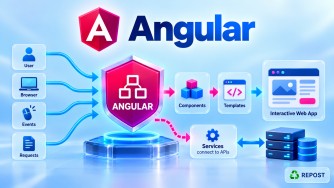


Single Page Application (SPA) & Angular SPA
These two questions are closely related, so it is useful to understand them together.
1. What is a Single Page Application (SPA)?
What is SPA?
A Single Page Application (SPA) is a web application that loads the main application page once and then dynamically updates the content in the browser without performing a full-page reload for every navigation.
Angular is commonly used to build SPAs.
For example, consider an application with:
Home
Products
Articles
Contact
Login
In a traditional server-rendered application, navigating between pages can result in separate requests that return complete HTML pages.
Home
  |
  | Click Products
  v
Server
  |
  | Complete HTML page
  v
Products Page
In an SPA, the Angular application remains loaded in the browser.
Browser
   |
   v
Angular Application
   |
   +-- Home
   +-- Products
   +-- Articles
   +-- Contact
When the user navigates from:
Home -> ProductsAngular changes the displayed component instead of requesting an entirely new document from the server.
2. Why Do We Need SPA?
Traditional multi-page applications can reload the entire page during navigation.
For example:
Browser
   |
   | GET /Products
   v
Server
   |
   | Generate complete HTML
   v
Browser
   |
   | Full page load
   v
Products
This may include loading/reprocessing common UI elements again:
Header
Navigation
Content
Footer
Scripts
Styles
An SPA can keep the application shell loaded and change primarily the content that needs to change.
+-----------------------------------+
| Header                            |
+-----------------------------------+
| Navigation                        |
+-----------------------------------+
|                                   |
|     Dynamic Content Area          |
|                                   |
+-----------------------------------+
| Footer                            |
+-----------------------------------+
When the user navigates:
Home
  ↓
Products
  ↓
Articles
the dynamic content area can change without a traditional full-document reload.
3. Purpose of SPA
The main purpose of an SPA is to provide a fast, interactive, application-like user experience in the browser.
SPAs are particularly useful for applications such as:
- Admin dashboards
- Customer portals
- Banking portals
- E-commerce applications
- Management systems
- Reporting applications
- Social applications
- Enterprise applications
For example:
Angular SPA
│
├── Dashboard
├── Articles
├── Categories
├── Users
├── Reports
└── Settings
The user can move between these areas while the Angular application remains active.
4. SPA vs Traditional Multi-Page Application
| SPA | Multi-Page Application |
|---|---|
| Main application loads once | New document may load for navigation |
| Client-side routing commonly used | Server-side routing commonly used |
| UI updated dynamically | Server commonly generates new HTML |
| APIs commonly return JSON | Server commonly returns HTML |
| Application logic runs substantially in browser | Rendering/navigation logic is substantially server-side |
| Common with Angular | Common with traditional MVC/Razor |
For example:
Traditional MVC
Browser
   |
   | GET /Articles
   v
ASP.NET Core MVC
   |
   | Razor renders HTML
   v
Browser
Angular SPA
Browser
   |
   | Angular Router
   v
Articles Component
   |
   | GET /api/articles
   v
ASP.NET Core Web API
   |
   | JSON
   v
Angular
This distinction is especially important when moving an ASP.NET Core MVC frontend to Angular.
5. How Does an Angular SPA Work?
Now consider Angular specifically.
A simplified Angular SPA flow is:
User
 |
 v
Browser
 |
 v
index.html
 |
 v
Angular Application Starts
 |
 v
Angular Router
 |
 v
Component
 |
 v
Service
 |
 | HTTP Request
 v
ASP.NET Core Web API
 |
 v
SQL Server
 |
 | JSON Response
 v
Angular
 |
 v
Update UI
Let's break this down.
Step 1: Browser Loads the Angular Application
The browser initially requests the Angular application.
The application has an index.html containing the root element, for example:
<app-root></app-root>Angular starts and renders the application inside this root element.
Conceptually:
index.html
    |
    v
<app-root>
    |
    v
Angular Application
Step 2: Angular Bootstraps the Application
Modern standalone Angular applications commonly start from main.ts.
import { bootstrapApplication } from '@angular/platform-browser';
import { App } from './app/app';

bootstrapApplication(App);
This starts the Angular application.
Older NgModule-based applications commonly used:
platformBrowserDynamic()
    .bootstrapModule(AppModule);
So:
Older Angular
main.ts
   ↓
AppModule
   ↓
AppComponent
Modern standalone Angular:
main.ts
   ↓
bootstrapApplication()
   ↓
App
6. Angular Router Handles Navigation
Suppose the application contains:
/
 /articles
 /contact
 /login
Angular routes can map URLs to components.
export const routes: Routes = [
  {
    path: '',
    component: Home
  },
  {
    path: 'articles',
    component: Articles
  },
  {
    path: 'contact',
    component: Contact
  }
];
When the user navigates to:
/articlesAngular Router displays:
Articles ComponentThe browser does not need a traditional full-page reload just to switch from the Home component to the Articles component.
7. Router Outlet
Angular needs a location where routed components can be displayed.
This is commonly:
<router-outlet></router-outlet>For example:
<header>
  My Portfolio
</header>

<nav>
  Home | Articles | Contact
</nav>

<router-outlet></router-outlet>

<footer>
  Copyright
</footer>
Think of <router-outlet> as a placeholder for the current routed component.
If the URL is:
/Angular might display:
+--------------------------+
| Header                   |
+--------------------------+
| Navigation               |
+--------------------------+
| HOME COMPONENT           |
+--------------------------+
| Footer                   |
+--------------------------+
If the user clicks Articles:
/articlesAngular changes the routed content:
+--------------------------+
| Header                   |
+--------------------------+
| Navigation               |
+--------------------------+
| ARTICLES COMPONENT       |
+--------------------------+
| Footer                   |
+--------------------------+
The application shell remains.
8. How Does an Angular SPA Get Data?
An Angular SPA normally gets business data from a backend API.
For example:
Angular
   |
   | GET /api/articles
   v
ASP.NET Core Web API
The API could return:
[
  {
    "id": 1,
    "title": "Angular Basics"
  },
  {
    "id": 2,
    "title": "ASP.NET Core Web API"
  }
]
Angular receives the JSON and updates the UI.
ASP.NET Core API
       |
       | JSON
       v
Angular Service
       |
       v
Component
       |
       v
HTML
The important point is:
The page itself does not have to reload just because Angular requested new data.
Angular can make an API request in the background and update only the relevant UI.
9. Simple Angular SPA Example
Consider three components:
Home
Articles
Contact
Routes
import { Routes } from '@angular/router';
import { Home } from './home/home';
import { Articles } from './articles/articles';
import { Contact } from './contact/contact';

export const routes: Routes = [
  { path: '', component: Home },
  { path: 'articles', component: Articles },
  { path: 'contact', component: Contact }
];
app.html
<nav>
  <a routerLink="/">Home</a>
  <a routerLink="/articles">Articles</a>
  <a routerLink="/contact">Contact</a>
</nav>

<router-outlet></router-outlet>
Now:
Click Home
    ↓
Home Component

Click Articles
    ↓
Articles Component

Click Contact
    ↓
Contact Component
Angular Router changes the component displayed inside:
<router-outlet></router-outlet>without a traditional full-page navigation.
10. Angular SPA with ASP.NET Core Web API
For an Angular + ASP.NET Core application, the architecture is commonly:
                 Browser
                    |
                    v
           +----------------+
           |  Angular SPA   |
           +----------------+
                    |
          Angular Router
                    |
          +---------+---------+
          |         |         |
        Home     Articles   Contact
                    |
                    |
                 Service
                    |
                    | HTTPS
                    v
           +------------------+
           | ASP.NET Core API |
           +------------------+
                    |
                    v
              SQL Server
For example:
User opens website
      ↓
Angular loads
      ↓
User clicks Articles
      ↓
Angular Router loads Articles component
      ↓
Articles component/service calls Web API
      ↓
GET /api/articles
      ↓
ASP.NET Core retrieves data
      ↓
API returns JSON
      ↓
Angular displays articles
No traditional full-page reload is necessary during this process.
11. Advantages of SPA
Fast Navigation
Once the application has loaded, navigation can feel very fast because Angular can switch components without full-document reloads.
Better User Experience
The application can behave more like a desktop application.
Frontend and Backend Separation
You can maintain:
Angular
    +
ASP.NET Core Web API
as separate frontend and backend applications.
Reusable Backend
The same Web API can potentially serve multiple clients:
                 ASP.NET Core API
                        |
          +-------------+-------------+
          |             |             |
       Angular        Mobile       Other Client
Efficient UI Updates
Angular can update only the UI that needs to change rather than replacing the entire page.
12. Disadvantages of SPA
Initial Loading
An SPA may require downloading JavaScript bundles before the application becomes fully interactive.
JavaScript Dependency
The application depends heavily on client-side JavaScript.
SEO Requires Consideration
Pure client-side rendering can require additional consideration for SEO and initial content delivery. Angular provides other rendering options when these requirements matter.
More Frontend Complexity
Developers need to understand concepts such as:
Components
Routing
Services
HTTP
State management
RxJS
Signals
Guards
Interceptors
Backend Security Is Still Required
Angular runs in the user's browser.
Therefore, Angular guards or hidden buttons cannot provide backend security by themselves.
The Web API must still enforce authentication and authorization.
13. Key Points
Remember these points for interviews:
- SPA = Single Page Application.
- The main application is loaded once.
- Navigation generally does not require full-page reloads.
- Angular Router handles client-side navigation.
<router-outlet>displays the routed component.- Angular components represent different areas of the UI.
- Angular can retrieve data from backend APIs using HTTP.
- ASP.NET Core Web API commonly returns JSON to Angular.
- Angular updates the UI based on the returned data.
- An SPA does not mean there is literally only one screen or one URL.
- An SPA can contain many routes and components.
- Client-side route protection does not replace server-side authorization.
14. Interview Questions and Answers
Q1. What is a Single Page Application?
Answer:
A Single Page Application is a web application where the main application is loaded once and the content is dynamically updated as the user navigates, without performing a traditional full-page reload for every navigation.
Q2. Is Angular always used for SPA?
Answer:
Angular is commonly used to build SPAs, but Angular also supports other rendering approaches such as server-side rendering and prerendering.
Q3. Does SPA mean the application has only one page?
Answer:
No.
An SPA can have many logical pages or routes:
/
 /articles
 /products
 /login
 /admin
They are typically handled through client-side routing within the same running application.
Q4. How does an Angular SPA work?
Answer:
The browser loads the Angular application. Angular starts the root component, Angular Router handles navigation, components display the UI, and services can communicate with backend APIs. When the user navigates, Angular changes the displayed component without requiring a traditional full-page reload.
Q5. What is Angular Router?
Answer:
Angular Router provides client-side navigation between components based on URLs.
For example:
/articlescan display:
Articles ComponentQ6. What is <router-outlet>?
Answer:
<router-outlet> is the placeholder where Angular Router displays the component associated with the current route.
<router-outlet></router-outlet>Q7. Does Angular call the server during every navigation?
Answer:
Not necessarily.
If Angular already has the required component and data, navigation may occur completely on the client side.
If new data is required, Angular can call the backend API, but this API request still does not require a complete browser page reload.
Q8. What is the difference between Angular SPA and ASP.NET Core MVC?
Answer:
In a traditional ASP.NET Core MVC application, the server commonly renders Razor views and returns HTML.
Browser
   ↓
MVC Controller
   ↓
Razor View
   ↓
HTML
In an Angular SPA, Angular manages the frontend in the browser and commonly calls ASP.NET Core Web API for data.
Browser
   ↓
Angular
   ↓
Web API
   ↓
JSON
Q9. What happens when the user clicks a link in an Angular SPA?
Answer:
For Angular-managed navigation, Angular Router reads the requested route, finds the corresponding component, and displays it through the router outlet. This normally occurs without a traditional full-page reload.
Q10. Can an Angular SPA use ASP.NET Core Web API?
Answer:
Yes. This is a very common architecture.
Angular SPA
     ↓
HTTP / HTTPS
     ↓
ASP.NET Core Web API
     ↓
SQL Server
Angular handles the frontend UI, ASP.NET Core Web API handles the backend/API logic, and SQL Server can handle data storage.