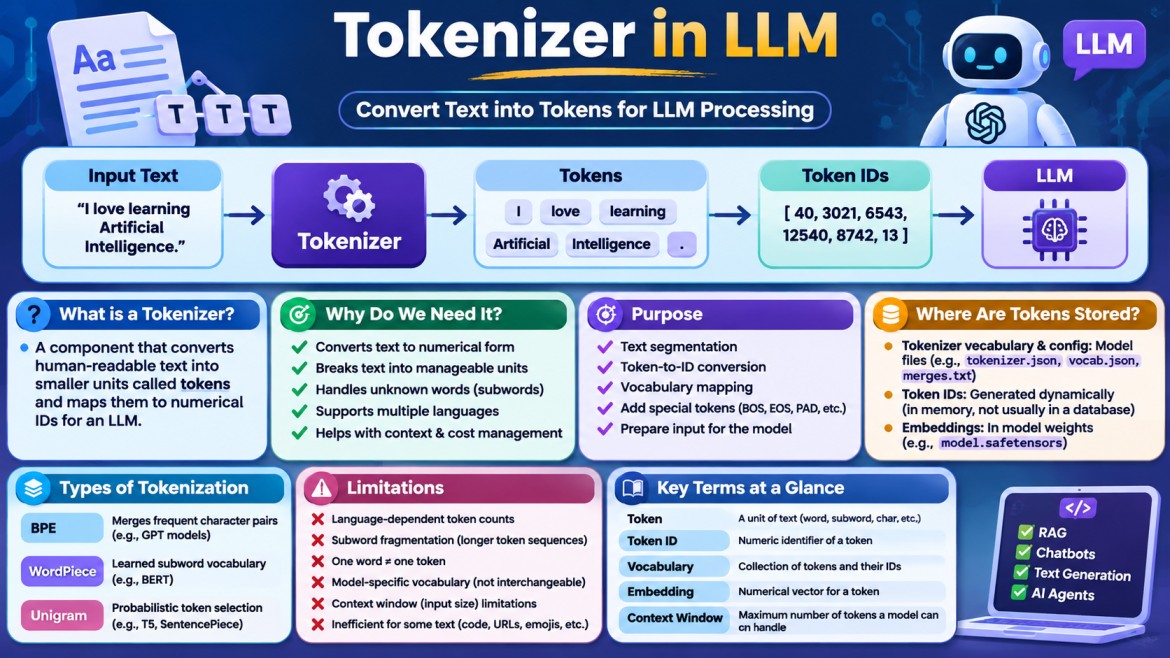


Tokenizer in LLM – Complete Guide
Artificial Intelligence | Large Language Models | NLP | Machine Learning
1. What is a Tokenizer?
A Tokenizer is a component of a Large Language Model (LLM) that converts human-readable text into smaller units called tokens. These tokens are then converted into numerical IDs so that the model can process the input.
Computers and neural networks do not directly understand sentences the way humans do. LLMs work with numerical representations. A tokenizer acts as a bridge between human language and the numerical format required by the model.
A token can represent:
-
A complete word.
-
A part of a word.
-
A character.
-
A number or sequence of digits.
-
A punctuation mark.
-
Whitespace or other text elements.
Example:
Consider the following input:
I love learning Artificial Intelligence.A tokenizer might split it into:
["I", " love", " learning", " Artificial", " Intelligence", "."]Each token is assigned a numerical ID based on the tokenizer's vocabulary.
For example:
|
Token |
Illustrative Token ID |
|---|---|
|
I |
40 |
|
love |
3021 |
|
learning |
6543 |
|
Artificial |
12540 |
|
Intelligence |
8742 |
|
. |
13 |
The resulting numerical sequence is passed to the LLM for further processing.
Note: These IDs are illustrative. Actual token IDs depend on the model and tokenizer.
2. Why Do We Need a Tokenizer?
The primary reason we need a tokenizer is that neural networks operate on numerical data rather than directly processing human-readable text.
Imagine sending this sentence directly to an AI model:
Explain Dependency Injection in ASP.NET Core.The model cannot simply process the sentence as ordinary text. The text must first be converted into a numerical representation.
This is where the tokenizer comes into the picture.
Without tokenization, the model would not have its expected numerical input format.
Key reasons:
-
Text Conversion: Converts text into tokens and numerical IDs.
-
Efficient Processing: Breaks large text into manageable units.
-
Vocabulary Management: Provides a predefined vocabulary for representing text.
-
Unknown Word Handling: Represents unfamiliar words using smaller subword units.
-
Multilingual Processing: Supports text from different languages using a shared token vocabulary.
-
Context Management: Helps calculate how much of the model's context window is consumed.
-
Cost Management: Helps estimate API usage and token-based charges.
3. What Is the Purpose of a Tokenizer?
A tokenizer performs several important functions in an LLM application.
3.1 Text Segmentation
It divides input text into smaller units.
Example:
Input:
Understanding Tokenization

Tokens:
["Understanding", " Token", "ization"]
The exact split depends on the tokenizer.
3.2 Token-to-ID Conversion
After splitting the text, the tokenizer maps each token to its corresponding numerical ID.
Tokens:
["Hello", " world"]

Token IDs:
[15496, 1917]
These are illustrative IDs, not universal values.
3.3 Vocabulary Mapping
A tokenizer maintains a vocabulary that defines which token corresponds to which ID.
For example:
Vocabulary:
{
    "Hello": 15496,
    "world": 1917,
    "AI": 9552
}
3.4 Handling Unknown Words
Suppose the tokenizer encounters an unfamiliar word:
UnbelievableInstead of requiring the entire word to exist in its vocabulary, a subword tokenizer may divide it into smaller units:
["Un", "believ", "able"]This makes it possible to represent many words using a relatively limited vocabulary.
3.5 Preparing Input for the Model
The tokenizer produces token IDs and, depending on the model, additional information such as attention masks and special tokens.
The model uses these inputs to generate embeddings and process the sequence.
4. How Does a Tokenizer Work Internally?
A tokenizer generally follows a sequence of processing stages. The exact implementation depends on the tokenizer algorithm and model architecture.
Tokenizer processing pipeline
1
Raw Input Text
Receives text from the user or application.
2
Normalization
Applies configured text normalization, if required.
3
Pre-tokenization
Splits text into preliminary pieces.
4
Tokenization Algorithm
Applies BPE, WordPiece, Unigram or another algorithm.
5
Token ID Mapping
Maps tokens to numerical IDs using the vocabulary.
6
Post-processing
Adds required special tokens, padding or other model-specific information.
7
Model Input
Produces the numerical input expected by the model.
Let's understand the stages individually.
4.1 Raw Input Text
The tokenizer receives text from the user.
Hello, how are you?This is the original input before tokenization.
4.2 Normalization
Normalization prepares the input text for processing.
Depending on the tokenizer, normalization can include:
-
Converting uppercase characters to lowercase.
-
Unicode normalization.
-
Removing or standardizing unnecessary whitespace.
-
Standardizing certain character representations.
Example:
Input:  HELLO     WORLD
Output: hello world
This is only an illustrative normalization example. Not every LLM tokenizer converts text to lowercase or removes whitespace. Some preserve case and spacing because these details matter to the model.
4.3 Pre-tokenization
Pre-tokenization divides the input into preliminary pieces before applying the main tokenization algorithm.
Example:
Input:
Hello, how are you?

Pre-tokenized:
["Hello", ",", " how", " are", " you", "?"]
The actual result depends on the tokenizer's rules.
4.4 Tokenization Algorithm
The tokenizer applies an algorithm such as BPE, WordPiece or Unigram to determine the final tokens.
For example:
Input: Tokenization

Possible output:
["Token", "ization"]
4.5 Token ID Mapping
Each resulting token is mapped to a numerical ID using the tokenizer vocabulary.
Token:
["Token", "ization"]

Token IDs:
[1234, 5678]
These IDs are illustrative.
4.6 Post-processing
Some tokenizers add special tokens required by the model.
Examples include:
|
Special token |
Purpose |
|---|---|
|
BOS |
Beginning of sequence |
|
EOS |
End of sequence |
|
PAD |
Padding shorter sequences |
|
UNK |
Unknown token |
|
SEP |
Separates sequences |
|
CLS |
Classification-related marker in some architectures |
Not every model uses all these tokens. Some models use different special-token conventions.
4.7 Model Input
Finally, the tokenizer provides numerical inputs to the model.
These can include:
-
Input token IDs.
-
Attention masks.
-
Token type IDs, for architectures that require them.
-
Other model-specific metadata.
The model converts token IDs into embeddings before processing them through its neural network layers.
5. What Is Tokenizer Vocabulary?
A Tokenizer Vocabulary is a predefined collection of tokens and their corresponding numerical IDs.
It acts like a dictionary that the tokenizer uses to convert text into numerical representations.
Example:
Vocabulary:

Token          Token ID
-----------------------
Hello          1001
World          1002
Learning       1003
Artificial     1004
Intelligence   1005
When the tokenizer encounters a known token, it retrieves its corresponding ID.
Important concepts:
-
Every token in a particular vocabulary has a corresponding ID.
-
Token IDs are specific to that tokenizer vocabulary.
-
The same text can have different token IDs across different models.
-
A vocabulary can contain ordinary tokens and special tokens.
-
The model's embedding layer is configured to work with the token IDs of its associated vocabulary.
Vocabulary size
Vocabulary size means the number of entries in a tokenizer's vocabulary.
For example, if a tokenizer has 50,000 token entries, its vocabulary size is approximately 50,000, depending on whether special tokens are included in the count.
A larger vocabulary does not automatically mean a better LLM. Vocabulary design involves trade-offs between sequence length, model size, multilingual coverage and training efficiency.
6. Tokenizer Storage Details – Where Are Tokens Stored?
This is an important concept to understand when learning LLM architecture.
There are two different things to distinguish:
-
Tokenizer vocabulary and configuration.
-
Token IDs generated when processing user input.
They are not the same.
6.1 Where Is the Tokenizer Vocabulary Stored?
For a locally deployed or open-source LLM, the tokenizer vocabulary and configuration are typically stored as files alongside the model assets.
For example, a Hugging Face model directory may contain:
MyLLM/
│
├── config.json
├── model.safetensors
├── tokenizer.json
├── tokenizer_config.json
├── special_tokens_map.json
└── vocab.json
The actual files vary depending on the model and tokenizer implementation.
|
File |
Purpose |
|---|---|
|
tokenizer.json |
Tokenizer configuration, vocabulary and processing pipeline in supported formats |
|
tokenizer_config.json |
Tokenizer settings and configuration |
|
special_tokens_map.json |
Special-token definitions |
|
vocab.json |
Token-to-ID vocabulary for certain tokenizer implementations |
|
merges.txt |
BPE merge rules in certain implementations |
|
model.safetensors |
Model weights, including learned embedding parameters |
Some formats combine vocabulary and merge information into a single file. Therefore, not every model contains all these files.
6.2 Where Are Token IDs Stored?
Token IDs are normally generated dynamically when the tokenizer processes input text.
For example:
User Input:
"Explain C#"

Tokenizer Output:
[1234, 5678, 9012]
These IDs are generally held in application memory or transmitted as part of the model request. They do not need to be saved permanently in a database.
6.3 Where Are Token Embeddings Stored?
This is another important distinction.
After tokenization, the model converts token IDs into embedding vectors using an embedding layer.
For example:
Token ID: 1001

Embedding:
[0.25, 0.61, -0.34, 0.82, ...]
The embedding layer contains learned numerical parameters that are part of the model's weights.
For a locally hosted model, these weights are stored in model files such as model.safetensors or equivalent formats.
For a cloud-hosted LLM API, the model weights and tokenizer assets are generally managed by the provider. The application developer does not need to store them locally.
6.4 Do We Need a Database to Store Tokens?
No. A database is not required for normal tokenization.
The tokenizer uses its vocabulary to convert text into IDs. The model processes those IDs.
However, an application may store token-related information for business or technical purposes.
For example:
|
Requirement |
Storage |
|---|---|
|
Tokenizer vocabulary |
Model/tokenizer files |
|
Tokenizer configuration |
Configuration files |
|
Input token IDs |
Usually temporary application memory |
|
Conversation history |
Database, depending on application design |
|
Token usage statistics |
Database or monitoring system |
|
API usage and billing records |
Provider usage records or application database |
|
Model embeddings |
Model weights; generated text embeddings may be stored in a vector database |
6.5 How Does It Work in a Cloud LLM Application?
Consider an ASP.NET Core application integrated with Azure OpenAI or another hosted LLM.
User
 |
 v
ASP.NET Core Web API
 |
 v
LLM API Request
 |
 v
Cloud LLM Service
 |
 v
Tokenizer
 |
 v
Token IDs
 |
 v
Embedding Layer
 |
 v
LLM Processing
 |
 v
Generated Response
 |
 v
ASP.NET Core Web API
 |
 v
User
In this architecture:
-
Your ASP.NET Core application sends the text.
-
The cloud provider handles tokenization.
-
The provider's model processes the numerical representation.
-
Your application receives the generated response.
-
Your application can inspect usage information returned by the API.
You generally do not need to download or maintain the provider's tokenizer vocabulary when using a hosted API.
Important: The tokenizer may be implemented in the API service infrastructure rather than as a separate physical server or database. The diagram represents logical processing stages.
7. Types of Tokenization Techniques
Different LLMs use different tokenization algorithms. The three commonly used subword tokenization techniques are BPE, WordPiece and Unigram.
7.1 Byte Pair Encoding (BPE)
BPE stands for Byte Pair Encoding.
It is a popular subword tokenization technique used by many modern language models.
The basic idea is to identify frequently occurring character or byte sequences and merge them into larger tokens.
How BPE works:
Suppose the training text contains:
playing
played
player
plays
The tokenizer starts with smaller units and learns frequent combinations.
Possible learned subword tokens include:
play
ing
ed
er
s
Then it can represent:
playing = play + ing
played  = play + ed
player  = play + er
plays   = play + s
The actual merges are learned statistically from a training corpus; these examples illustrate the concept rather than a guaranteed BPE output.
Advantages:
-
Handles unfamiliar words using smaller units.
-
Reduces the need for an extremely large vocabulary.
-
Learns frequently occurring character combinations.
-
Can represent arbitrary text when using byte-level processing.
Disadvantages:
-
Token boundaries may not correspond to meaningful linguistic units.
-
Different BPE vocabularies can produce different tokenizations.
-
Rare words can require many tokens.
7.2 WordPiece
WordPiece is another subword tokenization technique.
It is associated with models such as BERT.
Instead of simply merging the most frequent character pairs, WordPiece uses a learned vocabulary and a scoring approach to determine useful subword units.
Example:
Input:
unwanted

Possible tokens:
["un", "##want", "##ed"]
The ## notation indicates a continuation of the previous token in common WordPiece implementations.
Advantages:
-
Handles unknown words through subword decomposition.
-
Maintains a manageable vocabulary.
-
Can capture useful word-level patterns.
Disadvantages:
-
Requires a learned vocabulary.
-
Tokenization may be less intuitive than splitting by words.
-
Different models use different vocabularies.
7.3 Unigram Language Model
Unigram tokenization uses a probabilistic approach.
It starts with a large vocabulary of possible subword units and selects a smaller vocabulary that provides a good representation of the training data.
It estimates the probability of possible token sequences and selects an appropriate segmentation.
Example:
Input:
unbelievable

Possible tokenization:
["un", "believable"]

Another possible tokenization:
["un", "believe", "able"]
The tokenizer selects a segmentation based on its learned probabilities.
Advantages:
-
Can consider multiple possible segmentations.
-
Supports subword vocabulary optimization.
-
Useful for multilingual tokenization.
Disadvantages:
-
Requires probabilistic modeling.
-
Training and vocabulary optimization can be computationally demanding.
-
Tokenization results depend on the learned vocabulary.
7.4 Comparison of Tokenization Techniques
|
Feature |
BPE |
WordPiece |
Unigram |
|---|---|---|---|
|
Approach |
Frequent pair merging |
Vocabulary scoring |
Probabilistic selection |
|
Unit |
Subword |
Subword |
Subword |
|
Unknown words |
Decomposes into smaller units |
Decomposes into smaller units |
Uses available subword units |
|
Common association |
GPT-style models |
BERT |
T5/SentencePiece ecosystem |
|
Main advantage |
Efficient representation |
Learned subword vocabulary |
Flexible segmentation |
Note: These are common associations, not exclusive algorithm-to-model mappings.
8. What Are Special Tokens?
Special tokens are predefined tokens that have specific structural or control-related meanings for a model.
They are different from ordinary text tokens.
For example:
|
Special Token |
Meaning |
|---|---|
|
BOS |
Beginning of sequence |
|
EOS |
End of sequence |
|
PAD |
Padding token |
|
UNK |
Unknown token |
|
SEP |
Sequence separator |
|
CLS |
Classification marker in certain models |
Consider:
Input:
What is C#?

Token sequence:
[BOS] What is C#? [EOS]
Here, BOS and EOS are illustrative markers. A particular model may use different token strings or may not require these markers.
Why do we need special tokens?
-
Identify the beginning and end of a sequence.
-
Separate different parts of an input.
-
Support structured conversation formats.
-
Represent control instructions.
-
Support specific training and inference requirements.
Modern chat models may also use special tokens to distinguish between user messages, assistant messages, tool calls and tool responses.
9. Tokenizer vs Token vs Token ID vs Embedding
These terms are closely related, but they have different meanings.
|
Term |
Meaning |
Example |
|---|---|---|
|
Tokenizer |
Component that converts text into tokens |
BPE tokenizer |
|
Token |
A piece of text |
|
|
Token ID |
Numerical identifier assigned to a token |
|
|
Embedding |
Numerical vector representing a token |
|
|
Vocabulary |
Collection of tokens and their IDs |
Token-to-ID mapping |
How are they connected?
Input Text
    |
    v
Tokenizer
    |
    v
Tokens
    |
    v
Token IDs
    |
    v
Embedding Layer
    |
    v
Embedding Vectors
    |
    v
Transformer Layers
    |
    v
LLM Output
Important distinction:
A token ID is not an embedding.
A token ID is an integer used to identify a vocabulary entry. An embedding is a learned vector retrieved from the model's embedding layer using that ID.
Also, token embeddings are not the same as text embeddings generated by a separate embedding model for semantic search and RAG applications.
10. Tokenizer vs Embedding Model
This is an important distinction when learning RAG and LLM architecture.
|
Feature |
Tokenizer |
Embedding Model |
|---|---|---|
|
Purpose |
Converts text into token IDs |
Converts text into vectors |
|
Input |
Text |
Text |
|
Output |
Tokens and numerical IDs |
Numerical vectors |
|
Main usage |
Preparing model input |
Semantic search, similarity and retrieval |
|
Example |
BPE tokenizer |
text-embedding model |
|
Storage |
Tokenizer vocabulary and configuration |
Model weights and generated vectors |
Example
Suppose we have this sentence:
Azure is a cloud computing platform.Tokenizer output:
["Azure", " is", " a", " cloud", " computing", " platform", "."]

Token IDs:
[1001, 1002, 1003, 1004, 1005, 1006, 13]
Embedding model output:
[0.21, 0.54, -0.12, 0.78, 0.33, ...]The tokenizer creates token IDs. The embedding model creates semantic vector representations.
In many embedding-model implementations, tokenization also occurs internally before the text is processed by the embedding model.
11. Tokenizer and Context Window
A context window represents the maximum number of tokens a model can handle within its supported context.
For example, suppose a model supports a context window of 128,000 tokens.
That context budget may include:
-
System instructions.
-
User prompts.
-
Conversation history.
-
Retrieved documents.
-
Tool definitions and tool-related content.
-
Generated output, depending on the model and API limits.
If the input becomes too large, the application may need to reduce the content, summarize older messages or split documents into smaller chunks.
Why is this important?
Consider a RAG application where a user uploads a 500-page technical document.
Sending the entire document to the model may exceed its context limit.
A common approach is:
-
Split the document into smaller chunks.
-
Generate embeddings for those chunks.
-
Store the vectors in a vector database.
-
Retrieve relevant chunks when the user asks a question.
-
Send the relevant chunks to the LLM.
The tokenizer helps estimate the size of each chunk and the final prompt.
12. Tokenizer Limitations
Although tokenization is essential for LLMs, it has several limitations.
12.1 Language Dependency
The number of tokens required to represent text varies by language.
English text may be represented efficiently by a tokenizer trained on large amounts of English content. Other languages may require more tokens for equivalent information.
This can affect processing cost and context-window usage.
12.2 Subword Fragmentation
Rare words, technical terms and unfamiliar names may be split into multiple smaller tokens.
Example:
AntidisestablishmentarianismA tokenizer may divide this into several subword units.
This increases the number of tokens needed to represent the input.
12.3 Token Count Is Not Word Count
A token is not always equal to one word.
For example:
Text: AI is amazing!The token count depends on the tokenizer and its vocabulary.
Therefore, calculating the number of words does not provide an exact token count.
12.4 Model-Specific Vocabulary
Different models may use different tokenizers and vocabularies.
A token ID generated by one tokenizer may represent something completely different in another tokenizer.
Therefore, using an incompatible tokenizer can result in incorrect token counts or invalid model inputs.
12.5 Context Window Limitations
Every model has its own context limitations.
A large document may exceed the available context window, even if it is stored successfully in a database.
The application must handle chunking, summarization or retrieval appropriately.
12.6 Special Token Handling
Some tokenizers treat specific strings as special tokens.
Incorrectly handling these tokens can affect model input structure or cause unexpected behavior.
12.7 Tokenization Is Not Semantic Understanding
A tokenizer only divides text and maps it to IDs.
It does not understand the meaning, intent or context of a sentence.
Semantic processing happens inside the model.
12.8 Tokenization Can Be Inefficient for Certain Content
Code, URLs, unusual symbols, emojis and some multilingual text can produce more tokens than expected.
This can increase API usage and consume more of the context window.
13. Tokenizer in Real-World Applications
Tokenizers are used in several AI application scenarios.
|
Application |
How a tokenizer helps |
|---|---|
|
Chatbots |
Converts user messages into model-compatible input |
|
RAG |
Helps measure and prepare retrieved document chunks |
|
Text Generation |
Prepares input and decodes generated tokens |
|
Text Embeddings |
Prepares text for embedding models |
|
AI Agents |
Helps prepare instructions and tool-related content |
|
Code Generation |
Converts programming code into tokens |
|
Text Summarization |
Helps manage input and output token limits |
|
Translation |
Prepares multilingual text for model processing |
Example: Tokenizer in a RAG Application
             User Question
                   |
                   v
             ASP.NET Core API
                   |
                   v
           Document Retrieval
                   |
                   v
             Relevant Chunks
                   |
                   v
              Tokenizer
                   |
                   v
             Token IDs
                   |
                   v
                  LLM
                   |
                   v
             AI Response
In practice, the embedding model also uses its own tokenizer when generating query embeddings. The generation model uses its compatible tokenizer when processing the final prompt.
This is particularly important when developing enterprise RAG applications with ASP.NET Core, Azure AI services and vector databases.
14. Tokenizer Implementation – .NET / C# Example
As a .NET developer, you may want to understand how tokenization can be implemented in an application.
When using hosted LLM services, tokenization is generally handled internally. However, you can use compatible tokenizer libraries to estimate token counts before sending requests.
14.1 Using Tiktoken-Compatible Libraries
OpenAI provides the open-source Python library tiktoken for its supported encodings. In the .NET ecosystem, community-maintained libraries such as SharpToken and TiktokenSharp provide compatible functionality.
Example using SharpToken:
Install the NuGet package:
Install-Package SharpTokenC# example:
using SharpToken;

class Program
{
    static void Main()
    {
        string input =
            "Explain Dependency Injection in ASP.NET Core.";

        var encoding =
            GptEncoding.GetEncoding("cl100k_base");

        var tokens = encoding.Encode(input);

        Console.WriteLine("Token Count: " + tokens.Count);

        Console.WriteLine("Token IDs:");

        foreach (var token in tokens)
        {
            Console.WriteLine(token);
        }
    }
}
The output will contain the token count and numerical IDs generated by the selected encoding.
Important: Choose the tokenizer encoding compatible with your target model. Do not assume cl100k_base is appropriate for every model.
14.2 Why Would We Count Tokens in .NET?
Consider an application that sends customer questions to an LLM.
Before sending the request, you may want to:
-
Estimate the input token count.
-
Check whether the prompt exceeds the model's input limit.
-
Estimate API usage costs.
-
Split large documents into smaller chunks.
-
Monitor token consumption per user.
-
Implement usage limits for different subscription plans.
Example:
public class TokenService
{
    private readonly GptEncoding _encoding;

    public TokenService()
    {
        _encoding =
            GptEncoding.GetEncoding("cl100k_base");
    }

    public int CountTokens(string text)
    {
        var tokens = _encoding.Encode(text);

        return tokens.Count;
    }
}
You can register this service using dependency injection and use it in your ASP.NET Core controllers or application services.
This is useful for token estimation, but remember that plain-text token counting does not necessarily equal the complete token usage of an API request. Message formatting, tool definitions, images and other inputs can affect usage.
15. Tokenizer vs Tokenization
These two terms are often used interchangeably, but they have different meanings.
|
Term |
Definition |
|---|---|
|
Tokenizer |
The component or software responsible for converting text into tokens. |
|
Tokenization |
The actual process of splitting text into tokens. |
Example:
-
Tokenizer = A C# JSON serializer component.
-
Tokenization = The process of converting text into tokens.
The tokenizer performs tokenization.
16. Most Important Interview Questions and Answers
Below are interview questions covering beginner, intermediate and advanced levels.
Beginner-Level Questions
1. What is a Tokenizer in LLM?
A tokenizer converts human-readable text into smaller units called tokens and maps them to numerical IDs that an LLM can process.
2. Why do we need a Tokenizer?
Neural networks process numerical data, not ordinary text. A tokenizer converts text into numerical representations.
3. What is a Token?
A token is a unit of text that can represent a complete word, part of a word, character or punctuation mark.
4. What is a Token ID?
A Token ID is a unique numerical identifier assigned to a token within a particular tokenizer vocabulary.
5. What is Tokenizer Vocabulary?
It is a predefined collection of tokens and their corresponding numerical IDs.
6. Where is the Tokenizer stored?
For local models, tokenizer vocabulary and configuration are stored as model assets, usually in files. Cloud LLM providers manage these internally.
7. Are tokens stored in a database?
No. Token IDs are generally generated dynamically and held in memory. A database is only needed if an application wants to persist token-related information.
8. Is one word always equal to one token?
No. A word may represent one token or multiple tokens depending on the tokenizer.
9. What is Tokenization?
Tokenization is the process of splitting text into smaller units and mapping them to numerical IDs.
10. What happens after tokenization?
The model converts token IDs into embeddings and processes them through its neural network layers.
Intermediate-Level Questions
11. What are the different tokenization techniques?
Common techniques include Byte Pair Encoding (BPE), WordPiece and Unigram.
12. What is BPE?
Byte Pair Encoding is a subword tokenization algorithm that iteratively merges frequently occurring character or byte sequences.
13. What is WordPiece?
WordPiece is a subword tokenization technique that uses a learned vocabulary and scoring approach to identify useful word segments.
14. What is Unigram Tokenization?
Unigram is a probabilistic tokenization approach that selects suitable token sequences using learned probabilities.
15. What are Special Tokens?
Special tokens are predefined tokens used for structural or control purposes, such as sequence boundaries, padding and message separation.
16. What is the difference between Token ID and Embedding?
A Token ID is an integer identifying a vocabulary entry. An embedding is a numerical vector representing that token.
17. What is the relationship between Tokenizer and Embedding Model?
The tokenizer converts text into token IDs. An embedding model processes tokenized input to generate vector representations.
18. Can two LLMs have different tokenizers?
Yes. Different LLMs can use different tokenization algorithms, vocabularies and token IDs.
19. What is a Context Window?
It is the maximum number of tokens a model can handle in its supported context, including relevant input and output tokens.
20. Does Tokenization understand the meaning of a sentence?
No. Tokenization only divides text and maps it to IDs. The LLM learns contextual relationships and processes meaning through its neural network.
Advanced-Level Questions
21. How does BPE handle unknown words?
It breaks unfamiliar words into smaller subword units that already exist in the vocabulary. Byte-level BPE can also represent arbitrary text through byte sequences.
22. Why do different languages consume different numbers of tokens?
Because tokenizer vocabulary coverage and the frequency of character sequences vary across languages. Some languages require more tokens to represent equivalent text.
23. Can we use one tokenizer for all LLMs?
Not reliably. The tokenizer must be compatible with the target model's vocabulary and input format.
24. What happens when input exceeds the context window?
The model API may reject the request or the application may need to reduce, summarize or split the input before sending it.
25. How does tokenization affect API costs?
Many LLM APIs calculate usage based on input and output tokens. More tokens generally mean higher usage costs, according to the provider's pricing.
26. How does Tokenization work in RAG?
Tokenization helps prepare documents, queries and retrieved chunks for embedding and generation models. It is also used to manage chunk sizes and prompt limits.
27. What is the difference between Tokenization and Chunking?
Tokenization splits text into model-compatible units. Chunking divides larger documents into manageable sections, usually for retrieval or context management.
28. What is the difference between Tokenizer and Vector Database?
A tokenizer converts text into token IDs. A vector database stores and retrieves numerical vectors, typically generated by embedding models.
29. Can we train our own Tokenizer?
Yes. We can train a tokenizer using a representative text corpus and an algorithm such as BPE or Unigram.
30. Why should we use the correct tokenizer when counting tokens?
Different tokenizers can produce different token sequences and counts. Using an incompatible tokenizer may lead to incorrect estimates of context usage and API costs.
31. Does the Tokenizer generate the LLM response?
No. The tokenizer converts between text and token representations. The LLM generates responses by predicting subsequent tokens.
32. What is the difference between Encoding and Decoding?
Encoding converts text into token IDs. Decoding converts token IDs back into readable text.
33. Can tokenization be lossless?
Yes. Some tokenization schemes, including byte-level BPE implementations, can reconstruct the original text exactly. This depends on the tokenizer's design and decoding process.
34. What is the role of a tokenizer in text embeddings?
It converts the input text into the numerical token representation required by the embedding model before vector generation.
35. What are the limitations of tokenization?
Language-dependent token counts, subword fragmentation, model-specific vocabularies, context-window constraints and inefficient representation of some text are common limitations.
17. Important Points to Remember
|
Concept |
Key takeaway |
|---|---|
|
Tokenizer |
Converts text into tokens and IDs |
|
Token |
Small unit of text |
|
Token ID |
Numerical identifier of a token |
|
Vocabulary |
Collection of tokens and IDs |
|
BPE |
Frequently occurring sequence merging |
|
WordPiece |
Learned subword vocabulary |
|
Unigram |
Probabilistic token selection |
|
Embedding |
Numerical vector representation |
|
Context Window |
Maximum supported context tokens |
|
Special Tokens |
Structural or control-related tokens |
|
Encoding |
Text to token IDs |
|
Decoding |
Token IDs to text |
18. Conclusion
A tokenizer is one of the fundamental components of an LLM architecture. It acts as a bridge between human-readable text and the numerical representations required by neural networks.
Understanding tokenization is essential when developing AI applications involving chatbots, RAG, embeddings, document processing and AI agents.
For .NET developers working with Azure OpenAI or other LLM APIs, understanding tokenization helps with prompt optimization, token usage estimation, context-window management and API cost control.
Remember this processing sequence:
Human Language
      |
      v
   Tokenizer
      |
      v
     Tokens
      |
      v
   Token IDs
      |
      v
 Embedding Layer
      |
      v
 Transformer Model
      |
      v
 Next Token Prediction
      |
      v
  Tokenizer Decoder
      |
      v
 Human-Readable Response
19. Recommended Learning Sequence
To understand LLM architecture more deeply, study these concepts in order:
-
LLM (Large Language Model)
-
Token and Tokenizer
-
Tokenization Algorithms (BPE, WordPiece, Unigram)
-
Embeddings and Embedding Models
-
Vector Databases
-
Transformer Architecture
-
Attention Mechanism
-
Context Window
-
RAG (Retrieval-Augmented Generation)
-
Agentic AI
References and Further Reading
-
OpenAI Tokenizer – Interactive Tokenization Tool – Test how text is converted into tokens.
-
OpenAI tiktoken – GitHub – Learn about BPE and token encoding.
-
OpenAI – Understanding and Counting Tokens – Understand token usage, limits and API costs.
-
Hugging Face – Tokenizer Components – Learn about tokenizer architecture.
-
Hugging Face – Tokenization Algorithms – Learn BPE, WordPiece and Unigram.