

What Happens When an Angular Application Starts?
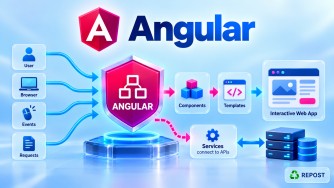
When an Angular application starts, Angular goes through a sequence of steps to load the application, bootstrap the root component, configure providers, create the component tree, and render the UI.
The basic modern Angular flow is:
Browser
   ↓
index.html
   ↓
main.ts
   ↓
bootstrapApplication(App, appConfig)
   ↓
Application providers configured
   ↓
Root App component created
   ↓
<app-root> matched
   ↓
app.html rendered
   ↓
Router / Child Components
   ↓
Services / API calls
   ↓
UI displayed
1. Browser Requests the Angular Application
Suppose the user opens:
https://www.example.comThe web server returns the built Angular application files, including the HTML document and JavaScript bundles.
The browser first loads:
index.html2. index.html Is Loaded
A typical index.html contains:
<!doctype html>
<html lang="en">

<head>
  <meta charset="utf-8">
  <title>My Angular App</title>
  <base href="/">
</head>

<body>

  <app-root></app-root>

</body>

</html>
The most important part is:
<app-root></app-root>This is the host element for the root Angular component.
At this point:
Browser
   ↓
index.html
   ↓
<app-root>
Angular still needs to start and create the component associated with this host.
3. Angular's JavaScript Is Loaded
During the Angular build process, your TypeScript application is transformed/bundled into JavaScript that the browser can execute.
Conceptually:
Development

main.ts
app.ts
services
components
routes
   ↓
Angular Build
   ↓
JavaScript bundles
   ↓
Browser
The browser ultimately executes JavaScript, not TypeScript directly.
4. main.ts Is the Application Entry Point
The Angular application's main TypeScript entry point is typically:
src/main.tsModern standalone Angular commonly contains:
import { bootstrapApplication }
  from '@angular/platform-browser';

import { App }
  from './app/app';

import { appConfig }
  from './app/app.config';

bootstrapApplication(App, appConfig)
  .catch(err => console.error(err));
The important line is:
bootstrapApplication(App, appConfig);This starts the Angular application.
5. Angular Bootstraps the Application
Angular executes:
bootstrapApplication(App, appConfig);There are two important arguments:
App
 ↓
Root Component


appConfig
 ↓
Application Configuration
Conceptually:
main.ts
   ↓
bootstrapApplication()
   |
   +---- App
   |
   └---- appConfig
6. Angular Configures Application-Level Providers
Suppose app.config.ts contains:
import { ApplicationConfig } from '@angular/core';
import { provideRouter } from '@angular/router';
import { provideHttpClient } from '@angular/common/http';

import { routes } from './app.routes';

export const appConfig: ApplicationConfig = {

  providers: [

    provideRouter(routes),

    provideHttpClient()

  ]

};
During application startup, Angular establishes the application environment and its dependency-injection providers.
For example:
Application Providers
        |
        +---- Router
        |
        +---- HttpClient
        |
        +---- Interceptors
        |
        +---- Other services/providers
This allows components and services to obtain registered dependencies.
7. Angular Creates the Root Component
Suppose app.ts contains:
import { Component } from '@angular/core';
import { RouterOutlet } from '@angular/router';

@Component({
  selector: 'app-root',
  imports: [RouterOutlet],
  templateUrl: './app.html',
  styleUrl: './app.css'
})
export class App {
}
Angular was told to bootstrap:
Appso Angular creates the root App component.
8. Angular Matches the Root Selector
The root component contains:
selector: 'app-root'And index.html contains:
<app-root></app-root>Angular associates the root component with this host element.
index.html

<app-root>
     ↓
Matches
     ↓
selector: 'app-root'
     ↓
App
The root component's UI is then rendered at that location.
9. Angular Loads the Root Template
The root component contains:
templateUrl: './app.html'Suppose app.html contains:
<h1>JN Tech</h1>

<router-outlet></router-outlet>
Angular renders this template as the root component's view.
App
 ↓
templateUrl
 ↓
app.html
 ↓
Browser UI
10. Angular Creates the Component Tree
Suppose the root template contains:
<app-header></app-header>

<app-home></app-home>

<app-footer></app-footer>
Angular creates the corresponding components, assuming they are available to the template.
The application becomes a component tree:
             App
              |
      +-------+-------+
      |       |       |
      v       v       v
   Header    Home   Footer
Those components can themselves contain additional components:
App
│
├── Header
│
├── Home
│   ├── Hero
│   └── LatestArticles
│       └── ArticleCard
│
└── Footer
Angular continues creating and rendering the required component hierarchy.
11. Angular Processes Template Bindings
Suppose a component contains:
export class Home {

  title = 'Welcome to Angular';

}
Template:
<h1>{{ title }}</h1>Angular evaluates:
{{ title }}and renders:
Welcome to AngularFlow:
Component

title = 'Welcome to Angular'
        ↓
Angular Binding
        ↓
Template

{{ title }}
        ↓
Browser

Welcome to Angular
Angular also processes other template features such as:
Property Binding
Event Binding
Control Flow
Pipes
Directives
Child Components
12. Angular Sets Up Event Handling
Suppose the template contains:
<button (click)="save()">
  Save
</button>
Component:
export class Home {

  save() {
    console.log('Saved');
  }

}
Angular connects the template event to the component method.
Button
   ↓
User Click
   ↓
(click)
   ↓
save()
   ↓
Component logic
The method does not execute during startup simply because it exists. Angular sets up the template so it can execute when the event occurs.
13. Angular Router Checks the Current URL
If routing is configured:
provideRouter(routes)and:
export const routes: Routes = [

  {
    path: '',
    component: Home
  },

  {
    path: 'articles',
    component: Articles
  }

];
Angular Router examines the current URL.
For example:
https://example.com/articlesThe router sees:
/articlesand matches:
{
  path: 'articles',
  component: Articles
}
Then it renders Articles into:
<router-outlet></router-outlet>Flow:
Current URL
    ↓
/articles
    ↓
Angular Router
    ↓
app.routes.ts
    ↓
path: 'articles'
    ↓
Articles
    ↓
<router-outlet>
14. Services May Be Created Through Dependency Injection
Suppose Articles needs:
ArticleServiceExample:
export class Articles {

  constructor(
    private articleService: ArticleService
  ) {
  }

}
Angular's dependency-injection system resolves the service according to its provider configuration.
For example:
@Injectable({
  providedIn: 'root'
})
export class ArticleService {
}
Conceptually:
Articles
    ↓
Needs ArticleService
    ↓
Angular Dependency Injection
    ↓
Resolve/Create ArticleService
    ↓
Inject it into Articles
An important detail:
A service is generally instantiated when Angular actually needs to resolve it, not simply because the service class exists in the source code.
15. Components Run Their Initialization Logic
As Angular creates components, their initialization lifecycle runs.
For example:
import { Component, OnInit } from '@angular/core';

@Component({
  selector: 'app-articles',
  templateUrl: './articles.html'
})
export class Articles implements OnInit {

  ngOnInit(): void {

    console.log('Articles initialized');

  }

}
A simplified sequence is:
Component created
      ↓
Dependencies injected
      ↓
Inputs initialized
      ↓
Initialization lifecycle
      ↓
ngOnInit()
      ↓
View rendered/checked
Angular has additional lifecycle hooks, but they are a separate topic.
16. API Calls May Start
A component might load data during initialization.
Example:
ngOnInit(): void {

  this.loadArticles();

}
Then:
loadArticles(): void {

  this.articleService
      .getArticles()
      .subscribe(data => {

        this.articles = data;

      });

}
The service could call:
getArticles() {

  return this.http.get<Article[]>(
    '/api/articles'
  );

}
Now the flow becomes:
Articles Component
       ↓
ngOnInit()
       ↓
ArticleService
       ↓
HttpClient
       ↓
GET /api/articles
       ↓
ASP.NET Core Web API
       ↓
SQL Server
       ↓
JSON Response
       ↓
Angular
       ↓
Component Data
       ↓
Template Updated
This is a common Angular + ASP.NET Core application flow.
17. Angular Renders and Updates the UI
Suppose the API returns:
[
  {
    "id": 1,
    "title": "Angular Components"
  },
  {
    "id": 2,
    "title": "Angular Templates"
  }
]
The component stores:
this.articles = data;The template may contain:
@for (article of articles; track article.id) {

  <h2>{{ article.title }}</h2>

}
Angular updates the UI:
Angular Components

Angular Templates
Conceptually:
API Response
    ↓
Component State Changes
    ↓
Angular detects relevant update
    ↓
Template evaluated
    ↓
DOM/UI updated
18. What Happens After Startup?
Angular does not stop after rendering the first screen.
The application continues running in the browser and responds to:
User clicks
Form input
Navigation
HTTP responses
Timers
State changes
Signal updates
Other application events
For example:
User clicks Articles
        ↓
Angular Router
        ↓
URL changes
        ↓
Articles component loaded
        ↓
API called
        ↓
Data received
        ↓
UI updated
This is the SPA behavior.
Angular normally updates the required parts of the page rather than requesting a completely new HTML document for every client-side route navigation.
19. Full Angular Startup Flow
This is the most important diagram for interview preparation:
User enters URL
       |
       v
Web Server
       |
       v
index.html + Angular JS files
       |
       v
Browser executes application
       |
       v
main.ts
       |
       v
bootstrapApplication(App, appConfig)
       |
       +-------------------------+
       |                         |
       v                         v
      App                   appConfig
       |                         |
       |                    Providers
       |                         |
       |              +----------+----------+
       |              |          |          |
       |           Router    HttpClient   Others
       |
       v
selector: 'app-root'
       |
       v
<app-root>
       |
       v
app.html
       |
       v
Component Tree
       |
       v
Router checks current URL
       |
       v
Route Component
       |
       v
Dependencies injected
       |
       v
Initialization
       |
       v
Service
       |
       v
HttpClient
       |
       v
ASP.NET Core Web API
       |
       v
SQL Server
       |
       v
JSON Response
       |
       v
Component State
       |
       v
Template
       |
       v
Browser UI
20. What Happens Before main.ts?
A useful distinction is:
Browser loads index.html
        ↓
Browser loads generated JavaScript
        ↓
Application entry code executes
        ↓
main.ts logic
        ↓
bootstrapApplication()
During development you write:
main.tsbut after:
ng buildthe browser receives generated JavaScript assets.
So technically, the browser is not directly executing your .ts file.
21. Startup vs Bootstrapping
These terms are related but not exactly identical.
Bootstrapping
Specifically refers to starting Angular and creating the root application/component.
main.ts
   ↓
bootstrapApplication()
   ↓
Root Component
Application Startup
Can describe the broader sequence:
Browser request
   ↓
HTML/JS loaded
   ↓
Angular bootstrap
   ↓
Providers
   ↓
Components
   ↓
Router
   ↓
Services
   ↓
Initial UI
Therefore:
Bootstrapping is an important part of the overall Angular startup process.
22. How Did This Work Before Standalone Angular?
Older NgModule-based Angular applications commonly started differently.
main.ts
import { platformBrowserDynamic }
  from '@angular/platform-browser-dynamic';

import { AppModule }
  from './app/app.module';

platformBrowserDynamic()
  .bootstrapModule(AppModule)
  .catch(err => console.error(err));
Then:
@NgModule({

  declarations: [
    AppComponent
  ],

  imports: [
    BrowserModule
  ],

  bootstrap: [
    AppComponent
  ]

})
export class AppModule {
}
The startup flow was:
index.html
    ↓
main.ts
    ↓
bootstrapModule(AppModule)
    ↓
AppModule
    ↓
bootstrap: [AppComponent]
    ↓
AppComponent
    ↓
<app-root>
    ↓
Application
23. Modern vs Older Startup
Older NgModule Approach
main.ts
   ↓
bootstrapModule(AppModule)
   ↓
AppModule
   ↓
AppComponent
   ↓
Application
Modern Standalone Approach
main.ts
   ↓
bootstrapApplication(App, appConfig)
   ↓
App
   ↓
Application| Older Angular | Modern Standalone Angular |
|---|---|
bootstrapModule() |
bootstrapApplication() |
Bootstraps AppModule |
Bootstraps root component |
Root NgModule required |
Root NgModule not required |
bootstrap: [AppComponent] |
bootstrapApplication(App) |
| Module-oriented configuration | Standalone/provider-oriented configuration |
24. Angular + ASP.NET Core Startup
In your architecture, Angular and ASP.NET Core should be understood as two separate applications.
Angular
Browser
   ↓
Angular starts
   ↓
Components
   ↓
Services
   ↓
HttpClient
ASP.NET Core
Separately:
ASP.NET Core process starts
       ↓
Program.cs
       ↓
Services registered
       ↓
Middleware pipeline configured
       ↓
Web API endpoints available
Then they communicate:
Angular
   |
   | HTTP / HTTPS + JSON
   v
ASP.NET Core Web API
   |
   v
SQL Server
Starting Angular does not start ASP.NET Core unless your development/hosting setup separately coordinates both processes.
25. Key Points
For interviews, remember:
- The browser loads
index.htmland the generated Angular JavaScript. index.htmlcontains the root host such as<app-root>.main.tsis the main Angular application entry point.- Modern Angular starts with:
bootstrapApplication(App, appConfig);- Angular configures application-level providers.
- Angular creates the root component.
- The root component selector matches
<app-root>. - Angular renders the root template.
- Angular builds the required component tree.
- The router checks the current URL when routing is configured.
- Angular DI resolves dependencies as they are needed.
- Components execute their initialization lifecycle.
- Components/services may make HTTP calls.
- Data updates component state.
- Angular updates the rendered UI.
- The application remains active and responds to navigation, user events and state changes.
- Older Angular commonly bootstrapped
AppModule. - Modern Angular bootstraps the standalone root component directly.
26. Interview Questions and Answers
Q1. What happens when an Angular application starts?
Answer:
The browser loads index.html and the generated Angular JavaScript. The application entry point executes, main.ts calls bootstrapApplication(), Angular configures application providers, creates the root component, renders it at its host element such as <app-root>, initializes the required component tree and routing, and renders the UI.
Q2. Which file starts an Angular application?
The main TypeScript entry point is typically:
main.tsIt commonly contains:
bootstrapApplication(App, appConfig);Q3. What is the first Angular component created?
The component passed to:
bootstrapApplication()is the root component.
For example:
bootstrapApplication(App, appConfig);means:
App → Root ComponentQ4. What is the role of index.html?
index.html is the browser's main HTML document and contains the host element for the Angular root component.
For example:
<app-root></app-root>Q5. What happens to app.config.ts during startup?
Its application-level providers are supplied during bootstrap.
For example:
provideRouter(routes)
provideHttpClient()
This configures capabilities such as routing and HTTP through Angular's dependency-injection system.
Q6. When does Angular Router start working?
When routing has been provided, Angular Router participates during application startup, examines the current URL, matches the configured route and renders the appropriate component into a router-outlet.
Q7. Are all Angular services created immediately at startup?
No.
Services are generally instantiated when Angular needs to resolve them according to their provider configuration. Merely having a service class in the project does not mean Angular immediately creates an instance at startup.
Q8. Does the browser execute main.ts directly?
No.
During the Angular build process, TypeScript is transformed/bundled into JavaScript. The browser executes the generated JavaScript.
Q9. What happens after the first UI is rendered?
Angular continues running as a client-side application and responds to user events, navigation, HTTP responses, state changes and other application activity, updating the UI when required.
Q10. What is the difference between older and modern Angular startup?
Older NgModule applications commonly use:
bootstrapModule(AppModule);Modern standalone applications use:
bootstrapApplication(App, appConfig);The modern approach directly bootstraps the standalone root component rather than first bootstrapping a root NgModule.
Interview Summary
When an Angular application starts, the browser loads
index.htmland the generated JavaScript. The application entry code executes andmain.tsbootstraps the root component usingbootstrapApplication(App, appConfig). Angular configures application-level providers, creates the root component, matches its selector with the host element such as<app-root>, renders its template, initializes the required component tree and routing, resolves dependencies, and displays the UI. The application then remains active in the browser, responding to user interactions, navigation, API responses, and state changes.