

What is a Component in Angular?
1. What is a Component?
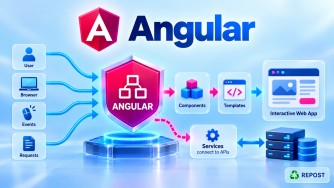
A component is the fundamental building block of an Angular application's user interface.
An Angular application is divided into multiple components, where each component is responsible for a specific part of the UI.
For example:
Angular Application
│
├── Header Component
├── Navigation Component
├── Home Component
├── Article List Component
├── Article Details Component
├── Contact Component
└── Footer Component
Instead of creating the entire application UI in one large file, Angular divides it into small, reusable, maintainable components.
A component normally consists of:
Component
│
├── TypeScript (.ts) → Logic / Data
├── HTML (.html)     → User Interface
└── CSS (.css)       → Styling
For example:
home/
├── home.ts
├── home.html
└── home.css
2. Why Do We Need Components?
Imagine an application containing:
Header
Navigation
Home
Articles
Categories
Contact
Admin Dashboard
Footer
If everything is written in one HTML and TypeScript file, the application becomes difficult to:
- Understand
- Maintain
- Test
- Debug
- Reuse
- Extend
Components solve this problem by dividing the UI into smaller independent units.
Instead of:
One Huge Application
        ↓
Thousands of lines of HTML/TypeScript
we can have:
Application
│
├── Header
├── Menu
├── Home
├── Articles
├── Contact
└── Footer
Each component has a specific responsibility.
This follows the general software engineering principle of separation of concerns.
3. Purpose of a Component
The main purpose of a component is to control a specific portion of the application's UI.
For example:
Header Component
Responsible for:
Logo
Site title
Navigation
Profile menu
Article List Component
Responsible for:
Article list
Search results
Pagination
Article cards
Login Component
Responsible for:
Username
Password
Login button
Validation messages
Therefore:
A component combines UI, data, and presentation behavior for a particular part of the application.
4. Basic Angular Component
Suppose we create:
ng generate component homeShort form:
ng g c homeDepending on the project's CLI configuration, Angular can generate files such as:
home/
│
├── home.ts
├── home.html
├── home.css
└── home.spec.ts
The three main files are:
home.ts      → Component logic
home.html    → Component UI
home.css     → Component styling
5. home.ts — Component Class
Example:
import { Component } from '@angular/core';

@Component({
  selector: 'app-home',
  standalone: true,
  templateUrl: './home.html',
  styleUrl: './home.css'
})
export class Home {

  title = 'Welcome to Angular';

}
There are two important parts:
@Component metadata
        +
Component class
Let's understand them.
6. What is @Component?
@Component is an Angular decorator.
@Component({
})
It tells Angular:
This TypeScript class is an Angular component.
Without @Component, this would simply be a normal TypeScript class:
export class Home {

}
With:
@Component({...})
export class Home {

}
Angular recognizes it as a component.
The decorator contains metadata describing how Angular should use the component.
7. Important @Component Properties
A basic component can contain:
@Component({
  selector: 'app-home',
  standalone: true,
  templateUrl: './home.html',
  styleUrl: './home.css'
})
Let's understand each property.
selector
selector: 'app-home'The selector defines the HTML tag used to represent the component.
For example:
<app-home></app-home>Angular sees:
<app-home>and knows that it represents:
HomeFlow:
<app-home>
     ↓
selector: 'app-home'
     ↓
Home Component
     ↓
home.html
standalone
standalone: trueThis means the component can be used without being declared inside an NgModule.
This is the modern Angular approach.
@Component({
  standalone: true
})
Modern Angular favors standalone components for new applications.
templateUrl
templateUrl: './home.html'This tells Angular where the component's HTML template is located.
home.ts
   |
   | templateUrl
   ↓
home.html
styleUrl
styleUrl: './home.css'This specifies the stylesheet associated with the component.
home.ts
   |
   +---- home.html
   |
   +---- home.css
imports
A standalone component can directly import the dependencies required by its template.
For example:
@Component({
  selector: 'app-home',
  standalone: true,
  imports: [],
  templateUrl: './home.html',
  styleUrl: './home.css'
})
Later, you may import things such as:
RouterLink
FormsModule
ReactiveFormsModule
Other standalone components
Pipes
Directives
through imports.
8. Component TypeScript File
Consider:
export class Home {

  title = 'Welcome to Angular';

}
The component class contains the component's:
- Data
- Properties
- Methods
- UI-related behavior
For example:
export class Home {

  title = 'Welcome to Angular';

  showMessage() {
    alert('Hello Angular');
  }

}
The HTML template can use both the property and method.
9. Component HTML File
home.html contains the component's UI.
Example:
<h1>{{ title }}</h1>

<button (click)="showMessage()">
  Click Me
</button>
The HTML accesses:
titlefrom the component.
Angular's interpolation syntax is:
{{ title }}The button calls:
showMessage()using event binding:
(click)="showMessage()"So:
home.ts
   |
   | title
   | showMessage()
   |
   v
home.html
10. Component CSS File
home.css contains the component's styles.
Example:
h1 {
    font-size: 30px;
}

button {
    padding: 10px;
}
The complete relationship is:
              Home Component
                    |
          +---------+---------+
          |         |         |
          v         v         v
      home.ts   home.html  home.css
          |         |         |
        Logic       UI       Style
This is the basic component structure you should remember.
11. How Does a Component Display Data?
Suppose home.ts contains:
export class Home {

  name = 'Syed';

}
The template can display it:
<h2>Welcome {{ name }}</h2>Angular evaluates:
{{ name }}and displays:
Welcome SyedThis is called interpolation.
Flow:
home.ts

name = 'Syed'
      ↓
Angular Binding
      ↓
home.html

{{ name }}
      ↓
Browser

Welcome Syed
12. How Does a Component Handle User Actions?
Components can also respond to user actions.
For example:
home.ts
export class Home {

  message = '';

  showMessage() {
    this.message = 'Welcome to Angular';
  }

}
home.html
<button (click)="showMessage()">
  Click Me
</button>

<p>{{ message }}</p>
When the user clicks:
Button Click
     ↓
showMessage()
     ↓
message updated
     ↓
Angular updates UI
     ↓
Welcome to Angular
This demonstrates one of Angular's fundamental ideas:
The component class manages state/behavior, and the template displays and interacts with that state.
13. Parent and Child Components
Angular applications are built as a component tree.
For example:
App
│
├── Header
│
├── Home
│   ├── LatestArticles
│   └── FeaturedArticle
│
└── Footer
Here:
App
 ↓
Parent

Header / Home / Footer
 ↓
Children
And inside Home:
Home
 ↓
Parent

LatestArticles
FeaturedArticle
 ↓
Children
Components can therefore be nested inside other components.
14. Using One Component Inside Another
Suppose we have a Header component:
@Component({
  selector: 'app-header',
  standalone: true,
  templateUrl: './header.html'
})
export class Header {
}
Its selector is:
app-headerThe parent component can import it:
import { Header } from './header/header';

@Component({
  selector: 'app-root',
  standalone: true,
  imports: [Header],
  templateUrl: './app.html'
})
export class App {
}
Then app.html can use:
<app-header></app-header>Conceptually:
App Component
     |
     v
<app-header>
     |
     v
Header Component
This is how reusable UI components are composed into larger screens.
15. Component Communication
Components frequently need to communicate.
For example:
Parent Component
       |
       | sends data
       v
Child Component
and:
Child Component
       |
       | sends event
       v
Parent Component
Angular provides mechanisms such as:
input()
output()

and the traditional:

@Input()
@Output()
These are separate important Angular topics, so they don't need to be expanded here.
The important idea is:
Components can receive information from other components and notify other components about events.
16. Types of Components
Angular does not impose official categories such as "smart" and "dumb" components, but in real-world design components are often described by their responsibilities.
1. Page / Feature Components
Represent a page or major feature.
Examples:
Home
Articles
ArticleDetails
Login
Dashboard
They are frequently connected to routing.
2. Reusable UI Components
Designed to be reused in multiple places.
Examples:
Button
Card
Loading Spinner
Pagination
Confirmation Dialog
Search Box
For example:
<app-loading-spinner></app-loading-spinner>could be used by many different features.
3. Layout Components
Define the general page layout.
Examples:
PublicLayout
AdminLayout
A public layout might contain:
Header
Navigation
Content
Footer
An admin layout might contain:
Admin Header
Sidebar
Content
4. Container and Presentational Components
You may also hear the terms:
Container / Smart Component
Usually coordinates:
Data
Services
Application state
Other components
Presentational / Dumb Component
Usually focuses primarily on:
Displaying data
Receiving inputs
Raising UI events
These are design patterns/conventions, not different Angular component classes.
17. Standalone vs NgModule-Based Components
This is important when working with modern and older Angular applications.
Older Angular
Components were commonly declared inside an NgModule.
@Component({
  selector: 'app-home',
  templateUrl: './home.component.html'
})
export class HomeComponent {
}
Then:
@NgModule({
  declarations: [
    HomeComponent
  ]
})
export class AppModule {
}
Flow:
HomeComponent
      ↓
Declared in
      ↓
AppModule
Modern Angular
A component can be standalone:
@Component({
  selector: 'app-home',
  standalone: true,
  templateUrl: './home.html'
})
export class Home {
}
No AppModule declaration is required.
Difference
| NgModule-Based | Standalone |
|---|---|
| Component declared in NgModule | No NgModule declaration required |
| Dependencies often provided through module imports | Component can directly import template dependencies |
| Common in older projects | Preferred for modern Angular development |
| More module configuration | Simpler component-oriented structure |
You should understand both because existing enterprise projects may still contain NgModule-based components.
18. Component vs Service
This is a common interview question.
| Component | Service |
|---|---|
| Primarily related to UI | Primarily reusable/shared logic |
| Has template | Normally no template |
| Can have component styles | No component UI |
| Handles user interaction | Often handles APIs/shared logic |
Uses @Component |
Uses @Injectable |
For example:
Articles Component
        |
        | uses
        v
Article Service
        |
        | HTTP
        v
ASP.NET Core Web API
The component should not become responsible for every concern.
A cleaner separation is:
Component
   ↓
Service
   ↓
Backend API
19. Component vs Directive
Another important distinction:
A component is a special type of directive that has its own template.
Conceptually:
Directive
   |
   +-- Component
         |
         +-- Has Template
A component typically creates a UI section:
<app-header></app-header>A directive usually adds or changes behavior on an existing element.
For example:
<p appHighlight>
  Angular
</p>
So:
| Component | Directive |
|---|---|
| Has a template | Normally does not have its own template |
| Creates/manages UI | Changes behavior/appearance |
@Component |
@Directive |
20. Advantages of Components
Reusability
A component can be reused.
For example:
<app-article-card></app-article-card>can appear in multiple places.
Maintainability
Instead of one huge application:
5000-line HTML filewe can have:
Header
ArticleList
ArticleCard
Pagination
Footer
Each is easier to maintain.
Separation of Concerns
Each component has a specific UI responsibility.
Testability
Components can be tested individually.
Team Development
Different developers can work on different components.
Scalability
Large applications can be broken into feature-specific component trees.
21. Disadvantages / Considerations
Too Many Components
Breaking every tiny piece of HTML into a separate component can make the application unnecessarily complicated.
Components should have meaningful responsibilities.
Component Communication Can Become Complex
Large component trees may require careful management of:
Inputs
Outputs
Services
Signals
State
Large Components Are Also a Problem
The opposite problem occurs when one component contains:
Huge template
Large business logic
Many API calls
Complex state
Hundreds of methods
Such components become difficult to maintain.
A component should have a clear and focused responsibility.
22. Key Points
For interviews, remember:
- A component is the basic building block of Angular UI.
- Angular applications are built as a tree of components.
- A component commonly consists of:
.ts   → Logic / state
.html → Template / UI
.css → Styling@Componenttells Angular that a TypeScript class is a component.selectordefines how the component can be referenced in HTML.templateUrlpoints to the HTML template.styleUrlpoints to the stylesheet.- Standalone components can directly declare/import their template dependencies.
- Components can be nested.
- Components can communicate with parent and child components.
- Components should focus primarily on UI responsibilities.
- Reusable non-UI/API logic is generally better placed in services.
- Modern Angular favors standalone components.
- Older applications commonly declare components inside NgModules.
The simplest way to remember a component is:
           COMPONENT
               |
       +-------+-------+
       |       |       |
       v       v       v
      .ts     .html   .css
       |       |       |
     Logic     UI     Style
23. Interview Questions and Answers
Q1. What is a component in Angular?
Answer:
A component is the fundamental building block of an Angular application's UI. It controls a specific portion of the user interface and normally consists of a TypeScript class, HTML template, and styles.
Q2. What is @Component?
Answer:
@Component is an Angular decorator that provides metadata telling Angular that a TypeScript class is a component.
Example:
@Component({
  selector: 'app-home',
  templateUrl: './home.html'
})
export class Home {
}
Q3. What is a component selector?
Answer:
The selector defines the HTML representation of a component.
For example:
selector: 'app-home'allows the component to be referenced as:
<app-home></app-home>Q4. What is templateUrl?
Answer:
templateUrl specifies the external HTML file used as the component's template.
templateUrl: './home.html'Q5. What is styleUrl?
Answer:
styleUrl specifies the stylesheet associated with the component.
styleUrl: './home.css'Q6. What is a standalone component?
Answer:
A standalone component does not need to be declared inside an NgModule.
For example:
@Component({
  standalone: true
})
export class Home {
}
Standalone components are the modern Angular approach.
Q7. What is the difference between a component and a service?
Answer:
A component primarily manages a part of the UI, while a service normally contains reusable logic, shared state, or API communication.
Component
    ↓
Service
    ↓
Web API
Q8. Can one Angular component contain another component?
Answer:
Yes.
Angular applications are built using nested components.
For example:
App
├── Header
├── Home
│   └── ArticleCard
└── Footer
Q9. How do parent and child components communicate?
Answer:
Angular provides input and output mechanisms for parent-child communication. Modern Angular supports input() and output(), while existing code commonly uses @Input() and @Output().
Q10. What is the difference between a component and a directive?
Answer:
A component has its own template and represents a portion of the UI. A directive generally modifies the behavior or appearance of an existing element.
Q11. What is the difference between standalone and NgModule-based components?
Answer:
A standalone component can directly import its required template dependencies and does not need to be declared in an NgModule.
An older NgModule-based component is declared in the declarations collection of an Angular module.
Q12. What are the main parts of an Angular component?
Answer:
The three main parts are:
TypeScript → Component logic/state
HTML       → Template/UI
CSS        → Styling
The TypeScript class and its metadata connect these pieces together.
Interview Summary
A component is the fundamental building block of an Angular application's user interface. It controls a specific part of the screen and typically consists of a TypeScript class for state and behavior, an HTML template for the UI, and CSS for styling. Angular identifies the class as a component through the
@Componentdecorator. Modern Angular favors standalone components, while older Angular applications commonly declare components inside NgModules.