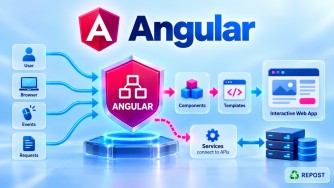


What is Angular?
1. What is Angular?
Angular is an open-source, TypeScript-based frontend web application framework maintained by Google.
It is used to build modern, dynamic, and interactive web applications, especially Single Page Applications (SPAs) and large enterprise applications.
Angular provides a complete framework for frontend development, including:
- Components
- Templates
- Services
- Dependency Injection
- Routing
- Forms and Validation
- HTTP communication
- Directives
- Pipes
- Signals
- Guards
- Interceptors
- CSR, SSR, SSG/Prerendering, and Hybrid Rendering
- Testing support
In an ASP.NET Core application, Angular is commonly used as the frontend, while ASP.NET Core Web API acts as the backend.
User / Browser
      |
      v
+----------------+
|    Angular     |
|   Frontend     |
+----------------+
      |
      | HTTP / HTTPS
      | JSON
      v
+----------------+
| ASP.NET Core   |
|    Web API     |
+----------------+
      |
      v
+----------------+
|   SQL Server   |
+----------------+
For example, your Angular application could display Articles, while your ASP.NET Core Web API retrieves the article data from SQL Server and returns it as JSON.
2. Why Do We Need Angular?
Building a large web application using only HTML, CSS, and JavaScript can become difficult to maintain.
For example, an application may contain:
Login
Dashboard
Articles
Categories
Users
Reports
Admin
Settings
As the application grows, we need a proper structure for managing UI, navigation, data, validation, API communication, reusable functionality, and application state.
Angular provides this structure.
Instead of writing everything as unrelated JavaScript code, Angular allows us to organize the application into reusable pieces.
Angular Application
│
├── Components
├── Services
├── Routes
├── Guards
├── Interceptors
├── Models
└── Shared functionality
This makes large frontend applications easier to develop, test, maintain, and scale.
3. Purpose of Angular
The main purpose of Angular is to provide a structured framework for building client-side web applications.
For example:
Angular
   |
   | GET /api/articles
   v
ASP.NET Core Web API
   |
   v
SQL Server
The Web API may return:
[
  {
    "id": 1,
    "title": "Angular Basics"
  }
]
Angular receives the data and displays it to the user.
So the responsibilities can be separated clearly:
| Layer | Responsibility |
|---|---|
| Angular | Frontend / User Interface |
| ASP.NET Core Web API | Backend / Business logic |
| SQL Server | Data storage |
4. Important Building Blocks of Angular
Some important Angular building blocks are:
| Building Block | Purpose |
|---|---|
| Component | Creates a part of the UI |
| Template | Defines HTML displayed by a component |
| Service | Contains reusable/shared logic |
| Dependency Injection | Provides dependencies to classes |
| Routing | Navigates between pages/components |
| Forms | Captures and validates user input |
| HttpClient | Communicates with backend APIs |
| Directive | Changes element behavior or structure |
| Pipe | Transforms data for display |
| Signal | Manages reactive state |
| Guard | Controls route navigation |
| Interceptor | Intercepts HTTP requests/responses |
| CSR / SSR / SSG / Hybrid | Different rendering strategies |
Each of these is a separate Angular topic and can be studied individually.
5. Angular Before Standalone vs Modern Angular
This is important because many existing Angular applications and older tutorials use NgModules, while modern Angular development favors standalone APIs.
Earlier Angular – NgModule Based
Components were commonly declared inside an NgModule.
@NgModule({
  declarations: [
    AppComponent,
    HomeComponent
  ],
  imports: [
    BrowserModule
  ],
  bootstrap: [
    AppComponent
  ]
})
export class AppModule {
}
The application commonly had:
main.ts
   |
   v
AppModule
   |
   v
Components
Modern Angular – Standalone
Modern Angular applications can use standalone components without requiring an AppModule.
@Component({
  selector: 'app-home',
  standalone: true,
  templateUrl: './home.html'
})
export class Home {
}
The application can be bootstrapped using:
bootstrapApplication(App);Difference
| Earlier Angular | Modern Angular |
|---|---|
| NgModule-centric | Standalone-first |
AppModule commonly used |
AppModule not required |
| Components declared in modules | Components can be standalone |
bootstrapModule() |
bootstrapApplication() |
| More module configuration | Simpler structure |
Important: NgModules still exist. You should understand them because many existing enterprise Angular applications still contain module-based code.
6. Simple Angular Example
A basic Angular component can have three files:
home.ts
home.html
home.css
home.ts
Contains the component's TypeScript logic.
import { Component } from '@angular/core';

@Component({
  selector: 'app-home',
  standalone: true,
  templateUrl: './home.html',
  styleUrl: './home.css'
})
export class Home {
  title = 'Welcome to Angular';
}
home.html
Contains the UI.
<h1>{{ title }}</h1>

<p>This is my first Angular application.</p>
home.css
Contains the component's styles.
h1 {
    font-size: 30px;
}

p {
    font-size: 18px;
}
How It Works
home.ts
   |
   | provides data
   v
home.html
   |
   | styled by
   v
home.css
The TypeScript property:
title = 'Welcome to Angular';is displayed in HTML using interpolation:
{{ title }}This demonstrates one of Angular's basic ideas: a component connects application logic with its HTML template and styles.
7. Advantages of Angular
1. Complete Frontend Framework
Angular provides many important features out of the box:
Components
Routing
Forms
HTTP
Dependency Injection
Validation
Signals
Testing
2. TypeScript Support
Angular uses TypeScript, which provides strong typing and better compile-time checking.
let age: number = 48;3. Component-Based Architecture
Large applications can be divided into smaller reusable components.
Application
├── Header
├── Menu
├── Home
├── Articles
└── Footer
4. Built-in Dependency Injection
Angular has its own DI system for managing services and dependencies.
5. Reusable Code
Components, services, directives, and pipes can be reused across the application.
6. Good for Large Applications
Angular provides conventions and structure that are particularly useful for large enterprise applications.
7. Easy Backend Integration
Angular can communicate with:
- ASP.NET Core Web API
- Java APIs
- Node.js APIs
- Python APIs
- Microservices
The backend technology does not need to be Angular-specific.
8. Disadvantages of Angular
1. Learning Curve
Angular contains many concepts that developers need to understand.
Components
Services
Routing
Dependency Injection
RxJS
Signals
Forms
Guards
Interceptors
2. Can Be Complex for Small Applications
For a very small static website, Angular may introduce more framework structure than necessary.
3. RxJS Can Take Time to Learn
Angular applications frequently use Observables and RxJS, especially for asynchronous operations.
4. Older and Modern Angular Code Can Look Different
Developers maintaining existing projects may need to understand both:
NgModule-based Angular
        +
Standalone Angular
9. Key Points
For interviews, remember these points:
- Angular is an open-source frontend framework.
- Angular is maintained by Google.
- Angular primarily uses TypeScript.
- Angular is commonly used to build SPAs and enterprise web applications.
- Angular uses a component-based architecture.
- Angular provides built-in Dependency Injection.
- It provides routing, forms, HTTP communication, validation, directives, pipes, signals, guards, and interceptors.
- Modern Angular favors standalone components/APIs.
- Older Angular applications commonly use NgModules.
- Angular can communicate with ASP.NET Core Web API using HTTP/HTTPS and JSON.
- Angular handles the frontend; it does not replace backend business logic, security enforcement, or database access.
10. Interview Questions and Answers
Q1. What is Angular?
Answer:
Angular is an open-source, TypeScript-based frontend framework maintained by Google. It is used to build modern web applications using a component-based architecture and provides built-in features such as routing, forms, dependency injection, HTTP communication, validation, and reactive state management.
Q2. Is Angular a framework or library?
Answer:
Angular is a framework.
It provides a complete application structure and many built-in capabilities such as routing, dependency injection, forms, and HTTP communication.
Q3. Which language is mainly used in Angular?
Answer:
Angular applications are mainly written using TypeScript, along with HTML and CSS.
Q4. What is a component in Angular?
Answer:
A component is a basic building block of an Angular application. It represents a portion of the user interface and normally contains TypeScript logic, an HTML template, and styles.
For example:
home.ts
home.html
home.css
Q5. What is a Single Page Application?
Answer:
A Single Page Application loads the main application once and dynamically updates the displayed content as the user navigates, rather than performing a traditional full-page reload for every navigation.
Angular is commonly used to build SPAs.
Q6. What are standalone components?
Answer:
Standalone components can be used without declaring them inside an NgModule.
@Component({
  standalone: true
})
export class Home {
}
Modern Angular favors standalone APIs for new applications.
Q7. Does modern Angular require AppModule?
Answer:
No.
Modern Angular applications can be created without AppModule and bootstrapped using:
bootstrapApplication(App);However, NgModule is still important when working with existing Angular applications and some libraries.
Q8. How does Angular communicate with ASP.NET Core Web API?
Answer:
Angular normally uses its HTTP client to send HTTP/HTTPS requests to ASP.NET Core Web API.
Angular
   |
   | HTTP Request
   v
ASP.NET Core Web API
   |
   | JSON Response
   v
Angular
Q9. Why is Angular suitable for enterprise applications?
Answer:
Angular provides a structured architecture with components, services, dependency injection, routing, forms, validation, HTTP communication, testing support, and other integrated features. This helps teams organize and maintain large applications.
Interview Summary
Angular is an open-source, TypeScript-based frontend framework maintained by Google. It is used to build modern, component-based web applications, particularly SPAs and enterprise applications. Angular provides built-in features such as components, routing, dependency injection, forms, validation, and HTTP communication. Modern Angular favors standalone components, while older Angular applications commonly use NgModules. In an ASP.NET Core solution, Angular can act as the frontend and communicate with ASP.NET Core Web API using HTTP/HTTPS and JSON.