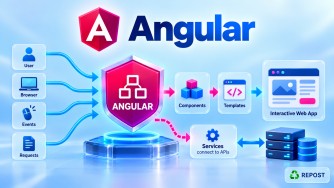


ngAfterViewInit() is an Angular lifecycle hook that runs once after Angular has fully initialized a component's view and its child views.
Simple definition:
ngAfterViewInit()is called when the component's own HTML view is ready, making it the standard lifecycle hook for initialization logic that needs@ViewChild()or@ViewChildren()results.
Why Do We Need ngAfterViewInit()?
Suppose the component template contains:
<h2 #title>Welcome Syed</h2>and you want to access this element from TypeScript:
@ViewChild('title')
title!: ElementRef;
Angular needs to first:
- Create the component.
- Create its template/view.
- Resolve the view query.
- Then your code can safely work with the resulting element reference.
This is why we commonly use:
ngAfterViewInit()with:
@ViewChild()
@ViewChildren()
Full Simple Sample Program
app.ts
import {
  AfterViewInit,
  Component,
  ElementRef,
  ViewChild
} from '@angular/core';

@Component({
  selector: 'app-root',
  standalone: true,
  template: `
    <h1>ngAfterViewInit Example</h1>

    <h2 #title>Welcome Syed</h2>
  `
})
export class App implements AfterViewInit {

  @ViewChild('title')
  title!: ElementRef;

  ngAfterViewInit(): void {

    console.log(
      this.title.nativeElement.textContent
    );
  }
}
Explanation
First, we have an HTML element:
<h2 #title>Welcome Syed</h2>Here:
#titleis a template reference variable.
We access it from TypeScript using:
@ViewChild('title')
title!: ElementRef;
Angular initializes the component's view.
After the view is initialized, Angular calls:
ngAfterViewInit()Now we can access:
this.title.nativeElementFor example:
console.log(
  this.title.nativeElement.textContent
);
Output:
Welcome SyedExecution Flow
Think of it like this:
Component Created
       ↓
ngOnInit()
       ↓
Angular creates component template
       ↓
<h2 #title>Welcome Syed</h2>
       ↓
ViewChild query is resolved
       ↓
ngAfterViewInit()
       ↓
Use the ViewChild result
What Does "View" Mean?
This is very important.
View means the component's own template and child views.
For example:
@Component({
  template: `
    <h1>Customer Details</h1>

    <input #nameInput>

    <button>Save</button>
  `
})
These elements are part of the component's view:
Component
   │
   ├── <h1>
   ├── <input>
   └── <button>
So when you want to work with something in this view using a view query, ngAfterViewInit() is often the appropriate hook.
Practical Example — Focus an Input
A common use case is automatically focusing an input after the view is created.
Full Code
import {
  AfterViewInit,
  Component,
  ElementRef,
  ViewChild
} from '@angular/core';

@Component({
  selector: 'app-root',
  standalone: true,
  template: `
    <h2>Login</h2>

    <input
      #username
      type="text"
      placeholder="Username">
  `
})
export class App implements AfterViewInit {

  @ViewChild('username')
  username!: ElementRef<HTMLInputElement>;

  ngAfterViewInit(): void {

    this.username.nativeElement.focus();
  }
}
Flow
Angular creates:
<input #username>Then resolves:
@ViewChild('username')Then calls:
ngAfterViewInit()Then:
this.username.nativeElement.focus();puts the cursor inside the input.
ngOnInit() vs ngAfterViewInit()
This is an important interview question.
ngOnInit() |
ngAfterViewInit() |
|---|---|
| Component initialization | View initialization |
| Runs once | Runs once |
| Runs earlier | Runs later |
| Good for general initialization | Good for logic requiring the initialized view |
| View may not yet be fully initialized | View is initialized |
| Usually not where you rely on view-query results | Commonly used with @ViewChild |
Easy way to remember
ngOnInit()
    ↓
Component initialized


ngAfterViewInit()
    ↓
Component VIEW initialized
ngAfterContentInit() vs ngAfterViewInit()
This is probably the most important distinction.
ngAfterContentInit()
Deals with content projected from the parent.
<app-card>

    <h2>Welcome</h2>   ← Parent provides this

</app-card>
Child receives it through:
<ng-content></ng-content>Commonly:
@ContentChild
      ↓
ngAfterContentInit
ngAfterViewInit()
Deals with the component's own view.
@Component({
  template: `
    <h2 #title>Welcome</h2>
  `
})
Commonly:
@ViewChild
     ↓
ngAfterViewInit
So remember:
CONTENT
   ↓
Provided by Parent
   ↓
<ng-content>
   ↓
@ContentChild
   ↓
ngAfterContentInit()


VIEW
   ↓
Component's template
   ↓
@ViewChild
   ↓
ngAfterViewInit()
ngAfterViewInit() vs ngAfterViewChecked()
Similar to the content hooks:
ngAfterViewInit()
       ↓
View initialized
       ↓
Runs ONCE
Whereas:
ngAfterViewChecked()
       ↓
View checked by Angular
       ↓
Can run MANY TIMES
ngAfterViewInit() |
ngAfterViewChecked() |
|---|---|
| After view initialization | After view checking |
| Runs once | Runs repeatedly |
| Initialization logic | Logic after view checks |
Common with initial @ViewChild usage |
Should be used carefully |
Lifecycle Order
A simplified lifecycle order is:
ngOnChanges()
      ↓
ngOnInit()
      ↓
ngDoCheck()
      ↓
ngAfterContentInit()       ← Once
      ↓
ngAfterContentChecked()    ← Repeated
      ↓
ngAfterViewInit()          ← Once
      ↓
ngAfterViewChecked()       ← Repeated
Notice:
CONTENT
   ↓
VIEW
Angular initializes/checks projected content before completing the component's view lifecycle.
Advantages
1. View Is Ready
It provides a lifecycle point after the component's view has been initialized.
2. Useful with @ViewChild()
@ViewChild('username')
username!: ElementRef;
Then:
ngAfterViewInit() {
  this.username.nativeElement.focus();
}
3. Useful with @ViewChildren()
You can work with multiple queried elements/components after the view is initialized.
4. Runs Only Once
Unlike ngAfterViewChecked(), it runs once for each component instance.
Disadvantages / Considerations
1. Direct DOM Manipulation Should Be Limited
This is possible:
this.title.nativeElement.style.backgroundColor = 'red';but Angular applications should generally avoid unnecessary direct DOM manipulation. Prefer Angular bindings, directives, or appropriate DOM abstraction where possible.
2. Be Careful Changing Bound State
Changing template-bound state at the wrong point inside ngAfterViewInit() can cause Angular's development checks to report an ExpressionChangedAfterItHasBeenCheckedError.
3. Don't Put Heavy Work Here
Keep lifecycle hooks focused and avoid unnecessary expensive operations.
Key Points
ngAfterViewInit()is an Angular lifecycle hook.- It runs once.
- It runs after Angular initializes the component's view and child views.
- It is commonly used with
@ViewChild(). - It is also commonly used with
@ViewChildren(). ngOnInit()runs before the view is fully initialized.ngAfterContentInit()deals with projected content.ngAfterViewInit()deals with the component's view.ngAfterViewChecked()can run repeatedly.
Interview Questions and Answers
1. What is ngAfterViewInit()?
ngAfterViewInit() is an Angular lifecycle hook called once after Angular initializes a component's view and child views.
2. How many times does ngAfterViewInit() run?
It runs once per component instance.
3. Why is ngAfterViewInit() commonly used with @ViewChild()?
Because it provides a lifecycle point where the component's view has been initialized and the view query result can be used.
4. What is the difference between ngOnInit() and ngAfterViewInit()?
ngOnInit() is used for general component initialization and runs earlier.
ngAfterViewInit() runs after the component's view has been initialized.
5. What is the difference between ngAfterContentInit() and ngAfterViewInit()?
ngAfterContentInit() deals with content projected from the parent, while ngAfterViewInit() deals with the component's own view and child views.
6. What is the difference between ngAfterViewInit() and ngAfterViewChecked()?
ngAfterViewInit() runs once after view initialization.
ngAfterViewChecked() runs repeatedly after Angular checks the view.
Easy Memory Trick
@ContentChild
      ↓
CONTENT from Parent
      ↓
ngAfterContentInit()


@ViewChild
      ↓
VIEW of Component
      ↓
ngAfterViewInit()
One-line Interview Answer
ngAfterViewInit()is an Angular lifecycle hook that runs once after the component's view and child views are initialized, and it is commonly used when initialization logic depends on@ViewChildor@ViewChildren.