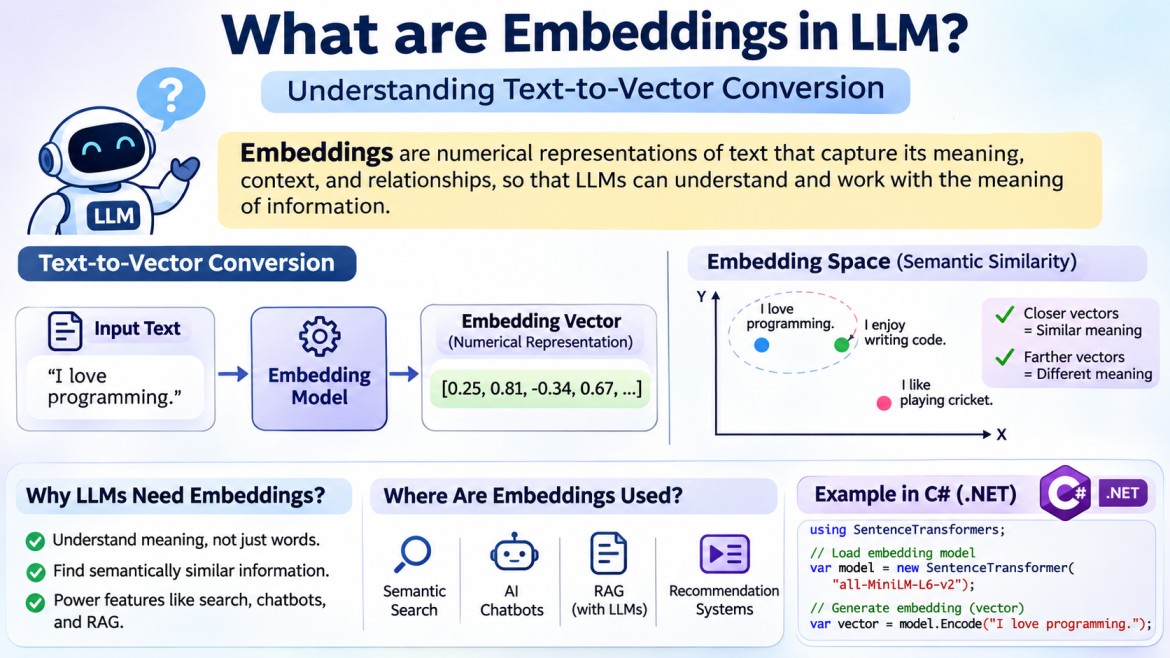


Embeddings in LLM
1. Introduction
Have you ever wondered how ChatGPT understands the meaning of your questions, even when you use different words to express the same idea?
For example, consider these three sentences:
-
I love programming.
-
I enjoy writing code.
-
I like software development.
Although these sentences use different words, they communicate almost the same meaning.
A traditional computer program generally processes text by matching characters, words, or strings. However, AI models need to understand the relationships and meanings behind words.
How does an AI model achieve this?
One important technique is called Embeddings.
Embeddings convert text, images, audio, or other types of information into numerical representations called Vectors.
These numerical representations help AI systems identify similarities, relationships, and contextual meanings between different pieces of information.
In this article, we will understand:
-
What are embeddings?
-
Why do LLMs need embeddings?
-
What is a vector?
-
How does text-to-vector conversion work?
-
How do embeddings identify similar meanings?
-
What are embedding models?
-
What is a vector database?
-
How are embeddings used in RAG applications?
-
How can we generate embeddings using Python?
Let's understand everything step by step with simple, real-world examples.
2. What Are Embeddings?
Embeddings are numerical representations of information that capture its meaning, context, and relationships.
In simple terms, embeddings convert human-readable information into a numerical format that computers and AI models can process mathematically.
Let's take a simple example.
Suppose we have this sentence:
I love programming.An embedding model converts this sentence into a list of numbers called a vector.
For example:
Input:
I love programming.

Output:
[0.25, 0.81, -0.34, 0.67, 0.12, ...]
The numbers above are illustrative values, not actual embedding output.
This numerical representation is called an Embedding Vector.
The AI model can use this vector to compare the meaning of this sentence with other sentences.
For example:
Sentence 1: I love programming.
Sentence 2: I enjoy writing code.
Sentence 3: The weather is very hot.
An embedding model may produce vectors that look conceptually like this:
|
Sentence |
Illustrative vector |
|---|---|
|
I love programming. |
[0.25, 0.81, -0.34] |
|
I enjoy writing code. |
[0.28, 0.79, -0.30] |
|
The weather is very hot. |
[-0.65, 0.12, 0.91] |
Notice that the first two vectors are relatively close to each other.
Why?
Because their sentences have similar meanings.
The third sentence has a different meaning, so its vector may be located far away in the embedding space.
Important: These are simplified three-dimensional examples. Real embedding models typically generate vectors containing hundreds or thousands of dimensions.
3. What Is a Vector?
Before understanding embeddings deeply, let's understand what a vector is.
A vector is simply an ordered collection of numbers.
For example:
[10, 20, 30]This is a three-dimensional vector.
It contains three numerical values:
-
Dimension 1 = 10
-
Dimension 2 = 20
-
Dimension 3 = 30
In mathematics, a vector can represent a point or direction in a multidimensional space.
Let's understand this using a real-world example.
Imagine a map.
You want to locate a particular restaurant.
You need two coordinates:
-
X-coordinate
-
Y-coordinate
For example:
Restaurant A

X = 10
Y = 20
We can represent its location as:
[10, 20]Similarly, an embedding represents text using numerical coordinates.
However, instead of using only two or three coordinates, an embedding model can use hundreds or thousands of dimensions.
Understanding vectors visually using a text diagram
                  Y
                  |
                  |
                  |        Restaurant A
                  |             *
                  |           (10,20)
                  |
                  |
                  |
                  +---------------------- X
Think of each dimension as a numerical feature that contributes to representing the information.
One important clarification: In real embeddings, individual dimensions usually do not have simple human-readable meanings such as happiness, programming, or weather. Meaning is distributed across multiple dimensions.
4. Why Do LLMs Need Embeddings?
Computers fundamentally process numerical data.
Human beings understand sentences like:
What is Dependency Injection in ASP.NET Core?But AI models perform mathematical operations on numerical representations.
They need a way to transform human language into numbers.
This is where embeddings become important.
Consider these two sentences:
Sentence 1:
How can I learn Python?

Sentence 2:
What is the best way to study Python?
A traditional keyword-based search might focus on matching individual words.
However, both questions have similar meanings even though their wording is different.
An embedding model can convert both sentences into vectors and help identify their semantic similarity.
This is particularly useful for:
-
Semantic search.
-
Question-answering systems.
-
Recommendation systems.
-
Chatbots.
-
Retrieval-Augmented Generation (RAG).
-
Document classification.
-
Content discovery.
In simple terms: Embeddings help AI systems work with the meaning of information rather than relying only on matching words.
5. How Does Text-to-Vector Conversion Work?
Let's understand the process step by step.
Suppose we provide this sentence:
Explain Dependency Injection in ASP.NET Core.The embedding process can be understood through these steps.
Step 1: Provide Input Text
First, we provide a sentence or paragraph to an embedding model.
Explain Dependency Injection in ASP.NET Core.The input can be:
-
A single word.
-
A sentence.
-
A paragraph.
-
A document.
-
A product description.
Step 2: Tokenization and Text Processing
The embedding model processes the input text.
Depending on the model architecture, this involves tokenization and other preprocessing steps.
For example:
Explain Dependency Injection in ASP.NET Core.The tokenizer divides the text into smaller units called tokens.
These tokens may represent complete words, parts of words, or punctuation.
Remember our previous article about Tokenizers?
A tokenizer prepares text in a format that the model can process.
Step 3: Numerical Representation
The model converts the tokens into internal numerical representations.
It processes the relationships between tokens and their surrounding context.
For example:
Dependency InjectionThe model uses learned patterns to represent information about this technical concept.
Step 4: Generate Embedding Vector
The embedding model produces a numerical vector representing the input text.
Illustrative output:
[
  0.125,
  0.843,
  -0.321,
  0.456,
  0.762,
  -0.112,
  ...
]
This is the embedding vector.
Step 5: Store or Compare the Vector
We can now use the vector for different purposes.
For example:
-
Store it in a vector database.
-
Compare it with another vector.
-
Find documents with similar meanings.
-
Retrieve relevant information for an AI chatbot.
Complete text-to-vector conversion flow
       Human Language
              |
              v
    "I love programming"
              |
              v
          Tokenizer
              |
              v
          AI Model
              |
              v
      Embedding Model
              |
              v
       Numerical Vector
              |
              v
    [0.25, 0.81, -0.34, ...]
              |
              v
    Semantic Search / RAG
This is the basic text-to-vector conversion process.
6. How Do Embeddings Understand Similar Meanings?
This is one of the most interesting features of embeddings.
Let's consider three sentences.
A: I love Python programming.

B: I enjoy coding in Python.

C: I like playing cricket.
All three sentences have different wording.
However:
-
A and B express similar meanings.
-
C expresses a different meaning.
An embedding model converts these sentences into vectors.
The vectors for A and B may be closer together, while C may be farther away.
Understanding semantic similarity
          Embedding Space

       A *------* B


                              *
                              C


       A and B = Similar meaning
       C       = Different meaning
This is called Semantic Similarity.
Semantic similarity measures how closely two pieces of information are related in meaning.
What Is Cosine Similarity?
One popular mathematical technique used to compare embedding vectors is Cosine Similarity.
It measures the angle between two vectors.
The formula is:
Where:
-
A = First vector.
-
B = Second vector.
-
A · B = Dot product of the vectors.
-
||A|| = Magnitude of the first vector.
-
||B|| = Magnitude of the second vector.
Generally, the result is interpreted as follows:
|
Score |
General interpretation |
|---|---|
|
Close to 1 |
Very similar direction |
|
Around 0 |
Little directional similarity |
|
Close to -1 |
Opposite direction |
The exact interpretation depends on the embedding model and the data.
For example:
Sentence A: I love programming.
Sentence B: I enjoy coding.

Cosine Similarity: 0.92 (illustrative)

Sentence A: I love programming.
Sentence C: The weather is hot.

Cosine Similarity: 0.15 (illustrative)
A higher score generally indicates greater similarity in direction.
Important: Similarity scores are not universal percentages. A score of 0.92 does not mean that two sentences are 92% identical.
7. What Is an Embedding Model?
An embedding model is an AI model specifically designed to convert information into numerical vectors.
Its primary responsibility is to generate meaningful numerical representations of input data.
For example:
Input:
What is Docker?

         |
         v

   Embedding Model

         |
         v

Output:
[0.21, 0.56, -0.18, 0.72, ...]
The generated vector represents the semantic information associated with the input.
Popular Embedding Models
Here are some commonly used embedding models:
|
Embedding model |
Provider |
|---|---|
|
text-embedding-3-small |
OpenAI |
|
text-embedding-3-large |
OpenAI |
|
all-MiniLM-L6-v2 |
Sentence Transformers |
|
BGE (BAAI General Embedding) |
BAAI |
|
E5 Models |
Microsoft Research |
|
Gemini Embedding |
|
Different embedding models have different architectures, dimensions, capabilities, and performance characteristics.
What Is Embedding Dimension?
You have already seen examples like:
[0.25, 0.81, -0.34]This vector contains three numbers. Therefore, it has three dimensions.
However, real embedding models generate much larger vectors.
For example:
|
Model |
Default embedding dimensions |
|---|---|
|
OpenAI text-embedding-3-small |
1536 |
|
OpenAI text-embedding-3-large |
3072 |
|
all-MiniLM-L6-v2 |
384 |
What does this mean?
If an embedding model generates a vector with 1536 dimensions, it means the output contains 1536 numerical values.
Input:
I love programming.

Output:
[
  0.125,
  0.843,
  -0.321,
  0.456,
  0.762,
  ...
  1536 numerical values
]
Important: More dimensions do not automatically mean better results. Model quality, training data, language support, and the use case also matter.
8. What Is the Difference Between Tokenization and Embeddings?
This is an important concept, especially when learning how LLMs work.
Both tokenization and embeddings are involved in processing text, but they perform different jobs.
Let's understand with an example.
Input:
I love programming.Tokenization
Tokenization divides the input text into smaller units called tokens.
Illustrative example:
"I love programming."

         |
         v

["I", " love", " programming", "."]
The tokenizer then maps these tokens to token IDs.
Illustrative example:
[40, 3021, 15899, 13]Embeddings
Embeddings represent the input information using numerical vectors.
Token IDs
    |
    v
Embedding Model
    |
    v
Numerical Vector

[0.25, 0.81, -0.34, 0.67, ...]
Tokenization vs Embeddings
|
Feature |
Tokenization |
Embeddings |
|---|---|---|
|
Purpose |
Divide text into tokens |
Represent information numerically |
|
Input |
Text |
Text or tokenized input, depending on the model |
|
Output |
Tokens and token IDs |
Numerical vectors |
|
Main objective |
Prepare text for processing |
Capture semantic relationships |
|
Example |
|
|
Remember:
-
Tokenization answers: How can we divide text into tokens?
-
Embeddings answer: How can we represent information as meaningful numerical vectors?
One technical distinction is worth understanding: LLMs also have internal token embedding layers that convert token IDs into vectors. These are not necessarily the same as standalone sentence embedding models used for semantic search.
9. What Is a Vector Database?
Now that we understand embeddings, let's introduce another important concept: Vector Database.
A vector database is a specialized database designed to store, index, and search numerical vectors efficiently.
Why do we need it?
Imagine that you are developing a technical learning platform.
Your website contains 10,000 articles about:
-
C#
-
.NET
-
ASP.NET Core
-
SQL Server
-
Azure
-
Docker
-
Python
-
Artificial Intelligence
Now, a user searches:
How can I create an API using Microsoft technology?A traditional keyword search might look for exact words such as API or Microsoft.
But the relevant article could be:
Building RESTful Web APIs using ASP.NET CoreThe article may not contain the exact search phrase, but its meaning is highly relevant.
This is where vector databases become useful.
How Does a Vector Database Work?
First, we convert our articles into embedding vectors.
Then we store those vectors along with the original article information.
For example:
|
Article |
Embedding vector |
|---|---|
|
C# Fundamentals |
[0.12, 0.45, 0.78, ...] |
|
ASP.NET Core Web API |
[0.25, 0.81, 0.36, ...] |
|
Docker Fundamentals |
[0.65, 0.22, 0.11, ...] |
|
Azure Cloud Computing |
[0.54, 0.72, 0.19, ...] |
When a user submits a question, the system converts that question into an embedding vector.
It then compares the query vector with stored article vectors.
The system retrieves the most relevant articles based on vector similarity.
Vector Database Workflow
             Articles
                 |
                 v
          Embedding Model
                 |
                 v
           Article Vectors
                 |
                 v
           Vector Database
                 |
                 |
User Question   |
      |         |
      v         |
Embedding Model |
      |         |
      v         |
   Query Vector |
      |         |
      v         v
    Similarity Search
          |
          v
   Relevant Articles
Popular Vector Databases
Some commonly used vector databases and vector search solutions are:
|
Technology |
Description |
|---|---|
|
Pinecone |
Managed vector database |
|
Chroma |
Open-source vector database |
|
Weaviate |
Vector database supporting semantic search |
|
Milvus |
Open-source vector database |
|
Qdrant |
Vector database for similarity search |
|
Azure AI Search |
Azure search service supporting vector and hybrid search |
|
PostgreSQL with pgvector |
Relational database with vector capabilities |
A vector database is not the same as an embedding model.
-
Embedding model: Converts information into vectors.
-
Vector database: Stores and searches those vectors.
10. What Is the Relationship Between Embeddings and RAG?
Embeddings play an important role in Retrieval-Augmented Generation (RAG).
Before understanding the relationship, let's understand why RAG is required.
Imagine that you have developed an internal company chatbot.
Your company has thousands of documents containing:
-
Employee policies.
-
Project documentation.
-
Technical guidelines.
-
HR information.
-
Company procedures.
You want employees to ask questions such as:
What is our company's work-from-home policy?A general-purpose LLM may not know your company's internal policies.
You need a way to provide relevant company information to the LLM.
This is where RAG becomes useful.
What Is RAG?
RAG stands for Retrieval-Augmented Generation.
It is an approach that retrieves relevant information from external data sources and provides that information to an LLM to generate an answer.
Embeddings help RAG systems identify relevant information.
How Does RAG Work?
Let's understand using a simple architecture.
       COMPANY DOCUMENTS
               |
               v
        Split into Chunks
               |
               v
         Embedding Model
               |
               v
         Generate Vectors
               |
               v
        Vector Database
               |
               |
               |
        USER QUESTION
               |
               v
         Embedding Model
               |
               v
          Query Vector
               |
               v
       Similarity Search
               |
               v
      Retrieve Relevant Data
               |
               v
          LLM (ChatGPT)
               |
               v
        Generate Answer
Step-by-Step Explanation
Step 1: Prepare Documents
Collect company documents, PDFs, Word files, or other knowledge sources.
Step 2: Split Documents into Chunks
Large documents are divided into smaller sections called chunks.
For example:
Company Policy Document

Chunk 1: Working Hours
Chunk 2: Leave Policy
Chunk 3: Work From Home
Chunk 4: Employee Benefits
Step 3: Generate Embeddings
Each chunk is converted into a numerical vector using an embedding model.
Step 4: Store Vectors
Store the vectors and associated text in a vector database.
Step 5: Receive User Question
An employee asks:
Can I work from home on Friday?Step 6: Search for Relevant Information
The system converts the question into an embedding vector and searches the vector database.
It may retrieve the Work From Home policy.
Step 7: Send Context to LLM
The retrieved information is provided to the LLM along with the original question.
Step 8: Generate an Answer
The LLM generates an answer using the retrieved information.
This is how embeddings help RAG systems retrieve relevant information.
Important: Embeddings perform the semantic retrieval task. They do not independently generate answers. The LLM performs the answer-generation task.
11. Practical Example: Finding Similar Sentences Using Embeddings in C#
In this practical example, we will build a C# Console Application using .NET 8 and OpenAI Embeddings to identify sentences with similar meanings.
We will use Cosine Similarity to compare embedding vectors and find which sentences are semantically related.
1. What Are We Going to Build?
Consider the following sentences:
1. I love programming.
2. I enjoy writing code.
3. I like playing cricket.
4. Python is my favorite language.
5. I develop software applications.
Our objective is to identify which sentences have meanings similar to the first sentence.
Expected behavior:
-
"I enjoy writing code." → Similar meaning.
-
"I like playing cricket." → Different meaning.
-
"Python is my favorite language." → Related meaning.
-
"I develop software applications." → Similar meaning.
The application will calculate similarity scores and display the results.
2. Application Workflow
       Input Sentences
              |
              v
       OpenAI Embedding API
              |
              v
       Generate Embeddings
              |
              v
       Store Vectors in C#
              |
              v
       Select Reference Sentence
              |
              v
       Calculate Cosine Similarity
              |
              v
       Sort Similarity Scores
              |
              v
       Display Similar Sentences
3. Create a .NET Console Application
Create a new Console Application using Visual Studio 2026.
Project name:
SentenceSimilarityDemoFramework:
.NET 8.0Alternatively:
dotnet new console -n SentenceSimilarityDemo
cd SentenceSimilarityDemo
4. Configure OpenAI API Key
We need an OpenAI API key to generate embeddings.
Set the environment variable using PowerShell:
$env:OPENAI_API_KEY="your-api-key"API key management: OpenAI API Keys.
5. Write the Complete C# Program
Replace the contents of Program.cs with the following code.
using System.Net.Http.Headers;
using System.Net.Http.Json;
using System.Text.Json.Serialization;

class Program
{
    static async Task Main()
    {
        // Step 1: Read API key
        string apiKey =
            Environment.GetEnvironmentVariable("OPENAI_API_KEY")
            ?? throw new Exception("API key not found.");

        // Step 2: Input sentences
        string[] sentences =
        {
            "I love programming.",
            "I enjoy writing code.",
            "I like playing cricket.",
            "Python is my favorite language.",
            "I develop software applications."
        };

        // Step 3: Initialize HTTP client
        using HttpClient client = new HttpClient();

        client.DefaultRequestHeaders.Authorization =
            new AuthenticationHeaderValue("Bearer", apiKey);

        // Step 4: Prepare embedding request
        var request = new
        {
            model = "text-embedding-3-small",
            input = sentences
        };

        // Step 5: Generate embeddings
        var response = await client.PostAsJsonAsync(
            "https://api.openai.com/v1/embeddings",
            request
        );

        response.EnsureSuccessStatusCode();

        var result = await response.Content
            .ReadFromJsonAsync<EmbeddingResponse>();

        if (result == null ||
            result.Data.Length != sentences.Length)
        {
            throw new Exception("Embedding generation failed.");
        }

        // Step 6: Extract embedding vectors
        float[][] embeddings = result.Data
            .OrderBy(x => x.Index)
            .Select(x => x.Embedding)
            .ToArray();

        Console.WriteLine("Embeddings Generated Successfully!");
        Console.WriteLine(
            "Vector Dimensions: " + embeddings[0].Length
        );

        // Step 7: Select reference sentence
        int referenceIndex = 0;

        Console.WriteLine("\nReference Sentence:");
        Console.WriteLine(sentences[referenceIndex]);

        // Step 8: Calculate similarity
        var similarityResults = new List<SimilarityResult>();

        for (int i = 0; i < sentences.Length; i++)
        {
            double similarity = CosineSimilarity(
                embeddings[referenceIndex],
                embeddings[i]
            );

            similarityResults.Add(
                new SimilarityResult
                {
                    Sentence = sentences[i],
                    Score = similarity
                }
            );
        }

        // Step 9: Sort results by similarity
        var sortedResults = similarityResults
            .OrderByDescending(x => x.Score)
            .ToList();

        // Step 10: Display results
        Console.WriteLine("\nSimilar Sentences:\n");

        foreach (var item in sortedResults)
        {
            Console.WriteLine(item.Sentence);

            Console.WriteLine(
                "Similarity Score: " +
                item.Score.ToString("F4")
            );

            Console.WriteLine();
        }
    }

    // Calculate Cosine Similarity
    static double CosineSimilarity(float[] A, float[] B)
    {
        if (A.Length != B.Length)
            throw new ArgumentException(
                "Vectors must have equal dimensions."
            );

        double dotProduct = 0;
        double magnitudeA = 0;
        double magnitudeB = 0;

        for (int i = 0; i < A.Length; i++)
        {
            dotProduct += A[i] * B[i];

            magnitudeA += A[i] * A[i];

            magnitudeB += B[i] * B[i];
        }

        double denominator =
            Math.Sqrt(magnitudeA) *
            Math.Sqrt(magnitudeB);

        if (denominator == 0)
            return 0;

        return dotProduct / denominator;
    }
}

// API Response Models

public class EmbeddingResponse
{
    [JsonPropertyName("data")]
    public EmbeddingData[] Data { get; set; } = [];
}

public class EmbeddingData
{
    [JsonPropertyName("index")]
    public int Index { get; set; }

    [JsonPropertyName("embedding")]
    public float[] Embedding { get; set; } = [];
}

// Similarity Result Model

public class SimilarityResult
{
    public string Sentence { get; set; } = string.Empty;

    public double Score { get; set; }
}
6. Understand the Important Code Sections
A. Generate Embeddings
var request = new
{
    model = "text-embedding-3-small",
    input = sentences
};
We provide the embedding model and five input sentences.
The API generates a numerical vector for each sentence.
B. Store Embedding Vectors
float[][] embeddings = result.Data
    .OrderBy(x => x.Index)
    .Select(x => x.Embedding)
    .ToArray();
We store the generated vectors in a two-dimensional array.
For example:
embeddings[0] = Vector of sentence 1
embeddings[1] = Vector of sentence 2
embeddings[2] = Vector of sentence 3
embeddings[3] = Vector of sentence 4
embeddings[4] = Vector of sentence 5
Each vector contains 1536 numerical values.
C. Select Reference Sentence
int referenceIndex = 0;We select the first sentence as our reference sentence.
I love programming.All other sentences will be compared against this sentence.
D. Calculate Cosine Similarity
double similarity = CosineSimilarity(
    embeddings[referenceIndex],
    embeddings[i]
);
This method compares the reference vector with each sentence vector.
The calculation uses:
A higher score generally indicates greater semantic similarity in direction.
E. Sort Similarity Results
var sortedResults = similarityResults
    .OrderByDescending(x => x.Score)
    .ToList();
This is important.
We sort the sentences from highest similarity score to lowest similarity score.
Therefore, the most similar sentences appear first.
7. Run the Application
Execute:
dotnet runExpected output (illustrative scores):
Expected console output
Embeddings Generated Successfully!
Vector Dimensions: 1536

Reference Sentence:
I love programming.

Similar Sentences:

I love programming.
Similarity Score: 1.0000

I enjoy writing code.
Similarity Score: 0.8500

I develop software applications.
Similarity Score: 0.8000

Python is my favorite language.
Similarity Score: 0.7200

I like playing cricket.
Similarity Score: 0.1200
Actual similarity scores will vary depending on the embedding model and its output. The values above are only examples.
8. Understanding the Results
Let's understand the output.
|
Sentence |
Similarity interpretation |
|---|---|
|
I love programming. |
Identical reference sentence |
|
I enjoy writing code. |
Highly related |
|
I develop software applications. |
Highly related |
|
Python is my favorite language. |
Related |
|
I like playing cricket. |
Unrelated |
Notice that the application can identify similar meanings even when the sentences use different words.
This is the main advantage of semantic similarity using embeddings.
9. Practical Exercise: Change the Reference Sentence
Now let's make the application more interesting.
Currently, we have hardcoded:
int referenceIndex = 0;Replace it with:
Console.WriteLine("\nSelect Reference Sentence:");

for (int i = 0; i < sentences.Length; i++)
{
    Console.WriteLine($"{i}. {sentences[i]}");
}

Console.Write("\nEnter sentence number: ");

int referenceIndex = int.Parse(Console.ReadLine()!);
Now you can select any sentence as the reference.
For example, if you select:
I like playing cricket.The application will compare all other sentences against the cricket sentence.
This demonstrates how embeddings can be used for dynamic similarity searches.
For production code, add input validation before using the selected index.
10. Real-World Application: Technical Article Search
Imagine you have 1,000 technical articles on your website.
A user searches:
How can I develop REST APIs using Microsoft technology?Your database contains:
Article 1: Introduction to C#
Article 2: ASP.NET Core Web API Tutorial
Article 3: Docker Fundamentals
Article 4: Azure App Service Deployment
Article 5: Dependency Injection in ASP.NET Core
Traditional keyword search may miss relevant articles when the exact words are different.
With embeddings:
-
Generate an embedding for the user's question.
-
Compare it with previously generated article embeddings.
-
Calculate similarity scores.
-
Sort the articles by relevance.
-
Display the most relevant articles.
        User Search Query
                |
                v
         Embedding Model
                |
                v
           Query Vector
                |
                v
          Vector Database
                |
                v
         Similarity Search
                |
                v
         Relevant Articles
                |
                v
          Display Results
This is the foundation of semantic search and is commonly used in RAG applications.
11. Key Concepts – Quick Revision
|
Concept |
Purpose |
|---|---|
|
Embedding Model |
Converts text into vectors |
|
Vector |
Numerical representation |
|
Embedding Dimension |
Number of values in a vector |
|
Cosine Similarity |
Compares two vectors |
|
Semantic Similarity |
Identifies related meanings |
|
Vector Database |
Stores and searches vectors |
12. Conclusion
In this practical exercise, we implemented a semantic similarity application using C# and .NET 8.
We learned how to generate embeddings, store vectors, calculate cosine similarity, and rank sentences based on their semantic relationships.
The important difference between traditional search and semantic search is that semantic search can identify relevant information even when the exact keywords do not match.
Next recommended practical: Build a Semantic Search application using ASP.NET Core Web API, SQL Server, and a vector search solution. This will be a good next step toward building a complete RAG application using .NET.
13. Different Types of Embeddings
Embeddings are not limited to text. AI systems can generate embeddings for different types of data.
Let's understand the major types.
1. Text Embeddings
Text embeddings convert words, sentences, paragraphs, and documents into numerical vectors.
Example:
Input:
What is Artificial Intelligence?

Output:
[0.25, 0.67, -0.34, 0.82, ...]
Common applications:
-
Semantic search.
-
Chatbots.
-
Document search.
-
RAG applications.
2. Image Embeddings
Image embeddings convert images into numerical vectors.
For example, consider two images:
-
Image A: A photograph of a dog.
-
Image B: A photograph of another dog.
An image embedding model can generate vectors representing their visual content.
These vectors can be compared to identify visually similar images.
Common applications:
-
Image search.
-
Face-independent image classification.
-
Product recommendations.
-
Image categorization.
3. Audio Embeddings
Audio embeddings convert audio information into numerical representations.
For example:
Audio Input:
A person speaking:
"How are you?"
          |
          v
    Audio Model
          |
          v
   Audio Embedding
          |
          v
  Numerical Vector
Common applications:
-
Voice recognition.
-
Audio search.
-
Speech classification.
-
Music recommendation.
4. Multimodal Embeddings
Multimodal embeddings allow AI systems to represent different types of information in a compatible vector space.
For example, an AI model can learn relationships between:
-
Text.
-
Images.
-
Audio.
-
Video.
Imagine uploading a picture of a dog and searching:
Show me images of dogs.A multimodal retrieval system can compare the text query with image representations to find relevant images.
This is useful for applications that work with multiple types of data.
14. What Is the Difference Between LLM and Embedding Model?
This is another important interview question.
Both LLMs and embedding models are AI models, but their primary purposes are different.
|
Feature |
LLM |
Embedding Model |
|---|---|---|
|
Primary purpose |
Understand and generate language |
Convert information into vectors |
|
Input |
Text, depending on model capabilities |
Text or other supported data |
|
Output |
Generated text or other supported outputs |
Numerical vectors |
|
Main application |
Chatbots, content generation, reasoning |
Semantic search, similarity matching |
|
Example |
GPT models |
text-embedding-3-small |
Simple Example
LLM:
Input:
What is Docker?Output:
Docker is a platform used to build,
package, and run applications inside
containers.
Embedding Model:
Input:
What is Docker?Output:
[0.21, 0.56, -0.18, 0.72, ...]The LLM generates an answer, whereas the embedding model generates a numerical representation.
An embedding model does not normally generate human-readable answers.
15. Real-World Applications of Embeddings
Embeddings are widely used in modern AI applications.
Let's explore some practical examples.
1. Semantic Search
Imagine searching for:
How do I secure my web application?Your knowledge base contains an article titled:
ASP.NET Core Authentication and AuthorizationEven though the exact words are different, embeddings can help identify the relevant article.
2. AI Chatbots
Suppose you develop a customer-support chatbot.
Customers can ask questions in different ways:
How can I reset my password?

I forgot my password. What should I do?

I cannot log in to my account.
An embedding-based retrieval system can identify relevant password-reset documentation.
3. Recommendation Systems
Consider an online learning platform.
A user reads articles about:
-
C#.
-
ASP.NET Core.
-
Web API.
The recommendation system can identify related content and suggest:
-
Entity Framework Core.
-
Dependency Injection.
-
Microservices.
Embeddings help identify relationships between content.
4. Duplicate Content Detection
Imagine that your website contains thousands of articles.
Some articles may have different titles but discuss almost identical topics.
Embeddings can help identify semantically similar content.
5. Document Search
Companies maintain thousands of PDF and Word documents.
Instead of searching only by exact keywords, employees can search using natural language.
Embeddings help retrieve relevant documents based on meaning.
16. Important Limitations of Embeddings
Although embeddings are powerful, they have some limitations.
1. Embeddings Are Not Perfect
Two sentences with similar meanings may sometimes receive different similarity scores due to wording, context, or model limitations.
2. Context Can Be Challenging
Consider:
I deposited money in the bank.And:
I sat near the river bank.The word "bank" has different meanings in these sentences.
A good embedding model considers surrounding context, but it may not always capture every nuance correctly.
3. Model Selection Matters
Different embedding models perform differently across languages, technical domains, and use cases.
Selecting an appropriate model is important.
4. Storage Requirements
Embedding vectors consume storage.
For example, a 1536-dimensional vector stored using 32-bit floating-point numbers requires approximately 6 KB, excluding additional database overhead.
Storing millions of vectors requires careful storage and indexing decisions.
5. Embeddings Do Not Guarantee Correct Answers
Embeddings help retrieve relevant information. They do not verify whether the information is factually correct or up to date.
In RAG applications, the quality of the source documents and retrieval process also matters.
17. Complete Embedding Workflow – Quick Revision
Let's summarize everything we have learned.
             ORIGINAL TEXT
                    |
                    v
                TOKENIZER
                    |
                    v
               TOKEN IDs
                    |
                    v
             EMBEDDING MODEL
                    |
                    v
             EMBEDDING VECTOR
                    |
                    v
             VECTOR DATABASE
                    |
                    v
             SIMILARITY SEARCH
                    |
                    v
             RELEVANT CONTENT
                    |
                    v
                  LLM
                    |
                    v
              FINAL ANSWER
This is a simplified workflow commonly used in embedding-based RAG systems.
Remember that an embedding model and an LLM can be separate models. Some systems also use different architectures and processing pipelines.
18. Frequently Asked Questions (FAQs)
Q1. What are embeddings in LLM?
Embeddings are numerical representations of text or other information. They help AI systems identify semantic relationships and similarities between different pieces of information.
Q2. Why are embeddings represented as numbers?
Computers perform mathematical operations on numerical data. Converting text into vectors allows AI systems to compare and process information mathematically.
Q3. What is an embedding vector?
An embedding vector is an ordered collection of numerical values generated by an embedding model to represent information.
Q4. What is the difference between tokens and embeddings?
Tokens are smaller units into which text is divided. Embeddings are numerical vectors representing information. Token IDs are commonly converted into vectors during model processing.
Q5. What is an embedding dimension?
Embedding dimension refers to the number of numerical values contained in an embedding vector. For example, a 384-dimensional embedding contains 384 numerical values.
Q6. What is cosine similarity?
Cosine similarity is a mathematical technique used to measure the similarity between two vectors by comparing the angle between them.
Q7. What is a vector database?
A vector database stores and searches numerical vectors efficiently. It is commonly used in semantic search and RAG applications.
Q8. Are embeddings used in RAG?
Yes. Embeddings help RAG systems identify and retrieve relevant information from external knowledge sources before providing the information to an LLM.
Q9. Can we generate embeddings using Python?
Yes. Libraries such as Sentence Transformers allow developers to generate embeddings using pre-trained models.
Q10. Are embeddings used only for text?
No. Embeddings can also represent images, audio, and other types of information, depending on the model.
19. Conclusion
Embeddings are one of the fundamental building blocks of modern AI applications.
They bridge the gap between human-readable information and numerical representations that computers can process.
We have learned that:
-
Embeddings convert text into numerical vectors.
-
Vectors represent information in multidimensional space.
-
Embedding models generate these numerical representations.
-
Cosine similarity helps compare vectors.
-
Vector databases store and retrieve vectors.
-
RAG uses embeddings to retrieve relevant information for LLMs.
If you are planning to learn Generative AI, RAG, or Agentic AI, understanding embeddings is an essential step.
Remember this simple concept:
Human Language
      |
      v
Embedding Model
      |
      v
Numerical Vectors
      |
      v
Understand Semantic Relationships
      |
      v
Build Intelligent AI Applications
This is the foundation of text-to-vector conversion.
20. What's Next in the Agentic AI Learning Series?
Now that we understand Tokenization and Embeddings, the next interesting topic is:
What Is a Vector Database? Understanding How AI Stores and Searches Knowledge
In the next article, we can explore how vector databases store embeddings, perform similarity searches, and retrieve relevant information for AI-powered applications.
Additional Learning Resources
|
Topic |
What you will learn |
|---|---|
|
Tokenization in LLM |
How text is divided into tokens |
|
Embeddings in LLM |
How text becomes numerical vectors |
|
Vector Database |
How vectors are stored and searched |
|
Semantic Search |
How AI searches by meaning |
|
RAG |
How LLMs use external knowledge |
|
Agentic AI |
How AI agents perform tasks autonomously |
Suggested learning order:
1. LLM Fundamentals
        |
        v
2. Tokenization
        |
        v
3. Embeddings
        |
        v
4. Vector Databases
        |
        v
5. Semantic Search
        |
        v
6. RAG Architecture
        |
        v
7. AI Agents
        |
        v
8. Agentic AI Applications
Tags: Embeddings, LLM, Large Language Models, Text Embeddings, Vector Embeddings, Text to Vector, Semantic Search, Vector Database, Cosine Similarity, RAG, Generative AI, Python, Sentence Transformers, AI Fundamentals