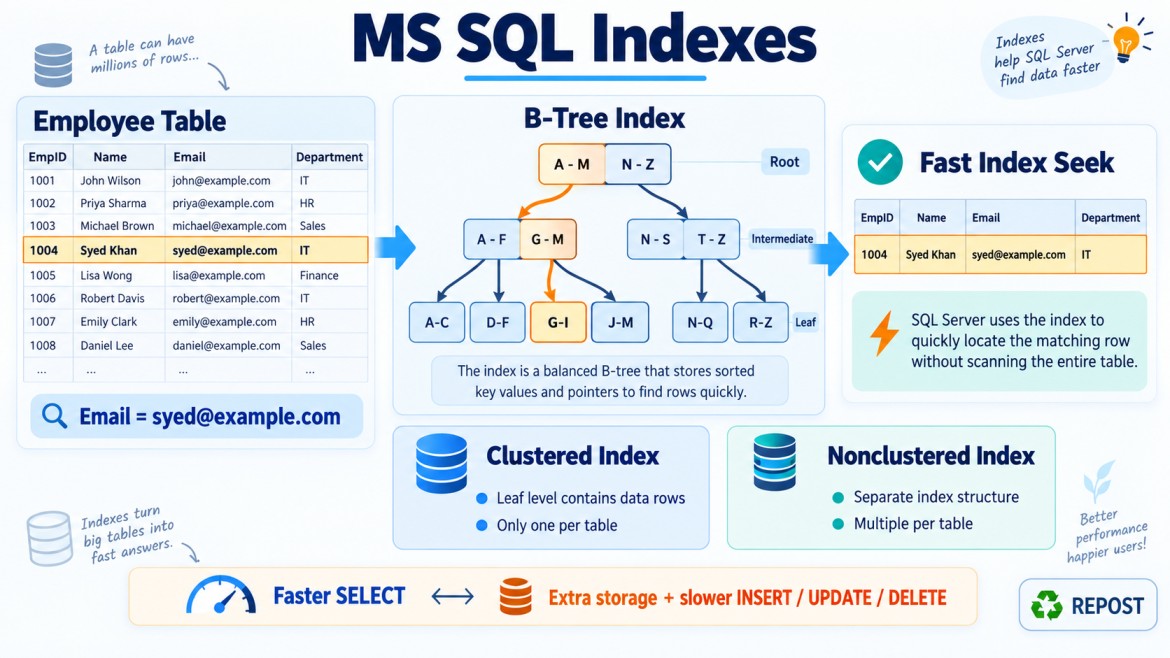


How Do Too Many Indexes Affect INSERT, UPDATE and DELETE Operations?
Indexes improve data-reading performance, but every index must be maintained whenever data changes.
Therefore, having too many indexes can slow down:
-
INSERT -
UPDATE -
DELETE -
Bulk data loading
-
Database maintenance
This is known as the read-versus-write trade-off:
More indexes → Faster reads but slower writes
Fewer indexes → Faster writes but some reads may be slower
Basic Example
Assume the Employees table has these indexes:
CREATE TABLE Employees
(
    EmployeeId   INT PRIMARY KEY,
    EmployeeName VARCHAR(100),
    Email        VARCHAR(150),
    DepartmentId INT,
    Salary       DECIMAL(10,2),
    IsActive     BIT
);
CREATE INDEX IX_Employees_Email
ON Employees(Email);
CREATE INDEX IX_Employees_Department
ON Employees(DepartmentId);
CREATE INDEX IX_Employees_Name
ON Employees(EmployeeName);
CREATE INDEX IX_Employees_Salary
ON Employees(Salary);
CREATE INDEX IX_Employees_Active
ON Employees(IsActive);The table now has:
-
A primary-key index
-
Five additional nonclustered indexes
When a row changes, SQL Server may need to update several of these index structures in addition to changing the table data.
Effect on INSERT
Consider:
INSERT INTO Employees
(
    EmployeeName,
    Email,
    DepartmentId,
    Salary,
    IsActive
)
VALUES
(
    'Syed',
    'syed@example.com',
    10,
    75000,
    1
);
SQL Server must:
-
Insert the row into the clustered index or heap.
-
Add the email to
IX_Employees_Email. -
Add the department to
IX_Employees_Department. -
Add the name to
IX_Employees_Name. -
Add the salary to
IX_Employees_Salary. -
Add the active status to
IX_Employees_Active. -
Record these changes in the transaction log.
-
Maintain uniqueness for any unique indexes.
Therefore, one logical insert may require several physical index modifications.
Additional INSERT costs
Too many indexes can cause:
-
More CPU usage
-
More page reads and writes
-
More transaction-log generation
-
Longer transaction duration
-
More locking and latching
-
More page splits
-
Lower bulk-insert performance
-
Higher storage activity
The more indexes a table has, the more work SQL Server usually performs for every inserted row.
Effect on UPDATE
The cost of an update depends on which columns are changed.
Updating a non-indexed column
UPDATE Employees
SET Notes = 'Promoted'
WHERE EmployeeId = 100;
If Notes is not part of any index, SQL Server mainly updates the base row.
However, if Notes is present as an included column in multiple indexes, those indexes must also be updated.
Updating an indexed key column
UPDATE Employees
SET Email = 'newemail@example.com'
WHERE EmployeeId = 100;
If Email is indexed, SQL Server may need to:
-
Locate the employee row.
-
Update the base-table value.
-
Remove the old email entry from the email index.
-
Insert the new email entry into the index.
-
Check uniqueness if it is a unique index.
-
Write all changes to the transaction log.
Updating an indexed key can behave internally like:
Delete old index entry
        +
Insert new index entry
This is more expensive than updating a column that is not stored in any index.
Updating a column included in several indexes
Suppose Salary is included in three covering indexes:
CREATE INDEX IX_Employees_Department
ON Employees(DepartmentId)
INCLUDE (EmployeeName, Salary);

CREATE INDEX IX_Employees_Email
ON Employees(Email)
INCLUDE (Salary);

CREATE INDEX IX_Employees_Name
ON Employees(EmployeeName)
INCLUDE (Salary);
Now execute:
UPDATE Employees
SET Salary = 85000
WHERE EmployeeId = 100;
SQL Server must update:
-
The base table
-
IX_Employees_Department -
IX_Employees_Email -
IX_Employees_Name
Although Salary is only an included column, it is physically stored at the leaf level of each index and must be maintained.
Effect on DELETE
Consider:
DELETE FROM Employees
WHERE EmployeeId = 100;
SQL Server must:
-
Locate the base-table row.
-
Remove the row from the clustered index or heap.
-
Remove the corresponding entry from every nonclustered index.
-
Record all changes in the transaction log.
-
Maintain constraint and relationship consistency.
If the table has ten nonclustered indexes, deleting one row may require changes to all ten indexes.
Additional DELETE costs
Too many indexes can cause:
-
Longer deletion time
-
Increased transaction-log usage
-
More page modifications
-
Longer lock duration
-
Higher blocking risk
-
Slower batch cleanup
-
More ghost records awaiting cleanup
Summary of Write Impact
| Operation | Index-maintenance work |
|---|---|
INSERT |
Adds an entry to every applicable index |
UPDATE on indexed key |
Removes the old entry and inserts a new entry |
UPDATE on included column |
Updates every index containing that included column |
UPDATE on unrelated column |
Usually fewer index changes |
DELETE |
Removes the entry from every applicable index |
Why Does This Happen?
An index is a separate data structure.
For example:
Employees table
    ├── Clustered index on EmployeeId
    ├── Nonclustered index on Email
    ├── Nonclustered index on DepartmentId
    ├── Nonclustered index on EmployeeName
    └── Nonclustered index on Salary
Every index stores some representation of the row. SQL Server must keep all these structures synchronized with the base data.
If index maintenance failed, an index could point to a deleted row or contain an outdated value. Therefore, index changes occur within the same transaction as the data modification.
More Page Splits
Indexes store keys in an ordered structure.
If a new key must be inserted into a full page, SQL Server may split the page:
-
Allocate a new page.
-
Move some existing rows.
-
Insert the new index entry.
-
Update page links.
-
Log the operation.
Page splits can increase:
-
CPU usage
-
I/O
-
Transaction-log activity
-
Fragmentation
-
Storage consumption
Tables with many indexes have more structures where page splits may occur.
Increased Transaction-Log Usage
SQL Server logs data modifications to support:
-
Transaction rollback
-
Crash recovery
-
Database backups
-
Availability Groups
-
Replication
-
Transactional consistency
When a row and several indexes are changed, all those modifications are logged.
More indexes therefore generally produce:
-
Larger log records
-
Faster transaction-log growth
-
Longer log backups
-
Increased Availability Group network traffic
-
Slower replication or recovery processing
This can be significant during bulk operations.
Longer Transactions and Blocking
Additional index maintenance makes write transactions take longer.
Longer transactions can hold locks for more time, increasing the possibility of:
-
Blocking
-
Lock escalation
-
Deadlocks
-
Reduced concurrency
For example, a batch update affecting one million rows becomes much more expensive when every row must update several indexes.
UPDATE Employees
SET IsActive = 0
WHERE LastWorkingDate < '2025-01-01';
If IsActive appears in several indexes, each matching row may require multiple index modifications.
Effect on Bulk Operations
Too many indexes can significantly slow down:
-
Bulk insert
-
Data migration
-
ETL processing
-
Archival deletion
-
Large batch updates
-
Initial data loading
For a controlled bulk load, a possible strategy is:
-
Disable or remove selected non-essential nonclustered indexes.
-
Load the data.
-
Rebuild or recreate the indexes.
Example:
ALTER INDEX IX_Employees_Email
ON Employees
DISABLE;
After loading:
ALTER INDEX IX_Employees_Email
ON Employees
REBUILD;
This requires careful planning because:
-
The index cannot serve queries while disabled.
-
Rebuilding requires time, storage and transaction-log capacity.
-
Unique indexes may enforce important business rules.
-
Indexes supporting constraints should not be disabled casually.
-
Disabling a clustered index makes table data inaccessible.
Too Many Overlapping Indexes
Consider these indexes:
CREATE INDEX IX_Orders_Customer
ON Orders(CustomerId);
CREATE INDEX IX_Orders_Customer_Date
ON Orders(CustomerId, OrderDate);CREATE INDEX IX_Orders_Customer_Date_Status
ON Orders(CustomerId, OrderDate, Status);These indexes overlap.
Depending on query requirements, the wider index may support some queries currently using the narrower indexes. Maintaining all of them may be unnecessary.
However, do not remove the narrower index automatically. It may be:
-
Smaller
-
Faster for certain queries
-
Better for memory usage
-
Used by a critical workload
-
Unique while the wider index is not
Review usage and execution plans before consolidating indexes.
Duplicate Indexes
These indexes may be duplicates:
CREATE INDEX IX_Employees_Email1
ON Employees(Email);
CREATE INDEX IX_Employees_Email2
ON Employees(Email);Both contain the same key column in the same order. SQL Server must maintain both even though they may provide the same benefit.
Indexes can also be effectively duplicated under different names, so their definitions—not only their names—must be compared.
Unused Indexes
SQL Server can provide index-usage information through:
SELECT
    OBJECT_SCHEMA_NAME(i.object_id) AS SchemaName,
    OBJECT_NAME(i.object_id) AS TableName,
    i.name AS IndexName,
    us.user_seeks,
    us.user_scans,
    us.user_lookups,
    us.user_updates
FROM sys.indexes AS i
LEFT JOIN sys.dm_db_index_usage_stats AS us
    ON us.database_id = DB_ID()
   AND us.object_id = i.object_id
   AND us.index_id = i.index_id
WHERE i.object_id > 100
ORDER BY us.user_updates DESC;
Important columns:
| Column | Meaning |
|---|---|
user_seeks |
Index used for targeted searches |
user_scans |
Index scanned |
user_lookups |
Lookup operations against the index |
user_updates |
Index modifications caused by writes |
An index with:
user_seeks   = 0
user_scans   = 0
user_lookups = 0
user_updates = 1,000,000
may be expensive to maintain but provide little observed read benefit.
However, these statistics reset when:
-
SQL Server restarts
-
Database is detached or shut down
-
An index is dropped and recreated
-
Certain maintenance or environment changes occur
Therefore, usage must be monitored over a representative business period before removing an index.
Indexes That Should Not Be Removed Carelessly
Even an apparently unused index may be important because it:
-
Enforces a primary key
-
Enforces a unique constraint
-
Enforces a business uniqueness rule
-
Supports a foreign-key relationship
-
Is used by a monthly or yearly report
-
Is required during peak business periods
-
Supports an infrequently executed critical process
Usage statistics should be combined with business knowledge and workload monitoring.
Example: One Insert with Multiple Indexes
Assume an Orders table contains:
PRIMARY KEY CLUSTERED (OrderId)and these nonclustered indexes:
(CustomerId)
(OrderDate)
(Status)
(CustomerId, OrderDate)
(Status, OrderDate)
Execute:
INSERT INTO Orders
(
    CustomerId,
    OrderDate,
    Status,
    TotalAmount
)
VALUES
(
    100,
    SYSDATETIME(),
    'Pending',
    5000
);
SQL Server must add data to:
-
Clustered index
-
Customer index
-
Order-date index
-
Status index
-
Customer-date index
-
Status-date index
One row insertion produces changes in six index structures.
If one million rows are loaded, this maintenance cost becomes substantial.
How to Balance Read and Write Performance
1. Create indexes for real queries
Indexes should support frequently executed or business-critical queries.
2. Avoid indexing every column
Not every column requires an index.
3. Review duplicate and overlapping indexes
Consolidate them where safe.
4. Avoid excessively wide indexes
Wide key and included-column lists increase storage and maintenance.
5. Review write-heavy tables carefully
Examples include:
-
Audit tables
-
Logging tables
-
Transaction tables
-
Queue tables
-
Staging tables
These tables often benefit from fewer indexes.
6. Verify benefit with execution plans
Confirm that an index reduces:
-
Logical reads
-
CPU usage
-
Execution time
-
Expensive lookup operations
7. Monitor read usage against write cost
Compare:
Seeks + scans + lookups
against
Updates
This is only one indicator, not an automatic removal rule.
Important Key Points
-
Every index is a separate structure that SQL Server must maintain.
-
INSERTadds entries to applicable indexes. -
DELETEremoves entries from applicable indexes. -
Updating an indexed key may delete the old entry and insert a new one.
-
Updating included columns also requires index maintenance.
-
More indexes increase CPU, I/O and transaction-log usage.
-
Too many indexes can lengthen transactions and increase blocking.
-
Bulk operations become slower when many indexes exist.
-
Duplicate, overlapping and unused indexes create unnecessary write overhead.
-
Primary-key, unique and constraint-supporting indexes must not be removed carelessly.
-
Index usage should be monitored over a representative period.
-
Index design must balance query performance against write cost.
Interview Answer
Too many indexes slow down INSERT, UPDATE and DELETE operations because SQL Server must keep every applicable index synchronized with the table data. An insert adds entries to multiple indexes, a delete removes those entries, and an update may modify or relocate entries in every index containing the changed column. This increases CPU, I/O, transaction-log usage, page splits, transaction duration and blocking. Therefore, indexes should be created according to real query requirements, while duplicate, overlapping and genuinely unused indexes should be reviewed and removed carefully.