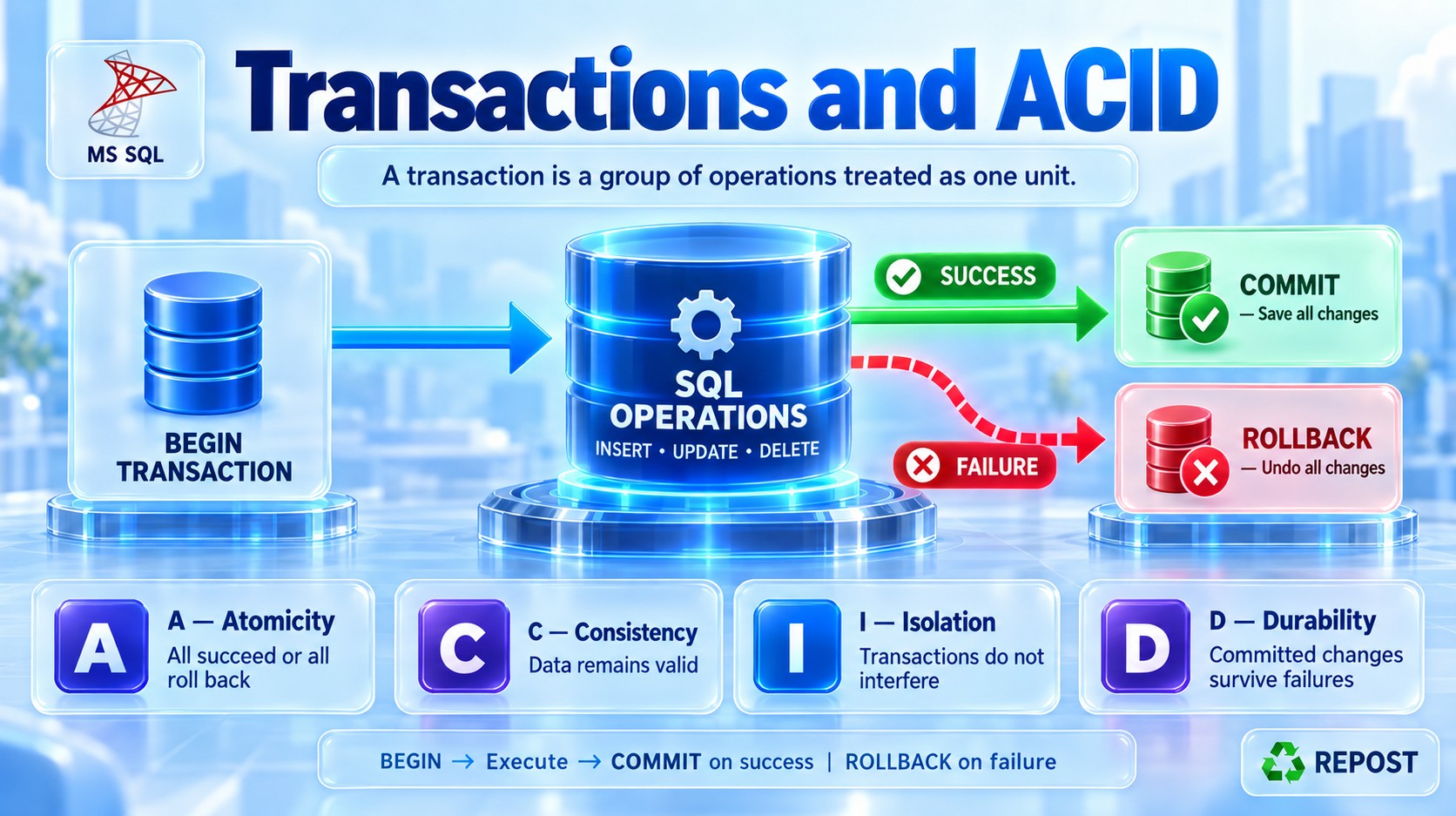


What is a Transaction in SQL Server?
A transaction is a group of one or more SQL operations treated as a single unit of work.
-
If every operation succeeds, the transaction is committed.
-
If an error occurs, the transaction can be rolled back.
-
This prevents the database from being left in an incomplete or inconsistent state.
Simple scenario
When transferring ₹1,000 from Account 1 to Account 2:
-
Deduct ₹1,000 from Account 1.
-
Add ₹1,000 to Account 2.
Both operations must succeed together. If only the deduction succeeds, the data becomes incorrect. Therefore, both statements should be executed inside one transaction.
Transaction Commands
| Command | Purpose |
|---|---|
BEGIN TRANSACTION |
Starts a transaction |
COMMIT TRANSACTION |
Permanently saves the changes |
ROLLBACK TRANSACTION |
Cancels changes made by the transaction |
SAVE TRANSACTION |
Creates a savepoint inside the transaction |
Example
Sample table and data
CREATE TABLE Accounts
(
    AccountId INT PRIMARY KEY,
    AccountName VARCHAR(50),
    Balance DECIMAL(12,2)
);

INSERT INTO Accounts
VALUES
(1, 'Syed', 5000.00),
(2, 'Rahman', 3000.00);
Money-transfer transaction
BEGIN TRY
    BEGIN TRANSACTION;

    UPDATE Accounts
    SET Balance = Balance - 1000
    WHERE AccountId = 1;

    UPDATE Accounts
    SET Balance = Balance + 1000
    WHERE AccountId = 2;

    COMMIT TRANSACTION;

    PRINT 'Transaction completed successfully.';
END TRY
BEGIN CATCH
    IF @@TRANCOUNT > 0
        ROLLBACK TRANSACTION;

    PRINT 'Transaction failed and was rolled back.';
    THROW;
END CATCH;
Result
SELECT * FROM Accounts;| AccountId | AccountName | Balance |
|---|---|---|
| 1 | Syed | 4000.00 |
| 2 | Rahman | 4000.00 |
Because both updates succeeded, COMMIT permanently saved the changes.
What happens if an error occurs?
Suppose the second operation fails:
BEGIN TRY
    BEGIN TRANSACTION;

    UPDATE Accounts
    SET Balance = Balance - 1000
    WHERE AccountId = 1;

    -- Simulated error
    THROW 50001, 'Unable to credit the destination account.', 1;

    UPDATE Accounts
    SET Balance = Balance + 1000
    WHERE AccountId = 2;

    COMMIT TRANSACTION;
END TRY
BEGIN CATCH
    IF @@TRANCOUNT > 0
        ROLLBACK TRANSACTION;

    PRINT 'Transaction rolled back.';
END CATCH;
The first update is also cancelled by ROLLBACK. The balances remain:
| AccountId | AccountName | Balance |
|---|---|---|
| 1 | Syed | 5000.00 |
| 2 | Rahman | 3000.00 |
ACID Properties
Reliable transactions follow the ACID principles:
| Property | Meaning |
|---|---|
| Atomicity | All operations succeed, or all are rolled back |
| Consistency | Data remains valid according to rules and constraints |
| Isolation | Concurrent transactions should not incorrectly interfere with each other |
| Durability | Committed changes remain saved even after a crash or restart |
Types of Transactions
1. Autocommit transaction
This is SQL Server's default mode. Each SQL statement is automatically treated as a separate transaction.
UPDATE Accounts
SET Balance = Balance + 500
WHERE AccountId = 1;
If the statement succeeds, SQL Server automatically commits it.
2. Explicit transaction
The developer manually controls the transaction using BEGIN TRANSACTION, COMMIT, and ROLLBACK.
BEGIN TRANSACTION;

UPDATE Accounts
SET Balance = Balance - 500
WHERE AccountId = 1;

UPDATE Accounts
SET Balance = Balance + 500
WHERE AccountId = 2;

COMMIT TRANSACTION;
3. Implicit transaction
SQL Server automatically starts a transaction, but the developer must manually commit or roll it back.
SET IMPLICIT_TRANSACTIONS ON;

UPDATE Accounts
SET Balance = Balance + 100
WHERE AccountId = 1;

COMMIT TRANSACTION;

SET IMPLICIT_TRANSACTIONS OFF;
@@TRANCOUNT
@@TRANCOUNT returns the number of active transaction levels in the current session.
BEGIN TRANSACTION;

SELECT @@TRANCOUNT AS TransactionCount;
Result:
| TransactionCount |
|---|
| 1 |
After COMMIT or ROLLBACK, it normally returns 0.
Recommended Error-Handling Pattern
SET XACT_ABORT ON;

BEGIN TRY
    BEGIN TRANSACTION;

    -- SQL operations

    COMMIT TRANSACTION;
END TRY
BEGIN CATCH
    IF XACT_STATE() <> 0
        ROLLBACK TRANSACTION;

    THROW;
END CATCH;-
SET XACT_ABORT ONcauses many runtime errors to terminate and roll back the transaction. -
XACT_STATE()determines whether a transaction exists and whether it can still be committed. -
THROWreturns the original error to the caller.
Important Points
-
Keep transactions as short as possible.
-
Do not perform unnecessary processing or wait for user input inside a transaction.
-
Long transactions hold locks longer and can cause blocking.
-
Use
TRY...CATCHfor error handling. -
Use
SET XACT_ABORT ONfor safer transaction handling. -
Always ensure that a transaction reaches either
COMMITorROLLBACK. -
Transactions protect data consistency, but poorly designed transactions can cause blocking and deadlocks.
-
Choose an appropriate transaction isolation level based on consistency and concurrency requirements.
Interview answer: A transaction is a sequence of database operations executed as one logical unit of work. It follows ACID properties and ensures that either all operations are committed or all are rolled back, keeping the database consistent.
ACID Properties in SQL Server
ACID represents four properties that make database transactions reliable:
-
Atomicity
-
Consistency
-
Isolation
-
Durability
Consider transferring ₹1,000 from Account A to Account B:
BEGIN TRANSACTION;

UPDATE Accounts
SET Balance = Balance - 1000
WHERE AccountId = 1;

UPDATE Accounts
SET Balance = Balance + 1000
WHERE AccountId = 2;

COMMIT TRANSACTION;
Both operations form one transaction.
1. Atomicity — All or Nothing
Atomicity ensures that all operations inside a transaction succeed together or all are cancelled.
In the money-transfer example:
-
₹1,000 must be deducted from Account A.
-
₹1,000 must be added to Account B.
-
If either operation fails, both changes must be rolled back.
BEGIN TRY
    BEGIN TRANSACTION;

    UPDATE Accounts
    SET Balance = Balance - 1000
    WHERE AccountId = 1;

    UPDATE Accounts
    SET Balance = Balance + 1000
    WHERE AccountId = 2;

    COMMIT TRANSACTION;
END TRY
BEGIN CATCH
    IF @@TRANCOUNT > 0
        ROLLBACK TRANSACTION;

    THROW;
END CATCH;
If the second update fails, the first update is also cancelled.
Result: Money is never deducted without being credited to the destination account.
2. Consistency — Data Remains Valid
Consistency ensures that a transaction moves the database from one valid state to another valid state.
Database rules must remain satisfied, including:
-
Primary keys
-
Foreign keys
-
Unique constraints
-
Check constraints
-
Data types
-
Business rules implemented by the application or transaction
Example
CREATE TABLE Accounts
(
    AccountId INT PRIMARY KEY,
    Balance DECIMAL(12,2)
        CHECK (Balance >= 0)
);
Suppose Account 1 has ₹500:
UPDATE Accounts
SET Balance = Balance - 1000
WHERE AccountId = 1;
The new balance would be -500, which violates the CHECK constraint. SQL Server rejects the operation.
Result: The database does not accept an invalid negative balance.
Consistency depends on correctly defined database constraints and correctly implemented business rules.
3. Isolation — Concurrent Transactions Do Not Interfere Incorrectly
Isolation controls how one transaction sees changes made by another transaction running at the same time.
For example:
-
Transaction A updates an account balance but has not committed.
-
Transaction B attempts to read the same account.
Depending on the isolation level, Transaction B may:
-
Wait until Transaction A completes
-
Read the previous committed value
-
In some configurations, read the uncommitted value
Example
Session 1:
BEGIN TRANSACTION;

UPDATE Accounts
SET Balance = Balance - 1000
WHERE AccountId = 1;

-- Transaction is still open
Session 2:
SELECT Balance
FROM Accounts
WHERE AccountId = 1;
Under the default READ COMMITTED isolation level, Session 2 normally waits until Session 1 commits or rolls back.
SQL Server isolation levels
| Isolation level | Main behavior |
|---|---|
READ UNCOMMITTED |
Can read uncommitted data |
READ COMMITTED |
Prevents dirty reads |
REPEATABLE READ |
Prevents data already read from being modified |
SNAPSHOT |
Reads row versions instead of waiting for many locks |
SERIALIZABLE |
Provides the strongest traditional isolation but reduces concurrency |
Result: Concurrent users do not incorrectly affect each other's work.
4. Durability — Committed Data Is Permanent
Durability ensures that after a transaction is successfully committed, its changes remain saved even if:
-
SQL Server restarts
-
The application crashes
-
The operating system fails
-
A power failure occurs
BEGIN TRANSACTION;

UPDATE Accounts
SET Balance = Balance + 1000
WHERE AccountId = 2;

COMMIT TRANSACTION;
Once COMMIT succeeds, SQL Server records the transaction in its transaction log.
During recovery, SQL Server uses the transaction log to restore committed changes and roll back incomplete transactions.
Result: Successfully committed data is not lost during normal database recovery.
Durability still requires proper storage, backups, high availability and disaster-recovery planning to protect against hardware or storage failure.
Quick Comparison
| Property | Simple meaning | Money-transfer example |
|---|---|---|
| Atomicity | All or nothing | Both debit and credit succeed, or neither happens |
| Consistency | Data remains valid | Constraints and account rules remain satisfied |
| Isolation | Transactions do not interfere incorrectly | Other users do not see unsafe intermediate changes |
| Durability | Committed changes remain saved | Completed transfer survives a restart |
Key Points
-
ACID provides reliable and predictable transaction processing.
-
Atomicity is achieved using commit and rollback behavior.
-
Consistency is supported by constraints and correct business logic.
-
Isolation is controlled using transaction isolation levels and row versioning.
-
Durability is primarily supported by SQL Server's transaction log.
-
Stronger isolation improves consistency but may increase blocking and reduce concurrency.
Interview answer: ACID stands for Atomicity, Consistency, Isolation and Durability. It ensures that transactions execute completely, preserve valid data, remain properly separated from concurrent transactions, and permanently retain committed changes.
Transaction Modes in SQL Server
SQL Server supports three main transaction modes:
-
Auto-commit transaction
-
Explicit transaction
-
Implicit transaction
The main difference is who starts and completes the transaction—SQL Server or the developer.
1. Auto-commit Transaction
Auto-commit is SQL Server’s default transaction mode.
Each SQL statement is treated as a separate transaction:
-
SQL Server starts the transaction automatically.
-
If the statement succeeds, SQL Server commits it.
-
If the statement fails, SQL Server rolls it back.
Example
UPDATE Accounts
SET Balance = Balance + 500
WHERE AccountId = 1;
If the statement succeeds, SQL Server automatically saves the change.
SELECT Balance
FROM Accounts
WHERE AccountId = 1;
If the original balance was 5000, the result is:
| Balance |
|---|
| 5500.00 |
Multiple statements are separate transactions
UPDATE Accounts
SET Balance = Balance - 1000
WHERE AccountId = 1;

UPDATE Accounts
SET Balance = Balance + 1000
WHERE AccountId = 2;
These are two independent transactions in auto-commit mode.
If the first statement succeeds but the second fails, the first change remains committed. Therefore, auto-commit is unsuitable when multiple statements must succeed or fail together.
2. Explicit Transaction
In an explicit transaction, the developer manually controls the transaction using:
-
BEGIN TRANSACTION -
COMMIT TRANSACTION -
ROLLBACK TRANSACTION
Multiple statements can be treated as one unit of work.
Example: Money transfer
BEGIN TRY
    BEGIN TRANSACTION;

    UPDATE Accounts
    SET Balance = Balance - 1000
    WHERE AccountId = 1;

    UPDATE Accounts
    SET Balance = Balance + 1000
    WHERE AccountId = 2;

    COMMIT TRANSACTION;

    PRINT 'Transaction committed.';
END TRY
BEGIN CATCH
    IF @@TRANCOUNT > 0
        ROLLBACK TRANSACTION;

    THROW;
END CATCH;
Assume the original balances are:
| AccountId | Balance |
|---|---|
| 1 | 5000.00 |
| 2 | 3000.00 |
After the transaction:
| AccountId | Balance |
|---|---|
| 1 | 4000.00 |
| 2 | 4000.00 |
If either update fails, ROLLBACK cancels both changes.
Safer recommended pattern
SET XACT_ABORT ON;

BEGIN TRY
    BEGIN TRANSACTION;

    -- Related database operations

    COMMIT TRANSACTION;
END TRY
BEGIN CATCH
    IF XACT_STATE() <> 0
        ROLLBACK TRANSACTION;

    THROW;
END CATCH;
SET XACT_ABORT ON helps ensure that many runtime errors terminate and roll back the transaction.
3. Implicit Transaction
In implicit transaction mode, SQL Server automatically starts a transaction when certain statements execute, but it does not automatically complete it.
The developer must manually execute:
COMMIT TRANSACTION;or:
ROLLBACK TRANSACTION;Enable implicit transactions
SET IMPLICIT_TRANSACTIONS ON;Example
SET IMPLICIT_TRANSACTIONS ON;

UPDATE Accounts
SET Balance = Balance + 500
WHERE AccountId = 1;

SELECT @@TRANCOUNT AS TransactionCount;
Result:
| TransactionCount |
|---|
| 1 |
SQL Server automatically started a transaction, but the update has not yet been committed.
Complete it manually:
COMMIT TRANSACTION;

SELECT @@TRANCOUNT AS TransactionCount;
Result:
| TransactionCount |
|---|
| 0 |
Disable implicit mode:
SET IMPLICIT_TRANSACTIONS OFF;Statements that can start an implicit transaction
When implicit transactions are enabled, statements such as these can start a transaction:
-
INSERT -
UPDATE -
DELETE -
MERGE -
SELECTthat accesses a table -
CREATE -
ALTER -
DROP -
TRUNCATE TABLE -
GRANTandREVOKE
A simple statement such as SELECT GETDATE() does not access a table and normally does not start one.
Important risk
If you forget to commit or roll back an implicit transaction:
-
Locks can remain active.
-
Other sessions may become blocked.
-
The transaction log may continue growing.
-
Application performance may be affected.
Check for an active transaction using:
SELECT @@TRANCOUNT AS TransactionCount;Comparison
| Feature | Auto-commit | Explicit | Implicit |
|---|---|---|---|
| Transaction starts | Automatically for each statement | Developer uses BEGIN TRANSACTION |
SQL Server starts it after a qualifying statement |
| Transaction completes | Automatically | Developer uses COMMIT or ROLLBACK |
Developer uses COMMIT or ROLLBACK |
| Multiple statements as one unit | No | Yes | Yes, until committed or rolled back |
| Default mode | Yes | No | No |
| Main use | Independent statements | Related business operations | Specialized applications and tools |
| Risk of leaving a transaction open | Low | Possible | Higher if completion is forgotten |
Simple Difference
-- Auto-commit
UPDATE Accounts SET Balance = Balance + 100 WHERE AccountId = 1;
-- Automatically committed
-- Explicit
BEGIN TRANSACTION;
UPDATE Accounts SET Balance = Balance + 100 WHERE AccountId = 1;
COMMIT TRANSACTION;-- Implicit
SET IMPLICIT_TRANSACTIONS ON;
UPDATE Accounts SET Balance = Balance + 100 WHERE AccountId = 1;
-- Transaction automatically started, but must be completed manually
COMMIT TRANSACTION;
SET IMPLICIT_TRANSACTIONS OFF;Key Points
-
Auto-commit: Every statement is automatically committed or rolled back.
-
Explicit: The developer controls the complete transaction boundary.
-
Implicit: SQL Server starts the transaction, but the developer must complete it.
-
Use explicit transactions when several related operations must succeed or fail together.
-
Keep transactions short to reduce locking, blocking and deadlocks.
-
Use
@@TRANCOUNTorXACT_STATE()to check transaction status. -
Always commit or roll back manually controlled transactions.
-
SET IMPLICIT_TRANSACTIONSapplies to the current database session.
Interview answer: Auto-commit treats every SQL statement as an individual transaction. An explicit transaction is started and completed manually by the developer. An implicit transaction is started automatically by SQL Server for qualifying statements, but it must be manually committed or rolled back.
BEGIN TRANSACTION, COMMIT, and ROLLBACK in SQL Server
These commands control an explicit transaction.
BEGIN TRANSACTION;

-- One or more SQL operations

COMMIT TRANSACTION;
-- or
ROLLBACK TRANSACTION;-
BEGIN TRANSACTIONstarts the transaction. -
COMMITpermanently saves its changes. -
ROLLBACKcancels changes made by the transaction.
Sample Table
CREATE TABLE Accounts
(
    AccountId INT PRIMARY KEY,
    AccountName VARCHAR(50),
    Balance DECIMAL(12,2)
        CHECK (Balance >= 0)
);

INSERT INTO Accounts
VALUES
(1, 'Syed', 5000.00),
(2, 'Rahman', 3000.00);
Initial data:
| AccountId | AccountName | Balance |
|---|---|---|
| 1 | Syed | 5000.00 |
| 2 | Rahman | 3000.00 |
1. BEGIN TRANSACTION
BEGIN TRANSACTION starts an explicit transaction.
BEGIN TRANSACTION;

UPDATE Accounts
SET Balance = Balance - 1000
WHERE AccountId = 1;
The update has been performed, but it is not yet permanently committed.
SELECT @@TRANCOUNT AS TransactionCount;Result:
| TransactionCount |
|---|
| 1 |
At this point, the transaction must end with either:
COMMIT TRANSACTION;or:
ROLLBACK TRANSACTION;Optional transaction name
A transaction can be given a name:
BEGIN TRANSACTION MoneyTransfer;Transaction names can make code more readable, although they are not required.
2. COMMIT TRANSACTION
COMMIT successfully completes the transaction and makes its changes permanent.
Example
BEGIN TRANSACTION;

UPDATE Accounts
SET Balance = Balance - 1000
WHERE AccountId = 1;

UPDATE Accounts
SET Balance = Balance + 1000
WHERE AccountId = 2;

COMMIT TRANSACTION;
Result:
| AccountId | AccountName | Balance |
|---|---|---|
| 1 | Syed | 4000.00 |
| 2 | Rahman | 4000.00 |
After the commit:
SELECT @@TRANCOUNT AS TransactionCount;Result:
| TransactionCount |
|---|
| 0 |
The transaction is complete, and its changes cannot normally be undone using ROLLBACK.
3. ROLLBACK TRANSACTION
ROLLBACK cancels the changes made after the transaction began.
Example
BEGIN TRANSACTION;

UPDATE Accounts
SET Balance = Balance - 1000
WHERE AccountId = 1;

UPDATE Accounts
SET Balance = Balance + 1000
WHERE AccountId = 2;

ROLLBACK TRANSACTION;
Result:
| AccountId | AccountName | Balance |
|---|---|---|
| 1 | Syed | 5000.00 |
| 2 | Rahman | 3000.00 |
Both updates were cancelled because the transaction was rolled back.
Transaction Flow
flowchart TD
    A["BEGIN TRANSACTION"] --> B["Execute SQL statements"]
    B --> C{"All operations successful?"}
    C -- Yes --> D["COMMIT"]
    C -- No --> E["ROLLBACK"]
    D --> F["Changes saved permanently"]
    E --> G["Changes cancelled"]
Practical Example with Error Handling
SET XACT_ABORT ON;

BEGIN TRY
    BEGIN TRANSACTION;

    UPDATE Accounts
    SET Balance = Balance - 1000
    WHERE AccountId = 1;

    IF @@ROWCOUNT = 0
        THROW 50001, 'Source account was not found.', 1;

    UPDATE Accounts
    SET Balance = Balance + 1000
    WHERE AccountId = 2;

    IF @@ROWCOUNT = 0
        THROW 50002, 'Destination account was not found.', 1;

    COMMIT TRANSACTION;

    PRINT 'Money transferred successfully.';
END TRY
BEGIN CATCH
    IF XACT_STATE() <> 0
        ROLLBACK TRANSACTION;

    THROW;
END CATCH;
How it works
-
SET XACT_ABORT ONmakes many runtime errors terminate the transaction. -
BEGIN TRANSACTIONstarts the money transfer. -
The first
UPDATEdeducts money. -
The second
UPDATEcredits money. -
@@ROWCOUNTconfirms that each account was found. -
If everything succeeds,
COMMITsaves both changes. -
If an error occurs, control moves to
CATCH. -
ROLLBACKcancels the entire transfer. -
THROWreturns the error to the calling application.
@@TRANCOUNT
@@TRANCOUNT returns the current number of active transaction levels.
SELECT @@TRANCOUNT;| Value | Meaning |
|---|---|
0 |
No active transaction |
1 or higher |
A transaction is active |
It is commonly checked before rollback:
IF @@TRANCOUNT > 0
    ROLLBACK TRANSACTION;
XACT_STATE()
XACT_STATE() provides more detailed transaction status:
| Result | Meaning |
|---|---|
1 |
Active transaction that can be committed |
0 |
No active transaction |
-1 |
Uncommittable transaction; it must be rolled back |
Example:
IF XACT_STATE() = 1
    COMMIT TRANSACTION;
ELSE IF XACT_STATE() = -1
    ROLLBACK TRANSACTION;
In a CATCH block, the common safe check is:
IF XACT_STATE() <> 0
    ROLLBACK TRANSACTION;
Using a Savepoint
A savepoint lets you roll back only part of a transaction.
BEGIN TRANSACTION;

UPDATE Accounts
SET Balance = Balance + 500
WHERE AccountId = 1;

SAVE TRANSACTION BeforeSecondUpdate;

UPDATE Accounts
SET Balance = Balance + 1000
WHERE AccountId = 2;

ROLLBACK TRANSACTION BeforeSecondUpdate;

COMMIT TRANSACTION;
Result:
-
The first update is committed.
-
The second update is cancelled.
A savepoint rollback does not end the complete transaction. The outer transaction must still be committed or rolled back.
Important Points
-
BEGIN TRANSACTIONdoes not permanently save changes. -
COMMITpermanently completes the transaction. -
ROLLBACKcancels uncommitted changes. -
A rollback without a savepoint normally rolls back the entire transaction.
-
COMMITandROLLBACKrelease transaction-related resources and locks. -
A transaction should always reach either
COMMITorROLLBACK. -
Use
TRY...CATCH,SET XACT_ABORT ON, andTHROWfor reliable error handling. -
Keep transactions short to minimize blocking and deadlocks.
-
Do not wait for user input or call slow external services while a transaction is open.
Interview answer: BEGIN TRANSACTION starts an explicit unit of work. COMMIT successfully ends it and permanently saves all changes. ROLLBACK ends it by cancelling all uncommitted changes, helping maintain data consistency when an operation fails.
What is @@TRANCOUNT in SQL Server?
@@TRANCOUNT is a SQL Server system function that returns the number of active transaction levels in the current session or connection.
SELECT @@TRANCOUNT AS TransactionCount;| Value | Meaning |
|---|---|
0 |
No active transaction |
1 |
One transaction level is active |
Greater than 1 |
Nested transaction levels exist |
Basic Example
SELECT @@TRANCOUNT AS BeforeTransaction;

BEGIN TRANSACTION;

SELECT @@TRANCOUNT AS AfterBegin;

COMMIT TRANSACTION;

SELECT @@TRANCOUNT AS AfterCommit;
Result:
| Stage | @@TRANCOUNT |
|---|---|
| Before transaction | 0 |
After BEGIN TRANSACTION |
1 |
After COMMIT |
0 |
How the value changes
-
BEGIN TRANSACTIONincreases@@TRANCOUNTby1. -
COMMIT TRANSACTIONdecreases it by1. -
A complete
ROLLBACK TRANSACTIONresets it to0. -
Rolling back to a savepoint does not change it.
Using @@TRANCOUNT During Error Handling
It is commonly used to verify that a transaction exists before performing a rollback.
BEGIN TRY
    BEGIN TRANSACTION;

    UPDATE Accounts
    SET Balance = Balance - 1000
    WHERE AccountId = 1;

    UPDATE Accounts
    SET Balance = Balance + 1000
    WHERE AccountId = 2;

    COMMIT TRANSACTION;
END TRY
BEGIN CATCH
    IF @@TRANCOUNT > 0
        ROLLBACK TRANSACTION;

    THROW;
END CATCH;
Without the check, executing ROLLBACK when no transaction exists produces an error:
The ROLLBACK TRANSACTION request has no corresponding BEGIN TRANSACTION.Nested Transaction Example
SELECT @@TRANCOUNT AS InitialCount;   -- 0

BEGIN TRANSACTION OuterTransaction;
SELECT @@TRANCOUNT AS AfterOuter;     -- 1

BEGIN TRANSACTION InnerTransaction;
SELECT @@TRANCOUNT AS AfterInner;     -- 2

COMMIT TRANSACTION InnerTransaction;
SELECT @@TRANCOUNT AS AfterInnerCommit; -- 1

COMMIT TRANSACTION OuterTransaction;
SELECT @@TRANCOUNT AS FinalCount;     -- 0
Result:
| Operation | @@TRANCOUNT |
|---|---|
| Initial value | 0 |
First BEGIN TRANSACTION |
1 |
Second BEGIN TRANSACTION |
2 |
First COMMIT |
1 |
Final COMMIT |
0 |
Important nested-transaction behavior
An inner COMMIT does not permanently save changes. It only reduces @@TRANCOUNT.
Changes become permanent only when the outermost transaction is committed and @@TRANCOUNT reaches 0.
BEGIN TRANSACTION;       -- Count = 1

UPDATE Accounts
SET Balance = Balance + 100
WHERE AccountId = 1;

BEGIN TRANSACTION;       -- Count = 2

UPDATE Accounts
SET Balance = Balance + 200
WHERE AccountId = 2;

COMMIT TRANSACTION;      -- Count = 1; not permanently committed

ROLLBACK TRANSACTION;    -- Count = 0; both updates are cancelled
The final ROLLBACK cancels changes made in both transaction levels.
Effect of ROLLBACK
A full rollback resets @@TRANCOUNT directly to 0, regardless of the number of nested levels.
BEGIN TRANSACTION;       -- Count = 1
BEGIN TRANSACTION;       -- Count = 2
BEGIN TRANSACTION;       -- Count = 3

ROLLBACK TRANSACTION;    -- Count = 0

SELECT @@TRANCOUNT;
Result:
0Unlike COMMIT, a full ROLLBACK does not reduce the count one level at a time.
Effect of a Savepoint
A savepoint marks a location inside an active transaction.
BEGIN TRANSACTION;              -- Count = 1

SAVE TRANSACTION BeforeUpdate;

UPDATE Accounts
SET Balance = Balance + 500
WHERE AccountId = 1;

ROLLBACK TRANSACTION BeforeUpdate;

SELECT @@TRANCOUNT AS TransactionCount; -- Still 1

COMMIT TRANSACTION;             -- Count = 0
Rolling back to a savepoint cancels only the work performed after the savepoint. It does not end the transaction, so @@TRANCOUNT remains unchanged.
@@TRANCOUNT vs XACT_STATE()
| Feature | @@TRANCOUNT |
XACT_STATE() |
|---|---|---|
| Purpose | Returns transaction nesting count | Returns transaction condition |
| No active transaction | 0 |
0 |
| Active and committable | Greater than 0 |
1 |
| Active but uncommittable | Greater than 0 |
-1 |
| Identifies a damaged transaction | No | Yes |
@@TRANCOUNT tells you whether a transaction exists, but it does not tell you whether that transaction can still be committed.
Recommended error-handling check
BEGIN CATCH
    IF XACT_STATE() <> 0
        ROLLBACK TRANSACTION;

    THROW;
END CATCH;
You can also use:
IF @@TRANCOUNT > 0
    ROLLBACK TRANSACTION;
However, XACT_STATE() provides more information about the transaction’s condition.
Stored Procedure Example
A stored procedure should avoid committing or rolling back a transaction started by its caller unless that behavior is intentionally designed.
CREATE PROCEDURE UpdateAccount
    @AccountId INT,
    @Amount DECIMAL(12,2)
AS
BEGIN
    SET NOCOUNT ON;
    SET XACT_ABORT ON;

    DECLARE @InitialTranCount INT = @@TRANCOUNT;

    BEGIN TRY
        IF @InitialTranCount = 0
            BEGIN TRANSACTION;
        ELSE
            SAVE TRANSACTION UpdateAccountSavepoint;

        UPDATE Accounts
        SET Balance = Balance + @Amount
        WHERE AccountId = @AccountId;

        IF @InitialTranCount = 0
            COMMIT TRANSACTION;
    END TRY
    BEGIN CATCH
        IF @InitialTranCount = 0 AND XACT_STATE() <> 0
            ROLLBACK TRANSACTION;
        ELSE IF XACT_STATE() = 1
            ROLLBACK TRANSACTION UpdateAccountSavepoint;

        THROW;
    END CATCH;
END;
This pattern detects whether the procedure created the transaction or joined an existing transaction.
Key Points
-
@@TRANCOUNTis specific to the current database session. -
Every
BEGIN TRANSACTIONincreases it by1. -
Every
COMMITdecreases it by1. -
Only the outermost commit permanently completes the transaction.
-
A full
ROLLBACKresets it to0. -
Rolling back to a savepoint does not change it.
-
Use it to prevent committing or rolling back when no transaction exists.
-
Use
XACT_STATE()when you also need to know whether the transaction is committable.
Interview answer: @@TRANCOUNT returns the number of active transaction levels in the current SQL Server session. BEGIN TRANSACTION increments it, COMMIT decrements it, and a complete ROLLBACK resets it to zero.
What Is a Savepoint in SQL Server?
A savepoint is a marker created inside a transaction. It allows you to roll back only part of the transaction instead of cancelling the entire transaction.
A savepoint is created using:
SAVE TRANSACTION SavepointName;To roll back to that savepoint:
ROLLBACK TRANSACTION SavepointName;Why Do We Need a Savepoint?
Suppose a transaction contains several operations:
-
Update customer information.
-
Create an order.
-
Add optional discount details.
If the optional discount operation fails, you may want to cancel only the discount-related changes while retaining the customer and order changes.
A savepoint provides this partial rollback capability.
Basic Example
Sample table
CREATE TABLE Accounts
(
    AccountId INT PRIMARY KEY,
    AccountName VARCHAR(50),
    Balance DECIMAL(12,2)
);

INSERT INTO Accounts
VALUES
(1, 'Syed', 5000.00),
(2, 'Rahman', 3000.00);
Initial data:
| AccountId | AccountName | Balance |
|---|---|---|
| 1 | Syed | 5000.00 |
| 2 | Rahman | 3000.00 |
Create and use a savepoint
BEGIN TRANSACTION;

-- First operation
UPDATE Accounts
SET Balance = Balance + 500
WHERE AccountId = 1;

-- Create a savepoint
SAVE TRANSACTION BeforeSecondUpdate;

-- Second operation
UPDATE Accounts
SET Balance = Balance + 1000
WHERE AccountId = 2;

-- Cancel only the second operation
ROLLBACK TRANSACTION BeforeSecondUpdate;

-- Save the remaining transaction
COMMIT TRANSACTION;
Final result:
| AccountId | AccountName | Balance |
|---|---|---|
| 1 | Syed | 5500.00 |
| 2 | Rahman | 3000.00 |
The first update was committed. The second update was cancelled because it occurred after the savepoint.
Transaction Flow
flowchart TD
    A["BEGIN TRANSACTION"] --> B["Update Account 1"]
    B --> C["SAVE TRANSACTION BeforeSecondUpdate"]
    C --> D["Update Account 2"]
    D --> E["ROLLBACK to savepoint"]
    E --> F["Second update cancelled"]
    F --> G["COMMIT"]
    G --> H["First update saved"]
Multiple Savepoints
A transaction can contain multiple savepoints.
BEGIN TRANSACTION;

INSERT INTO Orders(CustomerId, Amount)
VALUES (101, 5000);

SAVE TRANSACTION OrderCreated;

INSERT INTO OrderItems(OrderId, ProductId, Quantity)
VALUES (1, 10, 2);

SAVE TRANSACTION ItemsCreated;

UPDATE Inventory
SET StockQuantity = StockQuantity - 2
WHERE ProductId = 10;

ROLLBACK TRANSACTION ItemsCreated;

COMMIT TRANSACTION;
Here, the inventory update is rolled back, but earlier changes remain available to be committed.
Savepoint with Error Handling
SET XACT_ABORT OFF;

BEGIN TRY
    BEGIN TRANSACTION;

    UPDATE Accounts
    SET Balance = Balance + 500
    WHERE AccountId = 1;

    SAVE TRANSACTION BeforeOptionalOperation;

    BEGIN TRY
        -- Optional operation
        UPDATE Accounts
        SET Balance = Balance + 1000
        WHERE AccountId = 2;

        -- Simulated error
        THROW 50001, 'Optional operation failed.', 1;
    END TRY
    BEGIN CATCH
        -- Cancel only the optional operation
        ROLLBACK TRANSACTION BeforeOptionalOperation;
    END CATCH;

    COMMIT TRANSACTION;
END TRY
BEGIN CATCH
    IF XACT_STATE() <> 0
        ROLLBACK TRANSACTION;

    THROW;
END CATCH;
The inner error causes the optional work to be rolled back to the savepoint. The outer transaction can still be committed if it remains valid.
Savepoint and @@TRANCOUNT
Creating or rolling back to a savepoint does not change @@TRANCOUNT.
BEGIN TRANSACTION;

SELECT @@TRANCOUNT AS BeforeSavepoint; -- 1

SAVE TRANSACTION MySavepoint;

SELECT @@TRANCOUNT AS AfterSavepoint;  -- 1

ROLLBACK TRANSACTION MySavepoint;

SELECT @@TRANCOUNT AS AfterRollback;   -- 1

COMMIT TRANSACTION;

SELECT @@TRANCOUNT AS FinalCount;      -- 0
A savepoint does not create a nested transaction. It is only a marker inside the existing transaction.
Savepoint vs Complete Rollback
| Command | Effect |
|---|---|
ROLLBACK TRANSACTION |
Cancels the entire transaction |
ROLLBACK TRANSACTION SavepointName |
Cancels changes made after the savepoint |
COMMIT TRANSACTION |
Saves all remaining changes |
SAVE TRANSACTION SavepointName |
Creates a rollback marker |
Savepoint vs Nested Transaction
A savepoint and a nested transaction are not the same.
BEGIN TRANSACTION;           -- @@TRANCOUNT = 1

SAVE TRANSACTION Point1;     -- @@TRANCOUNT remains 1

BEGIN TRANSACTION; -- @@TRANCOUNT = 2| Feature | Savepoint | Nested BEGIN TRANSACTION |
|---|---|---|
| Creates rollback marker | Yes | No |
Increases @@TRANCOUNT |
No | Yes |
| Supports partial rollback | Yes | Not reliably by transaction name |
| Makes changes permanent | No | Inner commit does not make changes permanent |
For partial rollback, explicitly use a savepoint.
Important Limitation: Uncommittable Transaction
If an error makes the transaction uncommittable, SQL Server cannot roll back only to a savepoint. The complete transaction must be rolled back.
IF XACT_STATE() = -1
    ROLLBACK TRANSACTION;
XACT_STATE() values:
| Value | Meaning |
|---|---|
1 |
Transaction is active and committable |
0 |
No active transaction |
-1 |
Transaction is uncommittable; full rollback is required |
This is important when using SET XACT_ABORT ON, because some runtime errors can make the transaction uncommittable.
Important Points
-
A savepoint is a named marker inside an active transaction.
-
Use
SAVE TRANSACTIONto create it. -
Use
ROLLBACK TRANSACTION SavepointNamefor a partial rollback. -
A savepoint does not start a new transaction.
-
It does not change
@@TRANCOUNT. -
After rolling back to a savepoint, the main transaction remains active.
-
The transaction must still end with
COMMITor a fullROLLBACK. -
A savepoint cannot rescue an uncommittable transaction.
-
Savepoints are useful when some transaction operations are optional.
-
Keep transactions short even when using savepoints.
Interview answer: A savepoint is a named marker within an active transaction. It allows SQL Server to roll back changes made after that marker without cancelling the entire transaction. After a partial rollback, the outer transaction remains active and must still be committed or fully rolled back.
Handling Transactions Using TRY...CATCH in SQL Server
TRY...CATCH provides structured error handling for SQL Server transactions.
-
Put transaction operations inside the
TRYblock. -
Use
COMMITwhen every operation succeeds. -
Use the
CATCHblock to roll back the transaction when an error occurs. -
Use
THROWto return the error to the caller.
Recommended Pattern
SET XACT_ABORT ON;

BEGIN TRY
    BEGIN TRANSACTION;

    -- Database operations

    COMMIT TRANSACTION;
END TRY
BEGIN CATCH
    IF XACT_STATE() <> 0
        ROLLBACK TRANSACTION;

    THROW;
END CATCH;
How It Works
-
SET XACT_ABORT ONensures many runtime errors terminate the transaction. -
BEGIN TRYstarts the protected section. -
BEGIN TRANSACTIONstarts an explicit transaction. -
SQL operations are executed.
-
If everything succeeds,
COMMITsaves all changes. -
If an error occurs, control moves to
CATCH. -
XACT_STATE()checks whether a transaction exists. -
ROLLBACKcancels all uncommitted changes. -
THROWsends the original error to the application or calling procedure.
Practical Example: Money Transfer
Sample table
CREATE TABLE Accounts
(
    AccountId INT PRIMARY KEY,
    AccountName VARCHAR(50),
    Balance DECIMAL(12,2)
        CHECK (Balance >= 0)
);

INSERT INTO Accounts
VALUES
(1, 'Syed', 5000.00),
(2, 'Rahman', 3000.00);
Transaction with error handling
SET XACT_ABORT ON;

BEGIN TRY
    BEGIN TRANSACTION;

    DECLARE @Amount DECIMAL(12,2) = 1000.00;

    -- Verify the source account has sufficient balance
    IF NOT EXISTS
    (
        SELECT 1
        FROM Accounts
        WHERE AccountId = 1
          AND Balance >= @Amount
    )
        THROW 50001, 'Source account has insufficient balance.', 1;

    -- Debit the source account
    UPDATE Accounts
    SET Balance = Balance - @Amount
    WHERE AccountId = 1;

    -- Credit the destination account
    UPDATE Accounts
    SET Balance = Balance + @Amount
    WHERE AccountId = 2;

    IF @@ROWCOUNT = 0
        THROW 50002, 'Destination account was not found.', 1;

    COMMIT TRANSACTION;

    PRINT 'Money transferred successfully.';
END TRY
BEGIN CATCH
    IF XACT_STATE() <> 0
        ROLLBACK TRANSACTION;

    THROW;
END CATCH;
Successful result
SELECT * FROM Accounts;| AccountId | AccountName | Balance |
|---|---|---|
| 1 | Syed | 4000.00 |
| 2 | Rahman | 4000.00 |
Both updates succeeded, so the transaction was committed.
What Happens When an Error Occurs?
Suppose the destination account does not exist:
DECLARE @DestinationAccountId INT = 999;The debit executes first, but the destination update affects zero rows:
UPDATE Accounts
SET Balance = Balance + @Amount
WHERE AccountId = @DestinationAccountId;

IF @@ROWCOUNT = 0
    THROW 50002, 'Destination account was not found.', 1;
Execution moves to the CATCH block:
IF XACT_STATE() <> 0
    ROLLBACK TRANSACTION;
The earlier debit is also cancelled.
Final result:
| AccountId | AccountName | Balance |
|---|---|---|
| 1 | Syed | 5000.00 |
| 2 | Rahman | 3000.00 |
Understanding XACT_STATE()
XACT_STATE() identifies the current condition of the transaction.
| Value | Meaning | Allowed action |
|---|---|---|
1 |
Transaction is active and committable | COMMIT or ROLLBACK |
0 |
No active transaction | Neither is required |
-1 |
Transaction is active but uncommittable | Full ROLLBACK only |
A safe check inside CATCH is:
IF XACT_STATE() <> 0
    ROLLBACK TRANSACTION;
This rolls back both committable and uncommittable transactions.
@@TRANCOUNT vs XACT_STATE()
You may also see:
IF @@TRANCOUNT > 0
    ROLLBACK TRANSACTION;
This is valid, but it only confirms that a transaction exists.
| Function | Information provided |
|---|---|
@@TRANCOUNT |
Number of active transaction levels |
XACT_STATE() |
Whether the transaction can be committed |
For robust error handling, XACT_STATE() is generally more informative.
Getting Error Details Inside CATCH
SQL Server provides functions for obtaining error information:
BEGIN CATCH
    SELECT
        ERROR_NUMBER()    AS ErrorNumber,
        ERROR_MESSAGE()   AS ErrorMessage,
        ERROR_SEVERITY()  AS ErrorSeverity,
        ERROR_STATE()     AS ErrorState,
        ERROR_LINE()      AS ErrorLine,
        ERROR_PROCEDURE() AS ErrorProcedure;

    IF XACT_STATE() <> 0
        ROLLBACK TRANSACTION;

    THROW;
END CATCH;
These details can be written to an error-log table, but logging should be handled carefully because a full rollback will also undo log records inserted within that same transaction.
Why Use THROW?
THROW;When used without parameters inside CATCH, it rethrows the original error while preserving information such as:
-
Error number
-
Error message
-
Error state
-
Error line
Do not use only PRINT, because the calling application may not receive a proper error.
-- Not sufficient by itself
PRINT ERROR_MESSAGE();
Use:
THROW;SET XACT_ABORT ON
SET XACT_ABORT ON;This makes SQL Server automatically terminate and roll back a transaction for many runtime errors.
It is especially helpful for errors such as:
-
Foreign-key violations
-
Check-constraint violations
-
Data-conversion errors
-
Certain timeout or provider-related errors
However, you should still use TRY...CATCH to:
-
Control rollback logic
-
Add logging
-
Return meaningful errors
-
Perform cleanup
Stored Procedure Example
CREATE PROCEDURE TransferMoney
    @FromAccountId INT,
    @ToAccountId   INT,
    @Amount        DECIMAL(12,2)
AS
BEGIN
    SET NOCOUNT ON;
    SET XACT_ABORT ON;

    BEGIN TRY
        BEGIN TRANSACTION;

        UPDATE Accounts
        SET Balance = Balance - @Amount
        WHERE AccountId = @FromAccountId
          AND Balance >= @Amount;

        IF @@ROWCOUNT = 0
            THROW 50001, 'Invalid source account or insufficient balance.', 1;

        UPDATE Accounts
        SET Balance = Balance + @Amount
        WHERE AccountId = @ToAccountId;

        IF @@ROWCOUNT = 0
            THROW 50002, 'Destination account was not found.', 1;

        COMMIT TRANSACTION;
    END TRY
    BEGIN CATCH
        IF XACT_STATE() <> 0
            ROLLBACK TRANSACTION;

        THROW;
    END CATCH;
END;
Execution:
EXEC TransferMoney
    @FromAccountId = 1,
    @ToAccountId   = 2,
    @Amount        = 1000;
Important Points
-
Start the transaction inside the
TRYblock. -
Place
COMMITat the end of the successful path. -
Roll back active transactions inside
CATCH. -
Prefer
XACT_STATE()when checking transaction condition. -
Use
SET XACT_ABORT ONfor safer runtime-error handling. -
Use
THROWto return the original error. -
Validate
@@ROWCOUNTbecause updating a nonexistent row does not automatically raise an error. -
Keep transactions short to reduce blocking and deadlocks.
-
Do not commit from the
CATCHblock unless partial success is an intentional business requirement. -
Some same-level compilation errors, such as an invalid object name, may not be caught in the same scope; errors inside a called stored procedure can be caught by the caller.
Interview answer: Place BEGIN TRANSACTION and all database operations inside TRY. Commit when all operations succeed. In CATCH, use XACT_STATE() to detect an active transaction, roll it back, and use THROW to return the original error. SET XACT_ABORT ON is commonly added to improve reliability for runtime errors.
What Does SET XACT_ABORT ON Do?
SET XACT_ABORT ON tells SQL Server to automatically terminate and roll back the entire transaction when many runtime errors occur.
SET XACT_ABORT ON;It is commonly used with:
-
Explicit transactions
-
TRY...CATCH -
Stored procedures that modify multiple tables
-
Financial, order and inventory operations
Why Is It Needed?
Without XACT_ABORT ON, some runtime errors may roll back only the failed statement while leaving the transaction open. Earlier successful statements may still be pending, increasing the risk of:
-
Partial data changes
-
Open transactions
-
Long-held locks
-
Blocking
-
Accidental commits
With XACT_ABORT ON, many runtime errors cause the whole transaction to become invalid or be rolled back.
Example with XACT_ABORT ON
Sample table
CREATE TABLE Accounts
(
    AccountId INT PRIMARY KEY,
    AccountName VARCHAR(50),
    Balance DECIMAL(12,2)
        CHECK (Balance >= 0)
);

INSERT INTO Accounts
VALUES
(1, 'Syed', 5000.00),
(2, 'Rahman', 3000.00);
Transaction containing an error
SET XACT_ABORT ON;

BEGIN TRANSACTION;

UPDATE Accounts
SET Balance = Balance + 500
WHERE AccountId = 2;

-- Fails because the balance would become negative
UPDATE Accounts
SET Balance = Balance - 6000
WHERE AccountId = 1;

COMMIT TRANSACTION;
The second update violates the CHECK (Balance >= 0) constraint.
Because XACT_ABORT is ON, SQL Server rolls back the complete transaction, including the first successful update.
Result
SELECT * FROM Accounts;| AccountId | AccountName | Balance |
|---|---|---|
| 1 | Syed | 5000.00 |
| 2 | Rahman | 3000.00 |
Account 2’s increase was also cancelled.
What Can Happen When It Is OFF?
OFF is normally the default setting outside triggers.
SET XACT_ABORT OFF;For some runtime errors, SQL Server rolls back only the statement that failed while leaving the transaction active.
SET XACT_ABORT OFF;

BEGIN TRANSACTION;

UPDATE Accounts
SET Balance = Balance + 500
WHERE AccountId = 2;

-- This statement fails
UPDATE Accounts
SET Balance = Balance - 6000
WHERE AccountId = 1;

SELECT @@TRANCOUNT AS TransactionCount;
Depending on the type and severity of the error:
-
The failed statement may be cancelled.
-
The earlier update may remain active.
-
@@TRANCOUNTmay remain1. -
The transaction must still be explicitly committed or rolled back.
This behaviour varies by error type, so XACT_ABORT ON provides safer and more predictable handling.
Recommended Pattern
SET XACT_ABORT ON;

BEGIN TRY
    BEGIN TRANSACTION;

    -- Debit source account
    UPDATE Accounts
    SET Balance = Balance - 1000
    WHERE AccountId = 1;

    -- Credit destination account
    UPDATE Accounts
    SET Balance = Balance + 1000
    WHERE AccountId = 2;

    IF @@ROWCOUNT = 0
        THROW 50001, 'Destination account was not found.', 1;

    COMMIT TRANSACTION;
END TRY
BEGIN CATCH
    IF XACT_STATE() <> 0
        ROLLBACK TRANSACTION;

    THROW;
END CATCH;
Although XACT_ABORT ON handles many runtime errors, TRY...CATCH is still required for controlled rollback, logging and returning the error.
XACT_STATE() Inside CATCH
After an error, use XACT_STATE() to determine the transaction’s condition:
SELECT XACT_STATE();| Value | Meaning |
|---|---|
1 |
Transaction exists and can be committed |
0 |
No active transaction |
-1 |
Transaction exists but cannot be committed |
A reliable check is:
IF XACT_STATE() <> 0
    ROLLBACK TRANSACTION;
When XACT_ABORT ON is used inside TRY...CATCH, an error may leave the transaction in the -1 state. Such a transaction must be fully rolled back.
Errors Not Fully Controlled by XACT_ABORT
XACT_ABORT ON does not guarantee that every possible error is handled identically. Important exceptions include:
-
Compile-time errors
-
Syntax errors
-
Some name-resolution errors
-
Some errors intentionally generated using
RAISERROR -
Informational messages and low-severity warnings
Therefore, it should be combined with proper validation and TRY...CATCH.
THROW vs RAISERROR
THROW respects the SET XACT_ABORT setting.
THROW 50001, 'Transaction failed.', 1;RAISERROR does not fully honor XACT_ABORT in the same way.
RAISERROR('Transaction failed.', 16, 1);For modern SQL Server transaction handling, prefer:
THROW;or:
THROW 50001, 'Custom error message.', 1;Checking the Current Setting
IF (16384 & @@OPTIONS) = 16384
    SELECT 'XACT_ABORT is ON' AS Status;
ELSE
    SELECT 'XACT_ABORT is OFF' AS Status;
The setting applies to the current session and takes effect during execution.
XACT_ABORT ON vs TRY...CATCH
| Feature | SET XACT_ABORT ON |
TRY...CATCH |
|---|---|---|
| Reacts to many runtime errors | Yes | Yes |
| Helps prevent partial transactions | Yes | Through manual rollback |
| Allows custom error handling | No | Yes |
| Supports logging | No | Yes |
| Can rethrow the error | No | Yes, using THROW |
| Should they be used together? | Yes | Yes |
Important Points
-
XACT_ABORT ONcauses many runtime errors to abort and roll back the complete transaction. -
With
OFF, some errors may cancel only the failed statement. -
It helps prevent incomplete transactions and long-held locks.
-
Use it with
TRY...CATCH,XACT_STATE()andTHROW. -
It does not replace business validation or error handling.
-
Prefer
THROWbecause it honorsXACT_ABORT. -
The default is generally
OFFin normal sessions, but it isONinside triggers. -
Keep transactions short even when
XACT_ABORT ONis enabled.
Interview answer: SET XACT_ABORT ON instructs SQL Server to terminate and roll back the entire transaction when many runtime errors occur. It is commonly combined with TRY...CATCH, XACT_STATE() and THROW to prevent partial updates and ensure reliable transaction handling.
Local vs Distributed Transactions in SQL Server
The main difference is the number of databases or resource managers participating in the transaction.
-
A local transaction operates on a single SQL Server instance.
-
A distributed transaction coordinates work across multiple resource managers, such as different SQL Server instances, databases, message queues or other transactional systems.
1. Local Transaction
A local transaction is controlled by one SQL Server instance.
It can modify:
-
One table
-
Multiple tables
-
Multiple databases on the same SQL Server instance
Example
SET XACT_ABORT ON;

BEGIN TRY
    BEGIN TRANSACTION;

    UPDATE Accounts
    SET Balance = Balance - 1000
    WHERE AccountId = 1;

    INSERT INTO TransactionHistory
    (
        AccountId,
        TransactionType,
        Amount
    )
    VALUES
    (
        1,
        'Debit',
        1000
    );

    COMMIT TRANSACTION;
END TRY
BEGIN CATCH
    IF XACT_STATE() <> 0
        ROLLBACK TRANSACTION;

    THROW;
END CATCH;
Both operations occur on the same SQL Server instance.
If either operation fails, both are rolled back.
Across databases on the same instance
This is still normally a local SQL Server transaction:
BEGIN TRANSACTION;

UPDATE BankingDB.dbo.Accounts
SET Balance = Balance - 1000
WHERE AccountId = 1;

INSERT INTO AuditDB.dbo.TransactionLog
(
    AccountId,
    Amount
)
VALUES
(
    1,
    1000
);

COMMIT TRANSACTION;
Although two databases are involved, the same SQL Server Database Engine manages the transaction.
2. Distributed Transaction
A distributed transaction involves more than one independent resource manager.
Examples include:
-
Two different SQL Server instances
-
SQL Server and Oracle
-
SQL Server and a transactional message queue
-
Multiple database connections managed through .NET
-
A local server and a linked server
A transaction coordinator ensures that every participating resource either commits or rolls back.
In Microsoft environments, this is commonly coordinated by Microsoft Distributed Transaction Coordinator, or MSDTC.
Distributed Transaction Example
Assume RemoteServer is a configured linked SQL Server.
SET XACT_ABORT ON;

BEGIN TRY
    BEGIN DISTRIBUTED TRANSACTION;

    -- Local SQL Server
    UPDATE LocalBankDB.dbo.Accounts
    SET Balance = Balance - 1000
    WHERE AccountId = 1;

    -- Different SQL Server instance
    UPDATE RemoteServer.RemoteBankDB.dbo.Accounts
    SET Balance = Balance + 1000
    WHERE AccountId = 2;

    COMMIT TRANSACTION;
END TRY
BEGIN CATCH
    IF XACT_STATE() <> 0
        ROLLBACK TRANSACTION;

    THROW;
END CATCH;
If the remote update fails, the local update is also rolled back.
Two-Phase Commit
Distributed transactions commonly use the two-phase commit protocol.
Phase 1: Prepare
The transaction coordinator asks every participating resource:
Are you ready to commit?
Each participant prepares its changes and responds with success or failure.
Phase 2: Commit or rollback
-
If every participant is ready, the coordinator tells all participants to commit.
-
If any participant fails, the coordinator tells all participants to roll back.
flowchart TD
    A["Application starts transaction"] --> B["Distributed transaction coordinator"]
    B --> C["SQL Server A"]
    B --> D["SQL Server B"]
    C --> E{"Both prepared?"}
    D --> E
    E -- Yes --> F["Commit both"]
    E -- No --> G["Roll back both"]
This provides all-or-nothing behaviour across multiple systems.
Automatic Promotion
A transaction may begin as a local transaction and later be promoted to a distributed transaction when another resource manager participates.
For example:
BEGIN TRANSACTION;

UPDATE LocalDB.dbo.Accounts
SET Balance = Balance - 1000
WHERE AccountId = 1;

UPDATE RemoteServer.RemoteDB.dbo.Accounts
SET Balance = Balance + 1000
WHERE AccountId = 2;

COMMIT TRANSACTION;
The linked-server operation may cause SQL Server to promote the local transaction to a distributed transaction.
Whether promotion occurs depends on factors such as:
-
Provider capabilities
-
Linked-server configuration
-
The type of remote operation
-
Transaction settings
.NET TransactionScope Example
In a .NET application, TransactionScope can coordinate operations across connections:
using var scope = new TransactionScope(
    TransactionScopeAsyncFlowOption.Enabled);

using (var connection1 = new SqlConnection(connectionString1))
{
    await connection1.OpenAsync();

    // Execute operation on SQL Server 1
}

using (var connection2 = new SqlConnection(connectionString2))
{
    await connection2.OpenAsync();

    // Execute operation on SQL Server 2
}

scope.Complete();
When multiple independent resource managers or incompatible connections participate, the transaction can be promoted to a distributed transaction.
If scope.Complete() is not called, the transaction is rolled back.
Comparison
| Feature | Local transaction | Distributed transaction |
|---|---|---|
| Scope | One SQL Server instance | Multiple resource managers |
| Coordinator | SQL Server Database Engine | Usually MSDTC |
| Databases | Can include databases on one instance | Can include different servers or systems |
| Commit process | Normal transaction commit | Commonly two-phase commit |
| Performance | Faster | Slower because of coordination |
| Configuration | Simple | Requires additional configuration |
| Network dependency | Usually not required | Usually required |
| Failure handling | Relatively simple | More complex |
| Typical use | Update related tables locally | Coordinate changes across independent systems |
Challenges of Distributed Transactions
Distributed transactions introduce additional complexity:
-
Network latency
-
More locking time
-
MSDTC configuration
-
Firewall and port configuration
-
Authentication and security requirements
-
Coordinator availability
-
More difficult troubleshooting
-
Reduced scalability
-
In-doubt transactions when communication fails
Therefore, they should be used only when strong atomic consistency across multiple resources is genuinely required.
Distributed Transactions in Microservices
Traditional distributed transactions are often avoided across microservices because:
-
Each service should normally own its database.
-
Services may use different technologies.
-
Network failures are unavoidable.
-
Long-running distributed locks reduce scalability.
-
Two-phase commit tightly couples participating services.
Common alternatives include:
-
Saga pattern
-
Outbox pattern
-
Compensating transactions
-
Idempotent message processing
-
Eventual consistency
For example, if payment succeeds but order creation fails, a compensating action can refund the payment instead of using one distributed database transaction.
Important Points
-
A local transaction is managed by a single SQL Server instance.
-
Multiple databases on the same SQL Server instance can normally participate in a local transaction.
-
A distributed transaction spans independent resource managers.
-
MSDTC commonly coordinates distributed transactions in Microsoft environments.
-
Distributed transactions use an all-or-nothing commit process, commonly two-phase commit.
-
A local transaction may be automatically promoted when a remote resource joins.
-
Distributed transactions are slower and more complicated than local transactions.
-
Use patterns such as Saga and Outbox when distributed transactions are unsuitable for microservices.
Interview answer: A local transaction is managed by one SQL Server instance, even when it updates multiple databases on that instance. A distributed transaction spans multiple servers or resource managers and normally requires a coordinator such as MSDTC to ensure that every participant commits or rolls back together.
How Should Transactions Be Kept Short?
A transaction should contain only the database operations that must succeed or fail together. It should begin as late as possible and commit or roll back as early as possible.
BEGIN TRANSACTION;

-- Only essential related database operations

COMMIT TRANSACTION;
Why Keep Transactions Short?
While a transaction is active, SQL Server may hold locks on rows, pages or tables. A long-running transaction can cause:
-
Blocking
-
Deadlocks
-
Lock escalation
-
Increased transaction-log usage
-
Reduced application performance
-
Longer rollback and recovery time
-
Timeouts for other users
Bad Example: Long Transaction
BEGIN TRANSACTION;

-- Read data
SELECT *
FROM Orders
WHERE OrderId = 1001;

-- Unnecessary delay while transaction remains open
WAITFOR DELAY '00:00:20';

-- Update database
UPDATE Orders
SET Status = 'Processed'
WHERE OrderId = 1001;

COMMIT TRANSACTION;
The transaction stays open during the 20-second delay and may hold locks unnecessarily.
Better Example
Perform unrelated work before opening the transaction:
-- Read configuration or prepare input first
DECLARE @OrderId INT = 1001;
DECLARE @NewStatus VARCHAR(20) = 'Processed';

BEGIN TRANSACTION;

UPDATE Orders
SET Status = @NewStatus
WHERE OrderId = @OrderId;

COMMIT TRANSACTION;
The transaction includes only the essential update.
1. Start the Transaction as Late as Possible
Complete preparation before starting the transaction:
-
Validate input format
-
Calculate values
-
Read configuration
-
Build data collections
-
Perform application-level validation
-
Prepare SQL parameters
Bad
BEGIN TRANSACTION;

-- Complex calculation
-- Input preparation
-- Configuration loading
-- Database update

COMMIT TRANSACTION;
Better
-- Complete preparation first

BEGIN TRANSACTION;

-- Perform only required database operations

COMMIT TRANSACTION;
Validation involving current database state may still need to occur inside the transaction to prevent race conditions.
2. Commit or Roll Back as Early as Possible
Do not perform additional work after the required database changes but before COMMIT.
Bad
BEGIN TRANSACTION;

UPDATE Orders
SET Status = 'Completed'
WHERE OrderId = 1001;

-- Generates a large report while locks may be held
SELECT *
FROM OrderHistory;

COMMIT TRANSACTION;
Better
BEGIN TRANSACTION;

UPDATE Orders
SET Status = 'Completed'
WHERE OrderId = 1001;

COMMIT TRANSACTION;

-- Generate the report after committing
SELECT *
FROM OrderHistory;
3. Never Wait for User Input
Do not keep a transaction open while waiting for:
-
User confirmation
-
Form submission
-
Manager approval
-
Payment details
-
Manual review
Incorrect flow
Begin transaction
→ Update order
→ Wait for user confirmation
→ Commit
Correct flow
Get user confirmation
→ Begin transaction
→ Update order
→ Commit immediately
4. Avoid External Calls Inside Transactions
Avoid calling these while a database transaction is active:
-
External APIs
-
Email services
-
Payment gateways
-
File systems
-
Cloud storage
-
Message brokers
-
Long-running web services
Problematic application flow
BeginTransaction();

UpdateOrder();

// Slow or unreliable network operation
await paymentGateway.ChargeAsync();

CommitTransaction();
A slow payment request keeps the database transaction and its locks open.
Better approach
Use patterns such as:
-
Transactional Outbox
-
Background processing
-
Saga pattern
-
Compensating transaction
For example, save an order and an outbox message in one short local transaction. After commit, a background worker sends the message.
5. Avoid Unnecessary Queries Inside the Transaction
Do not place reporting, large searches or unrelated SELECT statements inside the transaction.
-- Fetch noncritical reporting information first
SELECT CustomerName
FROM Customers
WHERE CustomerId = 10;

BEGIN TRANSACTION;

UPDATE Orders
SET Status = 'Confirmed'
WHERE OrderId = 1001;

COMMIT TRANSACTION;
However, reads required to make a safe update decision may need suitable concurrency control inside the transaction.
6. Update Only Required Rows
Always use a precise WHERE condition.
Bad
BEGIN TRANSACTION;

UPDATE Orders
SET Status = 'Archived';

COMMIT TRANSACTION;
This updates every row, creates extensive logging and may lock a large portion of the table.
Better
BEGIN TRANSACTION;

UPDATE Orders
SET Status = 'Archived'
WHERE OrderDate < '2025-01-01'
  AND Status = 'Completed';

COMMIT TRANSACTION;
Ensure useful indexes exist for transaction search conditions.
7. Process Large Operations in Batches
Do not update or delete millions of rows in one transaction when atomicity across every row is unnecessary.
Large single transaction
DELETE FROM AuditLog
WHERE CreatedDate < '2024-01-01';
Batch processing
WHILE 1 = 1
BEGIN
    DELETE TOP (5000)
    FROM AuditLog
    WHERE CreatedDate < '2024-01-01';

    IF @@ROWCOUNT = 0
        BREAK;
END;
Each batch runs as a smaller auto-commit transaction. This can reduce:
-
Lock duration
-
Transaction-log pressure
-
Rollback time
-
Blocking
A batch process requires restart and failure-handling logic because all batches are not one atomic operation.
8. Use Efficient Queries and Indexes
Slow queries create long transactions. To reduce execution time:
-
Add appropriate indexes.
-
Avoid table scans when possible.
-
Write SARGable conditions.
-
Return only required columns.
-
Avoid unnecessary joins.
-
Check the actual execution plan.
-
Update outdated statistics when appropriate.
Example:
-- Less efficient when OrderDate is indexed
WHERE YEAR(OrderDate) = 2025
Use a SARGable range:
WHERE OrderDate >= '2025-01-01'
  AND OrderDate <  '2026-01-01'
9. Handle Errors Immediately
Always ensure that the transaction reaches either COMMIT or ROLLBACK.
SET XACT_ABORT ON;

BEGIN TRY
    BEGIN TRANSACTION;

    UPDATE Accounts
    SET Balance = Balance - 1000
    WHERE AccountId = 1;

    UPDATE Accounts
    SET Balance = Balance + 1000
    WHERE AccountId = 2;

    COMMIT TRANSACTION;
END TRY
BEGIN CATCH
    IF XACT_STATE() <> 0
        ROLLBACK TRANSACTION;

    THROW;
END CATCH;
This prevents transactions from being unintentionally left open after an error.
10. Choose an Appropriate Isolation Level
Higher isolation levels may hold stronger locks for longer.
For example:
SET TRANSACTION ISOLATION LEVEL SERIALIZABLE;SERIALIZABLE provides strong consistency but can significantly increase blocking. Use the least restrictive isolation level that still satisfies the business requirement.
Row-versioning options such as READ_COMMITTED_SNAPSHOT can reduce reader-writer blocking, but they do not remove the need for short transactions.
Practical Example
Less efficient
BEGIN TRANSACTION;

SELECT *
FROM Products;

WAITFOR DELAY '00:00:10';

UPDATE Inventory
SET Quantity = Quantity - 1
WHERE ProductId = 101;

INSERT INTO Orders(ProductId, Quantity)
VALUES (101, 1);

COMMIT TRANSACTION;
Improved
-- Perform unrelated reading and input preparation first

SET XACT_ABORT ON;

BEGIN TRY
    BEGIN TRANSACTION;

    UPDATE Inventory
    SET Quantity = Quantity - 1
    WHERE ProductId = 101
      AND Quantity >= 1;

    IF @@ROWCOUNT = 0
        THROW 50001, 'Product is unavailable.', 1;

    INSERT INTO Orders(ProductId, Quantity)
    VALUES (101, 1);

    COMMIT TRANSACTION;
END TRY
BEGIN CATCH
    IF XACT_STATE() <> 0
        ROLLBACK TRANSACTION;

    THROW;
END CATCH;
The improved version performs only the inventory update and order creation inside the transaction.
Key Points
-
Begin the transaction immediately before the required database changes.
-
Commit or roll back immediately after completing them.
-
Include only operations that must be atomic.
-
Never wait for user input inside a transaction.
-
Avoid external API, email, file and network operations.
-
Use efficient queries, appropriate indexes and precise filters.
-
Process large operations in manageable batches when full atomicity is unnecessary.
-
Use
TRY...CATCH,SET XACT_ABORT ONandXACT_STATE(). -
Select the appropriate isolation level.
-
Monitor open transactions using
DBCC OPENTRANand database monitoring views.
Interview answer: Keep a transaction short by completing input preparation before it begins, executing only the related database changes inside it, and committing or rolling back immediately. Avoid user interaction, external service calls, unnecessary queries and large unbatched operations because they extend lock duration and increase blocking, deadlocks and transaction-log usage.
Should External API Calls Be Made Inside Database Transactions?
Generally, no. External API calls should not be performed while a database transaction is open.
A database transaction should contain only the database operations that must succeed or fail together. External API calls should normally occur before or after it, depending on the business requirement.
Why Is It a Problem?
An API call may take several seconds or may never respond. During that time, the database transaction remains open and can hold locks.
This can cause:
-
Long-running transactions
-
Blocking
-
Deadlocks
-
Database command timeouts
-
Increased transaction-log usage
-
Reduced application performance
-
Connection-pool exhaustion
-
Difficult failure recovery
Bad Example
await using var transaction =
    await dbContext.Database.BeginTransactionAsync();

try
{
    order.Status = "Processing";
    await dbContext.SaveChangesAsync();

    // External network call while database transaction is open
    var paymentResult =
        await paymentGateway.ChargeAsync(order.TotalAmount);

    order.Status = "Paid";
    await dbContext.SaveChangesAsync();

    await transaction.CommitAsync();
}
catch
{
    await transaction.RollbackAsync();
    throw;
}
If the payment API takes 30 seconds, the database transaction remains open for 30 seconds.
More importantly, the database rollback cannot undo an external payment that has already succeeded.
For example:
-
Payment API successfully charges the customer.
-
Database update fails.
-
Database transaction rolls back.
-
The customer remains charged, but the order is not marked as paid.
The database and payment system are now inconsistent.
Why ROLLBACK Cannot Undo an API Call
A SQL Server transaction controls only resources participating in that transaction.
ROLLBACK TRANSACTION;It can undo database changes such as:
-
INSERT -
UPDATE -
DELETE
It cannot automatically undo:
-
A payment processed by another company
-
An email already sent
-
A file uploaded to cloud storage
-
An SMS already delivered
-
A third-party booking already confirmed
These operations require their own recovery or compensation logic.
Option 1: Call the API Before the Transaction
Use this approach when the external result is needed before saving the database changes.
var paymentResult =
    await paymentGateway.ChargeAsync(order.TotalAmount);

if (!paymentResult.Success)
{
    throw new Exception("Payment failed.");
}

await using var transaction =
    await dbContext.Database.BeginTransactionAsync();

try
{
    order.Status = "Paid";
    order.PaymentReference = paymentResult.Reference;

    await dbContext.SaveChangesAsync();
    await transaction.CommitAsync();
}
catch
{
    await transaction.RollbackAsync();

    // Consider refunding or cancelling the successful payment
    throw;
}
However, if the database operation fails after payment succeeds, a refund or reconciliation process may still be required.
Option 2: Commit First, Then Call the API
Use this when the local database change must be completed before requesting the external operation.
await using (var transaction =
    await dbContext.Database.BeginTransactionAsync())
{
    order.Status = "PendingPayment";

    await dbContext.SaveChangesAsync();
    await transaction.CommitAsync();
}

var paymentResult =
    await paymentGateway.ChargeAsync(order.TotalAmount);
The database transaction is short, but another problem remains: the application might crash after committing and before calling the API.
To handle this reliably, use the Transactional Outbox pattern.
Recommended: Transactional Outbox Pattern
The business record and an outbox message are saved in the same local database transaction.
await using var transaction =
    await dbContext.Database.BeginTransactionAsync();

try
{
    order.Status = "PendingPayment";

    dbContext.Orders.Add(order);

    dbContext.OutboxMessages.Add(new OutboxMessage
    {
        Id = Guid.NewGuid(),
        Type = "ProcessPayment",
        Payload = JsonSerializer.Serialize(new
        {
            order.Id,
            order.TotalAmount
        }),
        CreatedOnUtc = DateTime.UtcNow
    });

    await dbContext.SaveChangesAsync();
    await transaction.CommitAsync();
}
catch
{
    await transaction.RollbackAsync();
    throw;
}
After the transaction commits:
-
A background worker reads the outbox message.
-
It calls the payment API.
-
It records the result.
-
It marks the message as processed.
-
Failed calls are safely retried.
flowchart TD
    A["Short database transaction"] --> B["Save order"]
    A --> C["Save outbox message"]
    B --> D["Commit"]
    C --> D
    D --> E["Background worker"]
    E --> F["Call external API"]
    F --> G["Update final status"]
This approach prevents database locks from being held during the external call and reduces the chance of losing an API request.
Idempotency Is Important
When an API request is retried, the same payment or order must not be processed twice.
Send a unique idempotency key:
request.Headers.Add(
    "Idempotency-Key",
    order.Id.ToString());
The receiving system should store this key and return the previous result when it receives the same request again.
This prevents:
-
Duplicate payments
-
Duplicate orders
-
Duplicate bookings
-
Duplicate messages
Use Compensating Transactions
If an external action succeeds but a later operation fails, execute an opposite business action.
Examples:
| Successful action | Compensating action |
|---|---|
| Charge payment | Issue refund |
| Reserve inventory | Release inventory |
| Create booking | Cancel booking |
| Allocate credit | Reverse credit allocation |
A compensating transaction is a new business operation. It is not the same as a database ROLLBACK.
What About Distributed Transactions?
Some transactional systems can participate in a distributed transaction coordinated by MSDTC.
However, most modern HTTP APIs do not support distributed transactions or two-phase commit.
Even when supported, distributed transactions introduce:
-
Additional configuration
-
Network dependency
-
Increased latency
-
Reduced scalability
-
More complex failure handling
They are usually unsuitable for normal REST APIs and microservices.
When Might an API Call Be Made Inside a Transaction?
Only in rare cases where:
-
The call is extremely fast and controlled.
-
The service is internal and highly reliable.
-
Strict locking is unavoidable.
-
The risks are understood.
-
Timeouts and compensation are implemented.
Even then, redesigning with an Outbox, Saga or asynchronous workflow is usually preferable.
Recommended Design
For an order-payment process:
-
Start a database transaction.
-
Create the order with
PendingPaymentstatus. -
Insert an outbox message.
-
Commit immediately.
-
Let a background worker call the payment API.
-
Retry temporary failures.
-
Use an idempotency key to prevent duplicate payment.
-
Update the order to
PaidorPaymentFailed. -
Use compensation when an already-completed action must be reversed.
Key Points
-
Avoid external API calls inside database transactions.
-
Network calls increase transaction duration and lock time.
-
A database rollback cannot undo a completed external action.
-
Use short local database transactions.
-
Use the Outbox pattern for reliable external processing.
-
Use retries only for temporary failures.
-
Make retries safe through idempotency.
-
Use compensating transactions when an external operation must be reversed.
-
Use Saga orchestration for complex multi-service workflows.
-
Configure reasonable API timeouts and monitoring.
Interview answer: External API calls should generally not be made inside database transactions because they can be slow or unavailable, causing long-held locks, blocking and timeouts. Also, a database rollback cannot undo a completed API operation. Prefer a short local transaction combined with the Outbox pattern, idempotent processing, retries and compensating actions.