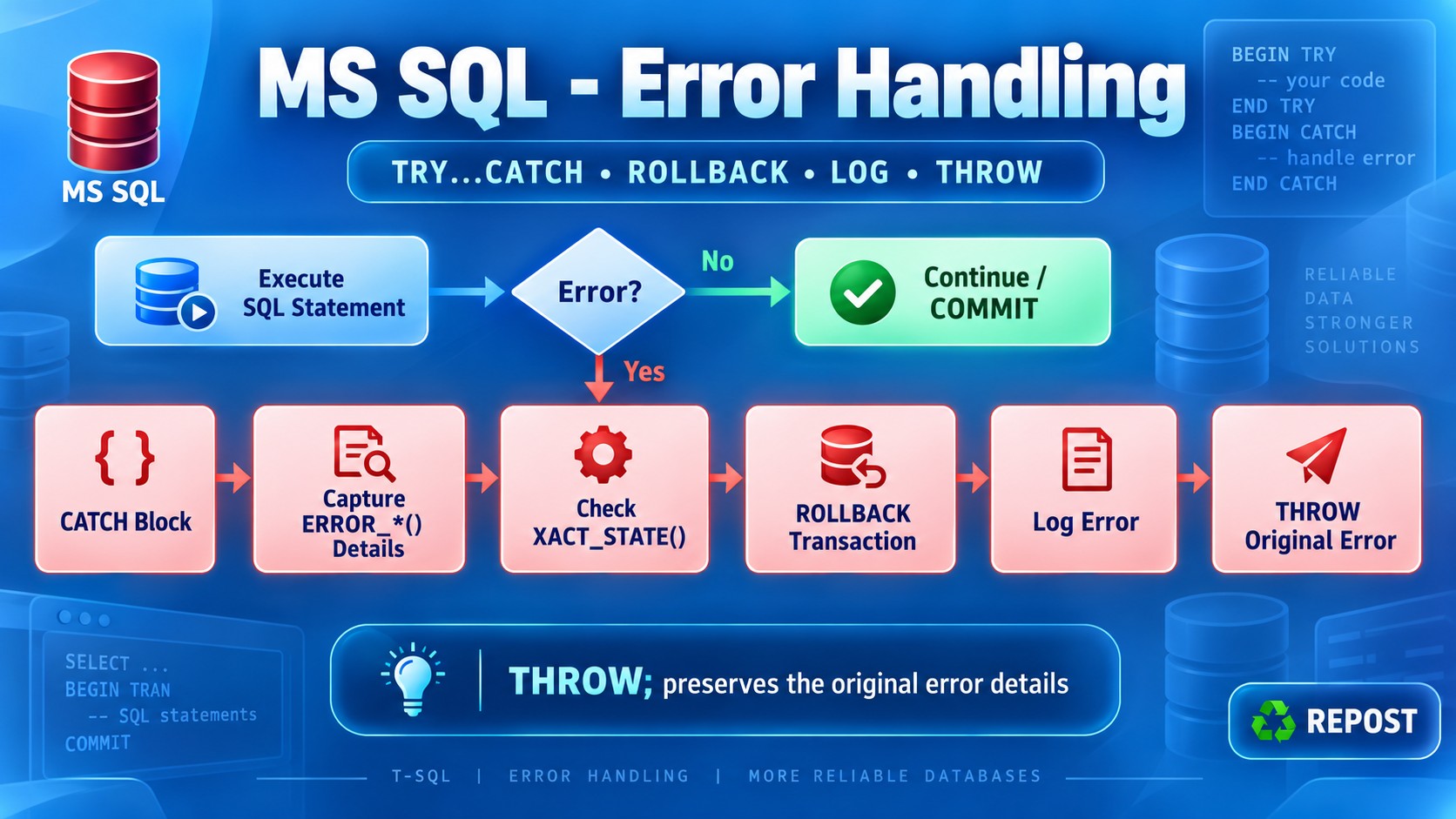


How does TRY...CATCH work in T-SQL?
TRY...CATCH handles runtime errors in SQL Server.
-
Put the statements that may fail inside the
TRYblock. -
If an error occurs, SQL Server stops the remaining statements in
TRY. -
Control moves to the
CATCHblock. -
The
CATCHblock can log the error and roll back the transaction.
Basic syntax
BEGIN TRY
    -- Statements that may cause an error
END TRY
BEGIN CATCH
    -- Error-handling statements
END CATCH;
Simple example
BEGIN TRY
    SELECT 10 / 0;
END TRY
BEGIN CATCH
    SELECT
        ERROR_NUMBER() AS ErrorNumber,
        ERROR_MESSAGE() AS ErrorMessage;
END CATCH;
Result:
ErrorNumber   ErrorMessage
-----------   ------------------------
8134          Divide by zero error encountered.
Transaction example
BEGIN TRY
    BEGIN TRANSACTION;

    UPDATE Accounts
    SET Balance = Balance - 1000
    WHERE AccountId = 1;

    UPDATE Accounts
    SET Balance = Balance + 1000
    WHERE AccountId = 2;

    COMMIT TRANSACTION;
END TRY
BEGIN CATCH
    IF XACT_STATE() <> 0
        ROLLBACK TRANSACTION;

    THROW;
END CATCH;
If an error occurs:
-
The remaining
TRYstatements are skipped. -
The transaction is rolled back.
-
THROWsends the original error back to the application.
Error functions
Inside CATCH, these functions provide error details:
| Function | Purpose |
|---|---|
ERROR_NUMBER() |
Error number |
ERROR_MESSAGE() |
Error description |
ERROR_SEVERITY() |
Error severity level |
ERROR_STATE() |
Error state |
ERROR_LINE() |
Line where the error occurred |
ERROR_PROCEDURE() |
Procedure or trigger where it occurred |
Key points
-
TRY...CATCHhandles most runtime errors. -
Compile-time errors in the same scope may not be caught.
-
Use it with transactions to prevent partial updates.
-
Check the transaction using
XACT_STATE()before rollback. -
Use
THROW;to return the original error to the caller. -
TRYmust be immediately followed byCATCH.
Difference between THROW and RAISERROR
Both are used to generate errors in SQL Server, but THROW is the modern and recommended option.
| Feature | THROW |
RAISERROR |
|---|---|---|
| Introduced | SQL Server 2012 | Older SQL Server versions |
| Recommendation | Preferred for new code | Mainly for legacy code |
| Syntax | Simple | More options but more complex |
| Error number | Must be 50000 or higher for a new error |
Can use a message ID from sys.messages |
| Severity | Always severity 16 for a new error |
Severity can be specified |
| Formatting | Does not support printf formatting |
Supports placeholders such as %s and %d |
| Rethrow original error | THROW; preserves original error details |
Usually requires error details to be supplied manually |
SET XACT_ABORT |
Respects it | Does not fully respect it |
| Statement terminator | Previous statement must end with ; |
No special semicolon requirement |
THROW example
IF NOT EXISTS
(
    SELECT 1
    FROM Accounts
    WHERE AccountId = 10
)
BEGIN
    THROW 50001, 'Account not found.', 1;
END;
THROW requires:
THROW error_number, message, state;The custom error number must be 50000 or greater.
Rethrowing the original error
BEGIN TRY
    SELECT 10 / 0;
END TRY
BEGIN CATCH
    PRINT 'An error occurred';

    THROW;
END CATCH;
THROW; preserves the original:
-
Error number
-
Message
-
Severity
-
State
-
Error line
RAISERROR example
DECLARE @AccountId INT = 10;

RAISERROR(
    'Account %d was not found.',
    16,
    1,
    @AccountId
);
Here:
-
16is the severity. -
1is the state. -
%dis replaced with@AccountId.
Key points
-
Prefer
THROWfor new T-SQL code. -
Use
THROW;insideCATCHto rethrow the original error. -
Use
RAISERRORmainly when legacy code needs custom severity or formatted messages. -
RAISERRORremains supported but is not recommended for new development.
How do you roll back a transaction when an exception occurs?
Use TRY...CATCH with BEGIN TRANSACTION, COMMIT, and ROLLBACK.
-
Start the transaction inside
TRY. -
Commit it when all statements succeed.
-
If an error occurs, control moves to
CATCH. -
Roll back the transaction inside
CATCH.
Example
BEGIN TRY
    BEGIN TRANSACTION;

    UPDATE Accounts
    SET Balance = Balance - 1000
    WHERE AccountId = 1;

    UPDATE Accounts
    SET Balance = Balance + 1000
    WHERE AccountId = 2;

    COMMIT TRANSACTION;
END TRY
BEGIN CATCH
    IF XACT_STATE() <> 0
        ROLLBACK TRANSACTION;

    THROW;
END CATCH;
How it works
If both updates succeed:
BEGIN TRANSACTION → UPDATE → UPDATE → COMMITIf any update fails:
BEGIN TRANSACTION → ERROR → CATCH → ROLLBACKROLLBACK cancels all changes made after BEGIN TRANSACTION.
Why check XACT_STATE()?
IF XACT_STATE() <> 0
    ROLLBACK TRANSACTION;
XACT_STATE() returns:
| Value | Meaning |
|---|---|
1 |
Transaction is active and can be committed or rolled back |
-1 |
Transaction is active but cannot be committed; it must be rolled back |
0 |
No active transaction |
Recommended version
SET XACT_ABORT ON;

BEGIN TRY
    BEGIN TRANSACTION;

    -- Database operations

    COMMIT TRANSACTION;
END TRY
BEGIN CATCH
    IF XACT_STATE() <> 0
        ROLLBACK TRANSACTION;

    THROW;
END CATCH;
SET XACT_ABORT ON makes most runtime errors automatically mark or terminate the transaction. The CATCH block still performs the necessary rollback and returns the original error.
Key points
-
Use explicit transactions for related operations.
-
Put
COMMITat the end of theTRYblock. -
Roll back only when a transaction exists.
-
Use
XACT_STATE()to check the transaction condition. -
Use
THROW;to return the original error. -
Keep transactions short to reduce blocking and deadlocks.
What is XACT_STATE()?
XACT_STATE() is a SQL Server function that shows the current state of a transaction.
It is commonly used inside a CATCH block to decide whether the transaction should be committed or rolled back.
Return values
| Value | Meaning | Allowed action |
|---|---|---|
1 |
Active and valid transaction | COMMIT or ROLLBACK |
-1 |
Active but uncommittable transaction | Only full ROLLBACK |
0 |
No active transaction | No COMMIT or ROLLBACK |
Example
SET XACT_ABORT ON;

BEGIN TRY
    BEGIN TRANSACTION;

    -- Causes an error
    INSERT INTO Orders(OrderId, Amount)
    VALUES (1, NULL);

    COMMIT TRANSACTION;
END TRY
BEGIN CATCH
    SELECT XACT_STATE() AS TransactionState;

    IF XACT_STATE() <> 0
        ROLLBACK TRANSACTION;

    THROW;
END CATCH;
If the error makes the transaction uncommittable, XACT_STATE() returns -1. Therefore, the transaction must be rolled back.
Detailed handling
BEGIN CATCH
    IF XACT_STATE() = -1
    BEGIN
        -- Transaction is invalid
        ROLLBACK TRANSACTION;
    END
    ELSE IF XACT_STATE() = 1
    BEGIN
        -- Transaction is still valid
        -- Usually roll back when handling an error
        ROLLBACK TRANSACTION;
    END;

    THROW;
END CATCH;
XACT_STATE() vs @@TRANCOUNT
XACT_STATE() |
@@TRANCOUNT |
|---|---|
| Shows whether a transaction is valid or uncommittable | Shows the transaction nesting count |
Returns -1, 0, or 1 |
Returns 0 or a positive number |
Helps decide whether COMMIT is possible |
Shows whether a transaction was started |
| Does not show nesting level | Does not show whether the transaction is uncommittable |
Key points
-
XACT_STATE() = 1: transaction is active and committable. -
XACT_STATE() = -1: transaction is active but must be rolled back. -
XACT_STATE() = 0: no transaction exists. -
Use it in
CATCHbefore executingROLLBACK. -
XACT_STATE()does not indicate the number of nested transactions.
How do you log SQL errors without losing the original error details?
Inside the CATCH block:
-
Capture the original error using
ERROR_*()functions. -
Roll back the failed transaction.
-
Insert the captured details into an error-log table.
-
Use
THROW;without parameters to return the original error.
Error-log table
CREATE TABLE ErrorLog
(
    ErrorLogId     INT IDENTITY PRIMARY KEY,
    ErrorNumber    INT,
    ErrorMessage   NVARCHAR(4000),
    ErrorSeverity  INT,
    ErrorState     INT,
    ErrorProcedure NVARCHAR(128),
    ErrorLine      INT,
    LoggedAt       DATETIME2 DEFAULT SYSDATETIME()
);
Example
BEGIN TRY
    BEGIN TRANSACTION;

    -- Database operations
    SELECT 10 / 0;

    COMMIT TRANSACTION;
END TRY
BEGIN CATCH
    -- Capture original details before leaving CATCH
    DECLARE @ErrorNumber    INT            = ERROR_NUMBER();
    DECLARE @ErrorMessage   NVARCHAR(4000) = ERROR_MESSAGE();
    DECLARE @ErrorSeverity  INT            = ERROR_SEVERITY();
    DECLARE @ErrorState     INT            = ERROR_STATE();
    DECLARE @ErrorProcedure NVARCHAR(128)  = ERROR_PROCEDURE();
    DECLARE @ErrorLine      INT            = ERROR_LINE();

    -- Roll back the failed transaction first
    IF XACT_STATE() <> 0
        ROLLBACK TRANSACTION;

    -- Log outside the rolled-back transaction
    INSERT INTO ErrorLog
    (
        ErrorNumber,
        ErrorMessage,
        ErrorSeverity,
        ErrorState,
        ErrorProcedure,
        ErrorLine
    )
    VALUES
    (
        @ErrorNumber,
        @ErrorMessage,
        @ErrorSeverity,
        @ErrorState,
        @ErrorProcedure,
        @ErrorLine
    );

    -- Rethrow the original error
    THROW;
END CATCH;
Why roll back before logging?
If the log record is inserted inside the failed transaction:
-
It may also be rolled back.
-
An uncommittable transaction (
XACT_STATE() = -1) does not allow normal write operations.
Therefore, capture the error, roll back, and then log it.
Why use THROW;?
THROW;Using THROW; without parameters preserves the original:
-
Error number
-
Message
-
Severity and state
-
Procedure and line number
Creating a new error with THROW 50000, ... or RAISERROR can replace some original details.
Key points
-
Capture
ERROR_*()values inside theCATCHblock. -
Roll back before inserting into the error-log table.
-
Use
THROW;to preserve and return the original error. -
Include useful context such as procedure name, parameters, user, and correlation ID.
-
Never log passwords, tokens, or sensitive information.
ASP.NET Core Web API calling T-SQL TRY...CATCH
When SQL Server executes THROW;, ASP.NET receives a SqlException. The API can catch it and return an appropriate response.
1. Install SQL Server package
dotnet add package Microsoft.Data.SqlClient2. appsettings.json
{
  "ConnectionStrings": {
    "DefaultConnection": "Server=.;Database=TestDb;Trusted_Connection=True;TrustServerCertificate=True"
  }
}
3. Program.cs
var builder = WebApplication.CreateBuilder(args);

builder.Services.AddControllers();

var app = builder.Build();

app.MapControllers();

app.Run();
4. Create controller
Controllers/SqlErrorController.cs
using Microsoft.AspNetCore.Mvc;
using Microsoft.Data.SqlClient;
using System.Data;

namespace SqlErrorApi.Controllers;

[ApiController]
[Route("api/[controller]")]
public class SqlErrorController : ControllerBase
{
    private readonly IConfiguration _configuration;
    private readonly ILogger<SqlErrorController> _logger;

    public SqlErrorController(
        IConfiguration configuration,
        ILogger<SqlErrorController> logger)
    {
        _configuration = configuration;
        _logger = logger;
    }

    [HttpGet("divide-by-zero")]
    public async Task<IActionResult> DivideByZero()
    {
        const string sql = """
            BEGIN TRY
                SELECT 10 / 0;
            END TRY
            BEGIN CATCH
                PRINT 'An error occurred';
                THROW;
            END CATCH;
            """;

        try
        {
            string connectionString =
                _configuration.GetConnectionString("DefaultConnection")!;

            await using var connection =
                new SqlConnection(connectionString);

            await using var command =
                new SqlCommand(sql, connection);

            command.CommandType = CommandType.Text;

            await connection.OpenAsync();
            await command.ExecuteNonQueryAsync();

            return Ok(new
            {
                success = true,
                message = "SQL command executed successfully."
            });
        }
        catch (SqlException ex)
        {
            _logger.LogError(
                ex,
                "SQL error {ErrorNumber}: {ErrorMessage}",
                ex.Number,
                ex.Message);

            return StatusCode(
                StatusCodes.Status500InternalServerError,
                new
                {
                    success = false,
                    message = "A database error occurred.",
                    errorNumber = ex.Number,
                    errorMessage = ex.Message
                });
        }
    }
}
5. Call the API
GET /api/SqlError/divide-by-zeroExample:
https://localhost:7001/api/SqlError/divide-by-zeroResponse
HTTP status:
500 Internal Server ErrorJSON response:
{
  "success": false,
  "message": "A database error occurred.",
  "errorNumber": 8134,
  "errorMessage": "Divide by zero error encountered."
}
How the flow works
Web API
   ↓
Executes T-SQL
   ↓
SELECT 10 / 0 causes error
   ↓
SQL CATCH executes
   ↓
THROW returns the original SQL error
   ↓
ASP.NET catches SqlException
   ↓
API returns HTTP 500 response
Important points
-
PRINT 'An error occurred'is only an informational SQL message. It does not become the API response. -
THROW;sends the original divide-by-zero error to ASP.NET. -
SQL Server error
8134means divide by zero. -
Log detailed errors internally.
-
In production, avoid returning
ex.Messageand other database details to clients. Return a safe message instead:
return StatusCode(500, new
{
    success = false,
    message = "An unexpected database error occurred."
});