

What is a Vector Database?
1. Introduction
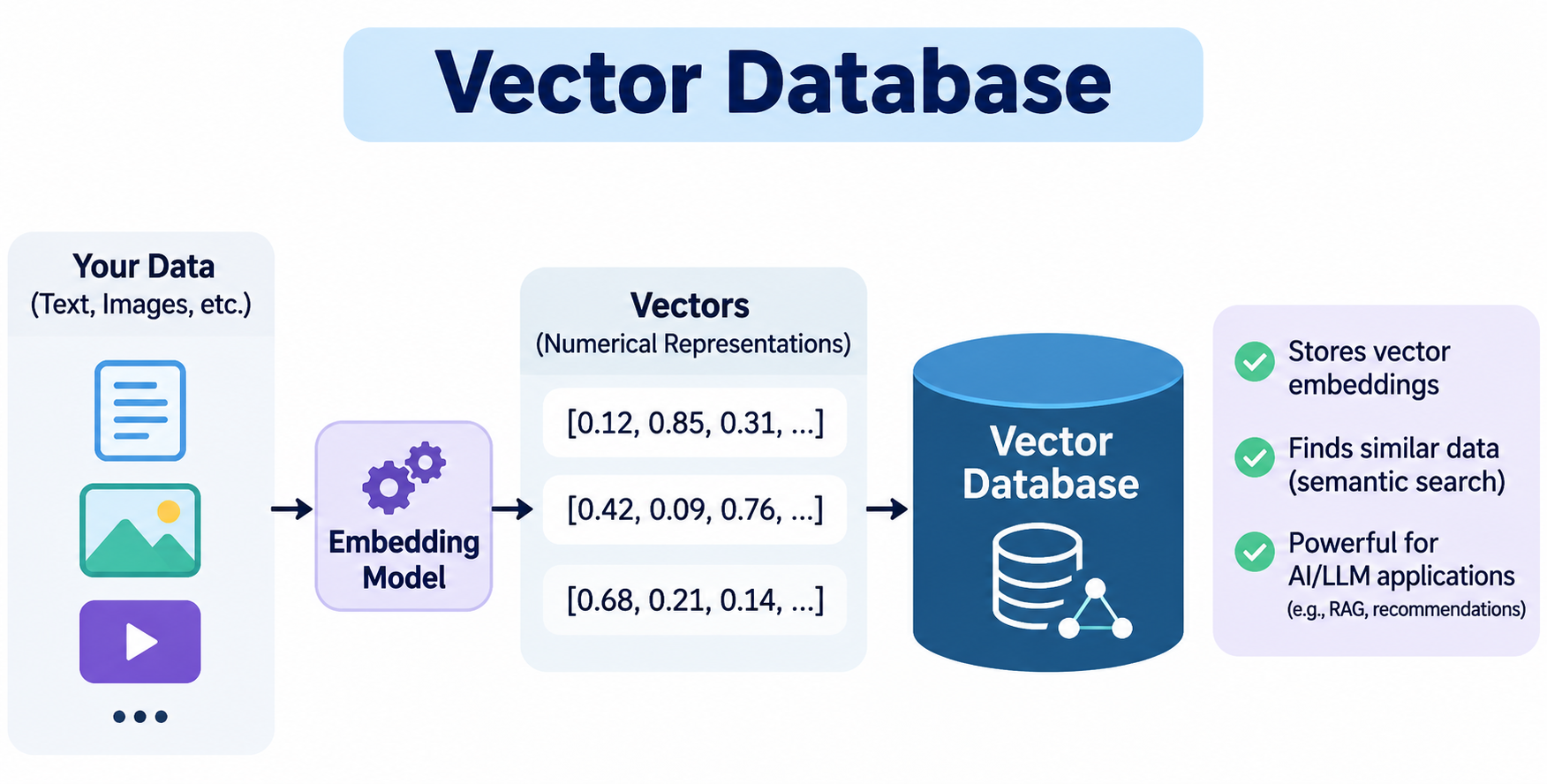
A Vector Database is a specialised type of database designed to store, manage, and search high-dimensional numerical vectors efficiently.
Unlike a traditional database, which primarily searches for exact values or matching text, a vector database can search for information based on meaning and similarity.
This makes vector databases particularly useful in modern AI applications such as:
-
Chatbots and AI assistants.
-
Retrieval-Augmented Generation (RAG).
-
Semantic search engines.
-
Recommendation systems.
-
Image and video search.
-
Document search.
-
Agentic AI applications.
-
AI-powered knowledge management systems.
Let's understand this with a simple example.
Suppose you have stored the following three sentences in a database:
Document 1: How to reset my password?

Document 2: How to change my login credentials?

Document 3: How to install Docker on Windows?
Now, a user searches for:
I forgot my password. How can I recover my account?A traditional database might struggle to find the relevant documents because the search sentence does not contain exactly the same words as the stored sentences.
However, a vector database can identify that the user's question is semantically similar to Document 1 and Document 2.
It can return the most relevant documents based on their meaning rather than only matching keywords.
This is the main purpose of a vector database.
2. First, What Is a Vector?
Before understanding a vector database, we need to understand what a vector is.
A vector is a collection of numerical values arranged in a particular order.
For example:
[0.25, 0.85, 0.45, 0.12]This is a simple vector containing four numerical values.
Another example:
[0.12, 0.76, 0.34, 0.91, 0.52]This vector contains five numerical values.
In mathematics and machine learning, vectors represent information using numbers.
In AI applications, vectors are commonly used to represent the meaning or characteristics of information such as:
-
Text.
-
Documents.
-
Images.
-
Audio.
-
Videos.
-
Products.
A vector can contain hundreds or thousands of numerical values, depending on the embedding model being used.
For example:
Text: "I love programming in C#"

Generated Vector:

[
  0.125,
  0.854,
  0.456,
  0.231,
  0.789,
  0.341,
  0.912,
  ...
]
The numerical values represent information learned from the text by an AI embedding model.
Important: These values are not manually assigned numbers. An embedding model generates them based on patterns and relationships learned during its training.
3. What Is an Embedding?
An embedding is a numerical representation of information in a vector space.
In simple terms, an embedding converts information such as text, images, or audio into a numerical vector that an AI system can process.
For example:
Input Text:
"Microsoft Azure is a cloud computing platform."

          |
          v

    Embedding Model

          |
          v

Generated Embedding:

[0.21, 0.67, 0.82, 0.14, 0.45, ...]
This numerical representation is called an embedding.
Why do we need embeddings?
Computers can compare numerical values mathematically. They cannot directly calculate semantic similarity between two sentences in the same way humans understand meaning.
Embeddings help solve this problem.
Consider these sentences:
Sentence 1: I love developing applications in C#.

Sentence 2: I enjoy building software using C Sharp.

Sentence 3: I like cooking Italian food.
From a human perspective:
-
Sentence 1 and Sentence 2 have similar meanings.
-
Sentence 3 has a completely different meaning.
An embedding model attempts to represent these semantic relationships in vector space.
Conceptually:
Semantic relationships between sentences
         Similar meanings

  "I love developing applications
            in C#."

              |
              |  Close in vector space
              |
              v

  "I enjoy building software
        using C Sharp."


     Different meaning

  "I like cooking Italian food."
Conceptual illustration only. Actual embeddings contain many dimensions and are not necessarily arranged as shown.
Sentences with similar meanings tend to have embeddings that are closer together according to the selected similarity metric.
What generates embeddings?
An embedding model generates embeddings.
Some examples include:
-
OpenAI embedding models.
-
Google embedding models.
-
Cohere embedding models.
-
Hugging Face embedding models.
-
Sentence Transformers models.
The embedding model and the vector database have different responsibilities.
|
Component |
Responsibility |
|---|---|
|
Embedding Model |
Converts information into numerical vectors. |
|
Vector Database |
Stores vectors and searches for similar vectors. |
|
Large Language Model (LLM) |
Generates human-readable responses. |
We will connect these components later.
4. What Exactly Is a Vector Database?
Now that we understand vectors and embeddings, let's combine these concepts.
A Vector Database stores embeddings and provides efficient similarity search to find information related to a given query.
A vector database can store records containing:
-
A unique ID.
-
A numerical vector.
-
Original text or a reference to the original data.
-
Metadata.
For example, imagine that we want to store technical articles in a vector database.
We have the following article:
Article Title:
Docker Installation on Windows

Article Content:
Docker Desktop allows developers to run containers
on Windows machines. It provides an easy way to
build and manage Docker containers.
An embedding model converts the article content into a vector.
The vector database stores the vector along with its associated information.
A simplified record might look like this:
{
  "id": "article-101",
  "vector": [
    0.21,
    0.45,
    0.87,
    0.32,
    0.65
  ],
  "payload": {
    "title": "Docker Installation on Windows",
    "category": "Docker",
    "content": "Docker Desktop allows developers to run containers..."
  }
}
The five numerical dimensions above are illustrative, not actual embeddings generated by a model.
Here, we have:
|
Field |
Description |
|---|---|
|
id |
Unique identifier for the record. |
|
vector |
Numerical embedding generated by an embedding model. |
|
title |
Original article title. |
|
category |
Article category. |
|
content |
Original text or a stored text chunk. |
The vector database uses the vector for similarity search and can return the associated content and metadata.
5. How Does a Vector Database Work?
Let's understand the complete process step by step.
Imagine that you have 1,000 technical articles stored in your application.
A user searches:
How can I run applications inside containers?You want to identify the most relevant articles.
The process involves two major operations:
-
Storing information (data ingestion).
-
Searching information (query processing).
A. Data Ingestion – Storing Information
Data ingestion means collecting, processing, and storing information in a system.
Suppose you have three articles:
Article 1: Introduction to Docker

Article 2: Docker Compose Complete Guide

Article 3: Python Functions Explained
The process works as follows:
Data ingestion workflow
Original Documents
Docker article, Docker Compose article, Python article
Text Processing
Clean text, extract content, split into chunks if needed
Embedding Model
Converts each text input into a numerical vector
Vector Database
Stores vectors, IDs, text and metadata
Let's understand each step.
Step 1: Collect the original information
Your application collects data from different sources.
Examples:
-
PDF documents.
-
Word documents.
-
Technical articles.
-
Database records.
-
Website content.
-
Customer support documents.
Step 2: Process the information
Before generating embeddings, the application may need to clean and prepare the text.
For example:
Original Text:

Docker Desktop allows developers to run
containers on Windows machines.
The application extracts the relevant text and prepares it for embedding generation.
Step 3: Generate embeddings
The application sends the text to an embedding model.
The embedding model returns a numerical vector.
For example:
Text:
"Docker Desktop allows developers to run containers."

Embedding:
[0.21, 0.45, 0.87, 0.32, 0.65, ...]
Step 4: Store the information
The application stores the generated vector in the vector database along with the corresponding document ID and metadata.
This process is repeated for all documents.
At the end, your vector database contains searchable vector records.
B. Query Processing – Searching Information
Now the user enters:
How can I run applications inside containers?The vector database cannot directly understand this sentence.
We first need to convert the user's query into an embedding.
Query processing workflow
User Search Query
"How can I run applications inside containers?"
Embedding Model
Converts the user query into a vector
Vector Database
Compares the query vector with stored vectors
Similarity Search Results
Returns the most relevant documents
The database might return:
|
Article |
Relevance |
|---|---|
|
Introduction to Docker |
Very High |
|
Docker Compose Complete Guide |
High |
|
Python Functions Explained |
Low |
These relevance labels are illustrative. Actual databases return distance or similarity scores, whose interpretation depends on the metric used.
The vector database has successfully found relevant information even though the user's exact search terms may not appear in the article.
6. How Does Similarity Search Work?
Similarity search is the most important operation performed by a vector database.
It identifies vectors that are closest to a given query vector.
Let's understand this with an example.
Suppose we have three vectors:
Vector A = [0.90, 0.80, 0.20]

Vector B = [0.85, 0.75, 0.25]

Vector C = [0.10, 0.20, 0.90]
Now suppose we receive a query vector:
Query Vector = [0.88, 0.78, 0.22]The database calculates how similar the query vector is to each stored vector.
Conceptually:
Query Vector
     |
     |
     |---- Compare with Vector A
     |
     |---- Compare with Vector B
     |
     |---- Compare with Vector C
Vector A and Vector B are closer to the query vector than Vector C.
Therefore, the database returns Vector A and Vector B as the closest matches.
There are different mathematical techniques used to calculate similarity.
The most common ones are:
-
Cosine Similarity.
-
Euclidean Distance.
-
Dot Product.
Let's understand each.
A. Cosine Similarity
Cosine similarity measures the angle between two vectors.
It calculates whether two vectors point in a similar direction.
The formula is:
Where:
-
A and B are vectors.
-
\(A\cdot B\) is the dot product.
-
\(\|A\|\) and \(\|B\|\) represent their magnitudes.
Generally, cosine similarity ranges from -1 to +1.
|
Score |
Interpretation |
|---|---|
|
+1 |
Same direction |
|
0 |
Orthogonal (no directional similarity) |
|
-1 |
Opposite direction |
For many text embedding applications, cosine similarity is commonly used.
Example:
Sentence 1:
"I love learning C# programming."

Sentence 2:
"I enjoy studying C# development."
If their embeddings point in similar directions, the cosine similarity will be high.
B. Euclidean Distance
Euclidean distance measures the straight-line distance between two vectors.
The formula is:
A smaller distance means the vectors are closer.
For example:
Vector A = [2, 3]

Vector B = [3, 4]
The Euclidean distance is:
A smaller distance indicates greater proximity.
C. Dot Product
The dot product multiplies corresponding vector values and adds the results.
The formula is:
The dot product can be used as a similarity score, particularly when the embedding model and indexing configuration are designed for it.
Its interpretation depends on the vector magnitudes and whether the vectors are normalized.
Comparison
|
Technique |
What it measures |
Better result |
|---|---|---|
|
Cosine Similarity |
Angular similarity |
Higher score |
|
Euclidean Distance |
Straight-line distance |
Lower distance |
|
Dot Product |
Vector alignment and magnitude |
Usually higher score |
Important: You should use the similarity metric recommended for your embedding model. A vector database does not automatically make every metric interchangeable.
7. What Is Vector Indexing?
Imagine that you have stored 10 million vectors in a vector database.
A user submits a search query.
One approach is to compare the query vector with every stored vector.
This is called exhaustive search or brute-force search.
For large datasets, performing this comparison for every query can be expensive and slow.
To improve search performance, vector databases use indexing techniques.
A vector index helps the database locate likely nearest vectors without comparing against every single vector.
Some commonly used indexing techniques include:
A. HNSW – Hierarchical Navigable Small World
HNSW is a popular approximate nearest-neighbor indexing algorithm.
It organizes vectors into connected graph structures.
Instead of comparing the query against every vector, the search algorithm navigates through the graph to find nearby candidates.
Conceptually:
             Layer 2
                A
               / \
              B   C

             Layer 1
          A --- B --- C
          |     |     |
          D --- E --- F
          |     |     |
          G --- H --- I

             Layer 0
       More detailed connections
This is only a simplified conceptual diagram.
Advantages:
-
Fast similarity searches.
-
Suitable for many high-dimensional search workloads.
-
Often provides good recall and latency trade-offs.
Disadvantages:
-
Uses additional memory.
-
Requires index-building time.
-
Performance depends on index configuration.
B. IVF – Inverted File Index
IVF groups vectors into clusters.
When a query arrives, the database identifies the most relevant clusters and searches within those clusters rather than the entire dataset.
Example:
                All Vectors
                     |
          -----------------------
          |          |          |
          v          v          v
       Cluster 1  Cluster 2  Cluster 3
          |          |          |
          v          v          v
       Vectors    Vectors    Vectors
The query is compared primarily against selected clusters.
Advantages:
-
Can reduce the search space significantly.
-
Useful for large collections.
Disadvantages:
-
Requires cluster training or configuration.
-
Searching too few clusters can reduce recall.
C. Flat Index
A flat index performs an exhaustive comparison against stored vectors.
It does not use an approximate nearest-neighbor structure.
Advantages:
-
Exact nearest-neighbor results.
-
Simple indexing.
-
Useful for smaller datasets and evaluation.
Disadvantages:
-
Search cost grows with the number of vectors.
-
Can become expensive for large collections.
Indexing Comparison
|
Index |
Search approach |
Main characteristic |
|---|---|---|
|
Flat |
Exhaustive comparison |
Exact results |
|
HNSW |
Graph-based navigation |
Fast approximate search |
|
IVF |
Cluster-based search |
Searches selected clusters |
What is ANN?
ANN stands for Approximate Nearest Neighbor.
It means finding vectors that are very close to the best matches without necessarily examining every vector.
Approximate search is often significantly faster than exhaustive search, but it can occasionally miss the mathematically closest result.
8. What Are the Important Components of a Vector Database?
A vector database generally provides several capabilities.
1. Vector Storage
Stores high-dimensional numerical vectors.
Example:
[0.12, 0.45, 0.78, 0.34, 0.91, ...]2. Metadata Storage
Stores additional details associated with each vector.
For example:
{
  "articleId": 101,
  "title": "Docker Complete Guide",
  "category": "Docker",
  "author": "Syed",
  "publishedDate": "2026-11-01"
}
Metadata allows the application to filter search results.
3. Similarity Search
Finds vectors that are most similar to the user's query vector.
4. Vector Indexing
Organizes vectors to improve search performance.
5. Filtering
Allows queries to restrict searches based on metadata.
For example:
Search:
"How to create Docker containers?"

Filter:
Category = "Docker"
The database searches for similar vectors only among records matching the specified filter, subject to its filtering and indexing implementation.
6. CRUD Operations
Like other databases, vector databases support data management operations:
|
Operation |
Purpose |
|---|---|
|
Create |
Insert a new vector record |
|
Read |
Retrieve a vector record |
|
Update |
Update the record or its vector |
|
Delete |
Remove a vector record |
9. Vector Database vs Traditional Database
This is an important topic for developers.
You have probably worked with SQL Server, MySQL, or PostgreSQL.
A traditional relational database stores structured information in tables and supports queries using SQL.
A vector database is specifically designed for efficient vector similarity search.
Let's compare them.
|
Feature |
Traditional Database |
Vector Database |
|---|---|---|
|
Main purpose |
Structured data management |
Vector storage and similarity search |
|
Data representation |
Rows and columns |
Numerical vectors with metadata |
|
Search |
Exact match, ranges, text search, joins |
Vector similarity search |
|
Query approach |
SQL or equivalent query language |
Vector-based search |
|
Similarity search |
Not its primary purpose |
Core capability |
|
Indexing |
B-tree, hash and other indexes |
HNSW, IVF and other vector indexes |
|
Common use |
Business applications, transactions |
AI search, RAG, recommendations |
Example: Traditional SQL Search
Suppose we have an Articles table.
|
Id |
Title |
|---|---|
|
1 |
Docker Installation |
|
2 |
Docker Compose |
|
3 |
Python Functions |
We execute:
SELECT *
FROM Articles
WHERE Title LIKE '%Docker%';
This returns records whose titles contain the word Docker.
Example: Vector Database Search
Now the user searches:
How do I package my application
to run in an isolated environment?
The vector database can identify Docker-related articles because the query has a similar meaning to their stored embeddings.
It does not require the exact word Docker to appear in the user's query.
Can Traditional Databases Store Vectors?
Yes.
Some traditional and general-purpose databases now support vector data types and similarity search.
For example, PostgreSQL supports vector search through the pgvector extension.
Azure AI Search also supports vector search alongside other search capabilities.
Therefore, you do not always need to deploy a separate vector database.
The right choice depends on your application, dataset size, search requirements, existing infrastructure, and operational needs.
10. Popular Vector Databases
Several vector database technologies are available.
Here are some commonly used options.
1. Pinecone
A managed vector database service designed for AI applications and similarity search.
Website: pinecone.io
2. Qdrant
An open-source vector database with vector search, payload filtering, and cloud-hosted options.
Website: qdrant.tech
3. Weaviate
An open-source vector database that supports vector search, hybrid search, and AI application integrations.
Website: weaviate.io
4. Milvus
An open-source vector database designed for large-scale vector search workloads.
Website: milvus.io
5. Chroma
An open-source database often used in AI prototypes and applications that need embedding storage and retrieval.
Website: trychroma.com
6. pgvector
A PostgreSQL extension that adds vector storage and similarity-search capabilities to PostgreSQL.
Website: GitHub – pgvector
Which one should you learn?
For a .NET developer learning vector databases:
|
Technology |
Suggested purpose |
|---|---|
|
Qdrant |
Hands-on vector database learning |
|
PostgreSQL + pgvector |
Learning vector search in an existing database |
|
Pinecone |
Understanding managed vector database services |
|
Azure AI Search |
Building search-based applications in Azure |
I recommend starting with Qdrant for hands-on learning because you can run it locally using Docker and interact with it from a .NET application.
11. What Is the Relationship Between Vector Database, Embeddings, LLM and RAG?
These four concepts are closely related, but they are not the same.
Let's understand each component.
|
Technology |
Responsibility |
|---|---|
|
Embedding Model |
Converts text into vectors |
|
Vector Database |
Stores and searches vectors |
|
LLM |
Generates human-readable answers |
|
RAG |
Retrieves relevant information and provides it to an LLM before answer generation |
What is RAG?
RAG stands for Retrieval-Augmented Generation.
It is an AI architecture that retrieves relevant external information and uses that information to help an LLM generate an answer.
A vector database is commonly used as the retrieval component in a RAG system.
Example: Building a Technical Knowledge Chatbot
Imagine that you have a website containing 500 technical articles about:
-
C#.
-
.NET Core.
-
ASP.NET Core.
-
SQL Server.
-
Azure.
-
Docker.
-
Python.
You want to build a chatbot that answers questions using these articles.
Without RAG, an LLM primarily relies on information learned during its training and any other context provided to it.
With RAG, the application can retrieve relevant content from your own articles.
RAG Architecture
RAG architecture using a vector database
Your Technical Articles
PDFs, articles, documents
Chunking and Embedding Generation
Split content and generate vectors
Vector Database
Stores document embeddings and metadata
User Question
"What is dependency injection in ASP.NET Core?"
Embedding Model + Similarity Search
Finds relevant article chunks
LLM
Receives the question and retrieved context
Final Answer
Generates an answer based on the retrieved content
Let's understand the actual execution.
Step 1: You upload technical articles into your application.
Step 2: The application splits long articles into smaller chunks.
Step 3: Each chunk is converted into an embedding using an embedding model.
Step 4: The embeddings and associated article information are stored in a vector database.
Step 5: A user asks a question.
Step 6: The application converts the user's question into an embedding.
Step 7: The vector database searches for the most relevant chunks.
Step 8: The application retrieves the original text associated with those vectors.
Step 9: The application sends the user's question and retrieved text to an LLM.
Step 10: The LLM generates an answer using the supplied context.
This is one of the most important practical applications of a vector database.
12. What Is Chunking? Why Is It Important?
Chunking means dividing a large document into smaller sections before generating embeddings.
Suppose you have an article containing 10,000 words about Docker.
Generating one embedding for the entire article may make it difficult to retrieve the most relevant specific section.
Instead, you can split the article into smaller chunks.
Example:
Original Article: Docker Complete Guide
                  |
        -----------------------
        |          |          |
        v          v          v
     Chunk 1    Chunk 2    Chunk 3
        |          |          |
        v          v          v
     Docker     Docker     Docker
     Overview   Images     Volumes
Each chunk gets its own embedding.
For example:
|
Chunk ID |
Content |
|---|---|
|
1 |
Introduction to Docker |
|
2 |
What is a Docker image? |
|
3 |
What is a Docker container? |
|
4 |
Docker volumes explained |
|
5 |
Docker networking |
When a user asks:
How can I persist data in Docker?The vector database can retrieve the chunk about Docker volumes rather than returning the entire article.
What Is Chunk Overlap?
Sometimes, splitting text at fixed boundaries can separate sentences that depend on each other.
Chunk overlap means repeating a small portion of one chunk in the next chunk.
Example:
Chunk 1:
Docker is a containerization platform.
It allows developers to package applications.

Chunk 2:
It allows developers to package applications.
Along with their dependencies.
The repeated sentence helps preserve some contextual information between adjacent chunks.
However, chunk size and overlap should be selected based on the document type, embedding model, and retrieval requirements. There is no universally optimal chunk size.
13. What Is Metadata Filtering?
Vector databases do not search only by similarity.
They can also use metadata to restrict which records are considered during a search.
Suppose your vector database stores articles from different categories:
|
Article |
Category |
|---|---|
|
Docker Installation |
Docker |
|
Docker Compose |
Docker |
|
Python Functions |
Python |
|
Angular Routing |
Angular |
|
Azure Virtual Machines |
Azure |
A user searches:
How to deploy an application using containers?But the user selects the category:
Category = DockerThe application can perform vector similarity search with a metadata filter.
Conceptually:
User Query
    |
    v
Convert Query into Vector
    |
    v
Vector Database
    |
    +---- Metadata Filter: Category = Docker
    |
    v
Similarity Search
    |
    v
Relevant Docker Articles
This is useful because similarity alone may return information from categories that your application does not want to include.
Metadata filtering helps narrow the search results.
14. What Is Hybrid Search?
Hybrid search combines two different search approaches:
-
Keyword search.
-
Vector search.
Let's understand the difference.
Keyword Search
Suppose the user searches:
AZ-104 Azure certificationKeyword search identifies documents that contain matching terms such as AZ-104 and Azure certification.
Vector Search
Suppose the user searches:
How do I prepare for the Microsoft cloud administrator examination?Vector search can identify documents about AZ-104 preparation even though the exact keyword AZ-104 is absent.
Hybrid Search combines the strengths of both techniques.
|
Search Type |
Main Advantage |
|---|---|
|
Keyword Search |
Exact terms, names and codes |
|
Vector Search |
Semantic meaning and related concepts |
|
Hybrid Search |
Combines exact matching and semantic relevance |
Hybrid search is particularly useful in enterprise search applications because users often search using a mixture of technical terms, product names and natural language.
15. Real-World Applications of Vector Databases
Vector databases are useful in many AI-powered applications.
1. AI Chatbots
An AI chatbot can use a vector database to retrieve relevant information from company documents before generating an answer.
Example:
User:
What is our company's leave policy?

Vector Database:
Finds relevant HR policy documents.

LLM:
Generates an answer based on those documents.
2. Semantic Search
Search engines can retrieve content based on meaning rather than exact keywords.
Example:
Search:
"How to protect an API?"

Relevant Results:
JWT Authentication
OAuth 2.0
API Security
Rate Limiting
3. Recommendation Systems
An e-commerce application can recommend products based on similarities between user interests and product embeddings.
Example:
User Searches:
Laptop for programming

Recommended:
Developer laptops
High RAM laptops
Workstation laptops
4. Image Search
An application can convert images into vectors using a suitable image embedding model.
It can then search for visually similar images.
5. Document Search
An enterprise application can search through thousands of PDFs, Word files, policies and technical documents using natural-language queries.
6. Agentic AI Memory
An AI agent can use a vector database to retrieve relevant information from previous interactions or a knowledge base.
For example:
Previous Interaction:
User is developing a .NET Web API.

Current Question:
How should I implement authentication?

Agent:
Retrieves relevant development context
and uses it to formulate a response.
A vector database can act as one component of an agent's long-term knowledge or memory system. However, it is not a complete memory-management solution by itself.
16. Vector Database vs RAG vs Embeddings vs LLM
Developers sometimes confuse these concepts.
Let's make the differences clear.
|
Concept |
Meaning |
Example |
|---|---|---|
|
Vector |
Numerical values representing information |
|
|
Embedding |
Numerical representation generated by an embedding model |
Text converted into a vector |
|
Embedding Model |
Model that generates embeddings |
OpenAI embedding model |
|
Vector Database |
Stores and searches embeddings |
Qdrant |
|
LLM |
Generates human-readable responses |
GPT |
|
RAG |
Retrieves relevant external information and supplies it to an LLM |
AI chatbot using company documents |
|
Chunking |
Splits large documents into smaller sections |
Splitting a PDF into text chunks |
|
Similarity Search |
Finds vectors close to a query vector |
Finding relevant articles |
|
ANN |
Approximate Nearest Neighbor |
Fast vector search |
|
Hybrid Search |
Combines keyword and vector search |
Search using both keywords and meaning |
17. Practical Architecture Using .NET and Qdrant
Let's see how a .NET application can interact with a vector database.
Suppose we are building an AI chatbot for a technical learning platform.
Our technology stack:
|
Component |
Technology |
|---|---|
|
Backend |
ASP.NET Core Web API (.NET 8) |
|
Embedding Model |
OpenAI embedding model |
|
Vector Database |
Qdrant |
|
LLM |
GPT model |
|
Frontend |
Angular or React |
|
Original Documents |
SQL Server or file storage |
Overall Architecture
                  ANGULAR / REACT
                         |
                         v
                ASP.NET CORE WEB API
                         |
              -----------------------
              |                     |
              v                     v
       Embedding Model          LLM Model
              |                     ^
              v                     |
        Query Vector          Retrieved Context
              |                     |
              v                     |
        QDRANT DATABASE ------------|
              |
              v
       Similar Documents
Example: Data Ingestion
Suppose you have an article:
Title:
Dependency Injection in ASP.NET Core

Content:
Dependency Injection is a design pattern
that helps manage dependencies between
different classes in an application.
The .NET application performs the following operations:
1. Read the article.
2. Extract the content.
3. Generate an embedding using an embedding model.
4. Connect to Qdrant.
5. Store the vector and article metadata.
A simplified C# model could look like this:
public class ArticleVector
{
    public string Id { get; set; } = string.Empty;

    public string Title { get; set; } = string.Empty;

    public string Content { get; set; } = string.Empty;

    public string Category { get; set; } = string.Empty;

    public float[] Embedding { get; set; } = [];
}
The Embedding property holds the numerical vector generated by the embedding model.
Example: Search Operation
Suppose the user asks:
Why should we use dependency injection?The .NET API performs these operations:
1. Receive the user's question.
2. Generate an embedding for the question.
3. Send the query vector to Qdrant.
4. Retrieve the most similar article chunks.
5. Send the retrieved content and question to GPT.
6. Return the generated answer to the user.
The important point is that Qdrant does not generate the final answer.
It only retrieves relevant information.
The LLM is responsible for generating the natural-language answer.
18. Advantages of Vector Databases
|
Advantage |
Explanation |
|---|---|
|
Semantic Search |
Finds information based on meaning |
|
Fast Retrieval |
Uses indexing to accelerate similarity search |
|
High-Dimensional Storage |
Designed to manage large numerical vectors |
|
Scalability |
Many solutions support distributed and large-scale workloads |
|
Metadata Filtering |
Narrows results using additional properties |
|
AI Integration |
Works with embedding models, LLMs and RAG |
|
Multiple Data Types |
Supports vectors generated from text, images and other modalities |
19. Limitations of Vector Databases
Vector databases are powerful, but they are not suitable for every type of application.
1. Embedding Generation Is Required
A vector database does not automatically understand raw text. You normally need an embedding model to generate vectors.
2. Embedding Costs
Cloud embedding APIs may introduce processing costs, depending on the model and volume of data.
3. Search Results Are Not Always Accurate
Semantically similar content is not necessarily factually correct or relevant to the precise question.
4. Data Maintenance
When original documents change, their embeddings may need to be regenerated and updated.
5. Storage Requirements
High-dimensional vectors can consume considerable storage, particularly when storing millions of records.
6. Not a Replacement for Every Database
You should not use a vector database for routine financial transactions, customer records, or relational joins simply because your application includes AI functionality.
The database should match the data and query requirements.
20. Frequently Asked Interview Questions
1. What is a Vector Database?
A vector database stores and manages numerical vectors generated by embedding models. It performs similarity searches to retrieve information based on semantic meaning.
2. What is the difference between a vector and an embedding?
A vector is an ordered collection of numerical values. An embedding is a vector generated by a model to represent information such as text or images.
3. Why do we need a Vector Database?
We need it to efficiently store embeddings and retrieve semantically similar information, which is useful in AI applications such as RAG and semantic search.
4. Can SQL Server store embeddings?
A database may store numerical vector values in supported data types or other representations, but dedicated vector search capabilities depend on the database and its features.
5. Is a Vector Database mandatory for RAG?
No. You can use other storage and search technologies for retrieval. However, vector databases are commonly used because they support efficient similarity search.
6. Does a Vector Database generate embeddings?
No. Normally, an embedding model generates embeddings, and the vector database stores and searches them.
7. What is cosine similarity?
Cosine similarity measures the angular similarity between two vectors. A higher score generally indicates greater directional similarity.
8. What is HNSW?
HNSW is a graph-based approximate nearest-neighbor indexing algorithm used to accelerate vector similarity searches.
9. What is metadata filtering?
Metadata filtering restricts vector search results using properties such as category, document ID, date, or author.
10. What is the difference between keyword search and vector search?
Keyword search looks for matching terms. Vector search finds semantically similar content based on numerical representations.
11. What is hybrid search?
Hybrid search combines keyword-based search and vector-based search to improve retrieval relevance.
12. What is the role of a Vector Database in Agentic AI?
It can provide an agent with relevant knowledge or previous interaction context by retrieving semantically similar information.
21. Final Summary
Let's understand the entire concept in one simple diagram.
                    ORIGINAL DATA
                         |
                         v
                  TEXT PROCESSING
                         |
                         v
                   CHUNKING
                         |
                         v
                  EMBEDDING MODEL
                         |
                         v
                NUMERICAL VECTORS
                         |
                         v
                 VECTOR DATABASE
                         |
                  STORE VECTORS
                         |
             -----------------------
             |
             |     USER QUERY
             |         |
             |         v
             |   EMBEDDING MODEL
             |         |
             |         v
             |    QUERY VECTOR
             |         |
             v         v
               SIMILARITY SEARCH
                       |
                       v
                RELEVANT CONTENT
                       |
                       v
                     LLM
                       |
                       v
                 FINAL ANSWER
Remember these five important points:
-
Vector: A collection of numerical values.
-
Embedding: A numerical representation of information generated by an embedding model.
-
Vector Database: Stores embeddings and retrieves similar vectors.
-
Similarity Search: Finds information based on vector similarity.
-
RAG: Uses retrieved information to help an LLM generate answers.