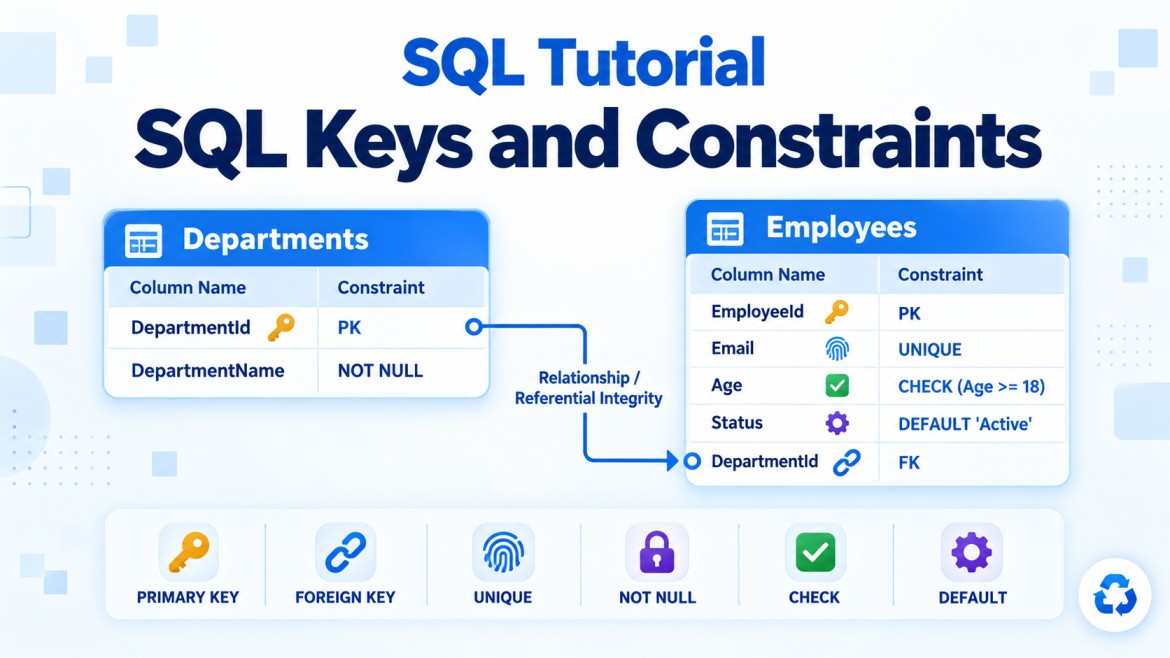


SQL Server Constraints
A constraint is a rule applied to a table or column to prevent invalid data from entering the database.
The following constraints enforce different rules:
-
CHECK— validates a condition -
DEFAULT— supplies a value when none is provided -
NOT NULL— makes a value mandatory -
FOREIGN KEY— maintains relationships between tables
1. CHECK Constraint
What is a CHECK constraint?
A CHECK constraint allows a value only when it satisfies a specified condition.
For example, an employee’s age must be between 18 and 60:
Age INT CHECK (Age BETWEEN 18 AND 60)SQL Server rejects values outside this range.
Why do we need it?
Application validation alone is not sufficient. Data might enter the database through:
-
A Web API
-
An MVC application
-
A desktop application
-
An import process
-
A scheduled job
-
A direct SQL query
A CHECK constraint protects the data regardless of which application inserts or updates it.
Basic syntax
Column-level constraint
CREATE TABLE Employees
(
    EmployeeId INT PRIMARY KEY,
    Age INT CHECK (Age >= 18)
);
Named table-level constraint
CREATE TABLE Employees
(
    EmployeeId INT PRIMARY KEY,
    Age INT,

    CONSTRAINT CK_Employees_Age
        CHECK (Age BETWEEN 18 AND 60)
);
Naming the constraint is recommended because it makes maintenance and error identification easier.
Example: Salary validation
CREATE TABLE Employees
(
    EmployeeId INT PRIMARY KEY,
    EmployeeName VARCHAR(100) NOT NULL,
    Salary DECIMAL(12,2),

    CONSTRAINT CK_Employees_Salary
        CHECK (Salary >= 0)
);
Valid:
INSERT INTO Employees
VALUES (1, 'Arun', 50000);
Invalid:
INSERT INTO Employees
VALUES (2, 'Bala', -5000);
The second statement fails because salary cannot be negative.
CHECK constraint using multiple columns
A table-level CHECK constraint can compare columns.
CREATE TABLE Projects
(
    ProjectId INT PRIMARY KEY,
    StartDate DATE NOT NULL,
    EndDate DATE NOT NULL,

    CONSTRAINT CK_Projects_Dates
        CHECK (EndDate >= StartDate)
);
Valid:
INSERT INTO Projects
VALUES (1, '2026-09-01', '2026-12-31');
Invalid:
INSERT INTO Projects
VALUES (2, '2026-09-01', '2026-08-01');
CHECK with a list of permitted values
CREATE TABLE Orders
(
    OrderId INT PRIMARY KEY,
    OrderStatus VARCHAR(20),

    CONSTRAINT CK_Orders_Status
        CHECK (OrderStatus IN ('Pending', 'Processing', 'Shipped', 'Cancelled'))
);
This prevents values such as:
Unknown
Completed123
WaitingForManager
unless they are included in the permitted list.
Important NULL behavior
Consider:
Age INT CHECK (Age >= 18)This does not prevent NULL.
A CHECK constraint rejects a row only when the condition evaluates to FALSE. When Age is NULL, the condition is UNKNOWN, so SQL Server permits it.
To require a value and validate it, combine NOT NULL and CHECK:
Age INT NOT NULL
    CONSTRAINT CK_Employees_Age CHECK (Age >= 18)
Limitations
A CHECK constraint is mainly intended to validate values within the same row.
It should not be used to perform complex checks involving other tables. Cross-table rules are normally handled using:
-
Foreign-key constraints
-
Unique constraints
-
Application or service-layer validation
-
Carefully designed triggers, when genuinely necessary
2. DEFAULT Constraint
What is a DEFAULT constraint?
A DEFAULT constraint automatically provides a value when an INSERT statement does not supply one.
IsActive BIT DEFAULT 1If IsActive is omitted during insertion, SQL Server stores 1.
Why do we need it?
A default constraint:
-
Reduces repetitive values in
INSERTstatements -
Provides predictable initial values
-
Prevents missing data when a standard value is appropriate
-
Keeps default rules inside the database
-
Ensures consistency across different applications
Basic syntax
CREATE TABLE Employees
(
    EmployeeId INT PRIMARY KEY,
    EmployeeName VARCHAR(100) NOT NULL,
    IsActive BIT DEFAULT 1
);
Recommended named syntax:
CREATE TABLE Employees
(
    EmployeeId INT PRIMARY KEY,
    EmployeeName VARCHAR(100) NOT NULL,
    IsActive BIT,

    CONSTRAINT DF_Employees_IsActive
        DEFAULT 1 FOR IsActive
);
Example
INSERT INTO Employees (EmployeeId, EmployeeName)
VALUES (1, 'Arun');
Because IsActive was omitted, SQL Server stores:
| EmployeeId | EmployeeName | IsActive |
|---|---|---|
| 1 | Arun | 1 |
An explicitly supplied value overrides the default:
INSERT INTO Employees
    (EmployeeId, EmployeeName, IsActive)
VALUES
    (2, 'Bala', 0);
Default date and time
CREATE TABLE Orders
(
    OrderId INT PRIMARY KEY,
    OrderDate DATETIME2 NOT NULL
        CONSTRAINT DF_Orders_OrderDate DEFAULT SYSDATETIME(),
    OrderStatus VARCHAR(20) NOT NULL
        CONSTRAINT DF_Orders_Status DEFAULT 'Pending'
);
Insertion:
INSERT INTO Orders (OrderId)
VALUES (101);
SQL Server automatically supplies:
-
Current server date and time for
OrderDate -
PendingforOrderStatus
Does DEFAULT replace an explicit NULL?
No. A default is normally used when:
-
The column is omitted from the
INSERT, or -
The
DEFAULTkeyword is specified
INSERT INTO Employees
    (EmployeeId, EmployeeName, IsActive)
VALUES
    (3, 'Kumar', DEFAULT);
If the nullable column is explicitly assigned NULL, SQL Server stores NULL, not the default:
INSERT INTO Employees
    (EmployeeId, EmployeeName, IsActive)
VALUES
    (4, 'Ravi', NULL);
If the column is NOT NULL, explicitly inserting NULL causes an error rather than applying the default.
DEFAULT does not update old or modified rows
A default applies to new insert operations. It does not automatically:
-
Replace existing
NULLvalues -
Reset a column during an
UPDATE -
Modify old rows when the constraint is added
Example:
UPDATE Employees
SET EmployeeName = 'Arun Kumar'
WHERE EmployeeId = 1;
This update does not reapply the IsActive default.
3. NOT NULL Constraint
What is NOT NULL?
NOT NULL makes a column mandatory. Every row must contain a non-NULL value for that column.
EmployeeName VARCHAR(100) NOT NULLWhy do we need it?
Use NOT NULL when a column is essential to the record.
Examples:
-
Employee name
-
Order date
-
Product price
-
Customer ID
-
Invoice number
-
Created date
Without it, incomplete records may enter the database.
Example
CREATE TABLE Customers
(
    CustomerId INT PRIMARY KEY,
    CustomerName VARCHAR(100) NOT NULL,
    PhoneNumber VARCHAR(20) NULL
);
CustomerName is required, but PhoneNumber is optional.
Valid:
INSERT INTO Customers
VALUES (1, 'Arun', NULL);
Invalid:
INSERT INTO Customers
VALUES (2, NULL, '9876543210');
NULL is not the same as empty text
These values are different:
NULL  → Value is missing or unknown
''    → Known value containing zero characters
' '   → One or more spaces
NOT NULL prevents only NULL. It does not prevent an empty or whitespace-only string.
This is permitted:
INSERT INTO Customers
VALUES (3, '', '9876543210');
To reject empty values, combine NOT NULL with CHECK:
CustomerName VARCHAR(100) NOT NULL,

CONSTRAINT CK_Customers_Name
    CHECK (LEN(LTRIM(RTRIM(CustomerName))) > 0)
NOT NULL and DEFAULT together
These constraints are commonly combined:
IsActive BIT NOT NULL
    CONSTRAINT DF_Employees_IsActive DEFAULT 1
Their responsibilities are different:
-
NOT NULLprevents missing values. -
DEFAULTsupplies a standard value when the column is omitted.
Is NOT NULL a separate database object?
In SQL Server, NOT NULL is a column property rather than a separately named constraint object like CHECK, DEFAULT or FOREIGN KEY.
It is still commonly discussed as a constraint because it restricts permitted data.
4. Foreign-Key Constraint
What is a foreign key?
A FOREIGN KEY creates a relationship between tables.
The foreign-key column in the child table references a primary key or eligible unique key in the parent table.
Example relationship
Departments                 Employees
----------------            ----------------
DepartmentId (PK)  <------- DepartmentId (FK)
DepartmentName              EmployeeId (PK)
                            EmployeeName
Why do we need it?
A foreign key enforces referential integrity.
It ensures that:
-
A child cannot reference a parent that does not exist.
-
Related data remains consistent.
-
Orphan records are prevented.
-
Relationships are enforced at the database level.
Basic example
CREATE TABLE Departments
(
    DepartmentId INT PRIMARY KEY,
    DepartmentName VARCHAR(100) NOT NULL
);

CREATE TABLE Employees
(
    EmployeeId INT PRIMARY KEY,
    EmployeeName VARCHAR(100) NOT NULL,
    DepartmentId INT NOT NULL,

    CONSTRAINT FK_Employees_Departments
        FOREIGN KEY (DepartmentId)
        REFERENCES Departments(DepartmentId)
);
Here:
-
Departmentsis the parent table. -
Employeesis the child table. -
Employees.DepartmentIdis the foreign key.
Valid insertion
First insert the parent:
INSERT INTO Departments
VALUES (10, 'Information Technology');
Then insert the child:
INSERT INTO Employees
VALUES (1, 'Arun', 10);
This succeeds because department 10 exists.
Invalid insertion
INSERT INTO Employees
VALUES (2, 'Bala', 99);
This fails because department 99 does not exist.
Can a foreign key contain duplicate values?
Yes. Several child rows can reference the same parent.
INSERT INTO Employees VALUES (1, 'Arun', 10);
INSERT INTO Employees VALUES (2, 'Bala', 10);
INSERT INTO Employees VALUES (3, 'Kumar', 10);
All employees can belong to the same department.
Therefore, a foreign-key column is not automatically unique.
Can a foreign key contain NULL?
Yes, when the column is nullable:
DepartmentId INT NULLNULL means that no department is currently assigned.
To make the relationship mandatory:
DepartmentId INT NOT NULLWhat happens when a parent row is deleted?
SQL Server provides several referential actions.
1. NO ACTION
This is the normal/default behavior.
CONSTRAINT FK_Employees_Departments
    FOREIGN KEY (DepartmentId)
    REFERENCES Departments(DepartmentId)
    ON DELETE NO ACTION
If employees reference the department, SQL Server prevents its deletion.
DELETE FROM Departments
WHERE DepartmentId = 10;
The deletion fails while related employees exist.
2. CASCADE
Deleting the parent automatically deletes related children.
ON DELETE CASCADEExample:
CONSTRAINT FK_OrderItems_Orders
    FOREIGN KEY (OrderId)
    REFERENCES Orders(OrderId)
    ON DELETE CASCADE
Deleting an order also deletes its order items.
Use this carefully because one deletion can remove many records.
3. SET NULL
Deleting the parent sets the child’s foreign key to NULL.
ON DELETE SET NULLThe foreign-key column must allow NULL.
DepartmentId INT NULL4. SET DEFAULT
Deleting the parent assigns the child column’s default value.
ON DELETE SET DEFAULTThe default value must reference a valid parent row, or the operation will still fail.
ON UPDATE actions
Foreign keys can also define what happens when the referenced key is updated:
ON UPDATE CASCADEHowever, primary-key values should generally be stable, so key updates should be uncommon.
Foreign key referencing a unique constraint
A foreign key is not limited to referencing a primary key. It can also reference an appropriate unique key.
CREATE TABLE Departments
(
    DepartmentId INT PRIMARY KEY,
    DepartmentCode VARCHAR(10) NOT NULL UNIQUE
);

CREATE TABLE Employees
(
    EmployeeId INT PRIMARY KEY,
    DepartmentCode VARCHAR(10),

    CONSTRAINT FK_Employees_DepartmentCode
        FOREIGN KEY (DepartmentCode)
        REFERENCES Departments(DepartmentCode)
);
Because DepartmentCode is unique, it can be referenced.
Composite foreign key
A foreign key can contain multiple columns.
CREATE TABLE Branches
(
    CompanyId INT,
    BranchId INT,
    BranchName VARCHAR(100),

    CONSTRAINT PK_Branches
        PRIMARY KEY (CompanyId, BranchId)
);

CREATE TABLE Employees
(
    EmployeeId INT PRIMARY KEY,
    CompanyId INT,
    BranchId INT,

    CONSTRAINT FK_Employees_Branches
        FOREIGN KEY (CompanyId, BranchId)
        REFERENCES Branches(CompanyId, BranchId)
);
Both columns together identify the related branch.
The number, order and compatible data types of the foreign-key columns must match the referenced key.
Does a foreign key automatically create an index?
No. SQL Server does not automatically create an index on a foreign-key column.
Creating one is often beneficial:
CREATE INDEX IX_Employees_DepartmentId
ON Employees(DepartmentId);
It can improve:
-
Joins between parent and child tables
-
Searches by the foreign key
-
Parent deletion and update checks
-
Referential-integrity validation
However, indexes consume storage and add write overhead, so they should be selected according to workload.
Combining All Four Constraints
CREATE TABLE Departments
(
    DepartmentId INT PRIMARY KEY,
    DepartmentName VARCHAR(100) NOT NULL
);

CREATE TABLE Employees
(
    EmployeeId INT IDENTITY(1,1) PRIMARY KEY,

    EmployeeName VARCHAR(100) NOT NULL,

    Age INT NOT NULL,

    Salary DECIMAL(12,2) NOT NULL,

    DepartmentId INT NOT NULL,

    EmploymentStatus VARCHAR(20) NOT NULL
        CONSTRAINT DF_Employees_Status DEFAULT 'Active',

    CreatedDate DATETIME2 NOT NULL
        CONSTRAINT DF_Employees_CreatedDate DEFAULT SYSDATETIME(),

    CONSTRAINT CK_Employees_Age
        CHECK (Age BETWEEN 18 AND 65),

    CONSTRAINT CK_Employees_Salary
        CHECK (Salary >= 0),

    CONSTRAINT CK_Employees_Status
        CHECK (EmploymentStatus IN
            ('Active', 'Inactive', 'Resigned')),

    CONSTRAINT FK_Employees_Departments
        FOREIGN KEY (DepartmentId)
        REFERENCES Departments(DepartmentId)
);
What each constraint does
| Constraint | Rule |
|---|---|
NOT NULL on EmployeeName |
Name is mandatory |
CHECK on Age |
Age must be between 18 and 65 |
CHECK on Salary |
Salary cannot be negative |
DEFAULT on EmploymentStatus |
Uses Active when omitted |
DEFAULT on CreatedDate |
Uses the current server date and time |
CHECK on EmploymentStatus |
Only permitted statuses are accepted |
FOREIGN KEY on DepartmentId |
Department must exist |
Practical Insertion
INSERT INTO Departments
    (DepartmentId, DepartmentName)
VALUES
    (10, 'Information Technology');
INSERT INTO Employees
(
EmployeeName,
Age,
Salary,
DepartmentId
)
VALUES
(
'Arun',
35,
75000,
10
);Because status and created date were omitted, SQL Server assigns their defaults.
The resulting row may look like:
| EmployeeId | EmployeeName | Age | Salary | DepartmentId | EmploymentStatus | CreatedDate |
|---|---|---|---|---|---|---|
| 1 | Arun | 35 | 75000 | 10 | Active | Current date/time |
Comparison
| Constraint | Main purpose | Example |
|---|---|---|
CHECK |
Validates a condition | Age >= 18 |
DEFAULT |
Supplies a value when omitted | Status = 'Active' |
NOT NULL |
Makes a value mandatory | Employee name is required |
FOREIGN KEY |
Enforces a table relationship | Employee must reference an existing department |
Common Misunderstandings
Does CHECK automatically prevent NULL?
No. Combine it with NOT NULL when a value is required.
Age INT NOT NULL CHECK (Age >= 18)Does DEFAULT apply when NULL is explicitly inserted?
No. The default normally applies only when the column is omitted or the DEFAULT keyword is used.
Does NOT NULL prevent empty strings?
No. It prevents only NULL. Use a CHECK constraint to reject empty or whitespace-only values.
Must a foreign key reference a primary key?
Not necessarily. It may reference an eligible unique key.
Does a foreign key have to be unique?
No. Duplicate foreign-key values are normally expected in one-to-many relationships.
Does a foreign key automatically create an index?
No. Create an index separately when useful.
Key Points
-
Constraints enforce data integrity inside the database.
-
CHECKvalidates values using a condition. -
DEFAULTsupplies a value when the column is omitted. -
NOT NULLmakes a column mandatory. -
FOREIGN KEYenforces valid relationships between tables. -
CHECKandNOT NULLare often used together. -
DEFAULTandNOT NULLsolve different problems and are commonly combined. -
A nullable foreign key represents an optional relationship.
-
A
NOT NULLforeign key represents a mandatory relationship. -
Foreign keys can reference primary or eligible unique keys.
-
Use cascading actions carefully.
-
Name constraints clearly for easier maintenance and troubleshooting.
Interview Answer
A
CHECKconstraint validates whether a column or row satisfies a condition. ADEFAULTconstraint supplies a predefined value when the column is omitted during insertion.NOT NULLmakes a column mandatory, while aFOREIGN KEYmaintains referential integrity by ensuring that a child value refers to an existing primary or unique key in the parent table. These constraints protect data even when it is inserted through different applications or direct SQL statements.