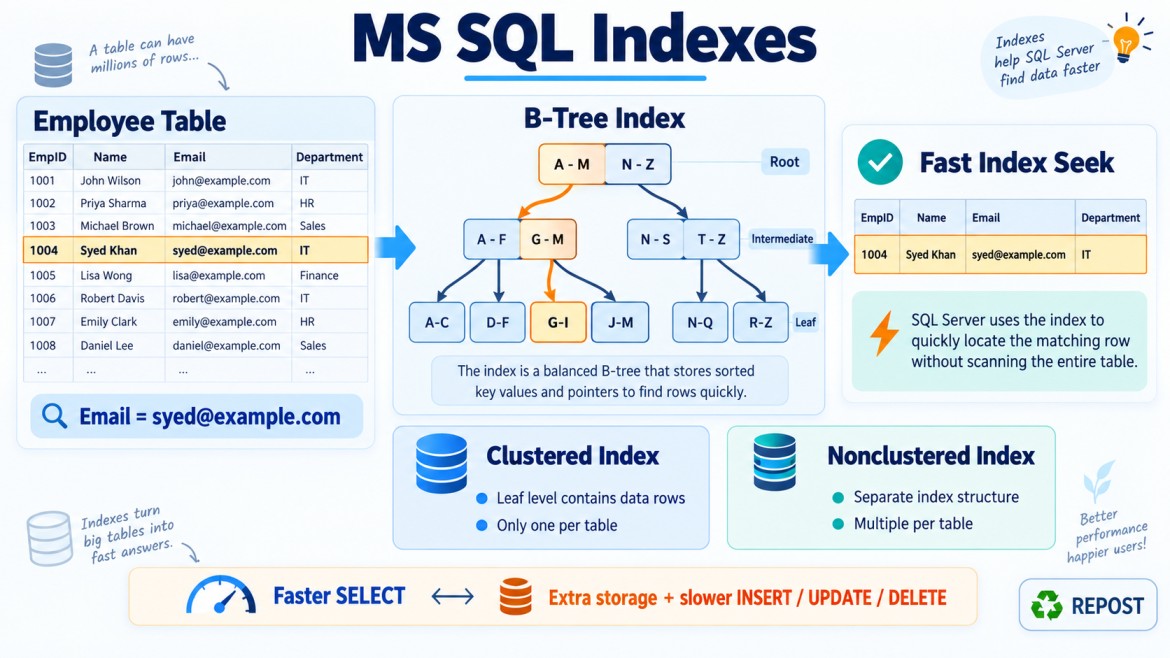


Included Columns in SQL Server
What are Included Columns?
Included columns are non-key columns added to the leaf level of a nonclustered index using the INCLUDE clause.
They are added mainly to store the additional columns required by a query so SQL Server can return the result directly from the index without accessing the base table or clustered index.
CREATE NONCLUSTERED INDEX IX_Employees_Email
ON Employees(Email)
INCLUDE (EmployeeName, Salary);
In this index:
-
Emailis the index key column. -
EmployeeNameandSalaryare included columns.
Why Do We Need Included Columns?
Consider this query:
SELECT EmployeeName, Salary
FROM Employees
WHERE Email = 'syed@example.com';
Suppose the following index exists:
CREATE INDEX IX_Employees_Email
ON Employees(Email);
The index contains Email, but the query also requires:
-
EmployeeName -
Salary
SQL Server may perform:
-
An Index Seek using
Email. -
A Key Lookup to the clustered index to retrieve
EmployeeNameandSalary.
For one record, the lookup is usually inexpensive. For hundreds or thousands of records, repeated lookups can become expensive.
We can add the required output columns to the index:
CREATE INDEX IX_Employees_Email
ON Employees(Email)
INCLUDE (EmployeeName, Salary);
Now the index contains everything required by the query, so SQL Server may return the result without a Key Lookup.
This is called a covering index.
How Included Columns Work
Consider this index:
CREATE INDEX IX_Orders_CustomerId
ON Orders(CustomerId)
INCLUDE (OrderDate, Status, TotalAmount);
Conceptually, its leaf level contains:
| CustomerId | OrderDate | Status | TotalAmount | Row locator |
|---|---|---|---|---|
| 101 | 2026-09-01 | Completed | 5,000 | OrderId 1 |
| 101 | 2026-09-10 | Pending | 2,500 | OrderId 8 |
| 102 | 2026-09-12 | Completed | 7,000 | OrderId 12 |
The index is organized only by:
CustomerIdIt is not organized by:
-
OrderDate -
Status -
TotalAmount
Those values exist only at the index’s leaf level.
Therefore, included columns can provide data to a query, but they do not normally help SQL Server navigate through the index.
Key Columns vs Included Columns
| Feature | Key columns | Included columns |
|---|---|---|
| Syntax | Inside ON (...) |
Inside INCLUDE (...) |
| Controls index order | Yes | No |
| Used for Index Seek | Yes | Generally no |
| Supports sorting | Yes | No |
| Supports range searches | Yes | No |
| Stored at intermediate levels | Yes | No |
| Stored at leaf level | Yes | Yes |
| Counts toward index-key limits | Yes | No |
| Used to enforce uniqueness | Yes | No |
| Main purpose | Search and organize data | Cover query output |
Example:
CREATE INDEX IX_Orders_Customer_Date
ON Orders(CustomerId, OrderDate)
INCLUDE (Status, TotalAmount);
Here:
-
CustomerIdandOrderDateare key columns. -
StatusandTotalAmountare included columns.
Practical Example
Consider this table:
CREATE TABLE Orders
(
    OrderId     BIGINT PRIMARY KEY,
    CustomerId  INT NOT NULL,
    OrderDate   DATETIME2 NOT NULL,
    Status      VARCHAR(20),
    TotalAmount DECIMAL(12,2)
);
The application frequently executes:
SELECT OrderDate, Status, TotalAmount
FROM Orders
WHERE CustomerId = 101;
Create this index:
CREATE INDEX IX_Orders_CustomerId
ON Orders(CustomerId)
INCLUDE (OrderDate, Status, TotalAmount);
SQL Server can:
-
Seek directly to
CustomerId = 101. -
Read
OrderDate,Status, andTotalAmountfrom the index. -
Return the result without visiting the clustered index.
What Is a Covering Index?
A covering index is an index that contains all the columns needed by a particular query.
Suppose the query is:
SELECT OrderDate, Status, TotalAmount
FROM Orders
WHERE CustomerId = @CustomerId;
The query needs:
-
CustomerIdfor filtering -
OrderDate,Status, andTotalAmountfor output
This index covers the query:
CREATE INDEX IX_Orders_CustomerId
ON Orders(CustomerId)
INCLUDE (OrderDate, Status, TotalAmount);
A covering index is not a separate index type. It simply means that an index contains all the columns required by a query.
Included Columns and Filtering
Included columns are primarily intended to cover selected output columns.
Suppose this index exists:
CREATE INDEX IX_Orders_CustomerId
ON Orders(CustomerId)
INCLUDE (Status);
Query:
SELECT CustomerId
FROM Orders
WHERE Status = 'Completed';
Because Status is only included, the index is not ordered by Status. SQL Server cannot normally seek directly to all completed rows using Status.
It may scan the index and apply a filter.
If Status is frequently used for searching, it should usually be an index key:
CREATE INDEX IX_Orders_Status
ON Orders(Status);
Or part of a composite key:
CREATE INDEX IX_Orders_Customer_Status
ON Orders(CustomerId, Status);
Included Columns and Sorting
Suppose this index exists:
CREATE INDEX IX_Orders_CustomerId
ON Orders(CustomerId)
INCLUDE (OrderDate);
Query:
SELECT OrderDate
FROM Orders
WHERE CustomerId = 101
ORDER BY OrderDate;
Although OrderDate exists in the index, it is not an index key. Therefore, the index does not guarantee that rows are ordered by OrderDate.
SQL Server may require a separate Sort operation.
To support filtering and sorting, use:
CREATE INDEX IX_Orders_Customer_Date
ON Orders(CustomerId, OrderDate);
Included Columns and Unique Indexes
Consider:
CREATE UNIQUE INDEX UX_Employees_Email
ON Employees(Email)
INCLUDE (EmployeeName);
Only the key column Email participates in uniqueness.
EmployeeName does not participate in the uniqueness check because it is an included column.
This index guarantees that email is unique:
Email must be uniqueIt does not guarantee that this combination is unique:
Email + EmployeeNameAdvantages of Included Columns
1. Avoid Key Lookups
They allow SQL Server to retrieve output columns directly from the nonclustered index.
2. Improve Read Performance
A covered query usually requires fewer logical reads.
3. Keep Search Keys Narrow
Instead of placing every required column in the index key, additional output columns can be included.
-- Wider key
CREATE INDEX IX_Orders_Search
ON Orders(CustomerId, Status, TotalAmount);

-- Often better if TotalAmount is only selected
CREATE INDEX IX_Orders_Search
ON Orders(CustomerId, Status)
INCLUDE (TotalAmount);
4. Reduce Upper-Level Index Size
Included columns are stored only at the leaf level. They are not copied into intermediate B-tree levels.
5. Support Additional Data Types
Some data types that cannot be used as index key columns may be used as included columns, subject to SQL Server restrictions.
6. Do Not Count Toward Key Limits
Included columns do not count toward index key-column count and key-size limits.
Disadvantages of Included Columns
Included columns are not free.
1. Increase Index Size
Every included value is stored at the leaf level.
2. Increase Write Cost
When an included column changes, SQL Server must update the index.
UPDATE Orders
SET Status = 'Completed'
WHERE OrderId = 1001;
If Status is included in several indexes, all affected indexes must be updated.
3. Increase Storage Requirements
Wide columns can make the index significantly larger.
4. Increase Memory Usage
Larger indexes require more buffer-pool memory.
5. Increase Maintenance Time
Index rebuilds, backups and restores may take longer.
6. May Encourage Over-Indexing
Adding every selected column to every index can create many large, overlapping indexes.
When Should You Use Included Columns?
Use included columns when:
-
A query performs an expensive Key Lookup.
-
The query is important and frequently executed.
-
The columns are mainly used in the
SELECTlist. -
The columns are not needed for seeking, sorting or grouping.
-
Covering the query provides a measurable benefit.
-
The increased storage and write cost are acceptable.
Example:
SELECT ProductName, UnitPrice, StockQuantity
FROM Products
WHERE CategoryId = @CategoryId;
A suitable index may be:
CREATE INDEX IX_Products_CategoryId
ON Products(CategoryId)
INCLUDE (ProductName, UnitPrice, StockQuantity);
When Should You Avoid Them?
Avoid or limit included columns when:
-
The table receives frequent inserts and updates.
-
The columns are very wide.
-
The columns change frequently.
-
The query is rarely executed.
-
The index already contains many included columns.
-
The same columns are duplicated across many indexes.
-
The performance improvement is not measurable.
Do not create an index like this without a specific reason:
CREATE INDEX IX_Orders_CustomerId
ON Orders(CustomerId)
INCLUDE
(
    OrderDate,
    Status,
    TotalAmount,
    ShippingAddress,
    BillingAddress,
    CustomerNotes,
    InternalComments
);
This index could become almost as large as the table.
How to Decide: Key or Included Column?
Use the following guideline:
Make a column a key column when it is used for:
-
WHERE -
JOIN -
ORDER BY -
GROUP BY -
Range searches
-
Uniqueness
Make a column an included column when it is:
-
Primarily returned in
SELECT -
Needed to cover the query
-
Not needed for navigation or ordering
Example query:
SELECT OrderDate, TotalAmount
FROM Orders
WHERE CustomerId = @CustomerId
  AND Status = 'Completed';
A suitable index could be:
CREATE INDEX IX_Orders_Customer_Status
ON Orders(CustomerId, Status)
INCLUDE (OrderDate, TotalAmount);
Reason:
-
CustomerIdandStatusfilter the rows, so they are keys. -
OrderDateandTotalAmountare returned, so they are included.
If the query also sorts by OrderDate:
ORDER BY OrderDate DESCThen OrderDate may be better as a key:
CREATE INDEX IX_Orders_Customer_Status_Date
ON Orders(CustomerId, Status, OrderDate DESC)
INCLUDE (TotalAmount);
Key Lookup Before and After INCLUDE
Before
CREATE INDEX IX_Orders_CustomerId
ON Orders(CustomerId);
Query:
SELECT Status, TotalAmount
FROM Orders
WHERE CustomerId = 101;
Possible execution plan:
Index Seek
   ↓
Key Lookup
After
CREATE INDEX IX_Orders_CustomerId
ON Orders(CustomerId)
INCLUDE (Status, TotalAmount);
Possible execution plan:
Index SeekThe Key Lookup may be eliminated because the index covers the query.
Important Technical Notes
-
Included columns are supported in nonclustered indexes.
-
They are stored at the index’s leaf level.
-
They do not define the index’s logical ordering.
-
They do not participate in index uniqueness.
-
They cannot be used as direct seek keys.
-
Dropping a column used as an included column requires modifying or dropping the dependent index first.
-
Computed columns can be included when they meet SQL Server requirements.
-
Large-value data types may be included in some cases, but they can make the index very large.
-
The clustered key is already available as the row locator in a nonclustered index, so explicitly including it is often unnecessary.
Common Mistakes
Adding filter columns as included columns
WHERE Status = 'Completed'If the query must efficiently seek by Status, it should normally be a key column, not only an included column.
Assuming included columns provide sorting
Included columns do not control index ordering.
Including too many columns
This increases storage and modification overhead.
Creating an index without checking the execution plan
A Key Lookup is not always a problem. It becomes problematic mainly when it is executed many times or consumes significant query cost.
Covering one query at any cost
Improving one query can negatively affect the overall workload. Index design must consider both reads and writes.
Interview Key Points
-
Included columns are non-key columns added using
INCLUDE. -
They are stored only at the leaf level of a nonclustered index.
-
Their main purpose is to cover queries and reduce Key Lookups.
-
They do not control index order.
-
They generally cannot be used as seek or range keys.
-
They do not participate in uniqueness.
-
Key columns are used for searching and sorting.
-
Included columns are mainly used for returning data.
-
Too many included columns increase index size and write cost.
-
Use actual execution plans and performance measurements before adding them.