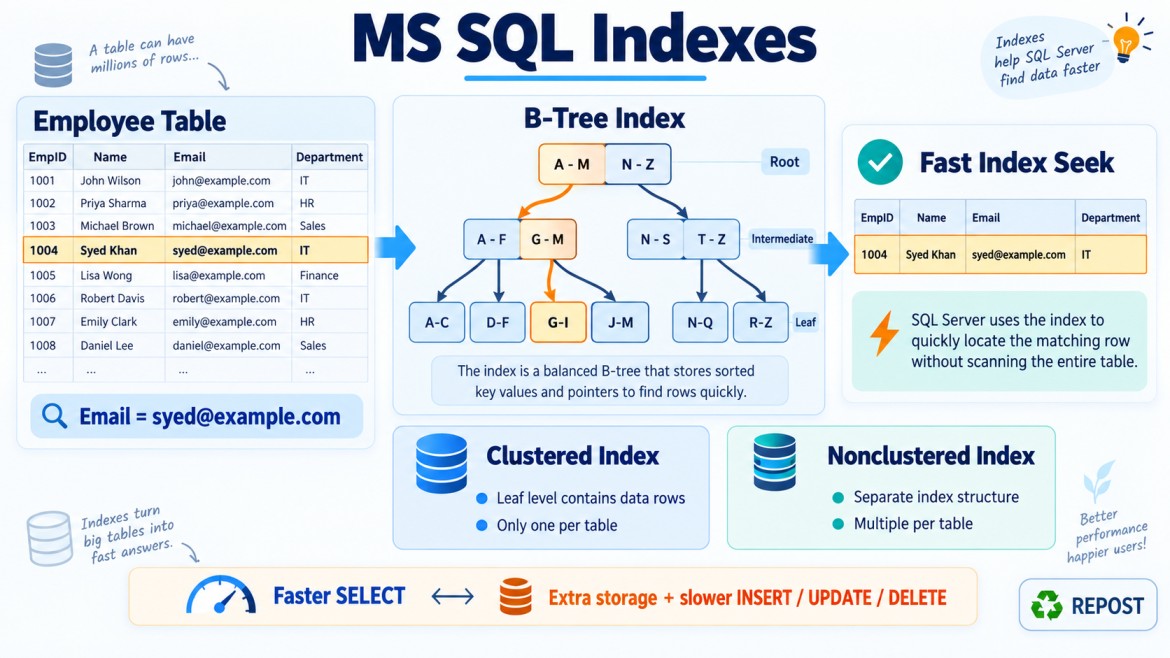


Index Seek, Index Scan, and Table Scan in SQL Server
SQL Server chooses an execution plan for every query. Depending on the indexes, query conditions, number of rows, and statistics, it may use:
-
Index Seek
-
Index Scan
-
Table Scan
These operators describe how SQL Server accesses data.
1. What Is an Index Seek?
An Index Seek means SQL Server uses the index structure to directly navigate to the required row or range of rows.
It is similar to using a book’s index to find a topic and opening the exact page.
Example
CREATE INDEX IX_Employees_EmployeeId
ON Employees(EmployeeId);
Query:
SELECT *
FROM Employees
WHERE EmployeeId = 1001;
SQL Server can navigate through the index’s B-tree directly to EmployeeId = 1001.
Conceptually:
Root page
    ↓
Intermediate page
    ↓
Leaf page containing EmployeeId 1001
SQL Server does not need to examine every row.
Range Seek
A seek can also retrieve a range:
SELECT *
FROM Employees
WHERE EmployeeId BETWEEN 1000 AND 1100;
SQL Server:
-
Seeks to the first matching value.
-
Reads consecutive leaf-level entries.
-
Stops after the last matching value.
Therefore, a seek does not always mean only one row is read.
When Does SQL Server Use an Index Seek?
A seek is likely when:
-
A suitable index exists.
-
The query uses the leading index column.
-
The condition is SARGable.
-
The query returns a relatively small subset.
-
Statistics indicate that seeking is cheaper than scanning.
Example composite index:
CREATE INDEX IX_Orders_Customer_Date
ON Orders(CustomerId, OrderDate);
Efficient seek:
SELECT *
FROM Orders
WHERE CustomerId = 101
  AND OrderDate >= '2026-01-01';
CustomerId is the leading index column.
Seek with Key Lookup
Suppose the index contains only Email:
CREATE INDEX IX_Employees_Email
ON Employees(Email);
Query:
SELECT EmployeeName, Salary
FROM Employees
WHERE Email = 'syed@example.com';
The plan may contain:
Index Seek
    ↓
Key Lookup
The Index Seek finds matching index entries. The Key Lookup retrieves missing columns from the clustered index.
If many rows match, repeated lookups may become expensive.
2. What Is an Index Scan?
An Index Scan means SQL Server reads many or all leaf-level pages of an index to find or return the required rows.
It is similar to reading through a book’s index from beginning to end.
Example
Suppose this index exists:
CREATE INDEX IX_Employees_Email
ON Employees(Email);
Query:
SELECT Email
FROM Employees;
Because the query requires every email, SQL Server may scan the entire nonclustered index.
This can be efficient because the nonclustered index may be narrower than the full table.
Scan Caused by Missing Leading Column
Suppose the composite index is:
CREATE INDEX IX_Employees_Department_Salary
ON Employees(DepartmentId, Salary);
Query:
SELECT *
FROM Employees
WHERE Salary = 50000;
The index is primarily ordered by DepartmentId, not globally by Salary.
Since DepartmentId is missing, SQL Server usually cannot navigate directly to Salary = 50000. It may scan the index and check salary values.
Scan Caused by Non-SARGable Condition
Index:
CREATE INDEX IX_Employees_EmployeeName
ON Employees(EmployeeName);
Query:
SELECT *
FROM Employees
WHERE UPPER(EmployeeName) = 'SYED';
Applying a function to the indexed column may prevent SQL Server from directly seeking to the value. It may scan the index and calculate UPPER() for many rows.
A more index-friendly query—depending on the database collation and requirement—is:
SELECT *
FROM Employees
WHERE EmployeeName = 'Syed';
Is an Index Scan Always Bad?
No.
An index scan may be the best choice when:
-
The query needs most or all rows.
-
The table or index is small.
-
The nonclustered index covers the query.
-
A large percentage of rows matches.
-
Scanning sequential pages is cheaper than many random lookups.
Example:
SELECT Email
FROM Employees;
If every email is needed, scanning a narrow email index is reasonable.
3. What Is a Table Scan?
A Table Scan generally means SQL Server reads all or most data pages of a table that does not have a clustered index.
A table without a clustered index is called a heap.
Example
CREATE TABLE Employees
(
    EmployeeId   INT,
    EmployeeName VARCHAR(100),
    DepartmentId INT
);
No clustered index exists, so the table is a heap.
Query:
SELECT *
FROM Employees
WHERE DepartmentId = 10;
If there is no useful nonclustered index on DepartmentId, SQL Server may scan all heap pages and check every row.
The execution plan normally displays:
Table ScanClustered Table Equivalent
If a table has a clustered index and SQL Server reads all its rows, the execution plan displays:
Clustered Index ScanIt does not normally display Table Scan because the clustered index’s leaf level is the table.
Therefore:
-
Heap + full scan → Table Scan
-
Clustered table + full scan → Clustered Index Scan
Main Differences
| Feature | Index Seek | Index Scan | Table Scan |
|---|---|---|---|
| Access method | Navigates directly to matching index entries | Reads many or all index pages | Reads many or all heap data pages |
| Requires an index | Yes | Yes | No useful index required |
| Typical rows read | Small subset or range | Large portion or all index rows | Large portion or all table rows |
| Common plan operator | Index Seek or Clustered Index Seek | Index Scan or Clustered Index Scan | Table Scan |
| Typical efficiency | Often efficient for selective searches | Efficient for broad queries | Often expensive on large heaps |
| Ordered structure | Uses an ordered index | Scans an ordered index | Heap has no clustered-key order |
| Lookup possibility | May require Key/RID Lookup | May require lookups, but covering scans may not | Data rows are read directly |
| Always good or bad? | Not always good | Not always bad | Acceptable for small tables or broad queries |
Practical Example
Consider:
CREATE TABLE Orders
(
    OrderId     BIGINT IDENTITY PRIMARY KEY,
    CustomerId  INT NOT NULL,
    OrderDate   DATETIME2 NOT NULL,
    Status      VARCHAR(20),
    TotalAmount DECIMAL(12,2)
);
Because OrderId is commonly created as a clustered primary key, the table has a clustered index.
Create another index:
CREATE INDEX IX_Orders_CustomerId
ON Orders(CustomerId);
Query 1: Index Seek
SELECT OrderId
FROM Orders
WHERE CustomerId = 101;
SQL Server may seek directly to customer 101 using IX_Orders_CustomerId.
Possible plan:
Index SeekQuery 2: Index Seek with Key Lookup
SELECT OrderDate, Status, TotalAmount
FROM Orders
WHERE CustomerId = 101;
If those selected columns are missing from the index, the plan may be:
Index Seek
    ↓
Key Lookup
A covering index can potentially remove the lookup:
CREATE INDEX IX_Orders_CustomerId
ON Orders(CustomerId)
INCLUDE (OrderDate, Status, TotalAmount);
Query 3: Clustered Index Scan
SELECT *
FROM Orders;
All rows are requested, so scanning the clustered index is normally appropriate.
Possible plan:
Clustered Index ScanQuery 4: Table Scan
If the same table were a heap with no useful index, SQL Server might use:
Table ScanSeek Predicates and Residual Predicates
An Index Seek operator does not always mean every condition was used to navigate the index.
Consider:
CREATE INDEX IX_Orders_Customer_Date
ON Orders(CustomerId, OrderDate);
Query:
SELECT *
FROM Orders
WHERE CustomerId = 101
  AND YEAR(OrderDate) = 2026;
SQL Server may:
-
Seek to
CustomerId = 101. -
Read all orders for that customer.
-
Evaluate
YEAR(OrderDate) = 2026row by row.
Here:
-
CustomerId = 101is a seek predicate. -
YEAR(OrderDate) = 2026may be a residual predicate.
A SARGable rewrite is:
SELECT *
FROM Orders
WHERE CustomerId = 101
  AND OrderDate >= '2026-01-01'
  AND OrderDate <  '2027-01-01';
Now both columns can contribute more effectively to index navigation.
SARGable Conditions
SARGable means that the condition can effectively use an index’s search structure.
SARG stands for Search Argument Able.
SARGable
WHERE OrderDate >= '2026-01-01'
  AND OrderDate <  '2027-01-01'
WHERE EmployeeId = 1001WHERE Salary BETWEEN 50000 AND 70000WHERE EmployeeName LIKE 'Syed%'Often Non-SARGable
WHERE YEAR(OrderDate) = 2026WHERE ISNULL(Status, '') = 'Pending'WHERE UPPER(EmployeeName) = 'SYED'WHERE EmployeeName LIKE '%Syed'Non-SARGable conditions often force SQL Server to examine more rows, potentially producing a scan.
Why Might SQL Server Choose a Scan Even When an Index Exists?
SQL Server is cost-based. It selects the plan estimated to require the least work.
It may choose a scan when:
1. Many Rows Match
SELECT *
FROM Orders
WHERE Status = 'Completed';
If 95% of rows are completed, scanning may be cheaper than seeking and performing many lookups.
2. The Table Is Small
Reading a few pages sequentially may cost less than navigating an index.
3. The Index Does Not Cover the Query
If many rows match and each requires a Key Lookup, scanning the clustered index may be cheaper.
4. Statistics Are Outdated
Incorrect cardinality estimates may lead to a poor access method.
5. The Predicate Is Non-SARGable
Functions or calculations on indexed columns may prevent effective seeking.
6. Data Types Do Not Match
Implicit conversions may prevent an efficient seek.
Example:
-- Column is VARCHAR but the parameter is NVARCHAR
WHERE EmployeeCode = @UnicodeParameter;
The exact effect depends on data types and conversion direction.
7. The Leading Index Column Is Missing
An index on (CustomerId, OrderDate) does not efficiently support many date-only searches.
8. The Optimizer Estimates That a Scan Is Cheaper
A scan is not automatically a problem. It can be the correct plan.
Seek Is Not Always Faster Than Scan
Consider a table containing one million rows.
Query A
SELECT *
FROM Orders
WHERE OrderId = 1001;
One row is required. A seek is likely efficient.
Query B
SELECT *
FROM Orders
WHERE OrderId > 1;
Almost all rows are required. A scan may be more efficient.
If SQL Server performed a seek followed by hundreds of thousands of lookups, the total cost could be much higher than one sequential scan.
The important question is not:
“Does the plan contain a scan?”
The important questions are:
-
How many rows were read?
-
How many rows were returned?
-
How many logical reads occurred?
-
Was the selected access method appropriate?
-
Did the query meet its performance requirement?
Index Scan vs Clustered Index Scan
Nonclustered Index Scan
SQL Server scans a separate nonclustered index.
Nonclustered Index ScanThis can be efficient when the nonclustered index is narrow and covers the query.
Clustered Index Scan
SQL Server scans the clustered index’s leaf level, which contains all table rows.
Clustered Index ScanThis is effectively a scan of the complete table through the clustered index.
A nonclustered index scan can be cheaper because it may contain fewer and narrower columns.
Table Scan vs RID Lookup
On a heap:
-
A Table Scan reads heap pages broadly.
-
An RID Lookup uses a row identifier obtained from a nonclustered index to retrieve a specific heap row.
Example plan:
Index Seek
    ↓
RID Lookup
On a clustered table, the equivalent additional lookup is:
Index Seek
    ↓
Key Lookup
How to Identify These Operations
In SQL Server Management Studio:
-
Enable Include Actual Execution Plan using
Ctrl + M. -
Execute the query.
-
Open the Execution Plan tab.
-
Look for operators such as:
-
Index Seek
-
Clustered Index Seek
-
Index Scan
-
Clustered Index Scan
-
Table Scan
-
Key Lookup
-
RID Lookup
-
You can also measure reads:
SET STATISTICS IO ON;
SET STATISTICS TIME ON;
Then execute the query:
SELECT *
FROM Orders
WHERE CustomerId = 101;
Compare:
-
Logical reads
-
CPU time
-
Elapsed time
-
Actual rows
-
Estimated rows
How to Convert an Unnecessary Scan into a Seek
1. Create an Appropriate Index
CREATE INDEX IX_Orders_CustomerId
ON Orders(CustomerId);
2. Use the Leading Index Column
For an index on:
(CustomerId, OrderDate)include CustomerId when appropriate.
3. Rewrite Non-SARGable Conditions
Avoid:
WHERE YEAR(OrderDate) = 2026;Prefer:
WHERE OrderDate >= '2026-01-01'
  AND OrderDate <  '2027-01-01';
4. Match Data Types
Use compatible column and parameter types to avoid implicit conversions.
5. Cover the Query
CREATE INDEX IX_Orders_CustomerId
ON Orders(CustomerId)
INCLUDE (OrderDate, Status, TotalAmount);
6. Maintain Statistics
Ensure statistics accurately represent the data distribution.
7. Return Only Required Columns
Avoid:
SELECT *Prefer:
SELECT OrderId, OrderDate, StatusThis can make covering indexes practical.
Common Misunderstandings
“Index Seek is always good”
Not necessarily. A seek returning most of the table or performing many lookups can be expensive.
“Index Scan is always bad”
No. Scans are appropriate when many rows are required or when scanning a narrow covering index is inexpensive.
“Table Scan means the query is wrong”
Not always. A Table Scan can be reasonable for a small heap or a query returning most rows.
“Creating any index will produce a seek”
No. The index must match the query predicates, column order, data types and data distribution.
“The highest-cost operator is definitely the problem”
Plan percentages are estimates relative to the same plan. Confirm performance using actual row counts, logical reads and runtime measurements.
Interview Key Points
-
An Index Seek navigates through a B-tree to specific keys or ranges.
-
An Index Scan reads many or all pages of an index.
-
A Table Scan reads heap data pages because no clustered index provides the table structure.
-
A full scan of a clustered table appears as a Clustered Index Scan.
-
A seek can still read many rows.
-
A scan is not automatically bad.
-
SQL Server selects seeks or scans using estimated cost.
-
Non-SARGable conditions can lead to scans.
-
Missing leading index columns can prevent efficient seeks.
-
Repeated Key Lookups can make a seek plan more expensive than a scan.
-
Use actual execution plans and
SET STATISTICS IO ONto evaluate performance. -
Optimize for fewer reads and appropriate access—not simply for the word “Seek.”