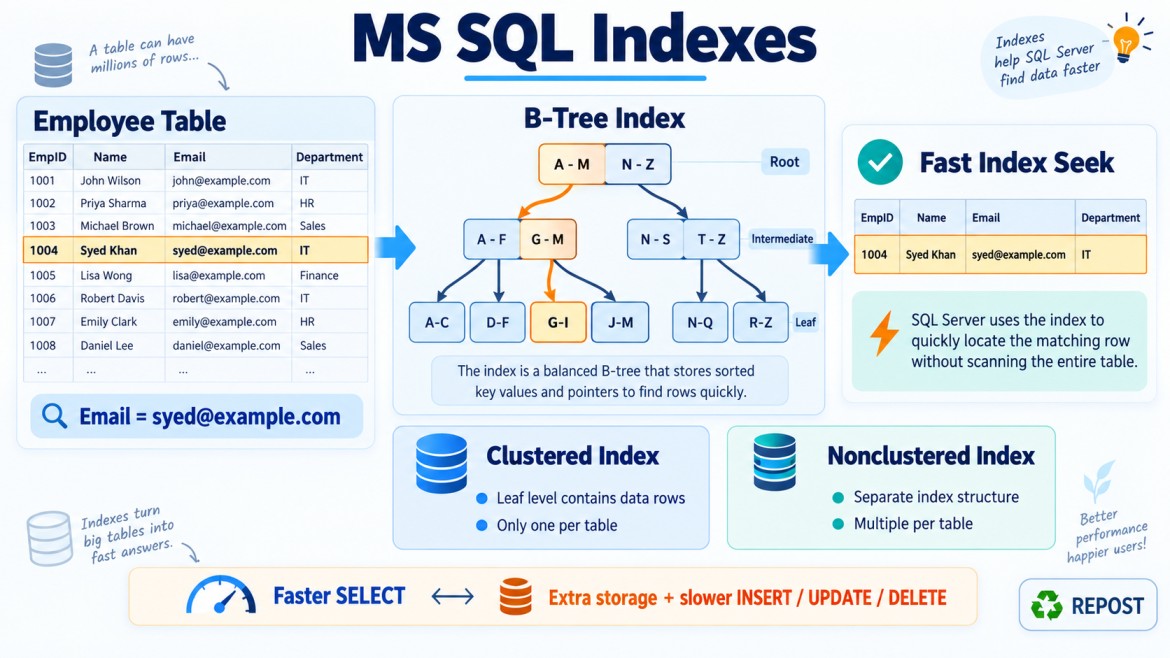


SARGable and Non-SARGable Conditions in SQL Server
What Does SARGable Mean?
SARGable means Search Argument Able.
A SARGable condition allows SQL Server to use an index efficiently to locate the required rows, usually through an Index Seek.
SELECT *
FROM Employees
WHERE EmployeeId = 1001;
If EmployeeId is indexed, SQL Server can navigate directly to the required value.
A non-SARGable condition prevents or limits efficient index navigation. SQL Server may need to examine many rows using an Index Scan or Table Scan.
SELECT *
FROM Employees
WHERE YEAR(JoiningDate) = 2026;
Because a function is applied to the indexed column, SQL Server may calculate YEAR() for many rows before checking the condition.
Why Is SARGability Important?
SARGable conditions can reduce:
-
Rows examined
-
Data pages read
-
CPU usage
-
Memory usage
-
Query execution time
-
Overall server workload
Consider a table with 10 million orders.
A SARGable query might read only the index pages containing matching rows. A non-SARGable query may inspect millions of rows even when it returns only a few results.
SARGable vs Non-SARGable
| Feature | SARGable | Non-SARGable |
|---|---|---|
| Index usage | Can efficiently navigate the index | Often scans the index or table |
| Common operator | Index Seek | Index Scan or Table Scan |
| Rows examined | Usually fewer | Often more |
| Logical reads | Usually lower | Often higher |
| CPU usage | Usually lower | Often higher |
| Performance on large tables | Generally better | Can be significantly slower |
| Typical form | Column compared directly with a value | Function or calculation applied to column |
SARGability does not guarantee an Index Seek. SQL Server may still choose a scan when many rows match or when a scan is estimated to be cheaper.
Core Principle
The most common pattern is:
WHERE IndexedColumn Operator SearchValueExample:
WHERE OrderDate >= '2026-01-01'Try to avoid transforming the indexed column:
WHERE YEAR(OrderDate) = 2026A useful guideline is:
Keep the indexed column unchanged and transform the value or parameter instead.
1. Functions on Indexed Columns
Assume an index exists:
CREATE INDEX IX_Orders_OrderDate
ON Orders(OrderDate);
Non-SARGable
SELECT *
FROM Orders
WHERE YEAR(OrderDate) = 2026;
SQL Server may need to calculate YEAR(OrderDate) for many rows.
SARGable
SELECT *
FROM Orders
WHERE OrderDate >= '2026-01-01'
  AND OrderDate <  '2027-01-01';
SQL Server can seek directly to the starting date and stop at the ending date.
The exclusive upper boundary is important because it works correctly when OrderDate contains a time portion.
2. Converting or Casting an Indexed Column
Assume:
CREATE INDEX IX_Orders_OrderDate
ON Orders(OrderDate);
Non-SARGable
SELECT *
FROM Orders
WHERE CAST(OrderDate AS DATE) = '2026-09-17';
SARGable
SELECT *
FROM Orders
WHERE OrderDate >= '2026-09-17'
  AND OrderDate <  '2026-09-18';
The indexed column remains unchanged.
3. Calculations on Indexed Columns
Assume:
CREATE INDEX IX_Products_Price
ON Products(Price);
Non-SARGable
SELECT *
FROM Products
WHERE Price * 1.18 > 1000;
SQL Server may calculate the expression for many rows.
SARGable
SELECT *
FROM Products
WHERE Price > 1000 / 1.18;
The calculation is moved to the constant side.
Another example:
Non-SARGable
WHERE Salary + 5000 > 50000SARGable
WHERE Salary > 450004. ISNULL() or COALESCE() on Indexed Columns
Assume:
CREATE INDEX IX_Employees_DepartmentId
ON Employees(DepartmentId);
Non-SARGable
SELECT *
FROM Employees
WHERE ISNULL(DepartmentId, 0) = 10;
SARGable
If only department 10 is required:
SELECT *
FROM Employees
WHERE DepartmentId = 10;
If NULL and a value must both be considered:
SELECT *
FROM Employees
WHERE DepartmentId = 10
   OR DepartmentId IS NULL;
This form is more index-friendly, although the optimizer may choose different strategies depending on statistics and selectivity.
5. Leading Wildcards with LIKE
Assume:
CREATE INDEX IX_Employees_Name
ON Employees(EmployeeName);
SARGable
SELECT *
FROM Employees
WHERE EmployeeName LIKE 'Syed%';
SQL Server knows the value starts with Syed and may seek to that range.
Non-SARGable
SELECT *
FROM Employees
WHERE EmployeeName LIKE '%Syed';
or:
WHERE EmployeeName LIKE '%Syed%'Because the beginning of the value is unknown, SQL Server normally cannot seek directly to the matching entries.
For contains searches, consider:
-
Full-text search
-
A specialized search service
-
A redesigned search requirement
6. String Functions on Indexed Columns
Non-SARGable
SELECT *
FROM Employees
WHERE LEFT(EmployeeCode, 3) = 'EMP';
SARGable
SELECT *
FROM Employees
WHERE EmployeeCode LIKE 'EMP%';
Another example:
Non-SARGable
WHERE UPPER(EmployeeName) = 'SYED'If the database uses a case-insensitive collation, the function may be unnecessary:
WHERE EmployeeName = 'Syed'Case sensitivity depends on the column or database collation.
7. DATEDIFF() on a Date Column
Non-SARGable
SELECT *
FROM Orders
WHERE DATEDIFF(DAY, OrderDate, GETDATE()) <= 30;
SQL Server may calculate DATEDIFF() for every row.
SARGable
SELECT *
FROM Orders
WHERE OrderDate >= DATEADD(DAY, -30, GETDATE());
The function is applied to the search value, not to OrderDate.
For future dates or strict time boundaries, add the appropriate upper bound according to the business requirement.
8. Implicit Data-Type Conversion
Implicit conversions may reduce index efficiency when SQL Server converts the indexed column rather than the parameter.
Assume:
EmployeeCode VARCHAR(20)The application sends an NVARCHAR parameter:
WHERE EmployeeCode = @EmployeeCodeDepending on data-type precedence and collation, SQL Server may convert EmployeeCode for comparison. This can prevent an efficient seek.
Use matching data types:
DECLARE @EmployeeCode VARCHAR(20) = 'EMP1001';

SELECT *
FROM Employees
WHERE EmployeeCode = @EmployeeCode;
The application parameter type and length should match the database column type and length.
Possible execution-plan warnings include:
CONVERT_IMPLICITNot every implicit conversion causes a performance problem. Check whether the conversion is applied to the indexed column and inspect the actual execution plan.
9. Arithmetic Between Columns
Assume this query:
SELECT *
FROM Products
WHERE SellingPrice - CostPrice > 1000;
Even if SellingPrice and CostPrice are indexed separately, SQL Server may calculate the difference for many rows.
Possible solutions include:
-
Store or define a computed column.
-
Make it deterministic.
-
Persist it when appropriate.
-
Index the computed column.
ALTER TABLE Products
ADD Profit AS (SellingPrice - CostPrice) PERSISTED;
CREATE INDEX IX_Products_Profit
ON Products(Profit);Now query:
SELECT *
FROM Products
WHERE Profit > 1000;
This can be SARGable against the computed-column index.
10. Optional-Parameter Pattern
A common stored-procedure pattern is:
WHERE CustomerId = @CustomerId
   OR @CustomerId IS NULL
This allows an optional parameter, but it may produce a plan that is not efficient for all parameter values.
For example:
-
When
@CustomerIdhas a value, an Index Seek may be ideal. -
When it is
NULL, all rows are required.
Possible solutions include:
-
Separate queries for each case
-
Dynamic SQL with parameters
-
OPTION (RECOMPILE)when appropriate -
A carefully designed stored procedure
Example:
IF @CustomerId IS NULL
BEGIN
    SELECT *
    FROM Orders;
END
ELSE
BEGIN
    SELECT *
    FROM Orders
    WHERE CustomerId = @CustomerId;
END
SARGability alone does not solve every parameter-sensitive plan issue.
11. NOT EQUAL and Negative Conditions
Conditions such as these may be technically searchable but often have low selectivity:
WHERE Status <> 'Completed'WHERE EmployeeId NOT IN (1, 2, 3)WHERE Name NOT LIKE 'A%'They can match a large portion of the table, so SQL Server may choose a scan.
This is not always because the syntax is strictly non-SARGable. The issue may be that the predicate returns too many rows for a seek to be beneficial.
This distinction is important:
A scan does not automatically mean the predicate is non-SARGable.
12. OR Conditions
An OR condition is not automatically non-SARGable.
For example:
WHERE CustomerId = 101
   OR CustomerId = 202
SQL Server may use multiple seeks or transform it internally.
It can also be written as:
WHERE CustomerId IN (101, 202)However, an OR involving different columns may be harder to optimize:
WHERE CustomerId = 101
   OR Status = 'Pending'
Possible solutions depend on the workload:
-
Suitable indexes on both columns
-
UNION ALLwith duplicate handling when appropriate -
Query redesign
Do not automatically rewrite every OR; compare execution plans and results.
13. SARGability with Composite Indexes
Assume this composite index:
CREATE INDEX IX_Orders_Customer_Date
ON Orders(CustomerId, OrderDate);
Efficient use
WHERE CustomerId = 101
  AND OrderDate >= '2026-01-01'
The query follows the index’s leading-column order.
Missing leading column
WHERE OrderDate >= '2026-01-01'The condition itself is SARGable, but this particular index may not provide an efficient seek because CustomerId is the leading key.
This demonstrates an important distinction:
A condition can be SARGable but still lack an appropriate index.
Function on second key column
WHERE CustomerId = 101
  AND YEAR(OrderDate) = 2026
SQL Server may seek on CustomerId, but YEAR(OrderDate) may become a residual condition.
Better:
WHERE CustomerId = 101
  AND OrderDate >= '2026-01-01'
  AND OrderDate <  '2027-01-01'
Seek Predicate vs Residual Predicate
Consider:
CREATE INDEX IX_Orders_Customer_Date
ON Orders(CustomerId, OrderDate);
Query:
SELECT *
FROM Orders
WHERE CustomerId = 101
  AND YEAR(OrderDate) = 2026;
The execution plan may show an Index Seek, but only part of the condition may be used for navigation:
-
Seek predicate:
CustomerId = 101 -
Residual predicate:
YEAR(OrderDate) = 2026
SQL Server may read all orders for customer 101 and then test the year condition.
Therefore, seeing the words Index Seek does not guarantee that the query is fully optimized.
Check:
-
Seek predicates
-
Predicates
-
Actual rows read
-
Actual rows returned
A large difference between rows read and rows returned may indicate inefficient filtering.
Common SARGable Operators
These conditions can often be SARGable when used directly against an indexed column:
=>>=<<=BETWEENINIS NULLLIKE 'prefix%'Example:
WHERE Salary >= 50000Whether SQL Server uses an index still depends on selectivity, statistics, index design and estimated cost.
Common Non-SARGable Patterns
WHERE YEAR(OrderDate) = 2026WHERE CAST(OrderDate AS DATE) = '2026-09-17'WHERE UPPER(EmployeeName) = 'SYED'WHERE LEFT(EmployeeCode, 3) = 'EMP'WHERE ISNULL(Status, '') = 'Pending'WHERE Salary + 5000 > 50000WHERE EmployeeName LIKE '%Syed%'WHERE DATEDIFF(DAY, OrderDate, GETDATE()) <= 30These patterns transform the indexed column or hide the starting search value.
Detailed Date Example
Assume:
OrderDate DATETIME2Incorrect or limited approach
WHERE OrderDate = '2026-09-17'This normally matches only rows exactly at midnight:
2026-09-17 00:00:00Non-SARGable approach
WHERE CAST(OrderDate AS DATE) = '2026-09-17'This expresses the intended day but may reduce efficient index use.
Preferred SARGable approach
WHERE OrderDate >= '2026-09-17'
  AND OrderDate <  '2026-09-18'
This:
-
Includes the entire day
-
Works with time values
-
Supports an index range seek
-
Avoids assumptions about fractional-second precision
How to Identify a Non-SARGable Condition
In SQL Server Management Studio:
-
Enable the actual execution plan with
Ctrl + M. -
Execute the query.
-
Inspect operators such as:
-
Index Seek
-
Index Scan
-
Clustered Index Scan
-
Table Scan
-
-
Inspect operator properties:
-
Seek Predicates
-
Predicate
-
Actual Number of Rows
-
Actual Number of Rows Read
-
-
Look for warnings such as:
-
CONVERT_IMPLICIT
-
-
Measure I/O:
SET STATISTICS IO ON;
SET STATISTICS TIME ON;
A key warning sign is:
Rows read: 1,000,000
Rows returned: 100
This indicates SQL Server examined far more rows than it returned.
Practical Before-and-After Example
Assume:
CREATE INDEX IX_Orders_OrderDate
ON Orders(OrderDate);
Before: Non-SARGable
SELECT OrderId, CustomerId, OrderDate
FROM Orders
WHERE YEAR(OrderDate) = 2026;
Possible plan:
Index ScanSQL Server may examine every indexed date.
After: SARGable
SELECT OrderId, CustomerId, OrderDate
FROM Orders
WHERE OrderDate >= '2026-01-01'
  AND OrderDate <  '2027-01-01';
Possible plan:
Index SeekSQL Server can navigate to the beginning of 2026 and stop at the beginning of 2027.
When a SARGable Query Still Uses a Scan
This query is SARGable:
SELECT *
FROM Orders
WHERE Status = 'Completed';
But if 95% of orders are completed, SQL Server may correctly choose a scan because:
-
Most rows must be returned.
-
Seeking provides little benefit.
-
Key Lookups may be more expensive than scanning.
-
The table or index may be small.
Therefore:
SARGable means an index seek is possible—not guaranteed.
Performance Improvement Checklist
When reviewing a slow condition:
-
Check whether a function is applied to the indexed column.
-
Check for calculations on the column.
-
Verify column and parameter data types.
-
Remove unnecessary
CAST,CONVERT,ISNULLandCOALESCE. -
Rewrite date functions as ranges.
-
Avoid leading wildcards when possible.
-
Verify the leading columns of composite indexes.
-
Check seek predicates and residual predicates.
-
Compare actual rows read and returned.
-
Measure logical reads before and after rewriting.
-
Confirm that a suitable index exists.
-
Ensure statistics represent current data.
Interview Key Points
-
SARGable means Search Argument Able.
-
A SARGable condition allows efficient index navigation.
-
A non-SARGable condition often causes scans or excessive row reads.
-
Avoid applying functions or calculations to indexed columns.
-
Rewrite date functions using start-inclusive and end-exclusive ranges.
-
LIKE 'text%'can use a seek;LIKE '%text%'normally cannot. -
Match parameter data types with column data types.
-
A condition can be SARGable but still lack an appropriate index.
-
An Index Seek can still contain a residual predicate.
-
A SARGable query is not guaranteed to use a seek.
-
A scan may be correct when many rows match.
-
Validate improvements using execution plans and
STATISTICS IO.