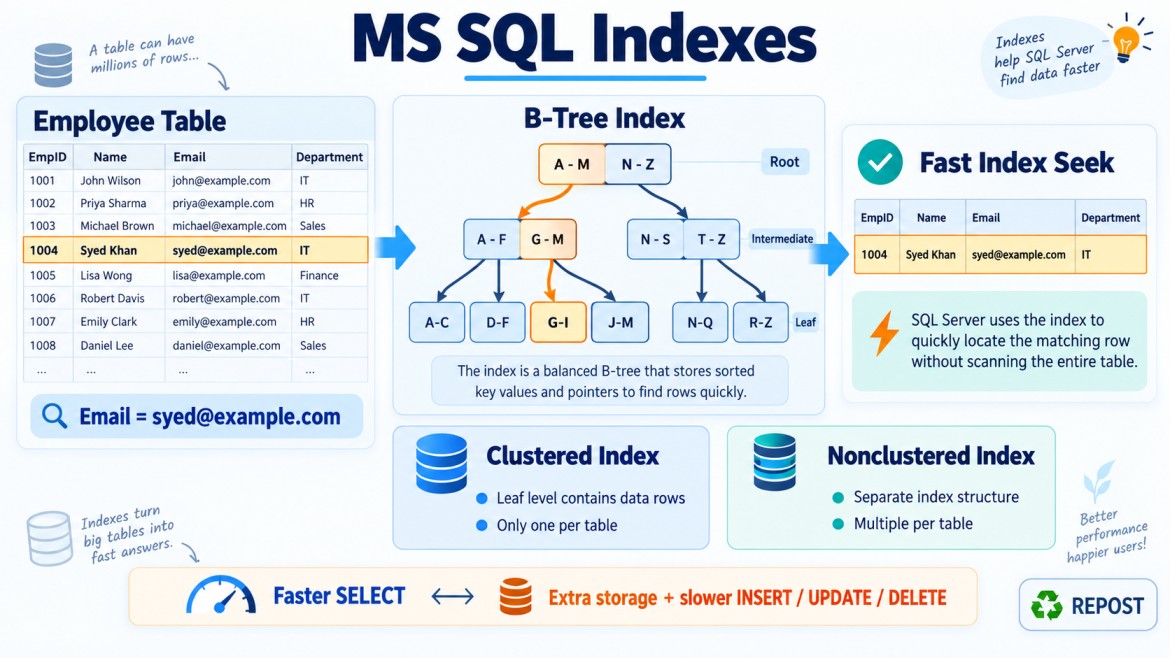


Composite Index in SQL Server
What is a Composite Index?
A composite index is an index created using two or more columns.
It is also called a:
-
Multicolumn index
-
Compound index
CREATE NONCLUSTERED INDEX IX_Employees_Department_Salary
ON Employees(DepartmentId, Salary);
Here:
-
DepartmentIdis the first or leading key column. -
Salaryis the second key column.
SQL Server logically organizes the index first by DepartmentId and then by Salary within each department.
Conceptually:
| DepartmentId | Salary |
|---|---|
| 1 | 40,000 |
| 1 | 50,000 |
| 1 | 70,000 |
| 2 | 35,000 |
| 2 | 60,000 |
| 3 | 45,000 |
The entire index is not globally sorted by Salary. Salary is ordered within each DepartmentId group.
Why Do We Need a Composite Index?
A composite index improves queries that frequently use multiple columns together for:
-
Filtering
-
Joining
-
Sorting
-
Grouping
-
Searching ranges
-
Enforcing uniqueness
-
Covering a query
Consider:
SELECT EmployeeId, EmployeeName, Salary
FROM Employees
WHERE DepartmentId = 10
  AND Salary >= 50000;
A composite index can quickly locate:
-
DepartmentId = 10 -
Employees within that department whose salary is at least
50000
CREATE NONCLUSTERED INDEX IX_Employees_Department_Salary
ON Employees(DepartmentId, Salary);
Without a suitable index, SQL Server may scan many rows.
Why Does Column Order Matter?
The column order determines:
-
How index entries are organized
-
Which queries can perform an efficient Index Seek
-
Which predicates can be used to navigate the index
-
Whether the index can support
ORDER BY -
Whether additional sorting is required
For this index:
CREATE INDEX IX_Employees_Department_Salary
ON Employees(DepartmentId, Salary);
The logical ordering is:
DepartmentId → SalarySQL Server can efficiently locate a department first and then search salaries inside that department.
It generally cannot navigate directly to a particular salary across all departments because Salary is not the leading column.
This behavior is commonly called the leftmost-prefix principle.
Leftmost-Prefix Principle
For an index on:
(A, B, C)The index is most effective when queries use the leading columns from left to right.
Common usable prefixes are:
A
A, B
A, B, C
The following is not a leading prefix:
B
C
B, C
However, this does not mean SQL Server can never use the index for B or C. It may still perform an index scan or use the index for covering purposes, but it usually cannot perform an efficient seek directly on a missing leading column.
Query Examples
Assume this index:
CREATE NONCLUSTERED INDEX IX_Orders_Customer_Date_Status
ON Orders(CustomerId, OrderDate, Status);
1. Filter using the first column
SELECT *
FROM Orders
WHERE CustomerId = 101;
This index can be used efficiently because CustomerId is the leading column.
Seek: CustomerId = 1012. Filter using the first two columns
SELECT *
FROM Orders
WHERE CustomerId = 101
  AND OrderDate >= '2026-01-01';
This is also efficient.
SQL Server can:
-
Seek to
CustomerId = 101. -
Seek or scan the required date range within that customer.
3. Filter using all three columns
SELECT *
FROM Orders
WHERE CustomerId = 101
  AND OrderDate = '2026-09-17'
  AND Status = 'Completed';
The index may use all three columns efficiently because the query follows the index’s left-to-right order.
4. Filter using only the second column
SELECT *
FROM Orders
WHERE OrderDate = '2026-09-17';
This query does not supply CustomerId.
Because rows are primarily organized by CustomerId, matching dates may exist throughout the index.
SQL Server may need to:
-
Scan the composite index
-
Use a different index
-
Scan the table
If date-only searches are common, create a separate index:
CREATE INDEX IX_Orders_OrderDate
ON Orders(OrderDate);
5. Filter using the first and third columns
SELECT *
FROM Orders
WHERE CustomerId = 101
  AND Status = 'Completed';
SQL Server can seek using CustomerId, but Status may be applied as a residual filter.
Why?
The index is arranged like this:
CustomerId → OrderDate → StatusStatus is ordered within each OrderDate. Because the query does not restrict OrderDate, SQL Server may need to inspect all rows for customer 101 and then filter by status.
Equality and Range Predicates
A useful design guideline is:
Put equality columns first, followed by range columns.
Consider:
WHERE CustomerId = 101
  AND OrderDate >= '2026-01-01'
  AND Status = 'Completed'
Suppose the index is:
(CustomerId, OrderDate, Status)SQL Server can seek on:
-
CustomerIdbecause it uses equality -
OrderDatebecause it uses a range
After SQL Server reaches the range predicate on OrderDate, columns following it—such as Status—often cannot further narrow the seek in the same straightforward way. Status may become a residual predicate.
A potentially better order for this query pattern is:
(CustomerId, Status, OrderDate)CREATE INDEX IX_Orders_Customer_Status_Date
ON Orders(CustomerId, Status, OrderDate);Now SQL Server can seek using:
-
CustomerId = 101 -
Status = 'Completed' -
OrderDate >= '2026-01-01'
This can reduce the number of rows examined.
Selectivity and Column Order
Selectivity describes how well a column narrows the number of matching rows.
Examples:
-
CustomerIdmay have thousands of different values—higher selectivity. -
Statusmay have only values such asPending,Completed, andCancelled—lower selectivity.
A common misconception is:
Always put the most selective column first.
That is not a universal rule.
Column order should primarily be based on:
-
Actual query predicates
-
Equality versus range conditions
-
Join requirements
-
Sorting requirements
-
Grouping requirements
-
Query frequency
-
Data distribution
For example, even if OrderDate is more selective, CustomerId may belong first if most queries search for orders belonging to one customer.
Column Order and ORDER BY
A composite index may eliminate a sort operation when its order matches the query.
Index:
CREATE INDEX IX_Orders_Customer_Date
ON Orders(CustomerId, OrderDate);
Query:
SELECT OrderId, OrderDate
FROM Orders
WHERE CustomerId = 101
ORDER BY OrderDate;
Since CustomerId has a fixed value and rows for that customer are ordered by OrderDate, SQL Server may return the results without a separate sort.
However:
SELECT OrderId, CustomerId, OrderDate
FROM Orders
ORDER BY OrderDate;
The same index normally cannot provide global OrderDate order because the rows are ordered first by CustomerId.
ASC and DESC Ordering
SQL Server allows the sort direction to be defined for each key:
CREATE INDEX IX_Orders_Customer_Date
ON Orders(CustomerId ASC, OrderDate DESC);
This can support a query such as:
SELECT TOP 10 *
FROM Orders
WHERE CustomerId = 101
ORDER BY OrderDate DESC;
It efficiently returns a customer’s newest orders.
SQL Server can also scan an index backward, so an index does not always need the exact direction specified by the query. Mixed sort directions become more important when ordering by multiple columns.
Key Columns vs Included Columns
Composite key columns control:
-
Sorting
-
Seeking
-
Range navigation
-
Uniqueness
Included columns are stored only at the leaf level and do not affect index ordering.
CREATE INDEX IX_Orders_Customer_Date
ON Orders(CustomerId, OrderDate)
INCLUDE (Status, TotalAmount);
Here:
-
CustomerIdandOrderDateare key columns. -
StatusandTotalAmountare included columns.
This query may be fully covered:
SELECT OrderDate, Status, TotalAmount
FROM Orders
WHERE CustomerId = 101
  AND OrderDate >= '2026-01-01';
SQL Server may return the result entirely from the index without performing a Key Lookup.
When should a column be a key?
Make it a key column when it is needed for:
-
Filtering
-
Joining
-
Sorting
-
Grouping
-
Uniqueness
When should it be included?
Use INCLUDE when the column is mainly required by the SELECT list and does not need to participate in searching or ordering.
Composite Unique Index
A composite index can enforce uniqueness across a combination of columns.
CREATE UNIQUE INDEX UX_Employees_Department_Email
ON Employees(DepartmentId, Email);
This means that the combination of DepartmentId and Email must be unique.
For example:
| DepartmentId | Allowed? | |
|---|---|---|
| 1 | syed@example.com | Yes |
| 2 | syed@example.com | Yes |
| 1 | syed@example.com | No—duplicate combination |
The same email may appear in different departments, but not twice within the same department.
Composite Clustered Index
A composite index may also be clustered:
CREATE CLUSTERED INDEX IX_OrderItems_Order_Product
ON OrderItems(OrderId, ProductId);
This can be useful when rows are commonly retrieved by OrderId and identified by the combination of OrderId and ProductId.
However, remember that every nonclustered index uses the clustered key as its row locator. Therefore, a wide composite clustered key can make every nonclustered index larger.
Practical Example
Consider an Orders table:
CREATE TABLE Orders
(
    OrderId     BIGINT IDENTITY PRIMARY KEY,
    CustomerId  INT NOT NULL,
    OrderDate   DATETIME2 NOT NULL,
    Status      VARCHAR(20) NOT NULL,
    TotalAmount DECIMAL(12,2) NOT NULL
);
The application frequently runs:
SELECT OrderDate, TotalAmount
FROM Orders
WHERE CustomerId = @CustomerId
  AND Status = 'Completed'
  AND OrderDate >= @StartDate
ORDER BY OrderDate DESC;
A suitable index could be:
CREATE INDEX IX_Orders_Customer_Status_Date
ON Orders(CustomerId, Status, OrderDate DESC)
INCLUDE (TotalAmount);
Reason for the order:
-
CustomerIduses equality. -
Statususes equality. -
OrderDateuses a range and supports sorting. -
TotalAmountis returned but not searched, so it is included.
This index may:
-
Seek to the required customer
-
Seek to the required status
-
Read only the required date range
-
Return rows in the requested order
-
Avoid a Key Lookup for
TotalAmount
Advantages
-
Supports queries filtering on multiple columns
-
Reduces table or index scans
-
Improves joins and range searches
-
Can support
ORDER BYandGROUP BY -
Can cover queries with
INCLUDE -
Can enforce uniqueness across multiple columns
Disadvantages
-
Incorrect column order may limit its usefulness
-
Wider indexes require more storage
-
More indexes slow down
INSERT,UPDATE, andDELETE -
Large indexes require more memory and maintenance
-
One composite index does not efficiently support every possible column combination
-
Overlapping indexes may waste storage and increase write costs
Common Mistakes
1. Ignoring the leading column
Index:
(CustomerId, OrderDate)Query:
WHERE OrderDate = @DateThis may not support an efficient seek because CustomerId is missing.
2. Putting a range column too early
Index:
(OrderDate, CustomerId, Status)Query:
WHERE OrderDate >= @Date
  AND CustomerId = @CustomerId
  AND Status = 'Completed'
Once SQL Server uses a broad range on OrderDate, the following columns may not narrow the seek efficiently.
3. Adding every selected column as a key
Columns needed only for output should often be added using INCLUDE, not as index keys.
4. Creating an index for every query
Too many indexes increase storage, modification costs and maintenance.
5. Assuming the most selective column must always come first
Query patterns and equality/range behavior are usually more important than selectivity alone.
How to Choose the Column Order
Consider these questions:
-
Which columns appear most often in
WHEREandJOINconditions? -
Which predicates use equality?
-
Which predicates use ranges?
-
Which columns are used in
ORDER BYorGROUP BY? -
Which queries are executed most frequently?
-
How many rows does each predicate normally return?
-
Can selected columns be added through
INCLUDE? -
Does a similar existing index already cover the query?
-
What does the actual execution plan show?
-
Is the improvement worth the write and storage cost?
A useful starting guideline is:
Equality columns → Range columns → Sorting columnsColumns required only for output can often be placed in INCLUDE.
This is a guideline, not a strict rule. Always validate the design using the actual execution plan and realistic data.
Interview Key Points
-
A composite index contains two or more key columns.
-
Index entries are organized from left to right based on the key order.
-
For
(A, B, C), the useful leading prefixes are usuallyA,(A, B)and(A, B, C). -
A query using only
BorCusually cannot seek efficiently through that index. -
Put equality predicates before range predicates as a general guideline.
-
Columns after the first range predicate may become residual filters.
-
Column order affects filtering, sorting, grouping and index seeks.
-
Do not blindly place the most selective column first.
-
Use key columns for searching and ordering.
-
Use
INCLUDEfor columns primarily needed in the result. -
Composite indexes can be clustered, nonclustered or unique.
-
Verify index usefulness using actual execution plans and production-like data.