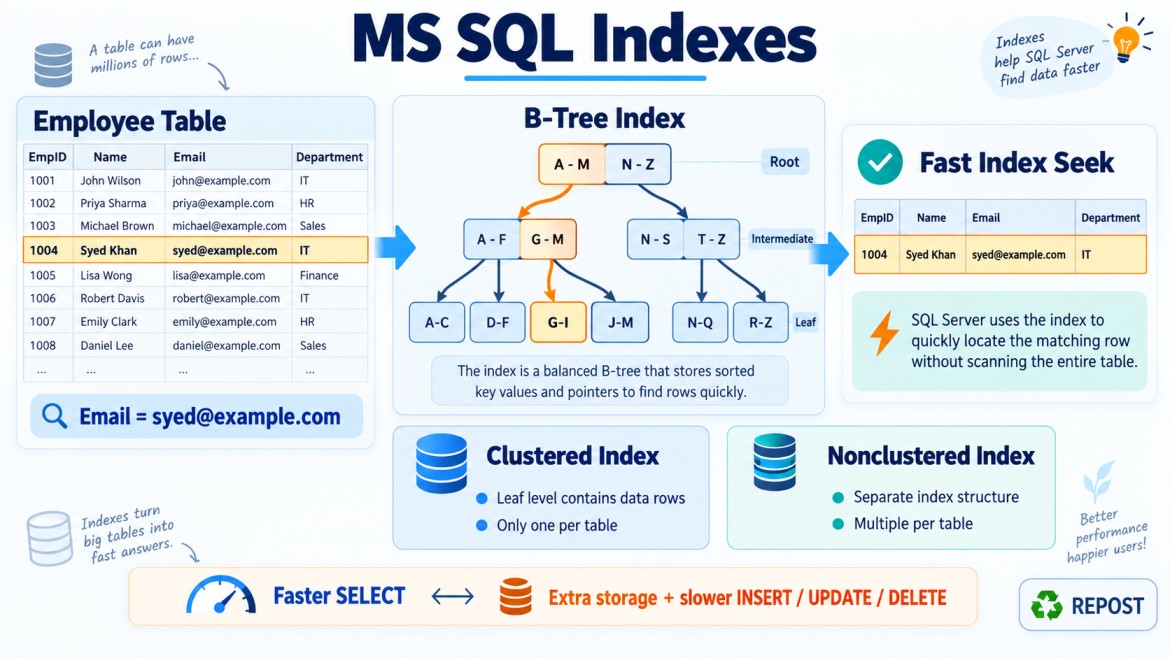


What Is a Covering Index?
A covering index is an index that contains all the columns required by a particular query.
Because the required columns are available inside the index, SQL Server can return the result directly from the index without accessing the base table or clustered index.
This reduces:
-
Key lookups
-
RID lookups
-
Logical reads
-
CPU usage
-
Query execution time
A covering index is not a separate index type. It is usually a nonclustered index designed to cover a particular query.
Simple Example
Consider this table:
CREATE TABLE Employees
(
    EmployeeId   INT PRIMARY KEY,
    EmployeeName VARCHAR(100),
    Email        VARCHAR(150),
    DepartmentId INT,
    Salary       DECIMAL(10,2)
);
The application frequently executes this query:
SELECT EmployeeName, Salary
FROM Employees
WHERE Email = 'syed@example.com';
Create a basic nonclustered index:
CREATE INDEX IX_Employees_Email
ON Employees(Email);
This index contains Email, but the query also needs:
-
EmployeeName -
Salary
SQL Server can find the matching email through the index, but it may need to access the clustered index to retrieve the other columns.
This additional operation is called a Key Lookup.
Execution Without a Covering Index
The process may be:
Nonclustered Index Seek
        ↓
Find matching Email
        ↓
Obtain clustered key
        ↓
Key Lookup in clustered index
        ↓
Retrieve EmployeeName and Salary
A small number of key lookups is generally acceptable. However, if thousands of rows are returned, thousands of lookups may become expensive.
Create a Covering Index
The index can be modified to include the required output columns:
CREATE INDEX IX_Employees_Email
ON Employees(Email)
INCLUDE (EmployeeName, Salary);
Now the index contains:
-
Emailas the index key -
EmployeeNameas an included column -
Salaryas an included column
The query is now covered:
SELECT EmployeeName, Salary
FROM Employees
WHERE Email = 'syed@example.com';
SQL Server may return the complete result directly from the nonclustered index.
Nonclustered Index Seek
        ↓
Find Email
        ↓
Return EmployeeName and Salary
The Key Lookup is no longer necessary.
Key Columns vs Included Columns
Consider:
CREATE INDEX IX_Employees_Email
ON Employees(Email)
INCLUDE (EmployeeName, Salary);
Key column
EmailKey columns:
-
Participate in the index’s ordered structure
-
Can be used efficiently for searching
-
Can help with sorting and grouping
-
Determine the index’s navigation path
Included columns
EmployeeName, SalaryIncluded columns:
-
Are stored only at the leaf level
-
Are used to return additional query data
-
Do not determine index order
-
Do not support navigation through the index
-
Help avoid Key Lookup operations
Why Not Add Every Column as a Key?
The following index is possible:
CREATE INDEX IX_Employees_Email_Name_Salary
ON Employees(Email, EmployeeName, Salary);
However, if EmployeeName and Salary are needed only in the SELECT list, they generally do not need to be key columns.
A better design is:
CREATE INDEX IX_Employees_Email
ON Employees(Email)
INCLUDE (EmployeeName, Salary);
This keeps the index key narrower.
Narrow keys generally provide:
-
Smaller intermediate index pages
-
More index entries per page
-
Reduced storage requirements
-
Lower maintenance overhead
-
Better navigation efficiency
Practical Example
Consider an Orders table:
CREATE TABLE Orders
(
    OrderId      INT PRIMARY KEY,
    CustomerId   INT,
    OrderDate    DATETIME2,
    Status       VARCHAR(20),
    TotalAmount  DECIMAL(10,2)
);
Frequently executed query:
SELECT OrderId, OrderDate, TotalAmount
FROM Orders
WHERE CustomerId = 100
  AND Status = 'Completed';
A suitable covering index could be:
CREATE INDEX IX_Orders_Customer_Status
ON Orders(CustomerId, Status)
INCLUDE (OrderId, OrderDate, TotalAmount);
The columns have different purposes:
CustomerId, Status
    → Used for filtering
    → Therefore, key columns

OrderId, OrderDate, TotalAmount
    → Used only in the SELECT list
    → Therefore, included columns
SQL Server may now satisfy the entire query using the index.
Covering an ORDER BY Query
Consider:
SELECT OrderId, TotalAmount
FROM Orders
WHERE CustomerId = 100
ORDER BY OrderDate DESC;
A possible covering index is:
CREATE INDEX IX_Orders_Customer_OrderDate
ON Orders(CustomerId, OrderDate DESC)
INCLUDE (OrderId, TotalAmount);
This index supports:
-
Filtering by
CustomerId -
Sorting by
OrderDate -
Returning
OrderIdandTotalAmount
SQL Server may avoid both:
-
A Key Lookup
-
A separate Sort operation
Covering an Aggregate Query
Consider:
SELECT CustomerId, SUM(TotalAmount)
FROM Orders
WHERE Status = 'Completed'
GROUP BY CustomerId;
A possible covering index is:
CREATE INDEX IX_Orders_Status_Customer
ON Orders(Status, CustomerId)
INCLUDE (TotalAmount);
It contains:
-
Statusfor filtering -
CustomerIdfor grouping -
TotalAmountfor aggregation
SQL Server may process the query using only the index.
Covering Index and Composite Index
A composite index contains multiple key columns:
CREATE INDEX IX_Orders_Customer_Status
ON Orders(CustomerId, Status);
A covering index contains all columns needed by a particular query:
CREATE INDEX IX_Orders_Customer_Status
ON Orders(CustomerId, Status)
INCLUDE (OrderId, OrderDate, TotalAmount);
An index can be both composite and covering.
| Term | Meaning |
|---|---|
| Composite index | Contains multiple key columns |
| Covering index | Contains all columns required by a query |
“Covering” describes the relationship between an index and a specific query—not the physical index type.
Covering Index and Clustered Key
In SQL Server, a nonclustered index on a clustered table automatically contains the clustered-index key as its row locator.
Suppose:
PRIMARY KEY CLUSTERED (EmployeeId)and:
CREATE INDEX IX_Employees_Email
ON Employees(Email)
INCLUDE (EmployeeName);
The nonclustered index effectively has access to:
-
Email -
EmployeeName -
EmployeeIdas the clustered row locator
Therefore, this query may already be covered:
SELECT EmployeeId, EmployeeName
FROM Employees
WHERE Email = 'syed@example.com';
You normally do not need to explicitly add the clustered key to the INCLUDE list.
What Is a Key Lookup?
A Key Lookup occurs when SQL Server:
-
Uses a nonclustered index to locate matching records.
-
Finds that the index does not contain all required columns.
-
Uses the clustered key to retrieve the missing columns from the clustered index.
Example:
CREATE INDEX IX_Employees_Department
ON Employees(DepartmentId);
Query:
SELECT EmployeeName, Email, Salary
FROM Employees
WHERE DepartmentId = 10;
The index finds employees in department 10, but it does not contain:
-
EmployeeName -
Email -
Salary
SQL Server may perform a Key Lookup for every matching row.
If 10,000 rows match, it may perform many lookup operations.
A covering index can eliminate them:
CREATE INDEX IX_Employees_Department
ON Employees(DepartmentId)
INCLUDE (EmployeeName, Email, Salary);
What Is an RID Lookup?
If a table does not have a clustered index, it is called a heap.
When a nonclustered index on a heap does not contain all required columns, SQL Server may use an RID Lookup to retrieve the missing data from the heap.
Therefore:
-
Clustered table → Key Lookup
-
Heap table → RID Lookup
A covering index can potentially eliminate both operations.
Advantages of a Covering Index
1. Eliminates lookup operations
The query can retrieve all required data directly from the index.
2. Reduces logical reads
SQL Server reads fewer pages.
3. Improves frequently executed queries
Small improvements can become significant when a query executes thousands of times.
4. Improves read-heavy applications
Covering indexes are particularly useful for:
-
Search screens
-
Reports
-
Dashboards
-
Frequently executed API queries
-
Read-heavy systems
5. Can avoid sorting
If the key-column order matches the query’s ORDER BY, SQL Server may avoid a separate Sort operation.
Disadvantages of a Covering Index
1. Additional storage
Included columns increase the leaf-level size of the index.
2. Slower data modifications
SQL Server must maintain the index during:
INSERT
UPDATE
DELETE
3. Increased memory usage
Larger indexes require more buffer-cache space.
4. More maintenance
Large indexes may require:
-
Statistics maintenance
-
Fragmentation monitoring
-
Reorganization or rebuilding
5. Duplicate or overlapping indexes
Creating separate covering indexes for every query can result in many similar indexes.
For example:
IX_Orders_Customer
IX_Orders_Customer_Status
IX_Orders_Customer_Status_Date
These indexes should be reviewed to determine whether they can be consolidated.
When Should You Create a Covering Index?
Consider one when:
-
A query runs frequently.
-
The table contains many rows.
-
The execution plan shows expensive Key Lookups or RID Lookups.
-
The query returns a manageable number of rows.
-
Read performance is more important than additional write cost.
-
The required output columns are relatively small.
Avoid automatically creating a covering index for every query.
When Should You Avoid It?
Be cautious when:
-
The query is rarely executed.
-
The table receives frequent inserts and updates.
-
Many large columns must be included.
-
The query uses
SELECT *. -
A similar index already exists.
-
The table is small.
-
The lookup cost is insignificant.
Avoid covering this query blindly:
SELECT *
FROM Employees
WHERE DepartmentId = 10;
Including every table column may produce a very large and expensive index.
Select only the required columns:
SELECT EmployeeId, EmployeeName, Email
FROM Employees
WHERE DepartmentId = 10;
Then design the index specifically:
CREATE INDEX IX_Employees_Department
ON Employees(DepartmentId)
INCLUDE (EmployeeName, Email);
EmployeeId may already be available if it is the clustered key.
How to Verify a Covering Index
Before creating the index
Enable the Actual Execution Plan and run:
SELECT EmployeeName, Salary
FROM Employees
WHERE Email = 'syed@example.com';
The plan may show:
Index Seek
   +
Key Lookup
Create the covering index
CREATE INDEX IX_Employees_Email
ON Employees(Email)
INCLUDE (EmployeeName, Salary);
Run the query again
The new plan may show only:
Index SeekYou can also compare logical reads:
SET STATISTICS IO ON;
SET STATISTICS TIME ON;
Look for reductions in:
-
Logical reads
-
CPU time
-
Elapsed time
-
Lookup operations
Important Design Guidelines
-
Use filter, join and ordering columns as key columns.
-
Use output-only columns as included columns.
-
Keep index keys narrow.
-
Avoid including unnecessary columns.
-
Avoid creating covering indexes for every query.
-
Review existing indexes before creating a new one.
-
Consider the table’s read-to-write ratio.
-
Verify improvements using the Actual Execution Plan.
-
Check logical reads, not only execution time.
-
Regularly monitor unused and overlapping indexes.
Key Points
-
A covering index contains all columns required by a specific query.
-
It is not a separate SQL Server index type.
-
It is commonly implemented using a nonclustered index with
INCLUDE. -
Key columns support searching, joining, sorting and grouping.
-
Included columns provide extra output data at the leaf level.
-
A covering index can eliminate Key Lookup and RID Lookup operations.
-
One index may cover one query but not another.
-
Covering indexes improve reads but increase storage and write overhead.
-
Always confirm the improvement using execution plans and I/O statistics.
Interview Answer
A covering index is an index that contains every column required by a particular query, including its filtering, joining, sorting and output columns. SQL Server can satisfy the query entirely from the index without accessing the base table or clustered index. It is commonly created using key columns for searching and INCLUDE columns for additional output, which can eliminate expensive Key Lookup or RID Lookup operations.