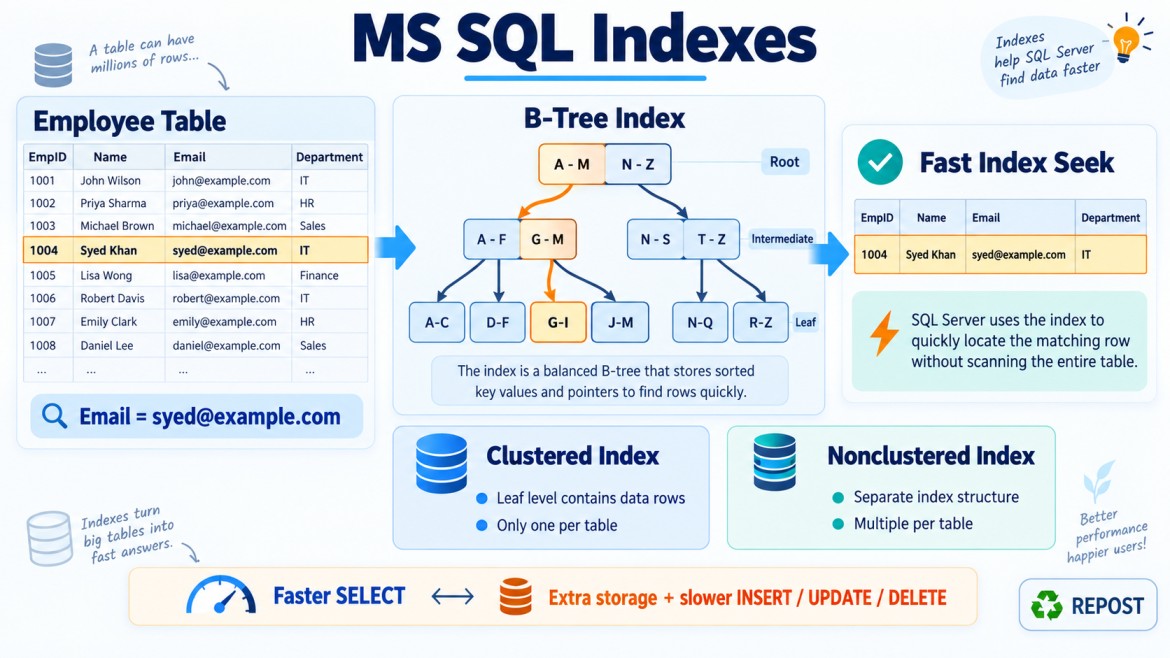


What Is a Unique Index?
A unique index is an index that does not allow duplicate values in its key column or combination of key columns.
It serves two purposes:
-
Enforces data uniqueness
-
Improves query performance
For example, if every employee must have a different email address, a unique index can prevent duplicate emails.
CREATE UNIQUE INDEX UX_Employees_Email
ON Employees(Email);
After creating this index, SQL Server rejects any attempt to insert or update a row with an email address that already exists.
Why Is a Unique Index Required?
1. To prevent duplicate data
Suppose the Employees table contains:
| EmployeeId | EmployeeName | |
|---|---|---|
| 1 | Syed | syed@example.com |
| 2 | John | john@example.com |
If this insert is attempted:
INSERT INTO Employees
(
    EmployeeId,
    EmployeeName,
    Email
)
VALUES
(
    3,
    'Mohamed',
    'syed@example.com'
);
SQL Server rejects it because syed@example.com already exists.
This protects the table from invalid duplicate data.
2. To enforce a business rule
A unique index can enforce business rules such as:
-
Every employee must have a unique email address.
-
Every user must have a unique username.
-
Every product must have a unique product code.
-
Every customer must have a unique account number.
-
An order number must not be repeated.
Example:
CREATE UNIQUE INDEX UX_Products_ProductCode
ON Products(ProductCode);
3. To improve search performance
A unique index is also a normal index, so it can improve queries such as:
SELECT *
FROM Employees
WHERE Email = 'syed@example.com';
Because SQL Server knows the indexed value is unique, it knows that a search can return at most one matching row.
This may improve:
-
Index seeks
-
Join performance
-
Cardinality estimation
-
Query-plan selection
Creating a Unique Index
Single-column unique index
CREATE UNIQUE INDEX UX_Employees_Email
ON Employees(Email);
This ensures that no two rows can have the same Email.
Composite unique index
A unique index can contain multiple columns.
CREATE UNIQUE INDEX UX_Employees_Department_Email
ON Employees(DepartmentId, Email);
This means the combination of DepartmentId and Email must be unique.
The same email could appear in different departments:
| DepartmentId | Valid? | |
|---|---|---|
| 1 | syed@example.com | Yes |
| 2 | syed@example.com | Yes |
But the same combination cannot be repeated:
| DepartmentId | Valid? | |
|---|---|---|
| 1 | syed@example.com | First row is valid |
| 1 | syed@example.com | Duplicate—not valid |
The individual columns do not need to be unique. Only their combined value must be unique.
Unique Index vs Normal Index
| Feature | Unique index | Normal index |
|---|---|---|
| Allows duplicate key values | No | Yes |
| Improves query performance | Yes | Yes |
| Enforces uniqueness | Yes | No |
| Can contain multiple columns | Yes | Yes |
| Can be clustered | Yes | Yes |
| Can be nonclustered | Yes | Yes |
A normal index improves performance but does not prevent duplicates:
CREATE INDEX IX_Employees_Email
ON Employees(Email);
A unique index improves performance and prevents duplicates:
CREATE UNIQUE INDEX UX_Employees_Email
ON Employees(Email);
Unique Index vs UNIQUE Constraint
Both a unique index and a UNIQUE constraint prevent duplicate values.
Unique constraint
ALTER TABLE Employees
ADD CONSTRAINT UQ_Employees_Email
UNIQUE (Email);
SQL Server creates a unique index internally to enforce this constraint.
Unique index
CREATE UNIQUE INDEX UX_Employees_Email
ON Employees(Email);
Difference
| UNIQUE constraint | Unique index |
|---|---|
| Represents a business/data-integrity rule | Primarily an index configured to enforce uniqueness |
| Defined as a table constraint | Created directly using CREATE UNIQUE INDEX |
| Automatically creates a unique index | Is itself the index |
| Clearer in the database model | Offers more indexing options |
| Less flexible | Supports features such as filtered conditions and included columns |
Recommended usage
Use a UNIQUE constraint when uniqueness is a permanent business rule:
CONSTRAINT UQ_Employees_Email UNIQUE (Email)Use a unique index when you require index-specific features, such as a filtered unique index:
CREATE UNIQUE INDEX UX_Employees_Email
ON Employees(Email)
WHERE Email IS NOT NULL;
Unique Index vs Primary Key
A primary key and a unique index both enforce uniqueness, but they have different purposes.
| Primary key | Unique index |
|---|---|
| Uniquely identifies every row | Ensures uniqueness of selected columns |
| Only one primary key per table | Multiple unique indexes are allowed |
Does not allow NULL |
Nullable behavior depends on index design |
| Creates a unique index automatically | Created explicitly |
| Represents the main row identity | Commonly enforces alternate business keys |
Example:
CREATE TABLE Employees
(
    EmployeeId INT PRIMARY KEY,
    Email VARCHAR(150) NOT NULL
);
Here:
-
EmployeeIdis the primary identifier. -
Emailis an alternate unique business value.
CREATE UNIQUE INDEX UX_Employees_Email
ON Employees(Email);
The table now has:
-
One primary key
-
One unique index
-
Two separately enforced uniqueness rules
Can a Table Have Multiple Unique Indexes?
Yes.
A table can have multiple unique indexes because it may have several unique business values.
CREATE UNIQUE INDEX UX_Employees_Email
ON Employees(Email);

CREATE UNIQUE INDEX UX_Employees_EmployeeCode
ON Employees(EmployeeCode);

CREATE UNIQUE INDEX UX_Employees_GovernmentId
ON Employees(GovernmentId);
Each unique index enforces a separate uniqueness rule.
Can a Unique Index Be Clustered?
Yes.
Unique clustered index
CREATE UNIQUE CLUSTERED INDEX UX_Employees_EmployeeId
ON Employees(EmployeeId);
A table can have only one clustered index, whether it is unique or non-unique.
Unique nonclustered index
CREATE UNIQUE NONCLUSTERED INDEX UX_Employees_Email
ON Employees(Email);
A table can have multiple unique nonclustered indexes.
Most additional uniqueness requirements are implemented using unique nonclustered indexes.
How Does a Unique Index Handle NULL?
This is an important SQL Server interview point.
In a normal single-column unique index, SQL Server generally allows only one NULL value because it treats another NULL as a duplicate for index uniqueness enforcement.
Example:
CREATE TABLE Employees
(
    EmployeeId INT PRIMARY KEY,
    Email VARCHAR(150) NULL
);

CREATE UNIQUE INDEX UX_Employees_Email
ON Employees(Email);
This insert succeeds:
INSERT INTO Employees(EmployeeId, Email)
VALUES (1, NULL);
A second NULL normally fails:
INSERT INTO Employees(EmployeeId, Email)
VALUES (2, NULL);
Allow multiple NULL values
Create a filtered unique index:
CREATE UNIQUE INDEX UX_Employees_Email
ON Employees(Email)
WHERE Email IS NOT NULL;
Now:
-
Non-
NULLemail addresses must be unique. -
Multiple rows can contain
NULL.
This is useful when email is optional but must be unique whenever supplied.
Creating a Unique Index When Duplicates Already Exist
Suppose the table contains duplicate emails:
| EmployeeId | |
|---|---|
| 1 | syed@example.com |
| 2 | syed@example.com |
The following statement will fail:
CREATE UNIQUE INDEX UX_Employees_Email
ON Employees(Email);
SQL Server cannot create a unique index until the existing duplicate values are corrected.
Find duplicate values:
SELECT
    Email,
    COUNT(*) AS DuplicateCount
FROM Employees
GROUP BY Email
HAVING COUNT(*) > 1;
The duplicates must then be reviewed, corrected or removed before creating the unique index.
What Happens During INSERT and UPDATE?
A unique index is checked whenever an indexed value is inserted or changed.
INSERT
INSERT INTO Employees(EmployeeId, Email)
VALUES (10, 'syed@example.com');
SQL Server checks whether the email already exists.
UPDATE
UPDATE Employees
SET Email = 'syed@example.com'
WHERE EmployeeId = 20;
SQL Server performs the same uniqueness check before completing the update.
If the value already exists, the statement fails with a duplicate-key error.
Unique Index and Concurrency
A unique index provides reliable database-level protection when multiple users submit the same value simultaneously.
For example, two requests might check:
SELECT COUNT(*)
FROM Employees
WHERE Email = 'syed@example.com';
Both requests may initially see zero rows and attempt to insert the same email.
Application-level validation alone cannot reliably prevent this race condition.
A unique index guarantees that only one insert succeeds:
CREATE UNIQUE INDEX UX_Employees_Email
ON Employees(Email);
Therefore:
-
Application validation gives a user-friendly message.
-
The unique index provides the final data-integrity guarantee.
Both should commonly be used.
Unique Index and Included Columns
A unique index can also contain included columns:
CREATE UNIQUE INDEX UX_Employees_Email
ON Employees(Email)
INCLUDE (EmployeeName, DepartmentId);
Only the key column participates in uniqueness:
EmailIncluded columns do not participate in the uniqueness check:
EmployeeName
DepartmentId
They are added to help cover queries and avoid lookup operations.
Advantages of a Unique Index
-
Prevents duplicate data
-
Enforces business rules
-
Improves search performance
-
Supports fast equality searches
-
Can improve joins
-
Helps SQL Server estimate that at most one matching row exists
-
Protects data during concurrent inserts
-
Can contain multiple key columns
-
Can be filtered
-
Can include additional output columns
Disadvantages
1. Additional storage
Like other indexes, a unique index consumes disk space.
2. Write overhead
SQL Server must check and maintain the index during:
-
INSERT -
UPDATE -
DELETE
3. Existing duplicates prevent creation
The index cannot be created until current duplicate values are resolved.
4. Incorrect uniqueness rules can reject valid data
For example:
CREATE UNIQUE INDEX UX_Employees_LastName
ON Employees(LastName);
This would wrongly prevent two employees from having the same last name.
The index must reflect a genuine business rule.
5. NULL handling requires attention
If a nullable column should allow multiple NULL values, a filtered unique index is generally required.
Practical Example
CREATE TABLE Users
(
    UserId      INT IDENTITY(1,1),
    UserName    VARCHAR(50) NOT NULL,
    Email       VARCHAR(150) NULL,
    DisplayName VARCHAR(100),

    CONSTRAINT PK_Users
        PRIMARY KEY CLUSTERED (UserId),

    CONSTRAINT UQ_Users_UserName
        UNIQUE (UserName)
);
Allow multiple users without an email but require supplied emails to be unique:
CREATE UNIQUE INDEX UX_Users_Email
ON Users(Email)
WHERE Email IS NOT NULL;
This table now has:
-
A primary key on
UserId -
A unique constraint on
UserName -
A filtered unique index on
Email
Key Points
-
A unique index does not allow duplicate key values.
-
It enforces uniqueness and improves query performance.
-
A unique index can contain one or multiple key columns.
-
A table can have multiple unique indexes.
-
A unique index can be clustered or nonclustered.
-
A
PRIMARY KEYandUNIQUEconstraint normally create unique indexes automatically. -
A composite unique index enforces uniqueness on the complete column combination.
-
Included columns do not participate in uniqueness.
-
A regular single-column unique index generally permits only one
NULLin SQL Server. -
Use a filtered unique index to allow multiple
NULLvalues. -
A database unique index is essential for protecting uniqueness during concurrent operations.
Interview Answer
A unique index is an index that prevents duplicate values in its key column or combination of key columns while also improving query performance. It can be clustered or nonclustered, and a table can have multiple unique indexes. A PRIMARY KEY or UNIQUE constraint creates a unique index internally, while a directly created unique index provides additional options such as filtering and included columns.