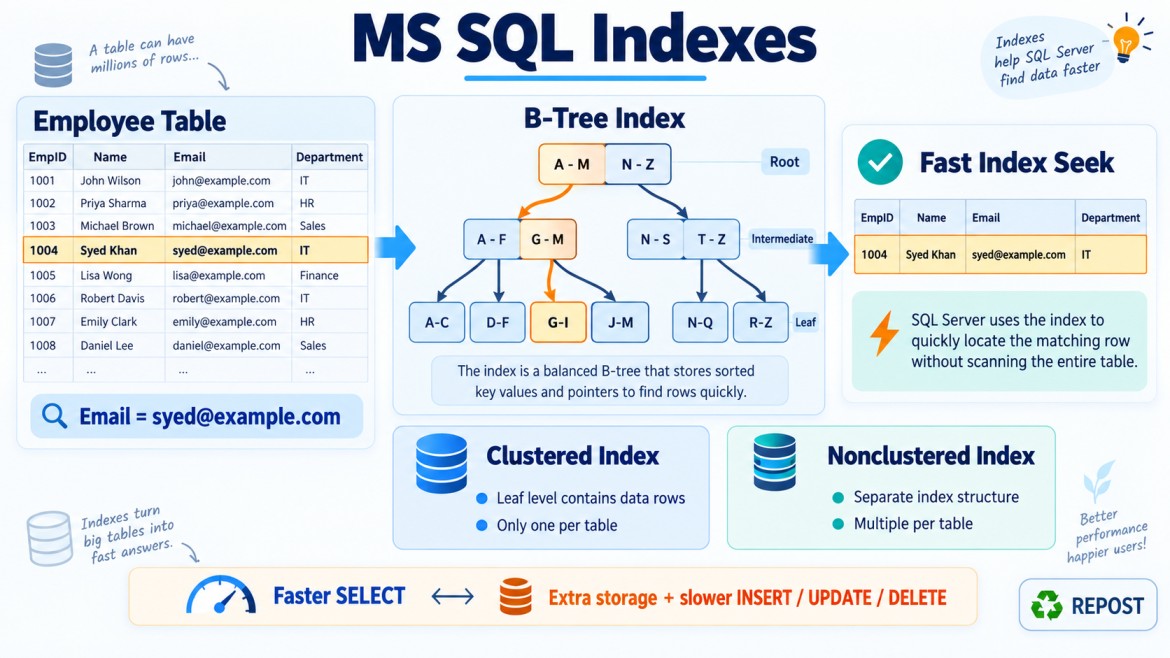


What Is an Index in SQL Server?
An index is a database object that helps SQL Server find and retrieve data faster without examining every row in a table.
It works similarly to an index in a book:
-
Without an index, you may read every page to find a topic.
-
With an index, you locate the topic and go directly to the correct page.
Simple Example
Consider the following table:
CREATE TABLE Employees
(
    EmployeeId INT PRIMARY KEY,
    EmployeeName VARCHAR(100),
    Email VARCHAR(150),
    Department VARCHAR(50)
);
Suppose the table contains one million employees:
SELECT *
FROM Employees
WHERE Email = 'syed@example.com';
Without an index on Email
SQL Server may check every row in the table.
This is called a table scan or clustered index scan.
Row 1 → Not matched
Row 2 → Not matched
Row 3 → Not matched
...
Row 1,000,000 → Matched
With an index on Email
CREATE INDEX IX_Employees_Email
ON Employees(Email);
SQL Server can navigate directly to the required email.
This is usually called an index seek.
Email Index
    ↓
syed@example.com
    ↓
Matching Employee Row
Why Is an Index Required?
1. Faster data retrieval
Indexes improve the performance of queries that search for specific values.
SELECT *
FROM Employees
WHERE Email = 'syed@example.com';
An index on Email can prevent SQL Server from reading the entire table.
2. Faster joins
Indexes can improve joins, particularly when the indexed columns are primary keys or foreign keys.
SELECT e.EmployeeName, d.DepartmentName
FROM Employees e
INNER JOIN Departments d
    ON e.DepartmentId = d.DepartmentId;
Useful indexes may include:
CREATE INDEX IX_Employees_DepartmentId
ON Employees(DepartmentId);
The primary key of Departments is normally indexed automatically.
SQL Server does not automatically create an index for a foreign-key column.
3. Faster sorting
An appropriately ordered index may reduce or eliminate a separate sorting operation.
SELECT *
FROM Employees
ORDER BY EmployeeName;
CREATE INDEX IX_Employees_EmployeeName
ON Employees(EmployeeName);4. Faster filtering
Indexes are useful for columns frequently used in WHERE conditions.
SELECT *
FROM Employees
WHERE Department = 'IT';
CREATE INDEX IX_Employees_Department
ON Employees(Department);However, an index on a column with very few distinct values may not always be useful. For example, if most employees belong to the same department, SQL Server may prefer a scan.
5. Faster grouping
Indexes may improve aggregation queries:
SELECT DepartmentId, COUNT(*) AS EmployeeCount
FROM Employees
GROUP BY DepartmentId;
An index on DepartmentId keeps related values together, which can reduce the work needed for grouping.
6. Enforces uniqueness
A unique index prevents duplicate values.
CREATE UNIQUE INDEX UX_Employees_Email
ON Employees(Email);
Now SQL Server rejects duplicate email addresses.
INSERT INTO Employees (Email)
VALUES ('syed@example.com');
A PRIMARY KEY or UNIQUE constraint normally creates a supporting unique index automatically.
7. Reduces disk reads and resource usage
A well-designed index can reduce:
-
Logical reads
-
Physical disk reads
-
CPU usage
-
Query execution time
-
Lock duration
This is especially important for large tables and high-traffic applications.
How Does an Index Work?
Most traditional SQL Server indexes use a balanced tree structure called a B-tree.
It contains three main levels:
Root level
    ↓
Intermediate level(s)
    ↓
Leaf level-
Root level: Starting point of the search
-
Intermediate levels: Guide SQL Server toward the correct location
-
Leaf level: Contains index entries or actual table rows
Instead of checking every row, SQL Server moves through a small number of index pages to find the required data.
Main Types of Indexes
1. Clustered index
A clustered index determines how the table’s data rows are stored and ordered at the leaf level.
CREATE CLUSTERED INDEX IX_Employees_EmployeeId
ON Employees(EmployeeId);
Key points:
-
A table can have only one clustered index.
-
The leaf level contains the actual table rows.
-
A table without a clustered index is called a heap.
-
A primary key creates a clustered index by default only when no clustered index already exists and no different index type is specified.
2. Nonclustered index
A nonclustered index is a separate structure containing:
-
Indexed key values
-
A row locator pointing to the corresponding data row
CREATE NONCLUSTERED INDEX IX_Employees_Email
ON Employees(Email);
A table can have multiple nonclustered indexes.
The row locator is:
-
The clustered key when the table has a clustered index
-
A physical row identifier when the table is a heap
Index Seek vs Index Scan
Index seek
SQL Server navigates directly to a specific value or range.
SELECT *
FROM Employees
WHERE EmployeeId = 100;
Usually efficient because only the relevant rows are accessed.
Index scan
SQL Server reads all or a large portion of an index.
SELECT *
FROM Employees
WHERE EmployeeName LIKE '%Mohamed%';
The leading wildcard often prevents an ordinary B-tree index from being used for an efficient seek.
A scan is not automatically bad. It can be more efficient when a query returns a large percentage of the table.
Covering Index Example
Consider this query:
SELECT EmployeeName, DepartmentId
FROM Employees
WHERE Email = 'syed@example.com';
A covering index can contain everything needed by the query:
CREATE INDEX IX_Employees_Email
ON Employees(Email)
INCLUDE (EmployeeName, DepartmentId);
SQL Server may return the result directly from the index without accessing the base table.
This can prevent a key lookup or RID lookup.
Composite Index Example
An index can contain multiple key columns:
CREATE INDEX IX_Employees_Department_Name
ON Employees(DepartmentId, EmployeeName);
This index can be effective for:
WHERE DepartmentId = 10and:
WHERE DepartmentId = 10
  AND EmployeeName = 'Syed'
It is generally less useful for searching only by:
WHERE EmployeeName = 'Syed'because DepartmentId is the leading column. This relates to the leftmost-prefix principle.
Disadvantages of Indexes
Indexes improve read performance, but they are not free.
1. Slower data modifications
Every relevant index must be maintained when data changes.
INSERT
UPDATE
DELETE
Too many indexes can therefore reduce write performance.
2. Additional storage
Indexes consume disk space and buffer-cache memory.
3. Maintenance overhead
Indexes can experience:
-
Fragmentation
-
Outdated statistics
-
Page splits
They may require monitoring, statistics updates, reorganizing or rebuilding when appropriate.
4. Poorly designed indexes may not help
An index may be ineffective when:
-
The query returns most rows
-
The table is very small
-
The indexed column has low selectivity
-
A function is applied to the indexed column
-
Data types do not match and cause implicit conversion
-
A search begins with a wildcard
-
The index key column order does not match the query pattern
SARGable and Non-SARGable Examples
A SARGable condition allows SQL Server to search an index efficiently.
SARGable
WHERE HireDate >= '2026-01-01'
  AND HireDate <  '2027-01-01'
Non-SARGable
WHERE YEAR(HireDate) = 2026Applying YEAR() to the indexed column may prevent an efficient index seek.
When Should an Index Be Created?
Consider indexing columns frequently used in:
-
WHEREclauses -
JOINconditions -
ORDER BY -
GROUP BY -
Primary and unique constraints
-
Foreign-key relationships
-
Frequently executed queries
Do not create an index merely because a column exists. Indexes should be based on actual query patterns, table size and workload.
Practical Verification
Enable execution statistics:
SET STATISTICS IO ON;
SET STATISTICS TIME ON;

SELECT *
FROM Employees
WHERE Email = 'syed@example.com';
Compare the query before and after creating the index:
CREATE INDEX IX_Employees_Email
ON Employees(Email);
Also inspect the Actual Execution Plan to identify:
-
Index seek
-
Index scan
-
Table scan
-
Key lookup
-
Sort operation
-
Estimated and actual row counts
Important Key Points
-
An index speeds up data retrieval by avoiding unnecessary row scanning.
-
Clustered and nonclustered indexes are the main traditional index types.
-
A table can have only one clustered index but multiple nonclustered indexes.
-
Primary-key and unique constraints usually create supporting indexes.
-
Foreign keys are not automatically indexed in SQL Server.
-
Indexes improve reads but add storage and write-maintenance overhead.
-
Column order is important in composite indexes.
-
SQL Server’s optimizer decides whether using an index is beneficial.
-
An index seek is usually efficient, but a scan is not always a problem.
-
Indexes should be created based on real queries and verified using execution plans and I/O statistics.
Interview answer: An index is a database object, usually based on a B-tree, that stores ordered key values so SQL Server can locate data efficiently. It is required to improve filtering, joining, sorting and grouping performance, and a unique index can enforce uniqueness. However, indexes consume storage and must be maintained during inserts, updates and deletes, so they should be designed according to the workload.