

What Is Index Fragmentation?
Index fragmentation occurs when the pages of a SQL Server index become disorganized or contain excessive unused space because of INSERT, UPDATE, and DELETE operations.
Fragmentation can cause SQL Server to read more pages than necessary, particularly during large range scans. This may increase:
-
Logical reads
-
Physical reads
-
Memory usage
-
I/O operations
-
Query execution time
However, fragmentation is not always a problem. Its effect depends on the index size, workload, storage type, and query pattern.
How SQL Server Stores Index Data
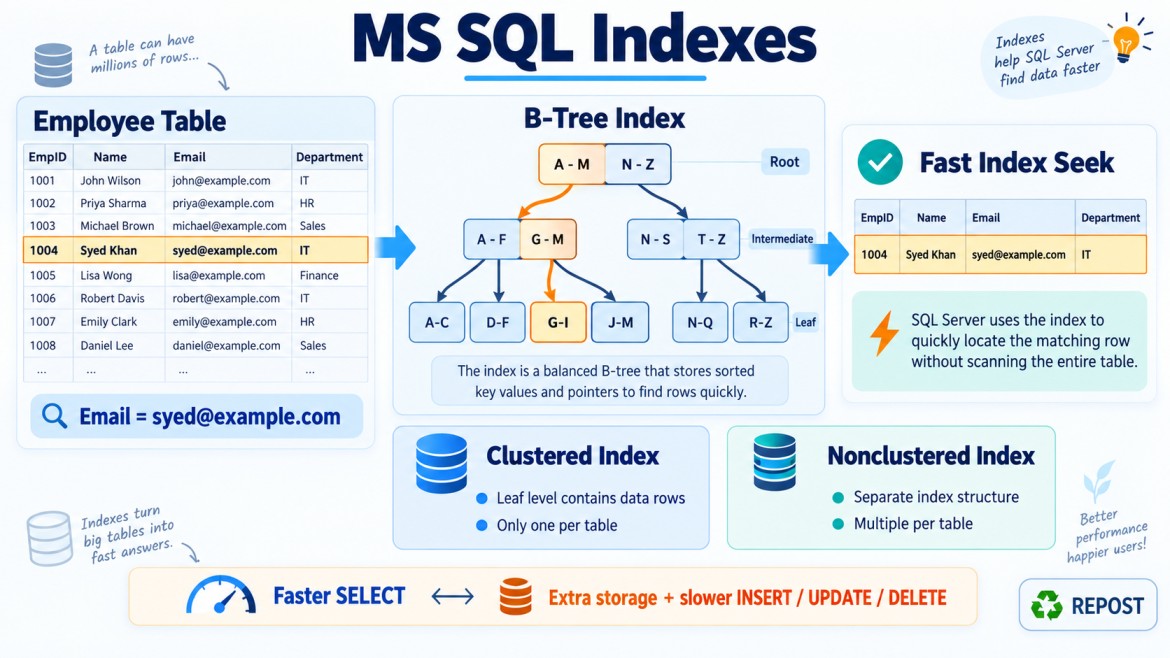
SQL Server stores index data in 8 KB pages.
A traditional index normally uses a B-tree structure:
Root page
    ↓
Intermediate pages
    ↓
Leaf pages
The leaf level contains:
-
Actual rows for a clustered index
-
Index keys and row locators for a nonclustered index
As data changes, leaf pages can become:
-
Out of logical order
-
Partially empty
-
Split into additional pages
This condition is called index fragmentation.
Main Types of Index Fragmentation
There are two important forms:
-
Logical fragmentation
-
Internal fragmentation
1. Logical Fragmentation
Logical fragmentation occurs when the physical order of index pages does not match the logical order defined by the index key.
Consider an index on EmployeeId:
Logical order:

Page 100 → Page 101 → Page 102 → Page 103
After many page splits, the physical page sequence might become:
Page 100 → Page 450 → Page 210 → Page 700The key values may still be logically correct, but the pages are physically scattered.
Effect
Logical fragmentation can affect queries that scan many consecutive pages, such as:
SELECT *
FROM Orders
WHERE OrderDate >= '2026-01-01'
  AND OrderDate <  '2027-01-01'
ORDER BY OrderDate;
It is more relevant for:
-
Range scans
-
Large index scans
-
Reporting queries
-
Disk-based workloads with slower random I/O
It is usually less important for:
-
Single-row Index Seeks
-
Very small indexes
-
Data already available in memory
-
Modern storage where random I/O is relatively fast
2. Internal Fragmentation
Internal fragmentation means index pages contain excessive unused space.
Example:
Page 1: 95% full
Page 2: 42% full
Page 3: 50% full
Page 4: 38% full
If pages contain significant free space, SQL Server requires more pages to store the same amount of data.
Effect
Internal fragmentation can increase:
-
Number of pages
-
Logical reads
-
Buffer-cache usage
-
Disk storage
-
Scan time
-
Backup size in some cases
SQL Server may need to read more pages to retrieve the same number of rows.
What Causes Index Fragmentation?
1. Page Splits
Page splits are one of the major causes of fragmentation.
Suppose an index page is full:
Page A

10 | 20 | 30 | 40
Now SQL Server must insert 25:
INSERT INTO ExampleTable(IndexKey)
VALUES (25);
Because 25 belongs between 20 and 30, but the page has no free space, SQL Server may:
-
Allocate another page.
-
Move approximately part of the rows to the new page.
-
Insert the new row.
-
Update page pointers.
Conceptually:
Before:

Page A: 10 | 20 | 30 | 40

After:

Page A: 10 | 20
Page B: 25 | 30 | 40
The new page may not be physically adjacent to the original page. Both pages may also contain unused space.
This can create:
-
Logical fragmentation
-
Internal fragmentation
-
Additional transaction-log activity
-
Extra I/O and CPU usage
2. Random Insertions
Random values inserted into the middle of an index can cause page splits.
For example, a clustered index using random GUID values:
CREATE TABLE Customers
(
    CustomerId UNIQUEIDENTIFIER
        DEFAULT NEWID(),

    CustomerName VARCHAR(100),

    CONSTRAINT PK_Customers
        PRIMARY KEY CLUSTERED(CustomerId)
);
NEWID() generates random GUIDs, so new rows may need to be inserted into many different index pages.
An increasing key such as:
EmployeeId INT IDENTITY(1,1)usually inserts new rows near the end of the index, reducing middle-page splits.
However, ever-increasing keys can create last-page contention under high concurrency, so key selection should consider the workload.
3. Updating Indexed Columns
If the value of an indexed column changes, SQL Server may need to move its index entry to another page.
UPDATE Employees
SET EmployeeName = 'Zahir'
WHERE EmployeeId = 100;
If EmployeeName is indexed, changing it may require removing its old index entry and inserting a new entry elsewhere.
4. Increasing Variable-Length Data
Updates to VARCHAR, NVARCHAR, or VARBINARY values may increase row size.
UPDATE Employees
SET EmployeeName = 'Syed Mohamed Abdul Salam'
WHERE EmployeeId = 100;
If the page does not have enough free space, SQL Server may need to split the page or move data.
5. Deleting Rows
Deleting rows creates free space inside index pages.
DELETE FROM Orders
WHERE OrderDate < '2020-01-01';
The remaining pages may become partially empty.
SQL Server may reuse this free space later, so empty space after deletion is not automatically a problem.
6. Incorrect Fill Factor
The fill factor controls how full SQL Server makes leaf pages when an index is created or rebuilt.
Example:
CREATE INDEX IX_Employees_Name
ON Employees(EmployeeName)
WITH (FILLFACTOR = 80);
A fill factor of 80 means SQL Server initially fills leaf pages to approximately 80%, leaving around 20% free space for future insertions.
A lower fill factor can reduce page splits but causes:
-
Larger indexes
-
More pages
-
More logical reads
-
Greater memory usage
A fill factor of 100 or 0 fills pages as fully as practical during a rebuild.
Fill factor should be changed only when measured page-split behavior justifies it.
Example of Fragmentation
Create a table with a random GUID clustered key:
CREATE TABLE CustomerOrders
(
    OrderId UNIQUEIDENTIFIER
        DEFAULT NEWID(),

    CustomerId INT,
    OrderDate DATETIME2,
    TotalAmount DECIMAL(10,2),

    CONSTRAINT PK_CustomerOrders
        PRIMARY KEY CLUSTERED(OrderId)
);
Because NEWID() produces random values, each new row may be inserted into a different part of the clustered index.
Over time, this may produce:
-
Frequent page splits
-
Scattered pages
-
Partially filled pages
-
Increased fragmentation
Using NEWSEQUENTIALID() can reduce random insertion:
OrderId UNIQUEIDENTIFIER
    DEFAULT NEWSEQUENTIALID()
This reduces fragmentation risk, though GUID keys remain wider than integer keys.
How to Check Index Fragmentation
SQL Server provides the sys.dm_db_index_physical_stats dynamic management function.
SELECT
    OBJECT_SCHEMA_NAME(ips.object_id) AS SchemaName,
    OBJECT_NAME(ips.object_id) AS TableName,
    i.name AS IndexName,
    ips.index_type_desc,
    ips.page_count,
    ips.avg_fragmentation_in_percent,
    ips.avg_page_space_used_in_percent
FROM sys.dm_db_index_physical_stats
(
    DB_ID(),
    NULL,
    NULL,
    NULL,
    'LIMITED'
) AS ips
INNER JOIN sys.indexes AS i
    ON ips.object_id = i.object_id
   AND ips.index_id = i.index_id
WHERE ips.index_id > 0
ORDER BY ips.avg_fragmentation_in_percent DESC;
Important values include:
| Column | Meaning |
|---|---|
avg_fragmentation_in_percent |
Percentage of pages that are logically out of order |
page_count |
Number of pages in the index |
avg_page_space_used_in_percent |
Average percentage of used space inside pages |
Scan modes
The function supports:
-
LIMITED– Fastest, least detail -
SAMPLED– Examines a sample -
DETAILED– Examines all pages and is the most expensive
Use DETAILED carefully on large production databases.
How to Fix Fragmentation
The two main maintenance operations are:
-
REORGANIZE -
REBUILD
1. Reorganize an Index
ALTER INDEX IX_Employees_Email
ON Employees
REORGANIZE;
Reorganizing:
-
Reorders leaf-level pages
-
Compacts index pages
-
Uses fewer system resources than a rebuild
-
Is performed online
-
Is incremental and can generally be interrupted
-
Does not perform a full statistics update like rebuilding
It is commonly suitable for moderate fragmentation.
Update statistics separately when necessary:
UPDATE STATISTICS Employees IX_Employees_Email;2. Rebuild an Index
ALTER INDEX IX_Employees_Email
ON Employees
REBUILD;
Rebuilding:
-
Drops and recreates the index internally
-
Removes logical fragmentation
-
Compacts pages based on fill factor
-
Updates the index statistics using a full scan
-
Requires more CPU, memory, I/O and transaction-log space
-
May block access unless an appropriate online rebuild is supported and requested
Example:
ALTER INDEX IX_Employees_Email
ON Employees
REBUILD
WITH
(
    FILLFACTOR = 90,
    ONLINE = ON
);
ONLINE = ON availability and restrictions depend on SQL Server version, edition and index characteristics.
Reorganize vs Rebuild
| Feature | REORGANIZE | REBUILD |
|---|---|---|
| Operation | Defragments existing leaf pages | Recreates the index |
| Resource usage | Lower | Higher |
| Transaction log | Usually lower | Usually higher |
| Online | Yes | Depends on configuration and support |
| Statistics update | Not a full statistics update | Updates index statistics with full scan |
| Can be interrupted | Incremental | Usually treated as one larger operation |
| Best suited for | Moderate fragmentation | High fragmentation or structural refresh |
Common Fragmentation Guidelines
A traditional guideline is:
| Fragmentation | Possible action |
|---|---|
| Below 5% | Usually no action |
| 5%–30% | Consider REORGANIZE |
| Above 30% | Consider REBUILD |
These are only starting points—not universal rules.
A better decision also considers:
-
Index page count
-
Query performance
-
Range-scan frequency
-
Available maintenance window
-
Storage type
-
Transaction-log capacity
-
Availability requirements
-
How quickly the index becomes fragmented again
A 60% fragmented index containing only eight pages normally does not justify rebuilding.
Why Page Count Is Important
Consider these indexes:
| Index | Fragmentation | Pages |
|---|---|---|
| Index A | 70% | 8 |
| Index B | 20% | 1,000,000 |
Index A has a higher fragmentation percentage but is very small. Rebuilding it may provide no noticeable benefit.
Index B has lower fragmentation but is very large and may affect range scans significantly.
Therefore, fragmentation percentage should never be evaluated without page_count.
A maintenance query commonly ignores small indexes:
WHERE ips.page_count >= 1000The appropriate threshold depends on the environment.
Does Fragmentation Affect Every Query?
No.
Fragmentation may matter more for:
-
Large range scans
-
Ordered scans
-
Reporting queries
-
Large indexes
-
Disk-bound systems
-
Queries performing many page reads
Fragmentation may matter less for:
-
Single-row Index Seeks
-
Small indexes
-
Memory-resident data
-
Point lookups
-
Fast storage systems
-
Queries affected by more serious problems such as missing indexes or poor joins
Fragmentation should not automatically be blamed for every slow query.
Fragmentation vs Outdated Statistics
These are different problems.
Fragmentation
Concerns the organization and density of index pages.
Statistics
Describe the distribution of column values and help the optimizer estimate row counts.
An index can have:
-
Low fragmentation but outdated statistics
-
High fragmentation but accurate statistics
-
Both problems
-
Neither problem
REORGANIZE does not fully update statistics, so this may be needed afterward:
UPDATE STATISTICS Employees;REBUILD updates the rebuilt index’s statistics using a full scan.
Fragmentation vs Missing Index
Fragmentation means an existing index has disorganized or underfilled pages.
A missing index means the query does not have an appropriate index.
Rebuilding an irrelevant index will not fix a query that needs a different index.
Always inspect the Actual Execution Plan and logical reads before assuming fragmentation is the root cause.
How to Reduce Fragmentation
1. Choose an appropriate clustered key
Prefer a key that is generally:
-
Narrow
-
Stable
-
Unique
-
Increasing when suitable
Example:
EmployeeId INT IDENTITY(1,1)2. Avoid unnecessary updates to indexed columns
Frequently changing key columns increases index maintenance.
3. Use fill factor carefully
Lower fill factor only when page splits are a measured issue.
4. Schedule intelligent index maintenance
Maintain indexes based on:
-
Fragmentation
-
Page count
-
Usage
-
Available resources
5. Monitor page splits and workload
Do not perform maintenance only because a percentage crosses an arbitrary threshold.
6. Remove unused indexes carefully
Unused indexes still consume storage and require maintenance during data modifications.
Confirm index usage over a representative workload period before removing one.
Important Key Points
-
Index fragmentation occurs when index pages become logically disordered or contain excessive unused space.
-
Logical fragmentation means page order does not match index key order.
-
Internal fragmentation means index pages contain too much free space.
-
Page splits, random inserts, updates and deletes can cause fragmentation.
-
Fragmentation mainly affects large scans and range queries.
-
It may have little effect on small indexes and single-row seeks.
-
Use
sys.dm_db_index_physical_statsto inspect fragmentation. -
REORGANIZEis a lighter leaf-level defragmentation operation. -
REBUILDrecreates the index and updates its statistics. -
Fragmentation percentage must be considered together with page count and workload.
-
A lower fill factor reduces some page splits but makes the index larger.
-
Fragmentation and outdated statistics are different issues.
-
Do not rebuild indexes automatically without measuring the expected benefit.
Interview Answer
Index fragmentation occurs when an index’s pages become logically out of order or contain excessive unused space because of inserts, updates, deletes and page splits. It can increase page reads and reduce the performance of large scans and range queries. Fragmentation can be measured using sys.dm_db_index_physical_stats and addressed using ALTER INDEX ... REORGANIZE or REBUILD, but maintenance decisions should consider the index’s page count, workload and actual performance—not only its fragmentation percentage.