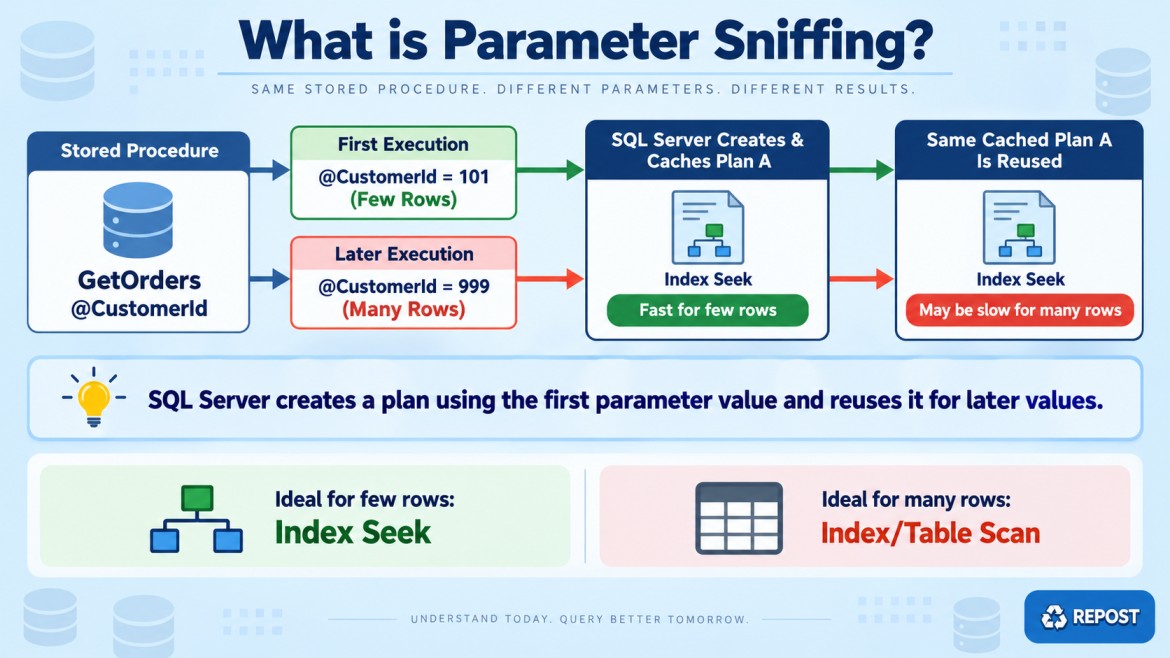


What is Parameter Sniffing?
Parameter sniffing is a SQL Server behavior where the Query Optimizer examines the parameter value supplied during compilation and creates an execution plan suitable for that value.
The plan is then stored in the plan cache and reused for later executions.
This reuse normally improves performance because SQL Server avoids compiling the query every time. It becomes a problem when different parameter values require different execution plans.
Simple example
CREATE PROCEDURE dbo.GetOrdersByCustomer
    @CustomerId INT
AS
BEGIN
    SELECT OrderId, OrderDate, Amount
    FROM dbo.Orders
    WHERE CustomerId = @CustomerId;
END;
Assume:
-
Customer
101has 5 orders -
Customer
1has 500,000 orders
First execution
EXEC dbo.GetOrdersByCustomer @CustomerId = 101;SQL Server compiles a plan for 5 rows. It may choose:
-
Nonclustered Index Seek
-
Nested Loops
-
Key Lookups
The plan is cached.
Later execution
EXEC dbo.GetOrdersByCustomer @CustomerId = 1;SQL Server may reuse the same plan created for 5 rows. But performing thousands of key lookups for 500,000 rows can be very expensive.
For the large customer, an Index Scan, Hash Join, or another plan might perform better.
How parameter sniffing works
First parameter value
        ↓
SQL Server compiles the query
        ↓
Optimizer reads statistics
        ↓
Plan created for that value
        ↓
Plan stored in cache
        ↓
Later parameter values reuse the plan
The problem is therefore not parameter sniffing itself. The problem is reusing one plan for values with very different data volumes.
Common symptoms
-
A stored procedure is sometimes fast and sometimes slow.
-
It becomes slow after deployment, restart or plan-cache clearing.
-
Running it with one parameter is fast but another is slow.
-
Recompiling the procedure temporarily fixes the problem.
-
Estimated rows and actual rows differ greatly.
-
Performance depends on which parameter was used first.
-
Executing the query directly is fast, but calling the procedure is slow.
Common causes
1. Uneven data distribution
A few values contain most of the records.
Customer 101 → 5 orders
Customer 1   → 500,000 orders
2. Outdated statistics
SQL Server uses statistics to estimate row counts. Old statistics can produce a poor plan.
3. Optional search parameters
WHERE (@CustomerId IS NULL OR CustomerId = @CustomerId)
  AND (@Status IS NULL OR Status = @Status);
Different parameter combinations can need completely different plans.
4. Changing data
A plan created when a table was small may become inefficient after the table grows.
How to identify the problem
1. Test different values
EXEC dbo.GetOrdersByCustomer 101;
EXEC dbo.GetOrdersByCustomer 1;
Compare duration, CPU time and logical reads.
2. View the actual execution plan
Check for:
-
Incorrect join type
-
Expensive key lookups
-
Scans instead of seeks
-
Memory spills
-
Large differences between estimated and actual rows
3. Measure query resources
SET STATISTICS IO ON;
SET STATISTICS TIME ON;

EXEC dbo.GetOrdersByCustomer 1;
4. Recompile temporarily
EXEC sys.sp_recompile 'dbo.GetOrdersByCustomer';If performance improves temporarily but later becomes unstable again, parameter-sensitive plan reuse may be involved.
5. Use Query Store
Query Store helps identify:
-
Multiple execution plans
-
Plan changes
-
Runtime differences
-
Plan regression
Solutions
1. Update statistics
UPDATE STATISTICS dbo.Orders;Use this when inaccurate or outdated statistics are causing incorrect estimates.
2. Use OPTION (RECOMPILE)
SELECT OrderId, OrderDate, Amount
FROM dbo.Orders
WHERE CustomerId = @CustomerId
OPTION (RECOMPILE);
SQL Server creates a plan for the current value every time.
Advantages:
-
Each execution receives a suitable plan.
-
Effective for highly uneven data.
Disadvantage:
-
Adds compilation CPU cost.
-
Avoid using it for very frequent queries without testing.
3. Use OPTIMIZE FOR
Optimize for a representative value:
OPTION (OPTIMIZE FOR (@CustomerId = 101));This is useful when most executions behave like a particular value.
However, the chosen value may become unsuitable when the data changes.
4. Use OPTIMIZE FOR UNKNOWN
OPTION (OPTIMIZE FOR UNKNOWN);SQL Server uses general statistical information instead of the current parameter value.
This creates a more stable average plan, but it may not be the best plan for extreme values.
5. Use different query paths
IF @CustomerId = 1
BEGIN
    -- Query designed for a large result
END
ELSE
BEGIN
    -- Query designed for a small result
END
This is useful when values clearly fall into small-result and large-result categories.
6. Use parameterized dynamic SQL
DECLARE @sql nvarchar(max) =
N'SELECT OrderId, OrderDate, Amount
  FROM dbo.Orders
  WHERE CustomerId = @Id;';

EXEC sys.sp_executesql
    @sql,
    N'@Id int',
    @Id = @CustomerId;
Dynamic SQL is especially useful for optional search conditions because only required filters can be added.
Always use parameters—never concatenate untrusted values.
7. Use Query Store hints
Query Store hints can apply options such as RECOMPILE or OPTIMIZE FOR UNKNOWN without modifying application code.
8. Parameter Sensitive Plan optimization
SQL Server 2022 and later can use Parameter Sensitive Plan optimization when supported and enabled.
Instead of keeping only one plan, SQL Server can maintain multiple plan variants for different parameter ranges, such as:
-
Small result
-
Medium result
-
Large result
This feature reduces many parameter-sniffing problems automatically.
What should not be done?
Avoid clearing the complete plan cache:
DBCC FREEPROCCACHE;It removes plans for all queries, increases compilation load and usually provides only temporary relief.
Key interview points
-
Parameter sniffing is a normal optimization, not automatically a defect.
-
SQL Server creates the first plan using the parameter values available during compilation.
-
Problems occur when one cached plan is reused for values requiring different strategies.
-
Uneven data distribution is a major cause.
-
Confirm the issue using actual plans, estimated versus actual rows, Query Store, logical reads and multiple parameter values.
-
Possible solutions include updated statistics,
RECOMPILE,OPTIMIZE FOR, separate query paths, dynamic SQL and SQL Server 2022’s Parameter Sensitive Plan optimization.