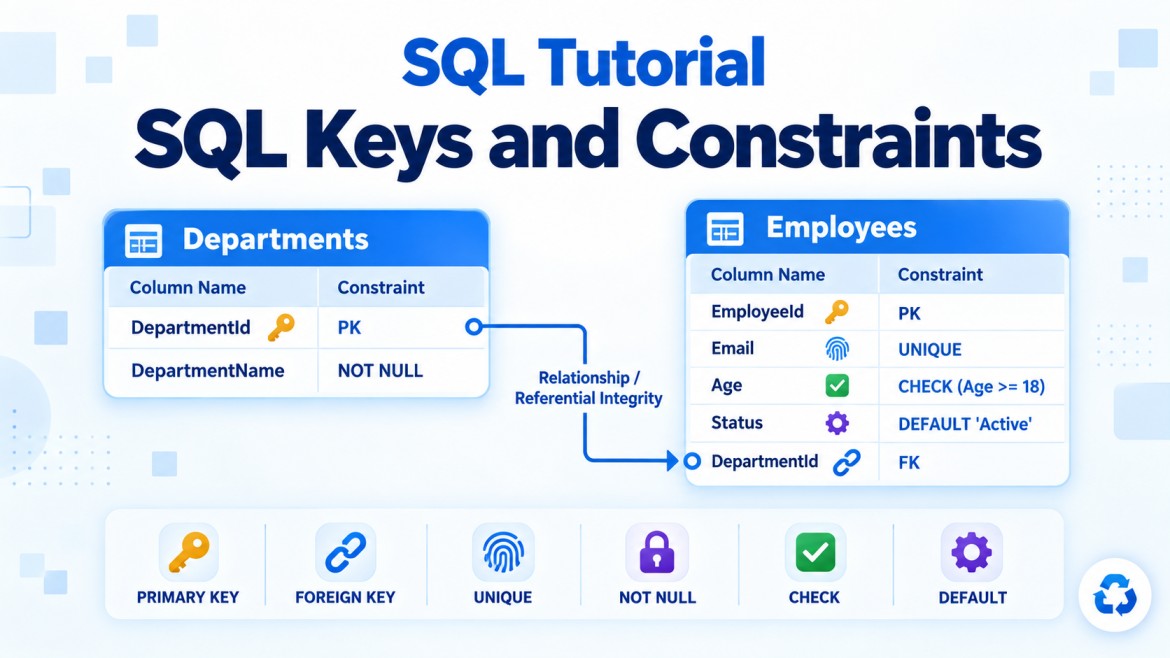


Referential Integrity in SQL Server
What is referential integrity?
Referential integrity is a database rule that keeps relationships between parent and child tables valid and consistent.
It ensures that:
Every non-
NULLforeign-key value in a child table must match an existing primary-key or unique-key value in the parent table.
It also prevents a parent record from being deleted or its referenced key changed when related child records still depend on it—unless a suitable cascading action is configured.
Simple Example
Consider two tables:
Departments — Parent table
Employees   — Child table
Every employee belongs to a department.
Departments
-----------------------------
DepartmentId  DepartmentName
10            IT
20            HR

Employees
---------------------------------------
EmployeeId  EmployeeName  DepartmentId
1           Arun          10
2           Bala          20
3           Kumar         10
The relationship is:
Departments.DepartmentId
           ↓
Employees.DepartmentId-
Departments.DepartmentIdis the primary key. -
Employees.DepartmentIdis the foreign key.
Referential integrity ensures that an employee cannot reference a department that does not exist.
Why Do We Need Referential Integrity?
Without referential integrity, the database could contain inconsistent or meaningless data.
For example:
EmployeeId:    4
EmployeeName:  Ravi
DepartmentId:  99
If department 99 does not exist, Ravi points to a missing department. This is called an orphan record.
Referential integrity prevents:
-
Orphan child records
-
Invalid table relationships
-
Accidental deletion of required parent data
-
Updates that break relationships
-
Inconsistent values inserted by different applications
-
Incorrect joins and reports
Parent and Child Tables
Parent table
The parent table contains the referenced key.
CREATE TABLE Departments
(
    DepartmentId INT PRIMARY KEY,
    DepartmentName VARCHAR(100) NOT NULL
);
DepartmentId uniquely identifies a department.
Child table
The child table contains the foreign key.
CREATE TABLE Employees
(
    EmployeeId INT PRIMARY KEY,
    EmployeeName VARCHAR(100) NOT NULL,
    DepartmentId INT NOT NULL,

    CONSTRAINT FK_Employees_Departments
        FOREIGN KEY (DepartmentId)
        REFERENCES Departments(DepartmentId)
);
The foreign-key constraint enforces referential integrity.
How Does It Work?
The foreign-key constraint controls four important operations:
-
Inserting a child row
-
Updating a child foreign key
-
Deleting a parent row
-
Updating a referenced parent key
1. Inserting a Child Record
First insert departments:
INSERT INTO Departments
    (DepartmentId, DepartmentName)
VALUES
    (10, 'Information Technology'),
    (20, 'Human Resources');
Valid child insertion
INSERT INTO Employees
    (EmployeeId, EmployeeName, DepartmentId)
VALUES
    (1, 'Arun', 10);
This succeeds because department 10 exists.
Invalid child insertion
INSERT INTO Employees
    (EmployeeId, EmployeeName, DepartmentId)
VALUES
    (2, 'Bala', 99);
This fails because department 99 does not exist.
SQL Server returns a foreign-key conflict error.
This protection is referential integrity.
2. Updating a Child Foreign Key
Suppose employee 1 currently belongs to department 10.
This is valid:
UPDATE Employees
SET DepartmentId = 20
WHERE EmployeeId = 1;
It succeeds because department 20 exists.
This is invalid:
UPDATE Employees
SET DepartmentId = 99
WHERE EmployeeId = 1;
It fails because department 99 does not exist.
Referential integrity validates both inserts and updates.
3. Deleting a Parent Record
Suppose employees still reference department 10.
DELETE FROM Departments
WHERE DepartmentId = 10;
By default, SQL Server rejects the deletion because it would leave employees pointing to a nonexistent department.
The application must first decide what should happen to those employees.
Possible choices include:
-
Prevent the deletion
-
Delete related employees
-
Set their department to
NULL -
Move them to a default department
These rules can be controlled through foreign-key referential actions.
4. Updating a Referenced Parent Key
Suppose employees reference department 10.
UPDATE Departments
SET DepartmentId = 30
WHERE DepartmentId = 10;
By default, SQL Server rejects the update because the child rows still contain DepartmentId = 10.
Possible approaches are:
-
Keep the primary key stable
-
Update child records explicitly
-
Configure
ON UPDATE CASCADE
Stable keys are generally preferred.
Referential Actions
SQL Server provides four actions for maintaining referential integrity.
| Action | What happens to child rows? |
|---|---|
NO ACTION |
Blocks the parent update or deletion |
CASCADE |
Updates or deletes related child rows |
SET NULL |
Sets the child foreign key to NULL |
SET DEFAULT |
Sets the child foreign key to its default value |
NO ACTION
This is the default behavior.
CONSTRAINT FK_Employees_Departments
    FOREIGN KEY (DepartmentId)
    REFERENCES Departments(DepartmentId)
    ON DELETE NO ACTION
    ON UPDATE NO ACTION
If child records exist, SQL Server prevents the parent from being deleted or its referenced key from being changed.
This is often the safest option.
CASCADE
Cascading delete
ON DELETE CASCADEDeleting a parent automatically deletes its related children.
Delete Order
    └── Automatically delete OrderItems
This is suitable when child records have no meaning without the parent.
Cascading update
ON UPDATE CASCADEChanging the parent key automatically changes the matching child foreign-key values.
Cascading update is less common because primary keys should generally remain stable.
SET NULL
ON DELETE SET NULLDeleting the parent keeps the child row but removes its parent reference.
DepartmentId INT NULLThe foreign-key column must allow NULL.
After the parent is deleted:
EmployeeId:    1
EmployeeName:  Arun
DepartmentId:  NULL
SET DEFAULT
ON DELETE SET DEFAULTDeleting the parent sets the child foreign key to its defined default.
For example:
DepartmentId INT NOT NULL
    CONSTRAINT DF_Employees_Department DEFAULT 1
Department 1 might represent:
UnassignedThe default parent value must exist; otherwise, the operation violates referential integrity.
Can a Foreign Key Contain NULL?
Yes, if the relationship is optional.
DepartmentId INT NULLA NULL foreign key means:
This employee currently has no assigned department.A NULL does not need to match a parent key because it represents no reference.
If every employee must belong to a department, use:
DepartmentId INT NOT NULLTherefore:
-
FOREIGN KEYensures the value is valid when supplied. -
NOT NULLensures the value must be supplied.
They are often used together for mandatory relationships.
Mandatory and Optional Relationships
Mandatory relationship
DepartmentId INT NOT NULLEvery employee must belong to an existing department.
Optional relationship
DepartmentId INT NULLAn employee may temporarily have no department.
In both cases, any non-NULL department value must exist in the parent table.
One-to-Many Relationship
The most common referential relationship is one-to-many.
One Department
      ↓
Many Employees
A department can have several employees, but each employee belongs to one department.
The child foreign key can contain duplicates:
Employee 1 → Department 10
Employee 2 → Department 10
Employee 3 → Department 10
Duplicate foreign-key values are valid because many children can reference the same parent.
One-to-One Relationship
A one-to-one relationship uses a foreign key that is also unique.
CREATE TABLE Employees
(
    EmployeeId INT PRIMARY KEY,
    EmployeeName VARCHAR(100) NOT NULL
);

CREATE TABLE EmployeeProfiles
(
    ProfileId INT PRIMARY KEY,
    EmployeeId INT NOT NULL UNIQUE,
    Biography VARCHAR(500),

    CONSTRAINT FK_EmployeeProfiles_Employees
        FOREIGN KEY (EmployeeId)
        REFERENCES Employees(EmployeeId)
);
The UNIQUE constraint prevents an employee from having more than one profile.
Many-to-Many Relationship
A many-to-many relationship is implemented through a junction table.
Students
    ↓
StudentCourses
    ↑
Courses
CREATE TABLE Students
(
StudentId INT PRIMARY KEY,
StudentName VARCHAR(100) NOT NULL
);
CREATE TABLE Courses
(
CourseId INT PRIMARY KEY,
CourseName VARCHAR(100) NOT NULL
);
CREATE TABLE StudentCourses
(
StudentId INT NOT NULL,
CourseId INT NOT NULL,
CONSTRAINT PK_StudentCourses
PRIMARY KEY (StudentId, CourseId),
CONSTRAINT FK_StudentCourses_Students
FOREIGN KEY (StudentId)
REFERENCES Students(StudentId),
CONSTRAINT FK_StudentCourses_Courses
FOREIGN KEY (CourseId)
REFERENCES Courses(CourseId)
);Referential integrity ensures:
-
Every
StudentIdexists inStudents. -
Every
CourseIdexists inCourses. -
No registration refers to a nonexistent student or course.
Can a Foreign Key Reference a Unique Key?
Yes. A foreign key can reference:
-
A primary key
-
An eligible unique key
Example:
CREATE TABLE Departments
(
    DepartmentId INT PRIMARY KEY,
    DepartmentCode VARCHAR(10) NOT NULL UNIQUE
);
CREATE TABLE Employees
(
EmployeeId INT PRIMARY KEY,
DepartmentCode VARCHAR(10) NOT NULL,
CONSTRAINT FK_Employees_DepartmentCode
FOREIGN KEY (DepartmentCode)
REFERENCES Departments(DepartmentCode)
);Because DepartmentCode is unique, every child value refers to only one parent row.
However, stable numeric primary keys are usually preferable for relationships because business codes may change.
Composite Referential Integrity
A foreign key may contain multiple columns.
CREATE TABLE Branches
(
    CompanyId INT NOT NULL,
    BranchId INT NOT NULL,
    BranchName VARCHAR(100) NOT NULL,

    CONSTRAINT PK_Branches
        PRIMARY KEY (CompanyId, BranchId)
);
CREATE TABLE Employees
(
EmployeeId INT PRIMARY KEY,
EmployeeName VARCHAR(100) NOT NULL,
CompanyId INT NOT NULL,
BranchId INT NOT NULL,
CONSTRAINT FK_Employees_Branches
FOREIGN KEY (CompanyId, BranchId)
REFERENCES Branches(CompanyId, BranchId)
);The combination (CompanyId, BranchId) in the child must match an existing combination in the parent.
Referential Integrity Without a Foreign Key
Applications can attempt to validate relationships manually:
IF EXISTS
(
    SELECT 1
    FROM Departments
    WHERE DepartmentId = 10
)
BEGIN
    INSERT INTO Employees
    VALUES (1, 'Arun', 10);
END;
However, application-only validation is not completely reliable because:
-
Another application might bypass the check.
-
A user might run direct SQL.
-
Import processes may skip application rules.
-
Concurrent operations can occur between checking and inserting.
-
The same validation must be repeated everywhere.
A database foreign key gives centralized and transactional enforcement.
Declarative vs Application Integrity
Declarative referential integrity
Implemented with foreign-key constraints:
FOREIGN KEY (DepartmentId)
REFERENCES Departments(DepartmentId)
This is the preferred method.
Application-enforced integrity
Implemented using application code, stored procedures or manual checks.
It may sometimes be required across separate databases, distributed services or systems where a database foreign key cannot be created. However, it requires more careful design.
Referential Integrity in Microservices
In a monolithic relational database, foreign keys can enforce relationships directly.
In microservices, different services may own separate databases:
Order Service Database
Customer Service Database
A normal cross-database or cross-service foreign key may not be available or appropriate.
Referential consistency may instead be maintained using:
-
Service APIs
-
Domain rules
-
Events
-
Message queues
-
Compensating actions
-
Reconciliation jobs
-
Eventual consistency
Therefore, referential integrity remains a requirement, but its enforcement mechanism may differ.
Entity Integrity vs Referential Integrity
These concepts are related but different.
| Integrity type | Meaning | Usually enforced by |
|---|---|---|
| Entity integrity | Every row has a unique identity | Primary key |
| Referential integrity | Every child reference points to a valid parent | Foreign key |
| Domain integrity | Column values follow permitted rules | Data type, CHECK, NOT NULL, DEFAULT |
| User-defined integrity | Custom business rules are satisfied | Constraints, procedures or application logic |
Example
EmployeeId must be unique             → Entity integrity
DepartmentId must exist               → Referential integrity
Age must be between 18 and 65         → Domain integrity
Manager cannot approve own expense    → Business/user-defined integrity
Performance Considerations
Foreign keys add validation work during:
-
Child inserts
-
Foreign-key updates
-
Parent deletes
-
Parent-key updates
-
Cascading operations
SQL Server automatically indexes primary and unique keys but does not automatically index child foreign-key columns.
An index may improve joins and parent modification checks:
CREATE INDEX IX_Employees_DepartmentId
ON Employees(DepartmentId);
Do not remove important foreign keys merely for minor performance gains. Appropriate indexing and transaction design are generally better solutions.
Trusted Referential Integrity
A foreign key should be enabled and trusted.
Check its status:
SELECT
    name,
    is_disabled,
    is_not_trusted
FROM sys.foreign_keys;
A trusted foreign key means SQL Server has verified that all existing rows follow the relationship.
If a constraint was disabled for bulk loading, validate and re-enable it:
ALTER TABLE Employees
WITH CHECK CHECK CONSTRAINT FK_Employees_Departments;
An untrusted constraint may contain invalid historical data and may provide fewer optimization opportunities.
Practical Example
CREATE TABLE Customers
(
    CustomerId INT PRIMARY KEY,
    CustomerName VARCHAR(100) NOT NULL
);

CREATE TABLE Orders
(
    OrderId INT PRIMARY KEY,
    OrderDate DATE NOT NULL,
    CustomerId INT NOT NULL,

    CONSTRAINT FK_Orders_Customers
        FOREIGN KEY (CustomerId)
        REFERENCES Customers(CustomerId)
        ON DELETE NO ACTION
);
Valid sequence
INSERT INTO Customers
VALUES (1, 'Arun');

INSERT INTO Orders
VALUES (101, '2026-09-17', 1);
Invalid order
INSERT INTO Orders
VALUES (102, '2026-09-17', 99);
It fails because customer 99 does not exist.
Invalid customer deletion
DELETE FROM Customers
WHERE CustomerId = 1;
It fails while order 101 still references customer 1.
The application must first:
-
Delete or reassign the order, or
-
Keep the customer, possibly marking the customer inactive.
This is referential integrity protecting the database.
Benefits
-
Prevents orphan records
-
Keeps table relationships consistent
-
Protects against invalid inserts and updates
-
Prevents unsafe parent deletions
-
Centralizes relationship rules
-
Protects data from every application and import process
-
Improves database reliability
-
Can provide useful information to the query optimizer
Common Misunderstandings
“A foreign key value must be unique.”
No. Duplicate foreign-key values are expected in one-to-many relationships.
“A foreign key cannot contain NULL.”
It can contain NULL when the relationship is optional.
“A foreign key can reference only a primary key.”
It can also reference an eligible unique key.
“Referential integrity is required only in application code.”
Database foreign-key constraints provide stronger centralized protection.
“Foreign keys automatically create indexes on child columns.”
Not in SQL Server. Supporting indexes must be evaluated and created separately.
“Deleting a parent always deletes its children.”
Only when ON DELETE CASCADE is configured. The default behavior is NO ACTION.
Key Points
-
Referential integrity keeps parent-child relationships valid.
-
It is normally enforced using foreign-key constraints.
-
Every non-
NULLforeign key must match an existing parent key. -
It prevents orphan child records.
-
Parent keys are usually primary or eligible unique keys.
-
A child foreign key may contain duplicate values.
-
A foreign key can be nullable for an optional relationship.
-
Use
NOT NULLwhen the relationship is mandatory. -
Parent deletions and updates are blocked by default when children exist.
-
CASCADE,SET NULLandSET DEFAULTprovide alternative behavior. -
Foreign keys work for one-to-many, one-to-one and many-to-many relationships.
-
Indexing child foreign-key columns can improve performance.
-
Database constraints protect data regardless of its source.
Interview Answer
Referential integrity ensures that relationships between parent and child tables remain valid. It requires every non-NULL foreign-key value in the child table to match an existing primary or unique key in the parent table. It also prevents parent rows from being deleted or their referenced keys changed when dependent child rows exist, unless actions such as
CASCADE,SET NULLorSET DEFAULTare configured. Its main purpose is to prevent orphan records and maintain consistent relational data.