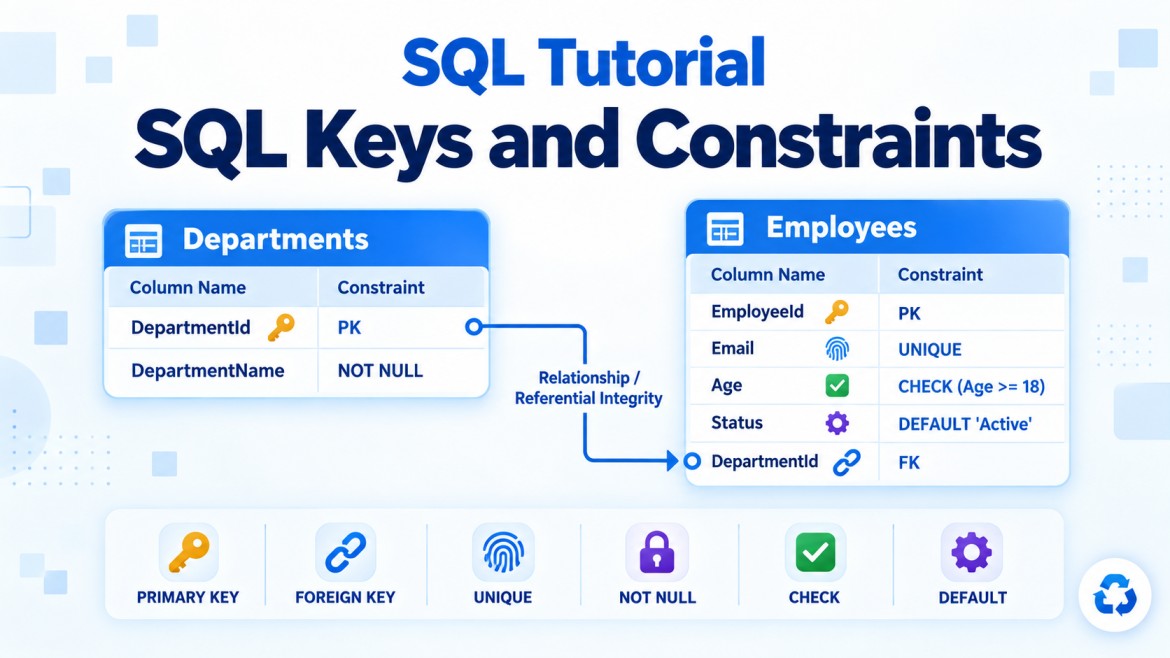


Primary-Key Constraint vs Unique Constraint
Both a primary-key constraint and a unique constraint prevent duplicate values. However, they serve different purposes.
-
A primary key represents the main identity of each row.
-
A unique constraint enforces uniqueness on additional business columns.
1. Primary-Key Constraint
What is it?
A primary-key constraint uniquely identifies every row in a table.
CREATE TABLE Employees
(
    EmployeeId INT NOT NULL,

    CONSTRAINT PK_Employees
        PRIMARY KEY (EmployeeId)
);
EmployeeId is the main identifier for each employee.
Why do we need it?
-
To uniquely identify every row
-
To prevent duplicate identifiers
-
To prevent
NULLidentifiers -
To establish the table’s main identity
-
To allow other tables to reference its rows
Rules
-
A table can have only one primary-key constraint.
-
It can contain one or multiple columns.
-
Its columns are automatically treated as
NOT NULL. -
Duplicate values are not allowed.
-
SQL Server creates a unique index to enforce it.
2. Unique Constraint
What is it?
A unique constraint prevents duplicate values in a column or combination of columns.
CREATE TABLE Employees
(
    EmployeeId INT PRIMARY KEY,
    Email VARCHAR(150),

    CONSTRAINT UQ_Employees_Email
        UNIQUE (Email)
);
Here:
-
EmployeeIdis the main identifier. -
Emailis an additional value that must remain unique.
Why do we need it?
A table may have several business values that must not be duplicated.
Examples:
-
Email address
-
Username
-
Employee code
-
Passport number
-
Product code
-
Invoice number
Rules
-
A table can have multiple unique constraints.
-
A unique constraint can contain one or multiple columns.
-
It can be created on nullable columns.
-
SQL Server creates a unique index to enforce it.
-
It can be referenced by a foreign key.
Main Differences
| Feature | Primary-Key Constraint | Unique Constraint |
|---|---|---|
| Main purpose | Main identity of each row | Additional business uniqueness |
| Number allowed per table | Only one | Multiple |
| Duplicate values | Not allowed | Not allowed |
NULL values |
Not allowed | Nullable columns are allowed |
| Columns per constraint | One or multiple | One or multiple |
| Default SQL Server index | Unique clustered, when possible | Unique nonclustered |
| Can be referenced by foreign key | Yes | Yes |
| Candidate-key role | Selected candidate key | Usually an alternate candidate key |
| Common example | EmployeeId |
Email, EmployeeCode |
Complete Example
CREATE TABLE Employees
(
    EmployeeId INT IDENTITY(1,1),
    EmployeeCode VARCHAR(20) NOT NULL,
    EmployeeName VARCHAR(100) NOT NULL,
    Email VARCHAR(150) NULL,
    PassportNumber VARCHAR(20) NULL,

    CONSTRAINT PK_Employees
        PRIMARY KEY (EmployeeId),

    CONSTRAINT UQ_Employees_EmployeeCode
        UNIQUE (EmployeeCode),

    CONSTRAINT UQ_Employees_Email
        UNIQUE (Email),

    CONSTRAINT UQ_Employees_Passport
        UNIQUE (PassportNumber)
);
This table contains:
| Column | Constraint | Purpose |
|---|---|---|
EmployeeId |
Primary key | Main employee identifier |
EmployeeCode |
Unique | Prevent duplicate employee codes |
Email |
Unique | Prevent duplicate email addresses |
PassportNumber |
Unique | Prevent duplicate passport numbers |
Difference 1: Main Purpose
Primary key
The primary key establishes the main identity of the row.
EmployeeId = 101Even if an employee changes their name, email or passport number, the EmployeeId can remain unchanged.
Unique constraint
A unique constraint enforces a business rule.
No two employees can use the same email address.It makes the column unique, but it does not make that column the table’s primary identifier.
Difference 2: Number Allowed per Table
Only one primary key
This is valid:
CREATE TABLE Employees
(
    EmployeeId INT PRIMARY KEY,
    Email VARCHAR(150) UNIQUE
);
This is invalid:
CREATE TABLE Employees
(
    EmployeeId INT PRIMARY KEY,
    EmployeeCode VARCHAR(20) PRIMARY KEY
);
A table cannot have two primary-key constraints.
Multiple unique constraints
This is valid:
CREATE TABLE Employees
(
    EmployeeId INT PRIMARY KEY,
    EmployeeCode VARCHAR(20) UNIQUE,
    Email VARCHAR(150) UNIQUE,
    PassportNumber VARCHAR(20) UNIQUE
);
Difference 3: NULL Values
Primary key
A primary-key column cannot contain NULL.
INSERT INTO Employees
(
    EmployeeCode,
    EmployeeName,
    Email,
    PassportNumber
)
VALUES
(
    'EMP001',
    'Arun',
    'arun@example.com',
    'P1001'
);
Because EmployeeId is an IDENTITY column, SQL Server automatically generates it.
If it were not an IDENTITY, attempting to insert NULL would fail:
INSERT INTO Employees
(
    EmployeeId,
    EmployeeCode,
    EmployeeName
)
VALUES
(
    NULL,
    'EMP001',
    'Arun'
);
Unique constraint
A unique constraint can be created on a nullable column.
However, in SQL Server, a normal single-column unique constraint generally allows only one NULL because another NULL would conflict with the unique index.
CREATE TABLE Users
(
    UserId INT PRIMARY KEY,
    Email VARCHAR(150) NULL UNIQUE
);
The first NULL is accepted:
INSERT INTO Users VALUES (1, NULL);A second NULL normally fails:
INSERT INTO Users VALUES (2, NULL);Allowing multiple NULL values
To allow multiple NULL values but keep non-NULL values unique, use a filtered unique index:
CREATE TABLE Users
(
    UserId INT PRIMARY KEY,
    Email VARCHAR(150) NULL
);

CREATE UNIQUE INDEX UX_Users_Email
ON Users(Email)
WHERE Email IS NOT NULL;
Now:
INSERT INTO Users VALUES (1, NULL);
INSERT INTO Users VALUES (2, NULL);
INSERT INTO Users VALUES (3, 'arun@example.com');
All three inserts succeed.
But this fails:
INSERT INTO Users VALUES (4, 'arun@example.com');The non-NULL email already exists.
Difference 4: Default Index Type
SQL Server creates an index to enforce both constraints.
Primary key default
A primary key creates a unique clustered index by default, provided the table does not already have a clustered index.
CONSTRAINT PK_Employees
PRIMARY KEY (EmployeeId)
Unique constraint default
A unique constraint creates a unique nonclustered index by default.
CONSTRAINT UQ_Employees_Email
UNIQUE (Email)
However, these are only defaults—not mandatory rules.
You can explicitly create a nonclustered primary key:
CONSTRAINT PK_Employees
PRIMARY KEY NONCLUSTERED (EmployeeId)
You can also create a clustered unique constraint:
CONSTRAINT UQ_Employees_EmployeeCode
UNIQUE CLUSTERED (EmployeeCode)
A table can have only one clustered index because rows can be physically ordered only one way.
Difference 5: Candidate Key Role
Assume each of these uniquely identifies an employee:
EmployeeId
EmployeeCode
Email
All three are candidate keys.
The database designer selects one as the primary key:
EmployeeId → Primary keyThe remaining candidate keys become alternate keys, normally implemented using unique constraints:
EmployeeCode → Unique constraint
Email        → Unique constraint
Therefore:
A primary key is the selected candidate key, while unique constraints usually enforce the remaining candidate keys.
Difference 6: Foreign-Key References
A foreign key can reference both:
-
A primary key
-
A unique constraint
Referencing a primary key
CREATE TABLE Orders
(
    OrderId INT PRIMARY KEY,
    EmployeeId INT,

    CONSTRAINT FK_Orders_Employees
        FOREIGN KEY (EmployeeId)
        REFERENCES Employees(EmployeeId)
);
Referencing a unique key
Suppose EmployeeCode has a unique constraint:
CREATE TABLE EmployeeLogins
(
    LoginId INT PRIMARY KEY,
    EmployeeCode VARCHAR(20),

    CONSTRAINT FK_EmployeeLogins_Employees
        FOREIGN KEY (EmployeeCode)
        REFERENCES Employees(EmployeeCode)
);
This is valid because EmployeeCode is guaranteed to be unique.
Nevertheless, referencing the stable primary key is usually preferred because business values may change.
Composite Constraints
Both constraints can contain multiple columns.
Composite primary key
CREATE TABLE OrderItems
(
    OrderId INT,
    ProductId INT,
    Quantity INT,

    CONSTRAINT PK_OrderItems
        PRIMARY KEY (OrderId, ProductId)
);
The combination (OrderId, ProductId) is the primary key.
Composite unique constraint
CREATE TABLE CourseRegistrations
(
    RegistrationId INT PRIMARY KEY,
    StudentId INT NOT NULL,
    CourseId INT NOT NULL,

    CONSTRAINT UQ_StudentCourses
        UNIQUE (StudentId, CourseId)
);
This prevents the same student from registering for the same course more than once.
The table has:
-
Primary key:
RegistrationId -
Composite unique constraint:
(StudentId, CourseId)
When Should You Use Each One?
Use a primary key when:
-
The column represents the main identity of a row.
-
Other tables will commonly reference the row.
-
The value is stable and should not change.
-
Every row must have an identifier.
Examples:
EmployeeId
CustomerId
OrderId
ProductId
Use a unique constraint when:
-
A business column must not contain duplicates.
-
The column is not the table’s main identifier.
-
Multiple columns independently require uniqueness.
-
A combination of columns must be unique.
Examples:
Email
EmployeeCode
Username
PassportNumber
(StudentId, CourseId)
Can the Primary Key Be Changed?
Technically, a primary-key value can be updated unless prevented by relationships or application rules:
UPDATE Employees
SET EmployeeId = 200
WHERE EmployeeId = 101;
However, changing a primary key is usually discouraged because:
-
Foreign-key rows may reference it.
-
It can require cascading updates.
-
It may affect indexes.
-
Primary keys should ideally be stable.
The same principle applies to unique business values, but values such as email addresses may legitimately change.
Advantages
Primary-key constraint
-
Guarantees every row has a unique identity
-
Prevents
NULLvalues -
Supports relationships
-
Improves search and join performance through its index
-
Enforces entity integrity
Unique constraint
-
Enforces business rules
-
Prevents duplicate business data
-
Supports multiple unique columns
-
Can enforce uniqueness across multiple columns
-
Can serve as a foreign-key target
Common Misunderstandings
“A table can have multiple primary keys.”
Incorrect. A table can have only one primary-key constraint, although it may contain multiple columns.
“A primary key is always clustered.”
Incorrect. Clustered is the SQL Server default when no clustered index already exists, but a primary key can be nonclustered.
“A unique constraint allows unlimited NULL values.”
Incorrect in SQL Server. A regular single-column unique constraint normally permits only one NULL. Use a filtered unique index to allow multiple NULL values.
“A foreign key can reference only a primary key.”
Incorrect. It can also reference columns protected by an eligible unique constraint.
“IDENTITY and primary key are the same.”
Incorrect:
-
IDENTITYgenerates numeric values automatically. -
PRIMARY KEYenforces uniqueness and disallowsNULL.
They are often used together but perform different jobs:
EmployeeId INT IDENTITY(1,1) PRIMARY KEYKey Points
-
Both constraints prevent duplicate key values.
-
A primary key represents the table’s main row identity.
-
A unique constraint enforces additional business uniqueness.
-
A table can have only one primary-key constraint.
-
A table can have multiple unique constraints.
-
Primary-key columns cannot contain
NULL. -
Unique constraints can be defined on nullable columns.
-
In SQL Server, a normal single-column unique constraint generally allows only one
NULL. -
Both constraints can contain multiple columns.
-
Both are enforced using unique indexes.
-
Both can be referenced by foreign keys.
-
Primary keys are clustered by default only when possible; they are not always clustered.
-
Choose stable values for primary keys and use unique constraints for changeable business identifiers.
Interview Answer
A primary-key constraint and a unique constraint both enforce uniqueness. The primary key is the main identifier of a table, does not permit NULL values, and only one primary-key constraint is allowed per table. A table can have multiple unique constraints to enforce additional business rules, and their columns may be nullable. In SQL Server, a primary key usually creates a unique clustered index by default, while a unique constraint usually creates a unique nonclustered index, though both defaults can be changed.