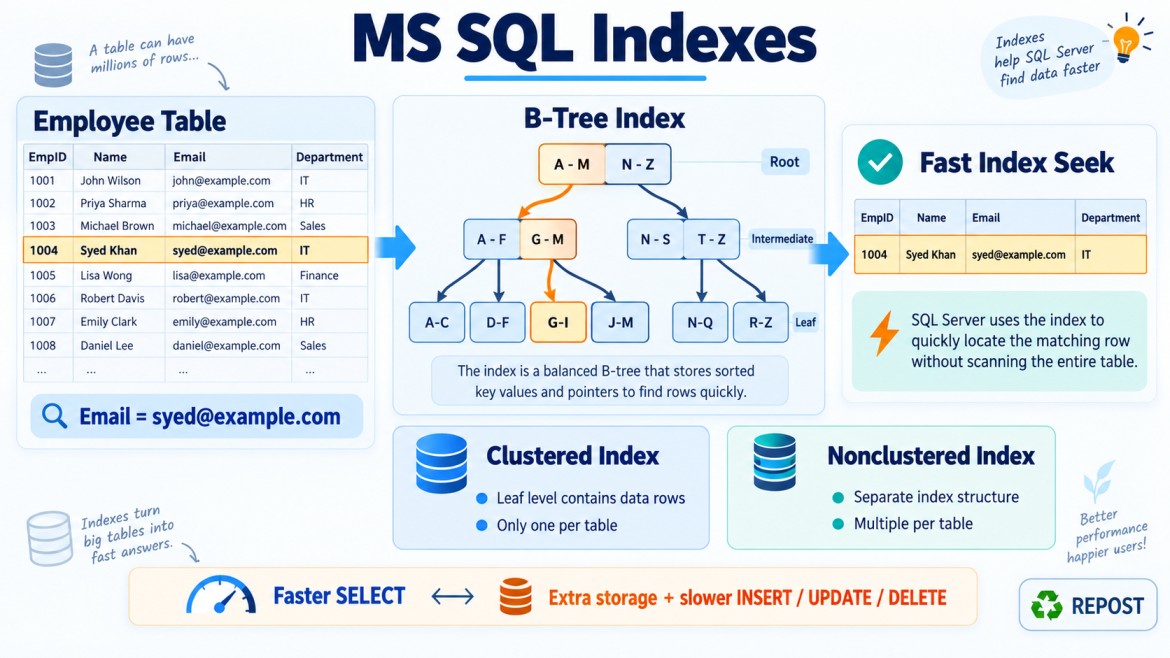


Clustered vs Nonclustered Indexes in SQL Server
An index helps SQL Server find data faster without scanning every row in a table.
The main difference is:
-
A clustered index stores the actual table rows in index-key order.
-
A nonclustered index stores index keys separately, with pointers to the actual rows.
1. Clustered Index
A clustered index determines how the actual data rows are logically organized and stored at the leaf level of the index.
CREATE CLUSTERED INDEX IX_Employees_EmployeeId
ON Employees(EmployeeId);
The leaf level contains the complete employee rows.
Simple structure
Clustered index
EmployeeId: 1 → Complete employee row
EmployeeId: 2 → Complete employee row
EmployeeId: 3 → Complete employee row
Why do we need it?
It is useful for:
-
Range-based searches
-
Sorting and sequential access
-
Primary-key lookups
-
Retrieving many rows in index order
-
MIN(),MAX()andORDER BYoperations
Example
SELECT *
FROM Employees
WHERE EmployeeId BETWEEN 100 AND 200
ORDER BY EmployeeId;
If EmployeeId is the clustered-index key, SQL Server can locate employee 100 and read the following rows sequentially until employee 200.
Important points
-
A table can have only one clustered index.
-
The leaf level contains the actual table rows.
-
A table without a clustered index is called a heap.
-
A primary key creates a clustered index by default only when no clustered index already exists and no different index type is specified.
-
Clustered keys should generally be narrow, unique, stable and preferably increasing.
2. Nonclustered Index
A nonclustered index is a separate structure containing:
-
Indexed key columns
-
Optional included columns
-
A row locator pointing to the actual table row
CREATE NONCLUSTERED INDEX IX_Employees_Email
ON Employees(Email);
Simple structure
Nonclustered index
Email                    Row locator
-------------------------------------
aisha@example.com   →    Actual employee row
kumar@example.com   →    Actual employee row
syed@example.com    →    Actual employee row
Row locator
The row locator depends on the table structure:
-
On a clustered table, it contains the clustered-index key.
-
On a heap, it contains a physical Row Identifier (RID).
Why do we need it?
It provides additional fast access paths for frequently searched columns without changing the table’s primary organization.
It is useful for:
-
Searching by email, phone number or status
-
Joining on frequently used columns
-
Supporting multiple query patterns
-
Creating covering indexes
-
Enforcing unique values
Example
SELECT EmployeeId, EmployeeName
FROM Employees
WHERE Email = 'syed@example.com';
SQL Server can use the index on Email instead of scanning the entire table.
3. Key Difference
| Feature | Clustered index | Nonclustered index |
|---|---|---|
| Storage | Leaf level contains actual table rows | Separate structure containing keys and row locators |
| Number per table | Only one | Multiple |
| Data organization | Determines the table’s primary row organization | Does not change the table’s primary organization |
| Leaf level | Complete data rows | Index entries |
| Row locator | Not required to locate its own data rows | Clustered key or heap RID |
| Range queries | Usually very efficient | Efficient when suitable or covering |
| Storage requirement | Uses storage for the B-tree structure | Requires additional storage for every index |
| Lookup | Often retrieves complete rows directly | May require a key lookup or RID lookup |
| Typical use | Primary key, date or sequential range access | Email, status, department and search columns |
4. Practical Example
Consider the following table:
CREATE TABLE Employees
(
    EmployeeId   INT,
    EmployeeName VARCHAR(100),
    Email        VARCHAR(200),
    DepartmentId INT,
    Salary       DECIMAL(12,2)
);
Create a clustered index
CREATE UNIQUE CLUSTERED INDEX IX_Employees_EmployeeId
ON Employees(EmployeeId);
The complete employee rows are available at the clustered index’s leaf level, ordered by EmployeeId.
Create a nonclustered index
CREATE NONCLUSTERED INDEX IX_Employees_Email
ON Employees(Email);
The nonclustered index contains approximately:
Email + EmployeeIdEmployeeId acts as the row locator because it is the clustered-index key.
5. Key Lookup in a Nonclustered Index
Consider this query:
SELECT EmployeeId, EmployeeName, Salary
FROM Employees
WHERE Email = 'syed@example.com';
The Email index does not contain EmployeeName or Salary.
SQL Server may:
-
Seek the nonclustered index using
Email. -
Get the clustered key,
EmployeeId. -
Use it to find the complete row in the clustered index.
-
Return
EmployeeNameandSalary.
This additional operation is called a Key Lookup.
When many rows are returned, repeated key lookups can become expensive.
6. Covering Nonclustered Index
A covering index contains all the columns required by a query.
CREATE NONCLUSTERED INDEX IX_Employees_Email
ON Employees(Email)
INCLUDE (EmployeeName, Salary);
Now this query can be answered directly from the index:
SELECT EmployeeName, Salary
FROM Employees
WHERE Email = 'syed@example.com';
A key lookup is no longer required.
Why use INCLUDE?
Included columns:
-
Are stored only at the leaf level
-
Do not control index sorting
-
Help cover queries
-
Can reduce key lookups
-
Do not count toward the index-key column limit
However, too many included columns increase storage and write costs.
7. Primary Key and Clustered Index Are Not the Same
A primary key is a constraint that guarantees uniqueness and disallows NULL.
A clustered index is a data-access structure.
The following primary key is clustered by default in many common cases:
CREATE TABLE Employees
(
    EmployeeId INT PRIMARY KEY,
    EmployeeName VARCHAR(100)
);
However, a primary key can be explicitly nonclustered:
CREATE TABLE Employees
(
    EmployeeId INT
        CONSTRAINT PK_Employees
        PRIMARY KEY NONCLUSTERED,

    EmployeeName VARCHAR(100),
    CreatedDate DATETIME2
);
A different column can then be used for the clustered index:
CREATE CLUSTERED INDEX IX_Employees_CreatedDate
ON Employees(CreatedDate);
8. Choosing a Clustered-Index Key
A good clustered-index key is usually:
-
Narrow – reduces index size
-
Unique – avoids internal uniquifiers
-
Stable – does not change frequently
-
Ever-increasing – reduces random page splits
-
Frequently used for searches or range queries
Common example:
EmployeeId INT IDENTITY(1,1)Potentially problematic clustered keys include:
-
Very wide strings
-
Frequently updated columns
-
Random GUID values
-
Columns with many duplicates
Why does the clustered key size matter?
The clustered key is stored as the row locator in every nonclustered index. Therefore, a wide clustered key increases the size of all nonclustered indexes.
9. Advantages and Disadvantages
Clustered index advantages
-
Efficient range queries
-
Fast ordered retrieval
-
Leaf pages contain complete rows
-
Good for sequential and primary-key access
-
Can reduce sorting for compatible
ORDER BYqueries
Clustered index disadvantages
-
Only one per table
-
Changing the key can move rows
-
Random insertions can cause page splits and fragmentation
-
A wide key increases the size of nonclustered indexes
Nonclustered index advantages
-
Multiple indexes can support different query patterns
-
Fast searches on frequently filtered or joined columns
-
Can cover queries using
INCLUDE -
Can enforce uniqueness using a unique index
Nonclustered index disadvantages
-
Requires additional storage
-
Slows
INSERT,UPDATEandDELETE -
May require key or RID lookups
-
Too many indexes increase maintenance costs
10. Real-World Scenario
Consider an Orders table:
CREATE TABLE Orders
(
    OrderId     BIGINT IDENTITY(1,1),
    CustomerId  INT,
    OrderDate   DATETIME2,
    Status      VARCHAR(20),
    TotalAmount DECIMAL(12,2),

    CONSTRAINT PK_Orders
        PRIMARY KEY CLUSTERED (OrderId)
);
OrderId is a suitable clustered key because it is narrow, unique, stable and increasing.
Create a nonclustered index for customer searches:
CREATE NONCLUSTERED INDEX IX_Orders_CustomerId_OrderDate
ON Orders(CustomerId, OrderDate)
INCLUDE (Status, TotalAmount);
This query can efficiently use that index:
SELECT OrderDate, Status, TotalAmount
FROM Orders
WHERE CustomerId = 101
  AND OrderDate >= '2026-01-01';
11. Common Misunderstandings
“A clustered index physically sorts the entire table forever”
More accurately, SQL Server stores the table’s rows at the clustered index’s leaf level and maintains the index’s logical key order through a B-tree. Physical pages are not guaranteed to be contiguous on disk.
“A primary key is always clustered”
Incorrect. It is clustered by default only under applicable conditions. It can be created as nonclustered.
“A nonclustered index contains only pointers”
It contains key columns, row locators and possibly included columns.
“More indexes always improve performance”
Indexes improve reads but add storage and increase the cost of data modifications.
Interview Key Points
-
A clustered index’s leaf level contains the actual data rows.
-
A nonclustered index is a separate structure containing keys and row locators.
-
A table can have only one clustered index but multiple nonclustered indexes.
-
A nonclustered index points to the clustered key or a heap RID.
-
Nonclustered queries may require Key Lookups or RID Lookups.
-
INCLUDEcolumns can create a covering index and avoid lookups. -
A primary key and a clustered index are different concepts.
-
Prefer a narrow, unique, stable and increasing clustered key.
-
Avoid unnecessary indexes because they affect write performance and storage.