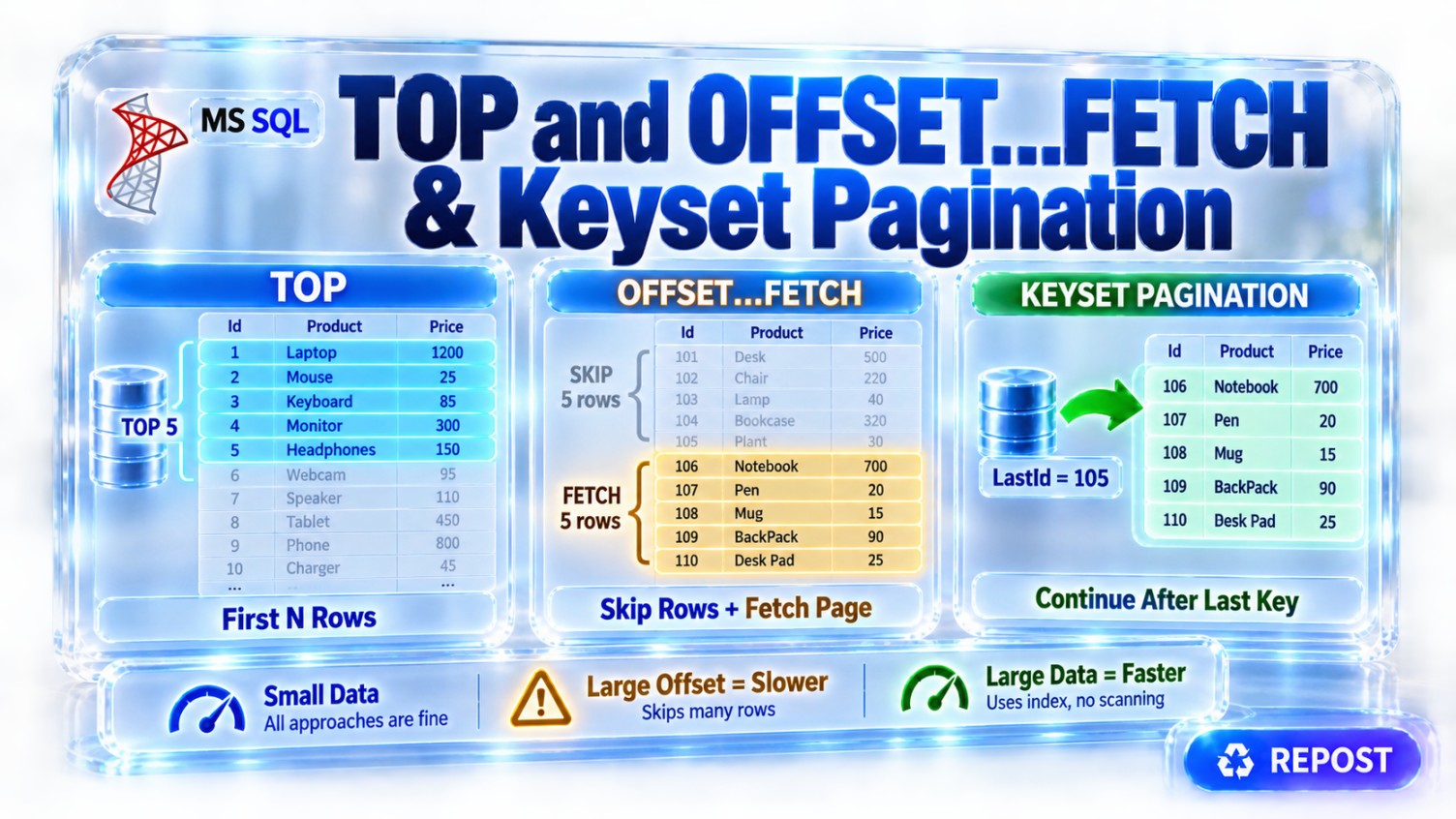


Difference Between TOP and OFFSET...FETCH in SQL Server
Both TOP and OFFSET...FETCH limit the number of rows returned by a query, but they are intended for different situations:
-
TOPreturns a limited number or percentage of rows, usually from the beginning of a result. -
OFFSET...FETCHskips a specified number of rows and returns the next set, making it suitable for pagination.
1. Sample table and data
CREATE TABLE Products
(
    ProductId   INT PRIMARY KEY,
    ProductName VARCHAR(50),
    Category    VARCHAR(30),
    Price       DECIMAL(10,2)
);
INSERT INTO Products
(
ProductId,
ProductName,
Category,
Price
)
VALUES
(1, 'Keyboard', 'Electronics', 1200),
(2, 'Mouse', 'Electronics', 700),
(3, 'Monitor', 'Electronics', 15000),
(4, 'Laptop', 'Electronics', 65000),
(5, 'Printer', 'Electronics', 12000),
(6, 'Office Chair','Furniture', 8000),
(7, 'Office Table','Furniture', 10000),
(8, 'Notebook', 'Stationery', 100),
(9, 'Pen Set', 'Stationery', 50),
(10, 'File Folder', 'Stationery', 150);View the data:
SELECT *
FROM Products
ORDER BY ProductId;
Result:
| ProductId | ProductName | Category | Price |
|---|---|---|---|
| 1 | Keyboard | Electronics | 1,200 |
| 2 | Mouse | Electronics | 700 |
| 3 | Monitor | Electronics | 15,000 |
| 4 | Laptop | Electronics | 65,000 |
| 5 | Printer | Electronics | 12,000 |
| 6 | Office Chair | Furniture | 8,000 |
| 7 | Office Table | Furniture | 10,000 |
| 8 | Notebook | Stationery | 100 |
| 9 | Pen Set | Stationery | 50 |
| 10 | File Folder | Stationery | 150 |
2. What is TOP?
TOP limits the number of rows returned by a query.
Syntax
SELECT TOP (number)
    Column1,
    Column2
FROM TableName
ORDER BY ColumnName;
Example: Return the first three products
SELECT TOP (3)
    ProductId,
    ProductName,
    Price
FROM Products
ORDER BY ProductId;
Result:
| ProductId | ProductName | Price |
|---|---|---|
| 1 | Keyboard | 1,200 |
| 2 | Mouse | 700 |
| 3 | Monitor | 15,000 |
SQL Server orders the rows by ProductId and returns the first three.
3. Return the three most expensive products
SELECT TOP (3)
    ProductId,
    ProductName,
    Price
FROM Products
ORDER BY Price DESC;
Result:
| ProductId | ProductName | Price |
|---|---|---|
| 4 | Laptop | 65,000 |
| 3 | Monitor | 15,000 |
| 5 | Printer | 12,000 |
The order determines which three rows are returned.
4. TOP without ORDER BY
SELECT TOP (3)
    ProductId,
    ProductName,
    Price
FROM Products;
This returns three rows, but SQL Server does not guarantee which three rows will be returned.
The result may appear to follow insertion or primary-key order, but that behavior should not be assumed.
Therefore, use:
SELECT TOP (3)
    ProductId,
    ProductName,
    Price
FROM Products
ORDER BY ProductId;
Use
ORDER BYwhenever “top,” “first,” “latest,” “highest” or “lowest” has a business meaning.
5. TOP PERCENT
TOP can return a percentage of rows.
SELECT TOP (20) PERCENT
    ProductId,
    ProductName,
    Price
FROM Products
ORDER BY Price DESC;
There are 10 products:
20% of 10 = 2Result:
| ProductId | ProductName | Price |
|---|---|---|
| 4 | Laptop | 65,000 |
| 3 | Monitor | 15,000 |
OFFSET...FETCH does not directly support PERCENT.
6. TOP WITH TIES
WITH TIES includes additional rows that have the same ordering value as the last selected row.
Add a product with the same price as Printer:
INSERT INTO Products
VALUES
(11, 'Scanner', 'Electronics', 12000);
Now execute:
SELECT TOP (3) WITH TIES
    ProductId,
    ProductName,
    Price
FROM Products
ORDER BY Price DESC;
Result:
| ProductId | ProductName | Price |
|---|---|---|
| 4 | Laptop | 65,000 |
| 3 | Monitor | 15,000 |
| 5 | Printer | 12,000 |
| 11 | Scanner | 12,000 |
Although TOP (3) was specified, four rows are returned because Printer and Scanner are tied at the boundary.
Without WITH TIES:
SELECT TOP (3)
    ProductId,
    ProductName,
    Price
FROM Products
ORDER BY Price DESC, ProductId;
Only three rows are returned.
OFFSET...FETCH does not provide a direct WITH TIES option.
7. What is OFFSET...FETCH?
OFFSET...FETCH skips some rows and returns the next specified number of rows.
It was introduced in SQL Server 2012 and is normally used for pagination.
Syntax
SELECT
    Column1,
    Column2
FROM TableName
ORDER BY ColumnName
OFFSET number_of_rows ROWS
FETCH NEXT number_of_rows ROWS ONLY;
Important:
-
ORDER BYis mandatory. -
OFFSETspecifies how many rows to skip. -
FETCH NEXTspecifies how many rows to return.
8. Basic OFFSET...FETCH example
Skip the first three products and return the next three:
SELECT
    ProductId,
    ProductName,
    Price
FROM Products
ORDER BY ProductId
OFFSET 3 ROWS
FETCH NEXT 3 ROWS ONLY;
Result:
| ProductId | ProductName | Price |
|---|---|---|
| 4 | Laptop | 65,000 |
| 5 | Printer | 12,000 |
| 6 | Office Chair | 8,000 |
How it works:
Rows 1–3 → Skipped
Rows 4–6 → Returned
9. Return the first page using OFFSET...FETCH
To return the first three rows:
SELECT
    ProductId,
    ProductName,
    Price
FROM Products
ORDER BY ProductId
OFFSET 0 ROWS
FETCH NEXT 3 ROWS ONLY;
Result:
| ProductId | ProductName | Price |
|---|---|---|
| 1 | Keyboard | 1,200 |
| 2 | Mouse | 700 |
| 3 | Monitor | 15,000 |
OFFSET 0 means no rows are skipped.
The following queries are similar:
SELECT TOP (3) *
FROM Products
ORDER BY ProductId;
SELECT *
FROM Products
ORDER BY ProductId
OFFSET 0 ROWS
FETCH NEXT 3 ROWS ONLY;However, OFFSET...FETCH can easily retrieve later pages.
10. Pagination example
Suppose the page size is three.
Page 1
SELECT
ProductId,
ProductName,
Price
FROM Products
ORDER BY ProductId
OFFSET 0 ROWS
FETCH NEXT 3 ROWS ONLY;Result:
| ProductId | ProductName |
|---|---|
| 1 | Keyboard |
| 2 | Mouse |
| 3 | Monitor |
Page 2
SELECT
ProductId,
ProductName,
Price
FROM Products
ORDER BY ProductId
OFFSET 3 ROWS
FETCH NEXT 3 ROWS ONLY;Result:
| ProductId | ProductName |
|---|---|
| 4 | Laptop |
| 5 | Printer |
| 6 | Office Chair |
Page 3
SELECT
ProductId,
ProductName,
Price
FROM Products
ORDER BY ProductId
OFFSET 6 ROWS
FETCH NEXT 3 ROWS ONLY;Result:
| ProductId | ProductName |
|---|---|
| 7 | Office Table |
| 8 | Notebook |
| 9 | Pen Set |
11. Pagination formula
The number of rows to skip is:
(PageNumber - 1) × PageSizeFor page 3 with a page size of 3:
(3 - 1) × 3
= 6 rows to skipQuery:
DECLARE @PageNumber INT = 3;
DECLARE @PageSize INT = 3;
SELECT
ProductId,
ProductName,
Category,
Price
FROM Products
ORDER BY ProductId
OFFSET (@PageNumber - 1) * @PageSize ROWS
FETCH NEXT @PageSize ROWS ONLY;Result:
| ProductId | ProductName | Category | Price |
|---|---|---|---|
| 7 | Office Table | Furniture | 10,000 |
| 8 | Notebook | Stationery | 100 |
| 9 | Pen Set | Stationery | 50 |
12. Stored procedure pagination example
CREATE OR ALTER PROCEDURE dbo.GetProducts
@PageNumber INT = 1,
@PageSize INT = 10
AS
BEGIN
SET NOCOUNT ON;
IF @PageNumber < 1
SET @PageNumber = 1;
IF @PageSize < 1
SET @PageSize = 10;
IF @PageSize > 100
SET @PageSize = 100;
SELECT
ProductId,
ProductName,
Category,
Price
FROM Products
ORDER BY ProductId
OFFSET (@PageNumber - 1) * @PageSize ROWS
FETCH NEXT @PageSize ROWS ONLY;
END;Execute it:
EXEC dbo.GetProducts
@PageNumber = 2,
@PageSize = 3;Result:
| ProductId | ProductName | Category | Price |
|---|---|---|---|
| 4 | Laptop | Electronics | 65,000 |
| 5 | Printer | Electronics | 12,000 |
| 6 | Office Chair | Furniture | 8,000 |
13. Pagination with total record count
A web application usually needs:
-
Current page records
-
Total number of records
-
Total number of pages
Use COUNT(*) OVER():
DECLARE @PageNumber INT = 2;
DECLARE @PageSize INT = 3;
SELECT
ProductId,
ProductName,
Category,
Price,
COUNT(*) OVER () AS TotalRecords
FROM Products
ORDER BY ProductId
OFFSET (@PageNumber - 1) * @PageSize ROWS
FETCH NEXT @PageSize ROWS ONLY;Assuming 11 products, result:
| ProductId | ProductName | Category | Price | TotalRecords |
|---|---|---|---|---|
| 4 | Laptop | Electronics | 65,000 | 11 |
| 5 | Printer | Electronics | 12,000 | 11 |
| 6 | Office Chair | Furniture | 8,000 | 11 |
Calculate total pages:
TotalPages = CEILING(TotalRecords / PageSize)
= CEILING(11 / 3.0)
= 4SQL expression:
CEILING(COUNT(*) OVER () * 1.0 / @PageSize)Complete query:
SELECT
ProductId,
ProductName,
Category,
Price,
COUNT(*) OVER () AS TotalRecords,
CEILING(COUNT(*) OVER () * 1.0 / @PageSize)
AS TotalPages
FROM Products
ORDER BY ProductId
OFFSET (@PageNumber - 1) * @PageSize ROWS
FETCH NEXT @PageSize ROWS ONLY;14. Pagination with filtering
Apply WHERE before pagination:
DECLARE @PageNumber INT = 1;
DECLARE @PageSize INT = 3;
SELECT
ProductId,
ProductName,
Category,
Price,
COUNT(*) OVER () AS TotalFilteredRecords
FROM Products
WHERE Category = 'Electronics'
ORDER BY ProductId
OFFSET (@PageNumber - 1) * @PageSize ROWS
FETCH NEXT @PageSize ROWS ONLY;Possible result:
| ProductId | ProductName | Category | Price | TotalFilteredRecords |
|---|---|---|---|---|
| 1 | Keyboard | Electronics | 1,200 | 6 |
| 2 | Mouse | Electronics | 700 | 6 |
| 3 | Monitor | Electronics | 15,000 | 6 |
WHERE filters the rows first. Pagination is then applied to the filtered result.
15. OFFSET without FETCH
FETCH is optional. You can skip rows and return everything after them:
SELECT
ProductId,
ProductName
FROM Products
ORDER BY ProductId
OFFSET 5 ROWS;Result:
| ProductId | ProductName |
|---|---|
| 6 | Office Chair |
| 7 | Office Table |
| 8 | Notebook |
| 9 | Pen Set |
| 10 | File Folder |
| 11 | Scanner |
However, OFFSET itself is required before FETCH. You cannot use FETCH alone.
Invalid:
SELECT *
FROM Products
ORDER BY ProductId
FETCH NEXT 3 ROWS ONLY;Correct:
SELECT *
FROM Products
ORDER BY ProductId
OFFSET 0 ROWS
FETCH NEXT 3 ROWS ONLY;16. Stable ordering is important for pagination
Consider:
SELECT
    ProductId,
    ProductName,
    Price
FROM Products
ORDER BY Price
OFFSET 0 ROWS
FETCH NEXT 3 ROWS ONLY;
If multiple products have the same price, SQL Server can return those tied rows in any order.
For stable pagination, include a unique tie-breaker:
SELECT
    ProductId,
    ProductName,
    Price
FROM Products
ORDER BY Price, ProductId
OFFSET 0 ROWS
FETCH NEXT 3 ROWS ONLY;
Here:
-
Priceprovides the business order. -
ProductIdmakes the order unique and deterministic.
Without a unique ordering, a row might appear on more than one page or appear to be skipped.
17. Main differences
| Feature | TOP |
OFFSET...FETCH |
|---|---|---|
| Main purpose | Limit result rows | Pagination |
| Position | After SELECT |
After ORDER BY |
| Can skip rows | No direct support | Yes |
| Return next rows | Yes, from the beginning | Yes, after skipped rows |
Requires ORDER BY |
No, but strongly recommended | Yes |
| Supports parameters | Yes | Yes |
Supports PERCENT |
Yes | No |
Supports WITH TIES |
Yes | No |
| Suitable for page 1 | Yes | Yes |
| Suitable for later pages | Not conveniently | Yes |
| SQL Server availability | Older versions | SQL Server 2012 and later |
18. TOP with a variable
TOP accepts a variable:
DECLARE @RowCount INT = 3;

SELECT TOP (@RowCount)
    ProductId,
    ProductName,
    Price
FROM Products
ORDER BY Price DESC;
Result:
| ProductId | ProductName | Price |
|---|---|---|
| 4 | Laptop | 65,000 |
| 3 | Monitor | 15,000 |
| 5 | Printer | 12,000 |
Parentheses are recommended when an expression or variable is supplied to TOP.
19. TOP in UPDATE
TOP can also limit affected rows in UPDATE.
UPDATE TOP (2) Products
SET Price = Price * 1.10
WHERE Category = 'Stationery';
This updates two matching rows.
However, the two updated rows are not reliably determined by ORDER BY, because normal UPDATE TOP syntax does not support ordering directly.
To update two specifically ordered rows, use a CTE:
WITH ProductsToUpdate AS
(
    SELECT TOP (2) *
    FROM Products
    WHERE Category = 'Stationery'
    ORDER BY ProductId
)
UPDATE ProductsToUpdate
SET Price = Price * 1.10;
OFFSET...FETCH is mainly used with SELECT; it cannot be placed directly in UPDATE or DELETE.
20. TOP in DELETE
DELETE TOP (100)
FROM ApplicationLogs
WHERE LogDate < '2025-01-01';
This can delete old records in smaller batches instead of deleting millions of records in one transaction.
Again, which 100 qualifying rows are deleted is not guaranteed unless the target rows are first selected through an ordered subquery or CTE.
21. Performance of OFFSET...FETCH
OFFSET...FETCH is simple and suitable for moderate page numbers.
However, deep pagination can become expensive.
Example:
SELECT
    ProductId,
    ProductName,
    Price
FROM Products
ORDER BY ProductId
OFFSET 1000000 ROWS
FETCH NEXT 20 ROWS ONLY;
SQL Server generally must process or navigate past the first 1,000,000 rows before returning the next 20.
Therefore, a large offset may result in:
-
More reads
-
Higher CPU usage
-
Longer response time
-
Increased memory usage, especially when sorting is required
An index supporting the ORDER BY column can help significantly.
CREATE INDEX IX_Products_Price_ProductId
ON Products (Price, ProductId);
This index supports queries ordered by:
ORDER BY Price, ProductId22. Keyset pagination for large tables
For large tables or deep pages, keyset pagination—also called seek pagination—is usually more efficient.
Instead of skipping thousands of rows, remember the last value returned on the previous page.
Suppose the previous page ended with:
ProductId = 6Get the next page:
DECLARE @LastProductId INT = 6;
DECLARE @PageSize      INT = 3;

SELECT TOP (@PageSize)
    ProductId,
    ProductName,
    Category,
    Price
FROM Products
WHERE ProductId > @LastProductId
ORDER BY ProductId;
Result:
| ProductId | ProductName |
|---|---|
| 7 | Office Table |
| 8 | Notebook |
| 9 | Pen Set |
Comparison
-- Offset pagination
ORDER BY ProductId
OFFSET 1000000 ROWS
FETCH NEXT 20 ROWS ONLY;
-- Keyset pagination
WHERE ProductId > @LastProductId
ORDER BY ProductId;Keyset pagination can seek directly to the required position using an appropriate index.
23. Keyset pagination with duplicate sort values
If sorting by Price, using only this condition is unsafe:
WHERE Price > @LastPriceMultiple products may have the same price.
Use a unique tie-breaker:
DECLARE @LastPrice     DECIMAL(10,2) = 12000;
DECLARE @LastProductId INT = 5;
DECLARE @PageSize      INT = 3;

SELECT TOP (@PageSize)
    ProductId,
    ProductName,
    Price
FROM Products
WHERE Price > @LastPrice
   OR
   (
       Price = @LastPrice
       AND ProductId > @LastProductId
   )
ORDER BY Price, ProductId;
The ordering columns and continuation condition must match.
24. Data changes during pagination
Imagine a user loads page 1. Before loading page 2:
-
A new product is inserted
-
A product is deleted
-
A price is modified
With OFFSET...FETCH, row positions can shift. This may cause:
-
Duplicate records across pages
-
Records being missed
-
Inconsistent navigation
Keyset pagination is generally more stable because it continues after the last known ordering value.
For reports that require a completely consistent snapshot, an appropriate transaction isolation strategy may also be required.
25. When should you use each?
Use TOP when:
-
You need only the first few rows
-
You need the highest or lowest values
-
You need the latest record
-
You need
PERCENT -
You need
WITH TIES -
You are performing a limited batch update or delete
-
You are implementing keyset pagination with a continuation value
Examples:
-- Latest order
SELECT TOP (1) *
FROM Orders
ORDER BY OrderDate DESC, OrderId DESC;
-- Five highest-paid employees
SELECT TOP (5) *
FROM Employees
ORDER BY Salary DESC;Use OFFSET...FETCH when:
-
You need numbered pages
-
Users must directly navigate to page 5, page 10 and so on
-
You need to skip a specific number of records
-
The data size and page depth are manageable
Example:
SELECT *
FROM Products
ORDER BY ProductId
OFFSET 40 ROWS
FETCH NEXT 10 ROWS ONLY;
Key interview points
-
TOPlimits rows from the beginning of an ordered result. -
OFFSETskips rows;FETCHreturns the next set. -
OFFSET...FETCHrequiresORDER BY. -
TOPtechnically does not requireORDER BY, but the returned rows are unpredictable without it. -
TOPsupportsPERCENTandWITH TIES;OFFSET...FETCHdoes not. -
OFFSET...FETCHis designed for numbered pagination. -
Pagination ordering should include a unique column to make results stable.
-
Large offsets may perform poorly because SQL Server must process skipped rows.
-
An index aligned with filtering and ordering improves performance.
-
Keyset pagination is generally better for large datasets and deep navigation.
-
TOPcan also be used inUPDATEandDELETE;OFFSET...FETCHcannot be used there directly.
What Is Keyset Pagination?
Keyset pagination retrieves the next set of records by using the last value returned on the previous page.
Instead of telling SQL Server:
Skip the first 100,000 rows.
It tells SQL Server:
Continue after the last record I received.
Keyset pagination is also called:
-
Seek pagination
-
Cursor-based pagination
-
Continuation-token pagination
It is usually faster and more stable than OFFSET...FETCH for large tables.
1. Offset vs keyset pagination
Offset pagination
SELECT
    ProductId,
    ProductName,
    Price
FROM Products
ORDER BY ProductId
OFFSET 100000 ROWS
FETCH NEXT 10 ROWS ONLY;
SQL Server must navigate past 100,000 rows before returning 10 rows.
Keyset pagination
SELECT TOP (10)
    ProductId,
    ProductName,
    Price
FROM Products
WHERE ProductId > 100000
ORDER BY ProductId;
With an index on ProductId, SQL Server can seek directly to records after 100000.
2. Sample table
CREATE TABLE Products
(
    ProductId   INT PRIMARY KEY,
    ProductName VARCHAR(50) NOT NULL,
    Category    VARCHAR(30) NOT NULL,
    Price       DECIMAL(10,2) NOT NULL,
    CreatedDate DATETIME2 NOT NULL
);
Sample data
INSERT INTO Products
(
    ProductId,
    ProductName,
    Category,
    Price,
    CreatedDate
)
VALUES
(1,  'Keyboard',     'Electronics',  1200, '2026-09-01 10:00:00'),
(2,  'Mouse',        'Electronics',   700, '2026-09-02 10:00:00'),
(3,  'Monitor',      'Electronics', 15000, '2026-09-03 10:00:00'),
(4,  'Laptop',       'Electronics', 65000, '2026-09-04 10:00:00'),
(5,  'Printer',      'Electronics', 12000, '2026-09-05 10:00:00'),
(6,  'Office Chair', 'Furniture',    8000, '2026-09-06 10:00:00'),
(7,  'Office Table', 'Furniture',   10000, '2026-09-07 10:00:00'),
(8,  'Notebook',     'Stationery',    100, '2026-09-08 10:00:00'),
(9,  'Pen Set',      'Stationery',     50, '2026-09-09 10:00:00'),
(10, 'File Folder',  'Stationery',    150, '2026-09-10 10:00:00');
View the data:
SELECT *
FROM Products
ORDER BY ProductId;
Result:
| ProductId | ProductName | Category | Price | CreatedDate |
|---|---|---|---|---|
| 1 | Keyboard | Electronics | 1,200 | 2026-09-01 10:00 |
| 2 | Mouse | Electronics | 700 | 2026-09-02 10:00 |
| 3 | Monitor | Electronics | 15,000 | 2026-09-03 10:00 |
| 4 | Laptop | Electronics | 65,000 | 2026-09-04 10:00 |
| 5 | Printer | Electronics | 12,000 | 2026-09-05 10:00 |
| 6 | Office Chair | Furniture | 8,000 | 2026-09-06 10:00 |
| 7 | Office Table | Furniture | 10,000 | 2026-09-07 10:00 |
| 8 | Notebook | Stationery | 100 | 2026-09-08 10:00 |
| 9 | Pen Set | Stationery | 50 | 2026-09-09 10:00 |
| 10 | File Folder | Stationery | 150 | 2026-09-10 10:00 |
Assume the page size is three.
3. Retrieve the first page
The first request has no previous key, so return the first three records:
DECLARE @PageSize INT = 3;

SELECT TOP (@PageSize)
    ProductId,
    ProductName,
    Price
FROM Products
ORDER BY ProductId;
Result:
| ProductId | ProductName | Price |
|---|---|---|
| 1 | Keyboard | 1,200 |
| 2 | Mouse | 700 |
| 3 | Monitor | 15,000 |
The last record returned is:
ProductId = 3The application saves this value as the continuation key.
4. Retrieve the second page
Pass the previous page’s last ProductId:
DECLARE @LastProductId INT = 3;
DECLARE @PageSize      INT = 3;

SELECT TOP (@PageSize)
    ProductId,
    ProductName,
    Price
FROM Products
WHERE ProductId > @LastProductId
ORDER BY ProductId;
Result:
| ProductId | ProductName | Price |
|---|---|---|
| 4 | Laptop | 65,000 |
| 5 | Printer | 12,000 |
| 6 | Office Chair | 8,000 |
The new continuation key is:
ProductId = 65. Retrieve the third page
DECLARE @LastProductId INT = 6;
DECLARE @PageSize      INT = 3;

SELECT TOP (@PageSize)
    ProductId,
    ProductName,
    Price
FROM Products
WHERE ProductId > @LastProductId
ORDER BY ProductId;
Result:
| ProductId | ProductName | Price |
|---|---|---|
| 7 | Office Table | 10,000 |
| 8 | Notebook | 100 |
| 9 | Pen Set | 50 |
The new continuation key is:
ProductId = 96. Retrieve the final page
DECLARE @LastProductId INT = 9;
DECLARE @PageSize      INT = 3;

SELECT TOP (@PageSize)
    ProductId,
    ProductName,
    Price
FROM Products
WHERE ProductId > @LastProductId
ORDER BY ProductId;
Result:
| ProductId | ProductName | Price |
|---|---|---|
| 10 | File Folder | 150 |
Because fewer than three records are returned, the application knows it has reached the final page.
7. How keyset pagination works
The navigation is based on the last returned key:
Page 1: ProductId 1, 2, 3
                    ↓
              Last key = 3

Page 2: ProductId > 3
        Returns 4, 5, 6
                    ↓
              Last key = 6

Page 3: ProductId > 6
        Returns 7, 8, 9
SQL Server does not count and discard all earlier records. It can use the index to seek directly to the position after the last key.
8. Why is it called “keyset” pagination?
A keyset is the set of ordering values that identifies the last returned position.
For simple ordering:
ORDER BY ProductIdThe keyset is:
ProductIdFor multi-column ordering:
ORDER BY CreatedDate DESC, ProductId DESCThe keyset is:
CreatedDate + ProductIdAll columns needed to establish a unique, stable order must be included in the continuation key.
9. Descending keyset pagination
Many applications display the newest records first.
DECLARE @PageSize INT = 3;

SELECT TOP (@PageSize)
    ProductId,
    ProductName,
    CreatedDate
FROM Products
ORDER BY ProductId DESC;
First-page result:
| ProductId | ProductName |
|---|---|
| 10 | File Folder |
| 9 | Pen Set |
| 8 | Notebook |
The last key is 8.
For the next page, use < because the ordering is descending:
DECLARE @LastProductId INT = 8;
DECLARE @PageSize      INT = 3;

SELECT TOP (@PageSize)
    ProductId,
    ProductName,
    CreatedDate
FROM Products
WHERE ProductId < @LastProductId
ORDER BY ProductId DESC;
Result:
| ProductId | ProductName |
|---|---|
| 7 | Office Table |
| 6 | Office Chair |
| 5 | Printer |
Rule:
| Ordering | Continuation condition |
|---|---|
ORDER BY ProductId ASC |
ProductId > @LastProductId |
ORDER BY ProductId DESC |
ProductId < @LastProductId |
10. Why a unique ordering column matters
Suppose products are ordered only by price:
ORDER BY PriceMultiple products may have the same price. Using only this condition can lose records:
WHERE Price > @LastPriceAssume the data is:
| ProductId | ProductName | Price |
|---|---|---|
| 1 | Product A | 100 |
| 2 | Product B | 100 |
| 3 | Product C | 100 |
| 4 | Product D | 200 |
If the first page ends with:
Price = 100The next query:
WHERE Price > 100returns Product D but could skip other products priced at 100.
Therefore, use a unique tie-breaker:
ORDER BY Price, ProductIdThe continuation key becomes:
LastPrice + LastProductId11. Keyset pagination with duplicate values
Use this sample ordering:
ORDER BY Price, ProductIdFirst page
DECLARE @PageSize INT = 3;

SELECT TOP (@PageSize)
    ProductId,
    ProductName,
    Price
FROM Products
ORDER BY Price, ProductId;
Result:
| ProductId | ProductName | Price |
|---|---|---|
| 9 | Pen Set | 50 |
| 8 | Notebook | 100 |
| 10 | File Folder | 150 |
The continuation key is:
LastPrice     = 150
LastProductId = 10
Next page
DECLARE @LastPrice     DECIMAL(10,2) = 150;
DECLARE @LastProductId INT = 10;
DECLARE @PageSize      INT = 3;

SELECT TOP (@PageSize)
    ProductId,
    ProductName,
    Price
FROM Products
WHERE Price > @LastPrice
   OR
   (
       Price = @LastPrice
       AND ProductId > @LastProductId
   )
ORDER BY Price, ProductId;
Result:
| ProductId | ProductName | Price |
|---|---|---|
| 2 | Mouse | 700 |
| 1 | Keyboard | 1,200 |
| 6 | Office Chair | 8,000 |
The predicate means:
Return records with a greater price.

If the price is equal,
return records with a greater ProductId.
12. Multi-column descending pagination
A common API requirement is:
ORDER BY CreatedDate DESC, ProductId DESCCreatedDate may not be unique, so ProductId is added as a tie-breaker.
First page
DECLARE @PageSize INT = 3;

SELECT TOP (@PageSize)
    ProductId,
    ProductName,
    CreatedDate
FROM Products
ORDER BY CreatedDate DESC, ProductId DESC;
Result:
| ProductId | ProductName | CreatedDate |
|---|---|---|
| 10 | File Folder | 2026-09-10 10:00 |
| 9 | Pen Set | 2026-09-09 10:00 |
| 8 | Notebook | 2026-09-08 10:00 |
Save:
LastCreatedDate = 2026-09-08 10:00
LastProductId   = 8
Next page
DECLARE @LastCreatedDate DATETIME2 =
    '2026-09-08 10:00:00';

DECLARE @LastProductId INT = 8;
DECLARE @PageSize      INT = 3;

SELECT TOP (@PageSize)
    ProductId,
    ProductName,
    CreatedDate
FROM Products
WHERE CreatedDate < @LastCreatedDate
   OR
   (
       CreatedDate = @LastCreatedDate
       AND ProductId < @LastProductId
   )
ORDER BY CreatedDate DESC, ProductId DESC;
Result:
| ProductId | ProductName | CreatedDate |
|---|---|---|
| 7 | Office Table | 2026-09-07 10:00 |
| 6 | Office Chair | 2026-09-06 10:00 |
| 5 | Printer | 2026-09-05 10:00 |
The comparison operators match the descending ordering.
13. Recommended index
The index should follow the filtering and ordering columns.
For this query:
ORDER BY CreatedDate DESC, ProductId DESCCreate:
CREATE INDEX IX_Products_CreatedDate_ProductId
ON Products
(
    CreatedDate DESC,
    ProductId DESC
)
INCLUDE
(
    ProductName,
    Category,
    Price
);
The index allows SQL Server to:
-
Seek to the last key.
-
Read the next records in the correct order.
-
Return required columns from the index.
-
Avoid a separate sort or key lookup in many cases.
14. Handling the first page with one query
The first request does not have a continuation key.
DECLARE @LastProductId INT = NULL;
DECLARE @PageSize      INT = 3;

SELECT TOP (@PageSize)
    ProductId,
    ProductName,
    Price
FROM Products
WHERE @LastProductId IS NULL
   OR ProductId > @LastProductId
ORDER BY ProductId;
For the first request:
@LastProductId = NULLFor the next request:
@LastProductId = 3In performance-sensitive production code, separate first-page and subsequent-page query branches may produce clearer and more predictable plans:
IF @LastProductId IS NULL
BEGIN
    SELECT TOP (@PageSize)
        ProductId,
        ProductName,
        Price
    FROM Products
    ORDER BY ProductId;
END
ELSE
BEGIN
    SELECT TOP (@PageSize)
        ProductId,
        ProductName,
        Price
    FROM Products
    WHERE ProductId > @LastProductId
    ORDER BY ProductId;
END;
15. Stored procedure example
CREATE OR ALTER PROCEDURE dbo.GetProductsByKeyset
    @LastProductId INT = NULL,
    @PageSize      INT = 10
AS
BEGIN
    SET NOCOUNT ON;

    IF @PageSize < 1
        SET @PageSize = 10;

    IF @PageSize > 100
        SET @PageSize = 100;

    IF @LastProductId IS NULL
    BEGIN
        SELECT TOP (@PageSize)
            ProductId,
            ProductName,
            Category,
            Price
        FROM Products
        ORDER BY ProductId;
    END
    ELSE
    BEGIN
        SELECT TOP (@PageSize)
            ProductId,
            ProductName,
            Category,
            Price
        FROM Products
        WHERE ProductId > @LastProductId
        ORDER BY ProductId;
    END;
END;
First page
EXEC dbo.GetProductsByKeyset
    @LastProductId = NULL,
    @PageSize = 3;
Result:
ProductId: 1, 2, 3Next page
EXEC dbo.GetProductsByKeyset
    @LastProductId = 3,
    @PageSize = 3;
Result:
ProductId: 4, 5, 616. Determine whether another page exists
Retrieve one extra row:
DECLARE @LastProductId INT = 3;
DECLARE @PageSize      INT = 3;

SELECT TOP (@PageSize + 1)
    ProductId,
    ProductName,
    Price
FROM Products
WHERE ProductId > @LastProductId
ORDER BY ProductId;
If four rows are returned:
-
Return only the first three to the client.
-
Set
HasNextPage = true.
If three or fewer rows are returned:
-
Return all rows.
-
Set
HasNextPage = false.
This avoids running a potentially expensive COUNT(*).
17. Continuation token
An API usually should not require clients to understand all ordering columns. Instead, it can return a continuation token.
Example logical token content:
{
  "createdDate": "2026-09-08T10:00:00",
  "productId": 8
}
The server can encode this data into a token:
eyJjcmVhdGVkRGF0ZSI6IjIwMjYtMDktMDhUMTA6MDA6MDAiLCJwcm9kdWN0SWQiOjh9Example API response:
{
  "items": [
    {
      "productId": 10,
      "productName": "File Folder"
    },
    {
      "productId": 9,
      "productName": "Pen Set"
    },
    {
      "productId": 8,
      "productName": "Notebook"
    }
  ],
  "nextCursor": "encoded-continuation-token",
  "hasNextPage": true
}
The client sends the token in the next request:
GET /api/products?pageSize=3&cursor=encoded-continuation-tokenFor security and correctness, the server should validate or sign the token so clients cannot modify it unexpectedly.
18. Behavior during concurrent inserts
Assume page 1 returns:
ProductId: 1, 2, 3Then a new product with a higher ID is inserted:
ProductId: 11The next page uses:
WHERE ProductId > 3
ORDER BY ProductId
Result:
4, 5, 6Existing rows do not shift simply because a new record was inserted. This generally avoids the duplicate-row problem common with offset pagination.
However, keyset pagination does not automatically provide a transactionally consistent snapshot. Records can still change between requests.
19. Be careful when ordering values can change
Suppose pagination is ordered by Price, and the price of a product changes between page requests.
The record can move before or after the saved cursor and may therefore:
-
Appear twice
-
Be missed
-
Appear in an unexpected position
For the most stable results, paginate using:
-
Immutable columns, or
-
Columns that rarely change
-
A unique tie-breaker such as the primary key
A common choice is:
ORDER BY CreatedDate DESC, ProductId DESCprovided CreatedDate is not modified after insertion.
20. Previous-page navigation
Keyset pagination naturally supports the next page. Previous-page navigation requires reversing the comparison and ordering.
Suppose the current page starts with:
FirstProductId = 7To retrieve the preceding three records:
DECLARE @FirstProductId INT = 7;
DECLARE @PageSize       INT = 3;

SELECT *
FROM
(
    SELECT TOP (@PageSize)
        ProductId,
        ProductName,
        Price
    FROM Products
    WHERE ProductId < @FirstProductId
    ORDER BY ProductId DESC
) AS PreviousPage
ORDER BY ProductId;
Inner result:
6, 5, 4Final displayed result:
4, 5, 6The inner query moves backward efficiently, and the outer query restores the normal display order.
21. Performance comparison
Assume one million records and a page size of 20.
Offset pagination
SELECT
    ProductId,
    ProductName
FROM Products
ORDER BY ProductId
OFFSET 900000 ROWS
FETCH NEXT 20 ROWS ONLY;
Conceptually:
Read/navigate 900,000 rows
Discard them
Return 20 rows
Keyset pagination
SELECT TOP (20)
    ProductId,
    ProductName
FROM Products
WHERE ProductId > 900000
ORDER BY ProductId;
Conceptually:
Seek directly after ProductId 900000
Read 20 rows
With a suitable index, the second query normally requires far fewer reads and has more consistent performance.
22. Limitations of keyset pagination
1. Cannot easily jump to an arbitrary page
Offset pagination can directly request:
Page 5,000Keyset pagination normally requires the continuation key from the previous page.
2. No natural page numbers
It works better with:
-
Next
-
Previous
-
Load more
-
Infinite scrolling
3. More complex with multiple sorting columns
All ordering columns must be correctly included in the continuation condition.
4. Total page count is not naturally available
An additional COUNT(*) query is required if the UI must show:
Page 2 of 50,0005. Cursor must match filters and sorting
If a user changes:
-
Search text
-
Category
-
Sorting direction
-
Sorting column
the old cursor should not be reused.
23. Keyset vs offset pagination
| Feature | Offset pagination | Keyset pagination |
|---|---|---|
| Example | OFFSET 1000 FETCH 20 |
WHERE Id > @LastId |
| Deep-page performance | Becomes slower | Usually consistent |
| Skips processed rows | Yes | No |
| Uses index seek efficiently | Limited for deep offsets | Usually yes |
| Directly jump to page N | Yes | No |
| Next-page navigation | Yes | Yes |
| Infinite scrolling | Acceptable | Excellent |
| Stable with new inserts | Less stable | More stable |
| Requires a cursor | No | Yes |
| Implementation complexity | Simple | Moderate |
When should keyset pagination be used?
Use keyset pagination when:
-
The table contains millions of records.
-
Users mainly move to the next or previous page.
-
The application uses infinite scrolling.
-
Consistent deep-page performance is important.
-
New records are inserted frequently.
-
The API returns transaction histories, activity feeds or logs.
-
Jumping directly to an arbitrary page is not required.
Key interview points
-
Keyset pagination continues after the previous page’s last ordering value.
-
It uses a
WHEREcondition withTOP, rather than skipping rows withOFFSET. -
A suitable index lets SQL Server seek directly to the starting position.
-
The ordering must be deterministic and preferably immutable.
-
Add a unique primary key as a tie-breaker when the main sorting column contains duplicates.
-
The continuation predicate must match the
ORDER BYcolumns and directions. -
Keyset pagination provides better and more consistent performance on large tables.
-
It is more stable than offset pagination during concurrent inserts.
-
It is ideal for “Next,” “Load more” and infinite-scroll interfaces.
-
Its main limitation is that it cannot conveniently jump directly to an arbitrary page number.